Download free for 30 days
Sign in
Upload
Language (EN)
Support
Business
Mobile
Social Media
Marketing
Technology
Art & Photos
Career
Design
Education
Presentations & Public Speaking
Government & Nonprofit
Healthcare
Internet
Law
Leadership & Management
Automotive
Engineering
Software
Recruiting & HR
Retail
Sales
Services
Science
Small Business & Entrepreneurship
Food
Environment
Economy & Finance
Data & Analytics
Investor Relations
Sports
Spiritual
News & Politics
Travel
Self Improvement
Real Estate
Entertainment & Humor
Health & Medicine
Devices & Hardware
Lifestyle
Change Language
Language
English
Español
Português
Français
Deutsche
Cancel
Save
EN
Uploaded by
Makoto Yamazaki
KEY, PPTX
1,518 views
20120516 第7回ウフィカ社内ハンズオン Git基礎
Git 基礎の会の資料です。 見たいという声が多かったので。
Technology
◦
Read more
6
Save
Share
Embed
Embed presentation
Download
Download as KEY, PPTX
1
/ 19
2
/ 19
3
/ 19
4
/ 19
5
/ 19
6
/ 19
7
/ 19
8
/ 19
9
/ 19
10
/ 19
11
/ 19
12
/ 19
13
/ 19
14
/ 19
15
/ 19
16
/ 19
17
/ 19
18
/ 19
19
/ 19
More Related Content
KEY
Go言語のスライスを理解しよう
by
Yasutaka Kawamoto
PDF
Go言語で作る webアプリ@gocon 2013 spring
by
Takuya Ueda
PDF
Firefox Add-on SDK 入門
by
Shoot Morii
KEY
とびだせHaskellの森1
by
Shoko Sasaki
PDF
Go言語入門者が Webアプリケーション を作ってみた話 #devfest #gdgkyoto
by
Shoot Morii
PDF
2011年10月7日
by
nukaemon
PDF
ocamloptの全体像
by
Kiwamu Okabe
PDF
FreeBSDでおうちのルーター
by
hoo0005
Go言語のスライスを理解しよう
by
Yasutaka Kawamoto
Go言語で作る webアプリ@gocon 2013 spring
by
Takuya Ueda
Firefox Add-on SDK 入門
by
Shoot Morii
とびだせHaskellの森1
by
Shoko Sasaki
Go言語入門者が Webアプリケーション を作ってみた話 #devfest #gdgkyoto
by
Shoot Morii
2011年10月7日
by
nukaemon
ocamloptの全体像
by
Kiwamu Okabe
FreeBSDでおうちのルーター
by
hoo0005
What's hot
PDF
Jailが起動しないので調査してみた
by
Toshinori Hayashi
ODP
Mongo dbのgridfsについて
by
Masahiro Saito
PDF
Clojure
by
yshigeru
PDF
Git
by
Appresso Engineering Team
KEY
01 php7
by
Satoshi Yoshimura
PDF
菩薩でもわかる!Rで動かすExcelアドインの作り方
by
Nagi Teramo
PPT
CPANの依存モジュールをもう少し正しく検出したい
by
charsbar
PPTX
CMSとPerlで遊ぼう
by
Daiki Ichinose
PPT
Maatkit で MySQL チューニング
by
Kensuke Nagae
PDF
mlr-grep - レコード指向grep
by
Ryoichi KATO
PDF
RのffでGLMしてみたけど...
by
Kazuya Wada
PPTX
Ctb57 with god7
by
kingtomo
PDF
Redis Intro Osc2010 Tokyo Spring
by
Makoto Ohnami
PDF
Tokyo.R#16 wdkz
by
Kazuya Wada
PDF
Git 仕組み 入門
by
Tomohiko Himura
PDF
WDD2012_SC-004
by
Kuninobu SaSaki
PDF
Nginx lua
by
Moriyoshi Koizumi
PDF
zsh とわたし
by
Toshihiko Shimokawa
PPTX
しょしんしゃのためのhello world
by
wata2ki
Jailが起動しないので調査してみた
by
Toshinori Hayashi
Mongo dbのgridfsについて
by
Masahiro Saito
Clojure
by
yshigeru
Git
by
Appresso Engineering Team
01 php7
by
Satoshi Yoshimura
菩薩でもわかる!Rで動かすExcelアドインの作り方
by
Nagi Teramo
CPANの依存モジュールをもう少し正しく検出したい
by
charsbar
CMSとPerlで遊ぼう
by
Daiki Ichinose
Maatkit で MySQL チューニング
by
Kensuke Nagae
mlr-grep - レコード指向grep
by
Ryoichi KATO
RのffでGLMしてみたけど...
by
Kazuya Wada
Ctb57 with god7
by
kingtomo
Redis Intro Osc2010 Tokyo Spring
by
Makoto Ohnami
Tokyo.R#16 wdkz
by
Kazuya Wada
Git 仕組み 入門
by
Tomohiko Himura
WDD2012_SC-004
by
Kuninobu SaSaki
Nginx lua
by
Moriyoshi Koizumi
zsh とわたし
by
Toshihiko Shimokawa
しょしんしゃのためのhello world
by
wata2ki
Similar to 20120516 第7回ウフィカ社内ハンズオン Git基礎
PDF
実践 Git - 低レベルに知る Git
by
Youhei Nitta
PDF
Git overview (v 0.96)
by
Tatsuki Sugiura
PDF
Gitを使ってみよう
by
Tamotsu Furuya
PDF
Get along with Git
by
Shinji Sugimoto
PDF
15分でわかるGit入門
by
to_ueda
KEY
Git (実践入門編)
by
Naomichi Yamakita
PDF
コンセプトから理解するGitコマンド
by
ktateish
PDF
Git勉強会
by
masahiro_minami
PDF
Git勉強会 2016 Gitで卒論を管理しよう回
by
kinme modoki
PDF
Gitのよく使うコマンド
by
YUKI Kaoru
PDF
Git for beginners
by
Shohei kamon
PDF
Gitを理解するためにおさえておきたい3つの図(工事中)
by
Teloo
PDF
Gitとちょっと仲良くなるために覚えたことまとめ
by
Natsumi Kashiwa
KEY
デザイナのためのGit講座
by
Akira Suenami
PDF
テーマ別Git tips
by
Ikuo Degawa
PPTX
いいこんぶGitマニュアル
by
Kaito Yuuki
PDF
Gitの便利ワザ
by
ktateish
PPTX
Git 勉強会
by
kinme modoki
PPT
Githubことはじめ
by
tikitikipoo
PDF
Gitのすすめ
by
Yuichi Yoshida
実践 Git - 低レベルに知る Git
by
Youhei Nitta
Git overview (v 0.96)
by
Tatsuki Sugiura
Gitを使ってみよう
by
Tamotsu Furuya
Get along with Git
by
Shinji Sugimoto
15分でわかるGit入門
by
to_ueda
Git (実践入門編)
by
Naomichi Yamakita
コンセプトから理解するGitコマンド
by
ktateish
Git勉強会
by
masahiro_minami
Git勉強会 2016 Gitで卒論を管理しよう回
by
kinme modoki
Gitのよく使うコマンド
by
YUKI Kaoru
Git for beginners
by
Shohei kamon
Gitを理解するためにおさえておきたい3つの図(工事中)
by
Teloo
Gitとちょっと仲良くなるために覚えたことまとめ
by
Natsumi Kashiwa
デザイナのためのGit講座
by
Akira Suenami
テーマ別Git tips
by
Ikuo Degawa
いいこんぶGitマニュアル
by
Kaito Yuuki
Gitの便利ワザ
by
ktateish
Git 勉強会
by
kinme modoki
Githubことはじめ
by
tikitikipoo
Gitのすすめ
by
Yuichi Yoshida
More from Makoto Yamazaki
PDF
20150425 DroidKaigi つかえるGradleプロジェクトの作り方
by
Makoto Yamazaki
PDF
Custom lintcheckをつくろう
by
Makoto Yamazaki
KEY
ICS ホットトピック
by
Makoto Yamazaki
KEY
DevQuiz 2011 の模範解答 Android編
by
Makoto Yamazaki
KEY
USB Host APIで遊んでみた
by
Makoto Yamazaki
KEY
20110619 live view ideathon_logcatonliveview
by
Makoto Yamazaki
KEY
I/O 2011 報告会 ADKで遊んでみた
by
Makoto Yamazaki
KEY
ぐだ生 Java入門第三回(文字コードの話)(Keynote版)
by
Makoto Yamazaki
KEY
ぐだ生 Java入門第ニ回(synchronized and lock)
by
Makoto Yamazaki
KEY
ぐだ生 Java入門第ニ回(synchronized and lock)
by
Makoto Yamazaki
KEY
ぐだ生 Java入門第一回(equals hash code_tostring)
by
Makoto Yamazaki
KEY
20110326 ネットプリントの紹介
by
Makoto Yamazaki
PDF
20110109 abc2010w gingerbread_api_storage
by
Makoto Yamazaki
20150425 DroidKaigi つかえるGradleプロジェクトの作り方
by
Makoto Yamazaki
Custom lintcheckをつくろう
by
Makoto Yamazaki
ICS ホットトピック
by
Makoto Yamazaki
DevQuiz 2011 の模範解答 Android編
by
Makoto Yamazaki
USB Host APIで遊んでみた
by
Makoto Yamazaki
20110619 live view ideathon_logcatonliveview
by
Makoto Yamazaki
I/O 2011 報告会 ADKで遊んでみた
by
Makoto Yamazaki
ぐだ生 Java入門第三回(文字コードの話)(Keynote版)
by
Makoto Yamazaki
ぐだ生 Java入門第ニ回(synchronized and lock)
by
Makoto Yamazaki
ぐだ生 Java入門第ニ回(synchronized and lock)
by
Makoto Yamazaki
ぐだ生 Java入門第一回(equals hash code_tostring)
by
Makoto Yamazaki
20110326 ネットプリントの紹介
by
Makoto Yamazaki
20110109 abc2010w gingerbread_api_storage
by
Makoto Yamazaki
20120516 第7回ウフィカ社内ハンズオン Git基礎
1.
Gitハンズオン
zaki 2012/5/16
2.
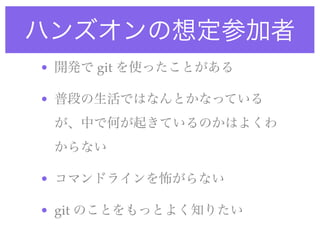
ハンズオンの想定参加者 • 開発で git
を使ったことがある • 普段の生活ではなんとかなっている が、中で何が起きているのかはよくわ からない • コマンドラインを怖がらない • git のことをもっとよく知りたい
3.
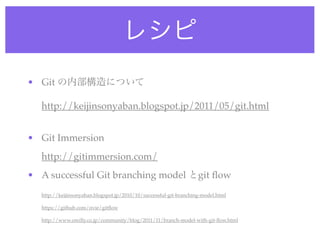
レシピ • Git の内部構造について
http://keijinsonyaban.blogspot.jp/2011/05/git.html • Git Immersion http://gitimmersion.com/ • A successful Git branching model とgit flow http://keijinsonyaban.blogspot.jp/2010/10/successful-git-branching-model.html https://github.com/nvie/gitflow http://www.oreilly.co.jp/community/blog/2011/11/branch-model-with-git-flow.html
4.
環境構築
5.
環境構築(MacPorts) •
git sudo port install git-core +svn +bash_completion コマンドプロンプトで git と打って not found と言われないこと • .profile に以下の記述をしてプロンプトにブランチ名表示 # for bash completion if [ -f /opt/local/etc/bash_completion ]; then . /opt/local/etc/bash_completion fi if [ -f $BASH_COMPLETION_DIR/git ]; then export PS1='[033[01;32m]u@h[033[01;33m] w$(__git_ps1) n[033[01;34m]$[033[00m] ' else export PS1='[033[01;32m]u@h[033[01;33m] w n[033[01;34m]$[033[00m] ' fi
6.
環境構築(Homebrew) •
git sudo brew install git bash-completion コマンドプロンプトで git と打って not found と言われないこと • .profile に以下の記述をしてプロンプトにブランチ名表示 # for bash completion if [ -f `brew --prefix`/etc/bash_completion ]; then . `brew --prefix`/etc/bash_completion fi if [ -f `brew --prefix`/etc/bash_completion.d/git-completion.bash ]; then export PS1='[033[01;32m]u@h[033[01;33m] w$(__git_ps1) n[033[01;34m]$[033[00m] ' else export PS1='[033[01;32m]u@h[033[01;33m] w n[033[01;34m]$[033[00m] ' fi
7.
Git の内部構造について http://keijinsonyaban.blogspot.jp/2011/05/git.html
8.
用語集 •
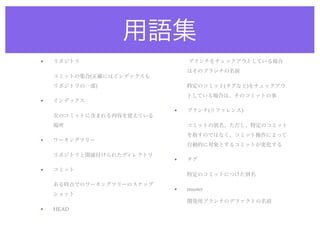
リポジトリ ブランチをチェックアウトしている場合 はそのブランチの名前 コミットの集合(正確にはインデックスも リポジトリの一部) 特定のコミット(タグなど)をチェックアウ トしている場合は、そのコミットの事 • インデックス • ブランチ(リファレンス) 次のコミットに含まれる内容を覚えている 場所 コミットの別名。ただし、特定のコミット を指すのではなく、コミット操作によって • ワーキングツリー 自動的に対象とするコミットが変化する リポジトリと関連付けられたディレクトリ • タグ • コミット 特定のコミットにつけた別名 ある時点でのワーキングツリーのスナップ • master ショット 開発用ブランチのデファクトの名前 • HEAD
9.
git のデータ構造 •
blob git ls-tree <tree id> [path] で、tree の ファイルの中身を保持するデータ。 情報が表示できる(ex. git ls-tree blob はファイルの中身のハッシュ値 HEAD によって識別されるため、リポジト git cat-file tree <hash> で中身そのも リやパスによらず一意のIDをもつ のを表示することも可能(化けるけど) git hash-object <ファイル名> でhash • commit を表示(ex. git hash-object greeting コミットに関連する情報を束ねるた めのデータ構造 git cat-file blob <hash> でblob の中身 を表示 git rev-parse <ref> で、commit のid を表示できる (ex. git rev-parse • tree HEAD ディレクトリ構造を管理するデータ。 git cat-file commit <hash> でcommit の中身を表示できる
10.
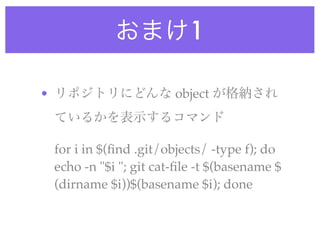
おまけ1 • リポジトリにどんな object
が格納され ているかを表示するコマンド for i in $(find .git/objects/ -type f); do echo -n "$i "; git cat-file -t $(basename $ (dirname $i))$(basename $i); done
11.
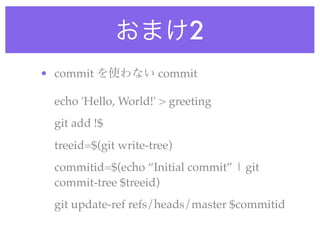
おまけ2 • commit を使わない
commit echo 'Hello, World!' > greeting git add !$ treeid=$(git write-tree) commitid=$(echo “Initial commit” | git commit-tree $treeid) git update-ref refs/heads/master $commitid
12.
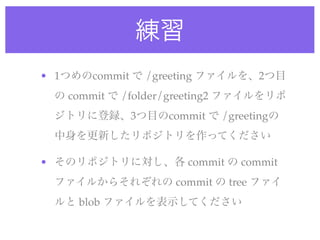
練習 • 1つめのcommit で
/greeting ファイルを、2つ目 の commit で /folder/greeting2 ファイルをリポ ジトリに登録、3つ目のcommit で /greetingの 中身を更新したリポジトリを作ってください • そのリポジトリに対し、各 commit の commit ファイルからそれぞれの commit の tree ファイ ルと blob ファイルを表示してください
13.
解答例 $ git init
$ git log --pretty=oneline Initialized empty Git repository in /Users/zaki/fromgit/ c802fa339e37c2cf6eaeca9faa40b2e38405cf44 3rd commit q1/.git/ 27a946b45cfc917a68b823c40848a7e8706f9a6a 2nd commit 09a263dd39525b5f8badd1a0eb2983e052b058e1 1st commit $ echo 'Hello!' > greeting $ git cat-file commit 09a263dd39525b5f8badd1a0eb2983e052b058e1 tree 57b6e13c3f7c0d4d9f327a878ffe5639c55148ee $ git add !$ author YAMAZAKI Makoto <makoto1975@gmail.com> 1337146517 +0900 git add greeting committer YAMAZAKI Makoto <makoto1975@gmail.com> 1337146517 +0900 $ git ci -m "1st commit" 1st commit [master (root-commit) 09a263d] 1st commit 1 file changed, 1 insertion(+) $ git ls-tree 57b6e13c3f7c0d4d9f327a878ffe5639c55148ee 100644 blob 10ddd6d257e01349d514541981aeecea6b2e741d greeting create mode 100644 greeting $ git cat-file commit 27a946b45cfc917a68b823c40848a7e8706f9a6a $ mkdir folder tree 06b2d98a9898376793134ae06dda58341af90656 parent 09a263dd39525b5f8badd1a0eb2983e052b058e1 $ echo 'Hello2!' > folder/greeting2 author YAMAZAKI Makoto <makoto1975@gmail.com> 1337146573 +0900 committer YAMAZAKI Makoto <makoto1975@gmail.com> 1337146573 +0900 $ git add !$ git add folder/greeting2 2nd commit $ git ls-tree 06b2d98a9898376793134ae06dda58341af90656 $ git ci -m "2nd commit" 040000 tree 3a06576055421d5d27ff1fe60b87d1e9ea76902c folder [master 27a946b] 2nd commit 100644 blob 10ddd6d257e01349d514541981aeecea6b2e741d greeting 1 file changed, 1 insertion(+) create mode 100644 folder/greeting2 $ git cat-file commit c802fa339e37c2cf6eaeca9faa40b2e38405cf44 tree 8422453ed2a20ecef084d404f4feac29a267a6d5 $ echo 'Hello, World!' > greeting parent 27a946b45cfc917a68b823c40848a7e8706f9a6a author YAMAZAKI Makoto <makoto1975@gmail.com> 1337146602 +0900 committer YAMAZAKI Makoto <makoto1975@gmail.com> 1337146602 +0900 $ git add !$ git add greeting 3rd commit $ git ci -m "3rd commit" $ git ls-tree 8422453ed2a20ecef084d404f4feac29a267a6d5 [master c802fa3] 3rd commit 040000 tree 3a06576055421d5d27ff1fe60b87d1e9ea76902c folder 1 file changed, 1 insertion(+), 1 deletion(-) 100644 blob 8ab686eafeb1f44702738c8b0f24f2567c36da6d greeting
14.
Git Immersion
15.
Git Immersion とは A
Guided Tour that Walks trough the Fundamentals of Git
16.
Git Immersion http://gitimmersion.com/
17.
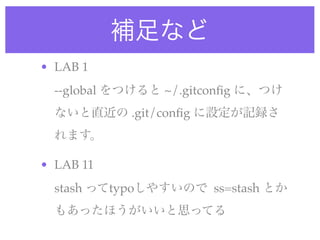
補足など • LAB 1
--global をつけると ~/.gitconfig に、つけ ないと直近の .git/config に設定が記録さ れます。 • LAB 11 stash ってtypoしやすいので ss=stash とか もあったほうがいいと思ってる
18.
git-flow
19.
git-flowによるブランチ管理 http://www.oreilly.co.jp/community/blog/2011/11/
branch-model-with-git-flow.html
Editor's Notes
#2
\n
#3
\n
#4
\n
#5
\n
#6
\n
#7
\n
#8
\n
#9
\n
#10
\n
#11
\n
#12
\n
#13
\n
#14
\n
#15
\n
#16
\n
#17
\n
#18
\n
#19
\n
#20
\n
Download




![環境構築(MacPorts)
• git
sudo port install git-core +svn +bash_completion
コマンドプロンプトで git と打って not found と言われないこと
• .profile に以下の記述をしてプロンプトにブランチ名表示
# for bash completion
if [ -f /opt/local/etc/bash_completion ]; then
. /opt/local/etc/bash_completion
fi
if [ -f $BASH_COMPLETION_DIR/git ]; then
export PS1='[033[01;32m]u@h[033[01;33m] w$(__git_ps1) n[033[01;34m]$[033[00m] '
else
export PS1='[033[01;32m]u@h[033[01;33m] w n[033[01;34m]$[033[00m] '
fi](https://image.slidesharecdn.com/20120516git-120516041121-phpapp01/85/20120516-Git-5-320.jpg)
![環境構築(Homebrew)
• git
sudo brew install git bash-completion
コマンドプロンプトで git と打って not found と言われないこと
• .profile に以下の記述をしてプロンプトにブランチ名表示
# for bash completion
if [ -f `brew --prefix`/etc/bash_completion ]; then
. `brew --prefix`/etc/bash_completion
fi
if [ -f `brew --prefix`/etc/bash_completion.d/git-completion.bash ]; then
export PS1='[033[01;32m]u@h[033[01;33m] w$(__git_ps1) n[033[01;34m]$[033[00m] '
else
export PS1='[033[01;32m]u@h[033[01;33m] w n[033[01;34m]$[033[00m] '
fi](https://image.slidesharecdn.com/20120516git-120516041121-phpapp01/85/20120516-Git-6-320.jpg)
![git のデータ構造
• blob git ls-tree <tree id> [path] で、tree の
ファイルの中身を保持するデータ。 情報が表示できる(ex. git ls-tree
blob はファイルの中身のハッシュ値 HEAD
によって識別されるため、リポジト git cat-file tree <hash> で中身そのも
リやパスによらず一意のIDをもつ のを表示することも可能(化けるけど)
git hash-object <ファイル名> でhash • commit
を表示(ex. git hash-object greeting コミットに関連する情報を束ねるた
めのデータ構造
git cat-file blob <hash> でblob の中身
を表示 git rev-parse <ref> で、commit のid
を表示できる (ex. git rev-parse
• tree
HEAD
ディレクトリ構造を管理するデータ。
git cat-file commit <hash> でcommit
の中身を表示できる](https://image.slidesharecdn.com/20120516git-120516041121-phpapp01/85/20120516-Git-9-320.jpg)
![解答例
$ git init $ git log --pretty=oneline
Initialized empty Git repository in /Users/zaki/fromgit/ c802fa339e37c2cf6eaeca9faa40b2e38405cf44 3rd commit
q1/.git/ 27a946b45cfc917a68b823c40848a7e8706f9a6a 2nd commit
09a263dd39525b5f8badd1a0eb2983e052b058e1 1st commit
$ echo 'Hello!' > greeting
$ git cat-file commit 09a263dd39525b5f8badd1a0eb2983e052b058e1
tree 57b6e13c3f7c0d4d9f327a878ffe5639c55148ee
$ git add !$ author YAMAZAKI Makoto <makoto1975@gmail.com> 1337146517 +0900
git add greeting committer YAMAZAKI Makoto <makoto1975@gmail.com> 1337146517 +0900
$ git ci -m "1st commit" 1st commit
[master (root-commit) 09a263d] 1st commit
1 file changed, 1 insertion(+) $ git ls-tree 57b6e13c3f7c0d4d9f327a878ffe5639c55148ee
100644 blob 10ddd6d257e01349d514541981aeecea6b2e741d greeting
create mode 100644 greeting
$ git cat-file commit 27a946b45cfc917a68b823c40848a7e8706f9a6a
$ mkdir folder tree 06b2d98a9898376793134ae06dda58341af90656
parent 09a263dd39525b5f8badd1a0eb2983e052b058e1
$ echo 'Hello2!' > folder/greeting2 author YAMAZAKI Makoto <makoto1975@gmail.com> 1337146573 +0900
committer YAMAZAKI Makoto <makoto1975@gmail.com> 1337146573 +0900
$ git add !$
git add folder/greeting2 2nd commit
$ git ls-tree 06b2d98a9898376793134ae06dda58341af90656
$ git ci -m "2nd commit"
040000 tree 3a06576055421d5d27ff1fe60b87d1e9ea76902c folder
[master 27a946b] 2nd commit 100644 blob 10ddd6d257e01349d514541981aeecea6b2e741d greeting
1 file changed, 1 insertion(+)
create mode 100644 folder/greeting2 $ git cat-file commit c802fa339e37c2cf6eaeca9faa40b2e38405cf44
tree 8422453ed2a20ecef084d404f4feac29a267a6d5
$ echo 'Hello, World!' > greeting parent 27a946b45cfc917a68b823c40848a7e8706f9a6a
author YAMAZAKI Makoto <makoto1975@gmail.com> 1337146602 +0900
committer YAMAZAKI Makoto <makoto1975@gmail.com> 1337146602 +0900
$ git add !$
git add greeting
3rd commit
$ git ci -m "3rd commit" $ git ls-tree 8422453ed2a20ecef084d404f4feac29a267a6d5
[master c802fa3] 3rd commit 040000 tree 3a06576055421d5d27ff1fe60b87d1e9ea76902c folder
1 file changed, 1 insertion(+), 1 deletion(-) 100644 blob 8ab686eafeb1f44702738c8b0f24f2567c36da6d greeting](https://image.slidesharecdn.com/20120516git-120516041121-phpapp01/85/20120516-Git-13-320.jpg)