Learning Commons Announcements Week of October 6 th “ Nobody ever graduated from a library. Nobody ever graduated without one.”
OPEN ACCESS DAY October 14, 6:30 pm  Du Bois Library Learning Commons   “ Open Access is the principle that research should be made freely available via the Internet, especially in the case of publicly funded research.”  Please register by emailing  scholarworks@library.umass.edu  by Monday, Oct. 13.  For more info: openaccessday.org  Refreshments will be served Sponsored by:  openaccessday.org / UMass Amherst Libraries / The Graduate School
UMass Amherst Libraries   is pleased to announce a new branch  The Image Collection Library  Dedicated to assisting the campus community (faculty, students, and staff)  in the use of images in the classroom and in research The Image Collection Library 225 Bartlett Hall 12:00 noon – 4:00 p.m., Monday through Friday 545-3314
Study Abroad Advising  at  The Link Mondays, 2:00-4:00 p.m. Tuesdays, 12:30-3:00 p.m. Wednesdays, 1:00-4:00 p.m. Brought to you by the International Programs Office, 545-2710,  www.ipo.umass.edu , abroad@ipo.umass.edu
Heavy Duty Headphones  TI-83 Graphing Calculators USB Floppy Drives Now Circulating from the LC Desk: Available for use on 2 hour loan with a UCard
Check out the Staple Station!! Standard, Heavy Duty, and Electric Staplers Hole Punch Pencil Sharpener Directly across from the LC Help Desk!!!
Check the availability of  OIT computer stations in the Learning Commons  and the Computer Classrooms: http://classrooms-av.oit.umass.edu/view.php Be sure to check the  classroom hours  and  scheduled  classes  at the site before going to a classroom!
Park in the Campus Garage nearby: The  first   hour  of Garage parking is  FREE  when your ticket is  validated  at the Learning Commons and Technical Support Desk Parking overnight is cheap (just  $3 total ) in the Garage between 5 p.m. - 5 a.m.
= you are here Workstations in the LC Public Terminals 58 computers Open to everyone (incl. public) No login Windows XP Web browsers, Microsoft Office 2007, Microsoft Student Print to public printers (along brick columns between staircases) = public printers
= you are here Workstations in the LC OIT Terminals Around 125 computers located around edges of LC Open to UMass faculty, staff, students (log in with NetID) Windows XP AND Mac OSX Lots and lots of software! (Office, Photoshop, Acrobat…)  Print to OIT printers = OIT printers
OIT’s Remote Printing Service is here! Install a small plug-in on your own computer Send print jobs from your dorm room or the campus wireless network to Learning Commons printers You have 8 hours to come pick up your print job. Want to learn more?   Ask at the Learning Commons & Technical Support Desk, or Visit the OIT website at http://www.oit.umass.edu/classrooms/printing/remote.html
Printing files from SPARK? Avoid problems!  Before you print,  SAVE YOUR FILE TO THE DESKTOP THEN, open it and print.
3 rd  floor, Du Bois Library Reserve, Media & Microforms Department Services: Reserve, Media & Microforms Department Get readings that your professors have assigned for class Borrow or view DVDs, audio recordings, and other media Explore the retrofuturistic world of Microforms Borrow a laptop, projector, or video camera to use in the library
Get help with… Hardware & software questions Accounts, passwords, connections  Navigating the library and Learning Commons Stop by, call, or instant message us Learning Commons & Technical Support Desk Services: LC & Technical Support Desk
Find the perfect sources for your papers and other research—work with a librarian! Reference & Research Assistance Services: Reference & Research Assistance Stop by the Reference & Research Assistance Desk anytime it is open… Make an appointment to work with a subject specialist librarian… Or, ask a question via phone, email, or IM. http://www.library.umass.edu/ask
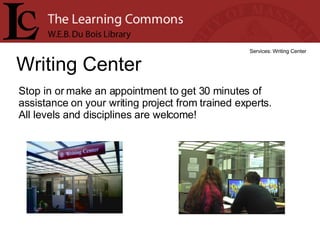
Writing Center Services: Writing Center Stop in or make an appointment to get 30 minutes of assistance on your writing project from trained experts.  All levels and disciplines are welcome!
Wr iting Center Fall Hours: Services: Writing Center Sunday  2 p.m. – 6 p.m.  Monday - Wednesday  10 a.m. – 9 p.m. Thursday  10 a.m. – 6 p.m. Friday  10 a.m. – 2 p.m.
Academic Advising Link Services: Academic Advising Link Academic advisors can connect you with the right academic programs and opportunities and support your journey to academic success. Advising resources  Campus-wide academic support  General Education Requirements  Registration rules & regulations  Special Learning Opportunities  Degree Progress Audit  SPIRE
Academic Advising Link Fall Hours Services: Academic Advising Link Sunday  4 p.m. –  8 p.m.  Monday – Wednesday  1 p.m. –  8 p.m.  Thursday  1 p.m.  –  4 p.m.
Learning Resource Center Services: Learning Resource Center Tutoring  and  supplemental instruction  for many difficult first and second year courses. Drop-in help and weekly sessions Students helping students! (10th floor of the  W.E.B. Du Bois Library)
Learning Resource Center Fall Hours Services: Learning Resource Center (10th floor of the W.E.B. Du Bois Library) Sunday  5 p.m. to 10 p.m. Monday - Thursday  1 p.m. to 10 p.m. Fall hours begin on Sunday September 14 th .
Looking for quiet? Quiet study areas on 2 nd  and 3 rd  floors  provide comfortable seating, electrical outlets, and wireless Internet access Drop-in carrels on 7 th  and 10 th  floors  offer individual study space; day-use lockers also located on these floors. To report noise in quiet areas  in the Library, call  1-2272  from a phone in any elevator lobby, or go to the Building Operations Desk on the entrance level.
Sample question from OIT Copyright Quiz What is the minimum the RIAA (Recording Industry Association of America) can make you pay for infringing copyright on  just one song ?(Choose one) a. $0.99 per song b. $75.00 per song c. $100.00 per song d. $500.00 per song e. $750.00 per song
Sample question from OIT Copyright Quiz What is the minimum the RIAA (Recording Industry Association of America) can make you pay for infringing copyright on  just one song ?(Choose one) Inform yourself. Protect yourself. Take the OIT Copyright Quiz: http://www.oit.umass.edu/copyright/quiz.html
Can’t get all your research materials at the UMass Amherst Libraries?  We can get them for you!  Order books and articles through our FAST and FREE Interlibrary Loan service!
If you need a BOOK… First try the Five Colleges Libraries , use the  Request Item  feature within the 5 College catalog.  Delivery   is within  2 – 3 days. For Books not held in the 5 Colleges  or  for loans of other types of materials  go to the Library’s  Interlibrary Loan  page  http://www.library.umass.edu/services/ill/index.html . Log in and fill out the ‘Request a Loan' form and the Interlibrary Loan staff will do the rest.  Delivery is in  7 - 10 days
If you need an ARTICLE… Go to the Library’s Interlibrary Loan page  http://www.library.umass.edu/services/ill/index.html . Log in and fill out the ‘ Request a Copy'  form and the Interlibrary Loan staff will do the rest.  Electronic delivery is in  1-3 days.
Figured out the new  research databases  page?
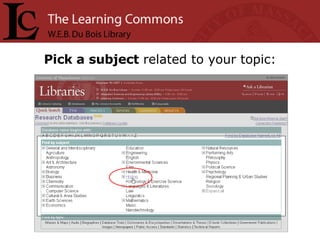
Pick a subject  related to your topic:
Hint :  Start with the  Best Bets Best Bets are  recommended databases  selected by a librarian with subject expertise
You may also find: Subtopics  to narrow your subject Subject librarians  to contact for help Guides to research  in your subject
Know the name  of the database you want?
Know the name  of the database you want? Select the first letter  of the name to get an alphabetical list.
Know the name  of the database you want? Or get your  search  on.
Find  audio, images, e-books , and more…
Any  questions ? Get more  tips for finding good databases , or help with connection issues.
http://www.library.umass.edu   30,000 online journals 300+ research databases Connect instantly to millions of dollars’ worth of quality, scholarly resources! Start your academic research with the Libraries: One-click access to FREE Interlibrary Loan & help
Did a slide go by too quickly? Visit the Learning Commons website: http://www.umass.edu/learningcommons and click  Weekly Announcements   (under News) View these announcements on the Web!

20081006

  • 1.
    Learning Commons AnnouncementsWeek of October 6 th “ Nobody ever graduated from a library. Nobody ever graduated without one.”
  • 2.
    OPEN ACCESS DAYOctober 14, 6:30 pm Du Bois Library Learning Commons “ Open Access is the principle that research should be made freely available via the Internet, especially in the case of publicly funded research.” Please register by emailing scholarworks@library.umass.edu by Monday, Oct. 13. For more info: openaccessday.org Refreshments will be served Sponsored by: openaccessday.org / UMass Amherst Libraries / The Graduate School
  • 3.
    UMass Amherst Libraries is pleased to announce a new branch The Image Collection Library Dedicated to assisting the campus community (faculty, students, and staff) in the use of images in the classroom and in research The Image Collection Library 225 Bartlett Hall 12:00 noon – 4:00 p.m., Monday through Friday 545-3314
  • 4.
    Study Abroad Advising at The Link Mondays, 2:00-4:00 p.m. Tuesdays, 12:30-3:00 p.m. Wednesdays, 1:00-4:00 p.m. Brought to you by the International Programs Office, 545-2710, www.ipo.umass.edu , abroad@ipo.umass.edu
  • 5.
    Heavy Duty Headphones TI-83 Graphing Calculators USB Floppy Drives Now Circulating from the LC Desk: Available for use on 2 hour loan with a UCard
  • 6.
    Check out theStaple Station!! Standard, Heavy Duty, and Electric Staplers Hole Punch Pencil Sharpener Directly across from the LC Help Desk!!!
  • 7.
    Check the availabilityof OIT computer stations in the Learning Commons and the Computer Classrooms: http://classrooms-av.oit.umass.edu/view.php Be sure to check the classroom hours and scheduled classes at the site before going to a classroom!
  • 8.
    Park in theCampus Garage nearby: The first hour of Garage parking is FREE when your ticket is validated at the Learning Commons and Technical Support Desk Parking overnight is cheap (just $3 total ) in the Garage between 5 p.m. - 5 a.m.
  • 9.
    = you arehere Workstations in the LC Public Terminals 58 computers Open to everyone (incl. public) No login Windows XP Web browsers, Microsoft Office 2007, Microsoft Student Print to public printers (along brick columns between staircases) = public printers
  • 10.
    = you arehere Workstations in the LC OIT Terminals Around 125 computers located around edges of LC Open to UMass faculty, staff, students (log in with NetID) Windows XP AND Mac OSX Lots and lots of software! (Office, Photoshop, Acrobat…) Print to OIT printers = OIT printers
  • 11.
    OIT’s Remote PrintingService is here! Install a small plug-in on your own computer Send print jobs from your dorm room or the campus wireless network to Learning Commons printers You have 8 hours to come pick up your print job. Want to learn more? Ask at the Learning Commons & Technical Support Desk, or Visit the OIT website at http://www.oit.umass.edu/classrooms/printing/remote.html
  • 12.
    Printing files fromSPARK? Avoid problems! Before you print, SAVE YOUR FILE TO THE DESKTOP THEN, open it and print.
  • 13.
    3 rd floor, Du Bois Library Reserve, Media & Microforms Department Services: Reserve, Media & Microforms Department Get readings that your professors have assigned for class Borrow or view DVDs, audio recordings, and other media Explore the retrofuturistic world of Microforms Borrow a laptop, projector, or video camera to use in the library
  • 14.
    Get help with…Hardware & software questions Accounts, passwords, connections Navigating the library and Learning Commons Stop by, call, or instant message us Learning Commons & Technical Support Desk Services: LC & Technical Support Desk
  • 15.
    Find the perfectsources for your papers and other research—work with a librarian! Reference & Research Assistance Services: Reference & Research Assistance Stop by the Reference & Research Assistance Desk anytime it is open… Make an appointment to work with a subject specialist librarian… Or, ask a question via phone, email, or IM. http://www.library.umass.edu/ask
  • 16.
    Writing Center Services:Writing Center Stop in or make an appointment to get 30 minutes of assistance on your writing project from trained experts. All levels and disciplines are welcome!
  • 17.
    Wr iting CenterFall Hours: Services: Writing Center Sunday 2 p.m. – 6 p.m. Monday - Wednesday 10 a.m. – 9 p.m. Thursday 10 a.m. – 6 p.m. Friday 10 a.m. – 2 p.m.
  • 18.
    Academic Advising LinkServices: Academic Advising Link Academic advisors can connect you with the right academic programs and opportunities and support your journey to academic success. Advising resources Campus-wide academic support General Education Requirements Registration rules & regulations Special Learning Opportunities Degree Progress Audit SPIRE
  • 19.
    Academic Advising LinkFall Hours Services: Academic Advising Link Sunday 4 p.m. – 8 p.m. Monday – Wednesday 1 p.m. – 8 p.m. Thursday 1 p.m. – 4 p.m.
  • 20.
    Learning Resource CenterServices: Learning Resource Center Tutoring and supplemental instruction for many difficult first and second year courses. Drop-in help and weekly sessions Students helping students! (10th floor of the W.E.B. Du Bois Library)
  • 21.
    Learning Resource CenterFall Hours Services: Learning Resource Center (10th floor of the W.E.B. Du Bois Library) Sunday 5 p.m. to 10 p.m. Monday - Thursday 1 p.m. to 10 p.m. Fall hours begin on Sunday September 14 th .
  • 22.
    Looking for quiet?Quiet study areas on 2 nd and 3 rd floors provide comfortable seating, electrical outlets, and wireless Internet access Drop-in carrels on 7 th and 10 th floors offer individual study space; day-use lockers also located on these floors. To report noise in quiet areas in the Library, call 1-2272 from a phone in any elevator lobby, or go to the Building Operations Desk on the entrance level.
  • 23.
    Sample question fromOIT Copyright Quiz What is the minimum the RIAA (Recording Industry Association of America) can make you pay for infringing copyright on just one song ?(Choose one) a. $0.99 per song b. $75.00 per song c. $100.00 per song d. $500.00 per song e. $750.00 per song
  • 24.
    Sample question fromOIT Copyright Quiz What is the minimum the RIAA (Recording Industry Association of America) can make you pay for infringing copyright on just one song ?(Choose one) Inform yourself. Protect yourself. Take the OIT Copyright Quiz: http://www.oit.umass.edu/copyright/quiz.html
  • 25.
    Can’t get allyour research materials at the UMass Amherst Libraries? We can get them for you! Order books and articles through our FAST and FREE Interlibrary Loan service!
  • 26.
    If you needa BOOK… First try the Five Colleges Libraries , use the Request Item feature within the 5 College catalog. Delivery is within 2 – 3 days. For Books not held in the 5 Colleges or for loans of other types of materials go to the Library’s Interlibrary Loan page http://www.library.umass.edu/services/ill/index.html . Log in and fill out the ‘Request a Loan' form and the Interlibrary Loan staff will do the rest. Delivery is in 7 - 10 days
  • 27.
    If you needan ARTICLE… Go to the Library’s Interlibrary Loan page http://www.library.umass.edu/services/ill/index.html . Log in and fill out the ‘ Request a Copy' form and the Interlibrary Loan staff will do the rest. Electronic delivery is in 1-3 days.
  • 28.
    Figured out thenew research databases page?
  • 29.
    Pick a subject related to your topic:
  • 30.
    Hint : Start with the Best Bets Best Bets are recommended databases selected by a librarian with subject expertise
  • 31.
    You may alsofind: Subtopics to narrow your subject Subject librarians to contact for help Guides to research in your subject
  • 32.
    Know the name of the database you want?
  • 33.
    Know the name of the database you want? Select the first letter of the name to get an alphabetical list.
  • 34.
    Know the name of the database you want? Or get your search on.
  • 35.
    Find audio,images, e-books , and more…
  • 36.
    Any questions? Get more tips for finding good databases , or help with connection issues.
  • 37.
    http://www.library.umass.edu 30,000 online journals 300+ research databases Connect instantly to millions of dollars’ worth of quality, scholarly resources! Start your academic research with the Libraries: One-click access to FREE Interlibrary Loan & help
  • 38.
    Did a slidego by too quickly? Visit the Learning Commons website: http://www.umass.edu/learningcommons and click Weekly Announcements (under News) View these announcements on the Web!