Process Management
SAP PP
Agenda: Process Management
Process Management Overview
Process Instructions
Creation of Control Recipes
Sending Control Recipes
Control Recipe Monitor
Maintaining PI Sheet
Process Messages
Process Messages Monitor
Overview - Process Management
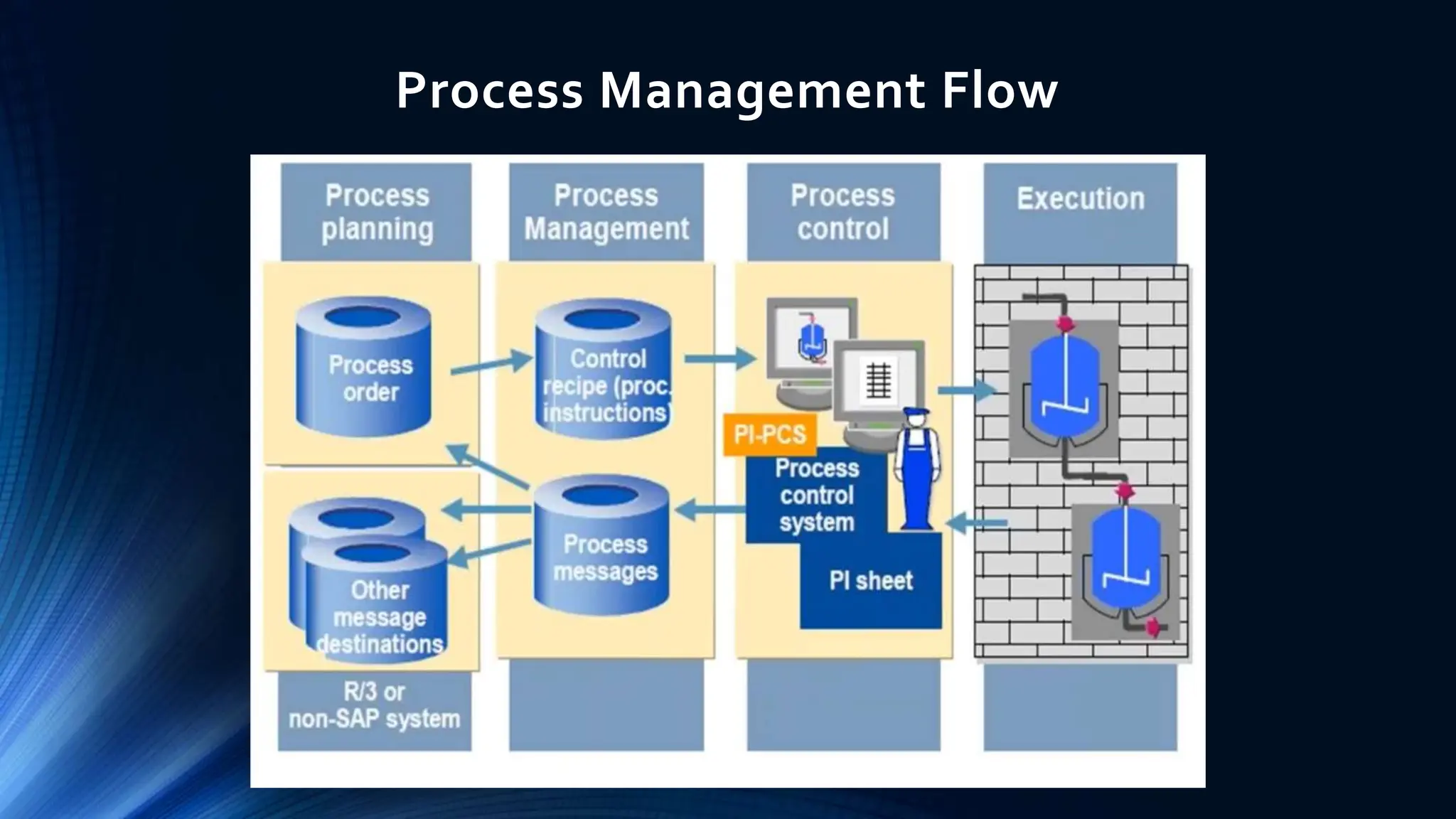
 Process Management serves as the interface between PP-PI and
the systems involved in process control.
 Receiving control recipes with process instructions from released
process orders.
 Transferring control recipes to the relevant process operators or
process control systems.
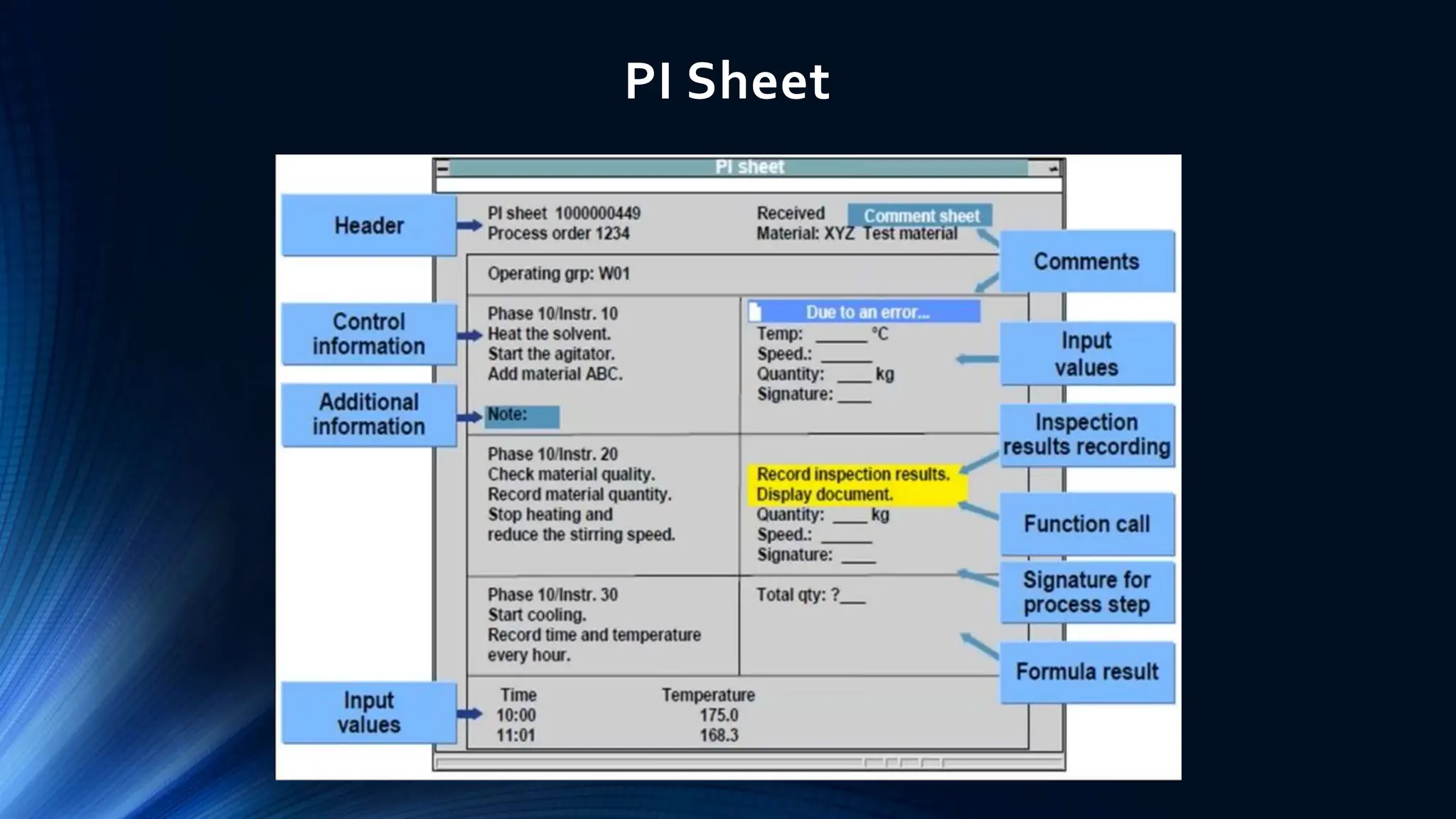
 Manual maintenance: Converting control recipes into PI sheets in
natural language, which can be read and maintained online by the
process operator.
 Receiving, checking and sending process messages with actual
process data from the process control system or the PI sheet.
Process Management Flow
Process Instructions
 You use process instructions to specify which information to be
transferred to process control and which information to be reported
from process control.
 You allocate process instructions to the phases of the master recipe and
the process order.The system bundles these into control recipes and
transfers them to process control.
 When you create a process order from a master recipe, the process
instructions are copied into the process order from the master recipe.
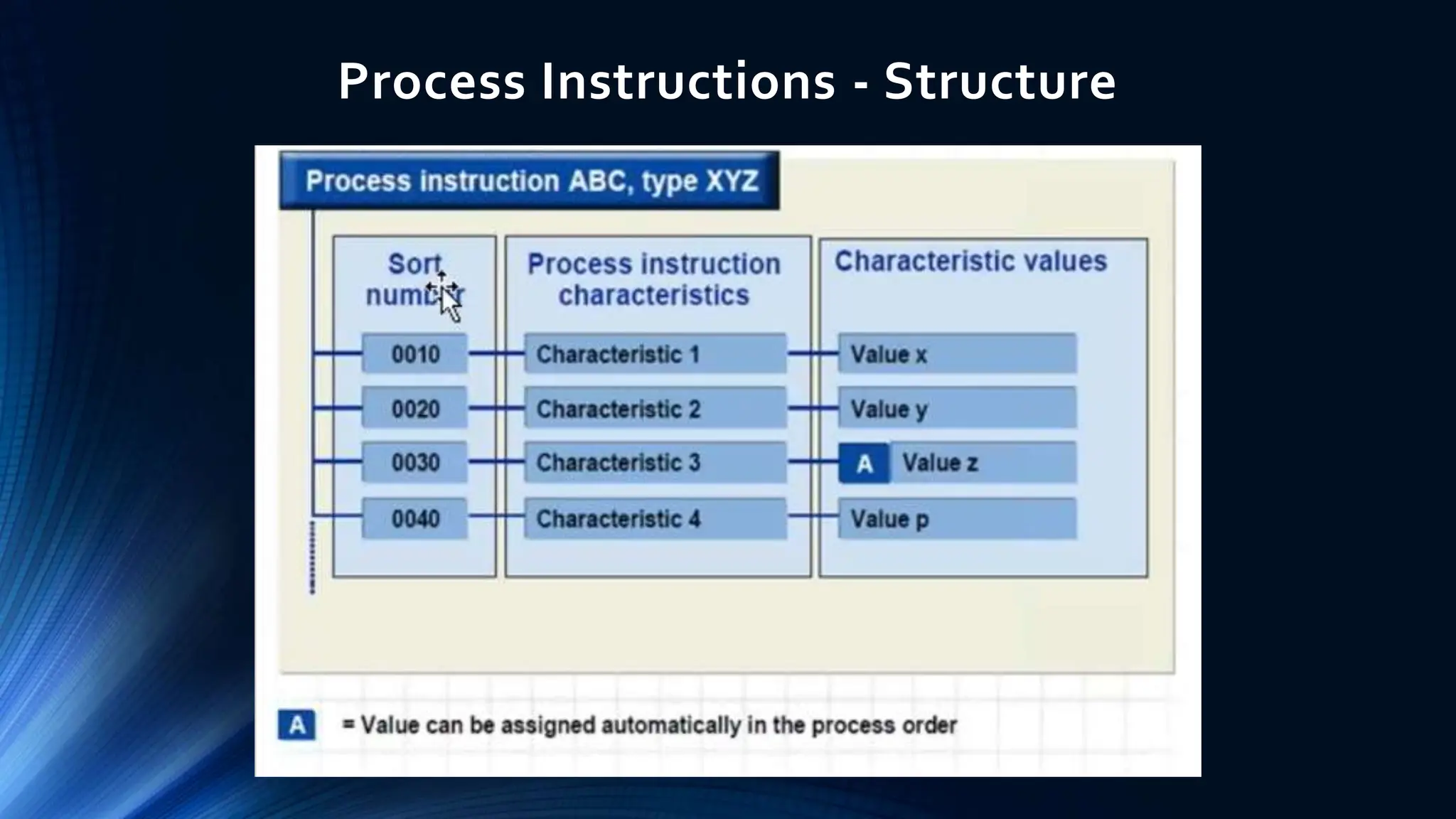
 By assigning characteristics and characteristic values, you specify:
 The information in a process instruction that is to be transferred or requested, for
example, the order number, a control instruction or the status of a control recipe
 How the requested data to be processed (for example, a specific value is to be
confirmed by process control) and which message category to be used for this
purpose
Process Instructions - Structure
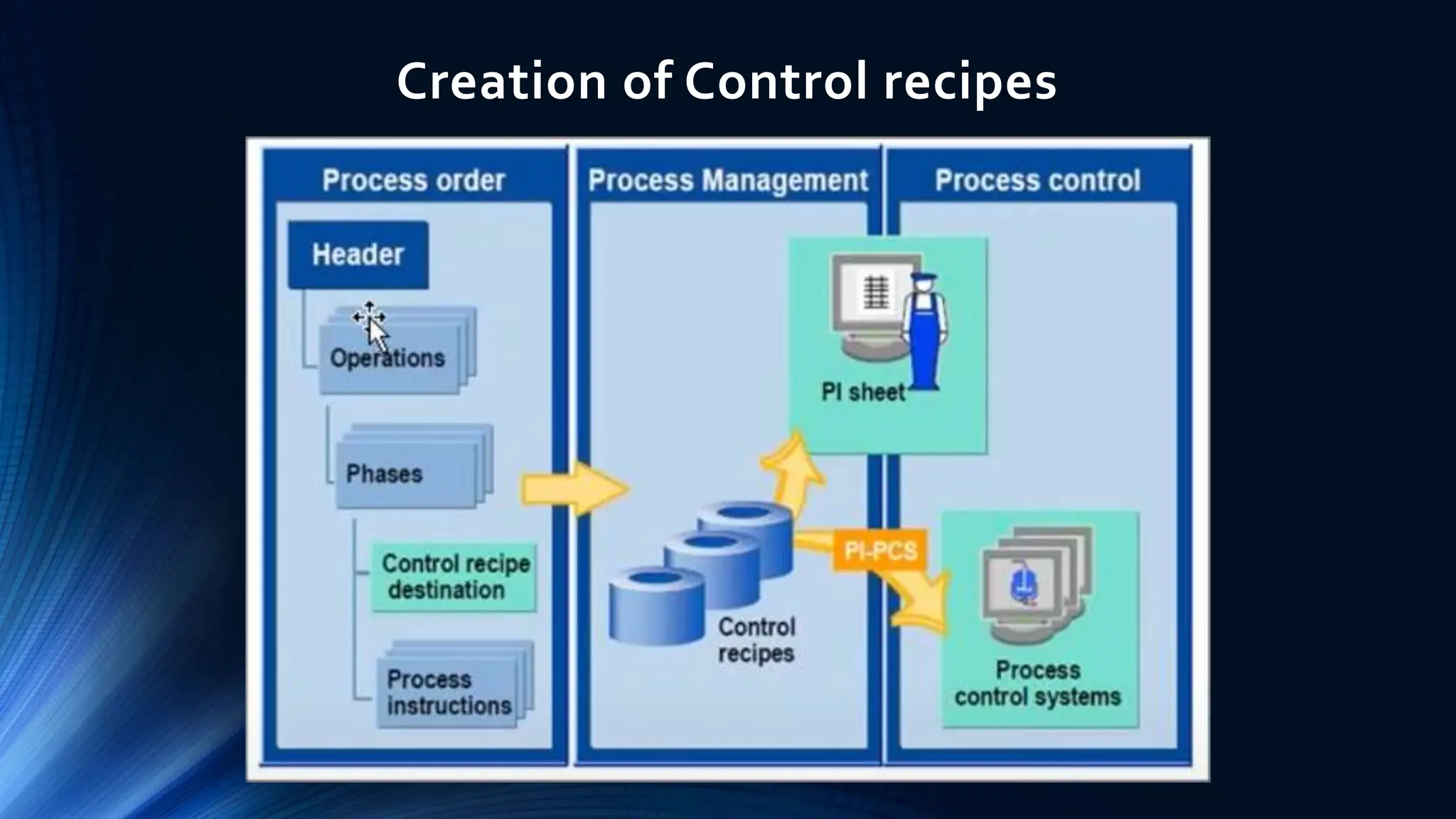
Creation of Control recipes
Creation and Sending Control Recipes
 Information that is relevant to process control is stored in the
process order in the form of process instructions that are assigned
to the phases of the process order.
 Process Management groups the process instructions together in
control recipes and transfers these to the control recipe
destination defined in the process order.
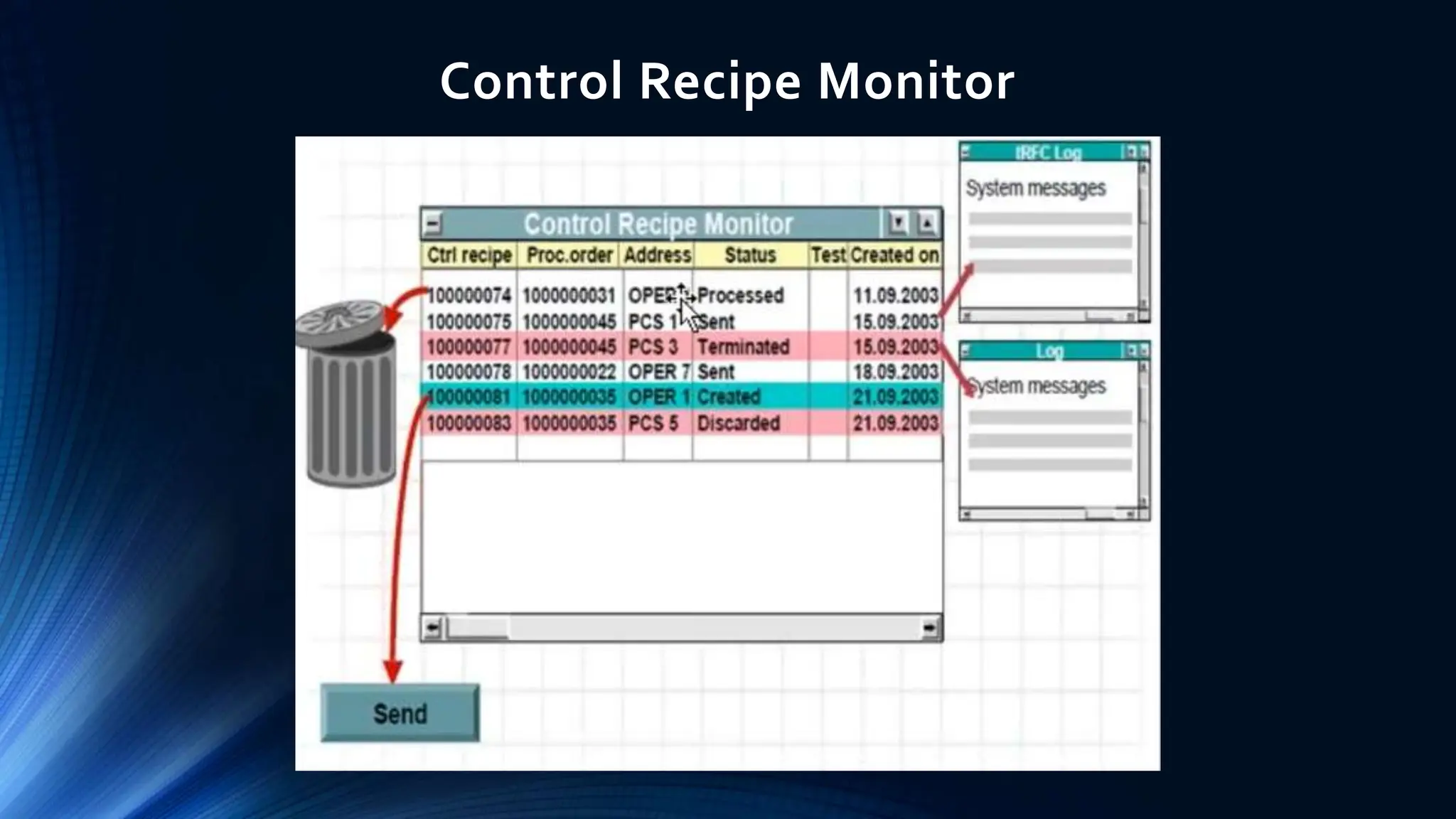
Control Recipe Monitor
 The control recipe monitor provides information on the current
processing status of a control recipe.
 From the monitor, you can call different logs that provide more
detailed information on the individual process steps and any errors
that may have occurred.
 On the basis of this information, you can execute the following
functions from the monitor:
 Send control recipes if they are not automatically sent in a background job
defined in Customizing
 Delete control recipes
PI Sheet
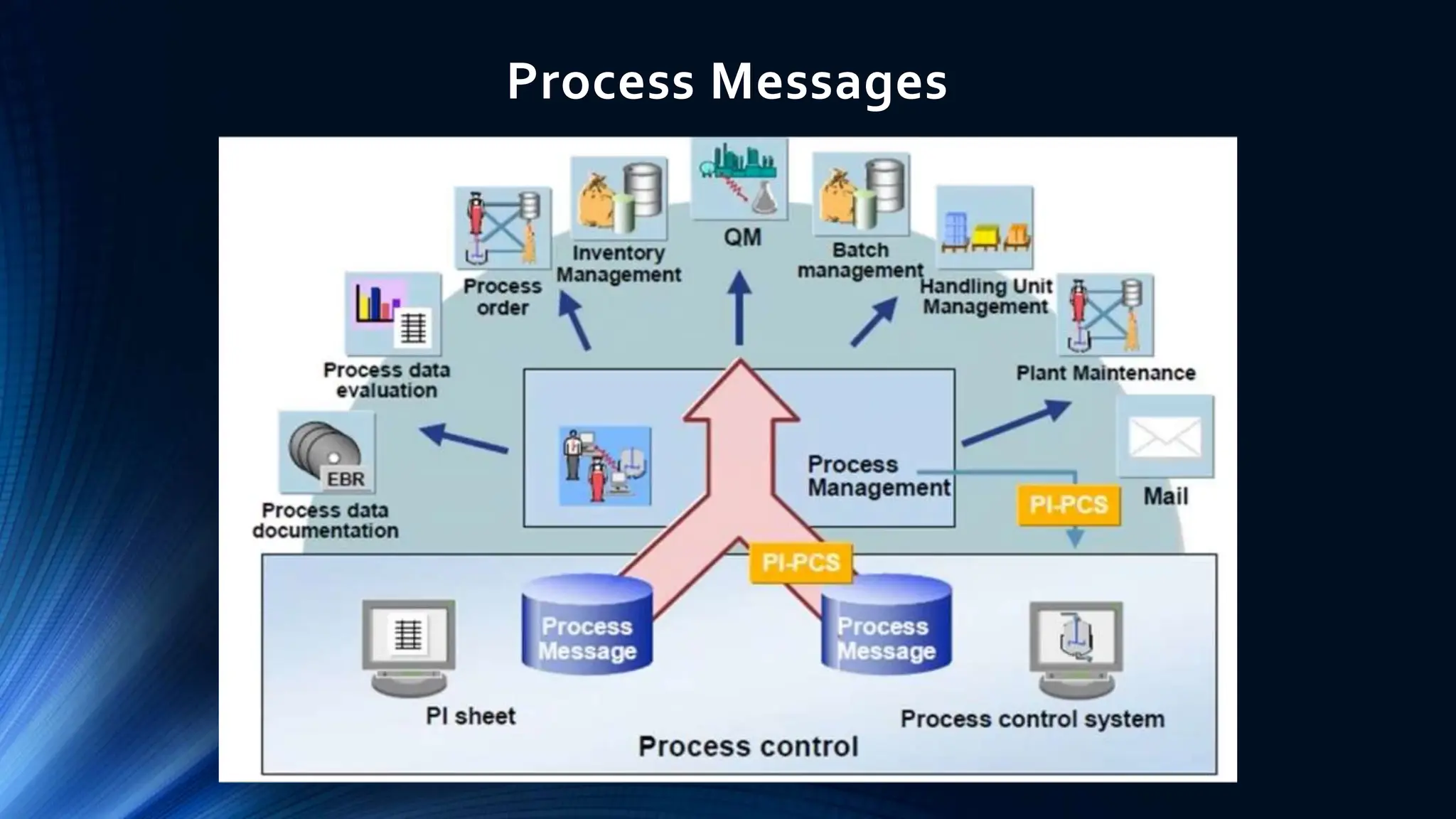
Process Messages
 Process messages are data structures used to report actual process data from
process control to one or more destinations.
 Users can define their own process messages in customizing to meet their specific
needs.
 The standard SAP System contains a number of predefined process message
categories that enable you to transfer actual data from process control to the R/3
System.
 First, the process messages are sent to Process Management.They are then checked
and passed on to predefined destinations.
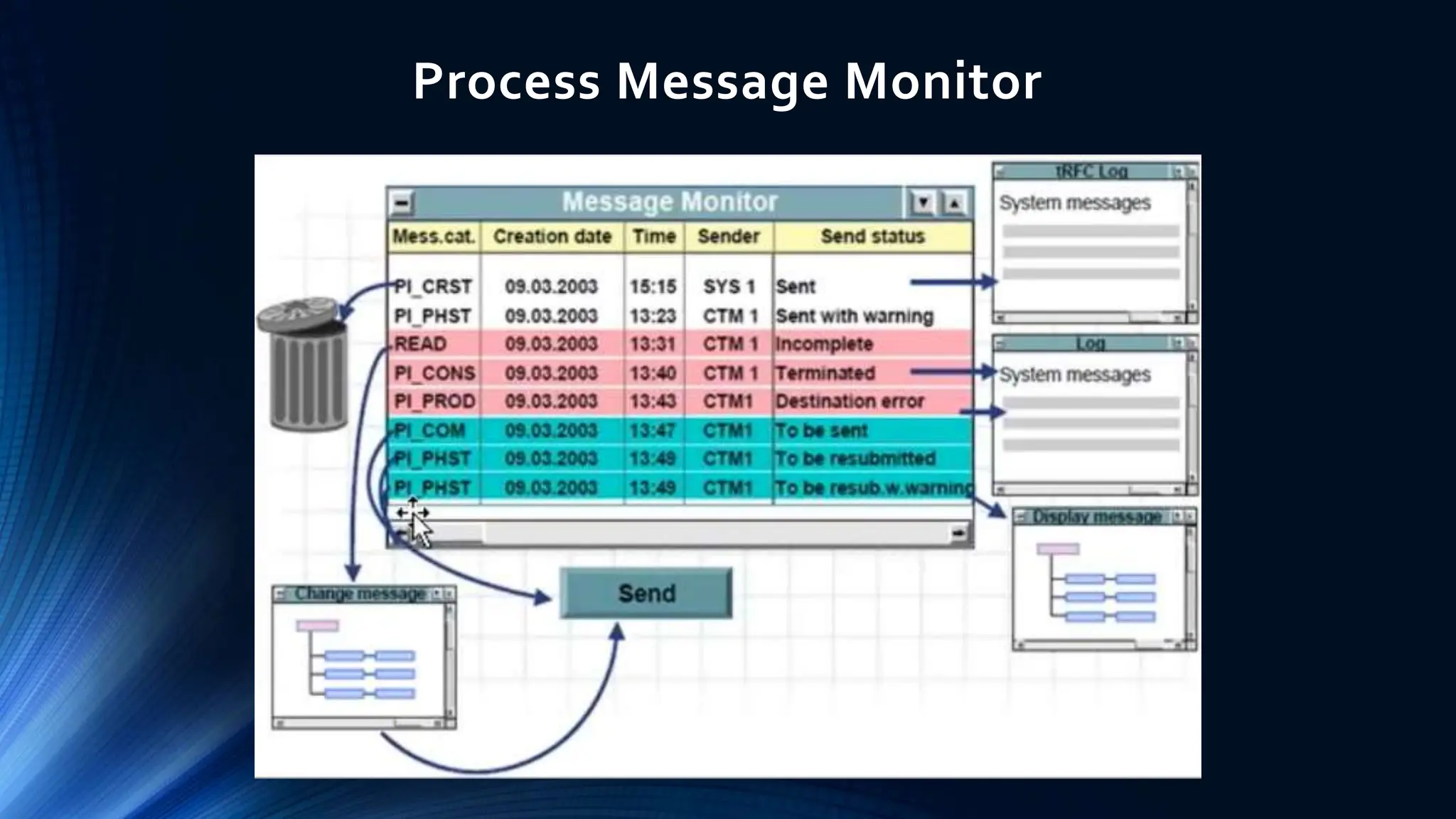
 The message monitor provides information on the current status of process
messages.
 From the monitor, you can call logs that provide more detailed information on the
processing of individual messages and any errors that may have occurred.
 On the basis of this information, you can execute the following functions from the
monitor:
 Complete or correct incomplete or incorrect messages
 Send messages if they are not automatically sent by a background job defined in customizing
 Delete messages
Process Messages
Process Message Monitor
Thank you

2.+Process+Messages.pptx it contains process management

  • 1.
  • 2.
    Agenda: Process Management ProcessManagement Overview Process Instructions Creation of Control Recipes Sending Control Recipes Control Recipe Monitor Maintaining PI Sheet Process Messages Process Messages Monitor
  • 3.
    Overview - ProcessManagement  Process Management serves as the interface between PP-PI and the systems involved in process control.  Receiving control recipes with process instructions from released process orders.  Transferring control recipes to the relevant process operators or process control systems.  Manual maintenance: Converting control recipes into PI sheets in natural language, which can be read and maintained online by the process operator.  Receiving, checking and sending process messages with actual process data from the process control system or the PI sheet.
  • 4.
  • 5.
    Process Instructions  Youuse process instructions to specify which information to be transferred to process control and which information to be reported from process control.  You allocate process instructions to the phases of the master recipe and the process order.The system bundles these into control recipes and transfers them to process control.  When you create a process order from a master recipe, the process instructions are copied into the process order from the master recipe.  By assigning characteristics and characteristic values, you specify:  The information in a process instruction that is to be transferred or requested, for example, the order number, a control instruction or the status of a control recipe  How the requested data to be processed (for example, a specific value is to be confirmed by process control) and which message category to be used for this purpose
  • 6.
  • 7.
  • 8.
    Creation and SendingControl Recipes  Information that is relevant to process control is stored in the process order in the form of process instructions that are assigned to the phases of the process order.  Process Management groups the process instructions together in control recipes and transfers these to the control recipe destination defined in the process order.
  • 9.
  • 10.
    Control Recipe Monitor The control recipe monitor provides information on the current processing status of a control recipe.  From the monitor, you can call different logs that provide more detailed information on the individual process steps and any errors that may have occurred.  On the basis of this information, you can execute the following functions from the monitor:  Send control recipes if they are not automatically sent in a background job defined in Customizing  Delete control recipes
  • 11.
  • 12.
    Process Messages  Processmessages are data structures used to report actual process data from process control to one or more destinations.  Users can define their own process messages in customizing to meet their specific needs.  The standard SAP System contains a number of predefined process message categories that enable you to transfer actual data from process control to the R/3 System.  First, the process messages are sent to Process Management.They are then checked and passed on to predefined destinations.  The message monitor provides information on the current status of process messages.  From the monitor, you can call logs that provide more detailed information on the processing of individual messages and any errors that may have occurred.  On the basis of this information, you can execute the following functions from the monitor:  Complete or correct incomplete or incorrect messages  Send messages if they are not automatically sent by a background job defined in customizing  Delete messages
  • 13.
  • 14.
  • 15.