Objectives
2
Identify and explainthe different steps in
the programming process; and
Explain the importance of programming
process;
Discuss the different steps needed to write,
compile and execute a program.
1
2
3
3.
1 2 34
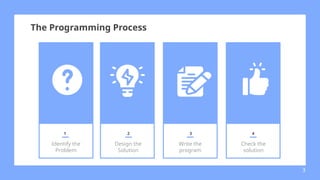
Identify the
Problem
Design the
Solution
Write the
program
Check the
solution
3
The Programming Process
4.
● In fact,this stage should really be
called identifying the solution because what
you're really trying to do is to tie down
exactly what it is that you're trying achieve.
Identify the Problem
4
5.
● The firststep is to examine the problem
carefully to try to identify what qualifies as a
solution. A single problem may have many
different solutions, but they will all have
something in common.
Identify the Problem
5
6.
● Compute theaverage of two numbers.
Things needed:
1. The user can enter two numbers
2. The program will then evaluate those numbers
correctly and display the result for the user.
Sample Problem
6
7.
● Once you'veidentified the things required to
solve your problem, and specified what form
your solution will take, the next step is to
work out just how you're going to turn that
specification into a working program. This is
usually the hardest task!
Design the Solution
7
8.
● A designis simply a higher-level description
of those steps. In effect it's a program
written as if the computer was a person.
English will do (or pseudocodes and
flowcharting)
Design the Solution
8
9.
For our problem,we have a fairly comprehensive specification and since it is a fairly
simple program we can turn the that quite easily into a design:
BEGIN
PRINT welcome message
PRINT instructions
PRINT [number 1]>
READ first_number
PRINT [number 2]>
READ second_number
calculate result by adding the first_number and the second_number and divide it by 2
PRINT result
END
Design the Solution
9
Here we assume
that PRINT means 'put
something on the
screen’
and READ means 'get
something typed on
the keyboard' - both
fairly standard
programming
operations.
10.
● Programming isthen the task of describing
your design to the computer: teaching it
your way of solving the problem.
● There are usually three stages to writing a
program:
1. Coding
2. Compiling
3. Debugging
Write the Program
10
11.
● Coding isthe act of translating the design
into an actual program, written in some form
of programming language. This is the step
where you actually have to sit down at the
computer and type!
CODING
11
12.
● When you'vefinished translating your design
into a program (usually filling in lots of
details in the process) you need to submit it
to the computer to see what it makes of it.
CODING
12
13.
● Compilation isactually the process of turning
the program written in some programming
language into the instructions made up of 0's
and 1's that the computer can actually follow.
COMPILING
13
14.
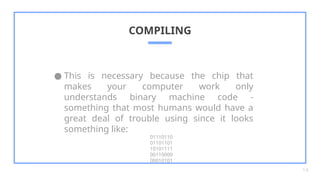
● This isnecessary because the chip that
makes your computer work only
understands binary machine code -
something that most humans would have a
great deal of trouble using since it looks
something like:
01110110
01101101
10101111
00110000
00010101
COMPILING
14
15.
● These programsused are called compilers
and you can think of them simply as
translators that can read a programming
language, translate it and write out the
corresponding machine code.
COMPILING
15
16.
● Compilers arenotoriously pedantic though -
if you don't write very correct programs, they
will complain. Think of them as the strictest
sort of English teacher, who picks you up on
every single missing comma, misplaced
apostrophe and grammatical error.
COMPILING
16
17.
● Debugging issimply the task of looking at
the original program, identifying the
mistakes, correcting the code and
recompiling it. This cycle of code -> compile -
> debug will often be repeated many times
before the compiler is happy with it. Luckily,
the compiler never ever gets cross during
this process - the programmer on the other
hand...
DEBUGGING
17
18.
● The finalstep in the grand programming
process is that of testing your creation to
check that it does what you wanted it to do.
This step is unfortunately necessary because
although the compiler has checked that your
program is correctly written, it can't check
whether what you've written actually solves
your original problem.
CHECK THE SOLUTION (TESTING)
18
19.
● Identify theProblem - What Are You Trying
To Do?
1. Requirements
2. Specification
3. Design a Solution - How Is It Going To Be Done?
● Write the Program - Teaching the Computer
1. Code
2. Compile
3. Debug
● Check the Solution - Testing it Understands
You
CHECK THE SOLUTION (TESTING)
19
20.
References
● Nadal G.(2013). Learning Module in Programing 1 using c#.
Module 1 (pages 1-20) Introduction to Programming
● https://runestone.academy/runestone/books/published/python
ds/Introduction/WhatIsProgramming.htm
● https://arunavaskar.medium.com
/the-programming-process-a-step-by-step-mini-guide-1e5aca60
ed08
20
![For our problem, we have a fairly comprehensive specification and since it is a fairly
simple program we can turn the that quite easily into a design:
BEGIN
PRINT welcome message
PRINT instructions
PRINT [number 1]>
READ first_number
PRINT [number 2]>
READ second_number
calculate result by adding the first_number and the second_number and divide it by 2
PRINT result
END
Design the Solution
9
Here we assume
that PRINT means 'put
something on the
screen’
and READ means 'get
something typed on
the keyboard' - both
fairly standard
programming
operations.](https://image.slidesharecdn.com/12theprogrammingprocess-250722125703-7efb8f62/85/1_2-Module-2-The-Programming-Process-pptx-9-320.jpg)