PYTHON PROGRAMMING WITH
WEB FRAMEWORKS – CSE304
This presentation contains the
concepts related to Basic coding
skills
Basic Coding Skills
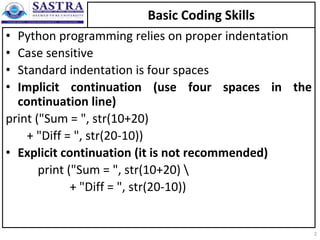
• Python programming relies on proper indentation
• Case sensitive
• Standard indentation is four spaces
• Implicit continuation (use four spaces in the
continuation line)
print ("Sum = ", str(10+20)
+ "Diff = ", str(20-10))
• Explicit continuation (it is not recommended)
print ("Sum = ", str(10+20) 
+ "Diff = ", str(20-10))
2
Basic Coding Skills
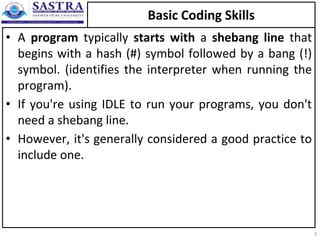
• A program typically starts with a shebang line that
begins with a hash (#) symbol followed by a bang (!)
symbol. (identifies the interpreter when running the
program).
• If you're using IDLE to run your programs, you don't
need a shebang line.
• However, it's generally considered a good practice to
include one.
3
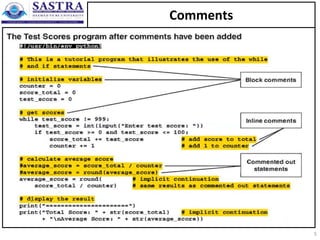
Comments
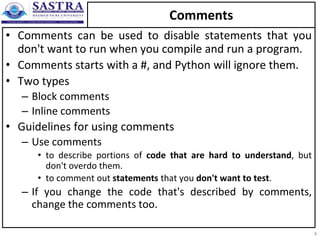
• Comments can be used to disable statements that you
don't want to run when you compile and run a program.
• Comments starts with a #, and Python will ignore them.
• Two types
– Block comments
– Inline comments
• Guidelines for using comments
– Use comments
• to describe portions of code that are hard to understand, but
don't overdo them.
• to comment out statements that you don't want to test.
– If you change the code that's described by comments,
change the comments too.
4
Comments
5
Comments
• Python does not really have a syntax for multi line comments.
• To add a multiline comment you could insert a # for each line.
• For writing “proper” multi-line comments in Python is to use
multi-line strings with the """ syntax in creative ways. Here’s an
example:
"""
This is a "block comment" in Python, made
out of a mult-line string constant.
This actually works quite well!
""“
• However, be careful where you place these “comments” in the
code. If the string follows right after a function signature, a
class definition, or at the start of a module, it turns into a
docstring which has a different meaning altogether in Python:
6
How to use functions ?
• A function is a reusable unit of code that performs a
specific task.
• Many built-in functions (in Python) that do common
tasks like getting input, printing output and etc.
• When you call a function, you code the name of the
function followed by a pair of parentheses. Within
the parentheses, you code any arguments that the
function requires, and you separate multiple
arguments with commas.
7
How to use functions ? – print()
8
How to use functions ? – input()
• The input() function allows a user to insert a value
into a program.
• input() returns a string value. You can convert the
contents of an input using any data type.
• For instance, you can convert the value a user inserts
to a floating-point number.
• For example:
x=input("Enter your name")
print("Welcome to Python Programming ", x)
I/P: III Year Students
O/P: Welcome to Python Programming III Year Students
9

1.3 Basic coding skills_tupels_sets_controlloops.ppt

  • 1.
    PYTHON PROGRAMMING WITH WEBFRAMEWORKS – CSE304 This presentation contains the concepts related to Basic coding skills
  • 2.
    Basic Coding Skills •Python programming relies on proper indentation • Case sensitive • Standard indentation is four spaces • Implicit continuation (use four spaces in the continuation line) print ("Sum = ", str(10+20) + "Diff = ", str(20-10)) • Explicit continuation (it is not recommended) print ("Sum = ", str(10+20) + "Diff = ", str(20-10)) 2
  • 3.
    Basic Coding Skills •A program typically starts with a shebang line that begins with a hash (#) symbol followed by a bang (!) symbol. (identifies the interpreter when running the program). • If you're using IDLE to run your programs, you don't need a shebang line. • However, it's generally considered a good practice to include one. 3
  • 4.
    Comments • Comments canbe used to disable statements that you don't want to run when you compile and run a program. • Comments starts with a #, and Python will ignore them. • Two types – Block comments – Inline comments • Guidelines for using comments – Use comments • to describe portions of code that are hard to understand, but don't overdo them. • to comment out statements that you don't want to test. – If you change the code that's described by comments, change the comments too. 4
  • 5.
  • 6.
    Comments • Python doesnot really have a syntax for multi line comments. • To add a multiline comment you could insert a # for each line. • For writing “proper” multi-line comments in Python is to use multi-line strings with the """ syntax in creative ways. Here’s an example: """ This is a "block comment" in Python, made out of a mult-line string constant. This actually works quite well! ""“ • However, be careful where you place these “comments” in the code. If the string follows right after a function signature, a class definition, or at the start of a module, it turns into a docstring which has a different meaning altogether in Python: 6
  • 7.
    How to usefunctions ? • A function is a reusable unit of code that performs a specific task. • Many built-in functions (in Python) that do common tasks like getting input, printing output and etc. • When you call a function, you code the name of the function followed by a pair of parentheses. Within the parentheses, you code any arguments that the function requires, and you separate multiple arguments with commas. 7
  • 8.
    How to usefunctions ? – print() 8
  • 9.
    How to usefunctions ? – input() • The input() function allows a user to insert a value into a program. • input() returns a string value. You can convert the contents of an input using any data type. • For instance, you can convert the value a user inserts to a floating-point number. • For example: x=input("Enter your name") print("Welcome to Python Programming ", x) I/P: III Year Students O/P: Welcome to Python Programming III Year Students 9