Javascript Client Side Scripting Herman Tolle, ST., MT - (herman_tolle@yahoo.com)
Web Dinamis Website yang dinamis menyediakan interaksi antara pengguna dengan halaman web Interaktifitas tidak didapatkan pada dokumen yang murni HTML saja. Kemampuan pemrograman dapat ditambahkan pada dokumen web untuk interaktifitas
Why JavaScript? Web application round-trip expensive no way to do computation on the client side example: form validation Web pages static no way to allow users to interact with the page example: popup link menus What is needed client-side code
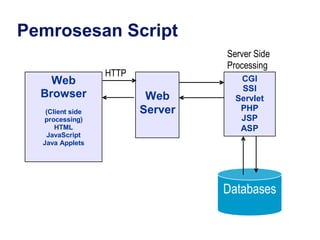
Pemrograman Web Client Side Script  : Script yang ditambahkan dalam dokumen html, dieksekusi oleh browser  client .  Javascript, Jscript, VBScript Server Side Script : Script yang ditambahkan dalam dokumen html, dieksekusi oleh server, hasilnya dalam bentuk html yang dikirim ke  client . ASP/ASP.Net, PHP, CGI, JSP, dll
Pemrosesan Script
Client Side Script Script  yang ditambahkan ( embedded ) pada halaman web yang sebelumnya hanya disusun dengan sintaks HTML.  Penambahan  script  ini mempunyai tujuan tertentu. Misalnya: menampilkan  jam  dan   tanggal   yang  up- to-date ,  menu yang  dinamis   (mis:  pull down  menu),  kontrol   terhadap   sebuah   window ,  animasi   sederhana ,  animasi  mouse maupun untuk  validasi  form , dll
Client Side Script Advantage: Waktu proses relatif cepat karena langsung dieksekusi oleh browser client Tidak memerlukan web server untuk hosting Dapat dieksekusi langsung oleh berbagai browser Disadvantage: Script bisa dilihat oleh pengguna Script dapat di copy-paste Tidak cocok untuk akses data atau database
Server Side Script Digunakan untuk membuat aplikasi web atau konten-konten dinamis: news, buku tamu, dll PHP :  open   source  dan banyak digunakan luas Active Server Pages (ASP)  dan  ASP.Net , teknologi yang dikembangkan oleh Microsoft ColdFusion (CFM),  dikembangkan oleh Macromedia Java Server Pages  dan  Servlet  dikembangkan oleh  Sun   Microsystem Common Gateway Interface (CGI),   yang dibuat dengan bahasa pemrograman C++ atau Perl Server Side Include (SSI),  seperti misalnya  Frontpage Server Extension
Server Side Script Advantage: Script tidak bisa dilihat oleh pengguna, sehingga tidak dapat di-copy-paste Cocok untuk akses data atau aplikasi database Untuk membuat fitur-fitur tertentu yang berguna, misalnya: hit counter, user manajemen, disain yang dinamis, CMS, dll Disdvantage: Waktu proses relatif lebih lambat karena dieksekusi oleh server Memerlukan web server untuk hosting
JavaScript Very little connection to Java marketing move by Netscape JavaScript is a scripting language for web clients interpreted Un-typed Dynamic HTML combination of JavaScript, CSS and DOM to create very flexible web page presentation
Scripts vs. programs a scripting language is a simple, interpreted programming language scripts are embedded as plain text, interpreted by application simpler execution model:  don't need compiler or development environment saves bandwidth:  source code is downloaded, not compiled executable platform-independence:  code interpreted by any script-enabled browser but:  slower than compiled code, not as powerful/full-featured
JavaScript: the first Web scripting language, developed by Netscape in 1995 syntactic similarities to Java/C++, but simpler & more flexible (loose typing, dynamic variables, simple objects) JScript: Microsoft version of JavaScript, introduced in 1996 same core language, but some browser-specific differences fortunately, IE & Netscape can (mostly) handle both JavaScript & JScript  JavaScript 1.5 & JScript 5.0 cores conform to ECMAScript standard VBScript: client-side scripting version of Microsoft Visual Basic
Java Applet Applets are small applications to run on client’s machine. It is in separate file than the Web page itself. The downloaded applet executed by the browser’s built-in interpreter, that reduces the burden on the  server. A Java applet first need to be compiled and needs JDK. JavaScript is a subset of Java and don’t need to be compiled, it is an interpreted only language.
What's the difference between  Java  and  JavaScript ? Java is completely different from JavaScript Java is a full-fledged, object-oriented prog. lang.  It belongs in the same league as C, C++, and other compiled languages.  Also, you need to compile a Java program (using JDK) before you can run it,  whereas with JavaScript, no compilation is needed- simply open up a text editor, type it, save it, and your browser is ready to run it!
Common scripting tasks adding dynamic features to Web pages validation of form data image rollovers time-sensitive or random page elements handling cookies defining programs with Web interfaces utilize buttons, text boxes, clickable images, prompts, frames
limitations of client-side scripting since script code is embedded in the page, viewable to the world for security reasons, scripts are limited in what they can do e.g., can't access the client's hard drive since designed to run on any machine platform, scripts do not contain platform specific commands script languages are not full-featured e.g., JavaScript objects are crude, not good for large project development
JavaScript code can be embedded in a Web page using SCRIPT tags the output of JavaScript code is displayed as if directly entered in HTML <html> <!-- Dave Reed  js01.html  2/06/03 --> <head> <title>JavaScript Page</title> </head> <body> <script type=&quot;text/javascript&quot;> // silly code to demonstrate output document.write(&quot;Hello world!&quot;); document.write(&quot;<p>How are <br />&quot; + &quot;<i>you</i>?</p>&quot;); </script> <p>Here is some static text as well. </p> </body> </html> document.write   displays text in page text to be displayed can include HTML tags the tags are interpreted by the browser when the text is displayed as in C++/Java, statements end with   ; JavaScript comments similar to C++/Java //   starts a single line comment /*…*/   enclose multi-line comments
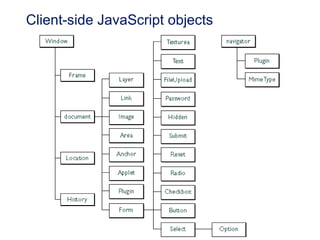
JavaScript Object Reference JavaScript has a wide variety of objects you can use when programming, and each of them have different properties you can control or display through the use of methods. This list should make your programming jobs in JavaScript a little easier.  Client-side JavaScript objects   Anchor, Applet, Array, Boolean, Button, Checkbox, Date, document, event, FileUpload, form, Frame, Function, Hidden, History, Image, Java, JavaArray, JavaClass, JavaObject, JavaPackage, Layer Link, Location, Math, MimeType, Navigator, netscape, Number, Object, Option, Packages, Password, Plugin, Radio, RegExp, Reset, screen, Select, String, Style, Submit, Sun, Text, Textarea, window.
Tips Client Side Script: Gunakan untuk proses-proses sisi client  Script Javascript mudah untuk “dibajak” Pelajari bagaimana cara “menambahkan” ke website kita Source: http://www.dynamicdrive.com http://www.javascriptsource.com
Referensi JavaScript Guide from Netscape (Complete Reference): http://developer.netscape.com/docs/manuals/communicator/jsguide4/index.htm Quick Reference from Shelly Cahsman: http://www.scsite.com/js/qr.htm JavaScript Object Reference : http://www.htmlstuff.com/programmer/jsobjects/index.html
Client-side JavaScript objects
Task Baca dan pelajari materi Lanjutan + Contoh, lihat file Javascript2.ppt Tambahkan pada website Anda: Show the time and date to a Web page. Add a greeting to a Web page based on the time of day. Using mouse event handlers create rollover effect.

06 Javascript

  • 1.
    Javascript Client SideScripting Herman Tolle, ST., MT - (herman_tolle@yahoo.com)
  • 2.
    Web Dinamis Websiteyang dinamis menyediakan interaksi antara pengguna dengan halaman web Interaktifitas tidak didapatkan pada dokumen yang murni HTML saja. Kemampuan pemrograman dapat ditambahkan pada dokumen web untuk interaktifitas
  • 3.
    Why JavaScript? Webapplication round-trip expensive no way to do computation on the client side example: form validation Web pages static no way to allow users to interact with the page example: popup link menus What is needed client-side code
  • 4.
    Pemrograman Web ClientSide Script : Script yang ditambahkan dalam dokumen html, dieksekusi oleh browser client . Javascript, Jscript, VBScript Server Side Script : Script yang ditambahkan dalam dokumen html, dieksekusi oleh server, hasilnya dalam bentuk html yang dikirim ke client . ASP/ASP.Net, PHP, CGI, JSP, dll
  • 5.
  • 6.
    Client Side ScriptScript yang ditambahkan ( embedded ) pada halaman web yang sebelumnya hanya disusun dengan sintaks HTML. Penambahan script ini mempunyai tujuan tertentu. Misalnya: menampilkan jam dan tanggal yang up- to-date , menu yang dinamis (mis: pull down menu), kontrol terhadap sebuah window , animasi sederhana , animasi mouse maupun untuk validasi form , dll
  • 7.
    Client Side ScriptAdvantage: Waktu proses relatif cepat karena langsung dieksekusi oleh browser client Tidak memerlukan web server untuk hosting Dapat dieksekusi langsung oleh berbagai browser Disadvantage: Script bisa dilihat oleh pengguna Script dapat di copy-paste Tidak cocok untuk akses data atau database
  • 8.
    Server Side ScriptDigunakan untuk membuat aplikasi web atau konten-konten dinamis: news, buku tamu, dll PHP : open source dan banyak digunakan luas Active Server Pages (ASP) dan ASP.Net , teknologi yang dikembangkan oleh Microsoft ColdFusion (CFM), dikembangkan oleh Macromedia Java Server Pages dan Servlet dikembangkan oleh Sun Microsystem Common Gateway Interface (CGI), yang dibuat dengan bahasa pemrograman C++ atau Perl Server Side Include (SSI), seperti misalnya Frontpage Server Extension
  • 9.
    Server Side ScriptAdvantage: Script tidak bisa dilihat oleh pengguna, sehingga tidak dapat di-copy-paste Cocok untuk akses data atau aplikasi database Untuk membuat fitur-fitur tertentu yang berguna, misalnya: hit counter, user manajemen, disain yang dinamis, CMS, dll Disdvantage: Waktu proses relatif lebih lambat karena dieksekusi oleh server Memerlukan web server untuk hosting
  • 10.
    JavaScript Very littleconnection to Java marketing move by Netscape JavaScript is a scripting language for web clients interpreted Un-typed Dynamic HTML combination of JavaScript, CSS and DOM to create very flexible web page presentation
  • 11.
    Scripts vs. programsa scripting language is a simple, interpreted programming language scripts are embedded as plain text, interpreted by application simpler execution model: don't need compiler or development environment saves bandwidth: source code is downloaded, not compiled executable platform-independence: code interpreted by any script-enabled browser but: slower than compiled code, not as powerful/full-featured
  • 12.
    JavaScript: the firstWeb scripting language, developed by Netscape in 1995 syntactic similarities to Java/C++, but simpler & more flexible (loose typing, dynamic variables, simple objects) JScript: Microsoft version of JavaScript, introduced in 1996 same core language, but some browser-specific differences fortunately, IE & Netscape can (mostly) handle both JavaScript & JScript JavaScript 1.5 & JScript 5.0 cores conform to ECMAScript standard VBScript: client-side scripting version of Microsoft Visual Basic
  • 13.
    Java Applet Appletsare small applications to run on client’s machine. It is in separate file than the Web page itself. The downloaded applet executed by the browser’s built-in interpreter, that reduces the burden on the server. A Java applet first need to be compiled and needs JDK. JavaScript is a subset of Java and don’t need to be compiled, it is an interpreted only language.
  • 14.
    What's the differencebetween Java and JavaScript ? Java is completely different from JavaScript Java is a full-fledged, object-oriented prog. lang. It belongs in the same league as C, C++, and other compiled languages. Also, you need to compile a Java program (using JDK) before you can run it, whereas with JavaScript, no compilation is needed- simply open up a text editor, type it, save it, and your browser is ready to run it!
  • 15.
    Common scripting tasksadding dynamic features to Web pages validation of form data image rollovers time-sensitive or random page elements handling cookies defining programs with Web interfaces utilize buttons, text boxes, clickable images, prompts, frames
  • 16.
    limitations of client-sidescripting since script code is embedded in the page, viewable to the world for security reasons, scripts are limited in what they can do e.g., can't access the client's hard drive since designed to run on any machine platform, scripts do not contain platform specific commands script languages are not full-featured e.g., JavaScript objects are crude, not good for large project development
  • 17.
    JavaScript code canbe embedded in a Web page using SCRIPT tags the output of JavaScript code is displayed as if directly entered in HTML <html> <!-- Dave Reed js01.html 2/06/03 --> <head> <title>JavaScript Page</title> </head> <body> <script type=&quot;text/javascript&quot;> // silly code to demonstrate output document.write(&quot;Hello world!&quot;); document.write(&quot;<p>How are <br />&quot; + &quot;<i>you</i>?</p>&quot;); </script> <p>Here is some static text as well. </p> </body> </html> document.write displays text in page text to be displayed can include HTML tags the tags are interpreted by the browser when the text is displayed as in C++/Java, statements end with ; JavaScript comments similar to C++/Java // starts a single line comment /*…*/ enclose multi-line comments
  • 18.
    JavaScript Object ReferenceJavaScript has a wide variety of objects you can use when programming, and each of them have different properties you can control or display through the use of methods. This list should make your programming jobs in JavaScript a little easier. Client-side JavaScript objects Anchor, Applet, Array, Boolean, Button, Checkbox, Date, document, event, FileUpload, form, Frame, Function, Hidden, History, Image, Java, JavaArray, JavaClass, JavaObject, JavaPackage, Layer Link, Location, Math, MimeType, Navigator, netscape, Number, Object, Option, Packages, Password, Plugin, Radio, RegExp, Reset, screen, Select, String, Style, Submit, Sun, Text, Textarea, window.
  • 19.
    Tips Client SideScript: Gunakan untuk proses-proses sisi client Script Javascript mudah untuk “dibajak” Pelajari bagaimana cara “menambahkan” ke website kita Source: http://www.dynamicdrive.com http://www.javascriptsource.com
  • 20.
    Referensi JavaScript Guidefrom Netscape (Complete Reference): http://developer.netscape.com/docs/manuals/communicator/jsguide4/index.htm Quick Reference from Shelly Cahsman: http://www.scsite.com/js/qr.htm JavaScript Object Reference : http://www.htmlstuff.com/programmer/jsobjects/index.html
  • 21.
  • 22.
    Task Baca danpelajari materi Lanjutan + Contoh, lihat file Javascript2.ppt Tambahkan pada website Anda: Show the time and date to a Web page. Add a greeting to a Web page based on the time of day. Using mouse event handlers create rollover effect.