Internal Use Only- Training
Introduction to
AeroScout
RTLS Technical Certification
Level 1
Internal Use Only- Training 2AeroScout Confidential
 AeroScout System Overview
 AeroScout System Architecture
 AeroScout Solutions
 Industrial
Agenda
2
Internal Use Only- Training
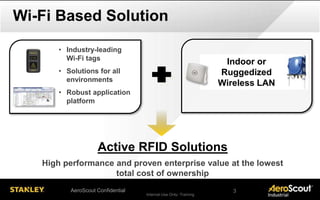
Indoor or
Ruggedized
Wireless LAN
Wi-Fi Based Solution
• Industry-leading
Wi-Fi tags
• Solutions for all
environments
• Robust application
platform
Active RFID Solutions
High performance and proven enterprise value at the lowest
total cost of ownership
AeroScout Confidential 3
Internal Use Only- Training
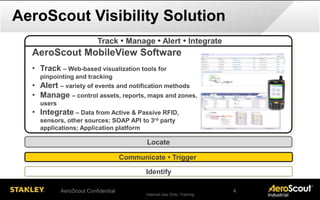
AeroScout Visibility Solution
Identify
Locate
AeroScout MobileView Software
• Track – Web-based visualization tools for
pinpointing and tracking
• Alert – variety of events and notification methods
• Manage – control assets, reports, maps and zones,
users
• Integrate – Data from Active & Passive RFID,
sensors, other sources; SOAP API to 3rd party
applications; Application platform
Communicate • Trigger
Track • Manage • Alert • Integrate
AeroScout Confidential 4
Internal Use Only- Training
AeroScout Visibility Solution
Identify
Track • Manage • Alert • Integrate
Communicate • Trigger
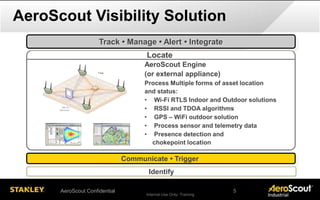
AeroScout Engine
(or external appliance)
Process Multiple forms of asset location
and status:
• Wi-Fi RTLS Indoor and Outdoor solutions
• RSSI and TDOA algorithms
• GPS – WiFi outdoor solution
• Process sensor and telemetry data
• Presence detection and
chokepoint location
Locate
AeroScout Confidential 5
Internal Use Only- Training
AeroScout Visibility Solution
Identify
Locate
Infrastructure
• Communicate via tags
• Wi-Fi standard, indoor and outdoor options (both RSSI and TDOA)
• Exciters trigger tags at defined areas for immediate, accurate detection
Track • Manage • Alert • Integrate
Enterprise Wi-Fi
Network
Location Receivers
(TDOA receiver - optional)
Exciters (Chokepoint
Device - optional)
Communicate • Trigger
AeroScout Confidential 6
Internal Use Only- Training
AeroScout Visibility Solution
Communicate • Trigger
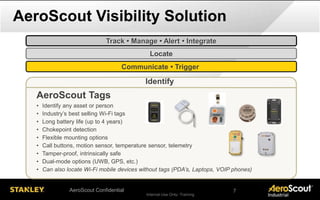
AeroScout Tags
• Identify any asset or person
• Industry’s best selling Wi-Fi tags
• Long battery life (up to 4 years)
• Chokepoint detection
• Flexible mounting options
• Call buttons, motion sensor, temperature sensor, telemetry
• Tamper-proof, intrinsically safe
• Dual-mode options (UWB, GPS, etc.)
• Can also locate Wi-Fi mobile devices without tags (PDA’s, Laptops, VOIP phones)
Locate
Track • Manage • Alert • Integrate
Identify
AeroScout Confidential 7
Internal Use Only- Training 8AeroScout Confidential
 AeroScout System Overview
 AeroScout System Architecture
 AeroScout Solutions
 Industrial
Agenda
8
Internal Use Only- Training
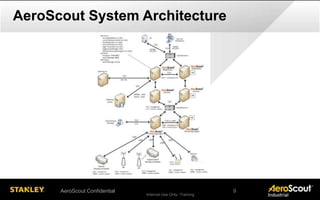
AeroScout System Architecture
AeroScout Confidential 9
Internal Use Only- Training
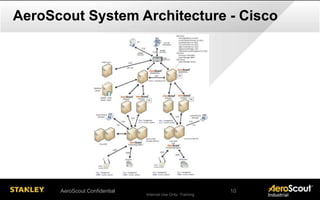
AeroScout System Architecture - Cisco
AeroScout Confidential 10
Internal Use Only- Training
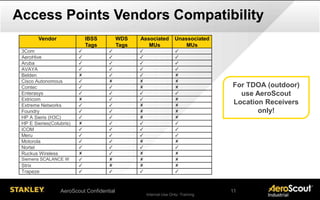
Access Points Vendors Compatibility
For TDOA (outdoor)
use AeroScout
Location Receivers
only!
Vendor IBSS
Tags
WDS
Tags
Associated
MUs
Unassociated
MUs
3Com ✓ ✓ ✓ ✓
AeroHive ✓ ✓ ✓ ✓
Aruba ✓ ✓ ✓ ✓
AVAYA ✓ ✓ ✓ ✓
Belden ✘ ✓ ✓ ✘
Cisco Autonomous ✓ ✘ ✘ ✘
Contec ✓ ✓ ✘ ✘
Enterasys ✓ ✓ ✓ ✓
Extricom ✘ ✓ ✓ ✘
Extreme Networks ✓ ✓ ✘ ✘
Foundry ✓ ✓ ✘ ✘
HP A Sieris (H3C) ✓ ✓ ✘ ✘
HP E Sieries(Colubris) ✘ ✓ ✓ ✓
iCOM ✓ ✓ ✓ ✓
Meru ✓ ✓ ✓ ✓
Motorola ✓ ✓ ✘ ✘
Nortel ✓ ✓ ✓ ✓
Ruckus Wireless ✘ ✓ ✘ ✘
Siemens SCALANCE W ✓ ✘ ✘ ✘
Strix ✓ ✘ ✘ ✘
Trapeze ✓ ✓ ✓ ✓
AeroScout Confidential 11
Internal Use Only- Training 12AeroScout Confidential
 AeroScout System Overview
 AeroScout System Architecture
 AeroScout Solutions
 Industrial
Agenda
13
Internal Use Only- Training
• Parts replenishment
• Vehicle inventory
• Inbound logistics
Automotive
• WIP visibility
• Parts replenishment
• Condition Monitoring
Discrete Manuf.
• WIP visibility
• Equipment utilization
• Inter-site visibility
Aerospace
• Mustering
• Worker safety
• Equipment utilization
Oil & Gas
• Yard management
• Shipping and freight
• Outdoor inventory mgt
Logistics
• Employee safety
• Ore production
• Equipment utilization
Mining
And more - Oil, Gas, Chemicals, Data Centers, Mining, Transportation
Industrial Solutions
AeroScout Confidential 13
Internal Use Only- Training
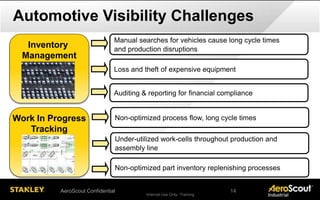
Automotive Visibility Challenges
Inventory
Management
Manual searches for vehicles cause long cycle times
and production disruptions
Loss and theft of expensive equipment
Work In Progress
Tracking
Non-optimized process flow, long cycle times
Non-optimized part inventory replenishing processes
Under-utilized work-cells throughout production and
assembly line
Auditing & reporting for financial compliance
AeroScout Confidential 14
Internal Use Only- Training
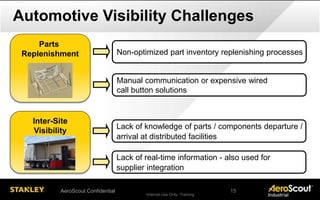
Automotive Visibility Challenges
Lack of knowledge of parts / components departure /
arrival at distributed facilities
Lack of real-time information - also used for
supplier integration
Inter-Site
Visibility
Parts
Replenishment Non-optimized part inventory replenishing processes
Manual communication or expensive wired
call button solutions
AeroScout Confidential 15
Internal Use Only- Training
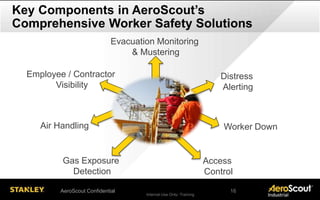
Key Components in AeroScout’s
Comprehensive Worker Safety Solutions
Evacuation Monitoring
& Mustering
Gas Exposure
Detection
Employee / Contractor
Visibility
Distress
Alerting
Access
Control
AeroScout Confidential 16
Worker DownAir Handling
Internal Use Only- Training 17AeroScout Confidential
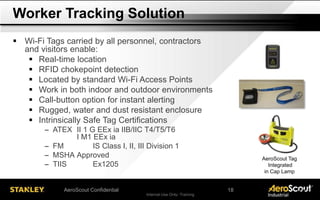
 Wi-Fi Tags carried by all personnel, contractors
and visitors enable:
 Real-time location
 RFID chokepoint detection
 Located by standard Wi-Fi Access Points
 Work in both indoor and outdoor environments
 Call-button option for instant alerting
 Rugged, water and dust resistant enclosure
 Intrinsically Safe Tag Certifications
─ ATEX II 1 G EEx ia IIB/IIC T4/T5/T6
I M1 EEx ia
─ FM IS Class I, II, III Division 1
─ MSHA Approved
─ TIIS Ex1205
Worker Tracking Solution
AeroScout Tag
Integrated
in Cap Lamp
18
Internal Use Only- Training
Many Sites Present Significant Hazards to Worker
Safety - That is a Fact
Ensuring worker safety is
a key initiative today.
AeroScout Confidential 18
Internal Use Only- Training 19AeroScout Confidential
 MSHA, ATEX 137 and DSEAR require site evacuation plans and
regularly scheduled drills
 Tracking and accounting for Personnel On Site (POS), Personnel On
Board (POB) or Personnel Tagged in - is critical across many
industries
 Real-time tracking of all personnel during an event is critical to insure
safety and is done most often done manually today with pen and
paper
 Muster Captains and/or Safety Wardens need to analyze muster drill
results for both statutory reporting, identify training opportunities,
procedure improvements and for constant improvement
Today's Challenges
21
Internal Use Only- Training 20AeroScout Confidential
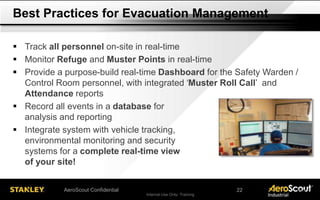
 Track all personnel on-site in real-time
 Monitor Refuge and Muster Points in real-time
 Provide a purpose-build real-time Dashboard for the Safety Warden /
Control Room personnel, with integrated ‘Muster Roll Call’ and
Attendance reports
 Record all events in a database for
analysis and reporting
 Integrate system with vehicle tracking,
environmental monitoring and security
systems for a complete real-time view
of your site!
Best Practices for Evacuation Management
22
Internal Use Only- Training
Evacuation Monitoring Overview
Dynamic counts of all
personnel in the
selected area by
Muster status
Evacuation Event Start:
Trigger alarms, sirens,
strobes, etc.
Mustering station status
indicators and
equipment profile
Evacuation Clock
List of people gets populated based on the selected button
[In Area, Mustered, Not Mustered]
First Responders flagged in GREEN
> Name [Click] opens Map for fast search
Alerts
panel
AeroScout Confidential 21
Internal Use Only- Training 22AeroScout Confidential
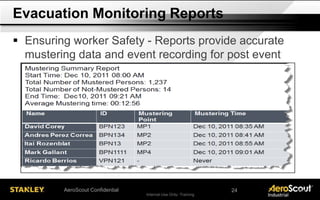
 Ensuring worker Safety - Reports provide accurate
mustering data and event recording for post event
analysis
Evacuation Monitoring Reports
24
Internal Use Only- Training
Thank You Very Much! …Questions?
AeroScout Confidential 23

02 RTLS L1 - Introduction AeroScout

  • 1.
    Internal Use Only-Training Introduction to AeroScout RTLS Technical Certification Level 1
  • 2.
    Internal Use Only-Training 2AeroScout Confidential  AeroScout System Overview  AeroScout System Architecture  AeroScout Solutions  Industrial Agenda 2
  • 3.
    Internal Use Only-Training Indoor or Ruggedized Wireless LAN Wi-Fi Based Solution • Industry-leading Wi-Fi tags • Solutions for all environments • Robust application platform Active RFID Solutions High performance and proven enterprise value at the lowest total cost of ownership AeroScout Confidential 3
  • 4.
    Internal Use Only-Training AeroScout Visibility Solution Identify Locate AeroScout MobileView Software • Track – Web-based visualization tools for pinpointing and tracking • Alert – variety of events and notification methods • Manage – control assets, reports, maps and zones, users • Integrate – Data from Active & Passive RFID, sensors, other sources; SOAP API to 3rd party applications; Application platform Communicate • Trigger Track • Manage • Alert • Integrate AeroScout Confidential 4
  • 5.
    Internal Use Only-Training AeroScout Visibility Solution Identify Track • Manage • Alert • Integrate Communicate • Trigger AeroScout Engine (or external appliance) Process Multiple forms of asset location and status: • Wi-Fi RTLS Indoor and Outdoor solutions • RSSI and TDOA algorithms • GPS – WiFi outdoor solution • Process sensor and telemetry data • Presence detection and chokepoint location Locate AeroScout Confidential 5
  • 6.
    Internal Use Only-Training AeroScout Visibility Solution Identify Locate Infrastructure • Communicate via tags • Wi-Fi standard, indoor and outdoor options (both RSSI and TDOA) • Exciters trigger tags at defined areas for immediate, accurate detection Track • Manage • Alert • Integrate Enterprise Wi-Fi Network Location Receivers (TDOA receiver - optional) Exciters (Chokepoint Device - optional) Communicate • Trigger AeroScout Confidential 6
  • 7.
    Internal Use Only-Training AeroScout Visibility Solution Communicate • Trigger AeroScout Tags • Identify any asset or person • Industry’s best selling Wi-Fi tags • Long battery life (up to 4 years) • Chokepoint detection • Flexible mounting options • Call buttons, motion sensor, temperature sensor, telemetry • Tamper-proof, intrinsically safe • Dual-mode options (UWB, GPS, etc.) • Can also locate Wi-Fi mobile devices without tags (PDA’s, Laptops, VOIP phones) Locate Track • Manage • Alert • Integrate Identify AeroScout Confidential 7
  • 8.
    Internal Use Only-Training 8AeroScout Confidential  AeroScout System Overview  AeroScout System Architecture  AeroScout Solutions  Industrial Agenda 8
  • 9.
    Internal Use Only-Training AeroScout System Architecture AeroScout Confidential 9
  • 10.
    Internal Use Only-Training AeroScout System Architecture - Cisco AeroScout Confidential 10
  • 11.
    Internal Use Only-Training Access Points Vendors Compatibility For TDOA (outdoor) use AeroScout Location Receivers only! Vendor IBSS Tags WDS Tags Associated MUs Unassociated MUs 3Com ✓ ✓ ✓ ✓ AeroHive ✓ ✓ ✓ ✓ Aruba ✓ ✓ ✓ ✓ AVAYA ✓ ✓ ✓ ✓ Belden ✘ ✓ ✓ ✘ Cisco Autonomous ✓ ✘ ✘ ✘ Contec ✓ ✓ ✘ ✘ Enterasys ✓ ✓ ✓ ✓ Extricom ✘ ✓ ✓ ✘ Extreme Networks ✓ ✓ ✘ ✘ Foundry ✓ ✓ ✘ ✘ HP A Sieris (H3C) ✓ ✓ ✘ ✘ HP E Sieries(Colubris) ✘ ✓ ✓ ✓ iCOM ✓ ✓ ✓ ✓ Meru ✓ ✓ ✓ ✓ Motorola ✓ ✓ ✘ ✘ Nortel ✓ ✓ ✓ ✓ Ruckus Wireless ✘ ✓ ✘ ✘ Siemens SCALANCE W ✓ ✘ ✘ ✘ Strix ✓ ✘ ✘ ✘ Trapeze ✓ ✓ ✓ ✓ AeroScout Confidential 11
  • 12.
    Internal Use Only-Training 12AeroScout Confidential  AeroScout System Overview  AeroScout System Architecture  AeroScout Solutions  Industrial Agenda 13
  • 13.
    Internal Use Only-Training • Parts replenishment • Vehicle inventory • Inbound logistics Automotive • WIP visibility • Parts replenishment • Condition Monitoring Discrete Manuf. • WIP visibility • Equipment utilization • Inter-site visibility Aerospace • Mustering • Worker safety • Equipment utilization Oil & Gas • Yard management • Shipping and freight • Outdoor inventory mgt Logistics • Employee safety • Ore production • Equipment utilization Mining And more - Oil, Gas, Chemicals, Data Centers, Mining, Transportation Industrial Solutions AeroScout Confidential 13
  • 14.
    Internal Use Only-Training Automotive Visibility Challenges Inventory Management Manual searches for vehicles cause long cycle times and production disruptions Loss and theft of expensive equipment Work In Progress Tracking Non-optimized process flow, long cycle times Non-optimized part inventory replenishing processes Under-utilized work-cells throughout production and assembly line Auditing & reporting for financial compliance AeroScout Confidential 14
  • 15.
    Internal Use Only-Training Automotive Visibility Challenges Lack of knowledge of parts / components departure / arrival at distributed facilities Lack of real-time information - also used for supplier integration Inter-Site Visibility Parts Replenishment Non-optimized part inventory replenishing processes Manual communication or expensive wired call button solutions AeroScout Confidential 15
  • 16.
    Internal Use Only-Training Key Components in AeroScout’s Comprehensive Worker Safety Solutions Evacuation Monitoring & Mustering Gas Exposure Detection Employee / Contractor Visibility Distress Alerting Access Control AeroScout Confidential 16 Worker DownAir Handling
  • 17.
    Internal Use Only-Training 17AeroScout Confidential  Wi-Fi Tags carried by all personnel, contractors and visitors enable:  Real-time location  RFID chokepoint detection  Located by standard Wi-Fi Access Points  Work in both indoor and outdoor environments  Call-button option for instant alerting  Rugged, water and dust resistant enclosure  Intrinsically Safe Tag Certifications ─ ATEX II 1 G EEx ia IIB/IIC T4/T5/T6 I M1 EEx ia ─ FM IS Class I, II, III Division 1 ─ MSHA Approved ─ TIIS Ex1205 Worker Tracking Solution AeroScout Tag Integrated in Cap Lamp 18
  • 18.
    Internal Use Only-Training Many Sites Present Significant Hazards to Worker Safety - That is a Fact Ensuring worker safety is a key initiative today. AeroScout Confidential 18
  • 19.
    Internal Use Only-Training 19AeroScout Confidential  MSHA, ATEX 137 and DSEAR require site evacuation plans and regularly scheduled drills  Tracking and accounting for Personnel On Site (POS), Personnel On Board (POB) or Personnel Tagged in - is critical across many industries  Real-time tracking of all personnel during an event is critical to insure safety and is done most often done manually today with pen and paper  Muster Captains and/or Safety Wardens need to analyze muster drill results for both statutory reporting, identify training opportunities, procedure improvements and for constant improvement Today's Challenges 21
  • 20.
    Internal Use Only-Training 20AeroScout Confidential  Track all personnel on-site in real-time  Monitor Refuge and Muster Points in real-time  Provide a purpose-build real-time Dashboard for the Safety Warden / Control Room personnel, with integrated ‘Muster Roll Call’ and Attendance reports  Record all events in a database for analysis and reporting  Integrate system with vehicle tracking, environmental monitoring and security systems for a complete real-time view of your site! Best Practices for Evacuation Management 22
  • 21.
    Internal Use Only-Training Evacuation Monitoring Overview Dynamic counts of all personnel in the selected area by Muster status Evacuation Event Start: Trigger alarms, sirens, strobes, etc. Mustering station status indicators and equipment profile Evacuation Clock List of people gets populated based on the selected button [In Area, Mustered, Not Mustered] First Responders flagged in GREEN > Name [Click] opens Map for fast search Alerts panel AeroScout Confidential 21
  • 22.
    Internal Use Only-Training 22AeroScout Confidential  Ensuring worker Safety - Reports provide accurate mustering data and event recording for post event analysis Evacuation Monitoring Reports 24
  • 23.
    Internal Use Only-Training Thank You Very Much! …Questions? AeroScout Confidential 23