Technical Skills Enhancement – PL/SQL Best
practices
Context Switching
Objectives
At the end of this training, you will be able to:
• Understand the concept of context switching and ways to avoid
it
Agenda
– Context Switching
– Under the hood
– Reduce context switches - Avoid SQL in loops
– Bulk Bind to reduce context switches
– Syntax: Bulk Collect
– Syntax: FORALL
– Example of Bulk Collect & For All
– Bulk collect vs FOR Loop
– Best Practices in Bulk Collect – Using LIMIT
– Best Practices in Bulk Collect – Eliminating
%NOTFOUND
Context Switching
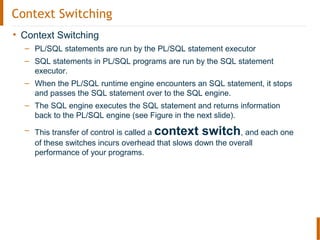
• Context Switching
– PL/SQL statements are run by the PL/SQL statement executor
– SQL statements in PL/SQL programs are run by the SQL statement
executor.
– When the PL/SQL runtime engine encounters an SQL statement, it stops
and passes the SQL statement over to the SQL engine.
– The SQL engine executes the SQL statement and returns information
back to the PL/SQL engine (see Figure in the next slide).
– This transfer of control is called a context switch, and each one
of these switches incurs overhead that slows down the overall
performance of your programs.
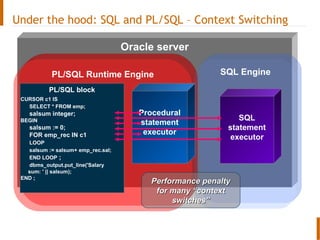
Oracle server
PL/SQL Runtime Engine SQL Engine
PL/SQL block
Procedural
statement
executor
SQL
statement
executor
CURSOR c1 IS
SELECT * FROM emp;
salsum integer;
BEGIN
salsum := 0;
FOR emp_rec IN c1
LOOP
salsum := salsum+ emp_rec.sal;
END LOOP ;
dbms_output.put_line('Salary
sum: ' || salsum);
END ;
Performance penaltyPerformance penalty
for many “contextfor many “context
switches”switches”
Under the hood: SQL and PL/SQL – Context Switching
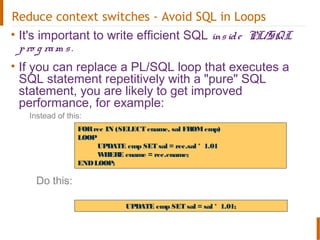
Reduce context switches - Avoid SQL in Loops
• It's important to write efficient SQL inside PL/SQL
pro g ram s.
• If you can replace a PL/SQL loop that executes a
SQL statement repetitively with a "pure" SQL
statement, you are likely to get improved
performance, for example:
Instead of this:
Do this:
FORrec IN (SELECT ename, sal FROMemp)
LOOP
UPDATE emp SET sal = rec.sal * 1.01
WHERE ename = rec.ename;
ENDLOOP;
UPDATE emp SET sal = sal * 1.01;
Bulk Bind to reduce context switches
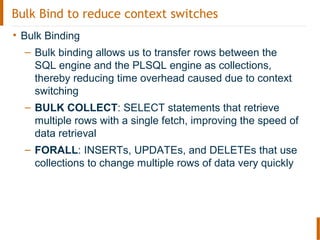
• Bulk Binding
– Bulk binding allows us to transfer rows between the
SQL engine and the PLSQL engine as collections,
thereby reducing time overhead caused due to context
switching
– BULK COLLECT: SELECT statements that retrieve
multiple rows with a single fetch, improving the speed of
data retrieval
– FORALL: INSERTs, UPDATEs, and DELETEs that use
collections to change multiple rows of data very quickly
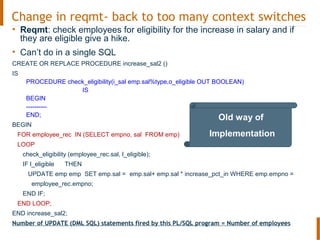
Change in reqmt- back to too many context switches
• Reqmt: check employees for eligibility for the increase in salary and if
they are eligible give a hike.
• Can’t do in a single SQL
CREATE OR REPLACE PROCEDURE increase_sal2 ()
IS
PROCEDURE check_eligibility(i_sal emp.sal%type,o_eligible OUT BOOLEAN)
IS
BEGIN
----------
END;
BEGIN
FOR employee_rec IN (SELECT empno, sal FROM emp)
LOOP
check_eligibility (employee_rec.sal, l_eligible);
IF l_eligible THEN
UPDATE emp emp SET emp.sal = emp.sal+ emp.sal * increase_pct_in WHERE emp.empno =
employee_rec.empno;
END IF;
END LOOP;
END increase_sal2;
Number of UPDATE (DML SQL) statements fired by this PL/SQL program = Number of employees
Old way of
Implementation
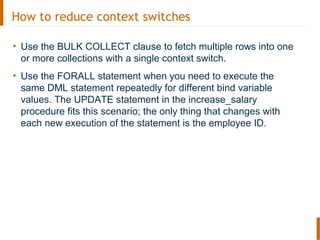
How to reduce context switches
• Use the BULK COLLECT clause to fetch multiple rows into one
or more collections with a single context switch.
• Use the FORALL statement when you need to execute the
same DML statement repeatedly for different bind variable
values. The UPDATE statement in the increase_salary
procedure fits this scenario; the only thing that changes with
each new execution of the statement is the employee ID.
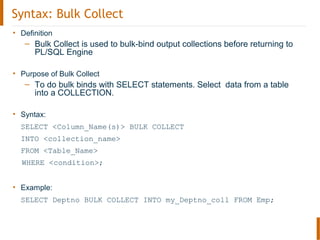
Syntax: Bulk Collect
• Definition
– Bulk Collect is used to bulk-bind output collections before returning to
PL/SQL Engine
• Purpose of Bulk Collect
– To do bulk binds with SELECT statements. Select data from a table
into a COLLECTION.
• Syntax:
SELECT <Column_Name(s)> BULK COLLECT
INTO <collection_name>
FROM <Table_Name>
WHERE <condition>;
• Example:
SELECT Deptno BULK COLLECT INTO my_Deptno_coll FROM Emp;
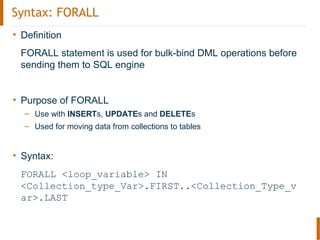
Syntax: FORALL
• Definition
FORALL statement is used for bulk-bind DML operations before
sending them to SQL engine
• Purpose of FORALL
– Use with INSERTs, UPDATEs and DELETEs
– Used for moving data from collections to tables
• Syntax:
FORALL <loop_variable> IN
<Collection_type_Var>.FIRST..<Collection_Type_v
ar>.LAST
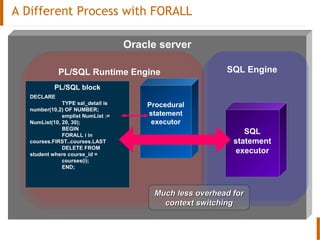
A Different Process with FORALL
Oracle server
PL/SQL Runtime Engine SQL Engine
PL/SQL block
Procedural
statement
executor
SQL
statement
executor
DECLARE
TYPE sal_detail is
number(10,2) OF NUMBER;
emplist NumList :=
NumList(10, 20, 30);
BEGIN
FORALL i in
courses.FIRST..courses.LAST
DELETE FROM
student where course_id =
courses(i);
END;
Much less overhead forMuch less overhead for
context switchingcontext switching
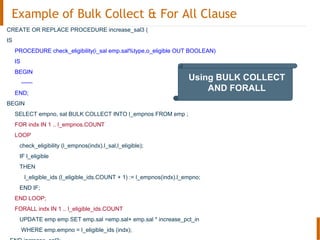
Example of Bulk Collect & For All Clause
CREATE OR REPLACE PROCEDURE increase_sal3 (
IS
PROCEDURE check_eligibility(i_sal emp.sal%type,o_eligible OUT BOOLEAN)
IS
BEGIN
------
END;
BEGIN
SELECT empno, sal BULK COLLECT INTO l_empnos FROM emp ;
FOR indx IN 1 .. l_empnos.COUNT
LOOP
check_eligibility (l_empnos(indx).l_sal,l_eligible);
IF l_eligible
THEN
l_eligible_ids (l_eligible_ids.COUNT + 1) := l_empnos(indx).l_empno;
END IF;
END LOOP;
FORALL indx IN 1 .. l_eligible_ids.COUNT
UPDATE emp emp SET emp.sal =emp.sal+ emp.sal * increase_pct_in
WHERE emp.empno = l_eligible_ids (indx);
Using BULK COLLECT
AND FORALL
Performance comparison
Script : BulkBind_PerfComparison
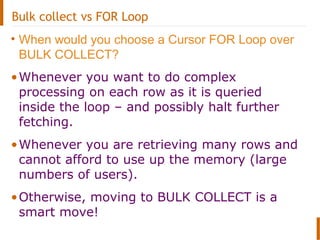
Bulk collect vs FOR Loop
• When would you choose a Cursor FOR Loop over
BULK COLLECT?
•Whenever you want to do complex
processing on each row as it is queried
inside the loop – and possibly halt further
fetching.
•Whenever you are retrieving many rows and
cannot afford to use up the memory (large
numbers of users).
•Otherwise, moving to BULK COLLECT is a
smart move!
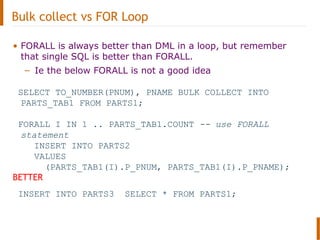
Bulk collect vs FOR Loop
• FORALL is always better than DML in a loop, but remember
that single SQL is better than FORALL.
– Ie the below FORALL is not a good idea
SELECT TO_NUMBER(PNUM), PNAME BULK COLLECT INTO
PARTS_TAB1 FROM PARTS1;
FORALL I IN 1 .. PARTS_TAB1.COUNT -- use FORALL
statement
INSERT INTO PARTS2
VALUES
(PARTS_TAB1(I).P_PNUM, PARTS_TAB1(I).P_PNAME);
BETTER
INSERT INTO PARTS3 SELECT * FROM PARTS1;
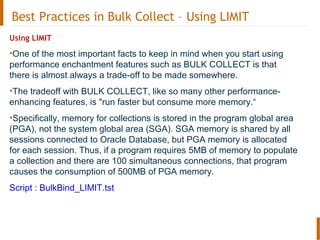
Best Practices in Bulk Collect – Using LIMIT
Using LIMIT
•One of the most important facts to keep in mind when you start using
performance enchantment features such as BULK COLLECT is that
there is almost always a trade-off to be made somewhere.
•The tradeoff with BULK COLLECT, like so many other performance-
enhancing features, is "run faster but consume more memory.“
•Specifically, memory for collections is stored in the program global area
(PGA), not the system global area (SGA). SGA memory is shared by all
sessions connected to Oracle Database, but PGA memory is allocated
for each session. Thus, if a program requires 5MB of memory to populate
a collection and there are 100 simultaneous connections, that program
causes the consumption of 500MB of PGA memory.
Script : BulkBind_LIMIT.tst
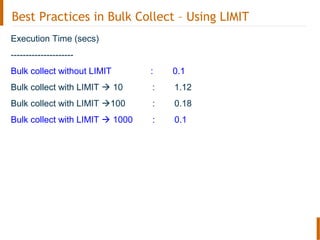
Best Practices in Bulk Collect – Using LIMIT
Execution Time (secs)
---------------------
Bulk collect without LIMIT : 0.1
Bulk collect with LIMIT  10 : 1.12
Bulk collect with LIMIT 100 : 0.18
Bulk collect with LIMIT  1000 : 0.1
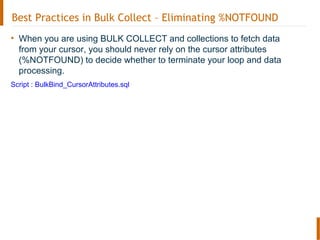
Best Practices in Bulk Collect – Eliminating %NOTFOUND
• When you are using BULK COLLECT and collections to fetch data
from your cursor, you should never rely on the cursor attributes
(%NOTFOUND) to decide whether to terminate your loop and data
processing.
Script : BulkBind_CursorAttributes.sql
Best Practices in Bulk Collect
Keep in mind while using BULK COLLECT:
•It can be used with all three types of collections: associative arrays,
nested tables, and VARRAYs.
•The collection is always filled sequentially and densely, starting from
index value 1.
•It is always safe to iterate through a collection from 1
to collection .COUNT when it has been filled with BULK COLLECT.
•The collection is empty when no rows are fetched.
•Always check the contents of the collection (with the COUNT method) to
see if there are more rows to process.
•Ignore the values returned by the cursor attributes, especially
%NOTFOUND.
Thank You
Feedback, Questions, Discussion

Oracle - SQL-PL/SQL context switching

  • 1.
    Technical Skills Enhancement– PL/SQL Best practices Context Switching
  • 2.
    Objectives At the endof this training, you will be able to: • Understand the concept of context switching and ways to avoid it
  • 3.
    Agenda – Context Switching –Under the hood – Reduce context switches - Avoid SQL in loops – Bulk Bind to reduce context switches – Syntax: Bulk Collect – Syntax: FORALL – Example of Bulk Collect & For All – Bulk collect vs FOR Loop – Best Practices in Bulk Collect – Using LIMIT – Best Practices in Bulk Collect – Eliminating %NOTFOUND
  • 4.
    Context Switching • ContextSwitching – PL/SQL statements are run by the PL/SQL statement executor – SQL statements in PL/SQL programs are run by the SQL statement executor. – When the PL/SQL runtime engine encounters an SQL statement, it stops and passes the SQL statement over to the SQL engine. – The SQL engine executes the SQL statement and returns information back to the PL/SQL engine (see Figure in the next slide). – This transfer of control is called a context switch, and each one of these switches incurs overhead that slows down the overall performance of your programs.
  • 5.
    Oracle server PL/SQL RuntimeEngine SQL Engine PL/SQL block Procedural statement executor SQL statement executor CURSOR c1 IS SELECT * FROM emp; salsum integer; BEGIN salsum := 0; FOR emp_rec IN c1 LOOP salsum := salsum+ emp_rec.sal; END LOOP ; dbms_output.put_line('Salary sum: ' || salsum); END ; Performance penaltyPerformance penalty for many “contextfor many “context switches”switches” Under the hood: SQL and PL/SQL – Context Switching
  • 6.
    Reduce context switches- Avoid SQL in Loops • It's important to write efficient SQL inside PL/SQL pro g ram s. • If you can replace a PL/SQL loop that executes a SQL statement repetitively with a "pure" SQL statement, you are likely to get improved performance, for example: Instead of this: Do this: FORrec IN (SELECT ename, sal FROMemp) LOOP UPDATE emp SET sal = rec.sal * 1.01 WHERE ename = rec.ename; ENDLOOP; UPDATE emp SET sal = sal * 1.01;
  • 7.
    Bulk Bind toreduce context switches • Bulk Binding – Bulk binding allows us to transfer rows between the SQL engine and the PLSQL engine as collections, thereby reducing time overhead caused due to context switching – BULK COLLECT: SELECT statements that retrieve multiple rows with a single fetch, improving the speed of data retrieval – FORALL: INSERTs, UPDATEs, and DELETEs that use collections to change multiple rows of data very quickly
  • 8.
    Change in reqmt-back to too many context switches • Reqmt: check employees for eligibility for the increase in salary and if they are eligible give a hike. • Can’t do in a single SQL CREATE OR REPLACE PROCEDURE increase_sal2 () IS PROCEDURE check_eligibility(i_sal emp.sal%type,o_eligible OUT BOOLEAN) IS BEGIN ---------- END; BEGIN FOR employee_rec IN (SELECT empno, sal FROM emp) LOOP check_eligibility (employee_rec.sal, l_eligible); IF l_eligible THEN UPDATE emp emp SET emp.sal = emp.sal+ emp.sal * increase_pct_in WHERE emp.empno = employee_rec.empno; END IF; END LOOP; END increase_sal2; Number of UPDATE (DML SQL) statements fired by this PL/SQL program = Number of employees Old way of Implementation
  • 9.
    How to reducecontext switches • Use the BULK COLLECT clause to fetch multiple rows into one or more collections with a single context switch. • Use the FORALL statement when you need to execute the same DML statement repeatedly for different bind variable values. The UPDATE statement in the increase_salary procedure fits this scenario; the only thing that changes with each new execution of the statement is the employee ID.
  • 10.
    Syntax: Bulk Collect •Definition – Bulk Collect is used to bulk-bind output collections before returning to PL/SQL Engine • Purpose of Bulk Collect – To do bulk binds with SELECT statements. Select data from a table into a COLLECTION. • Syntax: SELECT <Column_Name(s)> BULK COLLECT INTO <collection_name> FROM <Table_Name> WHERE <condition>; • Example: SELECT Deptno BULK COLLECT INTO my_Deptno_coll FROM Emp;
  • 11.
    Syntax: FORALL • Definition FORALLstatement is used for bulk-bind DML operations before sending them to SQL engine • Purpose of FORALL – Use with INSERTs, UPDATEs and DELETEs – Used for moving data from collections to tables • Syntax: FORALL <loop_variable> IN <Collection_type_Var>.FIRST..<Collection_Type_v ar>.LAST
  • 12.
    A Different Processwith FORALL Oracle server PL/SQL Runtime Engine SQL Engine PL/SQL block Procedural statement executor SQL statement executor DECLARE TYPE sal_detail is number(10,2) OF NUMBER; emplist NumList := NumList(10, 20, 30); BEGIN FORALL i in courses.FIRST..courses.LAST DELETE FROM student where course_id = courses(i); END; Much less overhead forMuch less overhead for context switchingcontext switching
  • 13.
    Example of BulkCollect & For All Clause CREATE OR REPLACE PROCEDURE increase_sal3 ( IS PROCEDURE check_eligibility(i_sal emp.sal%type,o_eligible OUT BOOLEAN) IS BEGIN ------ END; BEGIN SELECT empno, sal BULK COLLECT INTO l_empnos FROM emp ; FOR indx IN 1 .. l_empnos.COUNT LOOP check_eligibility (l_empnos(indx).l_sal,l_eligible); IF l_eligible THEN l_eligible_ids (l_eligible_ids.COUNT + 1) := l_empnos(indx).l_empno; END IF; END LOOP; FORALL indx IN 1 .. l_eligible_ids.COUNT UPDATE emp emp SET emp.sal =emp.sal+ emp.sal * increase_pct_in WHERE emp.empno = l_eligible_ids (indx); Using BULK COLLECT AND FORALL
  • 14.
    Performance comparison Script :BulkBind_PerfComparison
  • 15.
    Bulk collect vsFOR Loop • When would you choose a Cursor FOR Loop over BULK COLLECT? •Whenever you want to do complex processing on each row as it is queried inside the loop – and possibly halt further fetching. •Whenever you are retrieving many rows and cannot afford to use up the memory (large numbers of users). •Otherwise, moving to BULK COLLECT is a smart move!
  • 16.
    Bulk collect vsFOR Loop • FORALL is always better than DML in a loop, but remember that single SQL is better than FORALL. – Ie the below FORALL is not a good idea SELECT TO_NUMBER(PNUM), PNAME BULK COLLECT INTO PARTS_TAB1 FROM PARTS1; FORALL I IN 1 .. PARTS_TAB1.COUNT -- use FORALL statement INSERT INTO PARTS2 VALUES (PARTS_TAB1(I).P_PNUM, PARTS_TAB1(I).P_PNAME); BETTER INSERT INTO PARTS3 SELECT * FROM PARTS1;
  • 17.
    Best Practices inBulk Collect – Using LIMIT Using LIMIT •One of the most important facts to keep in mind when you start using performance enchantment features such as BULK COLLECT is that there is almost always a trade-off to be made somewhere. •The tradeoff with BULK COLLECT, like so many other performance- enhancing features, is "run faster but consume more memory.“ •Specifically, memory for collections is stored in the program global area (PGA), not the system global area (SGA). SGA memory is shared by all sessions connected to Oracle Database, but PGA memory is allocated for each session. Thus, if a program requires 5MB of memory to populate a collection and there are 100 simultaneous connections, that program causes the consumption of 500MB of PGA memory. Script : BulkBind_LIMIT.tst
  • 18.
    Best Practices inBulk Collect – Using LIMIT Execution Time (secs) --------------------- Bulk collect without LIMIT : 0.1 Bulk collect with LIMIT  10 : 1.12 Bulk collect with LIMIT 100 : 0.18 Bulk collect with LIMIT  1000 : 0.1
  • 19.
    Best Practices inBulk Collect – Eliminating %NOTFOUND • When you are using BULK COLLECT and collections to fetch data from your cursor, you should never rely on the cursor attributes (%NOTFOUND) to decide whether to terminate your loop and data processing. Script : BulkBind_CursorAttributes.sql
  • 20.
    Best Practices inBulk Collect Keep in mind while using BULK COLLECT: •It can be used with all three types of collections: associative arrays, nested tables, and VARRAYs. •The collection is always filled sequentially and densely, starting from index value 1. •It is always safe to iterate through a collection from 1 to collection .COUNT when it has been filled with BULK COLLECT. •The collection is empty when no rows are fetched. •Always check the contents of the collection (with the COUNT method) to see if there are more rows to process. •Ignore the values returned by the cursor attributes, especially %NOTFOUND.
  • 21.