Copyright © 2004, Oracle. All rights reserved.
Creating Triggers
10-2 Copyright © 2004, Oracle. All rights reserved.
Types of Triggers
A trigger:
• Is a PL/SQL block or a PL/SQL procedure
associated with a table, view, schema, or database
• Executes implicitly whenever a particular event
takes place
• Can be either of the following:
– Application trigger: Fires whenever an event occurs
with a particular application
– Database trigger: Fires whenever a data event (such
as DML) or system event (such as logon or
shutdown) occurs on a schema or database
10-3 Copyright © 2004, Oracle. All rights reserved.
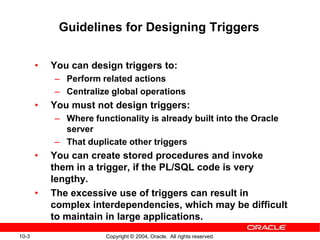
Guidelines for Designing Triggers
• You can design triggers to:
– Perform related actions
– Centralize global operations
• You must not design triggers:
– Where functionality is already built into the Oracle
server
– That duplicate other triggers
• You can create stored procedures and invoke
them in a trigger, if the PL/SQL code is very
lengthy.
• The excessive use of triggers can result in
complex interdependencies, which may be difficult
to maintain in large applications.
10-4 Copyright © 2004, Oracle. All rights reserved.
Creating DML Triggers
Create DML statement or row type triggers by using:
• A statement trigger fires once for a DML
statement.
• A row trigger fires once for each row affected.
Note: Trigger names must be unique with respect to
other triggers in the same schema.
CREATE [OR REPLACE] TRIGGER trigger_name
timing
event1 [OR event2 OR event3]
ON object_name
[[REFERENCING OLD AS old | NEW AS new]
FOR EACH ROW
[WHEN (condition)]]
trigger_body
10-5 Copyright © 2004, Oracle. All rights reserved.
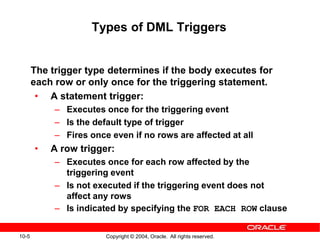
Types of DML Triggers
The trigger type determines if the body executes for
each row or only once for the triggering statement.
• A statement trigger:
– Executes once for the triggering event
– Is the default type of trigger
– Fires once even if no rows are affected at all
• A row trigger:
– Executes once for each row affected by the
triggering event
– Is not executed if the triggering event does not
affect any rows
– Is indicated by specifying the FOR EACH ROW clause
10-6 Copyright © 2004, Oracle. All rights reserved.
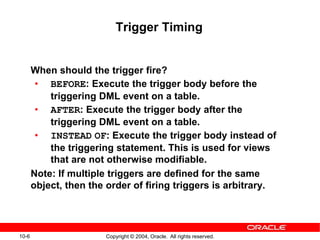
Trigger Timing
When should the trigger fire?
• BEFORE: Execute the trigger body before the
triggering DML event on a table.
• AFTER: Execute the trigger body after the
triggering DML event on a table.
• INSTEAD OF: Execute the trigger body instead of
the triggering statement. This is used for views
that are not otherwise modifiable.
Note: If multiple triggers are defined for the same
object, then the order of firing triggers is arbitrary.
10-7 Copyright © 2004, Oracle. All rights reserved.
…
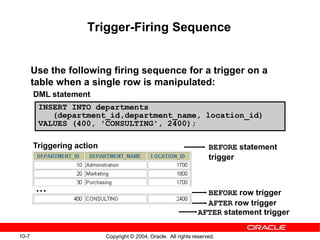
Trigger-Firing Sequence
Use the following firing sequence for a trigger on a
table when a single row is manipulated:
BEFORE statement
trigger
BEFORE row trigger
AFTER row trigger
AFTER statement trigger
DML statement
INSERT INTO departments
(department_id,department_name, location_id)
VALUES (400, 'CONSULTING', 2400);
Triggering action
10-8 Copyright © 2004, Oracle. All rights reserved.
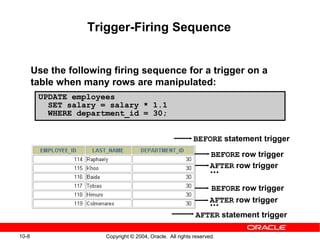
UPDATE employees
SET salary = salary * 1.1
WHERE department_id = 30;
Trigger-Firing Sequence
Use the following firing sequence for a trigger on a
table when many rows are manipulated:
BEFORE statement trigger
BEFORE row trigger
AFTER row trigger
...
BEFORE row trigger
AFTER row trigger...
AFTER statement trigger
10-9 Copyright © 2004, Oracle. All rights reserved.
Trigger Event Types and Body
A trigger event:
• Determines which DML statement causes the
trigger to execute
• Types are:
– INSERT
– UPDATE [OF column]
– DELETE
A trigger body:
• Determines what action is performed
• Is a PL/SQL block or a CALL to a procedure
10-10 Copyright © 2004, Oracle. All rights reserved.
Application
INSERT INTO EMPLOYEES...;
EMPLOYEES table
SECURE_EMP trigger
Creating a DML Statement Trigger
CREATE OR REPLACE TRIGGER secure_emp
BEFORE INSERT ON employees BEGIN
IF (TO_CHAR(SYSDATE,'DY') IN ('SAT','SUN')) OR
(TO_CHAR(SYSDATE,'HH24:MI')
NOT BETWEEN '08:00' AND '18:00') THEN
RAISE_APPLICATION_ERROR(-20500, 'You may insert'
||' into EMPLOYEES table only during '
||' business hours.');
END IF;
END;
10-11 Copyright © 2004, Oracle. All rights reserved.
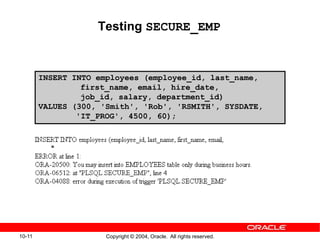
Testing SECURE_EMP
INSERT INTO employees (employee_id, last_name,
first_name, email, hire_date,
job_id, salary, department_id)
VALUES (300, 'Smith', 'Rob', 'RSMITH', SYSDATE,
'IT_PROG', 4500, 60);
10-12 Copyright © 2004, Oracle. All rights reserved.
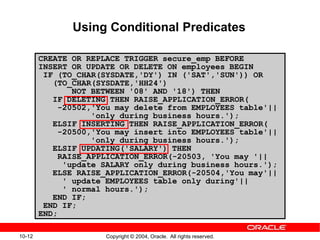
Using Conditional Predicates
CREATE OR REPLACE TRIGGER secure_emp BEFORE
INSERT OR UPDATE OR DELETE ON employees BEGIN
IF (TO_CHAR(SYSDATE,'DY') IN ('SAT','SUN')) OR
(TO_CHAR(SYSDATE,'HH24')
NOT BETWEEN '08' AND '18') THEN
IF DELETING THEN RAISE_APPLICATION_ERROR(
-20502,'You may delete from EMPLOYEES table'||
'only during business hours.');
ELSIF INSERTING THEN RAISE_APPLICATION_ERROR(
-20500,'You may insert into EMPLOYEES table'||
'only during business hours.');
ELSIF UPDATING('SALARY') THEN
RAISE_APPLICATION_ERROR(-20503, 'You may '||
'update SALARY only during business hours.');
ELSE RAISE_APPLICATION_ERROR(-20504,'You may'||
' update EMPLOYEES table only during'||
' normal hours.');
END IF;
END IF;
END;
10-13 Copyright © 2004, Oracle. All rights reserved.
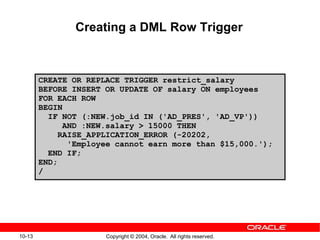
Creating a DML Row Trigger
CREATE OR REPLACE TRIGGER restrict_salary
BEFORE INSERT OR UPDATE OF salary ON employees
FOR EACH ROW
BEGIN
IF NOT (:NEW.job_id IN ('AD_PRES', 'AD_VP'))
AND :NEW.salary > 15000 THEN
RAISE_APPLICATION_ERROR (-20202,
'Employee cannot earn more than $15,000.');
END IF;
END;
/
10-14 Copyright © 2004, Oracle. All rights reserved.
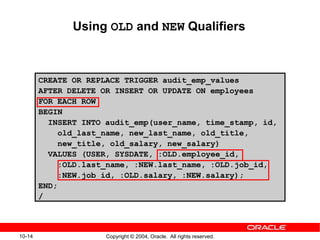
Using OLD and NEW Qualifiers
CREATE OR REPLACE TRIGGER audit_emp_values
AFTER DELETE OR INSERT OR UPDATE ON employees
FOR EACH ROW
BEGIN
INSERT INTO audit_emp(user_name, time_stamp, id,
old_last_name, new_last_name, old_title,
new_title, old_salary, new_salary)
VALUES (USER, SYSDATE, :OLD.employee_id,
:OLD.last_name, :NEW.last_name, :OLD.job_id,
:NEW.job_id, :OLD.salary, :NEW.salary);
END;
/
10-15 Copyright © 2004, Oracle. All rights reserved.
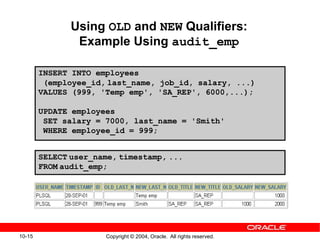
Using OLD and NEW Qualifiers:
Example Using audit_emp
INSERT INTO employees
(employee_id, last_name, job_id, salary, ...)
VALUES (999, 'Temp emp', 'SA_REP', 6000,...);
UPDATE employees
SET salary = 7000, last_name = 'Smith'
WHERE employee_id = 999;
SELECT user_name, timestamp, ...
FROM audit_emp;
10-16 Copyright © 2004, Oracle. All rights reserved.
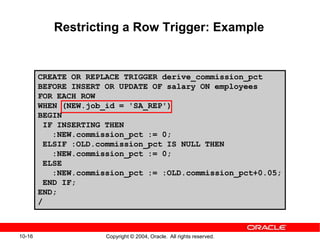
Restricting a Row Trigger: Example
CREATE OR REPLACE TRIGGER derive_commission_pct
BEFORE INSERT OR UPDATE OF salary ON employees
FOR EACH ROW
WHEN (NEW.job_id = 'SA_REP')
BEGIN
IF INSERTING THEN
:NEW.commission_pct := 0;
ELSIF :OLD.commission_pct IS NULL THEN
:NEW.commission_pct := 0;
ELSE
:NEW.commission_pct := :OLD.commission_pct+0.05;
END IF;
END;
/
10-17 Copyright © 2004, Oracle. All rights reserved.
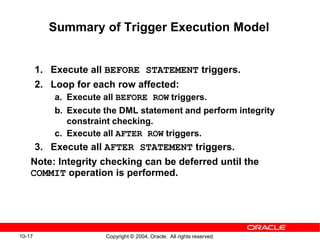
Summary of Trigger Execution Model
1. Execute all BEFORE STATEMENT triggers.
2. Loop for each row affected:
a. Execute all BEFORE ROW triggers.
b. Execute the DML statement and perform integrity
constraint checking.
c. Execute all AFTER ROW triggers.
3. Execute all AFTER STATEMENT triggers.
Note: Integrity checking can be deferred until the
COMMIT operation is performed.
10-18 Copyright © 2004, Oracle. All rights reserved.
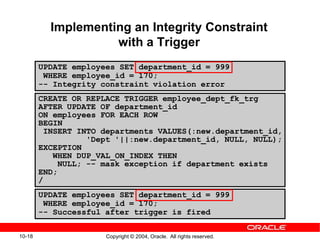
Implementing an Integrity Constraint
with a Trigger
CREATE OR REPLACE TRIGGER employee_dept_fk_trg
AFTER UPDATE OF department_id
ON employees FOR EACH ROW
BEGIN
INSERT INTO departments VALUES(:new.department_id,
'Dept '||:new.department_id, NULL, NULL);
EXCEPTION
WHEN DUP_VAL_ON_INDEX THEN
NULL; -- mask exception if department exists
END;
/
UPDATE employees SET department_id = 999
WHERE employee_id = 170;
-- Successful after trigger is fired
UPDATE employees SET department_id = 999
WHERE employee_id = 170;
-- Integrity constraint violation error
10-19 Copyright © 2004, Oracle. All rights reserved.
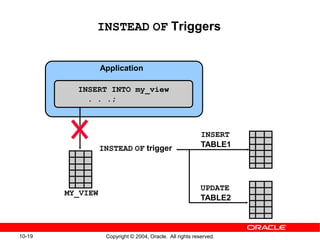
INSTEAD OF Triggers
Application
INSERT INTO my_view
. . .;
MY_VIEW
INSTEAD OF trigger
INSERT
TABLE1
UPDATE
TABLE2
10-20 Copyright © 2004, Oracle. All rights reserved.
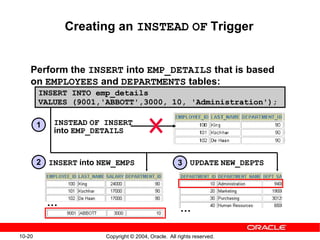
Creating an INSTEAD OF Trigger
Perform the INSERT into EMP_DETAILS that is based
on EMPLOYEES and DEPARTMENTS tables:
INSTEAD OF INSERT
into EMP_DETAILS
INSERT into NEW_EMPS UPDATE NEW_DEPTS
…
…
1
2 3
INSERT INTO emp_details
VALUES (9001,'ABBOTT',3000, 10, 'Administration');
10-21 Copyright © 2004, Oracle. All rights reserved.
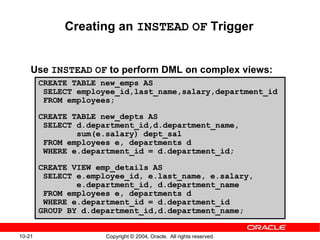
Creating an INSTEAD OF Trigger
Use INSTEAD OF to perform DML on complex views:
CREATE TABLE new_emps AS
SELECT employee_id,last_name,salary,department_id
FROM employees;
CREATE TABLE new_depts AS
SELECT d.department_id,d.department_name,
sum(e.salary) dept_sal
FROM employees e, departments d
WHERE e.department_id = d.department_id;
CREATE VIEW emp_details AS
SELECT e.employee_id, e.last_name, e.salary,
e.department_id, d.department_name
FROM employees e, departments d
WHERE e.department_id = d.department_id
GROUP BY d.department_id,d.department_name;
10-22 Copyright © 2004, Oracle. All rights reserved.
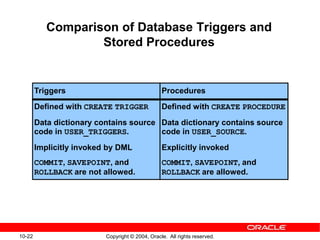
Comparison of Database Triggers and
Stored Procedures
Triggers
Defined with CREATE TRIGGER
Data dictionary contains source
code in USER_TRIGGERS.
Implicitly invoked by DML
COMMIT, SAVEPOINT, and
ROLLBACK are not allowed.
Procedures
Defined with CREATE PROCEDURE
Data dictionary contains source
code in USER_SOURCE.
Explicitly invoked
COMMIT, SAVEPOINT, and
ROLLBACK are allowed.
10-23 Copyright © 2004, Oracle. All rights reserved.
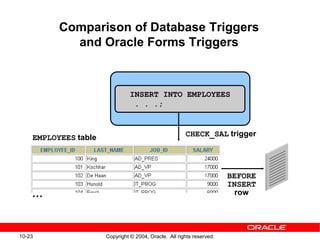
Comparison of Database Triggers
and Oracle Forms Triggers
INSERT INTO EMPLOYEES
. . .;
EMPLOYEES table CHECK_SAL trigger
BEFORE
INSERT
row…
10-24 Copyright © 2004, Oracle. All rights reserved.
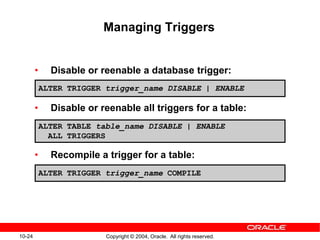
Managing Triggers
• Disable or reenable a database trigger:
• Disable or reenable all triggers for a table:
• Recompile a trigger for a table:
ALTER TRIGGER trigger_name DISABLE | ENABLE
ALTER TABLE table_name DISABLE | ENABLE
ALL TRIGGERS
ALTER TRIGGER trigger_name COMPILE
10-25 Copyright © 2004, Oracle. All rights reserved.
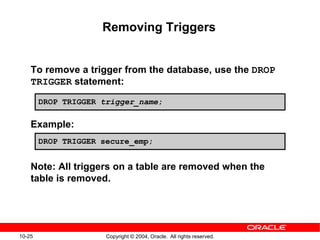
Removing Triggers
To remove a trigger from the database, use the DROP
TRIGGER statement:
Example:
Note: All triggers on a table are removed when the
table is removed.
DROP TRIGGER secure_emp;
DROP TRIGGER trigger_name;
10-26 Copyright © 2004, Oracle. All rights reserved.
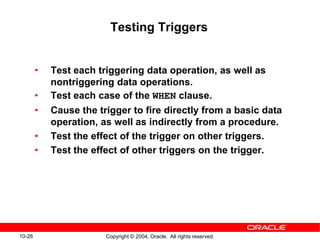
Testing Triggers
• Test each triggering data operation, as well as
nontriggering data operations.
• Test each case of the WHEN clause.
• Cause the trigger to fire directly from a basic data
operation, as well as indirectly from a procedure.
• Test the effect of the trigger on other triggers.
• Test the effect of other triggers on the trigger.
Copyright © 2004, Oracle. All rights reserved.
Applications for Triggers
10-28 Copyright © 2004, Oracle. All rights reserved.
Creating Database Triggers
• Triggering a user event:
– CREATE, ALTER, or DROP
– Logging on or off
• Triggering database or system event:
– Shutting down or starting up the database
– A specific error (or any error) being raised
10-29 Copyright © 2004, Oracle. All rights reserved.
Creating Triggers on DDL Statements
Syntax:
CREATE [OR REPLACE] TRIGGER trigger_name
Timing
[ddl_event1 [OR ddl_event2 OR ...]]
ON {DATABASE|SCHEMA}
trigger_body
10-30 Copyright © 2004, Oracle. All rights reserved.
Creating Triggers on System Events
Syntax:
CREATE [OR REPLACE] TRIGGER trigger_name
timing
[database_event1 [OR database_event2 OR ...]]
ON {DATABASE|SCHEMA}
trigger_body
10-31 Copyright © 2004, Oracle. All rights reserved.
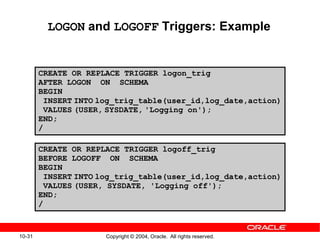
LOGON and LOGOFF Triggers: Example
CREATE OR REPLACE TRIGGER logon_trig
AFTER LOGON ON SCHEMA
BEGIN
INSERT INTO log_trig_table(user_id,log_date,action)
VALUES (USER, SYSDATE, 'Logging on');
END;
/
CREATE OR REPLACE TRIGGER logoff_trig
BEFORE LOGOFF ON SCHEMA
BEGIN
INSERT INTO log_trig_table(user_id,log_date,action)
VALUES (USER, SYSDATE, 'Logging off');
END;
/
10-32 Copyright © 2004, Oracle. All rights reserved.
CALL Statements
Note: There is no semicolon at the end of the CALL
statement.
CREATE OR REPLACE TRIGGER log_employee
BEFORE INSERT ON EMPLOYEES
CALL log_execution
/
CREATE [OR REPLACE] TRIGGER trigger_name
timing
event1 [OR event2 OR event3]
ON table_name
[REFERENCING OLD AS old | NEW AS new]
[FOR EACH ROW]
[WHEN condition]
CALL procedure_name
/
10-33 Copyright © 2004, Oracle. All rights reserved.
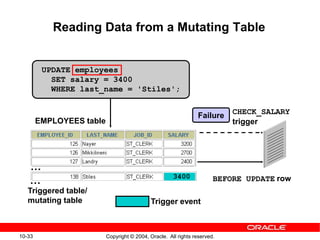
Trigger event
UPDATE employees
SET salary = 3400
WHERE last_name = 'Stiles';
EMPLOYEES table
Failure
Triggered table/
mutating table
BEFORE UPDATE row
CHECK_SALARY
trigger
Reading Data from a Mutating Table
…
… 3400
10-34 Copyright © 2004, Oracle. All rights reserved.
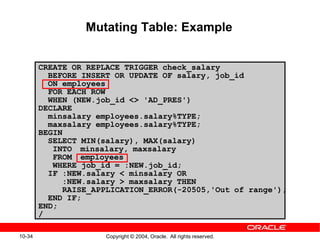
Mutating Table: Example
CREATE OR REPLACE TRIGGER check_salary
BEFORE INSERT OR UPDATE OF salary, job_id
ON employees
FOR EACH ROW
WHEN (NEW.job_id <> 'AD_PRES')
DECLARE
minsalary employees.salary%TYPE;
maxsalary employees.salary%TYPE;
BEGIN
SELECT MIN(salary), MAX(salary)
INTO minsalary, maxsalary
FROM employees
WHERE job_id = :NEW.job_id;
IF :NEW.salary < minsalary OR
:NEW.salary > maxsalary THEN
RAISE_APPLICATION_ERROR(-20505,'Out of range');
END IF;
END;
/
10-35 Copyright © 2004, Oracle. All rights reserved.
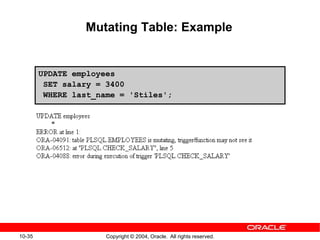
Mutating Table: Example
UPDATE employees
SET salary = 3400
WHERE last_name = 'Stiles';
10-36 Copyright © 2004, Oracle. All rights reserved.
Benefits of Database Triggers
• Improved data security:
– Provide enhanced and complex security checks
– Provide enhanced and complex auditing
• Improved data integrity:
– Enforce dynamic data integrity constraints
– Enforce complex referential integrity constraints
– Ensure that related operations are performed
together implicitly
10-37 Copyright © 2004, Oracle. All rights reserved.
Managing Triggers
The following system privileges are required to
manage triggers:
• CREATE/ALTER/DROP (ANY) TRIGGER privilege:
enables you to create a trigger in any schema
• ADMINISTER DATABASE TRIGGER privilege:
enables you to create a trigger on DATABASE
• EXECUTE privilege (if your trigger refers to any
objects that are not in your schema)
Note: Statements in the trigger body use the privileges
of the trigger owner, not the privileges of the user
executing the operation that fires the trigger.
10-38 Copyright © 2004, Oracle. All rights reserved.
Business Application Scenarios for
Implementing Triggers
You can use triggers for:
• Security
• Auditing
• Data integrity
• Referential integrity
• Table replication
• Computing derived data automatically
• Event logging
Note: Appendix C covers each of these examples in
more detail.
10-39 Copyright © 2004, Oracle. All rights reserved.
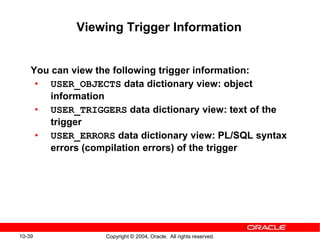
Viewing Trigger Information
You can view the following trigger information:
• USER_OBJECTS data dictionary view: object
information
• USER_TRIGGERS data dictionary view: text of the
trigger
• USER_ERRORS data dictionary view: PL/SQL syntax
errors (compilation errors) of the trigger
10-40 Copyright © 2004, Oracle. All rights reserved.
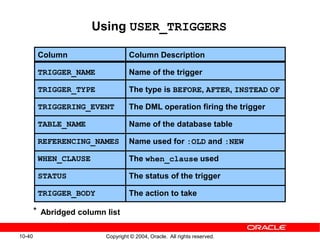
Column
TRIGGER_NAME
TRIGGER_TYPE
TRIGGERING_EVENT
TABLE_NAME
REFERENCING_NAMES
WHEN_CLAUSE
STATUS
TRIGGER_BODY
Column Description
Name of the trigger
The type is BEFORE, AFTER, INSTEAD OF
The DML operation firing the trigger
Name of the database table
Name used for :OLD and :NEW
The when_clause used
The status of the trigger
The action to take
Using USER_TRIGGERS
Abridged column list*
10-41 Copyright © 2004, Oracle. All rights reserved.
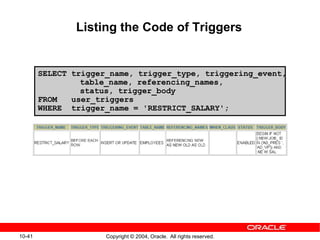
SELECT trigger_name, trigger_type, triggering_event,
table_name, referencing_names,
status, trigger_body
FROM user_triggers
WHERE trigger_name = 'RESTRICT_SALARY';
Listing the Code of Triggers
10-42 Copyright © 2004, Oracle. All rights reserved.
Practice 11: Overview
This practice covers the following topics:
• Creating advanced triggers to manage data
integrity rules
• Creating triggers that cause a mutating table
exception
• Creating triggers that use package state to solve
the mutating table problem
10-43 Copyright © 2004, Oracle. All rights reserved.
Class 10: Overview
This practice covers the following topics:
• Creating row triggers
• Creating a statement trigger
• Calling procedures from a trigger
• Creating advanced triggers to manage data
integrity rules
• Creating triggers that cause a mutating table
exception
• Creating triggers that use package state to solve
the mutating table problem

10 Creating Triggers

  • 1.
    Copyright © 2004,Oracle. All rights reserved. Creating Triggers
  • 2.
    10-2 Copyright ©2004, Oracle. All rights reserved. Types of Triggers A trigger: • Is a PL/SQL block or a PL/SQL procedure associated with a table, view, schema, or database • Executes implicitly whenever a particular event takes place • Can be either of the following: – Application trigger: Fires whenever an event occurs with a particular application – Database trigger: Fires whenever a data event (such as DML) or system event (such as logon or shutdown) occurs on a schema or database
  • 3.
    10-3 Copyright ©2004, Oracle. All rights reserved. Guidelines for Designing Triggers • You can design triggers to: – Perform related actions – Centralize global operations • You must not design triggers: – Where functionality is already built into the Oracle server – That duplicate other triggers • You can create stored procedures and invoke them in a trigger, if the PL/SQL code is very lengthy. • The excessive use of triggers can result in complex interdependencies, which may be difficult to maintain in large applications.
  • 4.
    10-4 Copyright ©2004, Oracle. All rights reserved. Creating DML Triggers Create DML statement or row type triggers by using: • A statement trigger fires once for a DML statement. • A row trigger fires once for each row affected. Note: Trigger names must be unique with respect to other triggers in the same schema. CREATE [OR REPLACE] TRIGGER trigger_name timing event1 [OR event2 OR event3] ON object_name [[REFERENCING OLD AS old | NEW AS new] FOR EACH ROW [WHEN (condition)]] trigger_body
  • 5.
    10-5 Copyright ©2004, Oracle. All rights reserved. Types of DML Triggers The trigger type determines if the body executes for each row or only once for the triggering statement. • A statement trigger: – Executes once for the triggering event – Is the default type of trigger – Fires once even if no rows are affected at all • A row trigger: – Executes once for each row affected by the triggering event – Is not executed if the triggering event does not affect any rows – Is indicated by specifying the FOR EACH ROW clause
  • 6.
    10-6 Copyright ©2004, Oracle. All rights reserved. Trigger Timing When should the trigger fire? • BEFORE: Execute the trigger body before the triggering DML event on a table. • AFTER: Execute the trigger body after the triggering DML event on a table. • INSTEAD OF: Execute the trigger body instead of the triggering statement. This is used for views that are not otherwise modifiable. Note: If multiple triggers are defined for the same object, then the order of firing triggers is arbitrary.
  • 7.
    10-7 Copyright ©2004, Oracle. All rights reserved. … Trigger-Firing Sequence Use the following firing sequence for a trigger on a table when a single row is manipulated: BEFORE statement trigger BEFORE row trigger AFTER row trigger AFTER statement trigger DML statement INSERT INTO departments (department_id,department_name, location_id) VALUES (400, 'CONSULTING', 2400); Triggering action
  • 8.
    10-8 Copyright ©2004, Oracle. All rights reserved. UPDATE employees SET salary = salary * 1.1 WHERE department_id = 30; Trigger-Firing Sequence Use the following firing sequence for a trigger on a table when many rows are manipulated: BEFORE statement trigger BEFORE row trigger AFTER row trigger ... BEFORE row trigger AFTER row trigger... AFTER statement trigger
  • 9.
    10-9 Copyright ©2004, Oracle. All rights reserved. Trigger Event Types and Body A trigger event: • Determines which DML statement causes the trigger to execute • Types are: – INSERT – UPDATE [OF column] – DELETE A trigger body: • Determines what action is performed • Is a PL/SQL block or a CALL to a procedure
  • 10.
    10-10 Copyright ©2004, Oracle. All rights reserved. Application INSERT INTO EMPLOYEES...; EMPLOYEES table SECURE_EMP trigger Creating a DML Statement Trigger CREATE OR REPLACE TRIGGER secure_emp BEFORE INSERT ON employees BEGIN IF (TO_CHAR(SYSDATE,'DY') IN ('SAT','SUN')) OR (TO_CHAR(SYSDATE,'HH24:MI') NOT BETWEEN '08:00' AND '18:00') THEN RAISE_APPLICATION_ERROR(-20500, 'You may insert' ||' into EMPLOYEES table only during ' ||' business hours.'); END IF; END;
  • 11.
    10-11 Copyright ©2004, Oracle. All rights reserved. Testing SECURE_EMP INSERT INTO employees (employee_id, last_name, first_name, email, hire_date, job_id, salary, department_id) VALUES (300, 'Smith', 'Rob', 'RSMITH', SYSDATE, 'IT_PROG', 4500, 60);
  • 12.
    10-12 Copyright ©2004, Oracle. All rights reserved. Using Conditional Predicates CREATE OR REPLACE TRIGGER secure_emp BEFORE INSERT OR UPDATE OR DELETE ON employees BEGIN IF (TO_CHAR(SYSDATE,'DY') IN ('SAT','SUN')) OR (TO_CHAR(SYSDATE,'HH24') NOT BETWEEN '08' AND '18') THEN IF DELETING THEN RAISE_APPLICATION_ERROR( -20502,'You may delete from EMPLOYEES table'|| 'only during business hours.'); ELSIF INSERTING THEN RAISE_APPLICATION_ERROR( -20500,'You may insert into EMPLOYEES table'|| 'only during business hours.'); ELSIF UPDATING('SALARY') THEN RAISE_APPLICATION_ERROR(-20503, 'You may '|| 'update SALARY only during business hours.'); ELSE RAISE_APPLICATION_ERROR(-20504,'You may'|| ' update EMPLOYEES table only during'|| ' normal hours.'); END IF; END IF; END;
  • 13.
    10-13 Copyright ©2004, Oracle. All rights reserved. Creating a DML Row Trigger CREATE OR REPLACE TRIGGER restrict_salary BEFORE INSERT OR UPDATE OF salary ON employees FOR EACH ROW BEGIN IF NOT (:NEW.job_id IN ('AD_PRES', 'AD_VP')) AND :NEW.salary > 15000 THEN RAISE_APPLICATION_ERROR (-20202, 'Employee cannot earn more than $15,000.'); END IF; END; /
  • 14.
    10-14 Copyright ©2004, Oracle. All rights reserved. Using OLD and NEW Qualifiers CREATE OR REPLACE TRIGGER audit_emp_values AFTER DELETE OR INSERT OR UPDATE ON employees FOR EACH ROW BEGIN INSERT INTO audit_emp(user_name, time_stamp, id, old_last_name, new_last_name, old_title, new_title, old_salary, new_salary) VALUES (USER, SYSDATE, :OLD.employee_id, :OLD.last_name, :NEW.last_name, :OLD.job_id, :NEW.job_id, :OLD.salary, :NEW.salary); END; /
  • 15.
    10-15 Copyright ©2004, Oracle. All rights reserved. Using OLD and NEW Qualifiers: Example Using audit_emp INSERT INTO employees (employee_id, last_name, job_id, salary, ...) VALUES (999, 'Temp emp', 'SA_REP', 6000,...); UPDATE employees SET salary = 7000, last_name = 'Smith' WHERE employee_id = 999; SELECT user_name, timestamp, ... FROM audit_emp;
  • 16.
    10-16 Copyright ©2004, Oracle. All rights reserved. Restricting a Row Trigger: Example CREATE OR REPLACE TRIGGER derive_commission_pct BEFORE INSERT OR UPDATE OF salary ON employees FOR EACH ROW WHEN (NEW.job_id = 'SA_REP') BEGIN IF INSERTING THEN :NEW.commission_pct := 0; ELSIF :OLD.commission_pct IS NULL THEN :NEW.commission_pct := 0; ELSE :NEW.commission_pct := :OLD.commission_pct+0.05; END IF; END; /
  • 17.
    10-17 Copyright ©2004, Oracle. All rights reserved. Summary of Trigger Execution Model 1. Execute all BEFORE STATEMENT triggers. 2. Loop for each row affected: a. Execute all BEFORE ROW triggers. b. Execute the DML statement and perform integrity constraint checking. c. Execute all AFTER ROW triggers. 3. Execute all AFTER STATEMENT triggers. Note: Integrity checking can be deferred until the COMMIT operation is performed.
  • 18.
    10-18 Copyright ©2004, Oracle. All rights reserved. Implementing an Integrity Constraint with a Trigger CREATE OR REPLACE TRIGGER employee_dept_fk_trg AFTER UPDATE OF department_id ON employees FOR EACH ROW BEGIN INSERT INTO departments VALUES(:new.department_id, 'Dept '||:new.department_id, NULL, NULL); EXCEPTION WHEN DUP_VAL_ON_INDEX THEN NULL; -- mask exception if department exists END; / UPDATE employees SET department_id = 999 WHERE employee_id = 170; -- Successful after trigger is fired UPDATE employees SET department_id = 999 WHERE employee_id = 170; -- Integrity constraint violation error
  • 19.
    10-19 Copyright ©2004, Oracle. All rights reserved. INSTEAD OF Triggers Application INSERT INTO my_view . . .; MY_VIEW INSTEAD OF trigger INSERT TABLE1 UPDATE TABLE2
  • 20.
    10-20 Copyright ©2004, Oracle. All rights reserved. Creating an INSTEAD OF Trigger Perform the INSERT into EMP_DETAILS that is based on EMPLOYEES and DEPARTMENTS tables: INSTEAD OF INSERT into EMP_DETAILS INSERT into NEW_EMPS UPDATE NEW_DEPTS … … 1 2 3 INSERT INTO emp_details VALUES (9001,'ABBOTT',3000, 10, 'Administration');
  • 21.
    10-21 Copyright ©2004, Oracle. All rights reserved. Creating an INSTEAD OF Trigger Use INSTEAD OF to perform DML on complex views: CREATE TABLE new_emps AS SELECT employee_id,last_name,salary,department_id FROM employees; CREATE TABLE new_depts AS SELECT d.department_id,d.department_name, sum(e.salary) dept_sal FROM employees e, departments d WHERE e.department_id = d.department_id; CREATE VIEW emp_details AS SELECT e.employee_id, e.last_name, e.salary, e.department_id, d.department_name FROM employees e, departments d WHERE e.department_id = d.department_id GROUP BY d.department_id,d.department_name;
  • 22.
    10-22 Copyright ©2004, Oracle. All rights reserved. Comparison of Database Triggers and Stored Procedures Triggers Defined with CREATE TRIGGER Data dictionary contains source code in USER_TRIGGERS. Implicitly invoked by DML COMMIT, SAVEPOINT, and ROLLBACK are not allowed. Procedures Defined with CREATE PROCEDURE Data dictionary contains source code in USER_SOURCE. Explicitly invoked COMMIT, SAVEPOINT, and ROLLBACK are allowed.
  • 23.
    10-23 Copyright ©2004, Oracle. All rights reserved. Comparison of Database Triggers and Oracle Forms Triggers INSERT INTO EMPLOYEES . . .; EMPLOYEES table CHECK_SAL trigger BEFORE INSERT row…
  • 24.
    10-24 Copyright ©2004, Oracle. All rights reserved. Managing Triggers • Disable or reenable a database trigger: • Disable or reenable all triggers for a table: • Recompile a trigger for a table: ALTER TRIGGER trigger_name DISABLE | ENABLE ALTER TABLE table_name DISABLE | ENABLE ALL TRIGGERS ALTER TRIGGER trigger_name COMPILE
  • 25.
    10-25 Copyright ©2004, Oracle. All rights reserved. Removing Triggers To remove a trigger from the database, use the DROP TRIGGER statement: Example: Note: All triggers on a table are removed when the table is removed. DROP TRIGGER secure_emp; DROP TRIGGER trigger_name;
  • 26.
    10-26 Copyright ©2004, Oracle. All rights reserved. Testing Triggers • Test each triggering data operation, as well as nontriggering data operations. • Test each case of the WHEN clause. • Cause the trigger to fire directly from a basic data operation, as well as indirectly from a procedure. • Test the effect of the trigger on other triggers. • Test the effect of other triggers on the trigger.
  • 27.
    Copyright © 2004,Oracle. All rights reserved. Applications for Triggers
  • 28.
    10-28 Copyright ©2004, Oracle. All rights reserved. Creating Database Triggers • Triggering a user event: – CREATE, ALTER, or DROP – Logging on or off • Triggering database or system event: – Shutting down or starting up the database – A specific error (or any error) being raised
  • 29.
    10-29 Copyright ©2004, Oracle. All rights reserved. Creating Triggers on DDL Statements Syntax: CREATE [OR REPLACE] TRIGGER trigger_name Timing [ddl_event1 [OR ddl_event2 OR ...]] ON {DATABASE|SCHEMA} trigger_body
  • 30.
    10-30 Copyright ©2004, Oracle. All rights reserved. Creating Triggers on System Events Syntax: CREATE [OR REPLACE] TRIGGER trigger_name timing [database_event1 [OR database_event2 OR ...]] ON {DATABASE|SCHEMA} trigger_body
  • 31.
    10-31 Copyright ©2004, Oracle. All rights reserved. LOGON and LOGOFF Triggers: Example CREATE OR REPLACE TRIGGER logon_trig AFTER LOGON ON SCHEMA BEGIN INSERT INTO log_trig_table(user_id,log_date,action) VALUES (USER, SYSDATE, 'Logging on'); END; / CREATE OR REPLACE TRIGGER logoff_trig BEFORE LOGOFF ON SCHEMA BEGIN INSERT INTO log_trig_table(user_id,log_date,action) VALUES (USER, SYSDATE, 'Logging off'); END; /
  • 32.
    10-32 Copyright ©2004, Oracle. All rights reserved. CALL Statements Note: There is no semicolon at the end of the CALL statement. CREATE OR REPLACE TRIGGER log_employee BEFORE INSERT ON EMPLOYEES CALL log_execution / CREATE [OR REPLACE] TRIGGER trigger_name timing event1 [OR event2 OR event3] ON table_name [REFERENCING OLD AS old | NEW AS new] [FOR EACH ROW] [WHEN condition] CALL procedure_name /
  • 33.
    10-33 Copyright ©2004, Oracle. All rights reserved. Trigger event UPDATE employees SET salary = 3400 WHERE last_name = 'Stiles'; EMPLOYEES table Failure Triggered table/ mutating table BEFORE UPDATE row CHECK_SALARY trigger Reading Data from a Mutating Table … … 3400
  • 34.
    10-34 Copyright ©2004, Oracle. All rights reserved. Mutating Table: Example CREATE OR REPLACE TRIGGER check_salary BEFORE INSERT OR UPDATE OF salary, job_id ON employees FOR EACH ROW WHEN (NEW.job_id <> 'AD_PRES') DECLARE minsalary employees.salary%TYPE; maxsalary employees.salary%TYPE; BEGIN SELECT MIN(salary), MAX(salary) INTO minsalary, maxsalary FROM employees WHERE job_id = :NEW.job_id; IF :NEW.salary < minsalary OR :NEW.salary > maxsalary THEN RAISE_APPLICATION_ERROR(-20505,'Out of range'); END IF; END; /
  • 35.
    10-35 Copyright ©2004, Oracle. All rights reserved. Mutating Table: Example UPDATE employees SET salary = 3400 WHERE last_name = 'Stiles';
  • 36.
    10-36 Copyright ©2004, Oracle. All rights reserved. Benefits of Database Triggers • Improved data security: – Provide enhanced and complex security checks – Provide enhanced and complex auditing • Improved data integrity: – Enforce dynamic data integrity constraints – Enforce complex referential integrity constraints – Ensure that related operations are performed together implicitly
  • 37.
    10-37 Copyright ©2004, Oracle. All rights reserved. Managing Triggers The following system privileges are required to manage triggers: • CREATE/ALTER/DROP (ANY) TRIGGER privilege: enables you to create a trigger in any schema • ADMINISTER DATABASE TRIGGER privilege: enables you to create a trigger on DATABASE • EXECUTE privilege (if your trigger refers to any objects that are not in your schema) Note: Statements in the trigger body use the privileges of the trigger owner, not the privileges of the user executing the operation that fires the trigger.
  • 38.
    10-38 Copyright ©2004, Oracle. All rights reserved. Business Application Scenarios for Implementing Triggers You can use triggers for: • Security • Auditing • Data integrity • Referential integrity • Table replication • Computing derived data automatically • Event logging Note: Appendix C covers each of these examples in more detail.
  • 39.
    10-39 Copyright ©2004, Oracle. All rights reserved. Viewing Trigger Information You can view the following trigger information: • USER_OBJECTS data dictionary view: object information • USER_TRIGGERS data dictionary view: text of the trigger • USER_ERRORS data dictionary view: PL/SQL syntax errors (compilation errors) of the trigger
  • 40.
    10-40 Copyright ©2004, Oracle. All rights reserved. Column TRIGGER_NAME TRIGGER_TYPE TRIGGERING_EVENT TABLE_NAME REFERENCING_NAMES WHEN_CLAUSE STATUS TRIGGER_BODY Column Description Name of the trigger The type is BEFORE, AFTER, INSTEAD OF The DML operation firing the trigger Name of the database table Name used for :OLD and :NEW The when_clause used The status of the trigger The action to take Using USER_TRIGGERS Abridged column list*
  • 41.
    10-41 Copyright ©2004, Oracle. All rights reserved. SELECT trigger_name, trigger_type, triggering_event, table_name, referencing_names, status, trigger_body FROM user_triggers WHERE trigger_name = 'RESTRICT_SALARY'; Listing the Code of Triggers
  • 42.
    10-42 Copyright ©2004, Oracle. All rights reserved. Practice 11: Overview This practice covers the following topics: • Creating advanced triggers to manage data integrity rules • Creating triggers that cause a mutating table exception • Creating triggers that use package state to solve the mutating table problem
  • 43.
    10-43 Copyright ©2004, Oracle. All rights reserved. Class 10: Overview This practice covers the following topics: • Creating row triggers • Creating a statement trigger • Calling procedures from a trigger • Creating advanced triggers to manage data integrity rules • Creating triggers that cause a mutating table exception • Creating triggers that use package state to solve the mutating table problem