Presentation detail is here


Writing a Book
Using Sphinx
    2012/9/16
SphinxCon JP 2012
Who am I?
http://清水川.jp/ @shimizukawa

●   BeProud Corp.
●   Expert Python Programming
    translator into Japanese
●   Sphinx-users.jp vice-chairman
●   PyConJP 2011,2012 vice-chairman
Python Professional Programming
●   Publisher: Shuwa System
●   Size: B5, 430 pages
●   2940 JPY
●   2012-3-27

call it #pypro
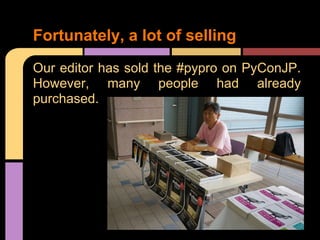
Fortunately, a lot of selling
Our editor has sold the #pypro on PyConJP.
However, many people had already
purchased.
Book's concept
● BPStyle (BeProud style):
  The book tell BP has been cultivated in
  the practice, the know-how of Python at
  work.

● for BP newbe:
  The book for work early to get accustomed
  to the new members of the company.
Table of Contents
4 parts, 15 chapters

1.   Let's develop with Python
2.   Cycle of team development
3.   Publish service
4.   Technique to accelerate the development
Part 1: Let's develop with Python
Chapter 1: Let's start Python
Chapter 2: Create a Web application


Appendix A: VirtualBox setup
Appendix B: OS(Ubuntu) setup
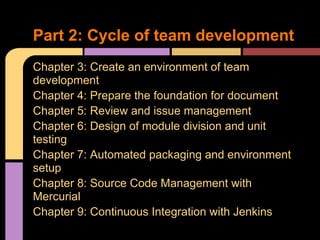
Part 2: Cycle of team development
Chapter 3: Create an environment of team
development
Chapter 4: Prepare the foundation for document
Chapter 5: Review and issue management
Chapter 6: Design of module division and unit
testing
Chapter 7: Automated packaging and environment
setup
Chapter 8: Source Code Management with
Mercurial
Chapter 9: Continuous Integration with Jenkins
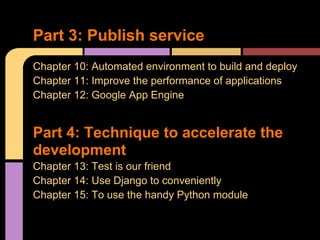
Part 3: Publish service
Chapter 10: Automated environment to build and deploy
Chapter 11: Improve the performance of applications
Chapter 12: Google App Engine


Part 4: Technique to accelerate the
development
Chapter 13: Test is our friend
Chapter 14: Use Django to conveniently
Chapter 15: To use the handy Python module
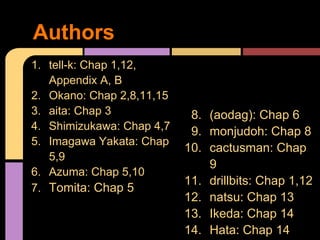
Authors
1. tell-k: Chap 1,12,
   Appendix A, B
2. Okano: Chap 2,8,11,15
3. aita: Chap 3             8. (aodag): Chap 6
4. Shimizukawa: Chap 4,7    9. monjudoh: Chap 8
5. Imagawa Yakata: Chap
                           10. cactusman: Chap
   5,9
                               9
6. Azuma: Chap 5,10
                           11. drillbits: Chap 1,12
7. Tomita: Chap 5
                           12. natsu: Chap 13
                           13. Ikeda: Chap 14
                           14. Hata: Chap 14
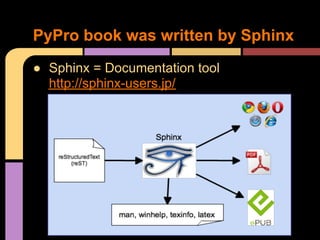
PyPro book was written by Sphinx
● Sphinx = Documentation tool
  http://sphinx-users.jp/
Build a writing environment
automatically using Sphinx
First:
   $ hg clone [repos-of-pypro] pypro
   $ cd pypro
   $ python bootstrap.py
   $ bin/buildout

build HTML:
  $ vim 04.rst #chapter 04
  $ make html
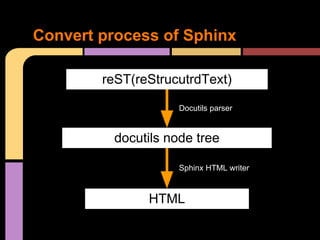
Convert process of Sphinx

        reST(reStrucutrdText)

                     Docutils parser


          docutils node tree

                     Sphinx HTML writer


               HTML
Writing and Review
● Write by reST
● HTML Review by office-member
● PDF Review by outer-geeks

Provide different formats for different
purposes.

If you change the look, we now notice that
such wrong or strange expression that was
not noticed until then.
Submission format for Editor
process: Writer -> Editor -> Print
● [Editor -> Print]
   maybe 'InDesign' or else.

● [Writer -> Editor]
   the Shuwa-System format.
      5 wide square charactors ->    ■■■■■Chapter 1 Let's start Python

             2 wide charactors ->    ▽◆
        1 wide bullet charactor ->   ・Python setup
        1 wide bullet charactor ->   ・Mercurial setup
             2 wide charactors ->    △◆

      4 wide square charactors ->    ■■■■01-01 Python setup
Rewrite manually for submission?
● We wrote draft with Sphinx(reST)

● Submission format is different

● But, we can't write submission format. It's
  difficult for us :(

● Then, ...how?
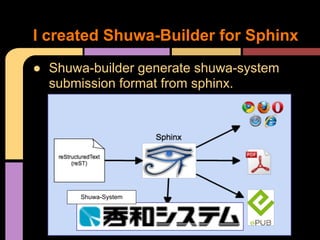
I created Shuwa-Builder for Sphinx
● Shuwa-builder generate shuwa-system
  submission format from sphinx.


       Shuwa-System
Generate manuscript for Shuwa
Generate submission formatted manuscript
for Shuwa-System:

   $ make shuwa

That's all.

   $ ls _build/shuwa
   01.txt 02.txt 03.txt 04.txt ....
Spent over 2 days to create the
Shuwa-builder
● I took a lot of time to create the bulider.
● But monotonous repetitive work is painful
  to me.
● I will submit several times until publication.
  I will get a return on that investment.

shortly afterward, I applying proved
difference to original reST draft :(

3rd proof paper was PDF format. How do I
check diff?
Conclusion
What went wrong
● auto-generation of submission manuscript needs
  explicit spec.
● consider how to diff-incorporation

What worked
● Written in text that easy to writing and manage
  differential
● Review need differencial look
● To automate the preparation of environmental
● At any time to provide the latest HTML and PDF
  ○ that is provided by Jenkins at commit&push to the
      repository.

Writing a book using sphinx #sphinxconjp 2012

  • 1.
    Presentation detail ishere Writing a Book Using Sphinx 2012/9/16 SphinxCon JP 2012
  • 2.
    Who am I? http://清水川.jp/@shimizukawa ● BeProud Corp. ● Expert Python Programming translator into Japanese ● Sphinx-users.jp vice-chairman ● PyConJP 2011,2012 vice-chairman
  • 3.
    Python Professional Programming ● Publisher: Shuwa System ● Size: B5, 430 pages ● 2940 JPY ● 2012-3-27 call it #pypro
  • 4.
    Fortunately, a lotof selling Our editor has sold the #pypro on PyConJP. However, many people had already purchased.
  • 5.
    Book's concept ● BPStyle(BeProud style): The book tell BP has been cultivated in the practice, the know-how of Python at work. ● for BP newbe: The book for work early to get accustomed to the new members of the company.
  • 6.
    Table of Contents 4parts, 15 chapters 1. Let's develop with Python 2. Cycle of team development 3. Publish service 4. Technique to accelerate the development
  • 7.
    Part 1: Let'sdevelop with Python Chapter 1: Let's start Python Chapter 2: Create a Web application Appendix A: VirtualBox setup Appendix B: OS(Ubuntu) setup
  • 8.
    Part 2: Cycleof team development Chapter 3: Create an environment of team development Chapter 4: Prepare the foundation for document Chapter 5: Review and issue management Chapter 6: Design of module division and unit testing Chapter 7: Automated packaging and environment setup Chapter 8: Source Code Management with Mercurial Chapter 9: Continuous Integration with Jenkins
  • 9.
    Part 3: Publishservice Chapter 10: Automated environment to build and deploy Chapter 11: Improve the performance of applications Chapter 12: Google App Engine Part 4: Technique to accelerate the development Chapter 13: Test is our friend Chapter 14: Use Django to conveniently Chapter 15: To use the handy Python module
  • 10.
    Authors 1. tell-k: Chap1,12, Appendix A, B 2. Okano: Chap 2,8,11,15 3. aita: Chap 3 8. (aodag): Chap 6 4. Shimizukawa: Chap 4,7 9. monjudoh: Chap 8 5. Imagawa Yakata: Chap 10. cactusman: Chap 5,9 9 6. Azuma: Chap 5,10 11. drillbits: Chap 1,12 7. Tomita: Chap 5 12. natsu: Chap 13 13. Ikeda: Chap 14 14. Hata: Chap 14
  • 11.
    PyPro book waswritten by Sphinx ● Sphinx = Documentation tool http://sphinx-users.jp/
  • 12.
    Build a writingenvironment automatically using Sphinx First: $ hg clone [repos-of-pypro] pypro $ cd pypro $ python bootstrap.py $ bin/buildout build HTML: $ vim 04.rst #chapter 04 $ make html
  • 13.
    Convert process ofSphinx reST(reStrucutrdText) Docutils parser docutils node tree Sphinx HTML writer HTML
  • 14.
    Writing and Review ●Write by reST ● HTML Review by office-member ● PDF Review by outer-geeks Provide different formats for different purposes. If you change the look, we now notice that such wrong or strange expression that was not noticed until then.
  • 15.
    Submission format forEditor process: Writer -> Editor -> Print ● [Editor -> Print] maybe 'InDesign' or else. ● [Writer -> Editor] the Shuwa-System format. 5 wide square charactors -> ■■■■■Chapter 1 Let's start Python 2 wide charactors -> ▽◆ 1 wide bullet charactor -> ・Python setup 1 wide bullet charactor -> ・Mercurial setup 2 wide charactors -> △◆ 4 wide square charactors -> ■■■■01-01 Python setup
  • 16.
    Rewrite manually forsubmission? ● We wrote draft with Sphinx(reST) ● Submission format is different ● But, we can't write submission format. It's difficult for us :( ● Then, ...how?
  • 17.
    I created Shuwa-Builderfor Sphinx ● Shuwa-builder generate shuwa-system submission format from sphinx. Shuwa-System
  • 18.
    Generate manuscript forShuwa Generate submission formatted manuscript for Shuwa-System: $ make shuwa That's all. $ ls _build/shuwa 01.txt 02.txt 03.txt 04.txt ....
  • 19.
    Spent over 2days to create the Shuwa-builder ● I took a lot of time to create the bulider. ● But monotonous repetitive work is painful to me. ● I will submit several times until publication. I will get a return on that investment. shortly afterward, I applying proved difference to original reST draft :( 3rd proof paper was PDF format. How do I check diff?
  • 20.
    Conclusion What went wrong ●auto-generation of submission manuscript needs explicit spec. ● consider how to diff-incorporation What worked ● Written in text that easy to writing and manage differential ● Review need differencial look ● To automate the preparation of environmental ● At any time to provide the latest HTML and PDF ○ that is provided by Jenkins at commit&push to the repository.