Raise More and Save Money
Virtual Events with Donations and Fundraising
Agenda
▷ Why should my nonprofit do a (free) virtual event?
▷ Create a Virtual Event on GiveSignup/RunSignup
○ Set up: Registration, Donations, and Fundraising
○ Website Customization
○ Swag
○ Results & Engagement
▷ Q & A
2
Why do a (free) virtual event?
▷ Engage your community, and make it easy for everyone to get
involved.
▷ Raise money: Make a soft ask for donations and incentivize
fundraising.
▷ Save money: No or limited costs to put on the event, free website,
free Facebook Fundraising, free email, free results, etc.
▷ Grow and cultivate your donor pipeline
3
What types of virtual events are
being done?
▷ Races, runs, walks, and rides
▷ Duathlons
▷ Scavenger hunts
▷ Fitness Challenges - push up challenge, flip challenge
▷ Distance Challenges (100 miles in a month or 1,000K in 4 months)
▷ Training Programs
▷ Multi-Week Track Season
4
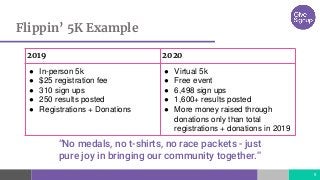
Flippin’ 5K Example
5
2019 2020
● In-person 5k
● $25 registration fee
● 310 sign ups
● 250 results posted
● Registrations + Donations
● Virtual 5k
● Free event
● 6,498 sign ups
● 1,600+ results posted
● More money raised through
donations only than total
registrations + donations in 2019
“No medals, no t-shirts, no race packets - just
pure joy in bringing our community together.”
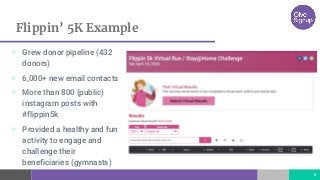
Flippin’ 5K Example
6
▷ Grew donor pipeline (432
donors)
▷ 6,000+ new email contacts
▷ More than 800 (public)
instagram posts with
#flippin5k
▷ Provided a healthy and fun
activity to engage and
challenge their
beneficiaries (gymnasts)
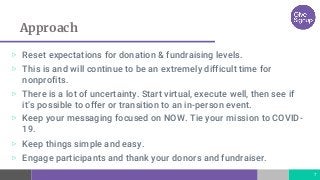
Approach
▷ Reset expectations for donation & fundraising levels.
▷ This is and will continue to be an extremely difficult time for
nonprofits.
▷ There is a lot of uncertainty. Start virtual, execute well, then see if
it’s possible to offer or transition to an in-person event.
▷ Keep your messaging focused on NOW. Tie your mission to COVID-
19.
▷ Keep things simple and easy.
▷ Engage participants and thank your donors and fundraiser.
7
Create a Virtual Event
How to create and customize
www.givesignup.org
www.runsignup.com
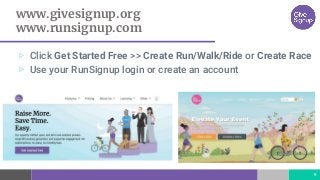
▷ Click Get Started Free >> Create Run/Walk/Ride or Create Race
▷ Use your RunSignup login or create an account
9
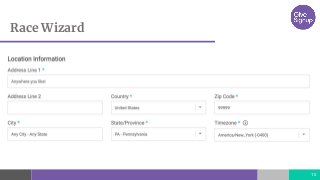
Race Wizard
10
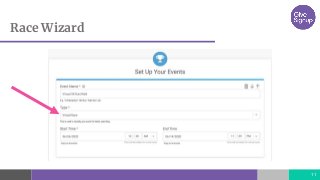
Race Wizard
11
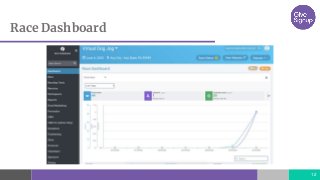
Race Dashboard
12
Virtual Race Checklist
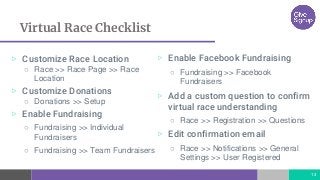
▷ Customize Race Location
○ Race >> Race Page >> Race
Location
▷ Customize Donations
○ Donations >> Setup
▷ Enable Fundraising
○ Fundraising >> Individual
Fundraisers
○ Fundraising >> Team Fundraisers
13
▷ Enable Facebook Fundraising
○ Fundraising >> Facebook
Fundraisers
▷ Add a custom question to confirm
virtual race understanding
○ Race >> Registration >> Questions
▷ Edit confirmation email
○ Race >> Notifications >> General
Settings >> User Registered
14
Demo
Design Your Website
Build a website in minutes
Free Websites
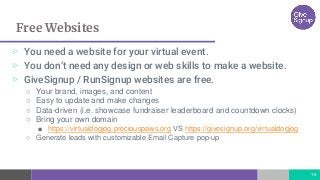
▷ You need a website for your virtual event.
▷ You don’t need any design or web skills to make a website.
▷ GiveSignup / RunSignup websites are free.

○ Your brand, images, and content
○ Easy to update and make changes
○ Data-driven (i.e. showcase fundraiser leaderboard and countdown clocks)
○ Bring your own domain
■ https://virtualdogjog.preciouspaws.org VS https://givesignup.org/virtualdogjog
○ Generate leads with customizable Email Capture pop-up
16
Theme Color
17
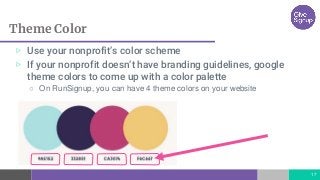
▷ Use your nonprofit’s color scheme
▷ If your nonprofit doesn’t have branding guidelines, google
theme colors to come up with a color palette
○ On RunSignup, you can have 4 theme colors on your website
Theme Color
18
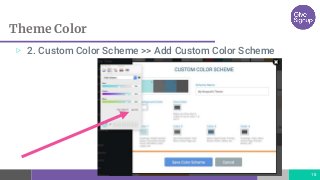
▷ 2. Custom Color Scheme >> Add Custom Color Scheme
Canva.com
19
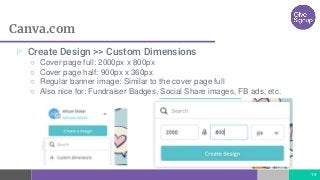
▷ Create Design >> Custom Dimensions
○ Cover page full: 2000px x 800px
○ Cover page half: 900px x 360px
○ Regular banner image: Similar to the cover page full
○ Also nice for: Fundraiser Badges, Social Share images, FB ads, etc.
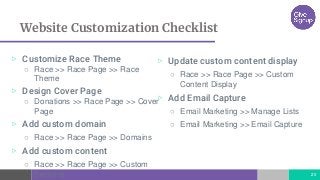
Website Customization Checklist
▷ Customize Race Theme
○ Race >> Race Page >> Race
Theme
▷ Design Cover Page
○ Donations >> Race Page >> Cover
Page
▷ Add custom domain
○ Race >> Race Page >> Domains
▷ Add custom content
○ Race >> Race Page >> Custom
Sections 20
▷ Update custom content display
○ Race >> Race Page >> Custom
Content Display
▷ Add Email Capture
○ Email Marketing >> Manage Lists
○ Email Marketing >> Email Capture
21
Demo
Swag
What’s the best plan for your nonprofit?
Swag Options
23
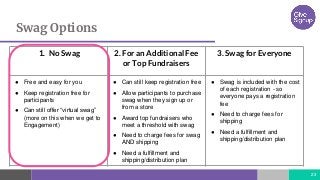
1. No Swag 2. For an Additional Fee
or Top Fundraisers
3. Swag for Everyone
● Free and easy for you
● Keep registration free for
participants
● Can still offer “virtual swag”
(more on this when we get to
Engagement)
● Can still keep registration free
● Allow participants to purchase
swag when they sign up or
from a store
● Award top fundraisers who
meet a threshold with swag
● Need to charge fees for swag
AND shipping
● Need a fulfillment and
shipping/distribution plan
● Swag is included with the cost
of each registration - so
everyone pays a registration
fee
● Need to charge fees for
shipping
● Need a fulfillment and
shipping/distribution plan
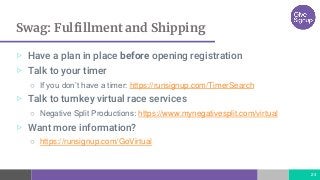
Swag: Fulfillment and Shipping
24
▷ Have a plan in place before opening registration
▷ Talk to your timer
○ If you don’t have a timer: https://runsignup.com/TimerSearch
▷ Talk to turnkey virtual race services
○ Negative Split Productions: https://www.mynegativesplit.com/virtual
▷ Want more information?
○ https://runsignup.com/GoVirtual
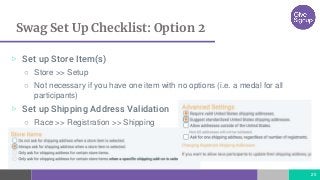
Swag Set Up Checklist: Option 2
25
▷ Set up Store Item(s)
○ Store >> Setup
○ Not necessary if you have one item with no options (i.e. a medal for all
participants)
▷ Set up Shipping Address Validation
○ Race >> Registration >> Shipping
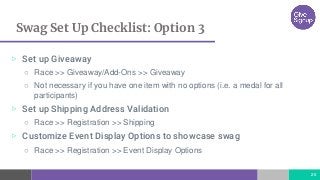
Swag Set Up Checklist: Option 3
26
▷ Set up Giveaway
○ Race >> Giveaway/Add-Ons >> Giveaway
○ Not necessary if you have one item with no options (i.e. a medal for all
participants)
▷ Set up Shipping Address Validation
○ Race >> Registration >> Shipping
▷ Customize Event Display Options to showcase swag
○ Race >> Registration >> Event Display Options
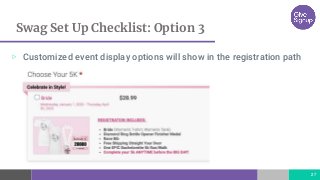
Swag Set Up Checklist: Option 3
27
▷ Customized event display options will show in the registration path
28
Demo
Results & Engagement
Results, Virtual bibs, Finisher Certificates
Facebook Fundraising, Drip Campaigns, Social Media
Result Options
30
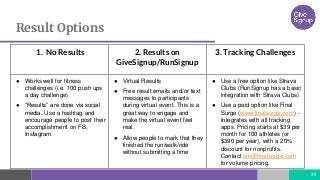
1. No Results 2. Results on
GiveSignup/RunSignup
3. Tracking Challenges
● Works well for fitness
challenges (i.e. 100 push ups
a day challenge)
● “Results” are done via social
media. Use a hashtag and
encourage people to post their
accomplishment on FB,
Instagram
● Virtual Results
● Free result emails and/or text
messages to participants
during virtual event. This is a
great way to engage and
make the virtual event feel
real.
● Allow people to mark that they
finished the run/walk/ride
without submitting a time
● Use a free option like Strava
Clubs (RunSignup has a basic
integration with Strava Clubs)
● Use a paid option like Final
Surge (www.finalsurge.com) -
Integrates with all tracking
apps. Pricing starts at $39 per
month for 100 athletes (or
$390 per year), with a 20%
discount for nonprofits.
Contact tim@finalsurge.com
for volume pricing.
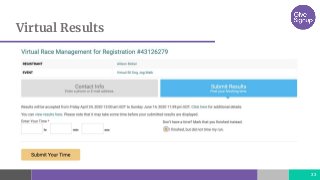
Virtual Results
31
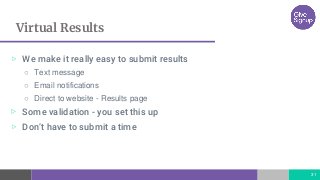
▷ We make it really easy to submit results
○ Text message
○ Email notifications
○ Direct to website - Results page
▷ Some validation - you set this up
▷ Don’t have to submit a time
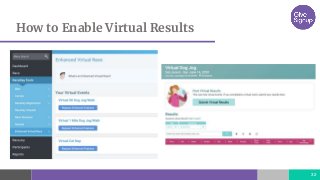
How to Enable Virtual Results
32
Virtual Results
33
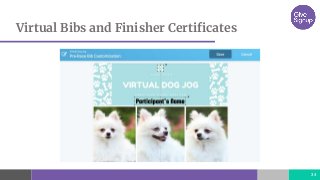
Virtual Bibs and Finisher Certificates
34
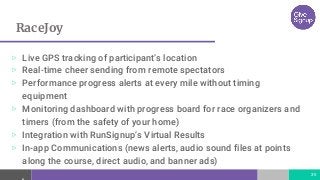
RaceJoy
35
▷ Live GPS tracking of participant’s location
▷ Real-time cheer sending from remote spectators
▷ Performance progress alerts at every mile without timing
equipment
▷ Monitoring dashboard with progress board for race organizers and
timers (from the safety of your home)
▷ Integration with RunSignup’s Virtual Results
▷ In-app Communications (news alerts, audio sound files at points
along the course, direct audio, and banner ads)
Free Email Marketing
36
▷ Send emails throughout the virtual challenge
○ Promote your hashtag
○ Provide motivational content
○ Include a soft ask for donations
○ Ask participants to recruit others to participate
Social Media
37
▷ Influencers
○ Keep the ask low, but ask them to promote
○ The Great Race Across Tennessee 1000k
▷ Customize social sharing content
▷ Private & Public Facebook Groups
○ Semper Fi Fund
Results & Engagement Checklist
▷ Enable Virtual Results
○ RaceDay Tools >> Enhanced
Virtual Race >> Set Up Virtual
Race
▷ Create Pre-Race Bib
○ RaceDay Tools >> Results >>
Customize Pre-Race Bib
▷ Create Finisher Certificate
○ RaceDay Tools >> Results >>
Finisher Certificate
38
▷ RaceJoy
○ Request from a RaceDay Certified
Timer
▷ Email Marketing
○ Email Marketing >> Send Email
▷ Customize Social Sharing
○ Promotion >> Social Sharing
39
Demo
Thanks!
Any questions?
If you want to learn more, visit
https://runsignup.com/GoVirtual
40

Virtual Events for Nonprofits

  • 1.
    Raise More andSave Money Virtual Events with Donations and Fundraising
  • 2.
    Agenda ▷ Why shouldmy nonprofit do a (free) virtual event? ▷ Create a Virtual Event on GiveSignup/RunSignup ○ Set up: Registration, Donations, and Fundraising ○ Website Customization ○ Swag ○ Results & Engagement ▷ Q & A 2
  • 3.
    Why do a(free) virtual event? ▷ Engage your community, and make it easy for everyone to get involved. ▷ Raise money: Make a soft ask for donations and incentivize fundraising. ▷ Save money: No or limited costs to put on the event, free website, free Facebook Fundraising, free email, free results, etc. ▷ Grow and cultivate your donor pipeline 3
  • 4.
    What types ofvirtual events are being done? ▷ Races, runs, walks, and rides ▷ Duathlons ▷ Scavenger hunts ▷ Fitness Challenges - push up challenge, flip challenge ▷ Distance Challenges (100 miles in a month or 1,000K in 4 months) ▷ Training Programs ▷ Multi-Week Track Season 4
  • 5.
    Flippin’ 5K Example 5 20192020 ● In-person 5k ● $25 registration fee ● 310 sign ups ● 250 results posted ● Registrations + Donations ● Virtual 5k ● Free event ● 6,498 sign ups ● 1,600+ results posted ● More money raised through donations only than total registrations + donations in 2019 “No medals, no t-shirts, no race packets - just pure joy in bringing our community together.”
  • 6.
    Flippin’ 5K Example 6 ▷Grew donor pipeline (432 donors) ▷ 6,000+ new email contacts ▷ More than 800 (public) instagram posts with #flippin5k ▷ Provided a healthy and fun activity to engage and challenge their beneficiaries (gymnasts)
  • 7.
    Approach ▷ Reset expectationsfor donation & fundraising levels. ▷ This is and will continue to be an extremely difficult time for nonprofits. ▷ There is a lot of uncertainty. Start virtual, execute well, then see if it’s possible to offer or transition to an in-person event. ▷ Keep your messaging focused on NOW. Tie your mission to COVID- 19. ▷ Keep things simple and easy. ▷ Engage participants and thank your donors and fundraiser. 7
  • 8.
    Create a VirtualEvent How to create and customize
  • 9.
    www.givesignup.org www.runsignup.com ▷ Click GetStarted Free >> Create Run/Walk/Ride or Create Race ▷ Use your RunSignup login or create an account 9
  • 10.
  • 11.
  • 12.
  • 13.
    Virtual Race Checklist ▷Customize Race Location ○ Race >> Race Page >> Race Location ▷ Customize Donations ○ Donations >> Setup ▷ Enable Fundraising ○ Fundraising >> Individual Fundraisers ○ Fundraising >> Team Fundraisers 13 ▷ Enable Facebook Fundraising ○ Fundraising >> Facebook Fundraisers ▷ Add a custom question to confirm virtual race understanding ○ Race >> Registration >> Questions ▷ Edit confirmation email ○ Race >> Notifications >> General Settings >> User Registered
  • 14.
  • 15.
    Design Your Website Builda website in minutes
  • 16.
    Free Websites ▷ Youneed a website for your virtual event. ▷ You don’t need any design or web skills to make a website. ▷ GiveSignup / RunSignup websites are free. ○ Your brand, images, and content ○ Easy to update and make changes ○ Data-driven (i.e. showcase fundraiser leaderboard and countdown clocks) ○ Bring your own domain ■ https://virtualdogjog.preciouspaws.org VS https://givesignup.org/virtualdogjog ○ Generate leads with customizable Email Capture pop-up 16
  • 17.
    Theme Color 17 ▷ Useyour nonprofit’s color scheme ▷ If your nonprofit doesn’t have branding guidelines, google theme colors to come up with a color palette ○ On RunSignup, you can have 4 theme colors on your website
  • 18.
    Theme Color 18 ▷ 2.Custom Color Scheme >> Add Custom Color Scheme
  • 19.
    Canva.com 19 ▷ Create Design>> Custom Dimensions ○ Cover page full: 2000px x 800px ○ Cover page half: 900px x 360px ○ Regular banner image: Similar to the cover page full ○ Also nice for: Fundraiser Badges, Social Share images, FB ads, etc.
  • 20.
    Website Customization Checklist ▷Customize Race Theme ○ Race >> Race Page >> Race Theme ▷ Design Cover Page ○ Donations >> Race Page >> Cover Page ▷ Add custom domain ○ Race >> Race Page >> Domains ▷ Add custom content ○ Race >> Race Page >> Custom Sections 20 ▷ Update custom content display ○ Race >> Race Page >> Custom Content Display ▷ Add Email Capture ○ Email Marketing >> Manage Lists ○ Email Marketing >> Email Capture
  • 21.
  • 22.
    Swag What’s the bestplan for your nonprofit?
  • 23.
    Swag Options 23 1. NoSwag 2. For an Additional Fee or Top Fundraisers 3. Swag for Everyone ● Free and easy for you ● Keep registration free for participants ● Can still offer “virtual swag” (more on this when we get to Engagement) ● Can still keep registration free ● Allow participants to purchase swag when they sign up or from a store ● Award top fundraisers who meet a threshold with swag ● Need to charge fees for swag AND shipping ● Need a fulfillment and shipping/distribution plan ● Swag is included with the cost of each registration - so everyone pays a registration fee ● Need to charge fees for shipping ● Need a fulfillment and shipping/distribution plan
  • 24.
    Swag: Fulfillment andShipping 24 ▷ Have a plan in place before opening registration ▷ Talk to your timer ○ If you don’t have a timer: https://runsignup.com/TimerSearch ▷ Talk to turnkey virtual race services ○ Negative Split Productions: https://www.mynegativesplit.com/virtual ▷ Want more information? ○ https://runsignup.com/GoVirtual
  • 25.
    Swag Set UpChecklist: Option 2 25 ▷ Set up Store Item(s) ○ Store >> Setup ○ Not necessary if you have one item with no options (i.e. a medal for all participants) ▷ Set up Shipping Address Validation ○ Race >> Registration >> Shipping
  • 26.
    Swag Set UpChecklist: Option 3 26 ▷ Set up Giveaway ○ Race >> Giveaway/Add-Ons >> Giveaway ○ Not necessary if you have one item with no options (i.e. a medal for all participants) ▷ Set up Shipping Address Validation ○ Race >> Registration >> Shipping ▷ Customize Event Display Options to showcase swag ○ Race >> Registration >> Event Display Options
  • 27.
    Swag Set UpChecklist: Option 3 27 ▷ Customized event display options will show in the registration path
  • 28.
  • 29.
    Results & Engagement Results,Virtual bibs, Finisher Certificates Facebook Fundraising, Drip Campaigns, Social Media
  • 30.
    Result Options 30 1. NoResults 2. Results on GiveSignup/RunSignup 3. Tracking Challenges ● Works well for fitness challenges (i.e. 100 push ups a day challenge) ● “Results” are done via social media. Use a hashtag and encourage people to post their accomplishment on FB, Instagram ● Virtual Results ● Free result emails and/or text messages to participants during virtual event. This is a great way to engage and make the virtual event feel real. ● Allow people to mark that they finished the run/walk/ride without submitting a time ● Use a free option like Strava Clubs (RunSignup has a basic integration with Strava Clubs) ● Use a paid option like Final Surge (www.finalsurge.com) - Integrates with all tracking apps. Pricing starts at $39 per month for 100 athletes (or $390 per year), with a 20% discount for nonprofits. Contact tim@finalsurge.com for volume pricing.
  • 31.
    Virtual Results 31 ▷ Wemake it really easy to submit results ○ Text message ○ Email notifications ○ Direct to website - Results page ▷ Some validation - you set this up ▷ Don’t have to submit a time
  • 32.
    How to EnableVirtual Results 32
  • 33.
  • 34.
    Virtual Bibs andFinisher Certificates 34
  • 35.
    RaceJoy 35 ▷ Live GPStracking of participant’s location ▷ Real-time cheer sending from remote spectators ▷ Performance progress alerts at every mile without timing equipment ▷ Monitoring dashboard with progress board for race organizers and timers (from the safety of your home) ▷ Integration with RunSignup’s Virtual Results ▷ In-app Communications (news alerts, audio sound files at points along the course, direct audio, and banner ads)
  • 36.
    Free Email Marketing 36 ▷Send emails throughout the virtual challenge ○ Promote your hashtag ○ Provide motivational content ○ Include a soft ask for donations ○ Ask participants to recruit others to participate
  • 37.
    Social Media 37 ▷ Influencers ○Keep the ask low, but ask them to promote ○ The Great Race Across Tennessee 1000k ▷ Customize social sharing content ▷ Private & Public Facebook Groups ○ Semper Fi Fund
  • 38.
    Results & EngagementChecklist ▷ Enable Virtual Results ○ RaceDay Tools >> Enhanced Virtual Race >> Set Up Virtual Race ▷ Create Pre-Race Bib ○ RaceDay Tools >> Results >> Customize Pre-Race Bib ▷ Create Finisher Certificate ○ RaceDay Tools >> Results >> Finisher Certificate 38 ▷ RaceJoy ○ Request from a RaceDay Certified Timer ▷ Email Marketing ○ Email Marketing >> Send Email ▷ Customize Social Sharing ○ Promotion >> Social Sharing
  • 39.
  • 40.
    Thanks! Any questions? If youwant to learn more, visit https://runsignup.com/GoVirtual 40

Editor's Notes

  • #6 Flippin 5k USA Gymnastics Team engagement
  • #8 Going virtual with we will go live if safe turns the event into a guarantee. At end of slide, hand over to Allison
  • #17 Pitch free websites, quick easy set-up, beautiful pages, add content continously
  • #18 Whitelabel solution with your branding to create unlimited and unique campaigns Ability to pass processing fee to donor (or give them the option to absorb it Custom donation receipt with your branding Custom thank you page to redirect traffic If offering recurring donations, the system automatically triggers notifications if the saved card fails and gives you a failed recurring donation report
  • #19 Whitelabel solution with your branding to create unlimited and unique campaigns Ability to pass processing fee to donor (or give them the option to absorb it Custom donation receipt with your branding Custom thank you page to redirect traffic If offering recurring donations, the system automatically triggers notifications if the saved card fails and gives you a failed recurring donation report
  • #20 Whitelabel solution with your branding to create unlimited and unique campaigns Ability to pass processing fee to donor (or give them the option to absorb it Custom donation receipt with your branding Custom thank you page to redirect traffic If offering recurring donations, the system automatically triggers notifications if the saved card fails and gives you a failed recurring donation report
  • #24 Mention supporting groups who may be able to make cloth masks as an additional swag option
  • #25 Reach out to local timers and event mgmt Have a plan for swag, fulfillment is tough Supporting local businesses Our go virtual page, has tremendous resources on fulfillment and shipping
  • #32 Explan 3 ways to submit results text/email/results page Follow up email with a direct link to results page for results submission
  • #34 Explan 3 ways to submit results text/email/results page Follow up email with a direct link to results page for results submission