QR CODES
                        IN THE CLASSROOM
                        Dr. Robert Mayben
                        Technology in Motion
                        The University of Alabama


The session will start at 3:30 PM.

Please have your Smartphone , iPad 2, or other tablet ready.
WHAT ARE QR CODES?

 Quick Response Code


 Invented in 1994


 Made popular in Japan


 Everywhere today!
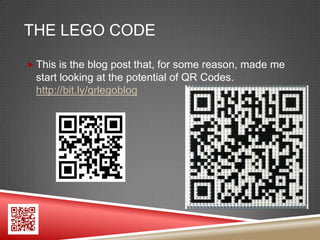
THE LEGO CODE

 This is the blog post that, for some reason, made me
  start looking at the potential of QR Codes.
  http://bit.ly/qrlegoblog
WHAT INFORMATION CAN BE SHARED
BY A QR CODE?
 Web Links
 Video Links
 Images
 Text
 Links to Profiles, iTunes, etc.
 E-Mail Addresses
 Maps & FourSquare
 Have you seen any others? Coupons? Sales?
WHAT APPS READ QR CODES?
 My favorite for the iPhone is i-Nigma.
  It is available for Android, Blackberry,
  and Windows phones as well.

 For my iPad, I use Scan because it is free
  and works well. Easy QR is a generator.

 Search the marketplace for your device
  and read the ratings.

 Desktop: http://www.dansl.net/blog/?p=256
  Requires Adobe Air & a Webcam
HOW ARE QR CODES CREATED?
 QR Code Generators
  I use QR Stuff: www.qrstuff.com

 QR Voice: http://qrvoice.net


 Web Tools, Browser Extensions/Plug-ins


 Customized QR Codes
  Nominal Fee or Create Your Own
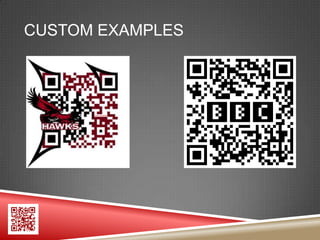
CUSTOM EXAMPLES
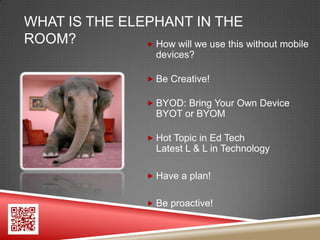
WHAT IS THE ELEPHANT IN THE
ROOM?           How will we use this without mobile
                        devices?

                       Be Creative!

                       BYOD: Bring Your Own Device
                        BYOT or BYOM

                       Hot Topic in Ed Tech
                        Latest L & L in Technology

                       Have a plan!


                       Be proactive!
HOW CAN QR CODES BE USED IN THE
EDUCATION WORLD?
 Scavenger Hunts – Links to Videos, Tasks, Questions
 Review Games
 Answer Key or way for students to check answers
 Quick Links to Teacher Web Sites
 Information about the school or events
 Video Tours of the School or Library
 T-Shirts
 Quick Links to Teacher E-Mail or Text
HOW CAN QR CODES BE USED IN THE
EDUCATION WORLD?
 Interactive Book Reviews or Trailers
 Interactive Posters or Handouts
 Homework Assignments
 Easy Access to Extra Content - Multimedia
 Clicker-Type Activities
 Links to Data, Graphs, Charts, Maps, etc.
 Hints, Clues, Tips, or Extra Help on Assignments
 Lists of Formulas or Glossary of Terms
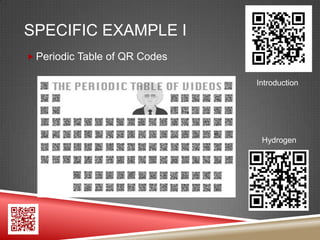
SPECIFIC EXAMPLE I
 Periodic Table of QR Codes

                               Introduction


                                Hydrogen
SPECIFIC EXAMPLE II
 Genetics QR Code Quest

 Activities such as Flip Camera Project, Video
  Questions, MC Questions, Read & Answer

 Incorporates Edmodo App


 Printed Codes: http://bit.ly/qractivitycards

 Instructions: http://bit.ly/qractivitypart2
WHAT IS THE QR TREASURE HUNT
GENERATOR?
 How to set up a QR Code Treasure Hunt
 http://bit.ly/qrhuntguide


 QR Treasure Hunt Generator
 http://www.classtools.net/QR/
SOME THOUGHTS ABOUT THE QR
TREASURE HUNT GENERATOR
 How would students submit answers?
   Edmodo, Moodle, Other CMS
   E-Mail from Notes App
   E-Mail
   Text Message
   Another App?
   Handwritten
   Your Ideas?
WHERE CAN I FIND MORE IDEAS FOR
CLASSROOM USES OF QR CODES?
 Scan the QR Code in the bottom left-hand corner of
 each slide or go to:
 http://uatim.wikispaces.com/QRWebinar

 Resources from EdTech Gurus


 My UATiM Shared Resources:
 http://www.delicious.com/uatim/qr
A FEW TIPS

 Laminating sometimes causes issues.


 Light colors do not work well.


 Large amounts of text can be more difficult to scan.


 Use a URL shortener such as bit.ly to make scanning
  of a code easier.
WERE YOU PAYING ATTENTION?

 QR Code Quiz


 I will display a few questions on the screen.


 Scan the code with your mobile device.


 Submit your answer via the chat window.
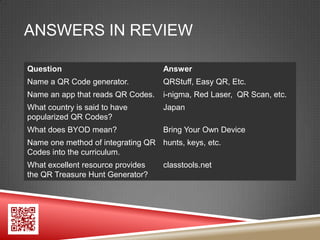
ANSWERS IN REVIEW

Question                           Answer
Name a QR Code generator.          QRStuff, Easy QR, Etc.
Name an app that reads QR Codes.   i-nigma, Red Laser, QR Scan, etc.
What country is said to have       Japan
popularized QR Codes?
What does BYOD mean?               Bring Your Own Device
Name one method of integrating QR hunts, keys, etc.
Codes into the curriculum.
What excellent resource provides   classtools.net
the QR Treasure Hunt Generator?
WHAT ARE YOUR IDEAS?

Feel free to share them in the chat
 window.
WHAT QUESTIONS DO YOU HAVE?

Please type your questions in the
 chat window.
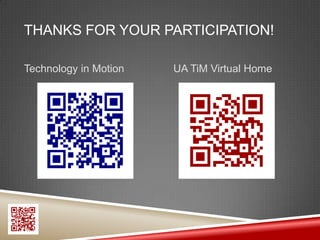
THANKS FOR YOUR PARTICIPATION!

Technology in Motion   UA TiM Virtual Home

QR Code Webinar

  • 1.
    QR CODES IN THE CLASSROOM Dr. Robert Mayben Technology in Motion The University of Alabama The session will start at 3:30 PM. Please have your Smartphone , iPad 2, or other tablet ready.
  • 2.
    WHAT ARE QRCODES?  Quick Response Code  Invented in 1994  Made popular in Japan  Everywhere today!
  • 3.
    THE LEGO CODE This is the blog post that, for some reason, made me start looking at the potential of QR Codes. http://bit.ly/qrlegoblog
  • 4.
    WHAT INFORMATION CANBE SHARED BY A QR CODE?  Web Links  Video Links  Images  Text  Links to Profiles, iTunes, etc.  E-Mail Addresses  Maps & FourSquare  Have you seen any others? Coupons? Sales?
  • 5.
    WHAT APPS READQR CODES?  My favorite for the iPhone is i-Nigma. It is available for Android, Blackberry, and Windows phones as well.  For my iPad, I use Scan because it is free and works well. Easy QR is a generator.  Search the marketplace for your device and read the ratings.  Desktop: http://www.dansl.net/blog/?p=256 Requires Adobe Air & a Webcam
  • 6.
    HOW ARE QRCODES CREATED?  QR Code Generators I use QR Stuff: www.qrstuff.com  QR Voice: http://qrvoice.net  Web Tools, Browser Extensions/Plug-ins  Customized QR Codes Nominal Fee or Create Your Own
  • 7.
  • 8.
    WHAT IS THEELEPHANT IN THE ROOM?  How will we use this without mobile devices?  Be Creative!  BYOD: Bring Your Own Device BYOT or BYOM  Hot Topic in Ed Tech Latest L & L in Technology  Have a plan!  Be proactive!
  • 9.
    HOW CAN QRCODES BE USED IN THE EDUCATION WORLD?  Scavenger Hunts – Links to Videos, Tasks, Questions  Review Games  Answer Key or way for students to check answers  Quick Links to Teacher Web Sites  Information about the school or events  Video Tours of the School or Library  T-Shirts  Quick Links to Teacher E-Mail or Text
  • 10.
    HOW CAN QRCODES BE USED IN THE EDUCATION WORLD?  Interactive Book Reviews or Trailers  Interactive Posters or Handouts  Homework Assignments  Easy Access to Extra Content - Multimedia  Clicker-Type Activities  Links to Data, Graphs, Charts, Maps, etc.  Hints, Clues, Tips, or Extra Help on Assignments  Lists of Formulas or Glossary of Terms
  • 11.
    SPECIFIC EXAMPLE I Periodic Table of QR Codes Introduction Hydrogen
  • 12.
    SPECIFIC EXAMPLE II Genetics QR Code Quest  Activities such as Flip Camera Project, Video Questions, MC Questions, Read & Answer  Incorporates Edmodo App  Printed Codes: http://bit.ly/qractivitycards  Instructions: http://bit.ly/qractivitypart2
  • 13.
    WHAT IS THEQR TREASURE HUNT GENERATOR?  How to set up a QR Code Treasure Hunt http://bit.ly/qrhuntguide  QR Treasure Hunt Generator http://www.classtools.net/QR/
  • 14.
    SOME THOUGHTS ABOUTTHE QR TREASURE HUNT GENERATOR  How would students submit answers?  Edmodo, Moodle, Other CMS  E-Mail from Notes App  E-Mail  Text Message  Another App?  Handwritten  Your Ideas?
  • 15.
    WHERE CAN IFIND MORE IDEAS FOR CLASSROOM USES OF QR CODES?  Scan the QR Code in the bottom left-hand corner of each slide or go to: http://uatim.wikispaces.com/QRWebinar  Resources from EdTech Gurus  My UATiM Shared Resources: http://www.delicious.com/uatim/qr
  • 16.
    A FEW TIPS Laminating sometimes causes issues.  Light colors do not work well.  Large amounts of text can be more difficult to scan.  Use a URL shortener such as bit.ly to make scanning of a code easier.
  • 17.
    WERE YOU PAYINGATTENTION?  QR Code Quiz  I will display a few questions on the screen.  Scan the code with your mobile device.  Submit your answer via the chat window.
  • 18.
    ANSWERS IN REVIEW Question Answer Name a QR Code generator. QRStuff, Easy QR, Etc. Name an app that reads QR Codes. i-nigma, Red Laser, QR Scan, etc. What country is said to have Japan popularized QR Codes? What does BYOD mean? Bring Your Own Device Name one method of integrating QR hunts, keys, etc. Codes into the curriculum. What excellent resource provides classtools.net the QR Treasure Hunt Generator?
  • 19.
    WHAT ARE YOURIDEAS? Feel free to share them in the chat window.
  • 20.
    WHAT QUESTIONS DOYOU HAVE? Please type your questions in the chat window.
  • 21.
    THANKS FOR YOURPARTICIPATION! Technology in Motion UA TiM Virtual Home