Today’s motivation andgoal.
Tip
Today’s sample code here.
https://github.
com/mitsuruog/_angular2-unit-
test-sample
- Not enough contents about unit testing :(
- Let’s look at actual tests !!
- Provide to quick reference in unit testing on
Angular 1 to 2 :)
3.
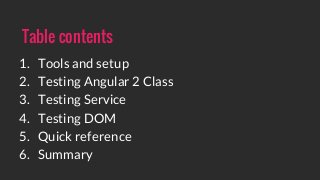
Table contents
1. Toolsand setup
2. Testing Angular 2 Class
3. Testing Service
4. Testing DOM
5. Quick reference
6. Summary
4.
Tools and setup.
-Typescript
- Karma
- Jasmine
Tip
If you want use mocha and power-assert.
Check it!!
https://github.com/laco0416/angular2-
testing-micro
5.
Target
SayHelloPipe
Usage
{{ 'world' |sayHello }} // => Hello world
Key factor
- Import
- Class
- Expect
Testing Angular 2 Class
Tip
Today’s sample code here.
https://github.
com/mitsuruog/_angular2-unit-
test-sample
6.
Testing Angular 2Class
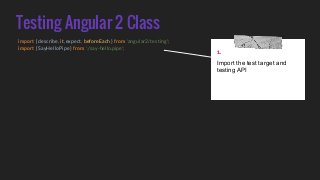
import { describe, it, expect, beforeEach } from 'angular2/testing';
import { SayHelloPipe } from './say-hello.pipe';
1.
Import the test target and
testing API
7.
Testing Angular 2Class
import { describe, it, expect, beforeEach } from 'angular2/testing';
import { SayHelloPipe } from './say-hello.pipe';
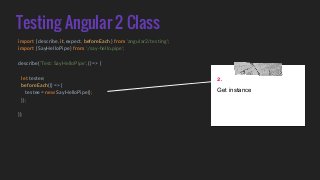
describe('Test: SayHelloPipe', () => {
let testee;
beforeEach(() => {
testee = new SayHelloPipe();
});
});
2.
Get instance
8.
Testing Angular 2Class
import { describe, it, expect, beforeEach } from 'angular2/testing';
import { SayHelloPipe } from './say-hello.pipe';
describe('Test: SayHelloPipe', () => {
let testee;
beforeEach(() => {
testee = new SayHelloPipe();
});
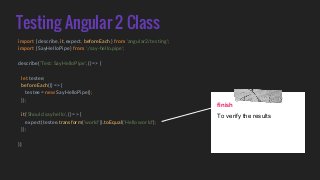
it('Should say hello', () => {
expect(testee.transform('world')).toEqual('Hello world');
});
});
finish
To verify the results
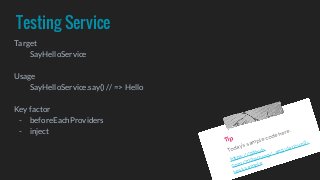
Testing Service
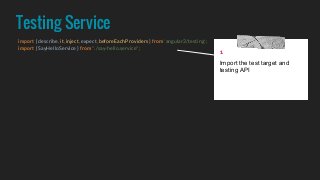
import {describe, it, inject, expect, beforeEachProviders } from 'angular2/testing';
import { SayHelloService } from "./say-hello.service";
1
Import the test target and
testing API
11.
Testing Service
import {describe, it, inject, expect, beforeEachProviders } from 'angular2/testing';
import { SayHelloService } from "./say-hello.service";
describe('Test: SayHelloService', () => {
beforeEachProviders(() => [ SayHelloService ]);
});
2
Define DI provider
12.
Testing Service
import {describe, it, inject, expect, beforeEachProviders } from 'angular2/testing';
import { SayHelloService } from "./say-hello.service";
describe('Test: SayHelloService', () => {
beforeEachProviders(() => [ SayHelloService ]);
it('Should service exist', inject([SayHelloService], (testee: SayHelloService) => {
}));
});
3
Inject to test target provider
into test context
13.
Testing Service
import {describe, it, inject, expect, beforeEachProviders } from 'angular2/testing';
import { SayHelloService } from "./say-hello.service";
describe('Test: SayHelloService', () => {
beforeEachProviders(() => [ SayHelloService ]);
it('Should service exist', inject([SayHelloService], (testee: SayHelloService) => {
expect(testee).toBeDefined();
}));
it('Should say Hello', inject([SayHelloService], (testee: SayHelloService) => {
expect(testee.say()).toEqual('Hello');
}));
});
finish
To verify the results
14.
Testing Service
import {describe, it, inject, expect, beforeEachProviders } from 'angular2/testing';
import { SayHelloService } from "./say-hello.service";
import { provide } from "angular2/core";
import { SayHelloServiceMock } from "./say-hello.service.mock";
describe('Test: SayHelloService', () => {
beforeEachProviders(() => [
provide(SayHelloService, { useClass: SayHelloServiceMock })
]);
});
bonus!!
Provider can be replaced
instantiate method
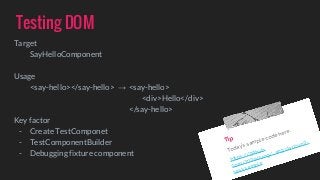
Testing DOM
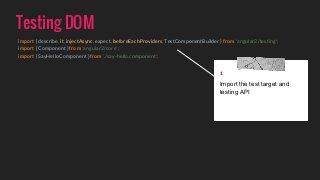
import {describe, it, injectAsync, expect, beforeEachProviders, TestComponentBuilder } from 'angular2/testing';
import { Component } from 'angular2/core';
import { SayHelloComponent } from './say-hello.component';
1
Import the test target and
testing API
17.
Testing DOM
import {describe, it, injectAsync, expect, beforeEachProviders, TestComponentBuilder } from 'angular2/testing';
import { Component } from 'angular2/core';
import { SayHelloComponent } from './say-hello.component';
@Component({ selector: 'test-container', template: '<say-hello></say-hello>', directives: [ SayHelloComponent ] })
class TestComponent { }
2
Create a fixture component
18.
Testing DOM
import {describe, it, injectAsync, expect, beforeEachProviders, TestComponentBuilder } from 'angular2/testing';
import { Component } from 'angular2/core';
import { SayHelloComponent } from './say-hello.component';
@Component({ selector: 'test-container', template: '<say-hello></say-hello>', directives: [ SayHelloComponent ] })
class TestComponent { }
describe('Test: SayHelloComponent', () => {
beforeEachProviders(() => [ TestComponentBuilder ]);
it('Should display Hello', injectAsync([TestComponentBuilder], (tcb: TestComponentBuilder) => {
}));
});
3
Define DI provider and
inject to provider into test
context
Testing DOM
import {describe, it, injectAsync, expect, beforeEachProviders, TestComponentBuilder } from 'angular2/testing';
import { Component } from 'angular2/core';
import { SayHelloComponent } from './say-hello.component';
@Component({ selector: 'test-container', template: '<say-hello></say-hello>', directives: [ SayHelloComponent ] })
class TestComponent { }
describe('Test: SayHelloComponent', () => {
beforeEachProviders(() => [ TestComponentBuilder ]);
it('Should display Hello', injectAsync([TestComponentBuilder], (tcb: TestComponentBuilder) => {
return tcb.createAsync(TestComponent)
.then((fixture) => {
let div = fixture.nativeElement.querySelector('div');
expect(div).toHaveText('Hello');
});
}));
});
finish
To verify the results
21.
Testing DOM
import {describe, it, injectAsync, expect, beforeEachProviders, TestComponentBuilder } from 'angular2/testing';
import { Component } from 'angular2/core';
import { SayHelloComponent } from './say-hello.component';
@Component({ selector: 'test-container', template: '<say-hello></say-hello>', directives: [ SayHelloComponent ] })
class TestComponent { }
describe('Test: SayHelloComponent', () => {
beforeEachProviders(() => [ TestComponentBuilder ]);
it('Should display Hello', injectAsync([TestComponentBuilder], (tcb: TestComponentBuilder) => {
let template = '<say-hello word=”world”></say-hello>';
return tcb.overrideTemplate(TestComponent, template)
.createAsync(TestComponent)
.then((fixture) => {
});
}));
});
bonus!!
Fixture can be replaced to
another template
22.
Where is QuickReference ?
Here
https://gist.github.com/mitsuruog/9e3e5c2c5d17a15a4c2a
23.
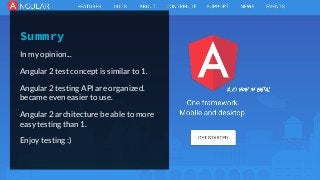
Summry
In my opinion...
Angular2 test concept is similar to 1.
Angular 2 testing API are organized.
became even easier to use.
Angular 2 architecture be able to more
easy testing than 1.
Enjoy testing :)
24.
Thanks !!
Who amI
Mitsuru Ogawa
front-end developer with a
passion for making the
maintainable web.
working for the improvement
of old Web experience.
mitsuruog mitsuruog
25.
Appendix
- AngularConnect -Testing (Public) - Google Slides
- https://goo.gl/szI8Q5
- Angular 2 — Unit Testing recipes — Google Developer Experts —
Medium
- https://goo.gl/MY9xyj
- Angular 2.0 Unit Testing
- http://www.syntaxsuccess.com/viewarticle/angular-2.0-
unit-testing
- Testing Angular 2 apps - Part 1: The beginning - LiveChat
Developers
- https://developers.livechatinc.com/blog/testing-angular-
2-apps-part-1-beginning
- Testing Angular 2 apps - Part 2: Dependency Injection and
Components - LiveChat Developers
- https://developers.livechatinc.com/blog/testing-angular-
2-apps-dependency-injection-and-components/
- Testing Angular 2 apps - Part 3: RouterOutlet and API - LiveChat
Developers
- https://developers.livechatinc.com/blog/testing-angular-
2-apps-routeroutlet-and-http/
Tip
If you want to read Japanese contents.
Check my blog :)
http://blog.mitsuruog.info/tags/unit-test/


![Testing Service
import { describe, it, inject, expect, beforeEachProviders } from 'angular2/testing';
import { SayHelloService } from "./say-hello.service";
describe('Test: SayHelloService', () => {
beforeEachProviders(() => [ SayHelloService ]);
});
2
Define DI provider](https://image.slidesharecdn.com/angular2unittestingoverview-160330110840/85/Angular-2-unit-testing-overview-11-320.jpg?cb=1459353385)
![Testing Service
import { describe, it, inject, expect, beforeEachProviders } from 'angular2/testing';
import { SayHelloService } from "./say-hello.service";
describe('Test: SayHelloService', () => {
beforeEachProviders(() => [ SayHelloService ]);
it('Should service exist', inject([SayHelloService], (testee: SayHelloService) => {
}));
});
3
Inject to test target provider
into test context](https://image.slidesharecdn.com/angular2unittestingoverview-160330110840/85/Angular-2-unit-testing-overview-12-320.jpg?cb=1459353385)
![Testing Service
import { describe, it, inject, expect, beforeEachProviders } from 'angular2/testing';
import { SayHelloService } from "./say-hello.service";
describe('Test: SayHelloService', () => {
beforeEachProviders(() => [ SayHelloService ]);
it('Should service exist', inject([SayHelloService], (testee: SayHelloService) => {
expect(testee).toBeDefined();
}));
it('Should say Hello', inject([SayHelloService], (testee: SayHelloService) => {
expect(testee.say()).toEqual('Hello');
}));
});
finish
To verify the results](https://image.slidesharecdn.com/angular2unittestingoverview-160330110840/85/Angular-2-unit-testing-overview-13-320.jpg?cb=1459353385)
![Testing Service
import { describe, it, inject, expect, beforeEachProviders } from 'angular2/testing';
import { SayHelloService } from "./say-hello.service";
import { provide } from "angular2/core";
import { SayHelloServiceMock } from "./say-hello.service.mock";
describe('Test: SayHelloService', () => {
beforeEachProviders(() => [
provide(SayHelloService, { useClass: SayHelloServiceMock })
]);
});
bonus!!
Provider can be replaced
instantiate method](https://image.slidesharecdn.com/angular2unittestingoverview-160330110840/85/Angular-2-unit-testing-overview-14-320.jpg?cb=1459353385)
![Testing DOM
import { describe, it, injectAsync, expect, beforeEachProviders, TestComponentBuilder } from 'angular2/testing';
import { Component } from 'angular2/core';
import { SayHelloComponent } from './say-hello.component';
@Component({ selector: 'test-container', template: '<say-hello></say-hello>', directives: [ SayHelloComponent ] })
class TestComponent { }
2
Create a fixture component](https://image.slidesharecdn.com/angular2unittestingoverview-160330110840/85/Angular-2-unit-testing-overview-17-320.jpg?cb=1459353385)
![Testing DOM
import { describe, it, injectAsync, expect, beforeEachProviders, TestComponentBuilder } from 'angular2/testing';
import { Component } from 'angular2/core';
import { SayHelloComponent } from './say-hello.component';
@Component({ selector: 'test-container', template: '<say-hello></say-hello>', directives: [ SayHelloComponent ] })
class TestComponent { }
describe('Test: SayHelloComponent', () => {
beforeEachProviders(() => [ TestComponentBuilder ]);
it('Should display Hello', injectAsync([TestComponentBuilder], (tcb: TestComponentBuilder) => {
}));
});
3
Define DI provider and
inject to provider into test
context](https://image.slidesharecdn.com/angular2unittestingoverview-160330110840/85/Angular-2-unit-testing-overview-18-320.jpg?cb=1459353385)
![Testing DOM
import { describe, it, injectAsync, expect, beforeEachProviders, TestComponentBuilder } from 'angular2/testing';
import { Component } from 'angular2/core';
import { SayHelloComponent } from './say-hello.component';
@Component({ selector: 'test-container', template: '<say-hello></say-hello>', directives: [ SayHelloComponent ] })
class TestComponent { }
describe('Test: SayHelloComponent', () => {
beforeEachProviders(() => [ TestComponentBuilder ]);
it('Should display Hello', injectAsync([TestComponentBuilder], (tcb: TestComponentBuilder) => {
return tcb.createAsync(TestComponent)
.then((fixture) => {
});
}));
});
4
Build fixture component](https://image.slidesharecdn.com/angular2unittestingoverview-160330110840/85/Angular-2-unit-testing-overview-19-320.jpg?cb=1459353385)
![Testing DOM
import { describe, it, injectAsync, expect, beforeEachProviders, TestComponentBuilder } from 'angular2/testing';
import { Component } from 'angular2/core';
import { SayHelloComponent } from './say-hello.component';
@Component({ selector: 'test-container', template: '<say-hello></say-hello>', directives: [ SayHelloComponent ] })
class TestComponent { }
describe('Test: SayHelloComponent', () => {
beforeEachProviders(() => [ TestComponentBuilder ]);
it('Should display Hello', injectAsync([TestComponentBuilder], (tcb: TestComponentBuilder) => {
return tcb.createAsync(TestComponent)
.then((fixture) => {
let div = fixture.nativeElement.querySelector('div');
expect(div).toHaveText('Hello');
});
}));
});
finish
To verify the results](https://image.slidesharecdn.com/angular2unittestingoverview-160330110840/85/Angular-2-unit-testing-overview-20-320.jpg?cb=1459353385)
![Testing DOM
import { describe, it, injectAsync, expect, beforeEachProviders, TestComponentBuilder } from 'angular2/testing';
import { Component } from 'angular2/core';
import { SayHelloComponent } from './say-hello.component';
@Component({ selector: 'test-container', template: '<say-hello></say-hello>', directives: [ SayHelloComponent ] })
class TestComponent { }
describe('Test: SayHelloComponent', () => {
beforeEachProviders(() => [ TestComponentBuilder ]);
it('Should display Hello', injectAsync([TestComponentBuilder], (tcb: TestComponentBuilder) => {
let template = '<say-hello word=”world”></say-hello>';
return tcb.overrideTemplate(TestComponent, template)
.createAsync(TestComponent)
.then((fixture) => {
});
}));
});
bonus!!
Fixture can be replaced to
another template](https://image.slidesharecdn.com/angular2unittestingoverview-160330110840/85/Angular-2-unit-testing-overview-21-320.jpg?cb=1459353385)