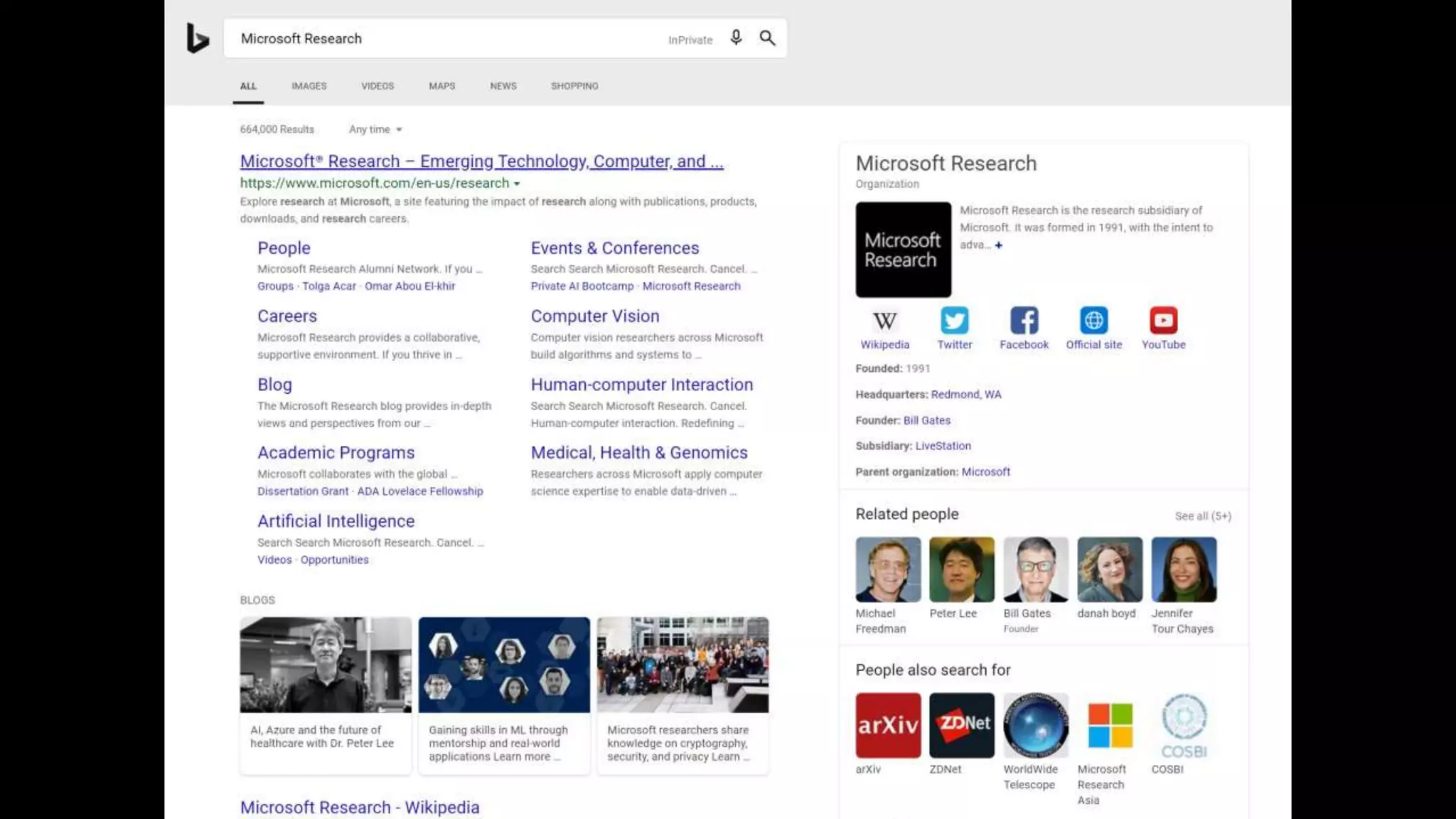
aka.ms/IRa11y
@merrierm
Accessible Information Seeking
Meredith Ringel Morris
Microsoft Research
• Worldwide, more than 1 billion people experience some form of
disability [World Health Organization, 2018]
• 19% of the U.S. population is disabled [U.S. Census Bureau, 2012]
Long-termShort-term
Situational
Impairment Temporary
Disability
Acquired
Disability
Congenital
Disability
Example: Curb Cuts
Mixed Methods Approach
• Interview study (n=10 w/d)
• Online survey (n=81 w/d & n=80 wo/d)
• Online experiment (n= 174 w/d & n=172 wo/d)
• Lab-based eye-tracking study (n=14 w/d & n=13 wo/d)
Interview & Survey Studies
• Phone interviews w/ 10 dyslexic adults in U.S.
• Recent critical incident approach
• Qualitative analysis to extract themes
• Identified challenges in all stages of the search process
• Query Formulation
• Search Result Triage
• Information Extraction
• Verified themes’ generalizability and specificity in an online
questionnaire to 80 dyslexic & 81 non-dyslexic adults in the U.S.
• More details in our CHI2018 paper: aka.ms/dyslexiaandsearch
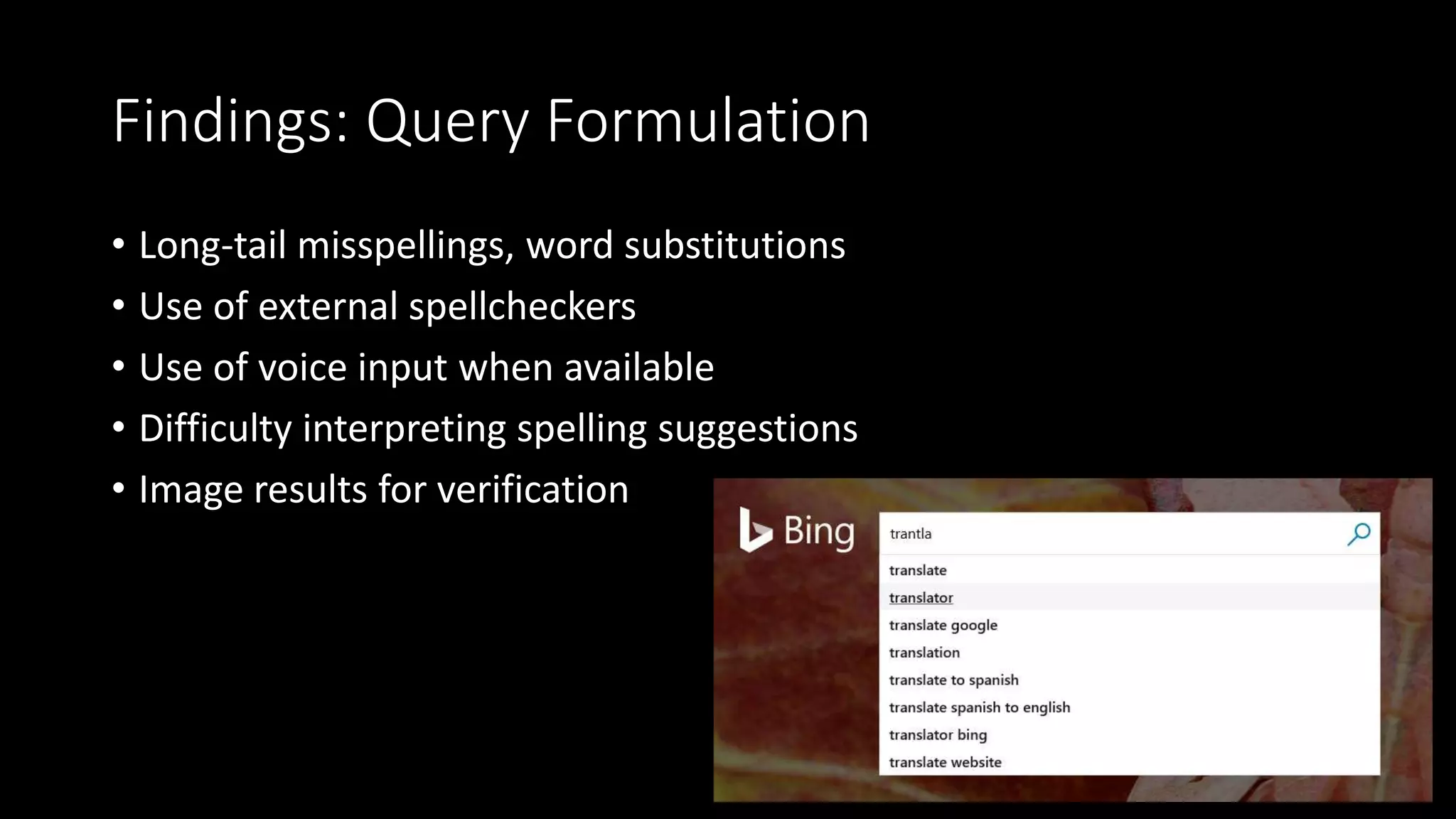
Findings: Query Formulation
• Long-tail misspellings, word substitutions
• Use of external spellcheckers
• Use of voice input when available
• Difficulty interpreting spelling suggestions
• Image results for verification
Findings: Search Result Triage
• Multimedia
• Reading level
• Clutter
• Density
• SERP Layout
• Refinding
Findings: Information Extraction
• Voice output
• Print & highlight
• Font size & style
• Color & contrast
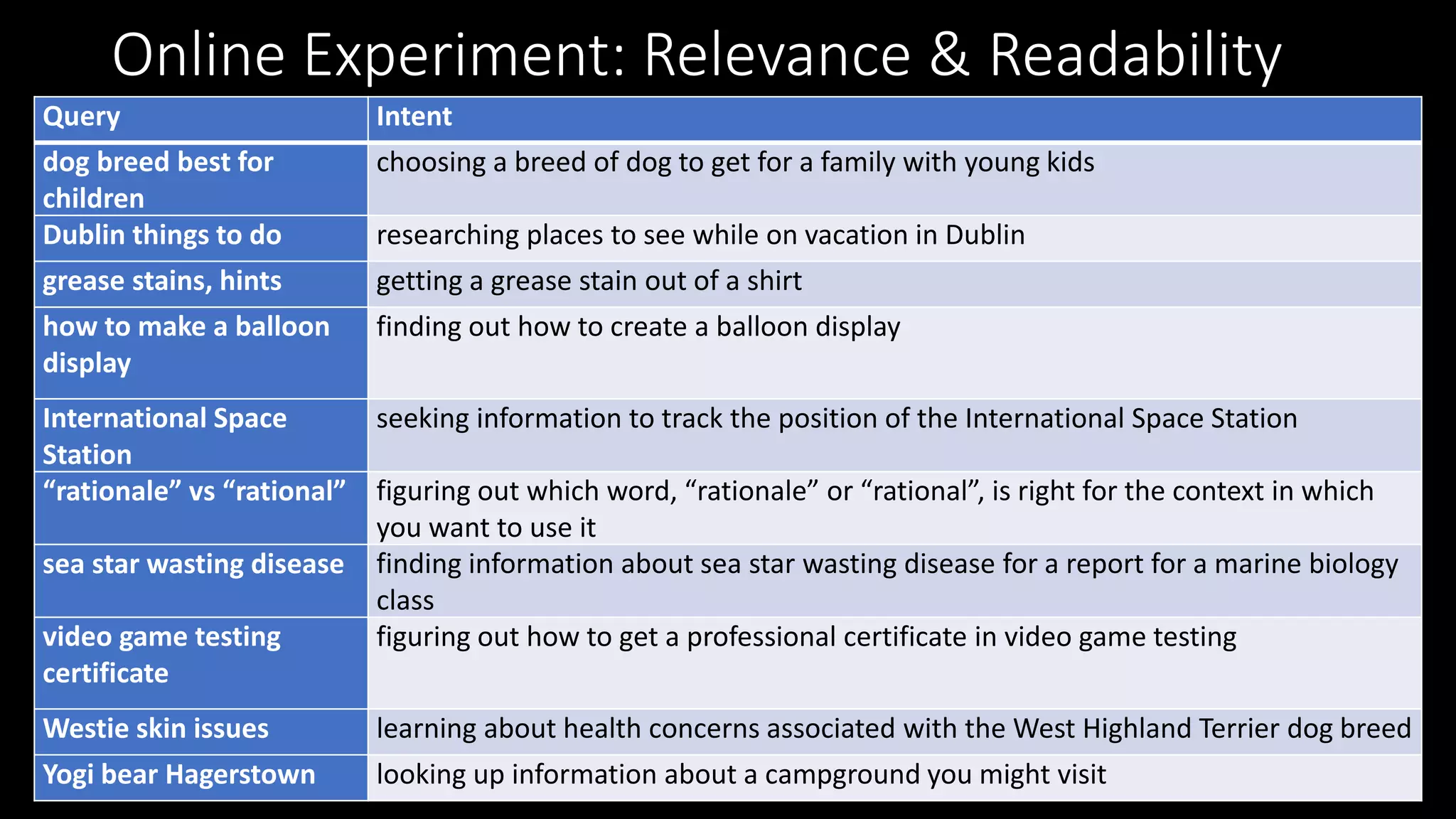
Online Experiment: Relevance & Readability
Query Intent
dog breed best for
children
choosing a breed of dog to get for a family with young kids
Dublin things to do researching places to see while on vacation in Dublin
grease stains, hints getting a grease stain out of a shirt
how to make a balloon
display
finding out how to create a balloon display
International Space
Station
seeking information to track the position of the International Space Station
“rationale” vs “rational” figuring out which word, “rationale” or “rational”, is right for the context in which
you want to use it
sea star wasting disease finding information about sea star wasting disease for a report for a marine biology
class
video game testing
certificate
figuring out how to get a professional certificate in video game testing
Westie skin issues learning about health concerns associated with the West Highland Terrier dog breed
Yogi bear Hagerstown looking up information about a campground you might visit
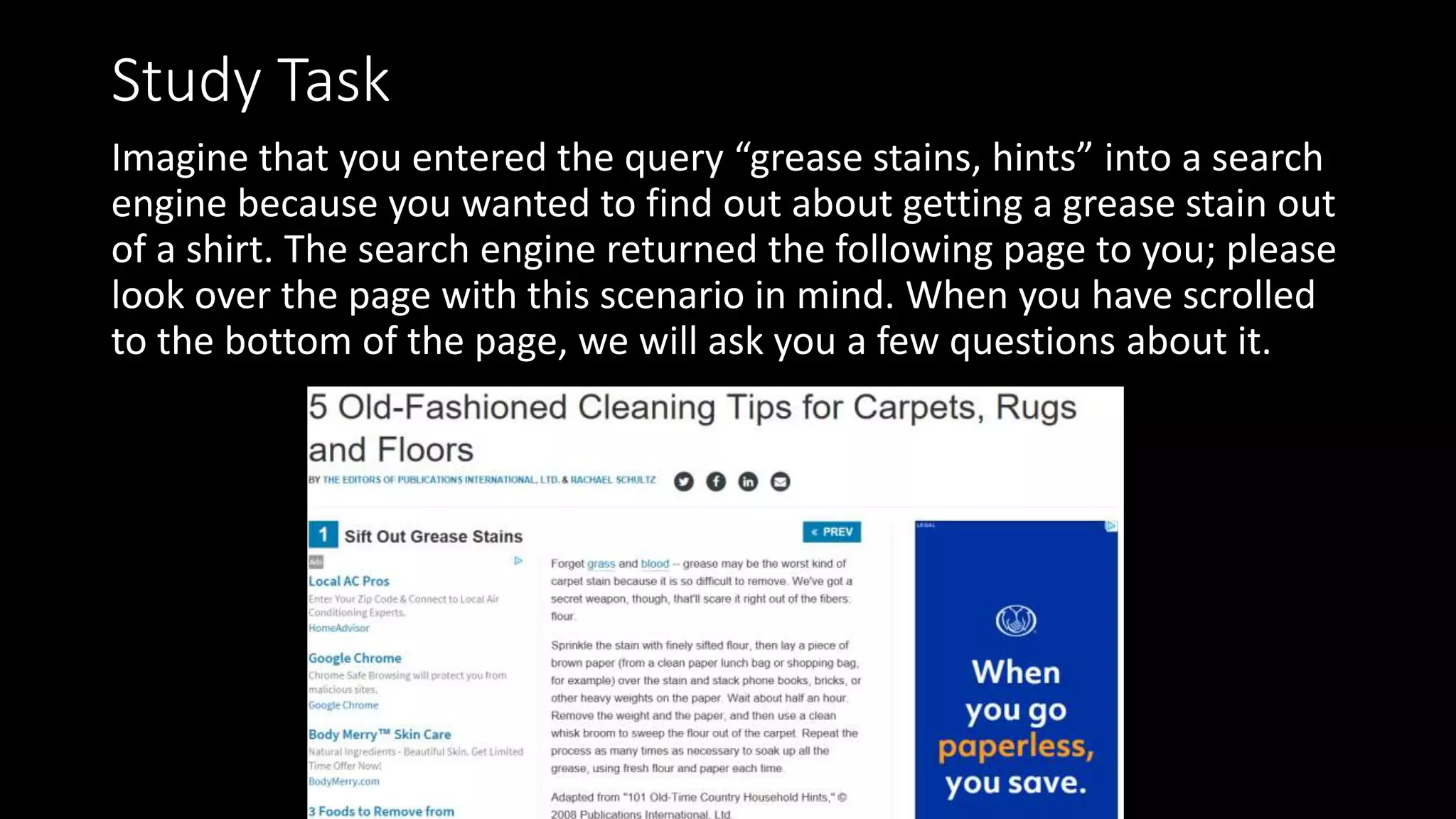
Study Task
Imagine that you entered the query “grease stains, hints” into a search
engine because you wanted to find out about getting a grease stain out
of a shirt. The search engine returned the following page to you; please
look over the page with this scenario in mind. When you have scrolled
to the bottom of the page, we will ask you a few questions about it.
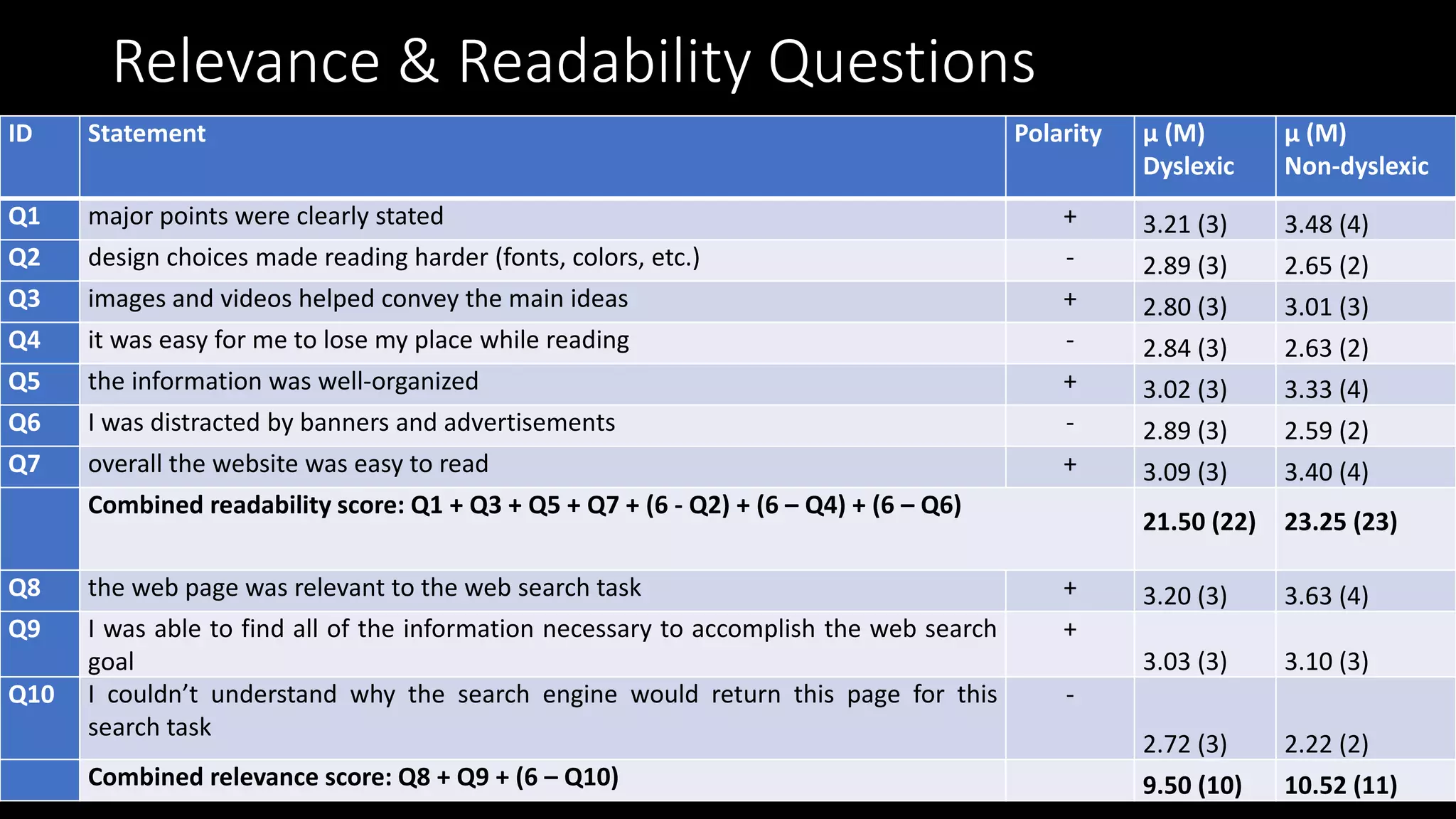
Relevance & Readability Questions
ID Statement Polarity μ (M)
Dyslexic
μ (M)
Non-dyslexic
Q1 major points were clearly stated + 3.21 (3) 3.48 (4)
Q2 design choices made reading harder (fonts, colors, etc.) - 2.89 (3) 2.65 (2)
Q3 images and videos helped convey the main ideas + 2.80 (3) 3.01 (3)
Q4 it was easy for me to lose my place while reading - 2.84 (3) 2.63 (2)
Q5 the information was well-organized + 3.02 (3) 3.33 (4)
Q6 I was distracted by banners and advertisements - 2.89 (3) 2.59 (2)
Q7 overall the website was easy to read + 3.09 (3) 3.40 (4)
Combined readability score: Q1 + Q3 + Q5 + Q7 + (6 - Q2) + (6 – Q4) + (6 – Q6)
21.50 (22) 23.25 (23)
Q8 the web page was relevant to the web search task + 3.20 (3) 3.63 (4)
Q9 I was able to find all of the information necessary to accomplish the web search
goal
+
3.03 (3) 3.10 (3)
Q10 I couldn’t understand why the search engine would return this page for this
search task
-
2.72 (3) 2.22 (2)
Combined relevance score: Q8 + Q9 + (6 – Q10) 9.50 (10) 10.52 (11)
SIGIR 2018:
aka.ms/dyslexiasearchfeatures
Eye Tracking Study
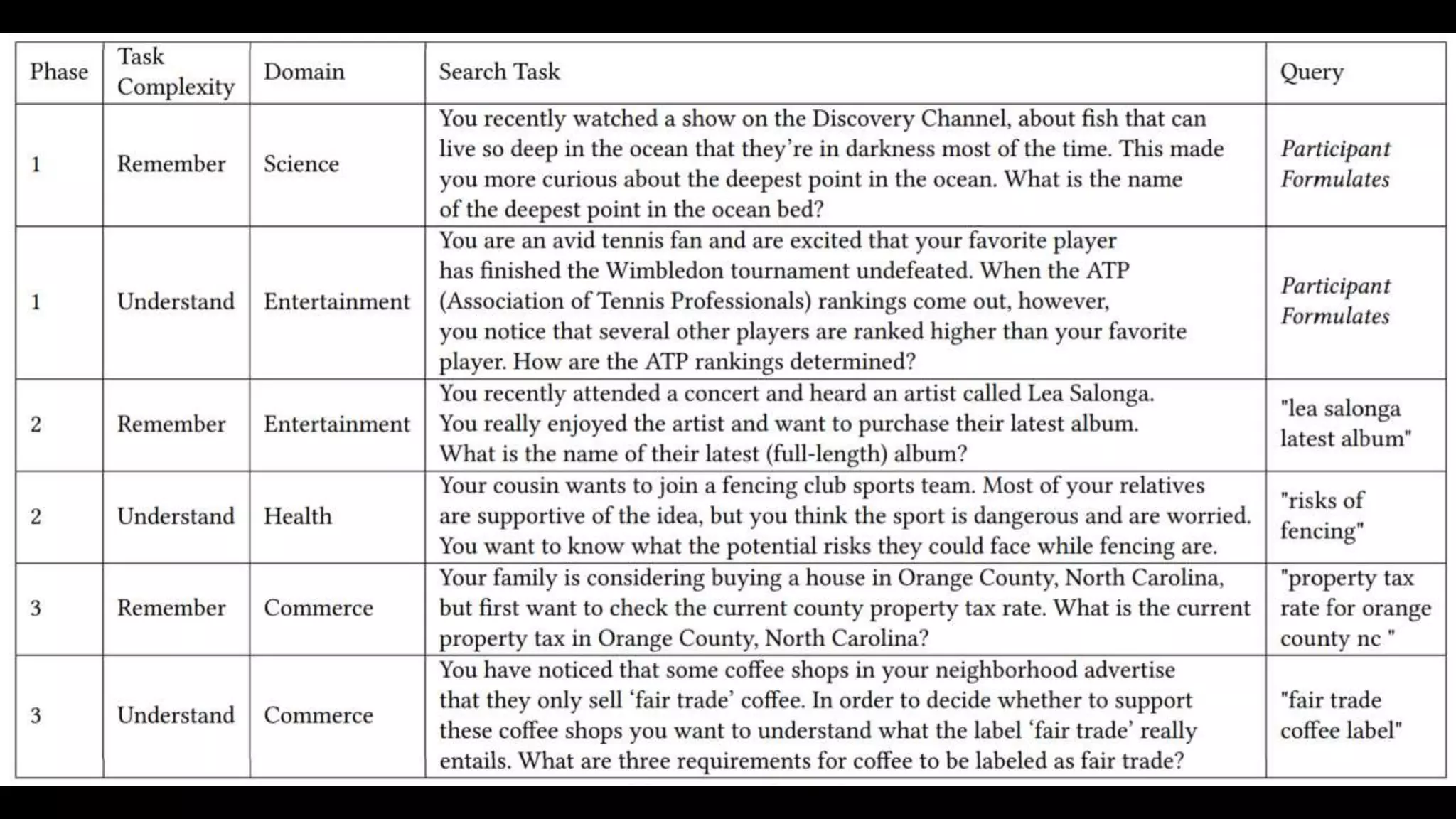
• 27 participants (half w/ dyslexia)
• 6 search tasks each
• 2 each focusing on query formulation, search results triage, & info extraction
• Held seating position, display size/resolution constant
• Tobii 4c eye tracker & Tobii Pro SDK to record gaze
• Custom Chrome browser extension to map fixation points to HTML
elements and record queries and page navigation events
• SIGIR 2020: aka.ms/dyslexiaSIGIR
Eye Tracking Patterns
Design Suggestions: Query Forumulation
• Spelling suggestions trained on dyslexia-specific errors (e.g., Rello et
al., 2013)
• Ability to toggle between auto-correction vs. n-best list
• Multi-modal spelling suggestions (icon, play-aloud)
• Multi-modal “instant answers”
• Make voice input simple across hardware and software platforms
Design Suggestions: Search Result Triage
• Re-rank results incorporating factors like reading level (e.g., Collins-
Thompson et al.) and simplified page layouts
• Consider bringing back the page preview thumbnail!
• Support re-finding
• Reduce SERP density (tension with ad revenue)
Design Suggestions: Information Extraction
• Make it easier to enable reader view in the browser – improves
reading speed by 5% for people w/ and w/o dyslexia
(CHI 2019: aka.ms/readerview)
• Automatically enlarge text to fill available space (Bigham et al. UIST
2014)
• Support in-browser highlighting, read-aloud (Edge Read Aloud mode)
• Create more powerful non-visual search and browsing interfaces (e.g.,
ASSETS 2019: aka.ms/versepaper & aka.ms/versevideo)
Future Directions
aka.ms/IRa11y
@merrierm
Questions?
Adam Fourney Kevin Larson Shane Williams Ryen White Leah Findlater Katharina Reinecke
Qisheng LiAlexandra VtyurinaAbdullah AliLaura VonessenSrishti Palani Meredith Ringel Morris

Accessible Information Seeking

  • 1.
  • 2.
    • Worldwide, morethan 1 billion people experience some form of disability [World Health Organization, 2018] • 19% of the U.S. population is disabled [U.S. Census Bureau, 2012]
  • 3.
  • 6.
    Mixed Methods Approach •Interview study (n=10 w/d) • Online survey (n=81 w/d & n=80 wo/d) • Online experiment (n= 174 w/d & n=172 wo/d) • Lab-based eye-tracking study (n=14 w/d & n=13 wo/d)
  • 7.
    Interview & SurveyStudies • Phone interviews w/ 10 dyslexic adults in U.S. • Recent critical incident approach • Qualitative analysis to extract themes • Identified challenges in all stages of the search process • Query Formulation • Search Result Triage • Information Extraction • Verified themes’ generalizability and specificity in an online questionnaire to 80 dyslexic & 81 non-dyslexic adults in the U.S. • More details in our CHI2018 paper: aka.ms/dyslexiaandsearch
  • 8.
    Findings: Query Formulation •Long-tail misspellings, word substitutions • Use of external spellcheckers • Use of voice input when available • Difficulty interpreting spelling suggestions • Image results for verification
  • 9.
    Findings: Search ResultTriage • Multimedia • Reading level • Clutter • Density • SERP Layout • Refinding
  • 10.
    Findings: Information Extraction •Voice output • Print & highlight • Font size & style • Color & contrast
  • 11.
    Online Experiment: Relevance& Readability Query Intent dog breed best for children choosing a breed of dog to get for a family with young kids Dublin things to do researching places to see while on vacation in Dublin grease stains, hints getting a grease stain out of a shirt how to make a balloon display finding out how to create a balloon display International Space Station seeking information to track the position of the International Space Station “rationale” vs “rational” figuring out which word, “rationale” or “rational”, is right for the context in which you want to use it sea star wasting disease finding information about sea star wasting disease for a report for a marine biology class video game testing certificate figuring out how to get a professional certificate in video game testing Westie skin issues learning about health concerns associated with the West Highland Terrier dog breed Yogi bear Hagerstown looking up information about a campground you might visit
  • 12.
    Study Task Imagine thatyou entered the query “grease stains, hints” into a search engine because you wanted to find out about getting a grease stain out of a shirt. The search engine returned the following page to you; please look over the page with this scenario in mind. When you have scrolled to the bottom of the page, we will ask you a few questions about it.
  • 13.
    Relevance & ReadabilityQuestions ID Statement Polarity μ (M) Dyslexic μ (M) Non-dyslexic Q1 major points were clearly stated + 3.21 (3) 3.48 (4) Q2 design choices made reading harder (fonts, colors, etc.) - 2.89 (3) 2.65 (2) Q3 images and videos helped convey the main ideas + 2.80 (3) 3.01 (3) Q4 it was easy for me to lose my place while reading - 2.84 (3) 2.63 (2) Q5 the information was well-organized + 3.02 (3) 3.33 (4) Q6 I was distracted by banners and advertisements - 2.89 (3) 2.59 (2) Q7 overall the website was easy to read + 3.09 (3) 3.40 (4) Combined readability score: Q1 + Q3 + Q5 + Q7 + (6 - Q2) + (6 – Q4) + (6 – Q6) 21.50 (22) 23.25 (23) Q8 the web page was relevant to the web search task + 3.20 (3) 3.63 (4) Q9 I was able to find all of the information necessary to accomplish the web search goal + 3.03 (3) 3.10 (3) Q10 I couldn’t understand why the search engine would return this page for this search task - 2.72 (3) 2.22 (2) Combined relevance score: Q8 + Q9 + (6 – Q10) 9.50 (10) 10.52 (11)
  • 14.
  • 15.
    Eye Tracking Study •27 participants (half w/ dyslexia) • 6 search tasks each • 2 each focusing on query formulation, search results triage, & info extraction • Held seating position, display size/resolution constant • Tobii 4c eye tracker & Tobii Pro SDK to record gaze • Custom Chrome browser extension to map fixation points to HTML elements and record queries and page navigation events • SIGIR 2020: aka.ms/dyslexiaSIGIR
  • 17.
  • 18.
    Design Suggestions: QueryForumulation • Spelling suggestions trained on dyslexia-specific errors (e.g., Rello et al., 2013) • Ability to toggle between auto-correction vs. n-best list • Multi-modal spelling suggestions (icon, play-aloud) • Multi-modal “instant answers” • Make voice input simple across hardware and software platforms
  • 19.
    Design Suggestions: SearchResult Triage • Re-rank results incorporating factors like reading level (e.g., Collins- Thompson et al.) and simplified page layouts • Consider bringing back the page preview thumbnail! • Support re-finding • Reduce SERP density (tension with ad revenue)
  • 20.
    Design Suggestions: InformationExtraction • Make it easier to enable reader view in the browser – improves reading speed by 5% for people w/ and w/o dyslexia (CHI 2019: aka.ms/readerview) • Automatically enlarge text to fill available space (Bigham et al. UIST 2014) • Support in-browser highlighting, read-aloud (Edge Read Aloud mode) • Create more powerful non-visual search and browsing interfaces (e.g., ASSETS 2019: aka.ms/versepaper & aka.ms/versevideo)
  • 21.
  • 22.
    aka.ms/IRa11y @merrierm Questions? Adam Fourney KevinLarson Shane Williams Ryen White Leah Findlater Katharina Reinecke Qisheng LiAlexandra VtyurinaAbdullah AliLaura VonessenSrishti Palani Meredith Ringel Morris

Editor's Notes

  • #3 Opportunity to achieve significant social, technical, and commercial impact
  • #4 Another example in the digital realm – automated captions added to videos. Helpful for situational impairment = noisy room.
  • #5 Web search is an important modern literacy skill, necessary for fully participating in many aspects of society including education, employment, commerce, and entertainment. However, web search is particularly challenging for people with print disabilities, such as visual or cognitive impairments. Our project on accessible information retrieval considers how front-end interfaces and back-end algorithms for IR systems can evolve to support successful information seeking by a wider audience. Thinking back to the prior slide on situational impairments, it becomes clear that search that is more accessible to people with cognitive or sensory disabilities can also benefit a wider audience – when you search on a small-screen device versus a large, multi-screen workstation, this creates cognitive limitations; when you search using an intelligent voice agent like Cortana, Siri, or Alexa, you are temporarily eyes-free. More inclusive search is vital for people with disabilities, but is something that can ultimately benefit everyone.
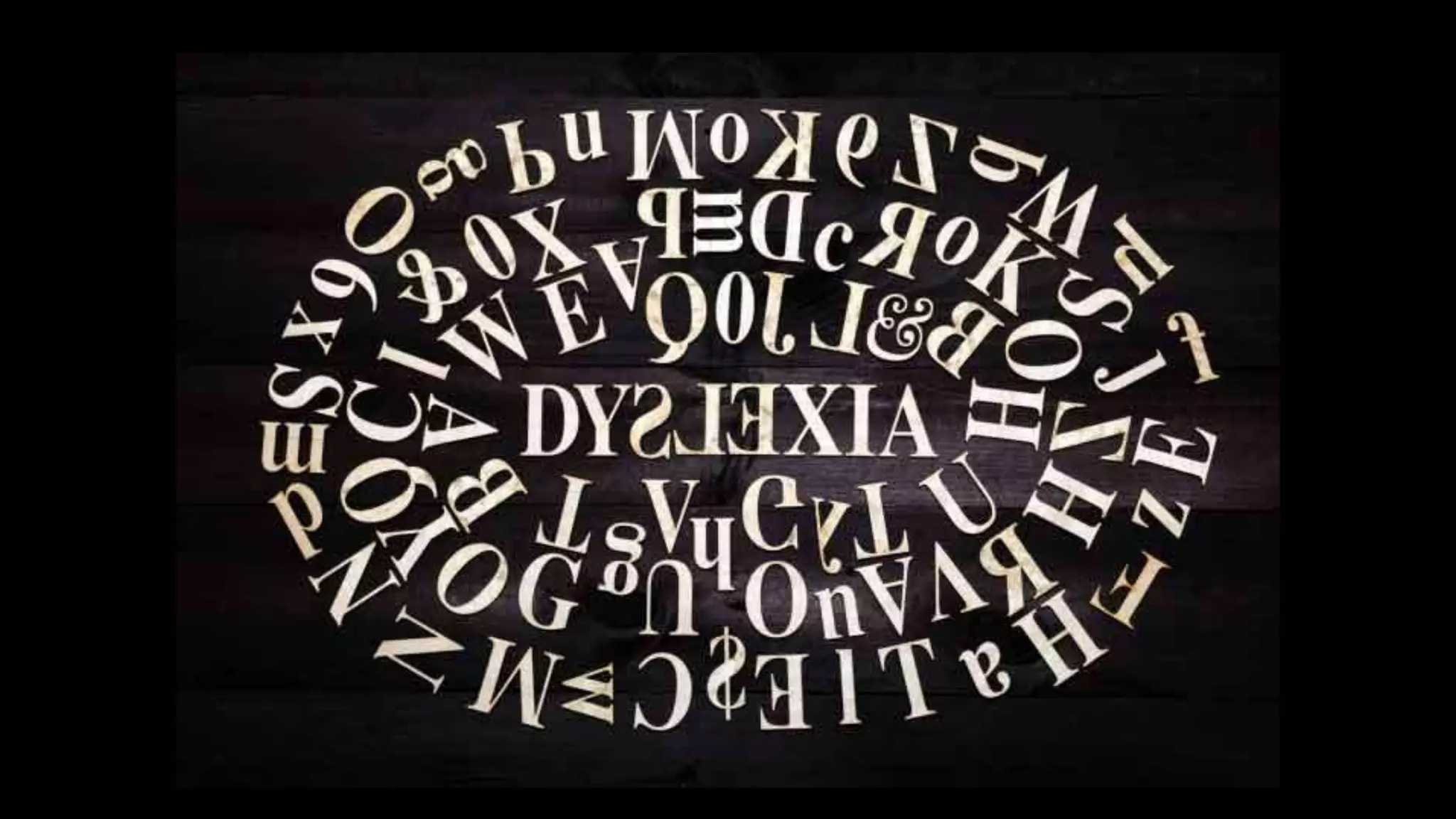
  • #6 Today, given the time limitations, I’m going to focus on discussing one particular disability – dyslexia. Dyslexia is a language disability that is estimated to impact 15 – 20% of English speakers. People with dyslexia may experience a range of challenges relating to reading and spelling, such as slow reading rate, low reading comprehension, difficulty reading long passages, difficulty organizing language, difficulty remembering written or numerical information, and spelling challenges. Because dyslexia is a spectrum disorder, not all people with dyslexia experience the same subset of challenges, and the severity of these challenges may vary, as well. Given the high incidence of dyslexia, and the pervasiveness and importance of web search as a method of finding information in modern life, it is important to consider whether the process of using a search engine to find information on the web is sufficiently accessible to people with dyslexia, and how this accessibility may be improved.
  • #7 My colleague Adam Fourney and I, together with several other collaborators, have been leading an investigation of this topic for the past few years. We’ve employed a variety of methods to increase our understanding of the challenges English-speaking adults with dyslexia experience during search. During today’s talk, I’ll review key insights from each of these studies, and then discuss design ideas for improving the accessibility of search interfaces based on these findings. I’ll close by discussing opportunities for future work in search accessibility.
  • #8 30 minute phone interviews w/ 10 dyslexic adults in the U.S. Used a recent critical incident technique asking for description of most recent web search, and challenges encountered. Also asked about general challenges with web search, mitigating strategies, and special technologies used. Qualitative analysis via open coding and affinity diagramming resulted in these themes. See the paper for details on the survey, which was used to validate that these themes resonated with the experiences of a larger audience and that they were specific to users with dyslexia. From both of these methods, we found that searchers with dyslexia encountered challenges at all stages of the web search process, including during query formulation, search result triage, and information extraction. Searchers without dyslexia found many of these same aspects challenging, but to a lesser degree than those with dyslexia, indicating that interface designs to benefit people with print disabilities might benefit the majority of searchers, much as curb cuts are utilized by a broad swatch of the population beyond wheelchair users.
  • #9 Difficulties with spelling and reading made query formulation particularly challenging for our participants. Many reported that their misspellings of query terms were so far off from the correct spelling that search engines’ spelling correction functionality did not help them (e.g., it would spell-correct to a word other than the target query). Trantla for tarantula; Garbage exposer vs garbage disposal; Dropped syllables Because of reading difficulties, participants reported that it was challenging for them to verify whether automatic spelling correction had helped or hindered their query. Half reported using image search results to help with query formulation or verification. Viewing the image search results was a way to verify that the query they issued (or the autocorrection suggested by the search engine) matched the concept they had in mind. Voice input was highly valued by searchers with dyslexia as a means to circumvent spelling challenges (though verifying that a voice search had been interpreted correctly still entailed reading challenges). However, on PCs and laptops, participants expressed displeasure that voice input search was not always available (or not available by default, so therefore undiscovered by participants).
  • #10 The layout of the SERP itself was often confusing to users with dyslexia, as modern SERPs are often cluttered with links, advertisements, inline answers, right rail content, etc., and the density, spacing, colors, and font families used in the SERP are not typically adjustable by the end-user. Reading challenges made navigating the SERP challenging, and some participants reported using software (e.g., Dragon) to read results pages aloud to them; others wished for more multimodal options in the SERP, such as the ability to highlight words and hear them read aloud, or hover over words and see an image representation of that term. Half of participants noted difficulties in recognizing domain names or URLs, and several suggested that iconic or screen-shot representations of pages on the SERP would help them identify familiar pages and/or identify key features (e.g., presence of multimedia, pages with appropriate reading level, uncluttered pages w/o distracting ads, non-dense pages with bullets and short line lengths) when choosing among unfamiliar pages.
  • #11 Upon selecting a target webpage from the SERP that met the criteria described in the prior section, our participants still described challenges in locating the sought piece of information within that page Half of participants discussed a desire for voice output, and half had taken the step of installing software (e.g., Speaky, Dragon, Dream Reader) that could read web pages aloud to them for easier comprehension. Some had been taught to highlight articles in different colors to support better reading comprehension, so she reported printing copies of web pages so she could engage with them in this manner. Visual characteristics of webpages made reading more challenging for some participants, such as font type (several mentioned having trouble reading italics, several mentioned preferring sans serif fonts), font size (with larger sizes facilitating reading), and the color and contrast of the page’s visual scheme. Some of these presentation features could be controlled by the user if they were knowledgeable about how to use their browser and if the webpages were coded in a flexible way, while sometimes these features were beyond a user’s control and impacted their ability to read and extract the target information.
  • #12 We conducted an online study with 346 participants (half dyslexic) to understand how people with and without dyslexia rate the readability and relevance of web pages in the context of a web search task, and how the properties of these pages relate to these judgments. We selected 10 search queries and goals from the interviews/surveys, and downloaded the top 20 ranked results for each query, caching the websites. Participants were randomly assigned one of these queries, and saw the query and search intent explained, followed by a screenshot of each of the 20 results, randomly ordered.
  • #14 There are no existing scales for measuring the accessibility of web pages to users with dyslexia, so we developed a set of questions based on the rubrics of WebQual, and the Marshal Readability Checklist, as well as based on the themes that emerged from our interview and questionnaire studies. All questions used a five-point Likert scale (1 = strongly disagree, 5 = strongly agree), and participants were asked to rate their level of agreement with the ten statements. Our analysis found statistically significant differences between the responses of dyslexic and non-dyslexic participants for each of the 10 questions (in each case, p ≤ 0.01 by Mann-Whitney U). For example, nondyslexic respondents tended to agree more strongly that pages stated their points clearly, were well-organized, and were relevant to the query. Conversely, dyslexic respondents tended to agree more strongly that design choices made pages more difficult to read, that ads were distracting, and that they could not understand why the search engine returned the page for the query. Here we found that readability and relevance are significantly correlated for both the dyslexic (rs = 0.33, p < .001) and non-dyslexic (rs = 0.59, p < .001) respondents, indicating that readability factors may influence relevance judgments regardless of dyslexia status. This experiment demonstrated systematic differences in how dyslexic and non-dyslexic users rate the relevance and readability of search results. We saw that dyslexic users self-rated themselves as having lower search skill, and consistently rated pages as less readable and as less relevant to the search task than their non-dyslexic counterparts (perhaps reflecting their ability to more easily find the query-relevant information within a page due to the readability advantage).
  • #15 We also extracted 14 features from each of the 200 web pages used in the online experiment to analyze how these features impacted dyslexia & non-dyslexic participants’ readability and relevance scores. Regression analysis indicated that for participants with dyslexia, 16% of the variance in readability scores can be explained by these 14 features, in particular the most important features were that larger average image sizes increase readability, higher gunning-fog levels decrease readability, and a higher proportion of text appearing in sentences (vs bullets, headings, etc) decreases readability. You can find more details of this analysis in our SIGIR 2018 paper.
  • #16 Explain eye tracking study & where to read more details
  • #18 One key difference we found was that searchers with dyslexia tended to use a “commitment” pattern on both SERPs and individual web pages, in which they fully explored the entire page, whereas those without dyslexia tended to employ the F-shape pattern, which is associated with skimming. This indicates that searchers with dyslexia are engaging in significantly more effort to locate target information while searching. From this lab study we also confirmed that SWD formulate more queries per task (2.27 vs. 1.54) than the control group, and make more spelling errors per query (particularly making more phonetic spelling errors as opposed to typographic errors). We also found during search results triage that SWD scroll further down the SERP to less relevant results, perhaps to find items that meet their readability criteria, and return to look at the SERP twice as often as the control group (perhaps re-reading information due to working-memory limits often associated with dyslexia).
  • #19 Based on the findings of these interviews, surveys, online and lab experiments, we can formulate design guidelines for making web search more accessible to people with dyslexia. Based on the experiences of the control (non-dyslexic) participants in our study, we have reason to believe these interventions may be positively benefit the majority of searchers, while particularly benefitting those with reading disabilities.
  • #22 Future work – other disabilities, give Danielle’s sign language search example, give example of using AAC input to search w/ motor disabilities or switch input… intellectual disability – mention kevyn c-t’s reading level work… also opportunity for collaborative interfaces…? Other cognitive disabilities – different UIs that might mitigate sensory overload in search results for those w/ autism or ADHD, etc. And, of course, new topics related to disability and search that remain underexplored also include AI FATE issues such as how disability is represented in search results (e.g., stereotyped content being returned). I know the CHIIR community’s dual interest in HCI and IR makes them well-positioned to tackle many of these important problems, and I look forward to seeing more work on accessible search at CHIIR 2021 (when hopefully we can be together in person!)
  • #23 Thank you to all my collaborators at Microsoft and UW, and the many graduate student interns who made this work possible.