ODOO OFFICE365
INTEGRATION
INTRODUCTION
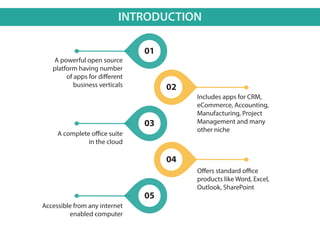
A powerful open source
platform having number
of apps for different
business verticals
Includes apps for CRM,
eCommerce, Accounting,
Manufacturing, Project
Management and many
other niche
A complete office suite
in the cloud
Offers standard office
products like Word, Excel,
Outlook, SharePoint
Accessible from any internet
enabled computer
01
02
04
03
05
ODOO – OFFICE365 INTEGRATION
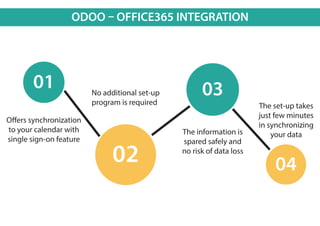
Offers synchronization
to your calendar with
single sign-on feature
No additional set-up
program is required
The information is
spared safely and
no risk of data loss
The set-up takes
just few minutes
in synchronizing
your data
01 03
0402
ODOO – OFFICE365 INTEGRATION
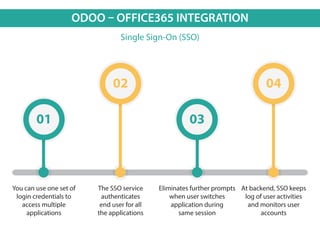
Single Sign-On (SSO)
You can use one set of
login credentials to
access multiple
applications
The SSO service
authenticates
end user for all
the applications
Eliminates further prompts
when user switches
application during
same session
At backend, SSO keeps
log of user activities
and monitors user
accounts
01 03
02 04
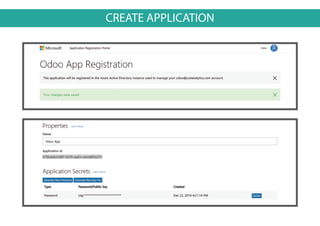
CREATE APPLICATION
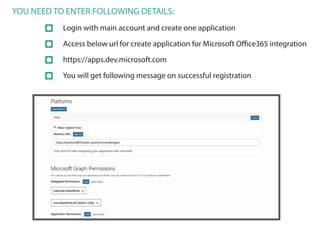
YOU NEED TO ENTER FOLLOWING DETAILS:
Login with main account and create one application
Access below url for create application for Microsoft Office365 integration
https://apps.dev.microsoft.com
You will get following message on successful registration
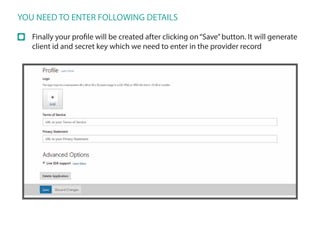
YOU NEED TO ENTER FOLLOWING DETAILS
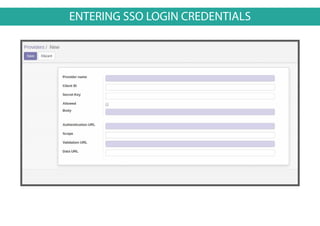
Finally your profile will be created after clicking on“Save”button. It will generate
client id and secret key which we need to enter in the provider record
ENTERING SSO LOGIN CREDENTIALS
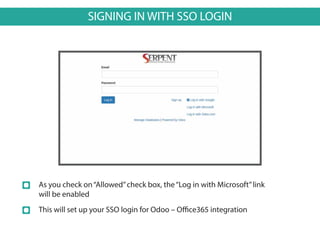
SIGNING IN WITH SSO LOGIN
As you check on“Allowed”check box, the“Log in with Microsoft”link
will be enabled
This will set up your SSO login for Odoo – Office365 integration
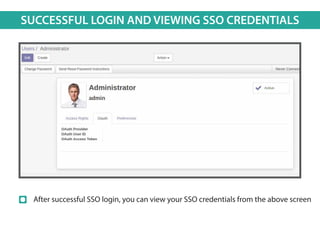
SUCCESSFUL LOGIN AND VIEWING SSO CREDENTIALS
After successful SSO login, you can view your SSO credentials from the above screen
ODOO – OFFICE 365 INTEGRATION
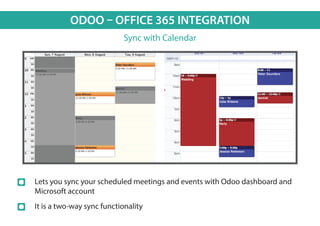
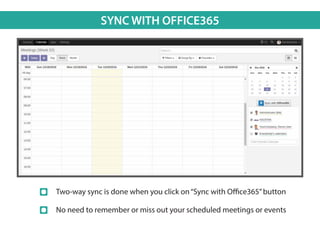
Sync with Calendar
Lets you sync your scheduled meetings and events with Odoo dashboard and
Microsoft account
It is a two-way sync functionality
SYNC WITH OFFICE365
Two-way sync is done when you click on“Sync with Office365”button
No need to remember or miss out your scheduled meetings or events
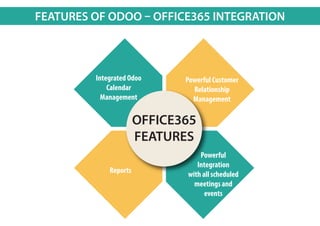
FEATURES OF ODOO – OFFICE365 INTEGRATION
OFFICE365
FEATURES
Integrated Odoo
Calendar
Management
Powerful Customer
Relationship
Management
Powerful
Integration
with all scheduled
meetings and
events
Reports
WHY CHOOSE SERPENT ?
Core expertise in Open ERP / ODOO platform.
The best combination of expertise and hard working personnel.
Excellent after sales support.
Multinational firm gaining trust from clients of over 130 countries.
The best in class service provider at a rate you cannot afford to lose.
SERPENT CONSULTING SERVICES
www.serpentcs.com
301, Siddhraj Zavod,
Nr. Kh-0 Circle, Vasna Hadmatiya,
Gandhinagar, Gujarat, India.
Pin – 382423.
Jay Vora +91-987-935-4457
+91-903-347-2982Husen Daudi
Ready Partner
India USA UAE
Australia Oman Mauritius
UK NigeriaSudan
OUR GLOBAL PRESENCE

Odoo - Office 365 Integration

  • 1.
  • 2.
    INTRODUCTION A powerful opensource platform having number of apps for different business verticals Includes apps for CRM, eCommerce, Accounting, Manufacturing, Project Management and many other niche A complete office suite in the cloud Offers standard office products like Word, Excel, Outlook, SharePoint Accessible from any internet enabled computer 01 02 04 03 05
  • 3.
    ODOO – OFFICE365INTEGRATION Offers synchronization to your calendar with single sign-on feature No additional set-up program is required The information is spared safely and no risk of data loss The set-up takes just few minutes in synchronizing your data 01 03 0402
  • 4.
    ODOO – OFFICE365INTEGRATION Single Sign-On (SSO) You can use one set of login credentials to access multiple applications The SSO service authenticates end user for all the applications Eliminates further prompts when user switches application during same session At backend, SSO keeps log of user activities and monitors user accounts 01 03 02 04
  • 5.
  • 6.
    YOU NEED TOENTER FOLLOWING DETAILS: Login with main account and create one application Access below url for create application for Microsoft Office365 integration https://apps.dev.microsoft.com You will get following message on successful registration
  • 7.
    YOU NEED TOENTER FOLLOWING DETAILS Finally your profile will be created after clicking on“Save”button. It will generate client id and secret key which we need to enter in the provider record
  • 8.
    ENTERING SSO LOGINCREDENTIALS
  • 9.
    SIGNING IN WITHSSO LOGIN As you check on“Allowed”check box, the“Log in with Microsoft”link will be enabled This will set up your SSO login for Odoo – Office365 integration
  • 10.
    SUCCESSFUL LOGIN ANDVIEWING SSO CREDENTIALS After successful SSO login, you can view your SSO credentials from the above screen
  • 11.
    ODOO – OFFICE365 INTEGRATION Sync with Calendar Lets you sync your scheduled meetings and events with Odoo dashboard and Microsoft account It is a two-way sync functionality
  • 12.
    SYNC WITH OFFICE365 Two-waysync is done when you click on“Sync with Office365”button No need to remember or miss out your scheduled meetings or events
  • 13.
    FEATURES OF ODOO– OFFICE365 INTEGRATION OFFICE365 FEATURES Integrated Odoo Calendar Management Powerful Customer Relationship Management Powerful Integration with all scheduled meetings and events Reports
  • 14.
    WHY CHOOSE SERPENT? Core expertise in Open ERP / ODOO platform. The best combination of expertise and hard working personnel. Excellent after sales support. Multinational firm gaining trust from clients of over 130 countries. The best in class service provider at a rate you cannot afford to lose. SERPENT CONSULTING SERVICES www.serpentcs.com 301, Siddhraj Zavod, Nr. Kh-0 Circle, Vasna Hadmatiya, Gandhinagar, Gujarat, India. Pin – 382423. Jay Vora +91-987-935-4457 +91-903-347-2982Husen Daudi Ready Partner India USA UAE Australia Oman Mauritius UK NigeriaSudan OUR GLOBAL PRESENCE