How to set Up Your POP3 email on an iPad. These instrctions are taylored for Client of GTP Web Design in Perth Western Australia but will be able to be used by most people for their iPad setup.
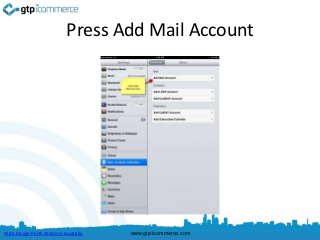
Press Add MailAccount
Web Design Perth Western Australia www.gtp-icommerce.com
7.
Fill in YourDetails
Fill in your details
Name: Your Name
Email: Your Email
Password: ******
Description: This will
usually become the
domain name.
See Example Left
Then Press Next
Web Design Perth Western Australia www.gtp-icommerce.com
8.
Press Next
Fill in your details
Name: Your Name
Email: Your Email
Password: ******
Description: This will
usually become the
domain name.
See Example Left
Then Press Next
Web Design Perth Western Australia www.gtp-icommerce.com
9.
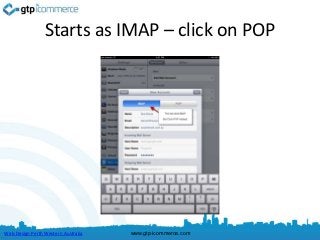
Starts as IMAP– click on POP
Web Design Perth Western Australia www.gtp-icommerce.com
10.
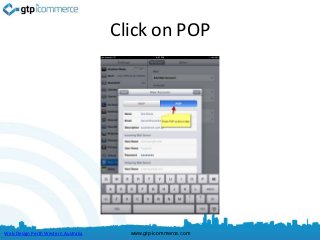
Click on POP
WebDesign Perth Western Australia www.gtp-icommerce.com
11.
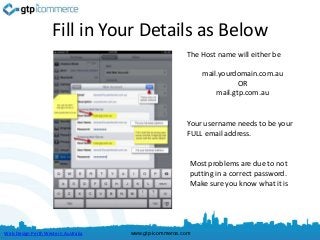
Fill in YourDetails as Below
The Host name will either be
mail.yourdomain.com.au
OR
mail.gtp.com.au
Your username needs to be your
FULL email address.
Most problems are due to not
putting in a correct password.
Make sure you know what it is
Web Design Perth Western Australia www.gtp-icommerce.com
12.
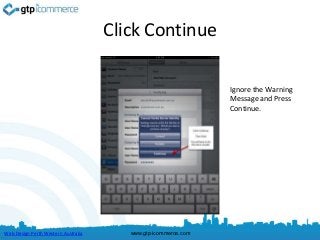
Click Continue
Ignore the Warning
Message and Press
Continue.
Web Design Perth Western Australia www.gtp-icommerce.com
13.
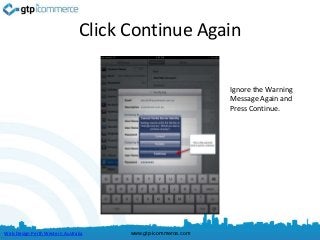
Click Continue Again
Ignore the Warning
Message Again and
Press Continue.
Web Design Perth Western Australia www.gtp-icommerce.com
14.
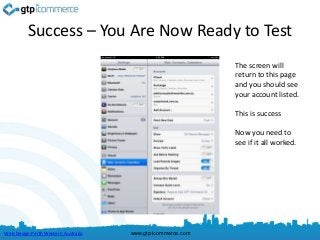
Success – YouAre Now Ready to Test
The screen will
return to this page
and you should see
your account listed.
This is success
Now you need to
see if it all worked.
Web Design Perth Western Australia www.gtp-icommerce.com
15.
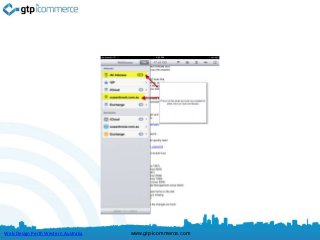
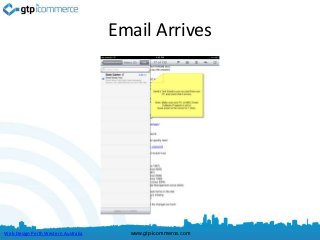
To Test –Click Mail
Web Design Perth Western Australia www.gtp-icommerce.com
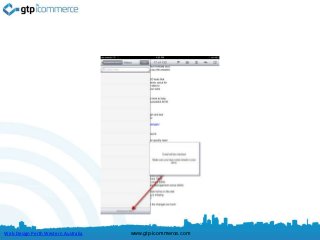
Then Test Sendingan Email as Well
• Once you can receive email and send email
then you have sucessfully set up your iPad.
• Note that if you check email on your computer
as well then you need to make sure that you
set your email program to leave mail on the
server for 7 days. You can google how to do
this.
Web Design Perth Western Australia www.gtp-icommerce.com
20.
Leaving Email onYour Server
• Click the link to see how to change the
settings
• Outlook 2007
• http://support.tigertech.net/outlook-2007-lmos
• Outlook 2010
• http://support.tigertech.net/outlook-2010-lmos
Web Design Perth Western Australia www.gtp-icommerce.com
21.
Results Focused InternetMarketing
ecommerce – web sites – CRM – Time Tracking – Task Management
GTP iCommerce
1300 856 533
www.gtp-icommerce.com
Web Design Perth Western Australia www.gtp-icommerce.com
22.
GTP iCommerce PtyLtd
“Results Focused Internet Marketing”
That’s “Guaranteed To Perform”
We specialise in
• Ecommerce Shopping Cart Web Sites with
• Integrated Email Marketing Software
• Search Engine Optimisation Services
• GTP Hub Business Management Software for
Time Tracking, Project Management, Task Management
Web Design Perth Western Australia www.gtp-icommerce.com
23.
Contact Us For
• Please contact us if you require a powerful
internet marketing web site for lead
generation, e-commerce, business process
improvement, and email marketing.
• GTP was established in 1996.
• Finalist in 2012 For Best Ecommerce Web Site
in the Australian Web Awards.
Web Design Perth Western Australia www.gtp-icommerce.com
24.
Contact Information
• support@gtp.com.au
• + 61 1300 856 533
• SMS: +61 411 352 766
• Twitter: perthwebdesign
• Facebook: http://www.facebook.com/gtp.web.design.seo
Web Design Perth Western Australia www.gtp-icommerce.com