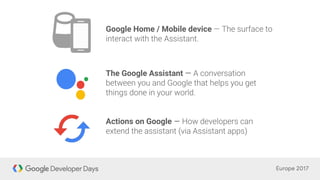
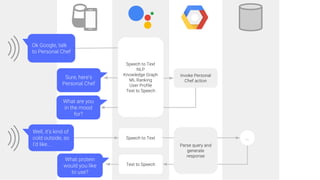
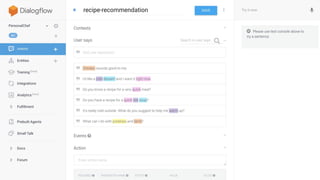
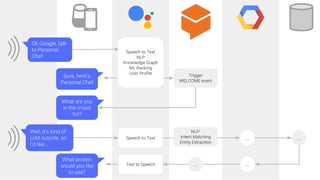

Google Home / Mobile device
The Google Assistant —
Actions on Google —
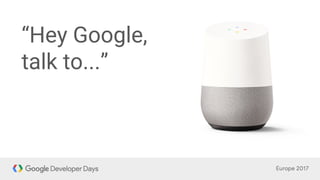
“Hey Google,
talk to...”
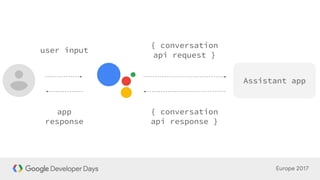
Assistant app
{ conversation
api request }
{ conversation
api response }
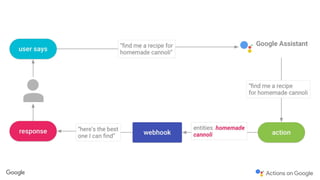
user input
app
response
“
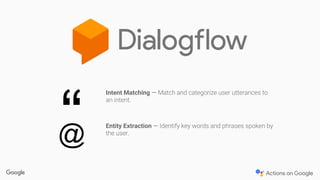
Intent Matching —
Entity Extraction —
@
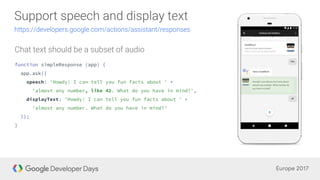
function simpleResponse (app) {
app.ask({
speech: 'Howdy! I can tell you fun facts about ' +
'almost any number, like 42. What do you have in mind?',
displayText: 'Howdy! I can tell you fun facts about ' +
'almost any number. What do you have in mind?'
});
}
function suggestionChips (app) {
app.ask(app.buildRichResponse()
.addSimpleResponse({
speech: 'Howdy! I can tell you fun facts about ' +
'almost any number like 0, 42, or 100. What number do you have ' +
'in mind?',
displayText: 'Howdy! I can tell you fun facts about almost any ' +
'number. What number do you have in mind?'
})
.addSuggestions(['0', '42', '100', 'Never mind'])
);
}
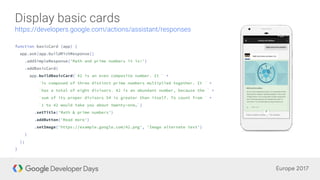
function basicCard (app) {
app.ask(app.buildRichResponse()
.addSimpleResponse('Math and prime numbers it is!')
.addBasicCard(
app.buildBasicCard(`42 is an even composite number. It ` +
`is composed of three distinct prime numbers multiplied together. It ` +
`has a total of eight divisors. 42 is an abundant number, because the ` +
`sum of its proper divisors 54 is greater than itself. To count from ` +
`1 to 42 would take you about twenty-one…`)
.setTitle('Math & prime numbers')
.addButton('Read more')
.setImage('https://example.google.com/42.png', 'Image alternate text')
)
);
}
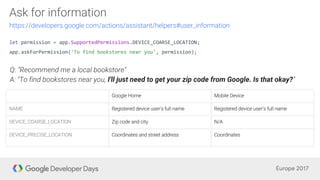
let permission = app.SupportedPermissions.DEVICE_COARSE_LOCATION;
app.askForPermission('To find bookstores near you', permission);
I'll just need to get your zip code from Google. Is that okay?
●
●
●
●
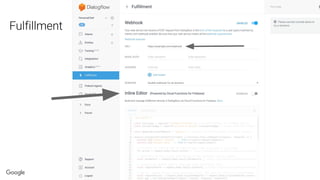
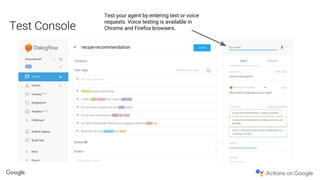
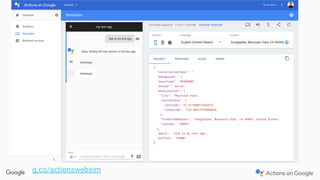
Test your agent by entering text or voice
requests. Voice testing is available in
Chrome and Firefox browsers.
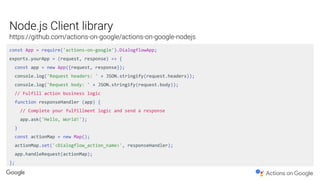
const App = require('actions-on-google').DialogflowApp;
exports.yourApp = (request, response) => {
const app = new App({request, response});
console.log('Request headers: ' + JSON.stringify(request.headers));
console.log('Request body: ' + JSON.stringify(request.body));
// Fulfill action business logic
function responseHandler (app) {
// Complete your fulfillment logic and send a response
app.ask('Hello, World!');
}
const actionMap = new Map();
actionMap.set('<Dialogflow_action_name>', responseHandler);
app.handleRequest(actionMap);
};
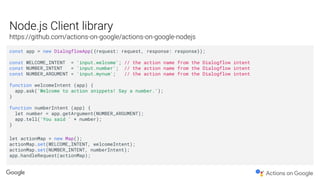
const app = new DialogflowApp({request: request, response: response});
const WELCOME_INTENT = 'input.welcome'; // the action name from the Dialogflow intent
const NUMBER_INTENT = 'input.number'; // the action name from the Dialogflow intent
const NUMBER_ARGUMENT = 'input.mynum'; // the action name from the Dialogflow intent
function welcomeIntent (app) {
app.ask('Welcome to action snippets! Say a number.');
}
function numberIntent (app) {
let number = app.getArgument(NUMBER_ARGUMENT);
app.tell('You said ' + number);
}
let actionMap = new Map();
actionMap.set(WELCOME_INTENT, welcomeIntent);
actionMap.set(NUMBER_INTENT, numberIntent);
app.handleRequest(actionMap);
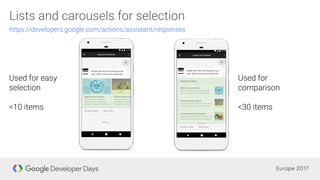
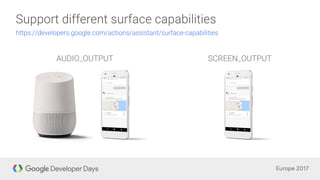
if (app.hasSurfaceCapability(app.SurfaceCapabilities.SCREEN_OUTPUT)) {
app.ask(app.buildRichResponse()
.addSimpleResponse(`Here's a fact for you. ${fact} Which one ` +
`do you want to hear about next, Google's history or headquarters?`)
.addBasicCard(
app.buildBasicCard('Google is an amazing company.')
.setImage(GOOGLE_LOGO_SRC))
.addSuggestions(['History', 'Headquarters']));
} else {
app.ask(`Here's a fact for you. ${fact} Which one ` +
`do you want to hear about next, Google's history or headquarters?`);
}
g.co/actionswebsim
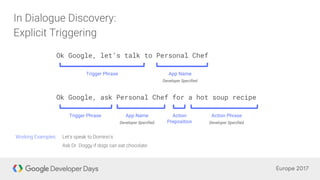
Ok Google, ask Personal Chef for a hot soup recipe
Trigger Phrase App Name
Developer Specified
Action
Preposition
Action Phrase
Developer Specified
Ok Google, let’s talk to Personal Chef
Trigger Phrase App Name
Developer Specified
Create An Amazing Apps For The Google Assistant!

Create An Amazing Apps For The Google Assistant!

  • 4.
    Google Home /Mobile device The Google Assistant — Actions on Google —
  • 5.
  • 9.
    Assistant app { conversation apirequest } { conversation api response } user input app response
  • 10.
  • 17.
    function simpleResponse (app){ app.ask({ speech: 'Howdy! I can tell you fun facts about ' + 'almost any number, like 42. What do you have in mind?', displayText: 'Howdy! I can tell you fun facts about ' + 'almost any number. What do you have in mind?' }); }
  • 18.
    function suggestionChips (app){ app.ask(app.buildRichResponse() .addSimpleResponse({ speech: 'Howdy! I can tell you fun facts about ' + 'almost any number like 0, 42, or 100. What number do you have ' + 'in mind?', displayText: 'Howdy! I can tell you fun facts about almost any ' + 'number. What number do you have in mind?' }) .addSuggestions(['0', '42', '100', 'Never mind']) ); }
  • 19.
    function basicCard (app){ app.ask(app.buildRichResponse() .addSimpleResponse('Math and prime numbers it is!') .addBasicCard( app.buildBasicCard(`42 is an even composite number. It ` + `is composed of three distinct prime numbers multiplied together. It ` + `has a total of eight divisors. 42 is an abundant number, because the ` + `sum of its proper divisors 54 is greater than itself. To count from ` + `1 to 42 would take you about twenty-one…`) .setTitle('Math & prime numbers') .addButton('Read more') .setImage('https://example.google.com/42.png', 'Image alternate text') ) ); }
  • 21.
    let permission =app.SupportedPermissions.DEVICE_COARSE_LOCATION; app.askForPermission('To find bookstores near you', permission); I'll just need to get your zip code from Google. Is that okay?
  • 32.
  • 40.
    Test your agentby entering text or voice requests. Voice testing is available in Chrome and Firefox browsers.
  • 41.
    const App =require('actions-on-google').DialogflowApp; exports.yourApp = (request, response) => { const app = new App({request, response}); console.log('Request headers: ' + JSON.stringify(request.headers)); console.log('Request body: ' + JSON.stringify(request.body)); // Fulfill action business logic function responseHandler (app) { // Complete your fulfillment logic and send a response app.ask('Hello, World!'); } const actionMap = new Map(); actionMap.set('<Dialogflow_action_name>', responseHandler); app.handleRequest(actionMap); };
  • 42.
    const app =new DialogflowApp({request: request, response: response}); const WELCOME_INTENT = 'input.welcome'; // the action name from the Dialogflow intent const NUMBER_INTENT = 'input.number'; // the action name from the Dialogflow intent const NUMBER_ARGUMENT = 'input.mynum'; // the action name from the Dialogflow intent function welcomeIntent (app) { app.ask('Welcome to action snippets! Say a number.'); } function numberIntent (app) { let number = app.getArgument(NUMBER_ARGUMENT); app.tell('You said ' + number); } let actionMap = new Map(); actionMap.set(WELCOME_INTENT, welcomeIntent); actionMap.set(NUMBER_INTENT, numberIntent); app.handleRequest(actionMap);
  • 47.
    if (app.hasSurfaceCapability(app.SurfaceCapabilities.SCREEN_OUTPUT)) { app.ask(app.buildRichResponse() .addSimpleResponse(`Here'sa fact for you. ${fact} Which one ` + `do you want to hear about next, Google's history or headquarters?`) .addBasicCard( app.buildBasicCard('Google is an amazing company.') .setImage(GOOGLE_LOGO_SRC)) .addSuggestions(['History', 'Headquarters'])); } else { app.ask(`Here's a fact for you. ${fact} Which one ` + `do you want to hear about next, Google's history or headquarters?`); }
  • 50.
  • 53.
    Ok Google, askPersonal Chef for a hot soup recipe Trigger Phrase App Name Developer Specified Action Preposition Action Phrase Developer Specified Ok Google, let’s talk to Personal Chef Trigger Phrase App Name Developer Specified