Creating a Secure Testing
Environment for Distance
Education Programs
Michelle Cruz
Sr. Graduate Program Associate
Oregon Health and Sciences University
Graduate Nursing Programs
E-Mail: cruzmi@ohsu.edu
Phone: 503-494-3378
Webinar Abstract
 Distance education programs become more popular, many institutions
are left with the difficult task of assuring the fair, and secure
assessment of their students. Common hurdles for assessing students
within these types of programs include secure exam distribution, exam
proctoring, and providing personalized performance feedback to
students who don’t have traditional office hours as a remediation
option. This presentation will provide insight on successful processes
and troubleshooting plans put in place by the Oregon Health and
Science University School of Nursing that have been helpful for their
distance-education program.
Objectives
 History & Background
 Methods of course delivery
 Testing Polices
 Common security & evaluation concerns
 Utilizing ExamSoft & Best Practices
 Integrating and communicating feedback via distance
What is Distance Nursing
Education?
 “Distance nursing education” means the provision of
nursing course(s) to students in settings physically separate
from the faculty and the campus-based setting. Distance
nursing education includes on-line and web-based portals,
video-streaming, interactive television, and use of other
electronic course delivery methods.
Oregon State Board of Nursing: Division 21;Pg 17
Methods used for Distance
Learning
 Webinars
 Blackboard or other academic platform (Sakai & ExamSoft)
 Pre-recorded lectures (Camtasia relay, echo 360 personal
capture)
 Supplementary reading and assignments
 Synchronous lectures (Jabber, Echo 360, Skype for business,
Adobe Connect)
 Live interaction
 Clinical Evaluations (typhon)
Oregon State Board of Nursing
Division 21
 Programs providing distance nursing education shall:
(a) Deliver the approved curriculum through learning
activities designed to allow students to achieve stated learning
outcomes or competencies;
(b) Provide learning activities that are sufficiently
comprehensive to achieve stated program outcomes and
competencies; and
(c) Support instructor-student interaction and meaningful
student interaction.
Division 21 Page 17
OHSU Exam Administration
Policy
 Online exams that require proctoring include multiple
choice and short answer mid-term exams, final exams, and
other exams that account for greater than 10 percent of a
final course grade. Open book exams are included in this
policy unless student collaboration is allowed during the
examination period.
OHSU Exam Administration
Policy Cont.
 An OHSU student taking an online exam has three choices
for completing proctored exams:
 1. Virtual proctoring: Use of Proctor U™ online
 2. Face-to-face Proctoring: Select an approved proctor who is
present in the room while a student sits for an exam
 3. Other service: Select another approved proctoring service
Common Security and Evaluation
Concerns
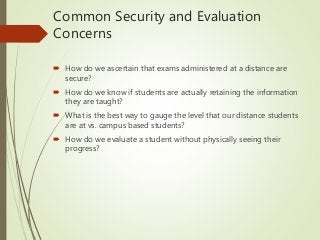
 How do we ascertain that exams administered at a distance are
secure?
 How do we know if students are actually retaining the information
they are taught?
 What is the best way to gauge the level that our distance students
are at vs. campus based students?
 How do we evaluate a student without physically seeing their
progress?
ExamSoft: Security Settings
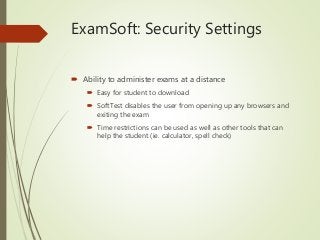
 Ability to administer exams at a distance
 Easy for student to download
 SoftTest disables the user from opening up any browsers and
exiting the exam
 Time restrictions can be used as well as other tools that can
help the student (ie. calculator, spell check)
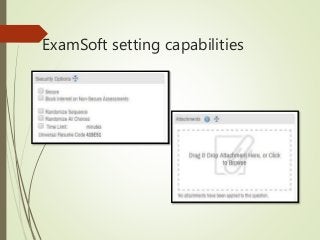
ExamSoft setting capabilities
ExamSoft: Categorizing
Questions
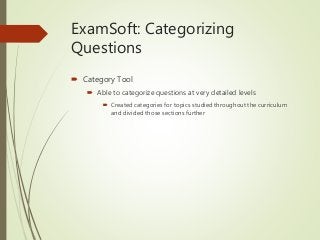
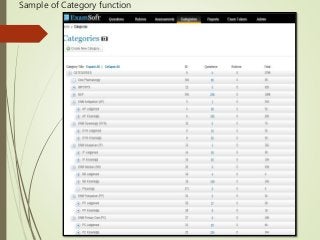
 Category Tool
 Able to categorize questions at very detailed levels
 Created categories for topics studied throughout the curriculum
and divided those sections further
Sample of Category function
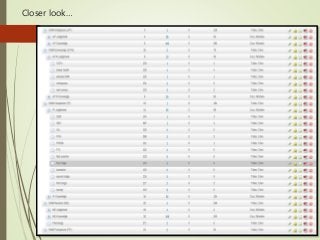
Closer look…
Getting Started: Prep for
Distance Exam
 Distance students must secure a proctor in their respective
locations
 Form filled out with proctor information and contact
 Faculty contacts proctors with expectations and
troubleshooting contact information
 Students always given the option to take exam with the rest of
the course (hybrid)
 All students required to take practice test prior to sitting for
midterm/final exam
Tips for creating courses
(within ExamSoft)
 We separate the distance students from the campus based
students when creating courses based on cohort in
ExamSoft (works well for dual delivery courses when
administering an exam)
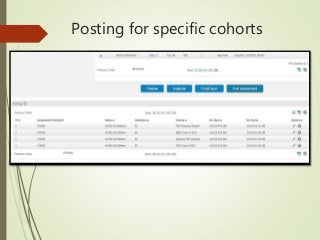
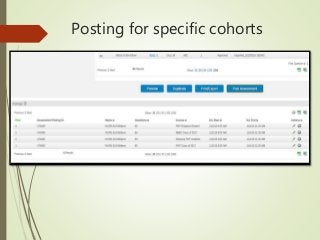
 You still have the ability to post a specific exam to more
than one cohort
 Ability to change password to start for each cohort (added
security)
Posting for specific cohorts
Best Practices for Exam Day
 Release exam one week prior to have students download
ahead of time
 Have student and proctor contact information ready just
incase
 Be sure to communicate “Password to start” to all proctors
 At the end of exam ensure student has uploaded answer file
correctly
 Try to avoid having an exam due on a Sunday!
ExamSoft: Faculty Results
 Grading and Summary
 Immediate feedback for faculty
 Easy access to grading essays
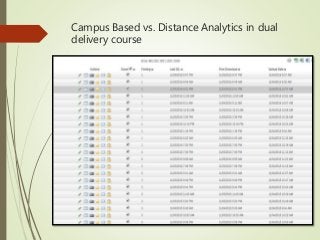
 Ability to create reports based on students groups (ie.
Campus based vs. Distance student)
 Detailed summary reports
 Item analysis
 At-risk students
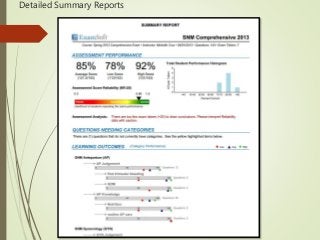
Detailed Summary Reports
Posting for specific cohorts
Campus Based vs. Distance Analytics in dual
delivery course
ExamSoft: Student Results
 Student Feedback
 Faculty can release grades as soon as students
submit exam or delay access to results
Modify what is released
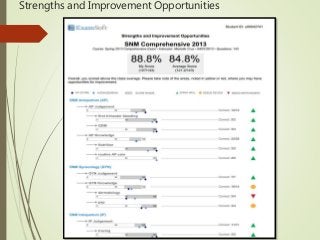
 Detailed strengths and opportunities summary for
students
Allows students to focus on specific categories
Strengths and Improvement Opportunities
Connecting with Distance
Students
 Asynchronously
 Email
 Discussion forums (within course management platform)
 Synchronously (via appointment or set office hours)
 Jabber
 Adobe Connect
 Teleconference
 Skype (not secure connection)
Application of results
 Faculty can create material that can address areas where
students need more direction.
 Case studies
 Live scenarios (labs during intensives)
 Placement in clinicals
 Students able to self analyze their results and create a plan
for better performance
 Work with Clinical advisor or preceptor
 Focus on really developing their knowledge base for a specific
category
Why it works: Knowledge is
Power
 Detailed analysis
 Identify discrepancies of distance vs FTF
 Assess retention
 Reporting
 Future course planning
Overall Summary
 History & Background
 Methods of course delivery
 Testing Polices
 Common security & evaluation concerns
 Utilizing ExamSoft & Best Practices
 Integrating and communicating feedback via distance
References
 Oregon State Board of Nursing Distance Education Rules
and Regulations
 Oregon Health and Sciences University Exam Proctoring
Policy
 School of Nursing Course Delivery & Size Parameters Policy
Questions??
 Contact Information:
Michelle Cruz
Sr. Graduate Program Specialist
Oregon Health and Sciences University
Graduate Nursing Programs
E-Mail: cruzmi@ohsu.edu
Phone: 503-494-3378

Creating a Secure Testing Environment for Distance Education Programs

  • 1.
    Creating a SecureTesting Environment for Distance Education Programs Michelle Cruz Sr. Graduate Program Associate Oregon Health and Sciences University Graduate Nursing Programs E-Mail: cruzmi@ohsu.edu Phone: 503-494-3378
  • 2.
    Webinar Abstract  Distanceeducation programs become more popular, many institutions are left with the difficult task of assuring the fair, and secure assessment of their students. Common hurdles for assessing students within these types of programs include secure exam distribution, exam proctoring, and providing personalized performance feedback to students who don’t have traditional office hours as a remediation option. This presentation will provide insight on successful processes and troubleshooting plans put in place by the Oregon Health and Science University School of Nursing that have been helpful for their distance-education program.
  • 3.
    Objectives  History &Background  Methods of course delivery  Testing Polices  Common security & evaluation concerns  Utilizing ExamSoft & Best Practices  Integrating and communicating feedback via distance
  • 4.
    What is DistanceNursing Education?  “Distance nursing education” means the provision of nursing course(s) to students in settings physically separate from the faculty and the campus-based setting. Distance nursing education includes on-line and web-based portals, video-streaming, interactive television, and use of other electronic course delivery methods. Oregon State Board of Nursing: Division 21;Pg 17
  • 5.
    Methods used forDistance Learning  Webinars  Blackboard or other academic platform (Sakai & ExamSoft)  Pre-recorded lectures (Camtasia relay, echo 360 personal capture)  Supplementary reading and assignments  Synchronous lectures (Jabber, Echo 360, Skype for business, Adobe Connect)  Live interaction  Clinical Evaluations (typhon)
  • 6.
    Oregon State Boardof Nursing Division 21  Programs providing distance nursing education shall: (a) Deliver the approved curriculum through learning activities designed to allow students to achieve stated learning outcomes or competencies; (b) Provide learning activities that are sufficiently comprehensive to achieve stated program outcomes and competencies; and (c) Support instructor-student interaction and meaningful student interaction. Division 21 Page 17
  • 7.
    OHSU Exam Administration Policy Online exams that require proctoring include multiple choice and short answer mid-term exams, final exams, and other exams that account for greater than 10 percent of a final course grade. Open book exams are included in this policy unless student collaboration is allowed during the examination period.
  • 8.
    OHSU Exam Administration PolicyCont.  An OHSU student taking an online exam has three choices for completing proctored exams:  1. Virtual proctoring: Use of Proctor U™ online  2. Face-to-face Proctoring: Select an approved proctor who is present in the room while a student sits for an exam  3. Other service: Select another approved proctoring service
  • 9.
    Common Security andEvaluation Concerns  How do we ascertain that exams administered at a distance are secure?  How do we know if students are actually retaining the information they are taught?  What is the best way to gauge the level that our distance students are at vs. campus based students?  How do we evaluate a student without physically seeing their progress?
  • 10.
    ExamSoft: Security Settings Ability to administer exams at a distance  Easy for student to download  SoftTest disables the user from opening up any browsers and exiting the exam  Time restrictions can be used as well as other tools that can help the student (ie. calculator, spell check)
  • 11.
  • 12.
    ExamSoft: Categorizing Questions  CategoryTool  Able to categorize questions at very detailed levels  Created categories for topics studied throughout the curriculum and divided those sections further
  • 13.
  • 14.
  • 15.
    Getting Started: Prepfor Distance Exam  Distance students must secure a proctor in their respective locations  Form filled out with proctor information and contact  Faculty contacts proctors with expectations and troubleshooting contact information  Students always given the option to take exam with the rest of the course (hybrid)  All students required to take practice test prior to sitting for midterm/final exam
  • 16.
    Tips for creatingcourses (within ExamSoft)  We separate the distance students from the campus based students when creating courses based on cohort in ExamSoft (works well for dual delivery courses when administering an exam)  You still have the ability to post a specific exam to more than one cohort  Ability to change password to start for each cohort (added security)
  • 17.
  • 18.
    Best Practices forExam Day  Release exam one week prior to have students download ahead of time  Have student and proctor contact information ready just incase  Be sure to communicate “Password to start” to all proctors  At the end of exam ensure student has uploaded answer file correctly  Try to avoid having an exam due on a Sunday!
  • 19.
    ExamSoft: Faculty Results Grading and Summary  Immediate feedback for faculty  Easy access to grading essays  Ability to create reports based on students groups (ie. Campus based vs. Distance student)  Detailed summary reports  Item analysis  At-risk students
  • 20.
  • 21.
  • 22.
    Campus Based vs.Distance Analytics in dual delivery course
  • 23.
    ExamSoft: Student Results Student Feedback  Faculty can release grades as soon as students submit exam or delay access to results Modify what is released  Detailed strengths and opportunities summary for students Allows students to focus on specific categories
  • 24.
  • 25.
    Connecting with Distance Students Asynchronously  Email  Discussion forums (within course management platform)  Synchronously (via appointment or set office hours)  Jabber  Adobe Connect  Teleconference  Skype (not secure connection)
  • 26.
    Application of results Faculty can create material that can address areas where students need more direction.  Case studies  Live scenarios (labs during intensives)  Placement in clinicals  Students able to self analyze their results and create a plan for better performance  Work with Clinical advisor or preceptor  Focus on really developing their knowledge base for a specific category
  • 27.
    Why it works:Knowledge is Power  Detailed analysis  Identify discrepancies of distance vs FTF  Assess retention  Reporting  Future course planning
  • 28.
    Overall Summary  History& Background  Methods of course delivery  Testing Polices  Common security & evaluation concerns  Utilizing ExamSoft & Best Practices  Integrating and communicating feedback via distance
  • 29.
    References  Oregon StateBoard of Nursing Distance Education Rules and Regulations  Oregon Health and Sciences University Exam Proctoring Policy  School of Nursing Course Delivery & Size Parameters Policy
  • 30.
    Questions??  Contact Information: MichelleCruz Sr. Graduate Program Specialist Oregon Health and Sciences University Graduate Nursing Programs E-Mail: cruzmi@ohsu.edu Phone: 503-494-3378

Editor's Notes

  • #2 Thank you all for being here today. I am the Sr. Graduate Program associate for Oregon Health and Science University School of Nursing for the Pediatric Nurse practitioner and Nurse Midwifery graduate programs. We have been utilizing ExamSoft for a little over 4 years now and recently implemented computer based testing throughout the entire school last fall. Some of our Adv Nursing practice graduate programs are distance friendly and we’ve learned a lot in the past few years of the best ways to administer CBT for those at a distance and hope this information could be helpful for other schools wanting to go down that path.
  • #4 I plan on going over some history and background regarding distance education at the school of nursing Our various methods of course delivery Our specific testing policies Common security and evaluation concerns of the faculty Utilizing Examsoft and Best practices Methods of integrating and communicating feedback for those at a distance.
  • #5 Just some fundamental definitions, We are accredited by the Oregon State board of nursing and have to ensure we meet all the requirements of offering and implementing a distance program.
  • #6 Some methods used for course lectures are webinars, blackboard and other academic platforms, we currently use sakai. We also offere pre-recorded lectures using these specific systems and synchronous lectures where the distance students join a campus based cohort where there is live interaction between the two during the class. We also offer clinical evaluations via our clinical tracking system typhon.
  • #7 Based on these requirements we have to ensure that the distance students are getting the same education as the campus based students.
  • #8 We also have a university policy that states that if an exam is valued at 10% or more of the entire course grade that it must be proctored.
  • #9 This is a schoolwide policy but the School of Nursing normally omits using Proctor U because the student has to accrue a fee so we use the 2nd option most often
  • #10 Here are the common questions and concerns that arise specifically to testing and evaluation in distance education.
  • #11 Great for rural students that don’t have immediate access to internet.
  • #12 Over view of ExamSoft settings capabilities/functionalities. You have the ability to make it a non-secure exam if it is an open book exam. If you want to allow them to use files they have saved on their computer but restrict them from the internet you would choose the option to block the internet. You can also randomize the sequence and create a time limit. We like the option for attaching images and other files that are supplementary to the question.
  • #13 We knew that we had to be very detailed in the way we organized the exam questions so that we can truly assess how each student is doing. With this information we can create material that will help them better understand what they are having difficulty in.
  • #14 You can see that we have our student nurse midwifery questions organized by topic, then type of question Knowledge vs. Judgement
  • #15 Then we went further by tagging the questions with other factors related to that topic. The more detail you can put into your question categories the better when it comes to results. We will revisit this when it comes to how the results are organized….
  • #16 Students have guidelines when it comes to choosing their proctor. Having them do a practice test on their laptops alleviates any concerns for test day malfunctions.
  • #17 Dual delivery meaning we have students at a distance and campus based students participating in the same course. Since all of our Adv Practice graduate programs take some core courses together, creating cohorts was much more manageable than creating courses based on the students in each course. When posting an exam you can create separate postings for each cohort and actually change the password to start for added security.
  • #18 Can modify posting specific to the student group but all analytics will be combined in exam summary. You can see here that I posted the same midterm for 4 different cohorts, but the analytics will be combined when I start pulling reports which I will elaborate later.
  • #19 Downloading ahead of time ensures their exam is ready to go when they sit with their proctor. We normally communicate the password to start via email 15 minutes prior to the start of the exam. ES student support available Monday through Friday: 7:30am - 8:30pm (ET) Saturday (Exam Takers only): 8:30am - 6:30pm (ET). Not available on Sunday
  • #20 If you have a TA assigned to the course you could give them access to specific functions such as the ability to grade essays.
  • #21 This is a sample of what an overall summary will look like, we like how visual it is. You can also see how students performed in each category if you categorized your questions. But say you want to focus on how the distance cohort performed in your dual delivery course, or look at how each program performed if your course is comprised of more than one program (core course)
  • #22 Revisiting why you created specific cohorts
  • #23 Found within the assessment in the “exam taker activity tab” you can uncheck the box that says score and that will omit that individuals scores from the overall summary. Based on the posting # or student name you can figure out which postings to omit or include if you want to narrow down your analytics based on whether the student is distance or campus based, or you can also do this based on which program they are in, if you have it separated by program.
  • #24 Also have the ability to have students go directly into secure exam review, a review password will be needed
  • #25 You can see here that the sample student needs to spruce up on GYN knowledge specific to dermatology. This information is incredibly helpful for students and faculty as students can make sure they study that material further. Or if the discrepancy in knowledgebase for a specific topic is a trend with multiple students then the faculty can create or modify course content to ensure that those materials are covered in future lectures.
  • #26 These are some of the many ways that we connect with our distance students for advising sessions and discussions post exam.
  • #27 See if there is any correlation with preceptor feedback and content areas needing remediation
  • #28 Detailed analysis for faculty and student really bring forward the areas that need more attention, for distance or FTF students. When administered to a whole class that includes both distance and FTF students you are able to identify any discrepancies between the groups by having the distance cohort be one course and the campus based students be another course. Run reports based on specific student groups Create reports for student progress
  • #29 Just to summarize, they are the topics I covered today. I really hope that you were able to take something from this lecture. I know we have learned a lot through the years of administering exams to those at a distance by trial and error.
  • #30 Here is my reference list