Allyouneedtoknowaboutyourportfolio
www.mediadesign.com
PortfolioGuidelines
So you want to apply to Media Design
School? Great! You’re about to take the
first step, which is to create and submit
a portfolio to our admissions board.
No two Media Design School courses
are the same, which is why every
course has its own unique set of specific
requirements. You’ll need to check what
type of portfolio or task sheet you’ll
need to prepare so that you’re sending
in all of the relevant documentation
at once.
We want to be impressed by your work,
so we’ve created this guide in order to
help you create a portfolio or task sheet
that will truly impress our faculty.Introduction
01
ImageCredit:LunaArango
CourseRequirements
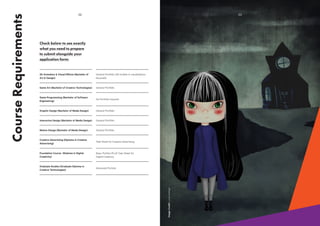
Check below to see exactly
what you need to prepare
to submit alongside your
application form:
02
3D Animation & Visual Effects (Bachelor of
Art & Design)
Game Art (Bachelor of Creative Technologies)
Game Programming (Bachelor of Software
Engineering)
Creative Advertising (Diploma in Creative
Advertising)
Foundation Course  (Diploma in Digital
Creativity) 
Graduate Studies (Graduate Diploma in
Creative Technologies)
General Portfolio
General Portfolio
General Portfolio
General Portfolio
No Portfolio required
Task Sheet for Creative Advertising
Advanced Portolio
Basic Porfolio PLUS Task Sheet for
Digital Creativity
General Portfolio (3D models or visualisations
favoured)
Graphic Design (Bachelor of Media Design)
Interactive Design (Bachelor of Media Design)
Motion Design (Bachelor of Media Design)
03
ImageCredit:LunaArango
BasicPortfolioBrief
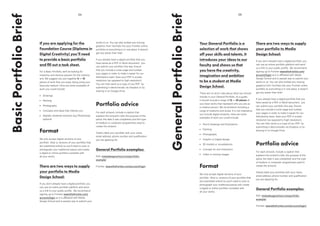
If you are applying for the
Foundation Course (Diploma in
Digital Creativity) you’ll need
to provide a basic portfolio
and fill out a task sheet.
For a Basic Portfolio, we’ll be looking for
creativity and obvious passion for the creative
arts. We suggest you put together 6 — 10
pieces of work that you enjoy doing using your
favourite medium. Here are some examples of
work you could include:
•	 Drawings
•	 Painting
•	 Photography
•	 Concepts and ideas that interest you
•	 Digitally rendered artworks (e.g Photoshop):
optional
Format
We only accept digital versions of your
portfolio (that is, versions of your portfolio that
are submitted online) so you’ll need to scan or
photograph your traditional pieces and create
a digital or online portfolio complete with
all your works.
There are two ways to supply
your portfolio to Media
Design School:
If you don’t already have a digital portfolio, you
can use an online portfolio platform and send
us a link to your public profile. We recommend
signing up to Frontier wearethefrontier.com/
account/login as it is affiliated with Media
Design School and is easiest way to submit your
05
works to us. You can also embed any moving
graphics from YouTube into your Frontier online
portfolio so everything is in one place. It doesn’t
get any easier than that!
If you already have a digital portfolio that you
have saved as a PDF or Word document, you
can submit your portfolio this way. Ensure
that you include a cover page and number
your pages in order to make it easier for our
Admissions team. Save your PDF in screen
resolution (as opposed to high resolution).
You can then send us a copy of you PDF by
submitting it electronically via Dropbox or by
sharing in on Google Drive.
Portfolio advice
For each artwork, include a caption that
explains the artwork’s title; the purpose of the
piece; the date it was completed; and the type
of medium or computer programmes used to
create the artwork;
Clearly label your portfolio with your name,
email address, phone number and qualification
you are applying for.
General Portfolio examples:
PDF: mediadesignschool.com/portfolio-
example/
Frontier: wearethefrontier.com/account/login
04
GeneralPortfolioBrief
Your General Portfolio is a
selection of work that shows
off your skills and talents. It
introduces your ideas to our
faculty and shows us that
you have the creativity,
imagination and ambition
to be a student at Media
Design School.
There are no strict rules about what you should
include in your General Portfolio. As a guide,
it should include a range of 12 — 20 pieces of
your best works that represent who you are as
a creative person. We recommend including a
range of mediums and styles. It is not imperative
you include digital artworks. Here are some
examples of work you could include:
•	 Pencil drawings and illustrations
•	 Painting
•	 Photography
•	 Graphic or Digital design
•	 3D models or visualisations
•	 Concept art and characters
•	 Video or moving images
Format
We only accept digital versions of your
portfolio (that is, versions of your portfolio that
are submitted online) so you’ll need to scan or
photograph your traditional pieces and create
a digital or online portfolio complete with
all your works.
There are two ways to supply
your portfolio to Media
Design School:
If you don’t already have a digital portfolio, you
can use an online portfolio platform and send
us a link to your public profile. We recommend
signing up to Frontier wearethefrontier.com/
account/login as it is affiliated with Media
Design School and is easiest way to submit your
works to us. You can also embed any moving
graphics from YouTube into your Frontier online
portfolio so everything is in one place. It doesn’t
get any easier than that!
If you already have a digital portfolio that you
have saved as a PDF or Word document, you
can submit your portfolio this way. Ensure
that you include a cover page and number
your pages in order to make it easier for our
Admissions team. Save your PDF in screen
resolution (as opposed to high resolution).
You can then send us a copy of you PDF by
submitting it electronically via Dropbox or by
sharing in on Google Drive.
Portfolio advice
For each artwork, include a caption that
explains the artwork’s title; the purpose of the
piece; the date it was completed; and the type
of medium or computer programmes used to
create the artwork;
Clearly label your portfolio with your name,
email address, phone number and qualification
you are applying for.
General Portfolio examples:
PDF: mediadesignschool.com/portfolio-
example/
Frontier: wearethefrontier.com/account/login/
07
ImageCredit:LunaArango
AdvancedPortfolioBrief
If you are applying for
Graduate Studies (Graduate
Diploma in Creative
Technologies), we expect
that you’ll already have a
body ofwork to show us,
including a portfolio of
previous projects.
We will expect any portfolio submitted to be of
a professional standard that clearly indicates
your areas of interest and who you are as an
artist. If you are intending to specialise in an
area such as visual effects or motion graphics, it
is expected that you would also submit a show
reel for our admissions board to watch.
Format
We only accept digital versions of your portfolio
so you’ll need create an online portfolio
complete with all your works.
There are two ways to supply
your portfolio to Media
Design School:
Provide your Portfolio in PDF format [insert
resolution requirements] and provide it to us via
Dropbox or by sharing in on Google Drive;
Use an online portfolio platform provider
and send us a link to your public profile.
Although you may already have an online
portfolio, we highly recommend using Frontier
wearethefrontier.com/account/login as it is
affiliated with Media Design School.
Image Credit: Christopher Peacock
Task Sheet
Make sure you also complete a task sheet to go
along with your application. You can download
you Task Sheet here:
mediadesignschool.com/portfolio-build/
06
What is Frontier?
By now you may have read about creating an
online portfolio in Frontier. For those who may
not have heard of Frontier before, Frontier is
a global community and source of inspiration
for young creatives, art and design students; a
portfolio network that rewards your creativity
with life changing scholarship opportunities and
top-shelf prizes.
Supported by Media Design School with four
other prestigious art & design educational
institutions, we are a platform nurturing a new
generation of thinkers and doers. Explore your
creative Frontiers with us!
Task Sheets
Task Sheets give you relevant tasks to complete
and submit along with your application. You can
download the Task Sheet that is relevant to your
course by clicking the link below:
mediadesignschool.com/portfolio-build/
HouseKeeping 08
Any questions?
We are here to help to make sure you can get
your portfolio in on time and have the best shot
at securing your space at the school. Please
send any questions or queries you may have to
admissions@mediadesign.school.nz
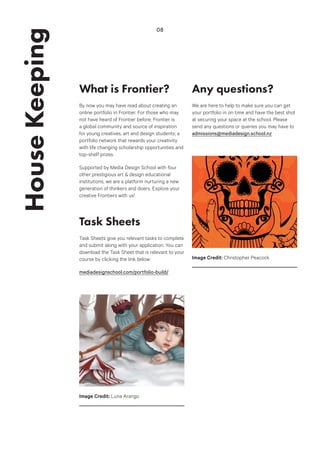
Image Credit: Luna Arango
Image Credit: Christopher Peacock

Portfolio guidelines

  • 1.
  • 2.
    So you wantto apply to Media Design School? Great! You’re about to take the first step, which is to create and submit a portfolio to our admissions board. No two Media Design School courses are the same, which is why every course has its own unique set of specific requirements. You’ll need to check what type of portfolio or task sheet you’ll need to prepare so that you’re sending in all of the relevant documentation at once. We want to be impressed by your work, so we’ve created this guide in order to help you create a portfolio or task sheet that will truly impress our faculty.Introduction 01 ImageCredit:LunaArango
  • 3.
    CourseRequirements Check below tosee exactly what you need to prepare to submit alongside your application form: 02 3D Animation & Visual Effects (Bachelor of Art & Design) Game Art (Bachelor of Creative Technologies) Game Programming (Bachelor of Software Engineering) Creative Advertising (Diploma in Creative Advertising) Foundation Course  (Diploma in Digital Creativity)  Graduate Studies (Graduate Diploma in Creative Technologies) General Portfolio General Portfolio General Portfolio General Portfolio No Portfolio required Task Sheet for Creative Advertising Advanced Portolio Basic Porfolio PLUS Task Sheet for Digital Creativity General Portfolio (3D models or visualisations favoured) Graphic Design (Bachelor of Media Design) Interactive Design (Bachelor of Media Design) Motion Design (Bachelor of Media Design) 03 ImageCredit:LunaArango
  • 4.
    BasicPortfolioBrief If you areapplying for the Foundation Course (Diploma in Digital Creativity) you’ll need to provide a basic portfolio and fill out a task sheet. For a Basic Portfolio, we’ll be looking for creativity and obvious passion for the creative arts. We suggest you put together 6 — 10 pieces of work that you enjoy doing using your favourite medium. Here are some examples of work you could include: • Drawings • Painting • Photography • Concepts and ideas that interest you • Digitally rendered artworks (e.g Photoshop): optional Format We only accept digital versions of your portfolio (that is, versions of your portfolio that are submitted online) so you’ll need to scan or photograph your traditional pieces and create a digital or online portfolio complete with all your works. There are two ways to supply your portfolio to Media Design School: If you don’t already have a digital portfolio, you can use an online portfolio platform and send us a link to your public profile. We recommend signing up to Frontier wearethefrontier.com/ account/login as it is affiliated with Media Design School and is easiest way to submit your 05 works to us. You can also embed any moving graphics from YouTube into your Frontier online portfolio so everything is in one place. It doesn’t get any easier than that! If you already have a digital portfolio that you have saved as a PDF or Word document, you can submit your portfolio this way. Ensure that you include a cover page and number your pages in order to make it easier for our Admissions team. Save your PDF in screen resolution (as opposed to high resolution). You can then send us a copy of you PDF by submitting it electronically via Dropbox or by sharing in on Google Drive. Portfolio advice For each artwork, include a caption that explains the artwork’s title; the purpose of the piece; the date it was completed; and the type of medium or computer programmes used to create the artwork; Clearly label your portfolio with your name, email address, phone number and qualification you are applying for. General Portfolio examples: PDF: mediadesignschool.com/portfolio- example/ Frontier: wearethefrontier.com/account/login 04 GeneralPortfolioBrief Your General Portfolio is a selection of work that shows off your skills and talents. It introduces your ideas to our faculty and shows us that you have the creativity, imagination and ambition to be a student at Media Design School. There are no strict rules about what you should include in your General Portfolio. As a guide, it should include a range of 12 — 20 pieces of your best works that represent who you are as a creative person. We recommend including a range of mediums and styles. It is not imperative you include digital artworks. Here are some examples of work you could include: • Pencil drawings and illustrations • Painting • Photography • Graphic or Digital design • 3D models or visualisations • Concept art and characters • Video or moving images Format We only accept digital versions of your portfolio (that is, versions of your portfolio that are submitted online) so you’ll need to scan or photograph your traditional pieces and create a digital or online portfolio complete with all your works. There are two ways to supply your portfolio to Media Design School: If you don’t already have a digital portfolio, you can use an online portfolio platform and send us a link to your public profile. We recommend signing up to Frontier wearethefrontier.com/ account/login as it is affiliated with Media Design School and is easiest way to submit your works to us. You can also embed any moving graphics from YouTube into your Frontier online portfolio so everything is in one place. It doesn’t get any easier than that! If you already have a digital portfolio that you have saved as a PDF or Word document, you can submit your portfolio this way. Ensure that you include a cover page and number your pages in order to make it easier for our Admissions team. Save your PDF in screen resolution (as opposed to high resolution). You can then send us a copy of you PDF by submitting it electronically via Dropbox or by sharing in on Google Drive. Portfolio advice For each artwork, include a caption that explains the artwork’s title; the purpose of the piece; the date it was completed; and the type of medium or computer programmes used to create the artwork; Clearly label your portfolio with your name, email address, phone number and qualification you are applying for. General Portfolio examples: PDF: mediadesignschool.com/portfolio- example/ Frontier: wearethefrontier.com/account/login/
  • 5.
    07 ImageCredit:LunaArango AdvancedPortfolioBrief If you areapplying for Graduate Studies (Graduate Diploma in Creative Technologies), we expect that you’ll already have a body ofwork to show us, including a portfolio of previous projects. We will expect any portfolio submitted to be of a professional standard that clearly indicates your areas of interest and who you are as an artist. If you are intending to specialise in an area such as visual effects or motion graphics, it is expected that you would also submit a show reel for our admissions board to watch. Format We only accept digital versions of your portfolio so you’ll need create an online portfolio complete with all your works. There are two ways to supply your portfolio to Media Design School: Provide your Portfolio in PDF format [insert resolution requirements] and provide it to us via Dropbox or by sharing in on Google Drive; Use an online portfolio platform provider and send us a link to your public profile. Although you may already have an online portfolio, we highly recommend using Frontier wearethefrontier.com/account/login as it is affiliated with Media Design School. Image Credit: Christopher Peacock Image Credit: Christopher Peacock Task Sheet Make sure you also complete a task sheet to go along with your application. You can download you Task Sheet here: mediadesignschool.com/portfolio-build/ 06
  • 6.
    What is Frontier? Bynow you may have read about creating an online portfolio in Frontier. For those who may not have heard of Frontier before, Frontier is a global community and source of inspiration for young creatives, art and design students; a portfolio network that rewards your creativity with life changing scholarship opportunities and top-shelf prizes. Supported by Media Design School with four other prestigious art & design educational institutions, we are a platform nurturing a new generation of thinkers and doers. Explore your creative Frontiers with us! Task Sheets Task Sheets give you relevant tasks to complete and submit along with your application. You can download the Task Sheet that is relevant to your course by clicking the link below: mediadesignschool.com/portfolio-build/ HouseKeeping 08 Any questions? We are here to help to make sure you can get your portfolio in on time and have the best shot at securing your space at the school. Please send any questions or queries you may have to admissions@mediadesign.school.nz Image Credit: Luna Arango Image Credit: Christopher Peacock