Reproducibility in
Artificial
Intelligence
By Carlos Toxtli
Introduction
Some AI projects that I've done
● Hum2Song : Compose the musical accompaniment of a melody produced by a human voice.
● MultiAffect : Reproducible Research Framework for Multimodal Affect and Action Recognition
● AutomEditor: AutomEditor is an AI-based video editor.
● DeepStab: Real-time Video Object Stabilization tool by using Deep Learning
● DeepPiracy: Video piracy detection system by using Longest Common Subsequence and DL
● VR-360-musi: Transforms a Youtube video into five stems by using AI and place them into a room.
● ReputationAgent: System that detects inaccurate and unfair reviews given to gig workers.
● TaskBot: Research and development of a bot that helps teams to delegate tasks
● ExpertTwin: Enhanced workspace by an AI agent that provides content to knowledge workers
● LivenessDetection: Design and development of Machine VIsion algorithms to validate identity
● QuantumDrugDiscovery: Drug discovery by using Quantum Computing.
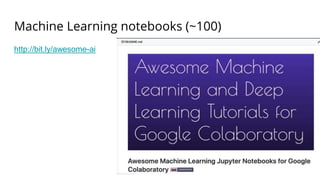
● Awesome Machine Learning Jupyter Notebooks for Colab: Curated list of notebooks
● Awesome Robotic Process Automation: Curated list of notebooks
● Artificial Intelligence By Example Second Edition, Book
● Explainable AI, Book
● Among others ...
Index
● Overview
● Reproducibility problems
● Solutions for reproducibility
● Understanding techniques
● Conclusions
What is Reproducibility?
Reproducibility means obtaining consistent computational
results using the same input data, computational steps,
methods, code, and conditions of analysis.
Replicability means obtaining consistent results across
studies aimed at answering the same scientific question,
each of which has obtained its own data.
Causes
Researchers over the years have investigated the factors that affect reproducibility in
data science related studies. Some common findings point that non-reproducible
studies:
● Lack information or access to the dataset in its original form and order
● The software environment used
● Randomization control
● The actual implementation of the proposed techniques
● Some studies require a large number of computational resources that not
everybody can afford.
Looking for solutions ...
During my work on academia I have explored three different solutions
● Reproducibility framework
● Reproducible benchmarking
● Reproducible standalone methods
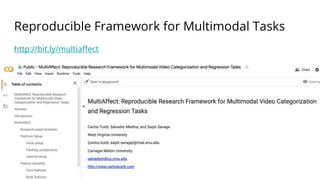
Reproducible Framework for Multimodal Tasks
http://bit.ly/multiaffect
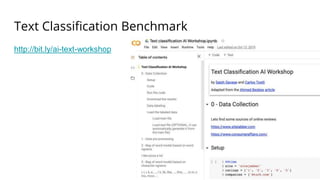
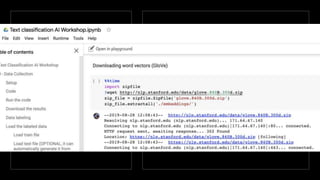
Text Classification Benchmark
http://bit.ly/ai-text-workshop
Machine Learning notebooks (~100)
http://bit.ly/awesome-ai
My journey
I will explain what is needed
to produce and use any of
these approaches.
Reproducibility framework
A reproducible research framework standarizes:
● Data processing
● Feature engineering
● Training methods
● Evaluation methods
● Research document formatting
● Administration interface
Inclusiveness
Additionally it should be accessible to have a
broader impact, some of the desired features may
be:
● No client requirements (online)
● No special hardware requirements
● No extra configuration
● Free of charge
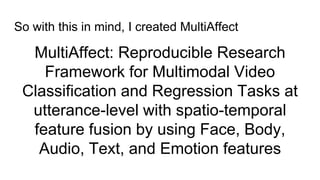
MultiAffect: Reproducible Research
Framework for Multimodal Video
Classification and Regression Tasks at
utterance-level with spatio-temporal
feature fusion by using Face, Body,
Audio, Text, and Emotion features
So with this in mind, I created MultiAffect
MultiAffect
framework
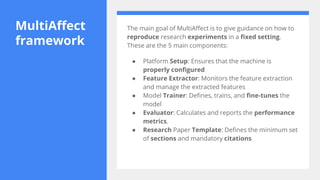
The main goal of MultiAffect is to give guidance on how to
reproduce research experiments in a fixed setting.
These are the 5 main components:
● Platform Setup: Ensures that the machine is
properly configured
● Feature Extractor: Monitors the feature extraction
and manage the extracted features
● Model Trainer: Defines, trains, and fine-tunes the
model
● Evaluator: Calculates and reports the performance
metrics.
● Research Paper Template: Defines the minimum set
of sections and mandatory citations
Platform Setup
Preparing a host machine to replicate machine learning research is usually
challenging, time-consuming, and expensive. One of the reasons is that
most of the models available today require a large scale dataset for
training. Hence, multimedia datasets have a high storage requirement. In
machine learning tasks, the feature extraction step helps algorithms to
reduce the dimensionality of the data and aids the model to focus on their
most significant or discriminative parameters. However, extracting
features from multimedia samples is a highly demanding task in terms of
computation.
Dealing with faulty code and
compiled libraries
Some of the tools that are required to perform the data extraction
need to be compiled for the host operating system. Scientific tools
are commonly built from multiple libraries and sometimes depend on
specific versions of certain libraries for certain operating systems;
this makes them prone to throw compilation errors. Sometimes the
code is not given, and there is an extra effort to code the
instructions described in the publication. Even if the code is available,
sometimes the code is not ready to reproduce, and important
efforts should be performed to make it work when works.
The solution is a
virtual machine
The software challenges can be mitigated by using virtual machines or
containers. Virtual machines and containers give a base operating system
that can contain the proper configuration built-in. These approaches can
run in the top of the host operating system or in online infrastructure. The
hardware challenges can be overcome by investing in powerful enough
infrastructure in-site or by using online on-demand infrastructure.
Conventional research paper replication depends on multiple factors as we
have explored.
MultiAffect over
Google
Colaboratory
The MultiAffect framework uses Google
Colaboratory to publish the Jupyter interactive
notebook and to perform the computation in
the attached virtual machine. Google
Colaboratory is a free research tool that enables
users with a Google account to host and run code
over Google's infrastructure. Google
Colaboratory offers users the ability to execute
their code segments in CPUs, GPUs, and TPUs
(an AI accelerator application-specific integrated
circuit). By the time this work is published, Google
Colaboratory offers a virtual machine with a Tesla
K80 GPU, 12 GB of RAM, and 350 GB of storage.
This platform provides enough resources to
perform video action recognition.
Ubuntu as
Operating
System
This platform includes a Debian based operating setting, so the provided
instructions are platform-specific. Local replication of our framework
requires an Ubuntu 18.04 operating system in order to install all the
libraries successfully. Our platform is agnostic to the Python version, all
the code executed in the notebook is written in Python, and it can be
executed in the versions 2 or 3 of the interpreter. Our framework is able
to set up and run the experiment from the online platform, enabling
users to deploy and execute the code in a free of charge environment
and without special requirements in the client-side.
Fine tuning the setup
process
The definition of the setup was an incremental
process of three main steps: (1) Initial setup:
The first functional version; (2) Packing
components: Uploading components in
batches to cloud storage; and (3) Optimal
setup: A version that loads faster.
Initialsetup
In this step, the libraries were downloaded and compiled
directly from the notebook by running shell commands
from the notebook cells. Pre-requisites, missing
dependencies, and additional packages were installed in
the same notebook. The dataset and the pre-trained
models were downloaded from their original sources to
the virtual machine. The feature extraction, training,
and evaluation code were directly inserted into the
notebook in separate cells. The first version was tested
until it successfully extracted the features, trained, and
evaluated the models from the notebook. A backup of this
notebook was documented and set as the initial version.
Packing components
Each individual compiled library was packaged into a zip file that contains
the binary files as well as the configuration files. The pre-trained models
that were individually downloaded from their original sources were packed
together into a single file. Sometimes the latency is reduced by
downloading a single large file from a high-speed source and increased
when downloading multiple large files from different bandwidths. The
outcome of this task is a collection of zip files that were uploaded to a
Google Drive account. The files were shared with public access to be able
to be downloaded in Google Colaboratory notebooks logged with different
accounts.
Optimal
setup
After packaging and storing the files from the initial setup
to the cloud, we started a branch of the initial setup that
loads these files. The optimal setup notebook was a
simplified version of the initial notebook, instead of having a
long section documenting the setup process, it was
replaced with a download pre-requisites section. The files
were downloaded by using a Python tool called GDown
that is already installed in Google Colaborary. It is important
to mention that the virtual machine attached to the Google
Colaboratory notebooks has already an Ubuntu
distribution with the most common machine learning
tools and libraries already installed. This optimal version is
tailored to Google Colaboratory only.
Optimizing the loading time
Per each of the libraries installed, we measured the time that takes to
install the prerequisites plus the compilation time. In average, the
overall setup of each library was five times slower than downloading
and extracting a previously compiled and zipped version of the library.
The total setup time for the Google Colaboratory environment was
reduced from 43 minutes to 6 minutes after implementing the pre-
compiled tools strategy and by downloading the files from the same
Google infrastructure.
Feature extractors
MultiAffect includes a feature extraction module as an independent component.
Multimodal feature extraction is often a highly demanding task, as it requires a
certain pre-processing of the videos before being able to extract features. Some
common pre-processing tasks are: separating the audio, extracting frames,
identifying faces, cropping faces, removing the background, skelethon detection
(pose), emotion detection, among many other procedures. Our feature extraction
methodology is based on the common ground found in submissions. Our feature
extraction process aims to maintain as invariant factors features such as the person
descriptors (i.e., gender, age, race), scale, position, background, and language. Our
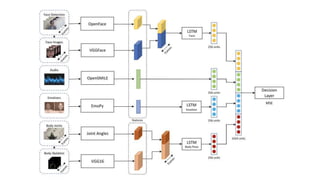
approach considers ten features from five different modalities: face, body, audio,
text, and emotions.
Audio features
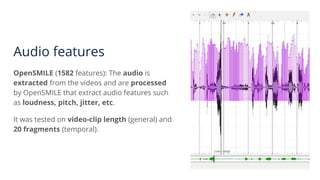
OpenSMILE (1582 features): The audio is
extracted from the videos and are processed
by OpenSMILE that extract audio features such
as loudness, pitch, jitter, etc.
It was tested on video-clip length (general) and
20 fragments (temporal).
Text features
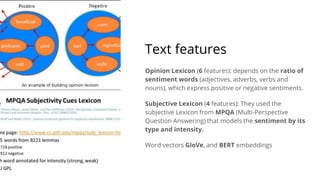
Opinion Lexicon (6 features): depends on the ratio of
sentiment words (adjectives, adverbs, verbs and
nouns), which express positive or negative sentiments.
Subjective Lexicon (4 features): They used the
subjective Lexicon from MPQA (Multi-Perspective
Question Answering) that models the sentiment by its
type and intensity.
Word vectors GloVe, and BERT embeddings
Face features
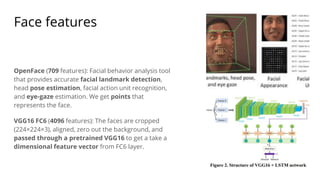
OpenFace (709 features): Facial behavior analysis tool
that provides accurate facial landmark detection,
head pose estimation, facial action unit recognition,
and eye-gaze estimation. We get points that
represents the face.
VGG16 FC6 (4096 features): The faces are cropped
(224×224×3), aligned, zero out the background, and
passed through a pretrained VGG16 to get a take a
dimensional feature vector from FC6 layer.
Body Features
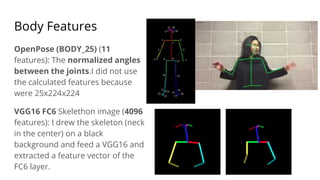
OpenPose (BODY_25) (11
features): The normalized angles
between the joints.I did not use
the calculated features because
were 25x224x224
VGG16 FC6 Skelethon image (4096
features): I drew the skeleton (neck
in the center) on a black
background and feed a VGG16 and
extracted a feature vector of the
FC6 layer.
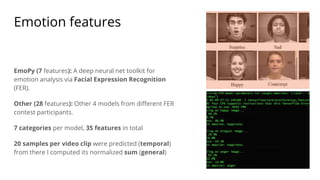
Emotion features
EmoPy (7 features): A deep neural net toolkit for
emotion analysis via Facial Expression Recognition
(FER).
Other (28 features): Other 4 models from different FER
contest participants.
7 categories per model, 35 features in total
20 samples per video clip were predicted (temporal)
from there I computed its normalized sum (general)
Model trainer
The MultiAffect models use different deep
learning models to recognize affect. Among
them we find RNNs (Recurrent Neural
Networks), CNNs (Convolutional Neural
Networks), and simple DNNs (Deep Neural
Networks) as MLPs (Multilayer Perceptrons).
Evaluator
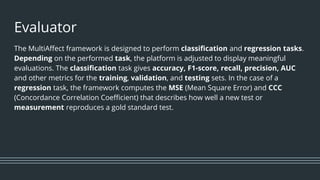
The MultiAffect framework is designed to perform classification and regression tasks.
Depending on the performed task, the platform is adjusted to display meaningful
evaluations. The classification task gives accuracy, F1-score, recall, precision, AUC
and other metrics for the training, validation, and testing sets. In the case of a
regression task, the framework computes the MSE (Mean Square Error) and CCC
(Concordance Correlation Coefficient) that describes how well a new test or
measurement reproduces a gold standard test.
Plotting the
results
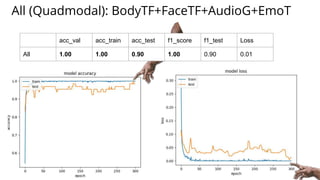
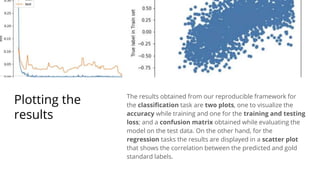
The results obtained from our reproducible framework for
the classification task are two plots, one to visualize the
accuracy while training and one for the training and testing
loss; and a confusion matrix obtained while evaluating the
model on the test data. On the other hand, for the
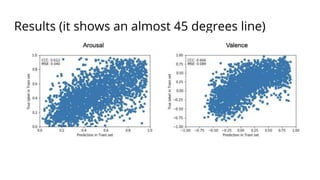
regression tasks the results are displayed in a scatter plot
that shows the correlation between the predicted and gold
standard labels.
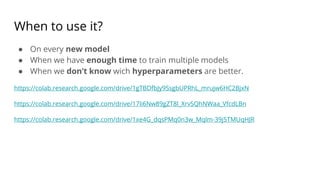
Experimentation
In order to test its generalizability, we performed experiments on
two main tasks: affect recognition and video action recognition.
The video action and affect recognition tasks are attacked through the
training and testing of classification and regression models,
respectively. One of the main goals of the proposed framework is to
be able to perform both actions by only configuring a new set of
variable without performing any change to the code. Another goal was
to deliver results comparable to existing work
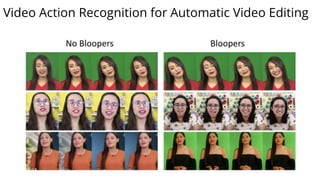
Video Action Recognition for Automatic Video Editing
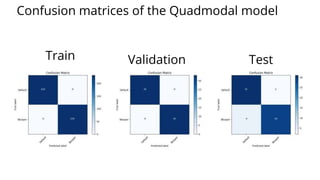
All (Quadmodal): BodyTF+FaceTF+AudioG+EmoT
acc_val acc_train acc_test f1_score f1_test Loss
All 1.00 1.00 0.90 1.00 0.90 0.01
Train Validation Test
Confusion matrices of the Quadmodal model
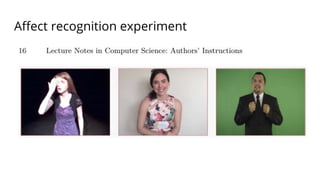
Affect recognition experiment
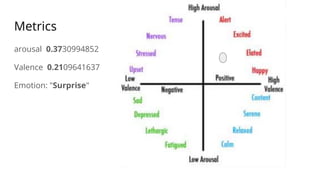
Metrics
arousal 0.3730994852
Valence 0.2109641637
Emotion: "Surprise"
Results (it shows an almost 45 degrees line)
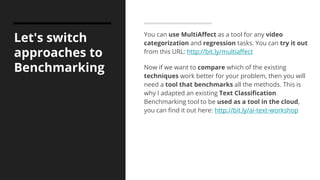
Let's switch
approaches to
Benchmarking
You can use MultiAffect as a tool for any video
categorization and regression tasks. You can try it out
from this URL: http://bit.ly/multiaffect
Now if we want to compare which of the existing
techniques work better for your problem, then you will
need a tool that benchmarks all the methods. This is
why I adapted an existing Text Classification
Benchmarking tool to be used as a tool in the cloud,
you can find it out here: http://bit.ly/ai-text-workshop
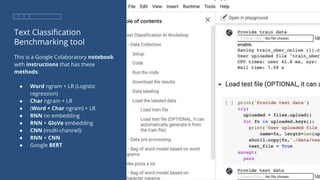
Text Classification
Benchmarking tool
This is a Google Colaboratory notebook
with instructions that has these
methods:
● Word ngram + LR (Logistic
regression)
● Char ngram + LR
● (Word + Char ngram) + LR
● RNN no embedding
● RNN + GloVe embedding
● CNN (multi-channel):
● RNN + CNN
● Google BERT
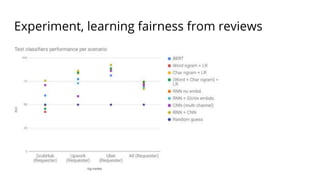
Experiment, learning fairness from reviews
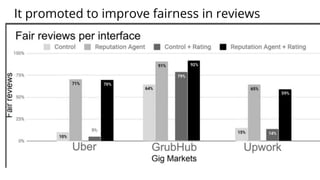
It promoted to improve fairness in reviews
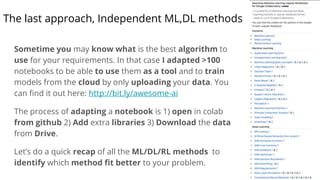
The last approach, Independent ML,DL methods
Sometime you may know what is the best algorithm to
use for your requirements. In that case I adapted >100
notebooks to be able to use them as a tool and to train
models from the cloud by only uploading your data. You
can find it out here: http://bit.ly/awesome-ai
The process of adapting a notebook is 1) open in colab
from github 2) Add extra libraries 3) Download the data
from Drive.
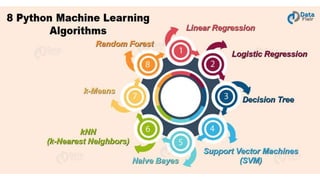
Let’s do a quick recap of all the ML/DL/RL methods to
identify which method fit better to your problem.
Frameworks
● Sklearn
● Weka
● Matlab
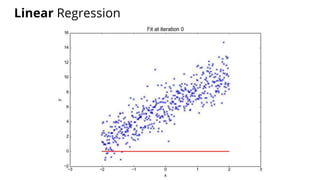
Linear Regression
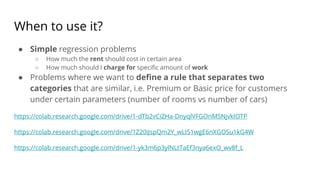
When to use it?
● Simple regression problems
○ How much the rent should cost in certain area
○ How much should I charge for specific amount of work
● Problems where we want to define a rule that separates two
categories that are similar, i.e. Premium or Basic price for customers
under certain parameters (number of rooms vs number of cars)
https://colab.research.google.com/drive/1-dTb2vCiZHa-DnyqlVFGOnMSNjvkIOTP
https://colab.research.google.com/drive/1Z20iJspQm2Y_wLI51wgE6nXGOSu1kG4W
https://colab.research.google.com/drive/1-yk3m6p3ylNLtTaEf3nya6exO_wv8f_L
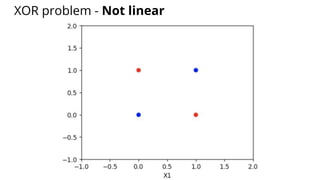
XOR problem - Not linear
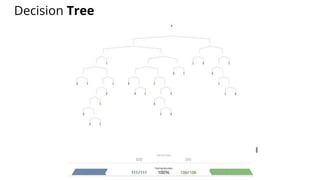
Decision Tree
Code
from sklearn.datasets import load_iris
from sklearn.tree import DecisionTreeClassifier, export_graphviz
import pydotplus
iris = load_iris()
clf = DecisionTreeClassifier().fit(iris.data, iris.target)
dot_data = export_graphviz(clf, out_file=None, filled=True, rounded=True,
feature_names=iris.feature_names,
class_names=['Versicolor','Setosa','Virginica'])
graph = pydotplus.graph_from_dot_data(dot_data)
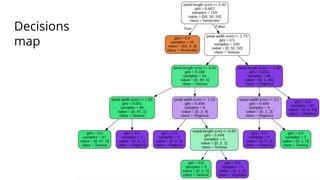
Decisions
map
When to use it?
● When we need to know what decisions the machine is taking
● When we need to explain to others how the features are evaluated
● When there are no much features
https://colab.research.google.com/drive/1Fc8qs1fwdcpoZ_-tTj32OBl-tCGlAe5c
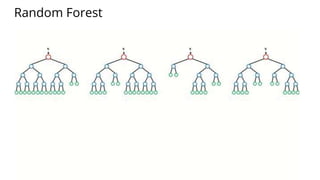
Random Forest
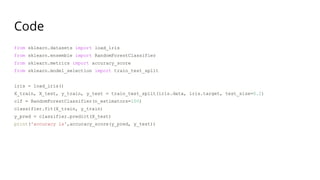
Code
from sklearn.datasets import load_iris
from sklearn.ensemble import RandomForestClassifier
from sklearn.metrics import accuracy_score
from sklearn.model_selection import train_test_split
iris = load_iris()
X_train, X_test, y_train, y_test = train_test_split(iris.data, iris.target, test_size=0.2)
clf = RandomForestClassifier(n_estimators=100)
classifier.fit(X_train, y_train)
y_pred = classifier.predict(X_test)
print('accuracy is',accuracy_score(y_pred, y_test))
When to use it?
● When we want to know alternatives of how to evaluate a problem.
● When we want to manually discard flows that are biased
● When we want to manage ensembles from one single method.
https://colab.research.google.com/drive/1WMOOtaHAMZPi-enVM8RRM_CC-grEtm9P
https://colab.research.google.com/drive/1jDdWp-CJybMJDX17jBmG5qoPPg9qj1sm
https://colab.research.google.com/drive/1-uDIRl1aYqmJX59rAJumHY1T20QqBJiQ
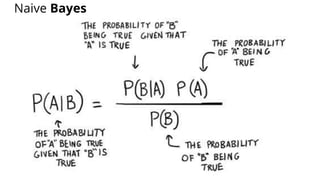
Naive Bayes
When to use it?
● When we want to know the probabilities of the different cases.
● When we need a probabilistic model.
● When we need an easy way to prove in paper
https://colab.research.google.com/drive/1qOCllKsBBrLeUnP-XAXHefXCtbuBWl69
https://colab.research.google.com/drive/11FiWH00vzygQp1T_pD0MCfMFg6FYsd01
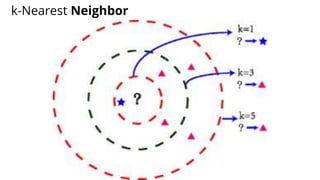
k-Nearest Neighbor
When to use it?
● When intuition says that the problem can be solved from getting thee
most similar option.
● When the information is no exhaustive.
● When we want to justify the decision of the algorithm in a common
human reasoning.
https://colab.research.google.com/drive/1GeUVjDW74SxFxz2Nh3rqOlte-S2dblYv
https://colab.research.google.com/drive/1X12qds10ZfN7QCrmpRR2OXxa--PTyS5e
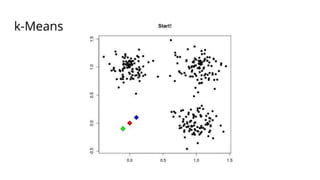
k-Means
When to use it?
● When we don’t know how to understand the data
● When we want to optimize resources by grouping related elements.
● When we want that the computer creates the labels for us.
https://colab.research.google.com/drive/1RL3oZm6LgnEChI1aOQZoMn1WDk-DQJiV
https://colab.research.google.com/drive/1yvy1scktjcDyydG2fZz2OJfRFAer0SEO
https://colab.research.google.com/drive/1CzEf6giBXPSQI5UJOhZrZfYKAJcH68wg
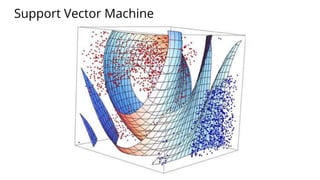
Support Vector Machine
When to use it?
● It was the most effective technique before Neural Networks, it can
achieve excellent results with less processing.
● Mathematically speaking, it is based in very strong math principles, it
creates complex multidimensional hyperplanes that separates the classes
precisely.
● It is not a white box technique, but may be the best option for problems
where we want to get the best of Machine Learning approach without
dealing with Neural Networks.
https://colab.research.google.com/drive/13PRk-GKeSivp4R-FIdjmYBQS7xWUco9C
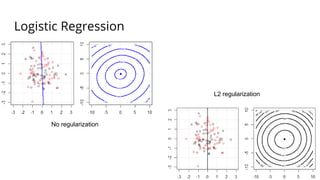
Logistic Regression
No regularization
L2 regularization
When to use it?
● When we want to optimize a regression
● When we want to binarize the output
● As a preliminary analysis before implementing neural networks
https://colab.research.google.com/drive/1PWmvsZRaj3JQ8rtj6vlwhJhJpOrIAamT
https://colab.research.google.com/drive/1p8rcrSQB-thLSakUmCHjSbqI6vd-NkCq
https://colab.research.google.com/drive/1jhrAtmPgg6Uu0WzMzV-VakWlncQAvk-D
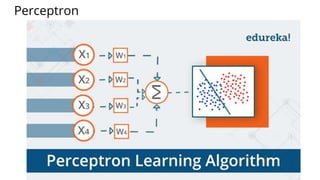
Perceptron
When to use it?
● When we have very few features and there is no extra details that can be
extracted from hidden layers.
● There are in fact neural networks, and we do not need alway to use
them for deep learning these can be used for machine learning when we
benchmark with other machine learning techniques.
● When we want to get the power of neural networks and we don’t have
much computational power.
https://colab.research.google.com/drive/10PvUh-8ZsVqQADqXSmRIDHGiCH9iypyO
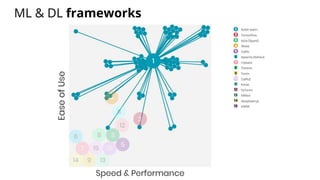
ML & DL frameworks
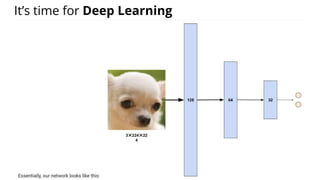
It’s time for Deep Learning
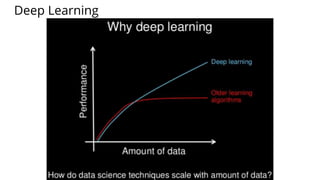
Deep Learning
Artificial Neural Networks = Multi-Layer Perceptron
Frameworks
● Tensorflow
● Keras
● Pythorch
● Sklearn
When to use it?
● Classifiers when common machine Learning Algorithms performs
poorly.
● Models with much features.
● Multiple classes projects.
https://colab.research.google.com/drive/1GAYf5yMNBkVrag0z2Q4MPSwuqfRN1Wz
https://colab.research.google.com/drive/12YBDQFYXN8VruxKTfzDpbPsYFAEQceQP
https://colab.research.google.com/drive/1pyRqGmMG4-Mj8Wis5XrQ_a4dUJvYln1
https://colab.research.google.com/drive/1wHjugM56k0ay5QCmRVMBfAMF96EY7A5k
https://colab.research.google.com/drive/1Ly0BtKBphUdeqMQBO8Xjweku62Vq3UAX
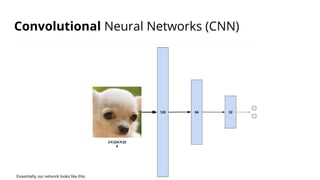
Convolutional Neural Networks (CNN)
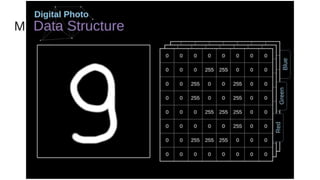
MNIST
Frameworks
● Tensorflow
● Keras
● Pytorch
● Caffe
When to use it?
● When we want to process images
● When we want to process videos
● When we have highly dimensional data
https://colab.research.google.com/drive/1jN8oswBOds4XuRbnQMxxDXDssmDD_rD9
https://colab.research.google.com/drive/1iEYJs75hat_URxshmCBMGzHQo5VgdRvN
https://colab.research.google.com/drive/1YHKZgpJuriGYjEzFDNGz2Hf0widu-exx
https://colab.research.google.com/drive/1gi2_Or0rDz5Gg9FkGJjFDxgeiwt5-lXm
https://colab.research.google.com/drive/1QcnY-LOZU9c7Sp2DsDVeYxLNBx87VNhn
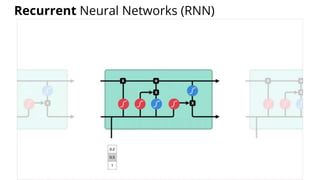
Recurrent Neural Networks (RNN)
Frameworks
● Tensorflow
● Keras
● Pytorch
When to use it?
● When sequences are provided
○ Text sequences
○ Image sequences (videos)
○ Time series
● When we need to provide an ordered output
https://colab.research.google.com/drive/1twc5dBjgFLFuv8p-gPfnrscTPcBlkx5q
https://colab.research.google.com/drive/10-ou-Za75bFgwArvgP3QfNJ4cWuwY-eF
https://colab.research.google.com/drive/1PEOqq8mBcmc-FMj8lpbVF93cQI4RLgVJ
https://colab.research.google.com/drive/1XUEAFxxKVmdgC7oPOzVpGInXfUeTcgIQ
https://colab.research.google.com/drive/1tfDDriSDUh_J9OHwjt-NzT8xRiEDQF7x
Mixed approaches
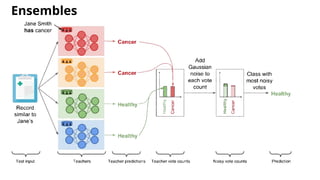
Ensembles
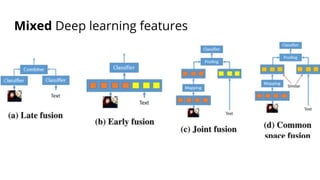
Mixed Deep learning features
When to use it?
● When we want to benchmark models
● When different models are stronger when these are evaluated together
● When the individual processing is not exhaustive
https://colab.research.google.com/drive/1Kg_nHBmUGQ1zepU-wZlDwMyM-YrlMTUX
https://colab.research.google.com/drive/1U86EVD-6ulYMxTzDX8-m6nEptYq0yaej
AutoML
Frameworks
● TPOT
● MLBox
● H2O
● Google AutoML
When to use it?
● On every new model
● When we have enough time to train multiple models
● When we don’t know wich hyperparameters are better.
https://colab.research.google.com/drive/1gTBDfbJy9SsgbUPRhL_mrujw6HC2BjxN
https://colab.research.google.com/drive/17Ii6Nw89gZT8l_XrvSQhNWaa_VfcdLBn
https://colab.research.google.com/drive/1xe4G_dqsPMq0n3w_Mqlm-39j5TMUqHJR
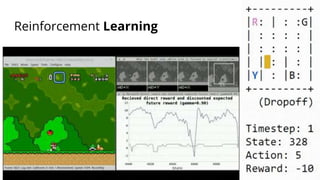
Reinforcement Learning
Frameworks
● OpenAI Gym
● Google Dopamine
● RLLib
● Keras-RL
● Tensorforce
● Facebook Horizon
When to use it?
● When a robot explores a place and needs to learn from the environment.
● When we can try as much as we can in a simulator.
● When we want to find the most optimal path
https://colab.research.google.com/drive/1fgv5UWhHR7xSwZfwwltF4OFDYqtWdlQD
https://colab.research.google.com/drive/14aYmND2LKtaPTW3JWS7scKGwU9baxHeE
https://colab.research.google.com/drive/16Scl43smvcXGZFEGITs15_SN_7-EidZd
Techniques to improve the learning process
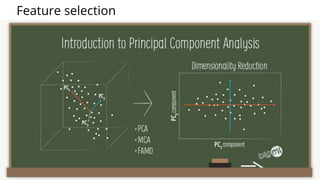
Principal Component Analysis (PCA)
Feature selection
When to use it?
● When we have too much features and we do not know which of them
are useful.
● When we want to reduce the dimensionality of our model.
● When we want to plot our decision boundaries.
https://colab.research.google.com/drive/1CO6BACds6J8hGPYlEU2INnSTpT0EmS74
https://colab.research.google.com/drive/1VU2SO3IfklPkK1EPMnwiO7trJslt79OZ
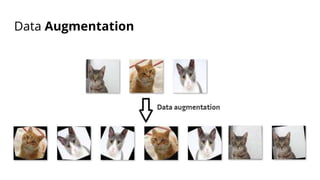
Data Augmentation
When to use it?
● When we have limited data
● When we want to help our model to generalize more
● When our unseen data comes in very different formats.
https://colab.research.google.com/drive/1ANIc7tXrggPT2I9JzpBlZQ3BBhCpbJUJ
https://colab.research.google.com/drive/1cQRVdiDc9xraHZYLu3VrXxX4FKXoaS8U
https://colab.research.google.com/drive/1O5far2FC4GlAc9pkLPZqsjKreCpI4S_-
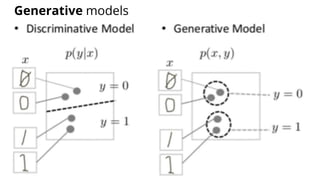
Generative models
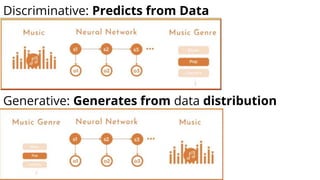
Discriminative: Predicts from Data
Generative: Generates from data distribution
Generative models
● Autoencoders
● Adversarial Networks
● Sequence Models
● Transformers
Frameworks
● Tensorflow
● Keras
● Pytorch
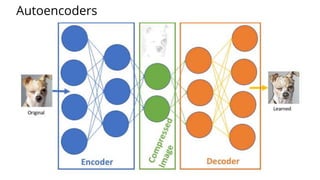
Autoencoders
When to use it?
● When we want to compress data.
● When we need to change one type of input to other type of output.
● When we don’t need much variability in the generated data.
https://colab.research.google.com/drive/1QxXqnhyqIZrrGtor2tVa4jY63adS4yc0
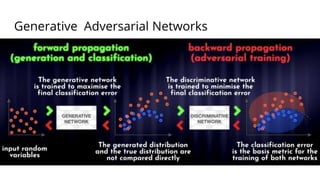
Generative Adversarial Networks
When to use it?
● When we need to transfer a style
● When we need more variability in the generated output
● When we need to keep context in the generation.
https://colab.research.google.com/drive/1YOYH78YQAgPBRIpUPhh_e0cFLNu-BPVo
https://colab.research.google.com/drive/1POZpWN-2M5hy3D2ATWzJs2LC5sk7hpts
https://colab.research.google.com/drive/1aKywiJ5p0eCwDIIWKe8Q205rcKqmR_VX
https://colab.research.google.com/drive/1QxXqnhyqIZrrGtor2tVa4jY63adS4yc0
https://colab.research.google.com/drive/1Lw7BqKABvtiSyUHg9DeM5f90_WFGB7uz
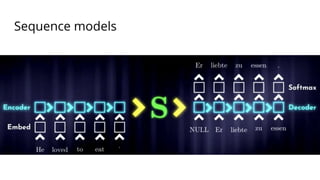
Sequence models
When to use it?
● When we generate text
● When we generate the next sequence from a serie
● When the order in the generated output matters.
https://colab.research.google.com/drive/1ZB-oueLvBgltXshb1lDV2EpqbqV6FC5x
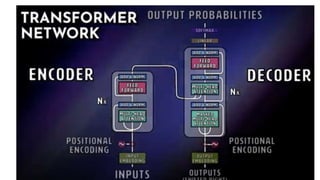
When to use it?
● When context is an essential part of the generated output
● When we need to keep consistency in the frequency space.
● When we have enough computational resources.
https://colab.research.google.com/drive/1jWaRkii6xLkxxAPyfudeGJsHf_jokqXG
Put notebooks into production
It seems that running code from a notebook in the cloud is just for testing
purposes, but actually you can run it as a service by running from a Docker
container locally.
I created a script that automatically prepares a container and execute it
every time you need as a command line application.
Example:
docker run psykohack/google-colab https://colab.research.google.com/drive/133DIr7lvkuaNU_X2JN5id3XmtSXQspy9
Code: https://github.com/toxtli/google-colab-docker
Resources
More and more AI research is being distributed nowadays in redistributable
format. Some valuable resources can be found in:
https://www.paperswithcode.com/
https://www.kaggle.com/
Conclusions
● Nowadays we can reproduce state-of-the-art AI algorithms from a web
based platform.
● Complex tasks can be executed in notebooks structured as
frameworks
● Our main job is to prepare the data to feed the algorithm that fits the
most to our needs.
● AI prototyping is drastically accelerated by using this technologies.
● Since these technologies are between pure-code and pure-tool
approaches, that gives the flexibility to iterate faster.
Thanks
@ctoxtli
http://www.carlostoxtli.com
http://facebook.com/carlos.toxtli

Reproducibility in artificial intelligence

  • 1.
  • 2.
  • 3.
    Some AI projectsthat I've done ● Hum2Song : Compose the musical accompaniment of a melody produced by a human voice. ● MultiAffect : Reproducible Research Framework for Multimodal Affect and Action Recognition ● AutomEditor: AutomEditor is an AI-based video editor. ● DeepStab: Real-time Video Object Stabilization tool by using Deep Learning ● DeepPiracy: Video piracy detection system by using Longest Common Subsequence and DL ● VR-360-musi: Transforms a Youtube video into five stems by using AI and place them into a room. ● ReputationAgent: System that detects inaccurate and unfair reviews given to gig workers. ● TaskBot: Research and development of a bot that helps teams to delegate tasks ● ExpertTwin: Enhanced workspace by an AI agent that provides content to knowledge workers ● LivenessDetection: Design and development of Machine VIsion algorithms to validate identity ● QuantumDrugDiscovery: Drug discovery by using Quantum Computing. ● Awesome Machine Learning Jupyter Notebooks for Colab: Curated list of notebooks ● Awesome Robotic Process Automation: Curated list of notebooks ● Artificial Intelligence By Example Second Edition, Book ● Explainable AI, Book ● Among others ...
  • 4.
    Index ● Overview ● Reproducibilityproblems ● Solutions for reproducibility ● Understanding techniques ● Conclusions
  • 5.
    What is Reproducibility? Reproducibilitymeans obtaining consistent computational results using the same input data, computational steps, methods, code, and conditions of analysis. Replicability means obtaining consistent results across studies aimed at answering the same scientific question, each of which has obtained its own data.
  • 7.
    Causes Researchers over theyears have investigated the factors that affect reproducibility in data science related studies. Some common findings point that non-reproducible studies: ● Lack information or access to the dataset in its original form and order ● The software environment used ● Randomization control ● The actual implementation of the proposed techniques ● Some studies require a large number of computational resources that not everybody can afford.
  • 8.
    Looking for solutions... During my work on academia I have explored three different solutions ● Reproducibility framework ● Reproducible benchmarking ● Reproducible standalone methods
  • 9.
    Reproducible Framework forMultimodal Tasks http://bit.ly/multiaffect
  • 10.
  • 11.
    Machine Learning notebooks(~100) http://bit.ly/awesome-ai
  • 12.
    My journey I willexplain what is needed to produce and use any of these approaches.
  • 13.
    Reproducibility framework A reproducibleresearch framework standarizes: ● Data processing ● Feature engineering ● Training methods ● Evaluation methods ● Research document formatting ● Administration interface
  • 14.
    Inclusiveness Additionally it shouldbe accessible to have a broader impact, some of the desired features may be: ● No client requirements (online) ● No special hardware requirements ● No extra configuration ● Free of charge
  • 15.
    MultiAffect: Reproducible Research Frameworkfor Multimodal Video Classification and Regression Tasks at utterance-level with spatio-temporal feature fusion by using Face, Body, Audio, Text, and Emotion features So with this in mind, I created MultiAffect
  • 16.
    MultiAffect framework The main goalof MultiAffect is to give guidance on how to reproduce research experiments in a fixed setting. These are the 5 main components: ● Platform Setup: Ensures that the machine is properly configured ● Feature Extractor: Monitors the feature extraction and manage the extracted features ● Model Trainer: Defines, trains, and fine-tunes the model ● Evaluator: Calculates and reports the performance metrics. ● Research Paper Template: Defines the minimum set of sections and mandatory citations
  • 17.
    Platform Setup Preparing ahost machine to replicate machine learning research is usually challenging, time-consuming, and expensive. One of the reasons is that most of the models available today require a large scale dataset for training. Hence, multimedia datasets have a high storage requirement. In machine learning tasks, the feature extraction step helps algorithms to reduce the dimensionality of the data and aids the model to focus on their most significant or discriminative parameters. However, extracting features from multimedia samples is a highly demanding task in terms of computation.
  • 18.
    Dealing with faultycode and compiled libraries Some of the tools that are required to perform the data extraction need to be compiled for the host operating system. Scientific tools are commonly built from multiple libraries and sometimes depend on specific versions of certain libraries for certain operating systems; this makes them prone to throw compilation errors. Sometimes the code is not given, and there is an extra effort to code the instructions described in the publication. Even if the code is available, sometimes the code is not ready to reproduce, and important efforts should be performed to make it work when works.
  • 19.
    The solution isa virtual machine The software challenges can be mitigated by using virtual machines or containers. Virtual machines and containers give a base operating system that can contain the proper configuration built-in. These approaches can run in the top of the host operating system or in online infrastructure. The hardware challenges can be overcome by investing in powerful enough infrastructure in-site or by using online on-demand infrastructure. Conventional research paper replication depends on multiple factors as we have explored.
  • 20.
    MultiAffect over Google Colaboratory The MultiAffectframework uses Google Colaboratory to publish the Jupyter interactive notebook and to perform the computation in the attached virtual machine. Google Colaboratory is a free research tool that enables users with a Google account to host and run code over Google's infrastructure. Google Colaboratory offers users the ability to execute their code segments in CPUs, GPUs, and TPUs (an AI accelerator application-specific integrated circuit). By the time this work is published, Google Colaboratory offers a virtual machine with a Tesla K80 GPU, 12 GB of RAM, and 350 GB of storage. This platform provides enough resources to perform video action recognition.
  • 22.
    Ubuntu as Operating System This platformincludes a Debian based operating setting, so the provided instructions are platform-specific. Local replication of our framework requires an Ubuntu 18.04 operating system in order to install all the libraries successfully. Our platform is agnostic to the Python version, all the code executed in the notebook is written in Python, and it can be executed in the versions 2 or 3 of the interpreter. Our framework is able to set up and run the experiment from the online platform, enabling users to deploy and execute the code in a free of charge environment and without special requirements in the client-side.
  • 23.
    Fine tuning thesetup process The definition of the setup was an incremental process of three main steps: (1) Initial setup: The first functional version; (2) Packing components: Uploading components in batches to cloud storage; and (3) Optimal setup: A version that loads faster.
  • 24.
    Initialsetup In this step,the libraries were downloaded and compiled directly from the notebook by running shell commands from the notebook cells. Pre-requisites, missing dependencies, and additional packages were installed in the same notebook. The dataset and the pre-trained models were downloaded from their original sources to the virtual machine. The feature extraction, training, and evaluation code were directly inserted into the notebook in separate cells. The first version was tested until it successfully extracted the features, trained, and evaluated the models from the notebook. A backup of this notebook was documented and set as the initial version.
  • 25.
    Packing components Each individualcompiled library was packaged into a zip file that contains the binary files as well as the configuration files. The pre-trained models that were individually downloaded from their original sources were packed together into a single file. Sometimes the latency is reduced by downloading a single large file from a high-speed source and increased when downloading multiple large files from different bandwidths. The outcome of this task is a collection of zip files that were uploaded to a Google Drive account. The files were shared with public access to be able to be downloaded in Google Colaboratory notebooks logged with different accounts.
  • 26.
    Optimal setup After packaging andstoring the files from the initial setup to the cloud, we started a branch of the initial setup that loads these files. The optimal setup notebook was a simplified version of the initial notebook, instead of having a long section documenting the setup process, it was replaced with a download pre-requisites section. The files were downloaded by using a Python tool called GDown that is already installed in Google Colaborary. It is important to mention that the virtual machine attached to the Google Colaboratory notebooks has already an Ubuntu distribution with the most common machine learning tools and libraries already installed. This optimal version is tailored to Google Colaboratory only.
  • 27.
    Optimizing the loadingtime Per each of the libraries installed, we measured the time that takes to install the prerequisites plus the compilation time. In average, the overall setup of each library was five times slower than downloading and extracting a previously compiled and zipped version of the library. The total setup time for the Google Colaboratory environment was reduced from 43 minutes to 6 minutes after implementing the pre- compiled tools strategy and by downloading the files from the same Google infrastructure.
  • 28.
    Feature extractors MultiAffect includesa feature extraction module as an independent component. Multimodal feature extraction is often a highly demanding task, as it requires a certain pre-processing of the videos before being able to extract features. Some common pre-processing tasks are: separating the audio, extracting frames, identifying faces, cropping faces, removing the background, skelethon detection (pose), emotion detection, among many other procedures. Our feature extraction methodology is based on the common ground found in submissions. Our feature extraction process aims to maintain as invariant factors features such as the person descriptors (i.e., gender, age, race), scale, position, background, and language. Our approach considers ten features from five different modalities: face, body, audio, text, and emotions.
  • 29.
    Audio features OpenSMILE (1582features): The audio is extracted from the videos and are processed by OpenSMILE that extract audio features such as loudness, pitch, jitter, etc. It was tested on video-clip length (general) and 20 fragments (temporal).
  • 30.
    Text features Opinion Lexicon(6 features): depends on the ratio of sentiment words (adjectives, adverbs, verbs and nouns), which express positive or negative sentiments. Subjective Lexicon (4 features): They used the subjective Lexicon from MPQA (Multi-Perspective Question Answering) that models the sentiment by its type and intensity. Word vectors GloVe, and BERT embeddings
  • 31.
    Face features OpenFace (709features): Facial behavior analysis tool that provides accurate facial landmark detection, head pose estimation, facial action unit recognition, and eye-gaze estimation. We get points that represents the face. VGG16 FC6 (4096 features): The faces are cropped (224×224×3), aligned, zero out the background, and passed through a pretrained VGG16 to get a take a dimensional feature vector from FC6 layer.
  • 32.
    Body Features OpenPose (BODY_25)(11 features): The normalized angles between the joints.I did not use the calculated features because were 25x224x224 VGG16 FC6 Skelethon image (4096 features): I drew the skeleton (neck in the center) on a black background and feed a VGG16 and extracted a feature vector of the FC6 layer.
  • 33.
    Emotion features EmoPy (7features): A deep neural net toolkit for emotion analysis via Facial Expression Recognition (FER). Other (28 features): Other 4 models from different FER contest participants. 7 categories per model, 35 features in total 20 samples per video clip were predicted (temporal) from there I computed its normalized sum (general)
  • 34.
    Model trainer The MultiAffectmodels use different deep learning models to recognize affect. Among them we find RNNs (Recurrent Neural Networks), CNNs (Convolutional Neural Networks), and simple DNNs (Deep Neural Networks) as MLPs (Multilayer Perceptrons).
  • 36.
    Evaluator The MultiAffect frameworkis designed to perform classification and regression tasks. Depending on the performed task, the platform is adjusted to display meaningful evaluations. The classification task gives accuracy, F1-score, recall, precision, AUC and other metrics for the training, validation, and testing sets. In the case of a regression task, the framework computes the MSE (Mean Square Error) and CCC (Concordance Correlation Coefficient) that describes how well a new test or measurement reproduces a gold standard test.
  • 37.
    Plotting the results The resultsobtained from our reproducible framework for the classification task are two plots, one to visualize the accuracy while training and one for the training and testing loss; and a confusion matrix obtained while evaluating the model on the test data. On the other hand, for the regression tasks the results are displayed in a scatter plot that shows the correlation between the predicted and gold standard labels.
  • 38.
    Experimentation In order totest its generalizability, we performed experiments on two main tasks: affect recognition and video action recognition. The video action and affect recognition tasks are attacked through the training and testing of classification and regression models, respectively. One of the main goals of the proposed framework is to be able to perform both actions by only configuring a new set of variable without performing any change to the code. Another goal was to deliver results comparable to existing work
  • 39.
    Video Action Recognitionfor Automatic Video Editing
  • 40.
    All (Quadmodal): BodyTF+FaceTF+AudioG+EmoT acc_valacc_train acc_test f1_score f1_test Loss All 1.00 1.00 0.90 1.00 0.90 0.01
  • 41.
    Train Validation Test Confusionmatrices of the Quadmodal model
  • 42.
  • 43.
  • 44.
    Results (it showsan almost 45 degrees line)
  • 45.
    Let's switch approaches to Benchmarking Youcan use MultiAffect as a tool for any video categorization and regression tasks. You can try it out from this URL: http://bit.ly/multiaffect Now if we want to compare which of the existing techniques work better for your problem, then you will need a tool that benchmarks all the methods. This is why I adapted an existing Text Classification Benchmarking tool to be used as a tool in the cloud, you can find it out here: http://bit.ly/ai-text-workshop
  • 46.
    Text Classification Benchmarking tool Thisis a Google Colaboratory notebook with instructions that has these methods: ● Word ngram + LR (Logistic regression) ● Char ngram + LR ● (Word + Char ngram) + LR ● RNN no embedding ● RNN + GloVe embedding ● CNN (multi-channel): ● RNN + CNN ● Google BERT
  • 47.
  • 48.
    It promoted toimprove fairness in reviews
  • 49.
    The last approach,Independent ML,DL methods Sometime you may know what is the best algorithm to use for your requirements. In that case I adapted >100 notebooks to be able to use them as a tool and to train models from the cloud by only uploading your data. You can find it out here: http://bit.ly/awesome-ai The process of adapting a notebook is 1) open in colab from github 2) Add extra libraries 3) Download the data from Drive. Let’s do a quick recap of all the ML/DL/RL methods to identify which method fit better to your problem.
  • 51.
  • 52.
  • 53.
    When to useit? ● Simple regression problems ○ How much the rent should cost in certain area ○ How much should I charge for specific amount of work ● Problems where we want to define a rule that separates two categories that are similar, i.e. Premium or Basic price for customers under certain parameters (number of rooms vs number of cars) https://colab.research.google.com/drive/1-dTb2vCiZHa-DnyqlVFGOnMSNjvkIOTP https://colab.research.google.com/drive/1Z20iJspQm2Y_wLI51wgE6nXGOSu1kG4W https://colab.research.google.com/drive/1-yk3m6p3ylNLtTaEf3nya6exO_wv8f_L
  • 54.
    XOR problem -Not linear
  • 55.
  • 56.
    Code from sklearn.datasets importload_iris from sklearn.tree import DecisionTreeClassifier, export_graphviz import pydotplus iris = load_iris() clf = DecisionTreeClassifier().fit(iris.data, iris.target) dot_data = export_graphviz(clf, out_file=None, filled=True, rounded=True, feature_names=iris.feature_names, class_names=['Versicolor','Setosa','Virginica']) graph = pydotplus.graph_from_dot_data(dot_data)
  • 57.
  • 58.
    When to useit? ● When we need to know what decisions the machine is taking ● When we need to explain to others how the features are evaluated ● When there are no much features https://colab.research.google.com/drive/1Fc8qs1fwdcpoZ_-tTj32OBl-tCGlAe5c
  • 59.
  • 60.
    Code from sklearn.datasets importload_iris from sklearn.ensemble import RandomForestClassifier from sklearn.metrics import accuracy_score from sklearn.model_selection import train_test_split iris = load_iris() X_train, X_test, y_train, y_test = train_test_split(iris.data, iris.target, test_size=0.2) clf = RandomForestClassifier(n_estimators=100) classifier.fit(X_train, y_train) y_pred = classifier.predict(X_test) print('accuracy is',accuracy_score(y_pred, y_test))
  • 61.
    When to useit? ● When we want to know alternatives of how to evaluate a problem. ● When we want to manually discard flows that are biased ● When we want to manage ensembles from one single method. https://colab.research.google.com/drive/1WMOOtaHAMZPi-enVM8RRM_CC-grEtm9P https://colab.research.google.com/drive/1jDdWp-CJybMJDX17jBmG5qoPPg9qj1sm https://colab.research.google.com/drive/1-uDIRl1aYqmJX59rAJumHY1T20QqBJiQ https://colab.research.google.com/drive/1-uDIRl1aYqmJX59rAJumHY1T20QqBJiQ
  • 62.
  • 63.
    When to useit? ● When we want to know the probabilities of the different cases. ● When we need a probabilistic model. ● When we need an easy way to prove in paper https://colab.research.google.com/drive/1qOCllKsBBrLeUnP-XAXHefXCtbuBWl69 https://colab.research.google.com/drive/11FiWH00vzygQp1T_pD0MCfMFg6FYsd01
  • 64.
  • 65.
    When to useit? ● When intuition says that the problem can be solved from getting thee most similar option. ● When the information is no exhaustive. ● When we want to justify the decision of the algorithm in a common human reasoning. https://colab.research.google.com/drive/1GeUVjDW74SxFxz2Nh3rqOlte-S2dblYv https://colab.research.google.com/drive/1X12qds10ZfN7QCrmpRR2OXxa--PTyS5e
  • 66.
  • 67.
    When to useit? ● When we don’t know how to understand the data ● When we want to optimize resources by grouping related elements. ● When we want that the computer creates the labels for us. https://colab.research.google.com/drive/1RL3oZm6LgnEChI1aOQZoMn1WDk-DQJiV https://colab.research.google.com/drive/1yvy1scktjcDyydG2fZz2OJfRFAer0SEO https://colab.research.google.com/drive/1CzEf6giBXPSQI5UJOhZrZfYKAJcH68wg
  • 68.
  • 69.
    When to useit? ● It was the most effective technique before Neural Networks, it can achieve excellent results with less processing. ● Mathematically speaking, it is based in very strong math principles, it creates complex multidimensional hyperplanes that separates the classes precisely. ● It is not a white box technique, but may be the best option for problems where we want to get the best of Machine Learning approach without dealing with Neural Networks. https://colab.research.google.com/drive/13PRk-GKeSivp4R-FIdjmYBQS7xWUco9C
  • 70.
  • 71.
    When to useit? ● When we want to optimize a regression ● When we want to binarize the output ● As a preliminary analysis before implementing neural networks https://colab.research.google.com/drive/1PWmvsZRaj3JQ8rtj6vlwhJhJpOrIAamT https://colab.research.google.com/drive/1p8rcrSQB-thLSakUmCHjSbqI6vd-NkCq https://colab.research.google.com/drive/1jhrAtmPgg6Uu0WzMzV-VakWlncQAvk-D
  • 72.
  • 73.
    When to useit? ● When we have very few features and there is no extra details that can be extracted from hidden layers. ● There are in fact neural networks, and we do not need alway to use them for deep learning these can be used for machine learning when we benchmark with other machine learning techniques. ● When we want to get the power of neural networks and we don’t have much computational power. https://colab.research.google.com/drive/10PvUh-8ZsVqQADqXSmRIDHGiCH9iypyO
  • 74.
    ML & DLframeworks
  • 75.
    It’s time forDeep Learning
  • 76.
  • 77.
    Artificial Neural Networks= Multi-Layer Perceptron
  • 78.
  • 79.
    When to useit? ● Classifiers when common machine Learning Algorithms performs poorly. ● Models with much features. ● Multiple classes projects. https://colab.research.google.com/drive/1GAYf5yMNBkVrag0z2Q4MPSwuqfRN1Wz https://colab.research.google.com/drive/12YBDQFYXN8VruxKTfzDpbPsYFAEQceQP https://colab.research.google.com/drive/1pyRqGmMG4-Mj8Wis5XrQ_a4dUJvYln1 https://colab.research.google.com/drive/1wHjugM56k0ay5QCmRVMBfAMF96EY7A5k https://colab.research.google.com/drive/1Ly0BtKBphUdeqMQBO8Xjweku62Vq3UAX
  • 80.
  • 81.
  • 83.
  • 84.
    When to useit? ● When we want to process images ● When we want to process videos ● When we have highly dimensional data https://colab.research.google.com/drive/1jN8oswBOds4XuRbnQMxxDXDssmDD_rD9 https://colab.research.google.com/drive/1iEYJs75hat_URxshmCBMGzHQo5VgdRvN https://colab.research.google.com/drive/1YHKZgpJuriGYjEzFDNGz2Hf0widu-exx https://colab.research.google.com/drive/1gi2_Or0rDz5Gg9FkGJjFDxgeiwt5-lXm https://colab.research.google.com/drive/1QcnY-LOZU9c7Sp2DsDVeYxLNBx87VNhn
  • 85.
  • 86.
  • 87.
    When to useit? ● When sequences are provided ○ Text sequences ○ Image sequences (videos) ○ Time series ● When we need to provide an ordered output https://colab.research.google.com/drive/1twc5dBjgFLFuv8p-gPfnrscTPcBlkx5q https://colab.research.google.com/drive/10-ou-Za75bFgwArvgP3QfNJ4cWuwY-eF https://colab.research.google.com/drive/1PEOqq8mBcmc-FMj8lpbVF93cQI4RLgVJ https://colab.research.google.com/drive/1XUEAFxxKVmdgC7oPOzVpGInXfUeTcgIQ https://colab.research.google.com/drive/1tfDDriSDUh_J9OHwjt-NzT8xRiEDQF7x
  • 88.
  • 89.
  • 90.
  • 91.
    When to useit? ● When we want to benchmark models ● When different models are stronger when these are evaluated together ● When the individual processing is not exhaustive https://colab.research.google.com/drive/1Kg_nHBmUGQ1zepU-wZlDwMyM-YrlMTUX https://colab.research.google.com/drive/1U86EVD-6ulYMxTzDX8-m6nEptYq0yaej
  • 92.
  • 93.
    Frameworks ● TPOT ● MLBox ●H2O ● Google AutoML
  • 94.
    When to useit? ● On every new model ● When we have enough time to train multiple models ● When we don’t know wich hyperparameters are better. https://colab.research.google.com/drive/1gTBDfbJy9SsgbUPRhL_mrujw6HC2BjxN https://colab.research.google.com/drive/17Ii6Nw89gZT8l_XrvSQhNWaa_VfcdLBn https://colab.research.google.com/drive/1xe4G_dqsPMq0n3w_Mqlm-39j5TMUqHJR
  • 95.
  • 96.
    Frameworks ● OpenAI Gym ●Google Dopamine ● RLLib ● Keras-RL ● Tensorforce ● Facebook Horizon
  • 97.
    When to useit? ● When a robot explores a place and needs to learn from the environment. ● When we can try as much as we can in a simulator. ● When we want to find the most optimal path https://colab.research.google.com/drive/1fgv5UWhHR7xSwZfwwltF4OFDYqtWdlQD https://colab.research.google.com/drive/14aYmND2LKtaPTW3JWS7scKGwU9baxHeE https://colab.research.google.com/drive/16Scl43smvcXGZFEGITs15_SN_7-EidZd
  • 98.
    Techniques to improvethe learning process
  • 99.
    Principal Component Analysis(PCA) Feature selection
  • 100.
    When to useit? ● When we have too much features and we do not know which of them are useful. ● When we want to reduce the dimensionality of our model. ● When we want to plot our decision boundaries. https://colab.research.google.com/drive/1CO6BACds6J8hGPYlEU2INnSTpT0EmS74 https://colab.research.google.com/drive/1VU2SO3IfklPkK1EPMnwiO7trJslt79OZ
  • 101.
  • 102.
    When to useit? ● When we have limited data ● When we want to help our model to generalize more ● When our unseen data comes in very different formats. https://colab.research.google.com/drive/1ANIc7tXrggPT2I9JzpBlZQ3BBhCpbJUJ https://colab.research.google.com/drive/1cQRVdiDc9xraHZYLu3VrXxX4FKXoaS8U https://colab.research.google.com/drive/1O5far2FC4GlAc9pkLPZqsjKreCpI4S_-
  • 103.
  • 104.
    Discriminative: Predicts fromData Generative: Generates from data distribution
  • 105.
    Generative models ● Autoencoders ●Adversarial Networks ● Sequence Models ● Transformers
  • 106.
  • 107.
  • 108.
    When to useit? ● When we want to compress data. ● When we need to change one type of input to other type of output. ● When we don’t need much variability in the generated data. https://colab.research.google.com/drive/1QxXqnhyqIZrrGtor2tVa4jY63adS4yc0
  • 109.
  • 110.
    When to useit? ● When we need to transfer a style ● When we need more variability in the generated output ● When we need to keep context in the generation. https://colab.research.google.com/drive/1YOYH78YQAgPBRIpUPhh_e0cFLNu-BPVo https://colab.research.google.com/drive/1POZpWN-2M5hy3D2ATWzJs2LC5sk7hpts https://colab.research.google.com/drive/1aKywiJ5p0eCwDIIWKe8Q205rcKqmR_VX https://colab.research.google.com/drive/1QxXqnhyqIZrrGtor2tVa4jY63adS4yc0 https://colab.research.google.com/drive/1Lw7BqKABvtiSyUHg9DeM5f90_WFGB7uz
  • 111.
  • 112.
    When to useit? ● When we generate text ● When we generate the next sequence from a serie ● When the order in the generated output matters. https://colab.research.google.com/drive/1ZB-oueLvBgltXshb1lDV2EpqbqV6FC5x
  • 114.
    When to useit? ● When context is an essential part of the generated output ● When we need to keep consistency in the frequency space. ● When we have enough computational resources. https://colab.research.google.com/drive/1jWaRkii6xLkxxAPyfudeGJsHf_jokqXG
  • 115.
    Put notebooks intoproduction It seems that running code from a notebook in the cloud is just for testing purposes, but actually you can run it as a service by running from a Docker container locally. I created a script that automatically prepares a container and execute it every time you need as a command line application. Example: docker run psykohack/google-colab https://colab.research.google.com/drive/133DIr7lvkuaNU_X2JN5id3XmtSXQspy9 Code: https://github.com/toxtli/google-colab-docker
  • 116.
    Resources More and moreAI research is being distributed nowadays in redistributable format. Some valuable resources can be found in: https://www.paperswithcode.com/ https://www.kaggle.com/
  • 117.
    Conclusions ● Nowadays wecan reproduce state-of-the-art AI algorithms from a web based platform. ● Complex tasks can be executed in notebooks structured as frameworks ● Our main job is to prepare the data to feed the algorithm that fits the most to our needs. ● AI prototyping is drastically accelerated by using this technologies. ● Since these technologies are between pure-code and pure-tool approaches, that gives the flexibility to iterate faster.
  • 118.

Editor's Notes

  • #81 This is how neural networks process the images to predict an output