Exploring 21 st  Century Technologies Day 01 Mr. Mullen Rm. 145 (sometimes)
A New Class for ’09-’10 Course Info: Prerequisites:  None Focus:  Explore technology that models engineering and technical professions of the 21st century.  How:  Students will engage inprojects designed to introduce them to technical terminology, computer skills, and hands-on designs that model current technology-based engineering tasks. Goal:  Help students develop problem solving and decision making skills.
Experiential Learning Computer-based information literacy and application competency. Hands-on project challenges that will be completed in the class by each student (or small group of students). Tech Wars 2010  – project review and activity challenges
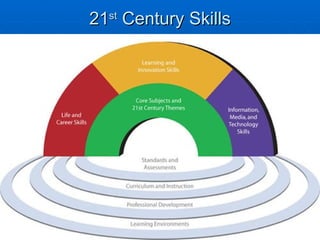
21 st  Century Skills
People in the 21st century live in a technology and media-suffused environment, marked by various characteristics, including: access to an abundance of information rapid changes in technology tools the ability to collaborate and make individual contributions on an unprecedented scale.  To be effective in the 21st century, citizens and workers must be able to exhibit a range of functional and critical thinking skills related to information, media and technology.   Source: 21stcenturyskills.org
How are you involved with 21 st  century technologies In School? At Home? At Work? Your hobbies? Your interests? Your free time? Virtually and/or Physically?
Before next class: Email me a list of project ideas (at least 3) you would be interested in working on this semester. [email_address] For each project idea on your list include at least one website url that demonstrates or provides information related to the project. No email?  Calendars

Day01 Exploring 21st Century Technologies

  • 1.
    Exploring 21 st Century Technologies Day 01 Mr. Mullen Rm. 145 (sometimes)
  • 2.
    A New Classfor ’09-’10 Course Info: Prerequisites: None Focus: Explore technology that models engineering and technical professions of the 21st century. How: Students will engage inprojects designed to introduce them to technical terminology, computer skills, and hands-on designs that model current technology-based engineering tasks. Goal: Help students develop problem solving and decision making skills.
  • 3.
    Experiential Learning Computer-basedinformation literacy and application competency. Hands-on project challenges that will be completed in the class by each student (or small group of students). Tech Wars 2010 – project review and activity challenges
  • 4.
    21 st Century Skills
  • 5.
    People in the21st century live in a technology and media-suffused environment, marked by various characteristics, including: access to an abundance of information rapid changes in technology tools the ability to collaborate and make individual contributions on an unprecedented scale. To be effective in the 21st century, citizens and workers must be able to exhibit a range of functional and critical thinking skills related to information, media and technology. Source: 21stcenturyskills.org
  • 6.
    How are youinvolved with 21 st century technologies In School? At Home? At Work? Your hobbies? Your interests? Your free time? Virtually and/or Physically?
  • 7.
    Before next class:Email me a list of project ideas (at least 3) you would be interested in working on this semester. [email_address] For each project idea on your list include at least one website url that demonstrates or provides information related to the project. No email? Calendars

Editor's Notes

  • #3 This course is designed to introduce students to projects and technology that model engineering and technical professions of the 21st century. Students complete projects designed to introduce them to technical terminology, computer skills, and hands-on designs that model current technology-based engineering tasks. Students will develop problem solving and decision making skills.
  • #4 The following computer programs will be used, discussed, and/or introduced in this class include: Google Sketchup, Google Earth, Solidworks, Softplan, ExpressSCH, Excel, Powerpoint, Logger Pro, Microsoft Flight Simulator, LEGO Mindstorms, Microsoft Visual Studio Basic, Scratch, Dreamweaver, Flash, Gimp, Lego Digital Designer, Blender, ArcGIS, GarminGPS, SolidEdge, Javascript, and others. Hand-on project challenges that will be completed in the class by each student (or small group of students) will include: Underwater ROV design and build, Lego, Electrical Breadboarding, RC Plane, CO2 car design and build, packaging, and computer programming.