LearnBop Blue/Green Deployments
October 2015
whoami
utcnow
CTO at
www.learnbop.com
Algorithmic individual tutoring tuned by veteran teachers
Common Core and state standards supported
Currently enjoyed in schools. Sign up to be notified when parent led version is live:
http://go.learnbop.com/amazon-parents
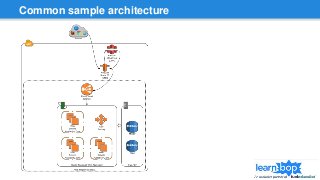
Common sample architecture
General release good practices
Continuous integration - build, test, etc
Scripted environment creation/update (ideally in source control)
Scripted “one-click” deploy
New code, API’s AND database schema should be backwards compatible
Why not rolling releases?
Not immutable infrastructure
❖Opportunities for config creep
❖Rollback risks - Code only releases likely easy. What if you patch the
OS, update a few libraries, etc?
Manual or automatic complexity tracking version state
Some big change will require new servers/environment anyway
Why blue/green?
Immutable infrastructure
❖Ensures your environment build process is up to date each release
❖Old environment is guaranteed untouched if rollback or comparison
needed
Rollback is FAST
Same process for minor or major changes (OS updates? no problem)
One button spin up & deploy plus one button to shift traffic. Either old or new.
No complex in between risk.
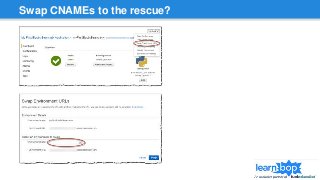
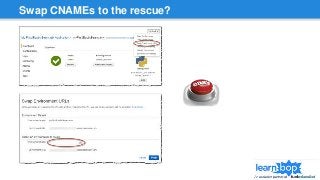
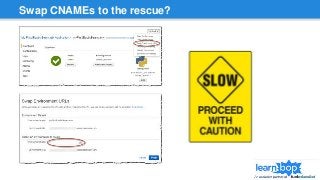
Swap CNAMEs to the rescue?
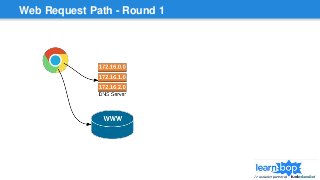
Web Request Path - Round 1
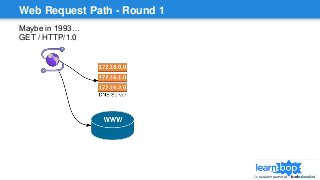
Maybe in 1993…
GET / HTTP/1.0
Web Request Path - Round 1
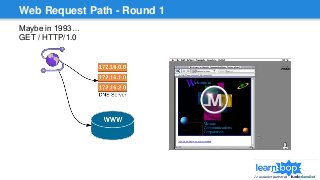
Maybe in 1993…
GET / HTTP/1.0
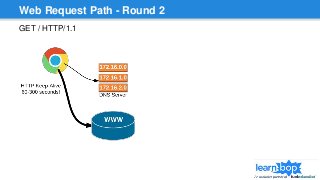
Web Request Path - Round 2
GET / HTTP/1.1
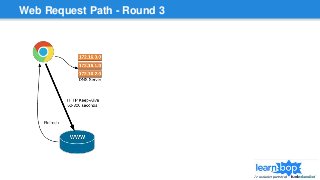
Web Request Path - Round 3
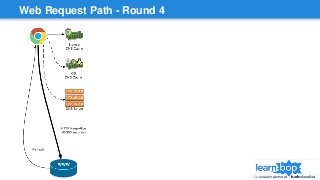
Web Request Path - Round 4
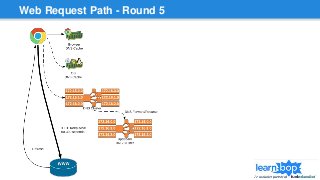
Web Request Path - Round 5
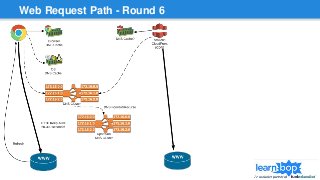
Web Request Path - Round 6
Swap CNAMEs to the rescue?
Swap CNAME worst case
Bad Scenario 1 - Users stuck on old pre-swap version longer than a few min
User actively clicking on the site with keep the HTTP keep-alive sockets
active and won’t get a chance to check DNS again
Browser and OS DNS cache can keep old value longer than a minimal DNS
TTL
Some DNS servers or apps may be configured/misconfigured with
abnormally high TTL
Bad Scenario 2 - Users stuck on old pre-swap version INDEFINITELY
Long polling, websockets, notification refresh will keep re-using the same
HTTP keep-alive socket
It never goes back to a DNS server to get a new address as long as they
don’t lose internet access/close the browser
I’ve seen it happen 12+ hours
Swap CNAME worst case
Bad Scenario 3 - Semi-permanent stale data
CDN caches old version of file during you swap
Browser gets old file with Cache-Control: max-
age=3600 and caches it for a YEAR
Emergency Workarounds
Tell your users to clear cache (not a great move for
public websites)
Change your cachebuster ?build= # and re-publish
Disable CDN
Bad Scenario 4 - User requests going from old → new
→ old servers
Request hits one bank of DNS servers and gets new
IP
Hit different bank of DNS servers and gets old IP
Could send new form data to old server backend...
Swap CNAME worst case
Bad Scenario 3 - Semi-permanent stale data
CDN caches old version of file during you swap
Browser gets old file with Cache-Control: max-
age=3600 and caches it for a YEAR
Emergency Workarounds
Tell your users to clear cache (not a great move for
public websites)
Change your cachebuster ?build= # and re-publish
Disable CDN
Bad Scenario 4 - User requests going from old → new
→ old servers
Request hits one bank of DNS servers and gets new
IP
Hit different bank of DNS servers and gets old IP
Could send new form data to old server backend...
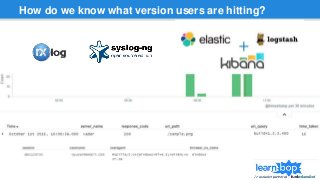
How do we know what version users are hitting?
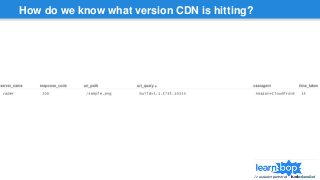
How do we know what version CDN is hitting?
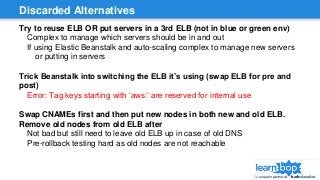
Discarded Alternatives
Try to reuse ELB OR put servers in a 3rd ELB (not in blue or green env)
Complex to manage which servers should be in and out
If using Elastic Beanstalk and auto-scaling complex to manage new servers
or putting in servers
Trick Beanstalk into switching the ELB it’s using (swap ELB for pre and
post)
Error: Tag keys starting with ‘aws:’ are reserved for internal use
Swap CNAMEs first and then put new nodes in both new and old ELB.
Remove old nodes from old ELB after
Not bad but still need to leave old ELB up in case of old DNS
Pre-rollback testing hard as old nodes are not reachable
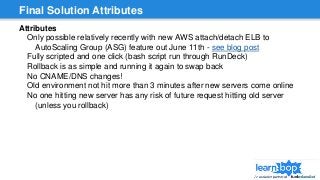
Final Solution Attributes
Attributes
Only possible relatively recently with new AWS attach/detach ELB to
AutoScaling Group (ASG) feature out June 11th - see blog post
Fully scripted and one click (bash script run through RunDeck)
Rollback is as simple and running it again to swap back
No CNAME/DNS changes!
Old environment not hit more than 3 minutes after new servers come online
No one hitting new server has any risk of future request hitting old server
(unless you rollback)
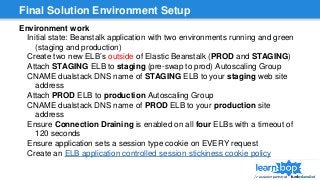
Final Solution Environment Setup
Environment work
Initial state: Beanstalk application with two environments running and green
(staging and production)
Create two new ELB’s outside of Elastic Beanstalk (PROD and STAGING)
Attach STAGING ELB to staging (pre-swap to prod) Autoscaling Group
CNAME dualstack DNS name of STAGING ELB to your staging web site
address
Attach PROD ELB to production Autoscaling Group
CNAME dualstack DNS name of PROD ELB to your production site
address
Ensure Connection Draining is enabled on all four ELBs with a timeout of
120 seconds
Ensure application sets a session type cookie on EVERY request
Create an ELB application controlled session stickiness cookie policy
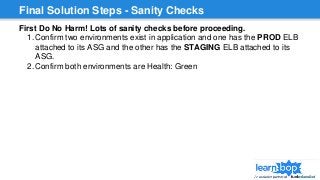
Final Solution Steps - Sanity Checks
First Do No Harm! Lots of sanity checks before proceeding.
1. Confirm two environments exist in application and one has the PROD ELB
attached to its ASG and the other has the STAGING ELB attached to its
ASG.
2. Confirm both environments are Health: Green
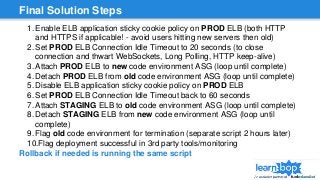
Final Solution Steps
1. Enable ELB application sticky cookie policy on PROD ELB (both HTTP
and HTTPS if applicable! - avoid users hitting new servers then old)
2. Set PROD ELB Connection Idle Timeout to 20 seconds (to close
connection and thwart WebSockets, Long Polling, HTTP keep-alive)
3. Attach PROD ELB to new code environment ASG (loop until complete)
4. Detach PROD ELB from old code environment ASG (loop until complete)
5. Disable ELB application sticky cookie policy on PROD ELB
6. Set PROD ELB Connection Idle Timeout back to 60 seconds
7. Attach STAGING ELB to old code environment ASG (loop until complete)
8. Detach STAGING ELB from new code environment ASG (loop until
complete)
9. Flag old code environment for termination (separate script 2 hours later)
10.Flag deployment successful in 3rd party tools/monitoring
Rollback if needed is running the same script
Q&A / Thank you!
Always Be Shipping!
Email: alec@learnbop.com
Twitter: alec1a
Slide Deck (posted by Sunday, Oct 4th)
http://tinyurl.com/bluegreen2015
LearnBop for Parents
http://go.learnbop.com/amazon-parents

LearnBop Blue Green AWS Deployments - October 2015

  • 1.
  • 2.
  • 3.
    utcnow CTO at www.learnbop.com Algorithmic individualtutoring tuned by veteran teachers Common Core and state standards supported Currently enjoyed in schools. Sign up to be notified when parent led version is live: http://go.learnbop.com/amazon-parents
  • 4.
  • 5.
    General release goodpractices Continuous integration - build, test, etc Scripted environment creation/update (ideally in source control) Scripted “one-click” deploy New code, API’s AND database schema should be backwards compatible
  • 6.
    Why not rollingreleases? Not immutable infrastructure ❖Opportunities for config creep ❖Rollback risks - Code only releases likely easy. What if you patch the OS, update a few libraries, etc? Manual or automatic complexity tracking version state Some big change will require new servers/environment anyway
  • 7.
    Why blue/green? Immutable infrastructure ❖Ensuresyour environment build process is up to date each release ❖Old environment is guaranteed untouched if rollback or comparison needed Rollback is FAST Same process for minor or major changes (OS updates? no problem) One button spin up & deploy plus one button to shift traffic. Either old or new. No complex in between risk.
  • 8.
    Swap CNAMEs tothe rescue?
  • 9.
    Swap CNAMEs tothe rescue?
  • 10.
  • 11.
    Web Request Path- Round 1 Maybe in 1993… GET / HTTP/1.0
  • 12.
    Web Request Path- Round 1 Maybe in 1993… GET / HTTP/1.0
  • 13.
    Web Request Path- Round 2 GET / HTTP/1.1
  • 14.
  • 15.
  • 16.
  • 17.
  • 18.
    Swap CNAMEs tothe rescue?
  • 19.
    Swap CNAME worstcase Bad Scenario 1 - Users stuck on old pre-swap version longer than a few min User actively clicking on the site with keep the HTTP keep-alive sockets active and won’t get a chance to check DNS again Browser and OS DNS cache can keep old value longer than a minimal DNS TTL Some DNS servers or apps may be configured/misconfigured with abnormally high TTL Bad Scenario 2 - Users stuck on old pre-swap version INDEFINITELY Long polling, websockets, notification refresh will keep re-using the same HTTP keep-alive socket It never goes back to a DNS server to get a new address as long as they don’t lose internet access/close the browser I’ve seen it happen 12+ hours
  • 20.
    Swap CNAME worstcase Bad Scenario 3 - Semi-permanent stale data CDN caches old version of file during you swap Browser gets old file with Cache-Control: max- age=3600 and caches it for a YEAR Emergency Workarounds Tell your users to clear cache (not a great move for public websites) Change your cachebuster ?build= # and re-publish Disable CDN Bad Scenario 4 - User requests going from old → new → old servers Request hits one bank of DNS servers and gets new IP Hit different bank of DNS servers and gets old IP Could send new form data to old server backend...
  • 21.
    Swap CNAME worstcase Bad Scenario 3 - Semi-permanent stale data CDN caches old version of file during you swap Browser gets old file with Cache-Control: max- age=3600 and caches it for a YEAR Emergency Workarounds Tell your users to clear cache (not a great move for public websites) Change your cachebuster ?build= # and re-publish Disable CDN Bad Scenario 4 - User requests going from old → new → old servers Request hits one bank of DNS servers and gets new IP Hit different bank of DNS servers and gets old IP Could send new form data to old server backend...
  • 22.
    How do weknow what version users are hitting?
  • 23.
    How do weknow what version CDN is hitting?
  • 24.
    Discarded Alternatives Try toreuse ELB OR put servers in a 3rd ELB (not in blue or green env) Complex to manage which servers should be in and out If using Elastic Beanstalk and auto-scaling complex to manage new servers or putting in servers Trick Beanstalk into switching the ELB it’s using (swap ELB for pre and post) Error: Tag keys starting with ‘aws:’ are reserved for internal use Swap CNAMEs first and then put new nodes in both new and old ELB. Remove old nodes from old ELB after Not bad but still need to leave old ELB up in case of old DNS Pre-rollback testing hard as old nodes are not reachable
  • 25.
    Final Solution Attributes Attributes Onlypossible relatively recently with new AWS attach/detach ELB to AutoScaling Group (ASG) feature out June 11th - see blog post Fully scripted and one click (bash script run through RunDeck) Rollback is as simple and running it again to swap back No CNAME/DNS changes! Old environment not hit more than 3 minutes after new servers come online No one hitting new server has any risk of future request hitting old server (unless you rollback)
  • 26.
    Final Solution EnvironmentSetup Environment work Initial state: Beanstalk application with two environments running and green (staging and production) Create two new ELB’s outside of Elastic Beanstalk (PROD and STAGING) Attach STAGING ELB to staging (pre-swap to prod) Autoscaling Group CNAME dualstack DNS name of STAGING ELB to your staging web site address Attach PROD ELB to production Autoscaling Group CNAME dualstack DNS name of PROD ELB to your production site address Ensure Connection Draining is enabled on all four ELBs with a timeout of 120 seconds Ensure application sets a session type cookie on EVERY request Create an ELB application controlled session stickiness cookie policy
  • 27.
    Final Solution Steps- Sanity Checks First Do No Harm! Lots of sanity checks before proceeding. 1. Confirm two environments exist in application and one has the PROD ELB attached to its ASG and the other has the STAGING ELB attached to its ASG. 2. Confirm both environments are Health: Green
  • 28.
    Final Solution Steps 1.Enable ELB application sticky cookie policy on PROD ELB (both HTTP and HTTPS if applicable! - avoid users hitting new servers then old) 2. Set PROD ELB Connection Idle Timeout to 20 seconds (to close connection and thwart WebSockets, Long Polling, HTTP keep-alive) 3. Attach PROD ELB to new code environment ASG (loop until complete) 4. Detach PROD ELB from old code environment ASG (loop until complete) 5. Disable ELB application sticky cookie policy on PROD ELB 6. Set PROD ELB Connection Idle Timeout back to 60 seconds 7. Attach STAGING ELB to old code environment ASG (loop until complete) 8. Detach STAGING ELB from new code environment ASG (loop until complete) 9. Flag old code environment for termination (separate script 2 hours later) 10.Flag deployment successful in 3rd party tools/monitoring Rollback if needed is running the same script
  • 29.
    Q&A / Thankyou! Always Be Shipping! Email: alec@learnbop.com Twitter: alec1a Slide Deck (posted by Sunday, Oct 4th) http://tinyurl.com/bluegreen2015 LearnBop for Parents http://go.learnbop.com/amazon-parents

Editor's Notes

  • #3 https://www.jasondavies.com/wordcloud/#
  • #4 LearnBop has had great results in schools from NYC to California suburbs. If you are or know any parents that could use help please pass it along.
  • #5 Note on diagrams. To keep it easier to read I didn’t make it a real sequence diagram with arrows back and forth. The DNS server is of course not actually making the request for you to the load balancer but you can think of the flow getting data from DNS and then logically continuing to the load balancer. What type of Web Server doesn’t really matter. Nginx, Node.js, Windows IIS same idea At a base level if you’re using a different CDN, DNS, or Load Balancer doesn’t matter much either unless they’re doing some extra magic
  • #8 MTTI / MTTR faster. If someone cowboy’d up and did make a manual change it will be found on next release when it’s missing vs who knows how much later when you switch to new instances when no one will remember the signs of the original issue.
  • #10 How long does this take? 1 minute or less 5 minutes or less 3 hours or less 48 hours MAYBE FOREVER Let’s take a step back looking at how the requests go and get back to this...
  • #11 Before DNS people kept a text file to convert addresses to IP’s. DNS was figured out before the web though.
  • #15 Long polling / Comet / Web Sockets / Notifications / Toast
  • #16 DNS caches!
  • #17 DNS isn’t one server though… It would never survive today’s traffic and availability demands. Neither the DNS server your domain is hosted on NOR upstream.
  • #18 We can’t forget about the CDN though. It will hit DNS. Maybe it gets the same answer as your user’s browser. Maybe not!
  • #19 Nope.
  • #20 MTTI / MTTR faster. If someone cowboy’d up and did make a manual change it will be found on next release when it’s missing vs who knows how much later when you switch to new instances when no one will remember the signs of the original issue.
  • #21 Users go back and forth in time between your code versions...
  • #23 nxlog -> syslog - fast and no expensive processing/grokking of logs on the web servers themselves Graylog2 is fine also. Splunk is awesome but can be pricey. ELK stack grok log files with patterns to pull out pieces of interest including sessionId’s from cookies, username making requests, etc CAREFUL what you store and what your security access is to this server to make sure a bad actor can’t get in and impersonate user traffic with it… Note the useragent and build in uri_query
  • #24 Note the useragent of Amazon+CloudFront and the build in uri_query
  • #27 The session cookie does not have to and SHOULD not be the same as your web session. You don’t want that sent with static resources for instance. You do need something just for Amazon to do a sticky cookie load balancing policy with
  • #29 Why not sticky cookies all the time? Can lead to inefficient load balancing especially with autoscaling. None of your existing sessions will move to new machines! Makes them much slower to help ease load.