A strategy for better scalability, security, and control for large AtoM installations
https://commons.wikimedia.org/wiki/File:Cell_division_according_to_E._Strasburger_(1875).png
2-site replication with AtoM
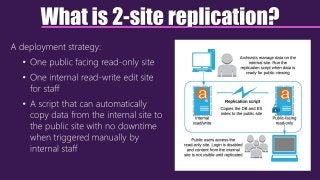
What is 2-site replication?
A deployment strategy:
• One public facing read-only site
• One internal read-write edit site
for staff
• A script that can automatically
copy data from the internal site to
the public site with no downtime
when triggered manually by
internal staff
Advantages of a 2-site deployment
Scalability
• Can enable aggressive caching on the public front-end
• Staff have their own separate site for editing
• Can tune the server parameters of each site differently for best performance
Control
• Staff can choose when records with no publication status (such as authority
records, terms, repository records, etc.) become publicly visible
Security
• Login can be completely disabled in the public-facing site
• Staff edit site can be kept behind firewall, HTTP authentication, and other
security measures
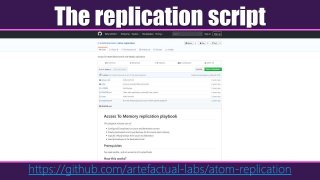
The replication script
https://github.com/artefactual-labs/atom-replication
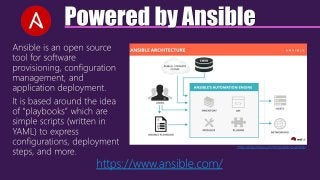
Powered by Ansible
Ansible is an open source
tool for software
provisioning, configuration
management, and
application deployment.
It is based around the idea
of “playbooks” which are
simple scripts (written in
YAML) to express
configurations, deployment
steps, and more.
https://blog.knoldus.com/introduction-to-ansible/
https://www.ansible.com/
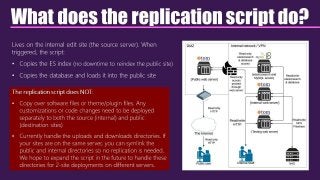
What does the replication script do?
Lives on the internal edit site (the source server). When
triggered, the script:
• Copies the ES index (no downtime to reindex the public site)
• Copies the database and loads it into the public site
The replication script does NOT:
• Copy over software files or theme/plugin files. Any
customizations or code changes need to be deployed
separately to both the source (internal) and public
(destination sites)
• Currently handle the uploads and downloads directories. If
your sites are on the same server, you can symlink the
public and internal directories so no replication is needed.
We hope to expand the script in the future to handle these
directories for 2-site deployments on different servers.
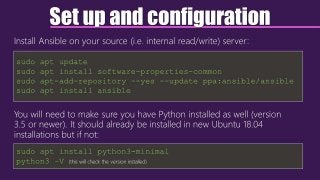
Set up and configuration
Install Ansible on your source (i.e. internal read/write) server:
You will need to make sure you have Python installed as well (version
3.5 or newer). It should already be installed in new Ubuntu 18.04
installations but if not:
sudo apt update
sudo apt install software-properties-common
sudo apt-add-repository --yes --update ppa:ansible/ansible
sudo apt install ansible
sudo apt install python3-minimal
python3 –V (this will check the version installed)
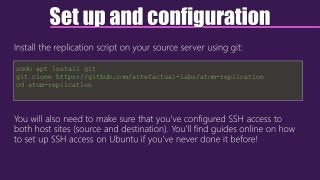
Set up and configuration
Install the replication script on your source server using git:
You will also need to make sure that you’ve configured SSH access to
both host sites (source and destination). You’ll find guides online on how
to set up SSH access on Ubuntu if you’ve never done it before!
sudo apt install git
git clone https://github.com/artefactual-labs/atom-replication
cd atom-replication
Set up and configuration
In the replication scripts, edit the hosts file to include the IP address of your
source (internal) and destination (public) AtoM instances.
If both MySQL and Elasticsearch are installed in the same host, put the same
IP address twice. Default contents of the file:
Notice that you’ll want to add the SSH user that Ansible should use for
each host as well.
[atom_sites]
# Source site
atom_es_source_site ansible_ssh_host=10.10.10.15 ansible_ssh_user=vagrant
atom_mysql_source_site ansible_ssh_host=10.10.10.15 ansible_ssh_user=vagrant
# Destination site
atom_es_destination_site ansible_ssh_host=10.10.10.10 ansible_ssh_user=vagrant
atom_mysql_destination_site ansible_ssh_host=10.10.10.10 ansible_ssh_user=vagrant
Set up and configuration
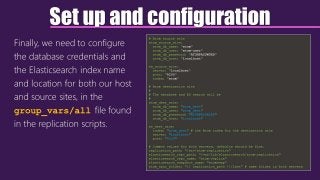
Finally, we need to configure
the database credentials and
the Elasticsearch index name
and location for both our host
and source sites, in the
group_vars/all file found
in the replication scripts.
# Atom source site
atom_source_site:
atom_db_name: "atom"
atom_db_user: "atom-user"
atom_db_password: "ATOMPASSWORD"
atom_db_host: "localhost"
es_source_site:
server: "localhost"
port: "9200"
index: "atom"
# Atom destination site
#
# The database and ES search will be
#
atom_dest_site:
atom_db_name: "atom_dest"
atom_db_user: "atom_dest"
atom_db_password: "ATOMPASSWORD"
atom_db_host: "localhost"
es_dest_site:
index: "atom_dest" # the Atom index for the destination site
server: "localhost"
port: "9200"
# Common values for both servers, defaults should be fine.
replication_path: "/srv/atom-replication"
elasticsearch_repo_path: "/var/lib/elasticsearch/atom-replication"
elasticsearch_repo_name: "atom-replica"
elasticsearch_snapshot_name: "atomsnap"
atom_sync_folder: "{{ replication_path }}/last" # same folder in both servers
Using the script
• Confirm the source/edit site is okay, i.e. the site is up, browse works,
archival descriptions page is okay. If source site is broken, the
destination site will be broken as well after replication!
• Impose a data/edit freeze on the source site to assure nobody is
making changes to the database.
• SSH or log in to your source server, and change to the directory where
the replication script is installed
• Run the replication Ansible playbook!
ansible-playbook -i hosts playbook.yml
Using the script
• After running the script, you should clear the Symfony cache, and
restart PHP-FPM on the destination (i.e. public) site.
php symfony cc
sudo systemctl php7.2-fpm restart
• If you are using an additional caching engine (such as Memcached,
Varnish, etc.) then you should clear that cache as well, to make sure that
the newest updates are shown to your public users.
• Do a quick review of your public site to make sure everything looks
good – remember to clear your browser cache (or test in an incognito
browser window) so you are seeing the newest updates!
See: https://www.accesstomemory.org/docs/latest/admin-manual/maintenance/clear-cache/
info@artefactual.com
Questions?

2-site replication with AtoM

  • 1.
    A strategy forbetter scalability, security, and control for large AtoM installations https://commons.wikimedia.org/wiki/File:Cell_division_according_to_E._Strasburger_(1875).png 2-site replication with AtoM
  • 2.
    What is 2-sitereplication? A deployment strategy: • One public facing read-only site • One internal read-write edit site for staff • A script that can automatically copy data from the internal site to the public site with no downtime when triggered manually by internal staff
  • 3.
    Advantages of a2-site deployment Scalability • Can enable aggressive caching on the public front-end • Staff have their own separate site for editing • Can tune the server parameters of each site differently for best performance Control • Staff can choose when records with no publication status (such as authority records, terms, repository records, etc.) become publicly visible Security • Login can be completely disabled in the public-facing site • Staff edit site can be kept behind firewall, HTTP authentication, and other security measures
  • 4.
  • 5.
    Powered by Ansible Ansibleis an open source tool for software provisioning, configuration management, and application deployment. It is based around the idea of “playbooks” which are simple scripts (written in YAML) to express configurations, deployment steps, and more. https://blog.knoldus.com/introduction-to-ansible/ https://www.ansible.com/
  • 6.
    What does thereplication script do? Lives on the internal edit site (the source server). When triggered, the script: • Copies the ES index (no downtime to reindex the public site) • Copies the database and loads it into the public site The replication script does NOT: • Copy over software files or theme/plugin files. Any customizations or code changes need to be deployed separately to both the source (internal) and public (destination sites) • Currently handle the uploads and downloads directories. If your sites are on the same server, you can symlink the public and internal directories so no replication is needed. We hope to expand the script in the future to handle these directories for 2-site deployments on different servers.
  • 7.
    Set up andconfiguration Install Ansible on your source (i.e. internal read/write) server: You will need to make sure you have Python installed as well (version 3.5 or newer). It should already be installed in new Ubuntu 18.04 installations but if not: sudo apt update sudo apt install software-properties-common sudo apt-add-repository --yes --update ppa:ansible/ansible sudo apt install ansible sudo apt install python3-minimal python3 –V (this will check the version installed)
  • 8.
    Set up andconfiguration Install the replication script on your source server using git: You will also need to make sure that you’ve configured SSH access to both host sites (source and destination). You’ll find guides online on how to set up SSH access on Ubuntu if you’ve never done it before! sudo apt install git git clone https://github.com/artefactual-labs/atom-replication cd atom-replication
  • 9.
    Set up andconfiguration In the replication scripts, edit the hosts file to include the IP address of your source (internal) and destination (public) AtoM instances. If both MySQL and Elasticsearch are installed in the same host, put the same IP address twice. Default contents of the file: Notice that you’ll want to add the SSH user that Ansible should use for each host as well. [atom_sites] # Source site atom_es_source_site ansible_ssh_host=10.10.10.15 ansible_ssh_user=vagrant atom_mysql_source_site ansible_ssh_host=10.10.10.15 ansible_ssh_user=vagrant # Destination site atom_es_destination_site ansible_ssh_host=10.10.10.10 ansible_ssh_user=vagrant atom_mysql_destination_site ansible_ssh_host=10.10.10.10 ansible_ssh_user=vagrant
  • 10.
    Set up andconfiguration Finally, we need to configure the database credentials and the Elasticsearch index name and location for both our host and source sites, in the group_vars/all file found in the replication scripts. # Atom source site atom_source_site: atom_db_name: "atom" atom_db_user: "atom-user" atom_db_password: "ATOMPASSWORD" atom_db_host: "localhost" es_source_site: server: "localhost" port: "9200" index: "atom" # Atom destination site # # The database and ES search will be # atom_dest_site: atom_db_name: "atom_dest" atom_db_user: "atom_dest" atom_db_password: "ATOMPASSWORD" atom_db_host: "localhost" es_dest_site: index: "atom_dest" # the Atom index for the destination site server: "localhost" port: "9200" # Common values for both servers, defaults should be fine. replication_path: "/srv/atom-replication" elasticsearch_repo_path: "/var/lib/elasticsearch/atom-replication" elasticsearch_repo_name: "atom-replica" elasticsearch_snapshot_name: "atomsnap" atom_sync_folder: "{{ replication_path }}/last" # same folder in both servers
  • 11.
    Using the script •Confirm the source/edit site is okay, i.e. the site is up, browse works, archival descriptions page is okay. If source site is broken, the destination site will be broken as well after replication! • Impose a data/edit freeze on the source site to assure nobody is making changes to the database. • SSH or log in to your source server, and change to the directory where the replication script is installed • Run the replication Ansible playbook! ansible-playbook -i hosts playbook.yml
  • 12.
    Using the script •After running the script, you should clear the Symfony cache, and restart PHP-FPM on the destination (i.e. public) site. php symfony cc sudo systemctl php7.2-fpm restart • If you are using an additional caching engine (such as Memcached, Varnish, etc.) then you should clear that cache as well, to make sure that the newest updates are shown to your public users. • Do a quick review of your public site to make sure everything looks good – remember to clear your browser cache (or test in an incognito browser window) so you are seeing the newest updates! See: https://www.accesstomemory.org/docs/latest/admin-manual/maintenance/clear-cache/
  • 13.