August 2016
SAP HANA, express edition
Start application development for free on laptop/desktop or in the cloud
© 2016 SAP SE or an SAP affiliate company. All rights reserved. 2
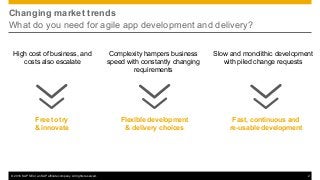
Changing market trends
What do you need for agile app development and delivery?
Slow and monolithic development
with piled change requests
Fast, continuous and
re-usable development
Free to try
& innovate
High cost of business, and
costs also escalate
Flexible development
& delivery choices
Complexity hampers business
speed with constantly changing
requirements
© 2016 SAP SE or an SAP affiliate company. All rights reserved. 3
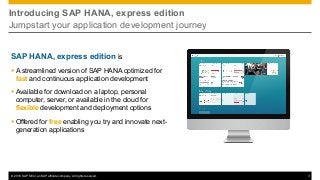
Introducing SAP HANA, express edition
Jumpstart your application development journey
SAP HANA, express edition is
§ A streamlined version of SAP HANA optimized for
fast and continuous application development
§ Available for download on a laptop, personal
computer, server, or available in the cloud for
flexible development and deployment options
§ Offered for free enabling you try and innovate next-
generation applications
© 2016 SAP SE or an SAP affiliate company. All rights reserved. 4
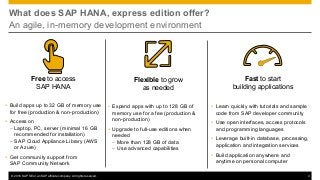
What does SAP HANA, express edition offer?
An agile, in-memory development environment
Free to access
SAP HANA
Ÿ Build apps up to 32 GB of memory use
for free (production & non-production)
Ÿ Access on
– Laptop, PC, server (minimal 16 GB
recommended for installation)
– SAP Cloud Appliance Library (AWS
or Azure)
Ÿ Get community support from
SAP Community Network
Flexible to grow
as needed
• Expand apps with up to 128 GB of
memory use for a fee (production &
non-production)
Ÿ Upgrade to full-use editions when
needed
– More than 128 GB of data
– Use advanced capabilities
Fast to start
building applications
Ÿ Learn quickly with tutorials and sample
code from SAP developer community
Ÿ Use open interfaces, access protocols
and programming languages
Ÿ Leverage built-in database, processing,
application and integration services
Ÿ Build application anywhere and
anytime on personal computer
© 2016 SAP SE or an SAP affiliate company. All rights reserved. 5
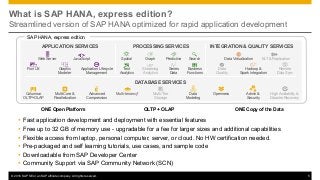
What is SAP HANA, express edition?
Streamlined version of SAP HANA optimized for rapid application development
Ÿ Fast application development and deployment with essential features
Ÿ Free up to 32 GB of memory use - upgradable for a fee for larger sizes and additional capabilities
Ÿ Flexible access from laptop, personal computer, server, or cloud. No HW certification needed.
Ÿ Pre-packaged and self learning tutorials, use cases, and sample code
Ÿ Downloadable from SAP Developer Center
Ÿ Community Support via SAP Community Network (SCN)
SAP HANA, express edition
DATABASE SERVICES
Web Server JavaScript
Graphic
Modeler
Data Virtualization ELT & Replication
Columnar
OLTP+OLAP
Multi-Core &
Parallelization
Advanced
Compression
Multi-tenancy* Multi-Tier
Storage
Graph Predictive Search
Data
Quality
Series
Data
Business
Functions
Streaming
Analytics
Application Lifecycle
Management
High Availability &
Disaster Recovery
OpennessData
Modeling
Admin &
Security
Remote
Data Sync
Spatial
Text
Analytics
Fiori UX Hadoop &
Spark Integration
ALM
</>
APPLICATION SERVICES INTEGRATION & QUALITY SERVICESPROCESSING SERVICES
OLTP + OLAPONE Open Platform ONE Copy of the Data
© 2016 SAP SE or an SAP affiliate company. All rights reserved. 6
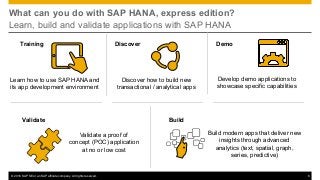
What can you do with SAP HANA, express edition?
Learn, build and validate applications with SAP HANA
Develop demo applications to
showcase specific capabilities
Discover how to build new
transactional / analytical apps
Build modern apps that deliver new
insights through advanced
analytics (text, spatial, graph,
series, predictive)
Learn how to use SAP HANA and
its app development environment
Training DemoDiscover
Build
Validate a proof of
concept (POC) application
at no or low cost
Validate
© 2016 SAP SE or an SAP affiliate company. All rights reserved. 7
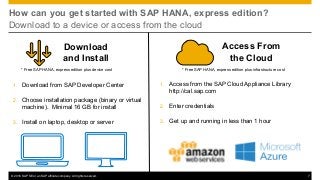
How can you get started with SAP HANA, express edition?
Download to a device or access from the cloud
1. Download from SAP Developer Center
2. Choose installation package (binary or virtual
machine). Minimal 16 GB for install
3. Install on laptop, desktop or server
Download
and Install
Access From
the Cloud
1. Access from the SAP Cloud Appliance Library
http://cal.sap.com
2. Enter credentials
3. Get up and running in less than 1 hour
* Free SAP HANA, express edition plus infrastructure cost* Free SAP HANA, express edition plus device cost
© 2016 SAP SE or an SAP affiliate company. All rights reserved. 8
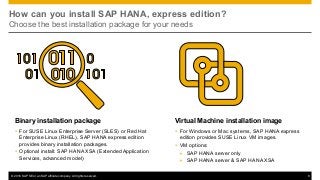
How can you install SAP HANA, express edition?
Choose the best installation package for your needs
Binary installation package
Ÿ For SUSE Linux Enterprise Server (SLES) or Red Hat
Enterprise Linux (RHEL), SAP HANA express edition
provides binary installation packages.
Ÿ Optional install: SAP HANA XSA (Extended Application
Services, advanced model)
Virtual Machine installation image
Ÿ For Windows or Mac systems, SAP HANA express
edition provides SUSE Linux VM images.
Ÿ VM options:
Ø SAP HANA server only
Ø SAP HANA server & SAP HANA XSA
© 2016 SAP SE or an SAP affiliate company. All rights reserved. 9
What is installed with SAP HANA, express edition?
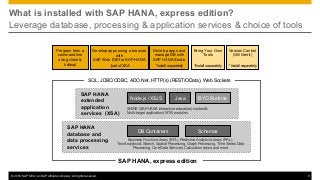
Leverage database, processing & application services & choice of tools
SAP HANA
database and
data processing
services
SAP HANA
extended
application
services (XSA)
DB Containers Schemas
Node.js / XSJS Java BYO Runtime
SHINE (SAP HANA interactive education) content &
Multi-target application (MTA) modules
Business Function Library (BFL), Predictive Analytics Library (PAL),
Text Analytics & Search, Spatial Processing, Graph Processing, Time Series Data
Processing, Core Data Services, Calculation views, and more
Program from a
command line
using client &
hdbsql
Develop apps and
manage DB with
SAP HANA Studio
Develop apps using a browser
with
SAP Web IDE for SAP HANA
*part of XSA *Install separately
SAP HANA, express edition
Bring Your Own
Tools
*Install separately
Version Control
(Git/Gerrit)
* Install separately
SQL, JDBC/ODBC, ADO.Net, HTTP(s) (REST/OData), Web Sockets
© 2016 SAP SE or an SAP affiliate company. All rights reserved. 10
How to get started using SAP HANA, express edition
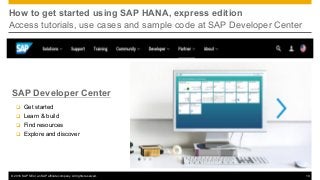
Access tutorials, use cases and sample code at SAP Developer Center
SAP Developer Center
q Get started
q Learn & build
q Find resources
q Explore and discover
© 2016 SAP SE or an SAP affiliate company. All rights reserved. 11
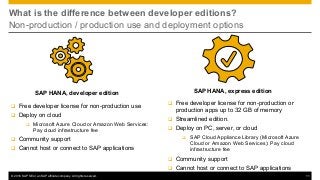
What is the difference between developer editions?
Non-production / production use and deployment options
SAP HANA, express editionSAP HANA, developer edition
q Free developer license for non-production or
production apps up to 32 GB of memory
q Streamlined edition.
q Deploy on PC, server, or cloud
q SAP Cloud Appliance Library (Microsoft Azure
Cloud or Amazon Web Services): Pay cloud
infrastructure fee
q Community support
q Cannot host or connect to SAP applications
q Free developer license for non-production use
q Deploy on cloud
q Microsoft Azure Cloud or Amazon Web Services:
Pay cloud infrastructure fee
q Community support
q Cannot host or connect to SAP applications
© 2016 SAP SE or an SAP affiliate company. All rights reserved. 12
When should you upgrade to another edition of SAP HANA?
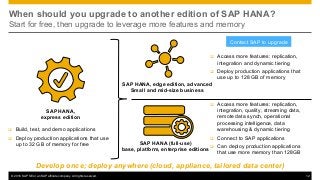
Start for free, then upgrade to leverage more features and memory
SAP HANA,
express edition
q Build, test, and demo applications
q Deploy production applications that use
up to 32 GB of memory for free SAP HANA (full-use)
base, platform, enterprise editions
Develop once; deploy anywhere (cloud, appliance, tailored data center)
SAP HANA, edge edition, advanced
Small and mid-size business
q Access more features: replication,
integration, quality, streaming data,
remote data synch, operational
processing intelligence, data
warehousing & dynamic tiering
q Connect to SAP applications
q Can deploy production applications
that use more memory than 128GB
q Access more features: replication,
integration and dynamic tiering
q Deploy production applications that
use up to 128 GB of memory
Contact SAP to upgrade
© 2016 SAP SE or an SAP affiliate company. All rights reserved. 13
What is the initial response to SAP HANA, express edition?
Developer references
Developers
“With	this	new	starter	SAP	HANA	express	edition,	we	have	
been	able	to	jumpstart	our	development	immediately,	
using	our	existing	personal	computers.	Additionally,	
the availability of	the	cloud	offering	and	flexible	upgrade	
options	to	full-use	editions	will	help	us	further	experiment	
and	leverage	SAP	HANA	to	support	our	future	technology	
innovation	plans.”
Jean	Safar,	Chief	Architect,	Calypso	Technology	INC
ISVs
“	SAP	HANA,	express	edition	provides	an	awesome	opportunity	
for	developers,	system	administrators	and	students	to	learn	
about	SAP	HANA	on	their	own	PC	or	laptop	without	requiring	
large	scale	IT	infrastructure	normally	associated	with	in-
memory	computing.	I	have	learned	more	about	SAP	HANA	in	
the	last	2	months	using	the	express	edition	than	I	have	learned	
over	the	last	two	years	attending	presentations	or	from	online	
training	and	research.”
Gary	Hooker,	SAP	Mentor
© 2016 SAP SE or an SAP affiliate company. All rights reserved. 14
SAP HANA, express edition
Get started today!
Upgrade When Needed
Contact
SAP
Ask SAP HANA
Connect with experts via communityFollow @SAPinMemory
Keep updated with #SAPHANA
Spread the word
Learn More
Visit
SAP Developer Center
Start for Free
Visit
Registration Page
Thank you!
Jordan Cao
SAP HANA Global Product Marketing
Email: jordan.cao@sap.com

SAP HANA, express edition Introduction Deck

  • 1.
    August 2016 SAP HANA,express edition Start application development for free on laptop/desktop or in the cloud
  • 2.
    © 2016 SAPSE or an SAP affiliate company. All rights reserved. 2 Changing market trends What do you need for agile app development and delivery? Slow and monolithic development with piled change requests Fast, continuous and re-usable development Free to try & innovate High cost of business, and costs also escalate Flexible development & delivery choices Complexity hampers business speed with constantly changing requirements
  • 3.
    © 2016 SAPSE or an SAP affiliate company. All rights reserved. 3 Introducing SAP HANA, express edition Jumpstart your application development journey SAP HANA, express edition is § A streamlined version of SAP HANA optimized for fast and continuous application development § Available for download on a laptop, personal computer, server, or available in the cloud for flexible development and deployment options § Offered for free enabling you try and innovate next- generation applications
  • 4.
    © 2016 SAPSE or an SAP affiliate company. All rights reserved. 4 What does SAP HANA, express edition offer? An agile, in-memory development environment Free to access SAP HANA Ÿ Build apps up to 32 GB of memory use for free (production & non-production) Ÿ Access on – Laptop, PC, server (minimal 16 GB recommended for installation) – SAP Cloud Appliance Library (AWS or Azure) Ÿ Get community support from SAP Community Network Flexible to grow as needed • Expand apps with up to 128 GB of memory use for a fee (production & non-production) Ÿ Upgrade to full-use editions when needed – More than 128 GB of data – Use advanced capabilities Fast to start building applications Ÿ Learn quickly with tutorials and sample code from SAP developer community Ÿ Use open interfaces, access protocols and programming languages Ÿ Leverage built-in database, processing, application and integration services Ÿ Build application anywhere and anytime on personal computer
  • 5.
    © 2016 SAPSE or an SAP affiliate company. All rights reserved. 5 What is SAP HANA, express edition? Streamlined version of SAP HANA optimized for rapid application development Ÿ Fast application development and deployment with essential features Ÿ Free up to 32 GB of memory use - upgradable for a fee for larger sizes and additional capabilities Ÿ Flexible access from laptop, personal computer, server, or cloud. No HW certification needed. Ÿ Pre-packaged and self learning tutorials, use cases, and sample code Ÿ Downloadable from SAP Developer Center Ÿ Community Support via SAP Community Network (SCN) SAP HANA, express edition DATABASE SERVICES Web Server JavaScript Graphic Modeler Data Virtualization ELT & Replication Columnar OLTP+OLAP Multi-Core & Parallelization Advanced Compression Multi-tenancy* Multi-Tier Storage Graph Predictive Search Data Quality Series Data Business Functions Streaming Analytics Application Lifecycle Management High Availability & Disaster Recovery OpennessData Modeling Admin & Security Remote Data Sync Spatial Text Analytics Fiori UX Hadoop & Spark Integration ALM </> APPLICATION SERVICES INTEGRATION & QUALITY SERVICESPROCESSING SERVICES OLTP + OLAPONE Open Platform ONE Copy of the Data
  • 6.
    © 2016 SAPSE or an SAP affiliate company. All rights reserved. 6 What can you do with SAP HANA, express edition? Learn, build and validate applications with SAP HANA Develop demo applications to showcase specific capabilities Discover how to build new transactional / analytical apps Build modern apps that deliver new insights through advanced analytics (text, spatial, graph, series, predictive) Learn how to use SAP HANA and its app development environment Training DemoDiscover Build Validate a proof of concept (POC) application at no or low cost Validate
  • 7.
    © 2016 SAPSE or an SAP affiliate company. All rights reserved. 7 How can you get started with SAP HANA, express edition? Download to a device or access from the cloud 1. Download from SAP Developer Center 2. Choose installation package (binary or virtual machine). Minimal 16 GB for install 3. Install on laptop, desktop or server Download and Install Access From the Cloud 1. Access from the SAP Cloud Appliance Library http://cal.sap.com 2. Enter credentials 3. Get up and running in less than 1 hour * Free SAP HANA, express edition plus infrastructure cost* Free SAP HANA, express edition plus device cost
  • 8.
    © 2016 SAPSE or an SAP affiliate company. All rights reserved. 8 How can you install SAP HANA, express edition? Choose the best installation package for your needs Binary installation package Ÿ For SUSE Linux Enterprise Server (SLES) or Red Hat Enterprise Linux (RHEL), SAP HANA express edition provides binary installation packages. Ÿ Optional install: SAP HANA XSA (Extended Application Services, advanced model) Virtual Machine installation image Ÿ For Windows or Mac systems, SAP HANA express edition provides SUSE Linux VM images. Ÿ VM options: Ø SAP HANA server only Ø SAP HANA server & SAP HANA XSA
  • 9.
    © 2016 SAPSE or an SAP affiliate company. All rights reserved. 9 What is installed with SAP HANA, express edition? Leverage database, processing & application services & choice of tools SAP HANA database and data processing services SAP HANA extended application services (XSA) DB Containers Schemas Node.js / XSJS Java BYO Runtime SHINE (SAP HANA interactive education) content & Multi-target application (MTA) modules Business Function Library (BFL), Predictive Analytics Library (PAL), Text Analytics & Search, Spatial Processing, Graph Processing, Time Series Data Processing, Core Data Services, Calculation views, and more Program from a command line using client & hdbsql Develop apps and manage DB with SAP HANA Studio Develop apps using a browser with SAP Web IDE for SAP HANA *part of XSA *Install separately SAP HANA, express edition Bring Your Own Tools *Install separately Version Control (Git/Gerrit) * Install separately SQL, JDBC/ODBC, ADO.Net, HTTP(s) (REST/OData), Web Sockets
  • 10.
    © 2016 SAPSE or an SAP affiliate company. All rights reserved. 10 How to get started using SAP HANA, express edition Access tutorials, use cases and sample code at SAP Developer Center SAP Developer Center q Get started q Learn & build q Find resources q Explore and discover
  • 11.
    © 2016 SAPSE or an SAP affiliate company. All rights reserved. 11 What is the difference between developer editions? Non-production / production use and deployment options SAP HANA, express editionSAP HANA, developer edition q Free developer license for non-production or production apps up to 32 GB of memory q Streamlined edition. q Deploy on PC, server, or cloud q SAP Cloud Appliance Library (Microsoft Azure Cloud or Amazon Web Services): Pay cloud infrastructure fee q Community support q Cannot host or connect to SAP applications q Free developer license for non-production use q Deploy on cloud q Microsoft Azure Cloud or Amazon Web Services: Pay cloud infrastructure fee q Community support q Cannot host or connect to SAP applications
  • 12.
    © 2016 SAPSE or an SAP affiliate company. All rights reserved. 12 When should you upgrade to another edition of SAP HANA? Start for free, then upgrade to leverage more features and memory SAP HANA, express edition q Build, test, and demo applications q Deploy production applications that use up to 32 GB of memory for free SAP HANA (full-use) base, platform, enterprise editions Develop once; deploy anywhere (cloud, appliance, tailored data center) SAP HANA, edge edition, advanced Small and mid-size business q Access more features: replication, integration, quality, streaming data, remote data synch, operational processing intelligence, data warehousing & dynamic tiering q Connect to SAP applications q Can deploy production applications that use more memory than 128GB q Access more features: replication, integration and dynamic tiering q Deploy production applications that use up to 128 GB of memory Contact SAP to upgrade
  • 13.
    © 2016 SAPSE or an SAP affiliate company. All rights reserved. 13 What is the initial response to SAP HANA, express edition? Developer references Developers “With this new starter SAP HANA express edition, we have been able to jumpstart our development immediately, using our existing personal computers. Additionally, the availability of the cloud offering and flexible upgrade options to full-use editions will help us further experiment and leverage SAP HANA to support our future technology innovation plans.” Jean Safar, Chief Architect, Calypso Technology INC ISVs “ SAP HANA, express edition provides an awesome opportunity for developers, system administrators and students to learn about SAP HANA on their own PC or laptop without requiring large scale IT infrastructure normally associated with in- memory computing. I have learned more about SAP HANA in the last 2 months using the express edition than I have learned over the last two years attending presentations or from online training and research.” Gary Hooker, SAP Mentor
  • 14.
    © 2016 SAPSE or an SAP affiliate company. All rights reserved. 14 SAP HANA, express edition Get started today! Upgrade When Needed Contact SAP Ask SAP HANA Connect with experts via communityFollow @SAPinMemory Keep updated with #SAPHANA Spread the word Learn More Visit SAP Developer Center Start for Free Visit Registration Page
  • 15.
    Thank you! Jordan Cao SAPHANA Global Product Marketing Email: jordan.cao@sap.com