Docker for .NET Developers
TASWAR BHATTI (MVP) SYSTEM ARCHITECT
@TASWARBHATTI GEMALTO
HTTP://TASWAR.ZEYTINSOFT.COM
Agenda
 What is Docker?
Images and Containers
Docker vs VM
Tooling around Docker
Dockerfile
Docker linking with other containers
Docker compose
Summary
History of Software Deployment
DevOps on your software
What is Docker?
- Lightweight, open, secure platform
- Simplify building, shipping, running apps
- Shipping container system for code
- Runs natively on Linux or Windows Server
- Runs on Windows or Mac Development machines (with a virtual machine or Hyper-V)
- Relies on "images" and "containers“
- Great for microservices system architecture design and deploy
Docker
Leading open-source containerization platform
Supported natively in Azure
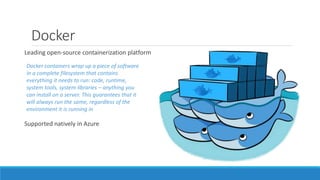
Docker containers wrap up a piece of software
in a complete filesystem that contains
everything it needs to run: code, runtime,
system tools, system libraries – anything you
can install on a server. This guarantees that it
will always run the same, regardless of the
environment it is running in
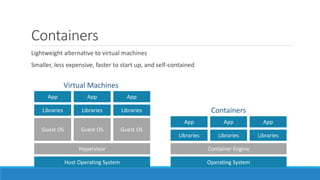
Containers
Lightweight alternative to virtual machines
Smaller, less expensive, faster to start up, and self-contained
Host Operating System
Hypervisor
Guest OS
Libraries
App
Guest OS
Libraries
App
Guest OS
Libraries
App
Operating System
Container Engine
Libraries
App
Libraries
App
Libraries
App
Virtual Machines
Containers
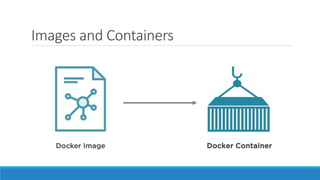
Images and Containers
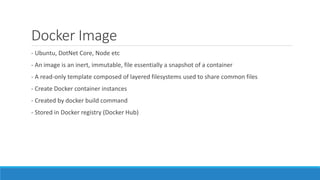
Docker Image
- Ubuntu, DotNet Core, Node etc
- An image is an inert, immutable, file essentially a snapshot of a container
- A read-only template composed of layered filesystems used to share common files
- Create Docker container instances
- Created by docker build command
- Stored in Docker registry (Docker Hub)
Docker Container
- Container is an instance of your image but running
- Using the docker run command
- An isolated and secured shipping container
- created from an image that can be run, started, stopped, moved and deleted
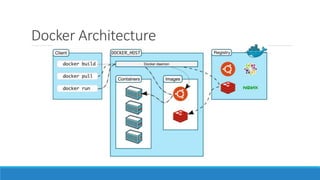
Docker Architecture
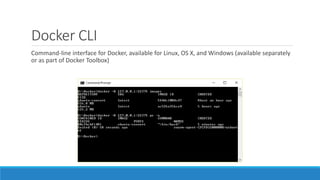
Docker CLI
Command-line interface for Docker, available for Linux, OS X, and Windows (available separately
or as part of Docker Toolbox)
Running a Container
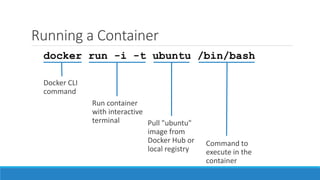
docker run -i -t ubuntu /bin/bash
Common Docker CLI Commands
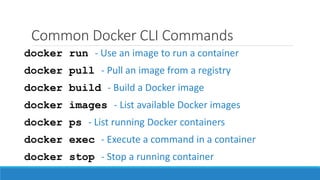
docker run - Use an image to run a container
docker pull - Pull an image from a registry
docker build - Build a Docker image
docker exec - Execute a command in a container
docker stop - Stop a running container
docker images - List available Docker images
docker ps - List running Docker containers
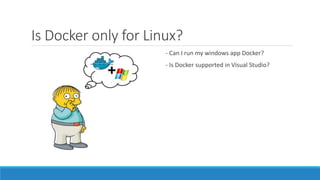
Is Docker only for Linux?
- Can I run my windows app Docker?
- Is Docker supported in Visual Studio?
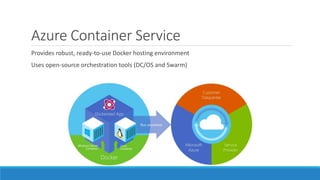
Azure Container Service
Provides robust, ready-to-use Docker hosting environment
Uses open-source orchestration tools (DC/OS and Swarm)
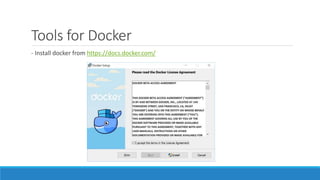
Tools for Docker
- Install docker from https://docs.docker.com/
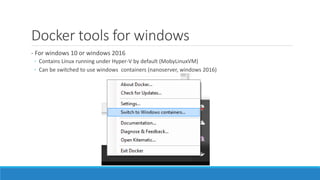
Docker tools for windows
- For windows 10 or windows 2016
◦ Contains Linux running under Hyper-V by default (MobyLinuxVM)
◦ Can be switched to use windows containers (nanoserver, windows 2016)
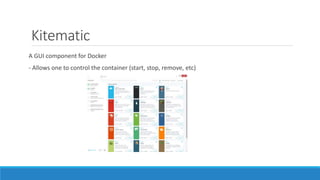
Kitematic
A GUI component for Docker
- Allows one to control the container (start, stop, remove, etc)
Demo of Kitematic
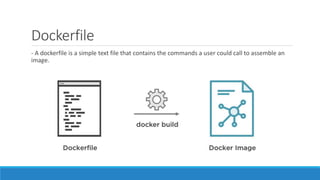
Dockerfile
- A dockerfile is a simple text file that contains the commands a user could call to assemble an
image.
Dockerfile (Sample)
FROM microsoft/dotnet:latest
COPY . /app
WORKDIR /app
RUN ["dotnet", "restore"]
RUN ["dotnet", "build"]
EXPOSE 5000/tcp
ENV ASPNETCORE_URLS http://*:5000
ENTRYPOINT ["dotnet", "run"]
Dockerfile Best Practices
 Use .dockerignore
 Avoid unnecessary installed packages
Run one process per container
Minimize the number of layers
A container can be stopped and destroyed and a new one built and put in place with an
absolute minimum of set-up and configuration
Linking Docker Container Demo
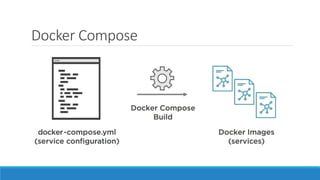
Docker Compose
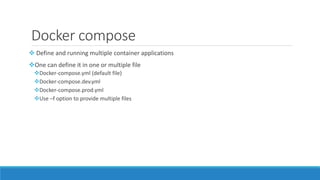
Docker compose
 Define and running multiple container applications
One can define it in one or multiple file
Docker-compose.yml (default file)
Docker-compose.dev.yml
Docker-compose.prod.yml
Use –f option to provide multiple files
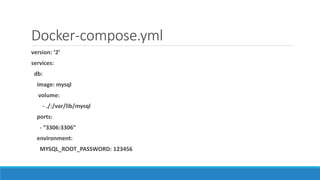
Docker-compose.yml
version: ‘2’
services:
db:
image: mysql
volume:
- ./:/var/lib/mysql
ports:
- “3306:3306”
environment:
MYSQL_ROOT_PASSWORD: 123456
Demo VSCode and VS Docker Tool
Additional Resources
Self Paced Training by Docker - https://training.docker.com/category/self-paced-online
Julien Corioland, TE France: HOL to get started with Docker containers on Windows:
https://github.com/jcorioland/WindowsContainersHOL
Docker created content in partnership with Microsoft: Curated list of resources on Docker and
Windows Containers - coming directly from docker:
https://github.com/docker/community/blob/master/Docker-Meetup-Content/+Windows.md
Questions?
Contact: taswar@gmail.com
Twitter: @taswarbhatti
Web: http://taswar.zeytinsoft.com

Docker for .NET Developers

  • 1.
    Docker for .NETDevelopers TASWAR BHATTI (MVP) SYSTEM ARCHITECT @TASWARBHATTI GEMALTO HTTP://TASWAR.ZEYTINSOFT.COM
  • 2.
    Agenda  What isDocker? Images and Containers Docker vs VM Tooling around Docker Dockerfile Docker linking with other containers Docker compose Summary
  • 3.
  • 4.
  • 7.
    What is Docker? -Lightweight, open, secure platform - Simplify building, shipping, running apps - Shipping container system for code - Runs natively on Linux or Windows Server - Runs on Windows or Mac Development machines (with a virtual machine or Hyper-V) - Relies on "images" and "containers“ - Great for microservices system architecture design and deploy
  • 8.
    Docker Leading open-source containerizationplatform Supported natively in Azure Docker containers wrap up a piece of software in a complete filesystem that contains everything it needs to run: code, runtime, system tools, system libraries – anything you can install on a server. This guarantees that it will always run the same, regardless of the environment it is running in
  • 9.
    Containers Lightweight alternative tovirtual machines Smaller, less expensive, faster to start up, and self-contained Host Operating System Hypervisor Guest OS Libraries App Guest OS Libraries App Guest OS Libraries App Operating System Container Engine Libraries App Libraries App Libraries App Virtual Machines Containers
  • 11.
  • 12.
    Docker Image - Ubuntu,DotNet Core, Node etc - An image is an inert, immutable, file essentially a snapshot of a container - A read-only template composed of layered filesystems used to share common files - Create Docker container instances - Created by docker build command - Stored in Docker registry (Docker Hub)
  • 13.
    Docker Container - Containeris an instance of your image but running - Using the docker run command - An isolated and secured shipping container - created from an image that can be run, started, stopped, moved and deleted
  • 14.
  • 16.
    Docker CLI Command-line interfacefor Docker, available for Linux, OS X, and Windows (available separately or as part of Docker Toolbox)
  • 17.
    Running a Container dockerrun -i -t ubuntu /bin/bash
  • 18.
    Common Docker CLICommands docker run - Use an image to run a container docker pull - Pull an image from a registry docker build - Build a Docker image docker exec - Execute a command in a container docker stop - Stop a running container docker images - List available Docker images docker ps - List running Docker containers
  • 19.
    Is Docker onlyfor Linux? - Can I run my windows app Docker? - Is Docker supported in Visual Studio?
  • 20.
    Azure Container Service Providesrobust, ready-to-use Docker hosting environment Uses open-source orchestration tools (DC/OS and Swarm)
  • 21.
    Tools for Docker -Install docker from https://docs.docker.com/
  • 22.
    Docker tools forwindows - For windows 10 or windows 2016 ◦ Contains Linux running under Hyper-V by default (MobyLinuxVM) ◦ Can be switched to use windows containers (nanoserver, windows 2016)
  • 23.
    Kitematic A GUI componentfor Docker - Allows one to control the container (start, stop, remove, etc)
  • 24.
  • 25.
    Dockerfile - A dockerfileis a simple text file that contains the commands a user could call to assemble an image.
  • 26.
    Dockerfile (Sample) FROM microsoft/dotnet:latest COPY. /app WORKDIR /app RUN ["dotnet", "restore"] RUN ["dotnet", "build"] EXPOSE 5000/tcp ENV ASPNETCORE_URLS http://*:5000 ENTRYPOINT ["dotnet", "run"]
  • 27.
    Dockerfile Best Practices Use .dockerignore  Avoid unnecessary installed packages Run one process per container Minimize the number of layers A container can be stopped and destroyed and a new one built and put in place with an absolute minimum of set-up and configuration
  • 28.
  • 29.
  • 30.
    Docker compose  Defineand running multiple container applications One can define it in one or multiple file Docker-compose.yml (default file) Docker-compose.dev.yml Docker-compose.prod.yml Use –f option to provide multiple files
  • 31.
    Docker-compose.yml version: ‘2’ services: db: image: mysql volume: -./:/var/lib/mysql ports: - “3306:3306” environment: MYSQL_ROOT_PASSWORD: 123456
  • 32.
    Demo VSCode andVS Docker Tool
  • 33.
    Additional Resources Self PacedTraining by Docker - https://training.docker.com/category/self-paced-online Julien Corioland, TE France: HOL to get started with Docker containers on Windows: https://github.com/jcorioland/WindowsContainersHOL Docker created content in partnership with Microsoft: Curated list of resources on Docker and Windows Containers - coming directly from docker: https://github.com/docker/community/blob/master/Docker-Meetup-Content/+Windows.md
  • 34.

Editor's Notes

  • #9 Docker (www.docker.com) isn't the world's only containerization platform, but it is the most popular. It is free, open-source, and Linux-based, with Windows support (Windows Server 2016) in the works. It has earned massive mindshare in the developer community. And with Azure Container Service, you can deploy Docker containers to Azure with minimal effort. Moreover, Docker containers are easily moved between Azure and Amazon Web Services (AWS), affording developers portability between cloud platforms.
  • #10 A virtual machine is -- well -- a virtualized machine created and managed by a hypervisor such as VirtualBox or Hyper-V. Even though a VM runs on a machine that has an operating system, each VM requires its own complete operating system, even if it's the same operating system as the host OS. VMs offer a very high degree of isolation, but at a cost: longer startup times, lower portability (ever tried to move a 127 GB virtual hard disk, or VHD, from one PC to another?), and higher memory requirements. Containers, by contrast, leverage the operating system that is already in place but offer nearly as much separation. RAM requirements are lower since the OS isn't being duplicated in each container, and cost is lower, too, because while cloud platforms typically charge for each VM, a single VM can host multiple container instances.
  • #12 Docker Image is the image of your software, and a container is the running software
  • #15 Docker utilizes a client-server architecture. You execute Docker commands through a Docker client such as the Docker CLI or Kitematic. The client uses REST commands to communicate with the Docker daemon running on a Docker host such as the Azure Container services. These commands can be used to push, pull (docker pull), and create Docker images, to run them in containers, and to manage those containers. Images can be built with the docker build command, and they can be stand-alone, or they can "inherit" from other images. Images are stored in Docker registries, which can be public or private, local or remote. Docker Hub is a popular public registry that is managed by Docker; it contains a "huge collection" of images that anyone may use. The docker run command runs a container using an image as a template.
  • #17 The Docker Client, also known as the Docker CLI, is the primary tool you use to manage Docker containers. You can download container images from repositories such as Docker Hub, build container images, run container instances, list container images and instances, and much more. After connecting to Azure Container Service using SSH, you can use port forwarding to execute commands locally that act on an Azure Container Service running in the cloud. In this example, the -H switch used with the docker commands forwards commands sent to port 22375 on localhost to the Azure Container Services via SSH.
  • #18 This command pulls the image named "Ubuntu" from Docker Hub (or a local registry if the image is cached there) and runs it interactively in a container. "Interactively" means standard input, output, and error are connected locally so you can provide input to the container and see its output. Of course, you are not limited to the "Ubuntu" image. You can specify other images and even create images of your own with docker build. Where the container runs depends on the context. The container can run locally in a docker host (for example, a VM on Windows), or it can remotely if you connect to a remote Docker daemon (for example, one running in Azure) via SSH tunneling and use port forwarding to forward docker commands to the daemon.
  • #19 These are some of the most commonly used docker commands. You can also use docker push to push an image to a registry such as Docker Hub. Also, docker ps is often accompanied by a -a switch to list all containers, including those that are no longer running, while docker rm and docker rmi are used to delete (remove) containers and images, respectively. The docker build command uses a Dockerfile (a text file containing build commands) and a "context" -- for example, a specified directory in the file system -- to build Docker images.
  • #21 From the documentation: "Azure Container Service makes it simpler for you to create, configure, and manage a cluster of virtual machines that are preconfigured to run containerized applications. It uses an optimized configuration of popular open-source scheduling and orchestration tools. This enables you to use your existing skills, or draw upon a large and growing body of community expertise, to deploy and manage container-based applications on Microsoft Azure." ACS supports Linux containers and Windows containers. The latter rely on Windows Server 2016.