OpenAPI development
with Python
EuroPython2017@Rimini, 11 July 2017
Takuro Wada
Hi
2
Kabuku Inc.
Software Engineer
@taxpon
taxpon
http://takuro.ws
- Speaker of EuroPython 2016, PyConJP 2015
- Member of swagger codegen technical committee
- Python, TypeScript
Takuro Wada
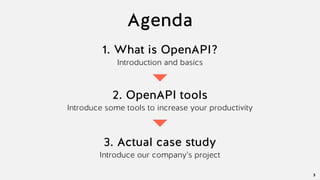
Agenda
3
1. What is OpenAPI?
Introduction and basics
2. OpenAPI tools
Introduce some tools to increase your productivity
3. Actual case study
Introduce our company’s project
What is OpenAPI?
What is OpenAPI?
OpenAPI is API description language which is focusing
on creating, evolving and promoting vendor neutral
description format
5
(Partially cited from https://www.openapis.org/about)
You can write your API spec with OpenAPI
What is OpenAPI?
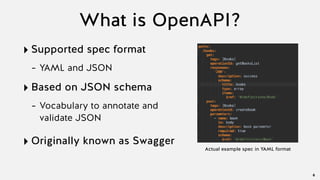
‣ Supported spec format
- YAML and JSON
‣ Based on JSON schema
- Vocabulary to annotate and
validate JSON
‣ Originally known as Swagger
6
Actual example spec in YAML format
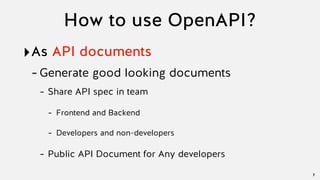
How to use OpenAPI?
‣As API documents
-Generate good looking documents
- Share API spec in team
- Frontend and Backend
- Developers and non-developers
- Public API Document for Any developers
7
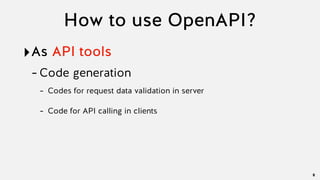
How to use OpenAPI?
‣As API tools
-Code generation
- Codes for request data validation in server
- Code for API calling in clients
8
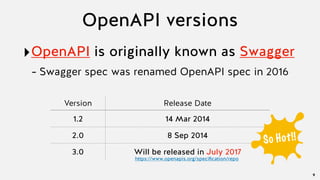
OpenAPI versions
‣OpenAPI is originally known as Swagger
- Swagger spec was renamed OpenAPI spec in 2016
9
Version Release Date
1.2 14 Mar 2014
2.0 8 Sep 2014
3.0 Will be released in July 2017
So Hot!!
https://www.openapis.org/specification/repo
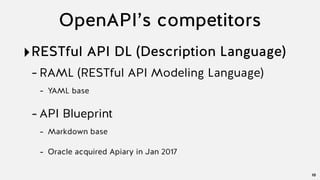
OpenAPI’s competitors
‣RESTful API DL (Description Language)
-RAML (RESTful API Modeling Language)
- YAML base
-API Blueprint
- Markdown base
- Oracle acquired Apiary in Jan 2017
10
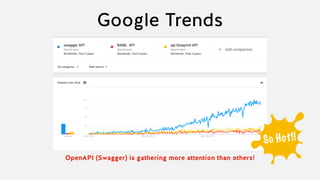
OpenAPI (Swagger) is gathering more attention than others!
Google Trends
So Hot!!
OpenAPI tools
OpenAPI tools
‣Core tools
-Developed by OpenAPI (Swagger) team
‣Community tools
-Developed by Community
-Introduce Python tools in this session
13
Core tools
‣Swagger UI
‣Swagger Editor
‣Swagger Codegen
14
Core tools (1/3)
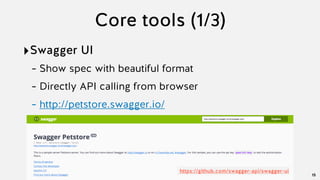
‣Swagger UI
- Show spec with beautiful format
- Directly API calling from browser
- http://petstore.swagger.io/
15
https://github.com/swagger-api/swagger-ui
Core tools (2/3)
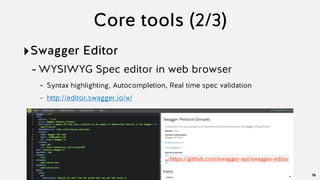
‣Swagger Editor
-WYSIWYG Spec editor in web browser
- Syntax highlighting, Autocompletion, Real time spec validation
- http://editor.swagger.io/#/
16
https://github.com/swagger-api/swagger-editor
Core tools (3/3)
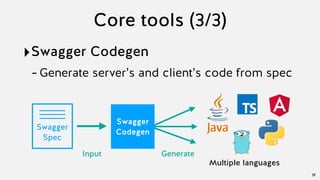
‣Swagger Codegen
-Generate server’s and client’s code from spec
17
Swagger
Spec
Generate
Multiple languages
Swagger
Codegen
Input
Community tools
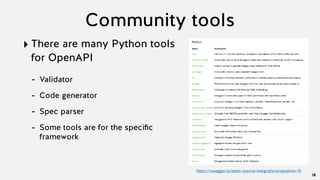
‣ There are many Python tools
for OpenAPI
- Validator
- Code generator
- Spec parser
- Some tools are for the specific
framework
18
https://swagger.io/open-source-integrations/#python-19
bravado-core
‣ Python library that adds client-side and server-side support for
OpenAPI (2.7, 3.4+, developed by Yelp, https://github.com/Yelp/bravado-core)
‣ Not dedicated to any specific framework (You can use it in you own
project today)
‣ Very simple to use
‣ Features
- Validation
- Marshaling and Unmarshaling
- Custom formats for type conversion
19
bravado-core
‣Spec example
20
Book:
type: object
required: [id]
properties:
   id:
     type: integer
   title:
     type: string
   author:
     type: string
bravado-core: (1)Validate
‣Validation execution
21
import yaml
from bravado_core.spec import Spec
# 1
with open('openapi.yaml', 'r') as f:
raw_spec = yaml.load(f)
# 2
spec = Spec.from_dict(raw_spec)
# 3
book = raw_spec[‘definitions']['Book']
# 4
validate_schema_object(spec, book, target)
1. Load YAML file with OpenAPI
spec (JSON is also OK)
2. Create Spec object
3. Retrieve “Book” definition
4. Validate (target is dict object
which is dumped from client’s
request)
bravado-core: (1)Validate
‣if required property “id” is not defined in dict:
22
validate_schema_object(spec, book, {})
Code
jsonschema.exceptions.ValidationError: 'id' is a required property
Failed validating 'required' in schema:
{'properties': {'author': {'type': 'string'},
'id': {'type': 'integer'},
'release_date': {'format': 'date', 'type': 'string'},
'title': {'type': 'string'}},
'required': ['id'],
'type': 'object',
'x-model': 'Book'}
On instance:
{}
Result
bravado-core: (1)Validation
‣If a property has invalid type value:
23
validate_schema_object(spec, book, {"id": 1, "title": 1})
Code
jsonschema.exceptions.ValidationError: 1 is not of type 'string'
Failed validating 'type' in schema['properties']['title']:
{'type': 'string'}
On instance['title']:
1
Result
bravado-core: (2)Unmarshal
‣Unmarshal (dict to object)
24
from bravado_core.unmarshal import unmarshal_schema_object
book_obj = unmarshal_schema_object(
  spec, book,
  {"id": 1,
"title": "Merchant of Venice”,
“author": "William Shakespeare"})
print(book_obj)
Code
]Dict need to be converted
Book(author='William Shakespeare', id=1, title='Merchant of Venice')
Result
Model object is created !!
bravado-core: (2)Unmarshal
‣Formatting in Unmarshal
25
Book:
type: object
required: [id]
properties:
   id:
     type: integer
   title:
     type: string
   author:
     type: string
   release_date:
     type: string
     format: date
] This property is added and
expected to be string with “date" format
bravado-core: (2)Unmarshal
‣Formatting in Unmarshal
26
book_obj = unmarshal_schema_object(
  spec, book,
  {"id": 1,
"title": "Merchant of Venice”,
“author": "William Shakespeare”,
“release_date”: “2017-07-11”})
print(book_obj)
Code
]Dict need to be converted
Book(author='William Shakespeare', id=1,
release_date=datetime.date(2017, 7, 11), title='Merchant of Venice')
Result
String with date format is successfully converted to a date object!!
bravado-core: (2)Unmarshal
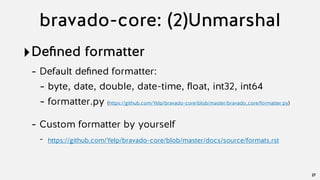
‣Defined formatter
- Default defined formatter:
- byte, date, double, date-time, float, int32, int64
- formatter.py (https://github.com/Yelp/bravado-core/blob/master/bravado_core/formatter.py)
- Custom formatter by yourself
- https://github.com/Yelp/bravado-core/blob/master/docs/source/formats.rst
27
Code
bravado-core: (3)Marshal
‣Marshal (object to dict)
28
Book = spec.definitions['Book']
book_obj = Book(id=1, title="Merchant of Venice",
author="William Shakespeare”,
release_date=date(2017, 7, 11))
book_dict = marshal_schema_object(spec, book, book_obj)
print(book_dict)
]“Book” object
{'release_date': '2017-07-11', 'title': 'Merchant of Venice', 'id': 1,
'author': 'William Shakespeare'}
Result
Date object is successfully converted to string with date format!!
bravado-core
‣And many useful features
-Document
- http://bravado-core.readthedocs.io/en/latest/
-Examples
- https://github.com/taxpon/bravado-core-example
29
Actual case study
Project overview
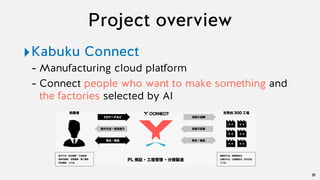
‣Kabuku Connect
- Manufacturing cloud platform
- Connect people who want to make something and
the factories selected by AI
31
32
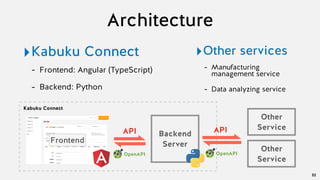
‣Kabuku Connect
- Frontend: Angular (TypeScript)
- Backend: Python
Backend
ServerFrontend
API
Architecture
Other
ServiceAPI
‣Other services
- Manufacturing
management service
- Data analyzing service
Kabuku Connect
Other
Service
OpenAPI OpenAPI
Backend
ServerFrontend
API
Kabuku Connect
OpenAPI
Other
ServiceAPI
Other
Service
OpenAPI
How OpenAPI is used
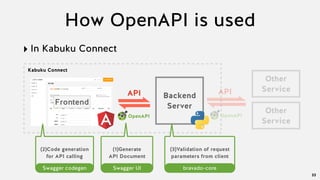
‣ In Kabuku Connect
33
(2)Code generation
for API calling
Swagger codegen
(1)Generate
API Document
Swagger UI
(3)Validation of request
parameters from client
bravado-core
Backend
ServerFrontend
API
Kabuku Connect
OpenAPI
Other
ServiceAPI
Other
Service
OpenAPI
How OpenAPI is used
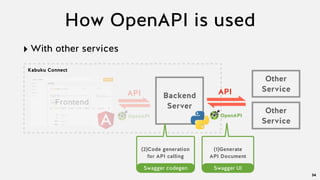
‣ With other services
34
(2)Code generation
for API calling
Swagger codegen
(1)Generate
API Document
Swagger UI
Implementation workflow
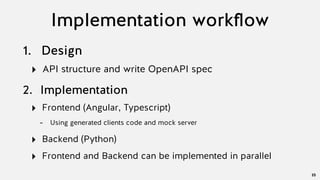
1. Design
‣ API structure and write OpenAPI spec
35
2. Implementation
‣ Frontend (Angular, Typescript)
- Using generated clients code and mock server
‣ Backend (Python)
‣ Frontend and Backend can be implemented in parallel
Impression
‣Using OpenAPI tools decrease your
tasks so much
- Document generation
- Code generation
- Frontend and Backend, API provider and API
consumer can be implemented in parallel
36
Very
Productive!
Recap
Recap
‣OpenAPI is a hot technology to describe
API specification
38
‣There are many tools to increase your
productivity with OpenAPI
‣You learned actual case with OpenAPISo Hot!!
Required more contributors!
‣New Open API Spec (Version 3.0) will be
released in July 2017
-There are many added good features
-Tools need to support OAS v3
39
Let’s
Contribute!
We are hiring!
40
‣ Python Developer
‣ C++ Developer
‣ Frontend Developer
‣ Angular/Three.js
‣ You can use 3D printers all you want
‣ International members
‣ 3 Google Developer Experts
Some 3D printed members
https://www.kabuku.co.jp/en

OpenAPI development with Python

  • 1.
  • 2.
    Hi 2 Kabuku Inc. Software Engineer @taxpon taxpon http://takuro.ws -Speaker of EuroPython 2016, PyConJP 2015 - Member of swagger codegen technical committee - Python, TypeScript Takuro Wada
  • 3.
    Agenda 3 1. What isOpenAPI? Introduction and basics 2. OpenAPI tools Introduce some tools to increase your productivity 3. Actual case study Introduce our company’s project
  • 4.
  • 5.
    What is OpenAPI? OpenAPIis API description language which is focusing on creating, evolving and promoting vendor neutral description format 5 (Partially cited from https://www.openapis.org/about) You can write your API spec with OpenAPI
  • 6.
    What is OpenAPI? ‣Supported spec format - YAML and JSON ‣ Based on JSON schema - Vocabulary to annotate and validate JSON ‣ Originally known as Swagger 6 Actual example spec in YAML format
  • 7.
    How to useOpenAPI? ‣As API documents -Generate good looking documents - Share API spec in team - Frontend and Backend - Developers and non-developers - Public API Document for Any developers 7
  • 8.
    How to useOpenAPI? ‣As API tools -Code generation - Codes for request data validation in server - Code for API calling in clients 8
  • 9.
    OpenAPI versions ‣OpenAPI isoriginally known as Swagger - Swagger spec was renamed OpenAPI spec in 2016 9 Version Release Date 1.2 14 Mar 2014 2.0 8 Sep 2014 3.0 Will be released in July 2017 So Hot!! https://www.openapis.org/specification/repo
  • 10.
    OpenAPI’s competitors ‣RESTful APIDL (Description Language) -RAML (RESTful API Modeling Language) - YAML base -API Blueprint - Markdown base - Oracle acquired Apiary in Jan 2017 10
  • 11.
    OpenAPI (Swagger) isgathering more attention than others! Google Trends So Hot!!
  • 12.
  • 13.
    OpenAPI tools ‣Core tools -Developedby OpenAPI (Swagger) team ‣Community tools -Developed by Community -Introduce Python tools in this session 13
  • 14.
    Core tools ‣Swagger UI ‣SwaggerEditor ‣Swagger Codegen 14
  • 15.
    Core tools (1/3) ‣SwaggerUI - Show spec with beautiful format - Directly API calling from browser - http://petstore.swagger.io/ 15 https://github.com/swagger-api/swagger-ui
  • 16.
    Core tools (2/3) ‣SwaggerEditor -WYSIWYG Spec editor in web browser - Syntax highlighting, Autocompletion, Real time spec validation - http://editor.swagger.io/#/ 16 https://github.com/swagger-api/swagger-editor
  • 17.
    Core tools (3/3) ‣SwaggerCodegen -Generate server’s and client’s code from spec 17 Swagger Spec Generate Multiple languages Swagger Codegen Input
  • 18.
    Community tools ‣ Thereare many Python tools for OpenAPI - Validator - Code generator - Spec parser - Some tools are for the specific framework 18 https://swagger.io/open-source-integrations/#python-19
  • 19.
    bravado-core ‣ Python librarythat adds client-side and server-side support for OpenAPI (2.7, 3.4+, developed by Yelp, https://github.com/Yelp/bravado-core) ‣ Not dedicated to any specific framework (You can use it in you own project today) ‣ Very simple to use ‣ Features - Validation - Marshaling and Unmarshaling - Custom formats for type conversion 19
  • 20.
    bravado-core ‣Spec example 20 Book: type: object required:[id] properties:    id:      type: integer    title:      type: string    author:      type: string
  • 21.
    bravado-core: (1)Validate ‣Validation execution 21 importyaml from bravado_core.spec import Spec # 1 with open('openapi.yaml', 'r') as f: raw_spec = yaml.load(f) # 2 spec = Spec.from_dict(raw_spec) # 3 book = raw_spec[‘definitions']['Book'] # 4 validate_schema_object(spec, book, target) 1. Load YAML file with OpenAPI spec (JSON is also OK) 2. Create Spec object 3. Retrieve “Book” definition 4. Validate (target is dict object which is dumped from client’s request)
  • 22.
    bravado-core: (1)Validate ‣if requiredproperty “id” is not defined in dict: 22 validate_schema_object(spec, book, {}) Code jsonschema.exceptions.ValidationError: 'id' is a required property Failed validating 'required' in schema: {'properties': {'author': {'type': 'string'}, 'id': {'type': 'integer'}, 'release_date': {'format': 'date', 'type': 'string'}, 'title': {'type': 'string'}}, 'required': ['id'], 'type': 'object', 'x-model': 'Book'} On instance: {} Result
  • 23.
    bravado-core: (1)Validation ‣If aproperty has invalid type value: 23 validate_schema_object(spec, book, {"id": 1, "title": 1}) Code jsonschema.exceptions.ValidationError: 1 is not of type 'string' Failed validating 'type' in schema['properties']['title']: {'type': 'string'} On instance['title']: 1 Result
  • 24.
    bravado-core: (2)Unmarshal ‣Unmarshal (dictto object) 24 from bravado_core.unmarshal import unmarshal_schema_object book_obj = unmarshal_schema_object(   spec, book,   {"id": 1, "title": "Merchant of Venice”, “author": "William Shakespeare"}) print(book_obj) Code ]Dict need to be converted Book(author='William Shakespeare', id=1, title='Merchant of Venice') Result Model object is created !!
  • 25.
    bravado-core: (2)Unmarshal ‣Formatting inUnmarshal 25 Book: type: object required: [id] properties:    id:      type: integer    title:      type: string    author:      type: string    release_date:      type: string      format: date ] This property is added and expected to be string with “date" format
  • 26.
    bravado-core: (2)Unmarshal ‣Formatting inUnmarshal 26 book_obj = unmarshal_schema_object(   spec, book,   {"id": 1, "title": "Merchant of Venice”, “author": "William Shakespeare”, “release_date”: “2017-07-11”}) print(book_obj) Code ]Dict need to be converted Book(author='William Shakespeare', id=1, release_date=datetime.date(2017, 7, 11), title='Merchant of Venice') Result String with date format is successfully converted to a date object!!
  • 27.
    bravado-core: (2)Unmarshal ‣Defined formatter -Default defined formatter: - byte, date, double, date-time, float, int32, int64 - formatter.py (https://github.com/Yelp/bravado-core/blob/master/bravado_core/formatter.py) - Custom formatter by yourself - https://github.com/Yelp/bravado-core/blob/master/docs/source/formats.rst 27
  • 28.
    Code bravado-core: (3)Marshal ‣Marshal (objectto dict) 28 Book = spec.definitions['Book'] book_obj = Book(id=1, title="Merchant of Venice", author="William Shakespeare”, release_date=date(2017, 7, 11)) book_dict = marshal_schema_object(spec, book, book_obj) print(book_dict) ]“Book” object {'release_date': '2017-07-11', 'title': 'Merchant of Venice', 'id': 1, 'author': 'William Shakespeare'} Result Date object is successfully converted to string with date format!!
  • 29.
    bravado-core ‣And many usefulfeatures -Document - http://bravado-core.readthedocs.io/en/latest/ -Examples - https://github.com/taxpon/bravado-core-example 29
  • 30.
  • 31.
    Project overview ‣Kabuku Connect -Manufacturing cloud platform - Connect people who want to make something and the factories selected by AI 31
  • 32.
    32 ‣Kabuku Connect - Frontend:Angular (TypeScript) - Backend: Python Backend ServerFrontend API Architecture Other ServiceAPI ‣Other services - Manufacturing management service - Data analyzing service Kabuku Connect Other Service OpenAPI OpenAPI
  • 33.
    Backend ServerFrontend API Kabuku Connect OpenAPI Other ServiceAPI Other Service OpenAPI How OpenAPIis used ‣ In Kabuku Connect 33 (2)Code generation for API calling Swagger codegen (1)Generate API Document Swagger UI (3)Validation of request parameters from client bravado-core
  • 34.
    Backend ServerFrontend API Kabuku Connect OpenAPI Other ServiceAPI Other Service OpenAPI How OpenAPIis used ‣ With other services 34 (2)Code generation for API calling Swagger codegen (1)Generate API Document Swagger UI
  • 35.
    Implementation workflow 1. Design ‣API structure and write OpenAPI spec 35 2. Implementation ‣ Frontend (Angular, Typescript) - Using generated clients code and mock server ‣ Backend (Python) ‣ Frontend and Backend can be implemented in parallel
  • 36.
    Impression ‣Using OpenAPI toolsdecrease your tasks so much - Document generation - Code generation - Frontend and Backend, API provider and API consumer can be implemented in parallel 36 Very Productive!
  • 37.
  • 38.
    Recap ‣OpenAPI is ahot technology to describe API specification 38 ‣There are many tools to increase your productivity with OpenAPI ‣You learned actual case with OpenAPISo Hot!!
  • 39.
    Required more contributors! ‣NewOpen API Spec (Version 3.0) will be released in July 2017 -There are many added good features -Tools need to support OAS v3 39 Let’s Contribute!
  • 40.
    We are hiring! 40 ‣Python Developer ‣ C++ Developer ‣ Frontend Developer ‣ Angular/Three.js ‣ You can use 3D printers all you want ‣ International members ‣ 3 Google Developer Experts Some 3D printed members https://www.kabuku.co.jp/en