What is anelectronic library?
An electronic library is a type of service that allows
users, without actually stepping into the library, to read
library books and conduct research at home, in the office,
or at school, using the Internet. Service which enables
users to effectively employ electronic data by using an in-
library network is also referred to as an "electronic library
service." This is a new library service that applies rapidly
advancing data processing technology and networking
technology, and it is expected to become a highly
convenient, epoch-making mode of service.
3.
What is digitallibrary ?
A digital library is a collection of documents in
organized electronic form, available on the Internet or on
CD-ROM (compact-disk read-only memory) disks.
Depending on the specific library, a user may be able to
access magazine articles, books, papers, images, sound
files, and videos.
4.
Delineate of thee - book
An eBook is an electronic version of a traditional print
book that can be read by using a personal computer or by
using an eBook reader. (An eBook reader can be a software
application for use on a computer.
5.
What is anelectronic journal?
An electronic journal is a periodical publication which is published in
electronic text (e.g. PDF) or hypertext format and is available for
access in electronic format e.g. on the Internet or on a CD-ROM.
Electronic journals have several advantages over traditional
printed journals:
You can search the contents pages and/or the full text of journals to
find articles on a certain subject.
You can read journal articles on your desktop, you don't have to be in
the Library.
You can e-mail articles to yourself or download them to disk for
printing.
The article that you want to read will always be available, even when
the Library is closed.
6.
E – LEARNINGINDIAN SCENARIO & IT’S IMPACT ON LIBRARY
AND
INFORMATION SCIENCE PROFESSIONALS
Introduction
Libraries have changed from mere static
storehouse of knowledge to dynamic service
centers. The internet is blurring the traditional
roles of creators, suppliers and distributors of
scientific information and injecting a long
overdue element of competition. The concept of
information is ageless, Information Technology is
the savoir of mankind. The method of classroom
learning is changed to e-learning. It has played a
major role on library and information science
professionals.
7.
Meaning
The term e-learningis used in a variety of ways such as
online learning, Computer Based Learning (CBL) Web
Based Training (WBT), Online Resource-Based Learning
(ORBL) Networked Collaborative Learning (NCL),
Computer Supported Collaborative Learning (CSCL) [2].E-
learning is nothing but the extension of classroom
learning, here the emphasis is on making available the
study material at the convenience of the user.[4]E-learning
is thus the high-tech, net-enabled subset of the larger
universe of distance education of distributed learning.[1]
8.
Role of Librariansin E-Learning
The following are the role of the Librarians in e-learning-
E-learning nowadays become the order of the day and it is
being used to impart distance education. Librarians are
the information intermediaries who can help the users in
making use of e-resources. The librarians need to be
made aware of the internet and the resources available
therein and how to make efficient use of them. The idea
behind e-learning module is to train both the librarians as
well as the users regarding the efficient use of e-
resources. The emphasis is on the resources related to
librarianship in addition to general topics of interest
9.
Need of e-learningModules
Effective usage of the information resources,
particularly those in electronic media such as e -
journals and databases, require continuous training to
user.• The need was to develop e-learning modules to
provide for both self-education and trainer assisted
education.
10.
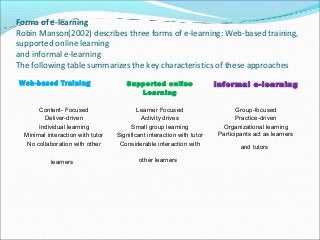
Forms of e-learning
RobinManson(2002) describes three forms of e-learning: Web-based training,
supported online learning
and informal e-learning
The following table summarizes the key characteristics of these approaches
Web-based Training Supported online
Learning
Informal e-learning
Content- Focused
Deliver-driven
Individual learning
Minimal interaction with tutor
No collaboration with other
learners
Learner Focused
Activity drives
Small group learning
Significant interaction with tutor
Considerable interaction with
other learners
Group-focused
Practice-driven
Organizational learning
Participants act as learners
and tutors
11.
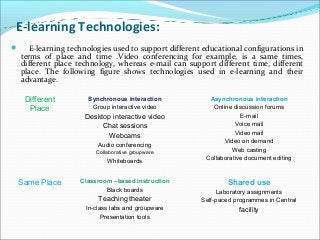
E-learning Technologies:
E-learningtechnologies used to support different educational configurations in
terms of place and time .Video conferencing for example, is a same times,
different place technology, whereas e-mail can support different time, different
place. The following figure shows technologies used in e-learning and their
advantage.
Different
Place
Synchronous interaction
Group interactive video
Desktop interactive video
Chat sessions
Webcams
Audio conferencing
Collaborative groupware
Whiteboards
Asynchronous interaction
Online discussion forums
E-mail
Voice mail
Video mail
Video on demand
Web casting
Collaborative document editing
Same Place Classroom –based instruction
Black boards
Teaching theater
In-class labs and groupware
Presentation tools
Shared use
Laboratory assignments
Self-paced programmes in Central
facility
12.
In asynchronous mode, classes are real time, which is instructional and
the students are connected through a chat room .On the other hand a
synchronous e-learning is that where a student can have an access to pre-
package detraining, based on his requirement and convenience.
Components of e-learning:
E-learning is comprised of the following elements (Shin taro, 2003)
Content delivery methods: e-learning allows content to be adjusted and
supplied according to the level of progress of the individual learner.
Live broadcasting: e-learning can be a two-way system that allows
participants to take-tests, ask questions, or respond to questionnaires.
Video-on Demand: This technology is available via cable television
(CATV) systems. Here large number of learners can access vide content
whenever they like.
Interactive Communications: There are two approaches, distance
education and community approach.
13.
Motivating Factors
Thefollowing are the motivating factors of e-learning
Employees want to enhance their learning opportunities.
Wide spread proliferation of information technology has
enable the Employees to have access to internet.
Due to globalization of business, it is essential to bring
employees together at the same time.
Competition is increased in the market by training the
manpower.
14.
Virtual Communication Tools
Thefollowing tools are covered they are:
E-mails: E-mail is used by information workers, librarians and others
for formal and informal learning and teaching activities.
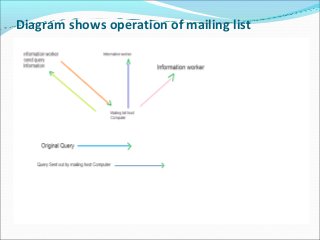
Mailing Lists: It is possible to send e-mails to groups using mailing
lists. The process is manageably a hosting service that maintain a list
of all the different discussion lists and the people who subscribe to
them. It is run by a mail server.
News Groups: Theuser can read and post
message in a single environment rather than a
series of e-mails arriving at different times. Here
an individual will send a message to a central
source, which then copies it to individuals and
other news groups.
Bulletin Boards: Bulletin boards provide a
facility for discussion under various topic
headings and not in real time. Many library and
information services provide bulletin boards
within their web sites as a means of enabling their
customers to discuss ideas and share information.
17.
Web forms: Webforms are often used as a means for providing a
reference service within a library or information unit. They are
commonly based in –
Reference service
• Administration of servicing such as mentoring programmes.
• As a tool for obtaining information from participants on e-learning
programmer.
• Polling : Polling enables us to setup a survey/questionnaire and obtain
feedback for a wide range of people.
• Instant messaging: It enables us to send and display a message on
someone’s screen in a matter of seconds. It means the staff who is
working on a busy reference or help point may message a colleague with
a question and obtain response
18.
Chat or conferencing:This enables users to hold a live discussion by
sending each other short written messages.
• Internet Telephony: In this tool a user can make calls by using the
internet. An individual can make distance phone calls through the
computer and the internet without paying long-distance phone
charges.
Video conferencing: it requires specialists and very expensive
machines are used in videoconferencing.
Virtual worlds: Used for e-learning within Universities, it is possible
to access through dimensional virtual worlds
19.
Impact of e-learningon library and information
science professionals
In order to promote e-learning, it is very important to develop library
and information science professionals, competencies in use of web-
technologies. Pariah (2004) identified the following bottle necks to
introduce Information Communication Technologies (ICT) in academic
set up –
• Teachers have to make a move to new education, but lack time.
• Teachers fear that ICT will dislocate them.
• Teachers are ensure of the security provisions for their study materials.
• Perceived unreliability of network servicing and local computing services.
20.
Impact on LISprofessionals: E-learning offers opportunities and
Challenges for information workers in the following areas
Offer new learning opportunities to develop their knowledge and skills in a
wide range of areas.
• Growth in employment opportunities associated with e-learning.
• It offers new opportunities to take part in collaborative development.
• Developed new roles and responsibilities within the libraries and
information units.
• It offers opportunities to work from home.
• It offers opportunities and challenges to maintain a healthy life/work
balance.
• Virtual communication tools helped in information exchange, sharing of
ideas and support within the library and Information community.
21.
E-learning offers theopportunity for information workers across
different countries to work together and
construct their own professional knowledge
Advantages
The following are the advantages of e-learning.
Lower costs
Time savings
Flexibility
Faster response
Greater effectiveness
Better Competitiveness
E-learning complements the process and can help reach
out the masses.
22.
Disadvantages:
The following arethe disadvantages:
Many people find it daunting, especially at first.
The student and tutor need reliable access to a computer
and internet.
The student and tutor need basic information technology
skills.
Training is required for both tutor and student.
The development of high-quality learning materials is
time-consuming and expensive.
Online tutoring can be more time-consuming than face to
face tutoring.
Learning is a social process and many people enjoy face-
to-face interactions.
23.
Conclusion
Information technologyis developing at a rapid
pace and forcing a change in the structure and
dynamics of the information society. Library
professionals cannot run away from this change,
they have to accept the challenge they face in the
new millennium.
E-learning in India has to improve its quality &
service. The quality of the e-learning experience
follows from the quality of the course modules
and of the interactions among students and
instructors that make up online courses.

![Meaning
The term e-learning is used in a variety of ways such as
online learning, Computer Based Learning (CBL) Web
Based Training (WBT), Online Resource-Based Learning
(ORBL) Networked Collaborative Learning (NCL),
Computer Supported Collaborative Learning (CSCL) [2].E-
learning is nothing but the extension of classroom
learning, here the emphasis is on making available the
study material at the convenience of the user.[4]E-learning
is thus the high-tech, net-enabled subset of the larger
universe of distance education of distributed learning.[1]](https://image.slidesharecdn.com/4e323a05-c379-49b5-aafd-dc88a4c31b1f-160602134215/85/Definition-of-E-library02-7-320.jpg?cb=1464874957)