Copyright 2015 Severalnines AB
Schema Changes for MySQL Replication & Galera Cluster
August 25, 2015
Krzysztof Książek
Severalnines
krzysztof@severalnines.com
1
Copyright 2015 Severalnines AB
! We want to help all non-DBA people who look after
MySQL infrastructures
! Share tips and good practices
! Watch the replays of the previous webinars on our
Slideshare page
! http://www.slideshare.net/Severalnines/videos
2
“Become a MySQL DBA” series
Copyright 2015 Severalnines AB
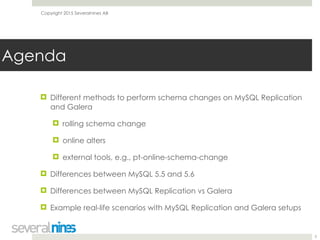
! Different methods to perform schema changes on MySQL Replication
and Galera
! rolling schema change
! online alters
! external tools, e.g., pt-online-schema-change
! Differences between MySQL 5.5 and 5.6
! Differences between MySQL Replication vs Galera
! Example real-life scenarios with MySQL Replication and Galera setups

3
Agenda
Copyright 2015 Severalnines AB
Schema changes in MySQL
4
Copyright 2015 Severalnines AB
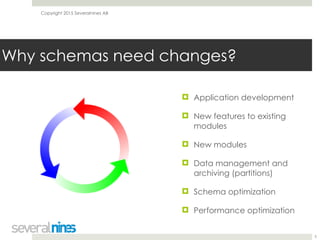
! Application development
! New features to existing
modules
! New modules
! Data management and
archiving (partitions)
! Schema optimization
! Performance optimization
5
Why schemas need changes?
Copyright 2015 Severalnines AB
! Point-in-time schema changes
! Everything happens at a given point of time, over the
whole infrastructure
! Rolling schema changes
! Changes happen at different times across the
infrastructure
! Requirement is that schema versions have to be
compatible with each other
6
Types of schema changes
Copyright 2015 Severalnines AB
! Schema changes cause significant performance
overhead as they are I/O-heavy operations
! Schema changes may take long time to finish on larger
tables
! Direct schema changes don’t play well with MySQL
replication due to the lag inducted
! Direct schema changes don’t play well with Galera
! Rolling schema changes may require significant amount
of work
7
Schema changes - limitations
Copyright 2015 Severalnines AB
! Replication has it’s limitations, only some changes can be
replicated. RBR is very strict here
! Remove a column at the end of the table - yes
! Remove a column in the middle - no go
! Add a column at the end - works
! Add a column in the middle - not really
! Not every conversion between column types works -
refer to the documentation
8
Schema changes - limitations
Copyright 2015 Severalnines AB
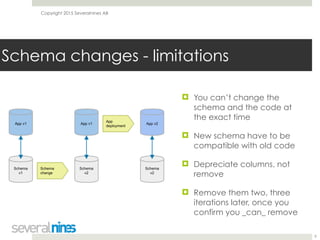
! You can’t change the
schema and the code at
the exact time
! New schema have to be
compatible with old code
! Depreciate columns, not
remove
! Remove them two, three
iterations later, once you
confirm you _can_ remove
9
Schema changes - limitations
Copyright 2015 Severalnines AB
Ways to perform a schema change
10
Copyright 2015 Severalnines AB
! Online DDL
! Rolling schema upgrade
! Online schema change
! Rolling Schema Upgrade for Galera
! Total Order Isolation for Galera
11
Methods to perform a schema change
Copyright 2015 Severalnines AB
! DDL, historically, was a locking operation
! Some of them were fast, i.e. DROP (secondary) INDEX
! InnoDB plugin in 5.1 and 5.5 introduced Fast Index
Creation that allowed reads to be executed while
secondary index has been added
! MySQL 5.6 introduced online DDL’s for InnoDB
12
Online DDL
Copyright 2015 Severalnines AB
! Many operations are non-blocking for reads and writes
! Add an index
! Add a column
! Reorder columns
! Add a primary key
! and many others (check the documentation)
! https://dev.mysql.com/doc/refman/5.6/en/innodb-create-
index-overview.html#innodb-online-ddl-summary-grid
13
Online DDL
Copyright 2015 Severalnines AB
! Busy tables may be an issue
(innodb_online_alter_log_max_size)
! Lag will be an issue - online DDL is online on the master
only
! Not suitable for large tables in replication setup
14
Online DDL
Copyright 2015 Severalnines AB
! Run DDL from the bottom to the top of replication chain
! SET SESSION sql_log_bin=0 to avoid errant transactions
! Once you reach the master, failover and then alter the
old master
! Schema changes have to be compatible, you’ll be
running DML’s on a mix of altered and not altered tables
! Schema changes have to be compatible, you’ll be
reading from a mix of altered and not altered tables
15
Rolling Schema Upgrade
Copyright 2015 Severalnines AB
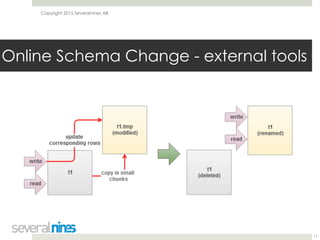
! Different tools (pt-online-schema-change, Online Schema
Change from FB), same idea
! Create a new table with desired schema
! Setup triggers to copy data from old to the new table
! Copy the data from old to new table in batches
! Rename table once the data has been copied
16
Online Schema Change - external tools
Copyright 2015 Severalnines AB
Online Schema Change - external tools
17
Copyright 2015 Severalnines AB
! pt-online-schema-change - the most popular tool
! Point-in-time change, you can use for any DDL
! Replicaton-aware, it can monitor lag and throttle itself
! Introduces additional load, slow down your system
! It has issues with foreign keys
! Can’t work with tables which have triggers
! Won’t work with tables without PK and unique key
18
pt-online-schema-change
Copyright 2015 Severalnines AB
! Otherwise it’s a very reliable tool
! Schema change may take a long time but it’s throttling
itself and can be paused at any time
! One of the most important tools in the DBA arsenal
! Sometimes it’s the only way to run a schema change
without downtime
19
pt-online-schema-change
Copyright 2015 Severalnines AB
Schema changes in Galera Cluster
20
Copyright 2015 Severalnines AB
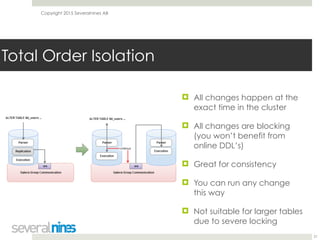
! All changes happen at the
exact time in the cluster
! All changes are blocking
(you won’t benefit from
online DDL’s)
! Great for consistency
! You can run any change
this way
! Not suitable for larger tables
due to severe locking
21
Total Order Isolation
Copyright 2015 Severalnines AB
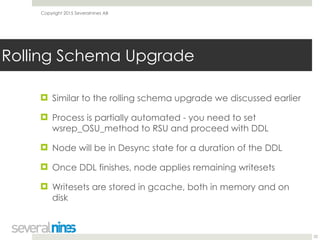
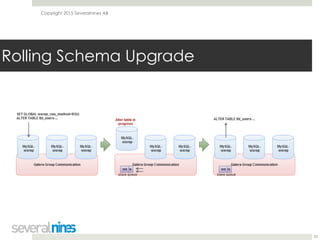
! Similar to the rolling schema upgrade we discussed earlier
! Process is partially automated - you need to set
wsrep_OSU_method to RSU and proceed with DDL
! Node will be in Desync state for a duration of the DDL
! Once DDL finishes, node applies remaining writesets
! Writesets are stored in gcache, both in memory and on
disk
22
Rolling Schema Upgrade
Copyright 2015 Severalnines AB
Rolling Schema Upgrade
23
Copyright 2015 Severalnines AB
Different scenarios for a schema
change
24
Copyright 2015 Severalnines AB
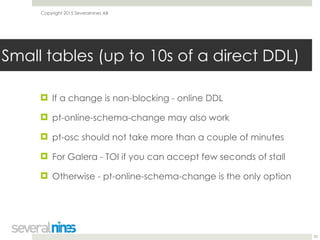
! If a change is non-blocking - online DDL
! pt-online-schema-change may also work
! pt-osc should not take more than a couple of minutes
! For Galera - TOI if you can accept few seconds of stall
! Otherwise - pt-online-schema-change is the only option
25
Small tables (up to 10s of a direct DDL)
Copyright 2015 Severalnines AB
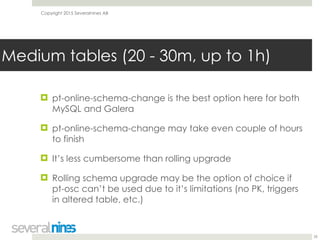
! pt-online-schema-change is the best option here for both
MySQL and Galera
! pt-online-schema-change may take even couple of hours
to finish
! It’s less cumbersome than rolling upgrade
! Rolling schema upgrade may be the option of choice if
pt-osc can’t be used due to it’s limitations (no PK, triggers
in altered table, etc.)
26
Medium tables (20 - 30m, up to 1h)
Copyright 2015 Severalnines AB
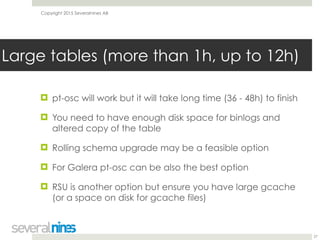
! pt-osc will work but it will take long time (36 - 48h) to finish
! You need to have enough disk space for binlogs and
altered copy of the table
! Rolling schema upgrade may be a feasible option
! For Galera pt-osc can be also the best option
! RSU is another option but ensure you have large gcache
(or a space on disk for gcache files)
27
Large tables (more than 1h, up to 12h)
Copyright 2015 Severalnines AB
! Are you sure that you need such a large table?
! Try to avoid them by splitting data across many tables or
archiving old data
! Rolling schema upgrade is the way to go
! Use snapshots or xtrabackup to provision new nodes
! Galera may need large gcache (both in memory and on
disk)
! Process of joining desynced node will take a long time
28
Very large tables (more than 12h)
Copyright 2015 Severalnines AB
! Schema change speed depends on your hardware and
data structure
! Test the changes on development environment
! Is it worth using triggers or foreign keys and not have the
option to use pt-osc?
! You _do_ want to have PK defined in all tables - do it
before it grows too large to alter
! Schema changes will happen, get used to them
29
What to keep in mind?
Copyright 2015 Severalnines AB
! More blogs in “Become a MySQL DBA” series:
! http://www.severalnines.com/blog/become-mysql-
dba-blog-series-query-tuning-process
! http://www.severalnines.com/blog/become-mysql-
dba-blog-series-configuration-tuning-performance
! Contact: krzysztof@severalnines.com
30
Thank You!

Become a MySQL DBA - Webinars - Schema Changes for MySQL Replication & Galera Cluster (slides)

  • 1.
    Copyright 2015 SeveralninesAB Schema Changes for MySQL Replication & Galera Cluster August 25, 2015 Krzysztof Książek Severalnines krzysztof@severalnines.com 1
  • 2.
    Copyright 2015 SeveralninesAB ! We want to help all non-DBA people who look after MySQL infrastructures ! Share tips and good practices ! Watch the replays of the previous webinars on our Slideshare page ! http://www.slideshare.net/Severalnines/videos 2 “Become a MySQL DBA” series
  • 3.
    Copyright 2015 SeveralninesAB ! Different methods to perform schema changes on MySQL Replication and Galera ! rolling schema change ! online alters ! external tools, e.g., pt-online-schema-change ! Differences between MySQL 5.5 and 5.6 ! Differences between MySQL Replication vs Galera ! Example real-life scenarios with MySQL Replication and Galera setups
 3 Agenda
  • 4.
    Copyright 2015 SeveralninesAB Schema changes in MySQL 4
  • 5.
    Copyright 2015 SeveralninesAB ! Application development ! New features to existing modules ! New modules ! Data management and archiving (partitions) ! Schema optimization ! Performance optimization 5 Why schemas need changes?
  • 6.
    Copyright 2015 SeveralninesAB ! Point-in-time schema changes ! Everything happens at a given point of time, over the whole infrastructure ! Rolling schema changes ! Changes happen at different times across the infrastructure ! Requirement is that schema versions have to be compatible with each other 6 Types of schema changes
  • 7.
    Copyright 2015 SeveralninesAB ! Schema changes cause significant performance overhead as they are I/O-heavy operations ! Schema changes may take long time to finish on larger tables ! Direct schema changes don’t play well with MySQL replication due to the lag inducted ! Direct schema changes don’t play well with Galera ! Rolling schema changes may require significant amount of work 7 Schema changes - limitations
  • 8.
    Copyright 2015 SeveralninesAB ! Replication has it’s limitations, only some changes can be replicated. RBR is very strict here ! Remove a column at the end of the table - yes ! Remove a column in the middle - no go ! Add a column at the end - works ! Add a column in the middle - not really ! Not every conversion between column types works - refer to the documentation 8 Schema changes - limitations
  • 9.
    Copyright 2015 SeveralninesAB ! You can’t change the schema and the code at the exact time ! New schema have to be compatible with old code ! Depreciate columns, not remove ! Remove them two, three iterations later, once you confirm you _can_ remove 9 Schema changes - limitations
  • 10.
    Copyright 2015 SeveralninesAB Ways to perform a schema change 10
  • 11.
    Copyright 2015 SeveralninesAB ! Online DDL ! Rolling schema upgrade ! Online schema change ! Rolling Schema Upgrade for Galera ! Total Order Isolation for Galera 11 Methods to perform a schema change
  • 12.
    Copyright 2015 SeveralninesAB ! DDL, historically, was a locking operation ! Some of them were fast, i.e. DROP (secondary) INDEX ! InnoDB plugin in 5.1 and 5.5 introduced Fast Index Creation that allowed reads to be executed while secondary index has been added ! MySQL 5.6 introduced online DDL’s for InnoDB 12 Online DDL
  • 13.
    Copyright 2015 SeveralninesAB ! Many operations are non-blocking for reads and writes ! Add an index ! Add a column ! Reorder columns ! Add a primary key ! and many others (check the documentation) ! https://dev.mysql.com/doc/refman/5.6/en/innodb-create- index-overview.html#innodb-online-ddl-summary-grid 13 Online DDL
  • 14.
    Copyright 2015 SeveralninesAB ! Busy tables may be an issue (innodb_online_alter_log_max_size) ! Lag will be an issue - online DDL is online on the master only ! Not suitable for large tables in replication setup 14 Online DDL
  • 15.
    Copyright 2015 SeveralninesAB ! Run DDL from the bottom to the top of replication chain ! SET SESSION sql_log_bin=0 to avoid errant transactions ! Once you reach the master, failover and then alter the old master ! Schema changes have to be compatible, you’ll be running DML’s on a mix of altered and not altered tables ! Schema changes have to be compatible, you’ll be reading from a mix of altered and not altered tables 15 Rolling Schema Upgrade
  • 16.
    Copyright 2015 SeveralninesAB ! Different tools (pt-online-schema-change, Online Schema Change from FB), same idea ! Create a new table with desired schema ! Setup triggers to copy data from old to the new table ! Copy the data from old to new table in batches ! Rename table once the data has been copied 16 Online Schema Change - external tools
  • 17.
    Copyright 2015 SeveralninesAB Online Schema Change - external tools 17
  • 18.
    Copyright 2015 SeveralninesAB ! pt-online-schema-change - the most popular tool ! Point-in-time change, you can use for any DDL ! Replicaton-aware, it can monitor lag and throttle itself ! Introduces additional load, slow down your system ! It has issues with foreign keys ! Can’t work with tables which have triggers ! Won’t work with tables without PK and unique key 18 pt-online-schema-change
  • 19.
    Copyright 2015 SeveralninesAB ! Otherwise it’s a very reliable tool ! Schema change may take a long time but it’s throttling itself and can be paused at any time ! One of the most important tools in the DBA arsenal ! Sometimes it’s the only way to run a schema change without downtime 19 pt-online-schema-change
  • 20.
    Copyright 2015 SeveralninesAB Schema changes in Galera Cluster 20
  • 21.
    Copyright 2015 SeveralninesAB ! All changes happen at the exact time in the cluster ! All changes are blocking (you won’t benefit from online DDL’s) ! Great for consistency ! You can run any change this way ! Not suitable for larger tables due to severe locking 21 Total Order Isolation
  • 22.
    Copyright 2015 SeveralninesAB ! Similar to the rolling schema upgrade we discussed earlier ! Process is partially automated - you need to set wsrep_OSU_method to RSU and proceed with DDL ! Node will be in Desync state for a duration of the DDL ! Once DDL finishes, node applies remaining writesets ! Writesets are stored in gcache, both in memory and on disk 22 Rolling Schema Upgrade
  • 23.
    Copyright 2015 SeveralninesAB Rolling Schema Upgrade 23
  • 24.
    Copyright 2015 SeveralninesAB Different scenarios for a schema change 24
  • 25.
    Copyright 2015 SeveralninesAB ! If a change is non-blocking - online DDL ! pt-online-schema-change may also work ! pt-osc should not take more than a couple of minutes ! For Galera - TOI if you can accept few seconds of stall ! Otherwise - pt-online-schema-change is the only option 25 Small tables (up to 10s of a direct DDL)
  • 26.
    Copyright 2015 SeveralninesAB ! pt-online-schema-change is the best option here for both MySQL and Galera ! pt-online-schema-change may take even couple of hours to finish ! It’s less cumbersome than rolling upgrade ! Rolling schema upgrade may be the option of choice if pt-osc can’t be used due to it’s limitations (no PK, triggers in altered table, etc.) 26 Medium tables (20 - 30m, up to 1h)
  • 27.
    Copyright 2015 SeveralninesAB ! pt-osc will work but it will take long time (36 - 48h) to finish ! You need to have enough disk space for binlogs and altered copy of the table ! Rolling schema upgrade may be a feasible option ! For Galera pt-osc can be also the best option ! RSU is another option but ensure you have large gcache (or a space on disk for gcache files) 27 Large tables (more than 1h, up to 12h)
  • 28.
    Copyright 2015 SeveralninesAB ! Are you sure that you need such a large table? ! Try to avoid them by splitting data across many tables or archiving old data ! Rolling schema upgrade is the way to go ! Use snapshots or xtrabackup to provision new nodes ! Galera may need large gcache (both in memory and on disk) ! Process of joining desynced node will take a long time 28 Very large tables (more than 12h)
  • 29.
    Copyright 2015 SeveralninesAB ! Schema change speed depends on your hardware and data structure ! Test the changes on development environment ! Is it worth using triggers or foreign keys and not have the option to use pt-osc? ! You _do_ want to have PK defined in all tables - do it before it grows too large to alter ! Schema changes will happen, get used to them 29 What to keep in mind?
  • 30.
    Copyright 2015 SeveralninesAB ! More blogs in “Become a MySQL DBA” series: ! http://www.severalnines.com/blog/become-mysql- dba-blog-series-query-tuning-process ! http://www.severalnines.com/blog/become-mysql- dba-blog-series-configuration-tuning-performance ! Contact: krzysztof@severalnines.com 30 Thank You!