Rob Habraken | Technical Manager, Consultant & Sitecore MVP
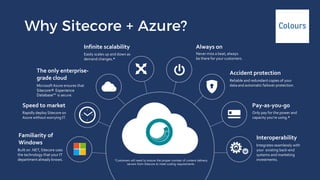
Sitecore 8.2 on Azure Web Apps
Familiarity of
Windows
Built on .NET, Sitecore uses
the technology that your IT
department already knows.
Infinite scalability
Easily scales up and down as
demand changes.*
Rapidly deploy Sitecore on
Azure without worrying IT.
Speed to market
The only enterprise-
grade cloud
Microsoft Azure ensures that
Sitecore® Experience
Database™ is secure.
Always on
Never miss a beat; always
be there for your customers.
Interoperability
Integrates seamlessly with
your existing back-end
systems and marketing
investments.
Accident protection
Reliable and redundant copies of your
data and automatic failover protection.
Pay-as-you-go
Only pay for the power and
capacity you’re using.*
*Customers will need to ensure the proper number of content delivery
servers from Sitecore to meet scaling requirements.
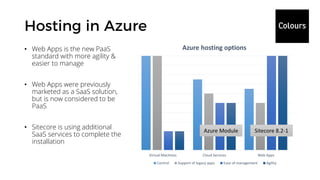
Virtual Machines Cloud Services Web Apps
Azure hosting options
Control Support of legacy apps Ease of management Agility
• Web Apps is the new PaaS
standard with more agility &
easier to manage
• Web Apps were previously
marketed as a SaaS solution,
but is now considered to be
PaaS
• Sitecore is using additional
SaaS services to complete the
installation
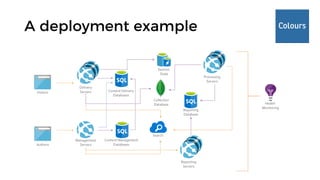
Azure Module Sitecore 8.2-1
Delivery
ServersVisitors
Authors
Management
Servers
Content Management
Databases
Health
Monitoring
Content Delivery
Databases
Processing
Servers
Search
Collection
Database
Session
State
Reporting
Database
Reporting
Servers
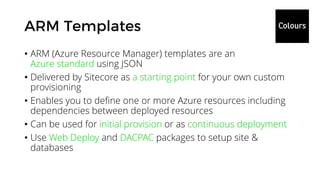
• ARM (Azure Resource Manager) templates are an
Azure standard using JSON
• Delivered by Sitecore as a starting point for your own custom
provisioning
• Enables you to define one or more Azure resources including
dependencies between deployed resources
• Can be used for initial provision or as continuous deployment
• Use Web Deploy and DACPAC packages to setup site &
databases
The road to the ultimate Continuous Deployment setup
• What do we need more for a good CI/CD setup?
• How to edit and extend the provided ARM templates?
• What are the pitfalls and black holes in blue / green provisioning?
Streamlining your Cloud deployments
• Clean install per deployment, based on vanilla Sitecore install
• Keep database content and only deploy new / changed items
• Don’t disturb live site with deployment process or new content
• Option to rollback deployment upon failure
• Repeatable process, fully automated
Sitecore gives you handy ARM templates for the different sizings,
but they’re a head start only; you will run into some issues
• You cannot re-provision an environment, having to deploy over
an existing web app, being unable to remove files
• It doesn’t provision staging slots to deploy while keeping your
current version up & running
• It doesn’t tell you how to re-provision without overwriting your
database with content you want to keep
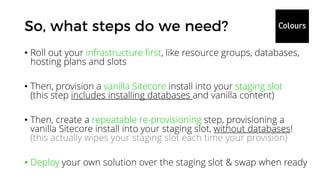
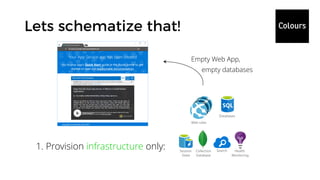
• Roll out your infrastructure first, like resource groups, databases,
hosting plans and slots
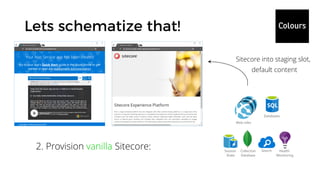
• Then, provision a vanilla Sitecore install into your staging slot
(this step includes installing databases and vanilla content)
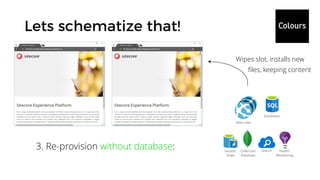
• Then, create a repeatable re-provisioning step, provisioning a
vanilla Sitecore install into your staging slot, without databases!
(this actually wipes your staging slot each time your provision)
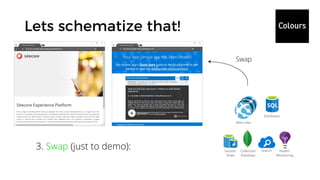
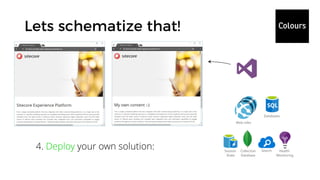
• Deploy your own solution over the staging slot & swap when ready
Web roles
Health
Monitoring
Databases
SearchCollection
Database
Session
State
1. Provision infrastructure only:
Empty Web App,
empty databases
Web roles
Health
Monitoring
Databases
SearchCollection
Database
Session
State
2. Provision vanilla Sitecore:
Sitecore into staging slot,
default content
Web roles
Health
Monitoring
Databases
SearchCollection
Database
Session
State
3. Swap (just to demo):
Swap
Web roles
Health
Monitoring
Databases
SearchCollection
Database
Session
State
3. Re-provision without database:
Wipes slot, installs new
files, keeping content
Web roles
Health
Monitoring
Databases
SearchCollection
Database
Session
State
4. Deploy your own solution:
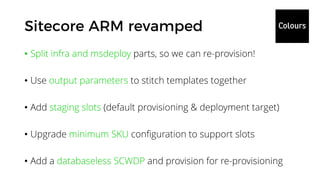
Customizing ARM templates
• Split infra and msdeploy parts, so we can re-provision!
• Use output parameters to stitch templates together
• Add staging slots (default provisioning & deployment target)
• Upgrade minimum SKU configuration to support slots
• Add a databaseless SCWDP and provision for re-provisioning
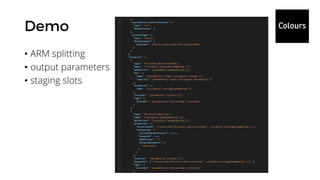
• ARM splitting
• output parameters
• staging slots
• The Sitecore Web Deploy Packages you can download from
Sitecore contain vanilla databases, but you don’t want them to
overwrite your own Sitecore content while re-provisioning
• You have to strip the databases from the different SCWDPs
• You can do that using msdeploy, deploying from one zip archive
(SCWDP) to another, using the skip dbFullSQL & skip dbDacFx
parameters!
• Get the parameters.xml file out of the SCWDP; it contains all
the info about the required parameters to deploy that package
• Invoke msdeploy with the -skip:objectName=dbFullSql and
-skip:objectName=dbDacFx parameters
• Add all additional parameters required by the specific SCWDP
msdeploy -verb:sync -source:package="D:DataInetpubazurexp0-singleSitecore 8.2 rev. 161221_single.scwdp.zip" -
dest:package="D:DataInetpubazurexp0-singleSitecore 8.2 rev. 161221_single-nodb.scwdp.zip" -declareparamfile="D:DataInetpubazurexp0-
singleparameters.xml" -skip:objectName=dbFullSql -skip:objectName=dbDacFx -setparam:"Sitecore Admin New Password"=“giLvgjMXG0D9CuKYKctA" -
setparam:"Core DB User Name"="single-core-sitecore-msdeploy-user" -setparam:"Core DB Password"="TWsxzkGQ5VrPT@7znJDe9NkFFtG" -setparam:"Master DB User
Name"="single-master-sitecore-msdeploy-user" -setparam:"Master DB Password"="xgMR7p6dmLYdL@7znJDe9NkFFtG" -setparam:"Web DB User Name"="single-web-
sitecore-msdeploy-user" -setparam:"Web DB Password"="B3j0tnNXVBoS6@7znJDe9NkFFtG" -setparam:"Reporting DB User Name"="single-reporting-sitecore-
msdeploy-user" -setparam:"Reporting DB Password"="0dURnXD5T93f@7znJDe9NkFFtG" -setparam:"Core Admin Connection
String"="Encrypt=True;TrustServerCertificate=False;Data Source=azure-rg-sql.database.windows.net,1433;Initial Catalog=azure-rg-core-db;User Id=xp0-
single-sql;Password=a6CmAkgOyY236ctkzsNx;" -setparam:"Core Connection String"="Encrypt=True;TrustServerCertificate=False;Data Source=azure-rg-
sql.database.windows.net,1433;Initial Catalog=azure-rg-core-db;User Id=single-core-sitecore-msdeploy-user;Password=TWsxzkGQ5VrPT@7znJDe9NkFFtG;" -
setparam:"Master Admin Connection String"="Encrypt=True;TrustServerCertificate=False;Data Source=azure-rg-sql.database.windows.net,1433;Initial
Catalog=azure-rg-master-db;User Id=xp0-single-sql;Password=a6CmAkgOyY236ctkzsNx;" -setparam:"Master Connection
String"="Encrypt=True;TrustServerCertificate=False;Data Source=azure-rg-sql.database.windows.net,1433;Initial Catalog=azure-rg-master-db;User
Id=single-master-sitecore-msdeploy-user;Password=xgMR7p6dmLYdL@7znJDe9NkFFtG;" -setparam:"Web Admin Connection
String"="Encrypt=True;TrustServerCertificate=False;Data Source=azure-rg-web-sql.database.windows.net,1433;Initial Catalog=azure-rg-web-db;User Id=xp0-
single-sql;Password=a6CmAkgOyY236ctkzsNx;" -setparam:"Web Connection String"="Encrypt=True;TrustServerCertificate=False;Data Source=azure-rg-web-
sql.database.windows.net,1433;Initial Catalog=azure-rg-web-db;User Id=single-web-sitecore-msdeploy-user;Password=B3j0tnNXVBoS6@7znJDe9NkFFtG;" -
setparam:"Reporting Admin Connection String"="Encrypt=True;TrustServerCertificate=False;Data Source=azure-rg-sql.database.windows.net,1433;Initial
Catalog=azure-rg-reporting-db;User Id=xp0-single-sql;Password=a6CmAkgOyY236ctkzsNx;" -setparam:"Reporting Connection
String"="Encrypt=True;TrustServerCertificate=False;Data Source=azure-rg-sql.database.windows.net,1433;Initial Catalog=azure-rg-reporting-db;User
Id=single-reporting-sitecore-msdeploy-user;Password=0dURnXD5T93f@7znJDe9NkFFtG;" -setparam:"Analytics Connection String"="mongodb://mlab-
azure:mM8kY7jD6JkDUykx6D2y@ds123456.mlab.com:12345/analytics" -setparam:"Tracking Live Connection String"="mongodb://mlab-
azure:mM8kY7jD6JkDUykx6D2y@ds123456.mlab.com:12345/tracking-live" -setparam:"Tracking History Connection String"="mongodb://mlab-
azure:mM8kY7jD6JkDUykx6D2y@ds123456.mlab.com:12345/analytics-history" -setparam:"Tracking Contact Connection String"="mongodb://mlab-
azure:mM8kY7jD6JkDUykx6D2y@ds123456.mlab.com:12345/tracking-contact" -setparam:"Cloud Search Connection String"="serviceUrl=https://azure-rg-
as.search.windows.net;apiVersion=2015-02-28;apiKey=A6836C6EBBA68675D558336C6EBBA686" -setparam:"Application Insights Instrumentation Key"="ecc59b93-
57eb-4c89-1264-945b2ae914f6" -setparam:"Application Insights Role"="Single" -setparam:"License XML"="." -setparam:"IP Security Client IP"="0.0.0.0" -
setparam:"IP Security Client IP Mask"="0.0.0.0"
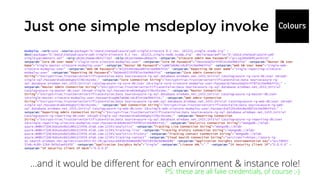
…and it would be different for each environment & instance role!
PS: these are all fake credentials, of course ;-)
• The real config values don’t have to be in the target package
• Actually, you don’t want them in there:
• A package should be re-usable among environment
• For security reasons, it shouldn’t contain the actual credentials
• They would be overwritten by the ARM provisioning anyway
• Use PowerShell to automate the creation and execution of the
command, based on the parameters.xml file
[CmdletBinding()]
Param(
[Parameter(Mandatory=$True)]
[string]$PackagePath,
[Parameter(Mandatory=$True)]
[string]$ParamFile,
[Parameter(Mandatory=$False)]
[string]$PackageDestinationPath =
$($PackagePath).Replace(".scwdp.zip", "-nodb.scwdp.zip")
)
$msdeploy = "C:Program FilesIISMicrosoft Web Deploy
V3msdeploy.exe"
$verb = "-verb:sync"
$source = "-source:package=`"$PackagePath`""
$destination = "-dest:package=`"$($PackageDestinationPath)`""
$declareParamFile = "-declareparamfile=`"$($ParamFile)`""
$skipDbFullSQL = "-skip:objectName=dbFullSql"
$skipDbDacFx = "-skip:objectName=dbDacFx"
# read parameter file
[xml]$paramfile_content = Get-Content -Path $ParamFile
$paramfile_paramnames =
$paramfile_content.parameters.parameter.name
$params = ""
foreach($paramname in $paramfile_paramnames){
$tmpvalue = "tmpvalue"
if($paramname -eq "License Xml"){ $tmpvalue =
"LicenseContent"}
if($paramname -eq "IP Security Client IP"){ $tmpvalue =
"0.0.0.0"}
if($paramname -eq "IP Security Client IP Mask"){ $tmpvalue =
"0.0.0.0"}
$params = "$params -setParam:`"$paramname`"=`"$tmpvalue`""
}
# create new package
Invoke-Expression "& '$msdeploy' --% $verb $source $destination
$declareParamFile $skipDbFullSQL $skipDbDacFx $params"
Combining PS, ARM & VSTS
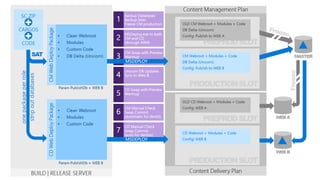
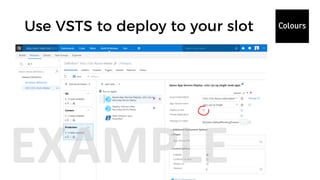
• Re-provision using msdeploy ARM and db-less SCWDP
• Deploy to the staging slot using VSTS (for example)
• Test & warm up your new site
• Swap slots
• Do you have custom role specific configuration
(CM/CD/REP/PRC)?
• Don’t transform them in your Solution, use cargo payloads!
• For more info on this topic, check out this article by Bas Lijten:
http://blog.baslijten.com/sitecore-on-azure-create-custom-web-
deploy-packages-using-the-sitecore-azure-toolkit/
What could go wrong
• Use shared access signatures (SAS) to access your SCWDPs
• You are not allowed to publicly expose Sitecore software downloads
• You do not want to share your base install, possibly including configs
• Add IP security to all testing and acceptance environments
• You can copy IP security setup from the XP CM role
• I have added this to the XP0-single templates, using it for test mainly
• Use Azure Key Vault to store your keys and passwords
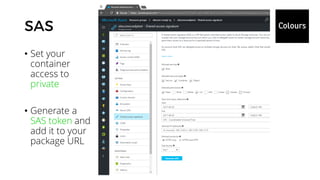
• Set your
container
access to
private
• Generate a
SAS token and
add it to your
package URL
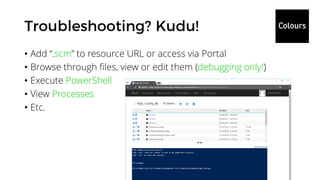
• Add “.scm” to resource URL or access via Portal
• Browse through files, view or edit them (debugging only!)
• Execute PowerShell
• View Processes
• Etc.
• EventQueue issue: the staging slot creates an extra CM role,
which could introduce concurrency issues with your production
slot CM
• Indexing: if you do blue green deployments using an extra web
database, please take in mind that your Azure Search already
updates your indexes based on the new master content!
• Content stop: if you want to avoid conflicts, content editors
should not publish during deployments (although than can
continue working on the master database); if you want to
deploy continuously, this can be a huge disturbance for editors
• Sitecore will release a new set of ARM templates shortly,
containing a few aspects we’ve seen today, and more:
• Nested templates
• Splitting infra & application
• Module support (add-ons)
• Staging and databaseless re-provisioning? Check my repository
• Always use them as a boilerplate to create your own templates!
• Blog on Azure Cloud Services – deprecated!
http://sitecore.robhabraken.nl/index.php/2229/sitecore-azure/
• First blog of my series on Azure Web Apps
http://sitecore.robhabraken.nl/index.php/2407/an-introduction-to-sitecore-on-azure-web-apps/
• An comprehensive introduction to Sitecore on Azure Web Apps
https://www.robhabraken.nl/index.php/2622/sitecore-8-2-1-on-azure-web-apps/
• Automated scaling using PowerShell
https://www.robhabraken.nl/index.php/2658/saving-costs-by-scaling-down/
• One of the issues of staging on a shared master database
https://www.robhabraken.nl/index.php/2683/the-staging-slot-eventqueue-issue/
• Download my demo scripts & ARM templates
https://github.com/robhabraken/Sitecore-Azure-Scripts
• A blog post, including recordings of this session, will follow
shortly on my Sitecore blog https://www.robhabraken.nl/

Blue Green Sitecore Deployments on Azure

  • 1.
    Rob Habraken |Technical Manager, Consultant & Sitecore MVP
  • 2.
    Sitecore 8.2 onAzure Web Apps
  • 3.
    Familiarity of Windows Built on.NET, Sitecore uses the technology that your IT department already knows. Infinite scalability Easily scales up and down as demand changes.* Rapidly deploy Sitecore on Azure without worrying IT. Speed to market The only enterprise- grade cloud Microsoft Azure ensures that Sitecore® Experience Database™ is secure. Always on Never miss a beat; always be there for your customers. Interoperability Integrates seamlessly with your existing back-end systems and marketing investments. Accident protection Reliable and redundant copies of your data and automatic failover protection. Pay-as-you-go Only pay for the power and capacity you’re using.* *Customers will need to ensure the proper number of content delivery servers from Sitecore to meet scaling requirements.
  • 4.
    Virtual Machines CloudServices Web Apps Azure hosting options Control Support of legacy apps Ease of management Agility • Web Apps is the new PaaS standard with more agility & easier to manage • Web Apps were previously marketed as a SaaS solution, but is now considered to be PaaS • Sitecore is using additional SaaS services to complete the installation Azure Module Sitecore 8.2-1
  • 6.
  • 7.
    • ARM (AzureResource Manager) templates are an Azure standard using JSON • Delivered by Sitecore as a starting point for your own custom provisioning • Enables you to define one or more Azure resources including dependencies between deployed resources • Can be used for initial provision or as continuous deployment • Use Web Deploy and DACPAC packages to setup site & databases
  • 8.
    The road tothe ultimate Continuous Deployment setup
  • 9.
    • What dowe need more for a good CI/CD setup? • How to edit and extend the provided ARM templates? • What are the pitfalls and black holes in blue / green provisioning?
  • 10.
  • 11.
    • Clean installper deployment, based on vanilla Sitecore install • Keep database content and only deploy new / changed items • Don’t disturb live site with deployment process or new content • Option to rollback deployment upon failure • Repeatable process, fully automated
  • 12.
    Sitecore gives youhandy ARM templates for the different sizings, but they’re a head start only; you will run into some issues • You cannot re-provision an environment, having to deploy over an existing web app, being unable to remove files • It doesn’t provision staging slots to deploy while keeping your current version up & running • It doesn’t tell you how to re-provision without overwriting your database with content you want to keep
  • 13.
    • Roll outyour infrastructure first, like resource groups, databases, hosting plans and slots • Then, provision a vanilla Sitecore install into your staging slot (this step includes installing databases and vanilla content) • Then, create a repeatable re-provisioning step, provisioning a vanilla Sitecore install into your staging slot, without databases! (this actually wipes your staging slot each time your provision) • Deploy your own solution over the staging slot & swap when ready
  • 14.
  • 15.
    Web roles Health Monitoring Databases SearchCollection Database Session State 2. Provisionvanilla Sitecore: Sitecore into staging slot, default content
  • 16.
  • 17.
    Web roles Health Monitoring Databases SearchCollection Database Session State 3. Re-provisionwithout database: Wipes slot, installs new files, keeping content
  • 18.
  • 20.
  • 21.
    • Split infraand msdeploy parts, so we can re-provision! • Use output parameters to stitch templates together • Add staging slots (default provisioning & deployment target) • Upgrade minimum SKU configuration to support slots • Add a databaseless SCWDP and provision for re-provisioning
  • 22.
    • ARM splitting •output parameters • staging slots
  • 23.
    • The SitecoreWeb Deploy Packages you can download from Sitecore contain vanilla databases, but you don’t want them to overwrite your own Sitecore content while re-provisioning • You have to strip the databases from the different SCWDPs • You can do that using msdeploy, deploying from one zip archive (SCWDP) to another, using the skip dbFullSQL & skip dbDacFx parameters!
  • 24.
    • Get theparameters.xml file out of the SCWDP; it contains all the info about the required parameters to deploy that package • Invoke msdeploy with the -skip:objectName=dbFullSql and -skip:objectName=dbDacFx parameters • Add all additional parameters required by the specific SCWDP
  • 25.
    msdeploy -verb:sync -source:package="D:DataInetpubazurexp0-singleSitecore8.2 rev. 161221_single.scwdp.zip" - dest:package="D:DataInetpubazurexp0-singleSitecore 8.2 rev. 161221_single-nodb.scwdp.zip" -declareparamfile="D:DataInetpubazurexp0- singleparameters.xml" -skip:objectName=dbFullSql -skip:objectName=dbDacFx -setparam:"Sitecore Admin New Password"=“giLvgjMXG0D9CuKYKctA" - setparam:"Core DB User Name"="single-core-sitecore-msdeploy-user" -setparam:"Core DB Password"="TWsxzkGQ5VrPT@7znJDe9NkFFtG" -setparam:"Master DB User Name"="single-master-sitecore-msdeploy-user" -setparam:"Master DB Password"="xgMR7p6dmLYdL@7znJDe9NkFFtG" -setparam:"Web DB User Name"="single-web- sitecore-msdeploy-user" -setparam:"Web DB Password"="B3j0tnNXVBoS6@7znJDe9NkFFtG" -setparam:"Reporting DB User Name"="single-reporting-sitecore- msdeploy-user" -setparam:"Reporting DB Password"="0dURnXD5T93f@7znJDe9NkFFtG" -setparam:"Core Admin Connection String"="Encrypt=True;TrustServerCertificate=False;Data Source=azure-rg-sql.database.windows.net,1433;Initial Catalog=azure-rg-core-db;User Id=xp0- single-sql;Password=a6CmAkgOyY236ctkzsNx;" -setparam:"Core Connection String"="Encrypt=True;TrustServerCertificate=False;Data Source=azure-rg- sql.database.windows.net,1433;Initial Catalog=azure-rg-core-db;User Id=single-core-sitecore-msdeploy-user;Password=TWsxzkGQ5VrPT@7znJDe9NkFFtG;" - setparam:"Master Admin Connection String"="Encrypt=True;TrustServerCertificate=False;Data Source=azure-rg-sql.database.windows.net,1433;Initial Catalog=azure-rg-master-db;User Id=xp0-single-sql;Password=a6CmAkgOyY236ctkzsNx;" -setparam:"Master Connection String"="Encrypt=True;TrustServerCertificate=False;Data Source=azure-rg-sql.database.windows.net,1433;Initial Catalog=azure-rg-master-db;User Id=single-master-sitecore-msdeploy-user;Password=xgMR7p6dmLYdL@7znJDe9NkFFtG;" -setparam:"Web Admin Connection String"="Encrypt=True;TrustServerCertificate=False;Data Source=azure-rg-web-sql.database.windows.net,1433;Initial Catalog=azure-rg-web-db;User Id=xp0- single-sql;Password=a6CmAkgOyY236ctkzsNx;" -setparam:"Web Connection String"="Encrypt=True;TrustServerCertificate=False;Data Source=azure-rg-web- sql.database.windows.net,1433;Initial Catalog=azure-rg-web-db;User Id=single-web-sitecore-msdeploy-user;Password=B3j0tnNXVBoS6@7znJDe9NkFFtG;" - setparam:"Reporting Admin Connection String"="Encrypt=True;TrustServerCertificate=False;Data Source=azure-rg-sql.database.windows.net,1433;Initial Catalog=azure-rg-reporting-db;User Id=xp0-single-sql;Password=a6CmAkgOyY236ctkzsNx;" -setparam:"Reporting Connection String"="Encrypt=True;TrustServerCertificate=False;Data Source=azure-rg-sql.database.windows.net,1433;Initial Catalog=azure-rg-reporting-db;User Id=single-reporting-sitecore-msdeploy-user;Password=0dURnXD5T93f@7znJDe9NkFFtG;" -setparam:"Analytics Connection String"="mongodb://mlab- azure:mM8kY7jD6JkDUykx6D2y@ds123456.mlab.com:12345/analytics" -setparam:"Tracking Live Connection String"="mongodb://mlab- azure:mM8kY7jD6JkDUykx6D2y@ds123456.mlab.com:12345/tracking-live" -setparam:"Tracking History Connection String"="mongodb://mlab- azure:mM8kY7jD6JkDUykx6D2y@ds123456.mlab.com:12345/analytics-history" -setparam:"Tracking Contact Connection String"="mongodb://mlab- azure:mM8kY7jD6JkDUykx6D2y@ds123456.mlab.com:12345/tracking-contact" -setparam:"Cloud Search Connection String"="serviceUrl=https://azure-rg- as.search.windows.net;apiVersion=2015-02-28;apiKey=A6836C6EBBA68675D558336C6EBBA686" -setparam:"Application Insights Instrumentation Key"="ecc59b93- 57eb-4c89-1264-945b2ae914f6" -setparam:"Application Insights Role"="Single" -setparam:"License XML"="." -setparam:"IP Security Client IP"="0.0.0.0" - setparam:"IP Security Client IP Mask"="0.0.0.0" …and it would be different for each environment & instance role! PS: these are all fake credentials, of course ;-)
  • 26.
    • The realconfig values don’t have to be in the target package • Actually, you don’t want them in there: • A package should be re-usable among environment • For security reasons, it shouldn’t contain the actual credentials • They would be overwritten by the ARM provisioning anyway • Use PowerShell to automate the creation and execution of the command, based on the parameters.xml file
  • 27.
    [CmdletBinding()] Param( [Parameter(Mandatory=$True)] [string]$PackagePath, [Parameter(Mandatory=$True)] [string]$ParamFile, [Parameter(Mandatory=$False)] [string]$PackageDestinationPath = $($PackagePath).Replace(".scwdp.zip", "-nodb.scwdp.zip") ) $msdeploy= "C:Program FilesIISMicrosoft Web Deploy V3msdeploy.exe" $verb = "-verb:sync" $source = "-source:package=`"$PackagePath`"" $destination = "-dest:package=`"$($PackageDestinationPath)`"" $declareParamFile = "-declareparamfile=`"$($ParamFile)`"" $skipDbFullSQL = "-skip:objectName=dbFullSql" $skipDbDacFx = "-skip:objectName=dbDacFx" # read parameter file [xml]$paramfile_content = Get-Content -Path $ParamFile $paramfile_paramnames = $paramfile_content.parameters.parameter.name $params = "" foreach($paramname in $paramfile_paramnames){ $tmpvalue = "tmpvalue" if($paramname -eq "License Xml"){ $tmpvalue = "LicenseContent"} if($paramname -eq "IP Security Client IP"){ $tmpvalue = "0.0.0.0"} if($paramname -eq "IP Security Client IP Mask"){ $tmpvalue = "0.0.0.0"} $params = "$params -setParam:`"$paramname`"=`"$tmpvalue`"" } # create new package Invoke-Expression "& '$msdeploy' --% $verb $source $destination $declareParamFile $skipDbFullSQL $skipDbDacFx $params"
  • 28.
  • 29.
    • Re-provision usingmsdeploy ARM and db-less SCWDP • Deploy to the staging slot using VSTS (for example) • Test & warm up your new site • Swap slots
  • 31.
    • Do youhave custom role specific configuration (CM/CD/REP/PRC)? • Don’t transform them in your Solution, use cargo payloads! • For more info on this topic, check out this article by Bas Lijten: http://blog.baslijten.com/sitecore-on-azure-create-custom-web- deploy-packages-using-the-sitecore-azure-toolkit/
  • 32.
  • 33.
    • Use sharedaccess signatures (SAS) to access your SCWDPs • You are not allowed to publicly expose Sitecore software downloads • You do not want to share your base install, possibly including configs • Add IP security to all testing and acceptance environments • You can copy IP security setup from the XP CM role • I have added this to the XP0-single templates, using it for test mainly • Use Azure Key Vault to store your keys and passwords
  • 34.
    • Set your container accessto private • Generate a SAS token and add it to your package URL
  • 35.
    • Add “.scm”to resource URL or access via Portal • Browse through files, view or edit them (debugging only!) • Execute PowerShell • View Processes • Etc.
  • 36.
    • EventQueue issue:the staging slot creates an extra CM role, which could introduce concurrency issues with your production slot CM • Indexing: if you do blue green deployments using an extra web database, please take in mind that your Azure Search already updates your indexes based on the new master content! • Content stop: if you want to avoid conflicts, content editors should not publish during deployments (although than can continue working on the master database); if you want to deploy continuously, this can be a huge disturbance for editors
  • 38.
    • Sitecore willrelease a new set of ARM templates shortly, containing a few aspects we’ve seen today, and more: • Nested templates • Splitting infra & application • Module support (add-ons) • Staging and databaseless re-provisioning? Check my repository • Always use them as a boilerplate to create your own templates!
  • 39.
    • Blog onAzure Cloud Services – deprecated! http://sitecore.robhabraken.nl/index.php/2229/sitecore-azure/ • First blog of my series on Azure Web Apps http://sitecore.robhabraken.nl/index.php/2407/an-introduction-to-sitecore-on-azure-web-apps/ • An comprehensive introduction to Sitecore on Azure Web Apps https://www.robhabraken.nl/index.php/2622/sitecore-8-2-1-on-azure-web-apps/ • Automated scaling using PowerShell https://www.robhabraken.nl/index.php/2658/saving-costs-by-scaling-down/ • One of the issues of staging on a shared master database https://www.robhabraken.nl/index.php/2683/the-staging-slot-eventqueue-issue/
  • 40.
    • Download mydemo scripts & ARM templates https://github.com/robhabraken/Sitecore-Azure-Scripts • A blog post, including recordings of this session, will follow shortly on my Sitecore blog https://www.robhabraken.nl/