Systems Managerによるパッチ管理
クラスメソッド株式会社 AWS事業本部
2019/06/03
Nobuhiro Nakayama
1
2目次
PCI DSSにおけるパッチ管理の要件
Systems Managerによるパッチ管理
Patch Managerの使い方
3
PCI DSSにおけるパッチ管理の要件
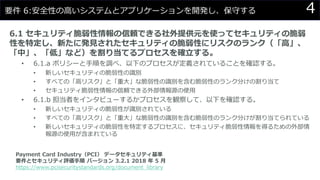
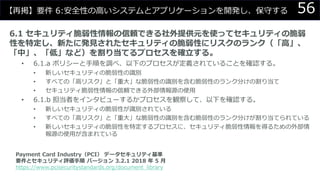
4要件 6:安全性の高いシステムとアプリケーションを開発し、保守する
6.1 セキュリティ脆弱性情報の信頼できる社外提供元を使ってセキュリティの脆弱
性を特定し、新たに発見されたセキュリティの脆弱性にリスクのランク(「高」、
「中」、「低」など)を割り当てるプロセスを確立する。
• 6.1.a ポリシーと手順を調べ、以下のプロセスが定義されていることを確認する。
• 新しいセキュリティの脆弱性の識別
• すべての「高リスク」と「重大」な脆弱性の識別を含む脆弱性のランク分けの割り当て
• セキュリティ脆弱性情報の信頼できる外部情報源の使用
• 6.1.b 担当者をインタビューするかプロセスを観察して、以下を確認する。
• 新しいセキュリティの脆弱性が識別されている
• すべての「高リスク」と「重大」な脆弱性の識別を含む脆弱性のランク分けが割り当てられている
• 新しいセキュリティの脆弱性を特定するプロセスに、セキュリティ脆弱性情報を得るための外部情
報源の使用が含まれている
Payment Card Industry(PCI) データセキュリティ基準
要件とセキュリティ評価手順 バージョン 3.2.1 2018 年 5 月
https://www.pcisecuritystandards.org/document_library
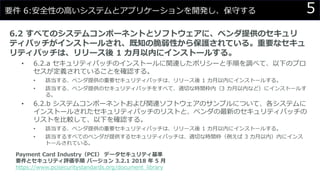
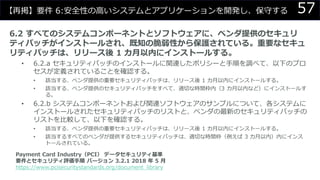
5要件 6:安全性の高いシステムとアプリケーションを開発し、保守する
6.2 すべてのシステムコンポーネントとソフトウェアに、ベンダ提供のセキュリ
ティパッチがインストールされ、既知の脆弱性から保護されている。重要なセキュ
リティパッチは、リリース後 1 カ月以内にインストールする。
• 6.2.a セキュリティパッチのインストールに関連したポリシーと手順を調べて、以下のプロ
セスが定義されていることを確認する。
• 該当する、ベンダ提供の重要セキュリティパッチは、リリース後 1 カ月以内にインストールする。
• 該当する、ベンダ提供のセキュリティパッチをすべて、適切な時間枠内(3 カ月以内など)にインストールす
る。
• 6.2.b システムコンポーネントおよび関連ソフトウェアのサンプルについて、各システムに
インストールされたセキュリティパッチのリストと、ベンダの最新のセキュリティパッチの
リストを比較して、以下を確認する。
• 該当する、ベンダ提供の重要セキュリティパッチは、リリース後 1 カ月以内にインストールする。
• 該当するすべてのベンダが提供するセキュリティパッチは、適切な時間枠(例えば 3 カ月以内)内にインス
トールされている。
Payment Card Industry(PCI) データセキュリティ基準
要件とセキュリティ評価手順 バージョン 3.2.1 2018 年 5 月
https://www.pcisecuritystandards.org/document_library
6
Systems Managerによるパッチ管理
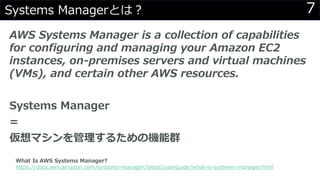
7Systems Managerとは?
AWS Systems Manager is a collection of capabilities
for configuring and managing your Amazon EC2
instances, on-premises servers and virtual machines
(VMs), and certain other AWS resources.
Systems Manager
=
仮想マシンを管理するための機能群
What Is AWS Systems Manager?
https://docs.aws.amazon.com/systems-manager/latest/userguide/what-is-systems-manager.html
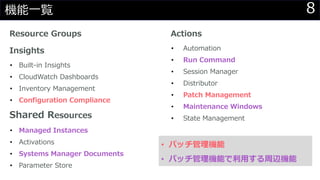
8機能一覧
Resource Groups
Insights
• Built-in Insights
• CloudWatch Dashboards
• Inventory Management
• Configuration Compliance
Shared Resources
• Managed Instances
• Activations
• Systems Manager Documents
• Parameter Store
Actions
• Automation
• Run Command
• Session Manager
• Distributor
• Patch Management
• Maintenance Windows
• State Management
• パッチ管理機能
• パッチ管理機能で利用する周辺機能
9Patch Managerとは?
パッチの適用を自動化
• スキャンのみ実行すること可能
• リリースから数日後にパッチを自動承認
• 何日後に承認するかは自身で制御可能
• 適用を拒否するパッチリストや独自のパッチソースを定義するこ
とも可能
AWS Systems Manager Patch Manager
https://docs.aws.amazon.com/systems-manager/latest/userguide/systems-manager-patch.html
10Patch Baseline
インスタンスへのインストールを承認するパッチの定義
• 自動承認ルールを定義可能
• 例)Severity = Critical,Important && Classification = Security
• パッチの承認および拒否を個別に指定可能
About Patch Baselines
https://docs.aws.amazon.com/systems-manager/latest/userguide/about-patch-baselines.html
11Configuration Complianceとは?
管理対象のインスタンス群がパッチのコンプライアンスに準拠
しているか確認
AWS Systems Manager Configuration Compliance
https://docs.aws.amazon.com/systems-manager/latest/userguide/systems-manager-compliance.html
12Managed Instancesとは?
SSMで管理されているインスタンスの情報
• インベントリ情報を保持(ハードウェア、ソフトウェア)
• パッチの適用状況も管理されている
AWS Systems Manager Managed Instances
https://docs.aws.amazon.com/systems-manager/latest/userguide/managed_instances.html
13Systems Manager Documentsとは?
Managed Instaceに対して実行するアクションを定義
• 事前定義済みのドキュメントが多数提供
• パッチの適用は以下のドキュメントで実行可能
• AWS-ConfigureWindowsUpdate
• AWS-InstallWindowsUpdates
• AWS-RunPatchBaseline
• ドキュメントは JSON / YAML で記述
AWS Systems Manager Documents
https://docs.aws.amazon.com/systems-manager/latest/userguide/sysman-ssm-docs.html
14Run Commandとは?
Managed Instanceに対してリモートからDocumentで定義
されたアクションを実行
• 一度だけ実行することも定期的に実行することも可能
• 任意のスクリプト (ShellScript / PowerShell) も実行可能
AWS Systems Manager Run Command
https://docs.aws.amazon.com/systems-manager/latest/userguide/execute-remote-commands.html
15Maintenance Windowとは?
Managed Instanceに対してアクションを定期的に実行
• パッチの適用やドライバーの更新などで利用
AWS Systems Manager Maintenance Windows
https://docs.aws.amazon.com/systems-manager/latest/userguide/systems-manager-maintenance.html
16補足
SSMエージェントを実行する権限について
• root アクセス権限 (Linux) または SYSTEM アクセス権限
(Windows) を使用して Amazon EC2 インスタンスで実行される
• AWS IAMでの権限付与には十分留意する必要がある
Restrict Access to Root-Level Commands Through SSM Agent
https://docs.aws.amazon.com/systems-manager/latest/userguide/ssm-agent-restrict-root-level-commands.html
17
Patch Managerの使い方
18利用開始からパッチ適用までの流れ
以下の流れで利用方法を説明
1. EC2インスタンスの作成 / インスタンスプロファイルのアタッチ
2. パッチベースラインの確認
3. メンテナンスウィンドウの作成、動作確認(スキャンのみ)
4. Managed Instanceの構成情報を確認
5. メンテナンスウィンドウの修正、動作確認(インストール)
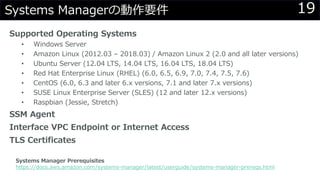
19Systems Managerの動作要件
Supported Operating Systems
• Windows Server
• Amazon Linux (2012.03 – 2018.03) / Amazon Linux 2 (2.0 and all later versions)
• Ubuntu Server (12.04 LTS, 14.04 LTS, 16.04 LTS, 18.04 LTS)
• Red Hat Enterprise Linux (RHEL) (6.0, 6.5, 6.9, 7.0, 7.4, 7.5, 7.6)
• CentOS (6.0, 6.3 and later 6.x versions, 7.1 and later 7.x versions)
• SUSE Linux Enterprise Server (SLES) (12 and later 12.x versions)
• Raspbian (Jessie, Stretch)
SSM Agent
Interface VPC Endpoint or Internet Access
TLS Certificates
Systems Manager Prerequisites
https://docs.aws.amazon.com/systems-manager/latest/userguide/systems-manager-prereqs.html
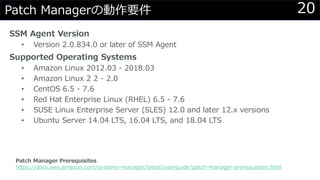
20Patch Managerの動作要件
SSM Agent Version
• Version 2.0.834.0 or later of SSM Agent
Supported Operating Systems
• Amazon Linux 2012.03 - 2018.03
• Amazon Linux 2 2 - 2.0
• CentOS 6.5 - 7.6
• Red Hat Enterprise Linux (RHEL) 6.5 - 7.6
• SUSE Linux Enterprise Server (SLES) 12.0 and later 12.x versions
• Ubuntu Server 14.04 LTS, 16.04 LTS, and 18.04 LTS
Patch Manager Prerequisites
https://docs.aws.amazon.com/systems-manager/latest/userguide/patch-manager-prerequisites.html
21ちなみに・・・
Systems Managerはオンプレの環境でも利用できます
• 詳細は以下のドキュメントで
Setting Up AWS Systems Manager for Hybrid Environments
https://docs.aws.amazon.com/systems-manager/latest/userguide/systems-manager-managedinstances.html
22
1.EC2インスタンスの作成
/ インスタンスプロファイルのアタッチ
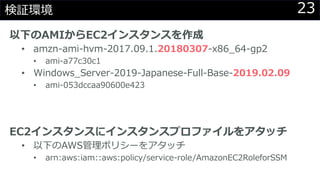
23検証環境
以下のAMIからEC2インスタンスを作成
• amzn-ami-hvm-2017.09.1.20180307-x86_64-gp2
• ami-a77c30c1
• Windows_Server-2019-Japanese-Full-Base-2019.02.09
• ami-053dccaa90600e423
EC2インスタンスにインスタンスプロファイルをアタッチ
• 以下のAWS管理ポリシーをアタッチ
• arn:aws:iam::aws:policy/service-role/AmazonEC2RoleforSSM
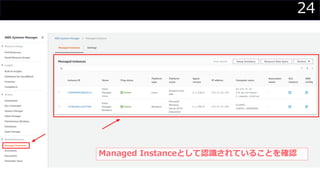
24
Managed Instanceとして認識されていることを確認
25
2.パッチベースラインの確認
26
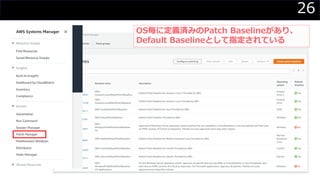
OS毎に定義済みのPatch Baselineがあり、
Default Baselineとして指定されている
27
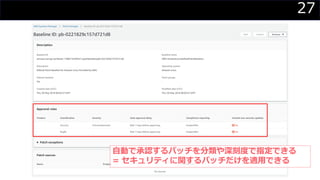
自動で承認するパッチを分類や深刻度で指定できる
= セキュリティに関するパッチだけを適用できる
28
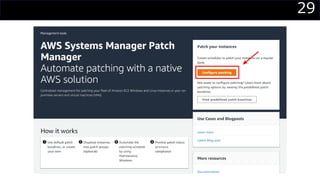
3.メンテナンスウィンドウの作成
/動作確認(スキャンのみ)
29
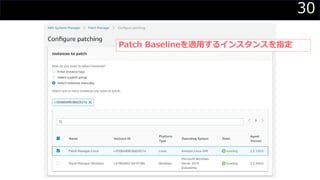
30
Patch Baselineを適用するインスタンスを指定
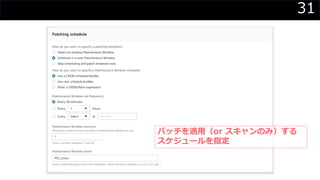
31
パッチを適用(or スキャンのみ)する
スケジュールを指定
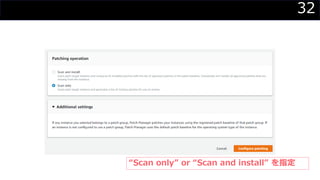
32
“Scan only” or “Scan and install” を指定
33
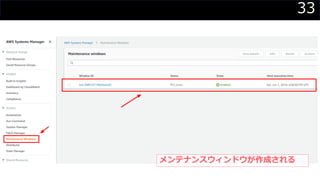
メンテナンスウィンドウが作成される
34
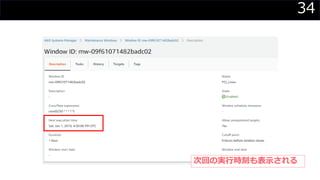
次回の実行時刻も表示される
35
メンテナンスウィンドウで実行するアクションとして
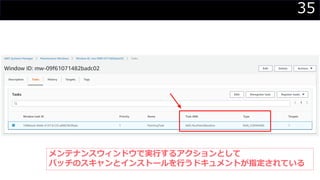
パッチのスキャンとインストールを行うドキュメントが指定されている
36
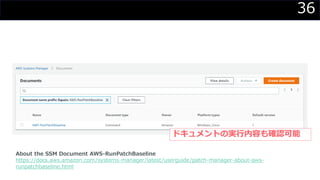
ドキュメントの実行内容も確認可能
About the SSM Document AWS-RunPatchBaseline
https://docs.aws.amazon.com/systems-manager/latest/userguide/patch-manager-about-aws-
runpatchbaseline.html
37
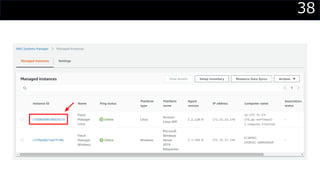
4.Managed Instanceの構成情報を確認
38
39
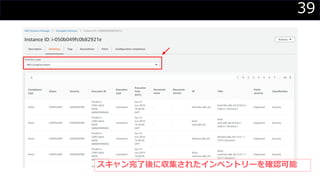
スキャン完了後に収集されたインベントリーを確認可能
40
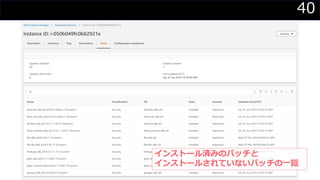
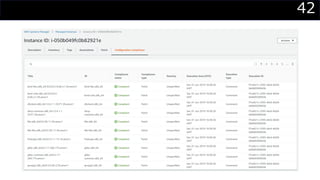
インストール済みのパッチと
インストールされていないパッチの一覧
41
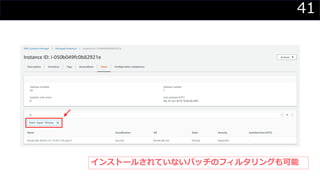
インストールされていないパッチのフィルタリングも可能
42
43
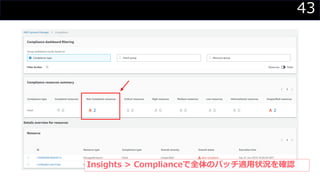
Insights > Complianceで全体のパッチ適用状況を確認
44
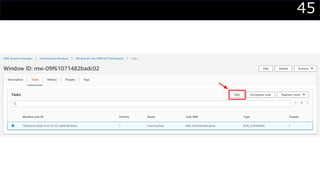
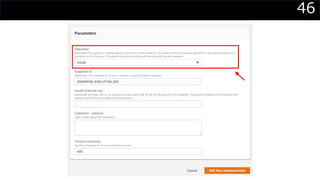
5.メンテナンスウィンドウの修正
/動作確認(インストール)
45
46
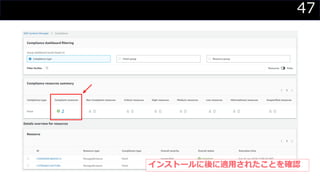
47
インストールに後に適用されたことを確認
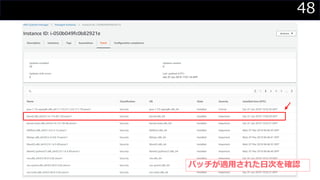
48
パッチが適用された日次を確認
49
おまけ
50
コンプライアンスに違反したことを
通知したい
51
CloudWatch Events で実現可能
52CloudWatch Eventsとは?
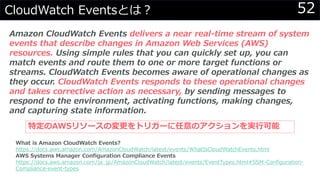
Amazon CloudWatch Events delivers a near real-time stream of system
events that describe changes in Amazon Web Services (AWS)
resources. Using simple rules that you can quickly set up, you can
match events and route them to one or more target functions or
streams. CloudWatch Events becomes aware of operational changes as
they occur. CloudWatch Events responds to these operational changes
and takes corrective action as necessary, by sending messages to
respond to the environment, activating functions, making changes,
and capturing state information.
What is Amazon CloudWatch Events?
https://docs.aws.amazon.com/AmazonCloudWatch/latest/events/WhatIsCloudWatchEvents.html
AWS Systems Manager Configuration Compliance Events
https://docs.aws.amazon.com/ja_jp/AmazonCloudWatch/latest/events/EventTypes.html#SSM-Configuration-
Compliance-event-types
特定のAWSリソースの変更をトリガーに任意のアクションを実行可能
53イベントフィルター
{
"source": [
"aws.ssm"
],
"detail-type": [
"Configuration Compliance State Change"
]
}
54イベント
{
"version": "0",
"id": "01234567-0123-0123-0123-012345678901",
"detail-type": "Configuration Compliance State Change",
"source": "aws.ssm",
"account": "123456789012",
"time": "2017-07-17T19:02:31Z",
"region": "us-west-1",
"resources": [
"arn:aws:ssm:us-west-1:461348341421:managed-instance/i-01234567890abcdef"
],
"detail": {
"resource-type": "managed-instance",
"resource-id": "i-01234567890abcdef",
"compliance-status": "non_compliant",
"compliance-type": "Patch",
"patch-baseline-id": "PB789",
"severity": "critical"
}
}
55
Discussion
56【再掲】要件 6:安全性の高いシステムとアプリケーションを開発し、保守する
6.1 セキュリティ脆弱性情報の信頼できる社外提供元を使ってセキュリティの脆弱
性を特定し、新たに発見されたセキュリティの脆弱性にリスクのランク(「高」、
「中」、「低」など)を割り当てるプロセスを確立する。
• 6.1.a ポリシーと手順を調べ、以下のプロセスが定義されていることを確認する。
• 新しいセキュリティの脆弱性の識別
• すべての「高リスク」と「重大」な脆弱性の識別を含む脆弱性のランク分けの割り当て
• セキュリティ脆弱性情報の信頼できる外部情報源の使用
• 6.1.b 担当者をインタビューするかプロセスを観察して、以下を確認する。
• 新しいセキュリティの脆弱性が識別されている
• すべての「高リスク」と「重大」な脆弱性の識別を含む脆弱性のランク分けが割り当てられている
• 新しいセキュリティの脆弱性を特定するプロセスに、セキュリティ脆弱性情報を得るための外部情
報源の使用が含まれている
Payment Card Industry(PCI) データセキュリティ基準
要件とセキュリティ評価手順 バージョン 3.2.1 2018 年 5 月
https://www.pcisecuritystandards.org/document_library
57【再掲】要件 6:安全性の高いシステムとアプリケーションを開発し、保守する
6.2 すべてのシステムコンポーネントとソフトウェアに、ベンダ提供のセキュリ
ティパッチがインストールされ、既知の脆弱性から保護されている。重要なセキュ
リティパッチは、リリース後 1 カ月以内にインストールする。
• 6.2.a セキュリティパッチのインストールに関連したポリシーと手順を調べて、以下のプロ
セスが定義されていることを確認する。
• 該当する、ベンダ提供の重要セキュリティパッチは、リリース後 1 カ月以内にインストールする。
• 該当する、ベンダ提供のセキュリティパッチをすべて、適切な時間枠内(3 カ月以内など)にインストールす
る。
• 6.2.b システムコンポーネントおよび関連ソフトウェアのサンプルについて、各システムに
インストールされたセキュリティパッチのリストと、ベンダの最新のセキュリティパッチの
リストを比較して、以下を確認する。
• 該当する、ベンダ提供の重要セキュリティパッチは、リリース後 1 カ月以内にインストールする。
• 該当するすべてのベンダが提供するセキュリティパッチは、適切な時間枠(例えば 3 カ月以内)内にインス
トールされている。
Payment Card Industry(PCI) データセキュリティ基準
要件とセキュリティ評価手順 バージョン 3.2.1 2018 年 5 月
https://www.pcisecuritystandards.org/document_library
58

【勉強会資料】Systems Managerによるパッチ管理 for PCI DSS