1
th
강인호
inho.kang@oracle.com
Infrastructure as Code
2020.01.18
16thOracle
Developer
Meetup
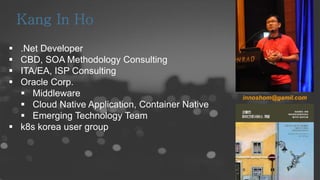
 .Net Developer
 CBD, SOA Methodology Consulting
 ITA/EA, ISP Consulting
 Oracle Corp.
 Middleware
 Cloud Native Application, Container Native
 Emerging Technology Team
 k8s korea user group
innoshom@gamil.com
A Table of Contents
01 Infra as Code
02 Terraform
3
PART 1
Infra as Code
4
오늘의 컨셉
5
오늘 다루지 않는 내용
6
7
8
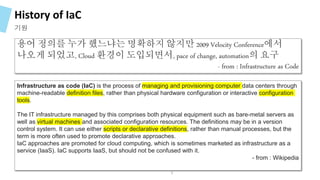
History of IaC
기원
용어 정의를 누가 했느냐는 명확하지 않지만 2009 Velocity Conference에서
나오게 되었고, Cloud 환경이 도입되면서, pace of change, automation의 요구
- from : Infrastructure as Code
Infrastructure as code (IaC) is the process of managing and provisioning computer data centers through
machine-readable definition files, rather than physical hardware configuration or interactive configuration
tools.
The IT infrastructure managed by this comprises both physical equipment such as bare-metal servers as
well as virtual machines and associated configuration resources. The definitions may be in a version
control system. It can use either scripts or declarative definitions, rather than manual processes, but the
term is more often used to promote declarative approaches.
IaC approaches are promoted for cloud computing, which is sometimes marketed as infrastructure as a
service (IaaS). IaC supports IaaS, but should not be confused with it.
- from : Wikipedia
9
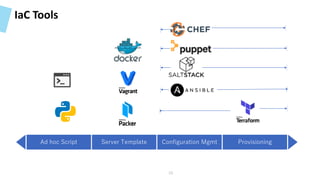
IaC Tools
Ad hoc Script Server Template Configuration Mgmt Provisioning
10
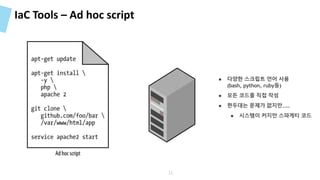
IaC Tools – Ad hoc script
11
● 다양한 스크립트 언어 사용
(bash, python, ruby등)
● 모든 코드를 직접 작성
● 한두대는 문제가 없지만…..
● 시스템이 커지만 스파게티 코드
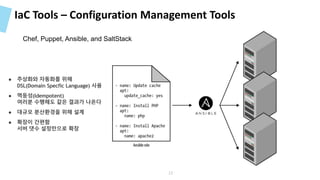
IaC Tools – Configuration Management Tools
Chef, Puppet, Ansible, and SaltStack
12
● 추상화와 자동화를 위해
DSL(Domain Specfic Language) 사용
● 멱등성(Idempotent)
여러분 수행해도 같은 결과가 나온다
● 대규모 분산환경을 위해 설계
● 확장이 간편함
서버 댓수 설정만으로 확장
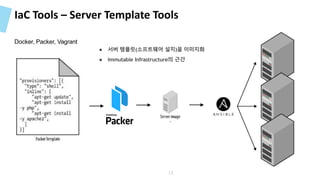
IaC Tools – Server Template Tools
Docker, Packer, Vagrant
13
● 서버 템플릿(소프트웨어 설치)을 이미지화
● Immutable Infrastructure의 근간
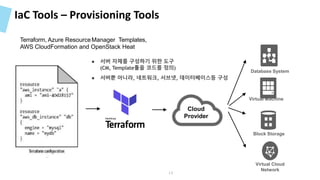
IaC Tools – Provisioning Tools
Virtual Machine
Block Storage
Virtual Cloud
Network
Database System
Cloud
Provider
Terraform, Azure ResourceManager Templates,
AWS CloudFormation and OpenStack Heat
14
● 서버 자체를 구성하기 위한 도구
(CM, Template툴을 코드를 정의)
● 서버뿐 아니라, 네트워크, 서브넷, 데이터베이스등 구성
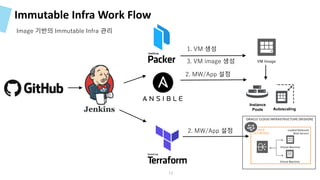
Immutable Infra Work Flow
Image 기반의 Immutable Infra 관리
Autoscaling
Instance
Pools
VM Image
1. VM 생성
2. MW/App 설정
3. VM image 생성
2. MW/App 설정 Subnet D
10.0.30.0/24
Loaded Balanced
Web Servers
Virtual Machine
Virtual Machine
ORACLE CLOUD INFRASTRUCTURE (REGION)
15
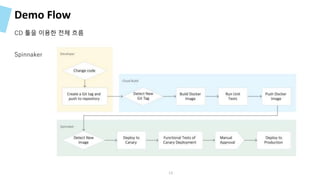
Demo Flow
CD 툴을 이용한 전체 흐름
Spinnaker
16
17
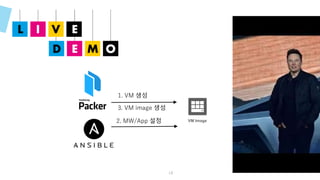
18
VM Image
1. VM 생성
2. MW/App 설정
3. VM image 생성
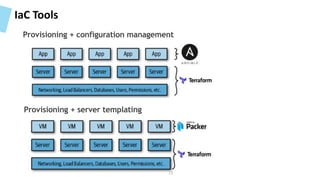
IaC Tools
Provisioning + configuration management
Provisioning + server templating
19
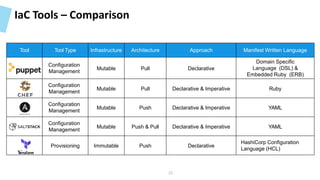
IaC Tools – Comparison
Tool Tool Type Infrastructure Architecture Approach Manifest Written Language
Configuration
Management
Mutable Pull Declarative
Domain Specific
Language (DSL) &
Embedded Ruby (ERB)
Configuration
Management
Mutable Pull Declarative & Imperative Ruby
Configuration
Management
Mutable Push Declarative & Imperative YAML
Configuration
Management
Mutable Push & Pull Declarative & Imperative YAML
Provisioning Immutable Push Declarative
HashiCorp Configuration
Language (HCL)
20
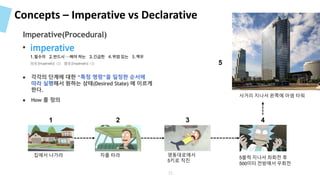
Concepts – Imperative vs Declarative
사거리 지나서 왼쪽에 아셈 타워
집에서 나가라 차를 타라 영동대로에서
5키로 직진
5블럭 지나서 좌회전 후
500미터 전방에서 우회전
1 2 3 4
5
● 지속적으로 수정/패치 적용
● 각각의 단계에 대한 “특정 명령”을 일정한 순서에
따라 실행해서 원하는 상태(Desired State) 에 이르게
한다.
● How 를 정의
Imperative(Procedural)
21
Concepts – Imperative vs Declarative
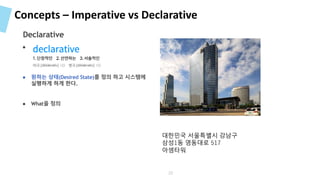
대한민국 서울특별시 강남구
삼성1동 영동대로 517
아셈타워
● 지속적으로 수정/패치 적용
● 원하는 상태(Desired State)를 정의 하고 시스템에
실행하게 하게 한다.
● What을 정의
Declarative
22
Concepts – Mutable vs Immutable
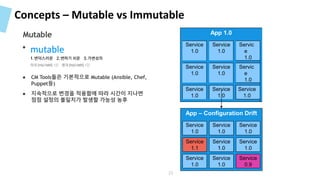
● 지속적으로 수정/패치 적용
● CM Tools들은 기본적으로 Mutable (Ansible, Chef,
Puppet등)
● 지속적으로 변경을 적용함에 따라 시간이 지나면
점점 설정의 불일치가 발생할 가능성 농후
Mutable App 1.0
Service
1.0
Service
1.0
Servic
e
1.0
Service
1.0
Service
1.0
Servic
e
1.0
Service
1.0
Service
1.0
Service
1.0
App – Configuration Drift
Service
1.0
Service
1.0
Service
1.0
Service
1.1
Service
1.0
Service
1.0
Service
1.0
Service
1.0
Service
0.9
23
Concepts – Mutable vs Immutable
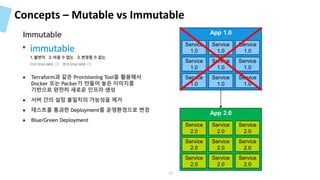
● 지속적으로 수정/패치 적용
● Terraform과 같은 Provisioning Tool을 활용해서
Docker 또는 Packer가 만들어 놓은 이미지를
기반으로 완전히 새로운 인프라 생성
● 서버 간의 설정 불일치의 가능성을 제거
● 테스트를 통과한 Deployment를 운영환경으로 변경
● Blue/Green Deployment
Immutable App 1.0
Service
1.0
Service
1.0
Service
1.0
Service
1.0
Service
1.0
Service
1.0
Service
1.0
Service
1.0
Service
1.0
App 2.0
Service
2.0
Service
2.0
Service
2.0
Service
2.0
Service
2.0
Service
2.0
Service
2.0
Service
2.0
Service
2.0
24
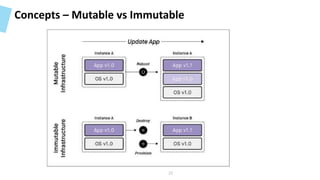
Concepts – Mutable vs Immutable
25
Concepts – Mutable vs Immutable
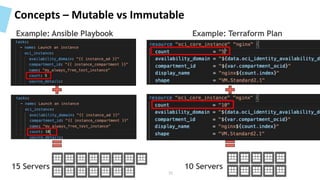
15 Servers 10 Servers
Example: Ansible Playbook Example: Terraform Plan
26
Terraform State
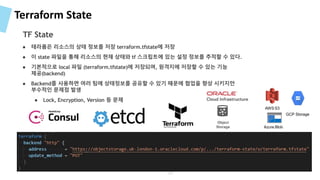
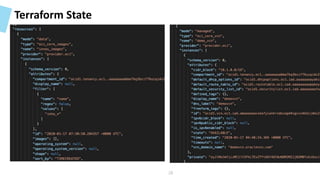
● 테라폼은 리소스의 상태 정보를 저장 terraform.tfstate에 저장
● 이 state 파일을 통해 리소스의 현재 상태와 tf 스크립트에 있는 설정 정보를 추적할 수 있다.
● 기본적으로 local 파일 (terraform.tfstate)에 저장되며, 원격지에 저장할 수 있는 기능
제공(backend)
● Backend를 사용하면 여러 팀에 상태정보를 공유할 수 있기 때문에 협업을 향상 시키지만
부수적인 문제점 발생
● Lock, Encryption, Version 등 문제
TF State
Azure Blob
AWS S3
GCP Storage
Object
Storage
27
Terraform State
28
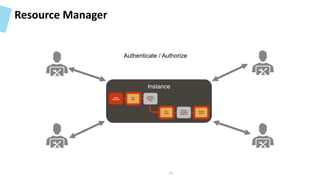
Resource Manager
Authenticate / Authorize
Instance
Install
Terraform
Destroy
Stack
Review
Terraform
state file
Run
Apply
Review
Execution
Plan
Run
Plan
29
PART 2
Terraform
30
Terraform
31
Terraform
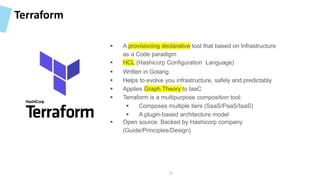
 A provisioning declarative tool that based on Infrastructure
as a Code paradigm
 HCL (Hashicorp Configuration Language)
 Written in Golang.
 Helps to evolve you infrastructure, safely and predictably
 Applies Graph Theory to IaaC
 Terraform is a multipurpose composition tool:
 Composes multiple tiers (SaaS/PaaS/IaaS)
 A plugin-based architecture model
 Open source. Backed by Hashicorp company
(Guide/Principles/Design)
32
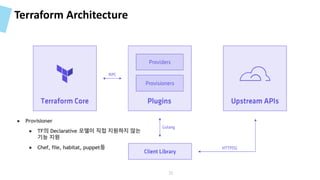
Terraform Architecture
33
● Provisioner
● TF의 Declarative 모델이 직접 지원하지 않는
기능 지원
● Chef, file, habitat, puppet등
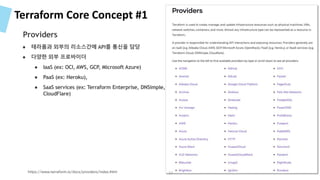
Terraform Core Concept #1
● 테라폼과 외부의 리소스간에 API를 통신을 담당
● 다양한 외부 프로바이더
● IaaS (ex: OCI, AWS, GCP, Microsoft Azure)
● PaaS (ex: Heroku),
● SaaS services (ex: Terraform Enterprise, DNSimple,
CloudFlare)
https://www.terraform.io/docs/providers/index.html
Providers
34
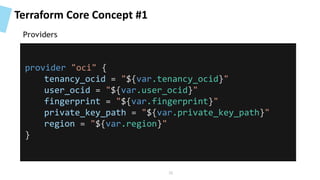
Terraform Core Concept #1
provider "oci" {
tenancy_ocid = "${var.tenancy_ocid}"
user_ocid = "${var.user_ocid}"
fingerprint = "${var.fingerprint}"
private_key_path = "${var.private_key_path}"
region = "${var.region}"
}
Providers
35
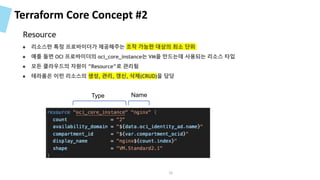
Terraform Core Concept #2
● 리소스란 특정 프로바이더가 제공해주는 조작 가능한 대상의 최소 단위
● 예를 들면 OCI 프로바이더의 oci_core_instance는 VM을 만드는데 사용되는 리소스 타입
● 모든 클라우드의 자원이 ”Resource”로 관리됨
● 테라폼은 이런 리소스의 생성, 관리, 갱신, 삭제(CRUD)을 담당
Type Name
Resource
36
Terraform Core Concept #3
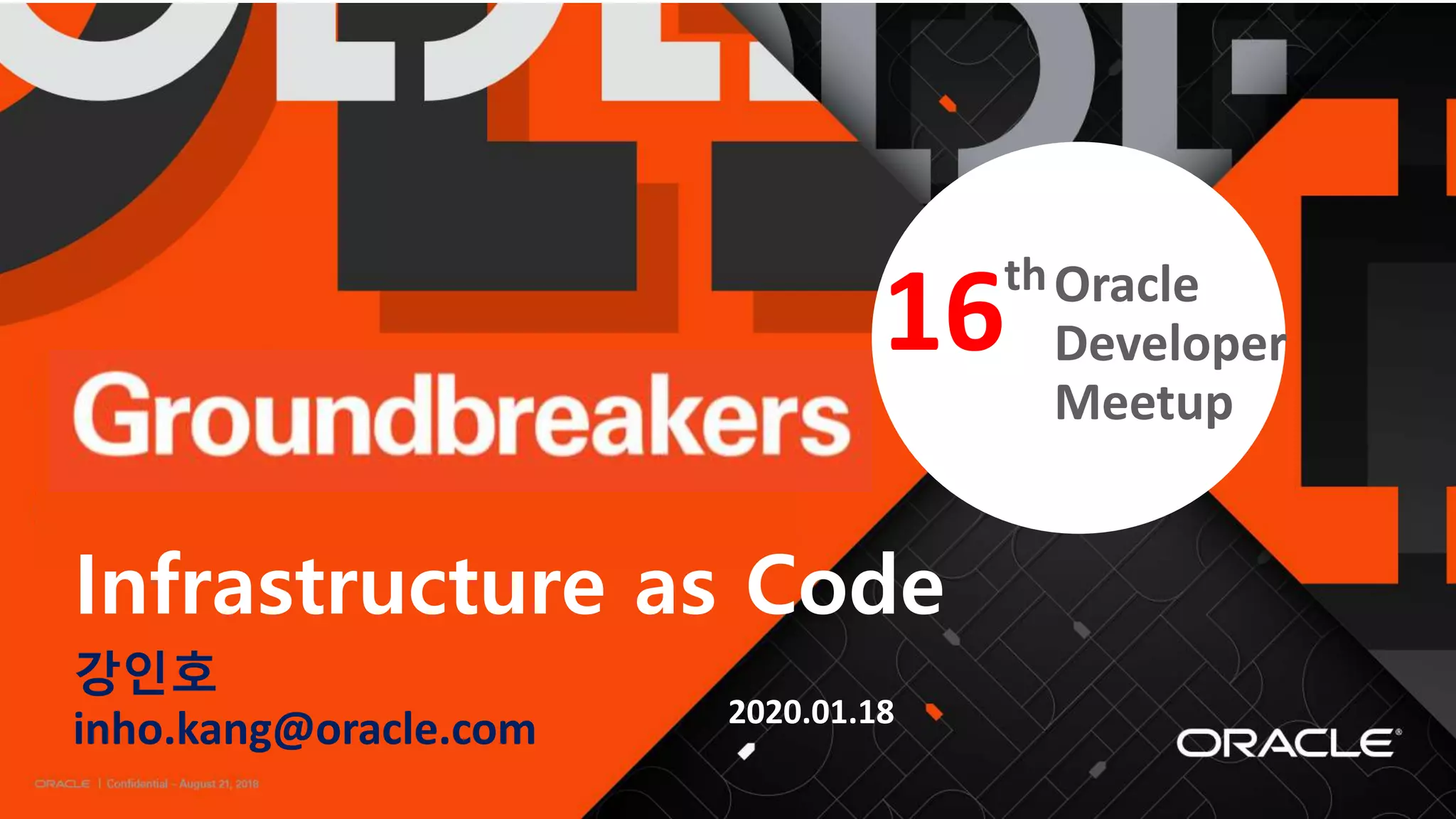
● 여러곳에 Hard Coding(ex:Port 번호)하는 것을 막기 위해 변수를 사용 (DRY, Don’t Repeat Yourself)
● Input 변수에 값을 제공하는 방법은 1. –var 옵션, 2. –-var-file 옵션, 3. TF_VAR_<변수명> 환경변수
● type은 string, list, map이며, 선언하지 않으면 string으로 간주
variable
37
Terraform Core Concept #3
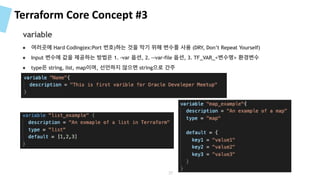
variable – 변수 입력 방법
export TF_VAR_tenancy_ocid=<value>
export TF_VAR_compartment_ocid=<value>
export TF_VAR_user_ocid=<value>
export TF_VAR_fingerprint=<value>
export TF_VAR_private_key_path=<value>
● Input 변수에 값을 제공하는 방법은 1. –var 옵션, 2. –-var-file 옵션, 3. TF_VAR_<변수명> 환경변수
38
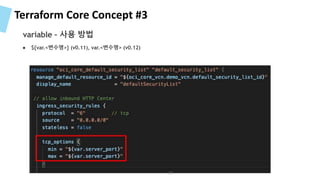
Terraform Core Concept #3
● ${var.<변수명>} (v0.11), var.<변수명> (v0.12)
variable – 사용 방법
39
Terraform Core Concept #3
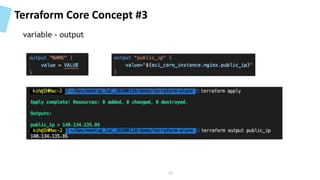
variable - output
40
Terraform Core Concept #4
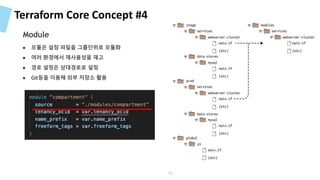
● 모듈은 설정 파일을 그룹단위로 모듈화
● 여러 환경에서 재사용성을 재고
● 경로 설정은 상대경로로 설정
● Git등을 이용해 외부 저장소 활용
Module
41
Terraform Core Concept
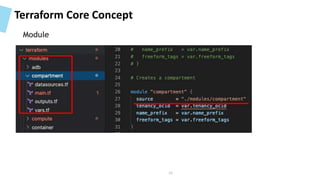
Module
42
Terraform Core Concept
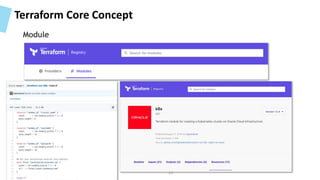
Module
43
Terraform Core Concept #5
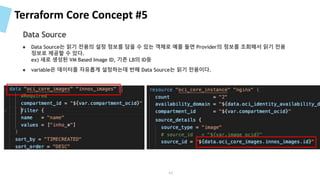
● Data Source는 읽기 전용의 설정 정보를 담을 수 있는 객체로 예를 들면 Provider의 정보를 조회해서 읽기 전용
정보로 제공할 수 있다.
ex) 새로 생성된 VM Based Image ID, 기존 LB의 ID등
● variable은 데이터를 자유롭게 설정하는데 반해 Data Source는 읽기 전용이다.
Data Source
44
Terraform Core Concept #5
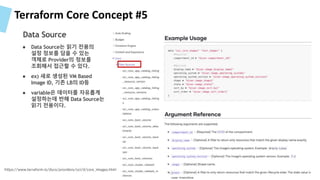
● Data Source는 읽기 전용의
설정 정보를 담을 수 있는
객체로 Provider의 정보를
조회해서 접근할 수 있다.
● ex) 새로 생성된 VM Based
Image ID, 기존 LB의 ID등
● variable은 데이터를 자유롭게
설정하는데 반해 Data Source는
읽기 전용이다.
Data Source
https://www.terraform.io/docs/providers/oci/d/core_images.html
45
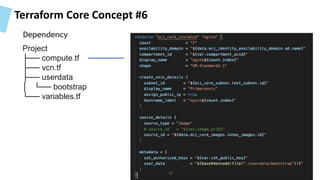
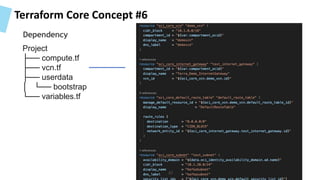
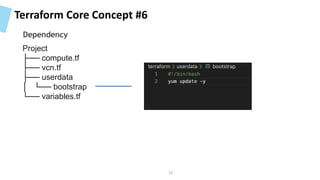
Terraform Core Concept #6
Project
├── compute.tf
├── vcn.tf
├── userdata
│ └── bootstrap
└── variables.tf
46
Dependency
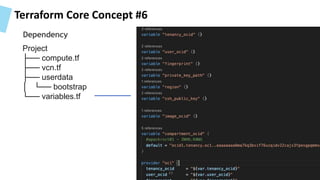
Terraform Core Concept #6
Project
├── compute.tf
├── vcn.tf
├── userdata
│ └── bootstrap
└── variables.tf
47
Dependency
Terraform Core Concept #6
Project
├── compute.tf
├── vcn.tf
├── userdata
│ └── bootstrap
└── variables.tf
48
Dependency
Terraform Core Concept #6
Project
├── compute.tf
├── vcn.tf
├── userdata
│ └── bootstrap
└── variables.tf
49
Dependency
Terraform Core Concept #6
Type Name
[root] root
meta
count-boundary
provider
oci
oci-core_instance
nignx
50
Dependency
Terraform Core Concept #6
51
• depends_on [root] root
meta
count-boundary
provider
oci
oci-core_instance
nignx
Dependency
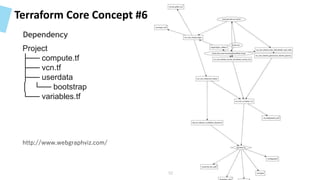
Terraform Core Concept #6
Project
├── compute.tf
├── vcn.tf
├── userdata
│ └── bootstrap
└── variables.tf
http://www.webgraphviz.com/
52
Dependency
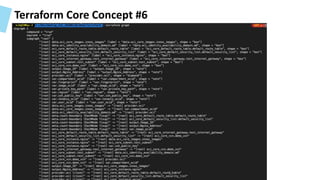
Terraform Core Concept #6
53
Terraform Core Concept #6
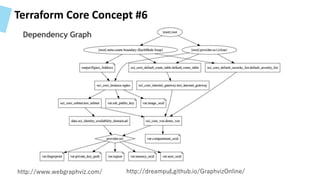
http://www.webgraphviz.com/ http://dreampuf.github.io/GraphvizOnline/
Dependency Graph
54
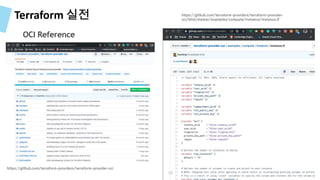
Terraform 실전
OCI Reference
https://github.com/terraform-providers/terraform-provider-oci
https://github.com/terraform-providers/terraform-provider-
oci/blob/master/examples/compute/instance/instance.tf
55
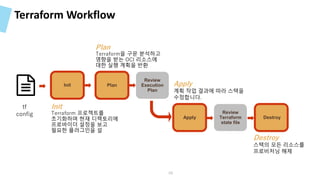
Terraform Workflow
Destroy
Review
Terraform
state file
Apply
Review
Execution
Plan
Plan
Plan :
Terraform을 구문 분석하고
영향을 받는 OCI 리소스에
대한 실행 계획을 반환
Apply :
계획 작업 결과에 따라 스택을
수정합니다.
Destroy :
스택의 모든 리소스를
프로비저닝 해제
Init
Init:
Terraform 프로젝트를
초기화하며 현재 디렉토리에
프로바이더 설정을 보고
필요한 플러그인을 설
tf
config
56
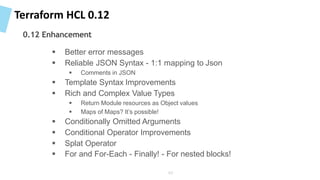
Terraform HCL 0.12
0.12 Enhancement
 Better error messages
 Reliable JSON Syntax - 1:1 mapping to Json
 Comments in JSON
 Template Syntax Improvements
 Rich and Complex Value Types
 Return Module resources as Object values
 Maps of Maps? It’s possible!
 Conditionally Omitted Arguments
 Conditional Operator Improvements
 Splat Operator
 For and For-Each - Finally! - For nested blocks!
57
58http://www.webgraphviz.com/ 58
• terraform graph
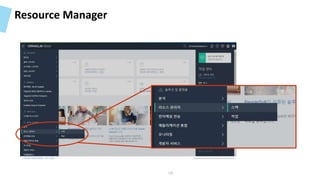
Resource Manager
59
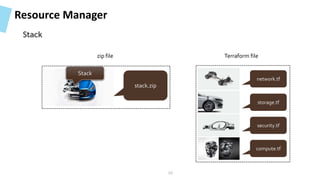
Resource Manager
network.tf
compute.tf
security.tf
storage.tf
stack.zip
Terraform filezip file
Stack
Stack
60
Resource Manager
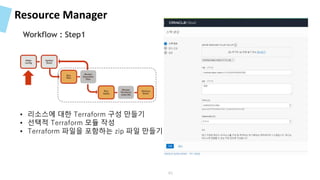
Workflow : Step1
• 리소스에 대한 Terraform 구성 만들기
• 선택적 Terraform 모듈 작성
• Terraform 파일을 포함하는 zip 파일 만들기
61
Resource Manager
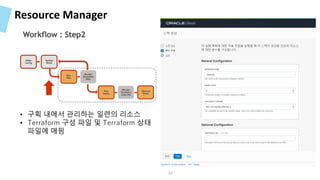
Workflow : Step2
• 구획 내에서 관리하는 일련의 리소스
• Terraform 구성 파일 및 Terraform 상태
파일에 매핑
62
Resource Manager
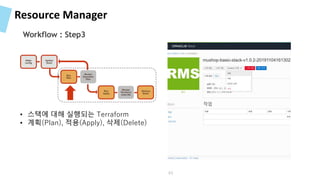
Workflow : Step3
• 스택에 대해 실행되는 Terraform
• 계획(Plan), 적용(Apply), 삭제(Delete)
63
6464
• Resource Manager
Reference
 https://www.slideshare.net/LiorKamrat/infrastructure-as-code-getting-started-concepts-tools
 https://www.slideshare.net/zekelabs/02-terraform-core-concepts?from_action=save
 https://learning.oreilly.com/library/view/terraform-up/9781492046899/
 https://www.44bits.io/ko/post/terraform_introduction_infrastrucute_as_code
65
Thank You
66

Infra as Code with Packer, Ansible and Terraform

  • 1.
  • 2.
     .Net Developer CBD, SOA Methodology Consulting  ITA/EA, ISP Consulting  Oracle Corp.  Middleware  Cloud Native Application, Container Native  Emerging Technology Team  k8s korea user group innoshom@gamil.com
  • 3.
    A Table ofContents 01 Infra as Code 02 Terraform 3
  • 4.
  • 5.
  • 6.
  • 7.
  • 8.
  • 9.
    History of IaC 기원 용어정의를 누가 했느냐는 명확하지 않지만 2009 Velocity Conference에서 나오게 되었고, Cloud 환경이 도입되면서, pace of change, automation의 요구 - from : Infrastructure as Code Infrastructure as code (IaC) is the process of managing and provisioning computer data centers through machine-readable definition files, rather than physical hardware configuration or interactive configuration tools. The IT infrastructure managed by this comprises both physical equipment such as bare-metal servers as well as virtual machines and associated configuration resources. The definitions may be in a version control system. It can use either scripts or declarative definitions, rather than manual processes, but the term is more often used to promote declarative approaches. IaC approaches are promoted for cloud computing, which is sometimes marketed as infrastructure as a service (IaaS). IaC supports IaaS, but should not be confused with it. - from : Wikipedia 9
  • 10.
    IaC Tools Ad hocScript Server Template Configuration Mgmt Provisioning 10
  • 11.
    IaC Tools –Ad hoc script 11 ● 다양한 스크립트 언어 사용 (bash, python, ruby등) ● 모든 코드를 직접 작성 ● 한두대는 문제가 없지만….. ● 시스템이 커지만 스파게티 코드
  • 12.
    IaC Tools –Configuration Management Tools Chef, Puppet, Ansible, and SaltStack 12 ● 추상화와 자동화를 위해 DSL(Domain Specfic Language) 사용 ● 멱등성(Idempotent) 여러분 수행해도 같은 결과가 나온다 ● 대규모 분산환경을 위해 설계 ● 확장이 간편함 서버 댓수 설정만으로 확장
  • 13.
    IaC Tools –Server Template Tools Docker, Packer, Vagrant 13 ● 서버 템플릿(소프트웨어 설치)을 이미지화 ● Immutable Infrastructure의 근간
  • 14.
    IaC Tools –Provisioning Tools Virtual Machine Block Storage Virtual Cloud Network Database System Cloud Provider Terraform, Azure ResourceManager Templates, AWS CloudFormation and OpenStack Heat 14 ● 서버 자체를 구성하기 위한 도구 (CM, Template툴을 코드를 정의) ● 서버뿐 아니라, 네트워크, 서브넷, 데이터베이스등 구성
  • 15.
    Immutable Infra WorkFlow Image 기반의 Immutable Infra 관리 Autoscaling Instance Pools VM Image 1. VM 생성 2. MW/App 설정 3. VM image 생성 2. MW/App 설정 Subnet D 10.0.30.0/24 Loaded Balanced Web Servers Virtual Machine Virtual Machine ORACLE CLOUD INFRASTRUCTURE (REGION) 15
  • 16.
    Demo Flow CD 툴을이용한 전체 흐름 Spinnaker 16
  • 17.
  • 18.
    18 VM Image 1. VM생성 2. MW/App 설정 3. VM image 생성
  • 19.
    IaC Tools Provisioning +configuration management Provisioning + server templating 19
  • 20.
    IaC Tools –Comparison Tool Tool Type Infrastructure Architecture Approach Manifest Written Language Configuration Management Mutable Pull Declarative Domain Specific Language (DSL) & Embedded Ruby (ERB) Configuration Management Mutable Pull Declarative & Imperative Ruby Configuration Management Mutable Push Declarative & Imperative YAML Configuration Management Mutable Push & Pull Declarative & Imperative YAML Provisioning Immutable Push Declarative HashiCorp Configuration Language (HCL) 20
  • 21.
    Concepts – Imperativevs Declarative 사거리 지나서 왼쪽에 아셈 타워 집에서 나가라 차를 타라 영동대로에서 5키로 직진 5블럭 지나서 좌회전 후 500미터 전방에서 우회전 1 2 3 4 5 ● 지속적으로 수정/패치 적용 ● 각각의 단계에 대한 “특정 명령”을 일정한 순서에 따라 실행해서 원하는 상태(Desired State) 에 이르게 한다. ● How 를 정의 Imperative(Procedural) 21
  • 22.
    Concepts – Imperativevs Declarative 대한민국 서울특별시 강남구 삼성1동 영동대로 517 아셈타워 ● 지속적으로 수정/패치 적용 ● 원하는 상태(Desired State)를 정의 하고 시스템에 실행하게 하게 한다. ● What을 정의 Declarative 22
  • 23.
    Concepts – Mutablevs Immutable ● 지속적으로 수정/패치 적용 ● CM Tools들은 기본적으로 Mutable (Ansible, Chef, Puppet등) ● 지속적으로 변경을 적용함에 따라 시간이 지나면 점점 설정의 불일치가 발생할 가능성 농후 Mutable App 1.0 Service 1.0 Service 1.0 Servic e 1.0 Service 1.0 Service 1.0 Servic e 1.0 Service 1.0 Service 1.0 Service 1.0 App – Configuration Drift Service 1.0 Service 1.0 Service 1.0 Service 1.1 Service 1.0 Service 1.0 Service 1.0 Service 1.0 Service 0.9 23
  • 24.
    Concepts – Mutablevs Immutable ● 지속적으로 수정/패치 적용 ● Terraform과 같은 Provisioning Tool을 활용해서 Docker 또는 Packer가 만들어 놓은 이미지를 기반으로 완전히 새로운 인프라 생성 ● 서버 간의 설정 불일치의 가능성을 제거 ● 테스트를 통과한 Deployment를 운영환경으로 변경 ● Blue/Green Deployment Immutable App 1.0 Service 1.0 Service 1.0 Service 1.0 Service 1.0 Service 1.0 Service 1.0 Service 1.0 Service 1.0 Service 1.0 App 2.0 Service 2.0 Service 2.0 Service 2.0 Service 2.0 Service 2.0 Service 2.0 Service 2.0 Service 2.0 Service 2.0 24
  • 25.
    Concepts – Mutablevs Immutable 25
  • 26.
    Concepts – Mutablevs Immutable 15 Servers 10 Servers Example: Ansible Playbook Example: Terraform Plan 26
  • 27.
    Terraform State ● 테라폼은리소스의 상태 정보를 저장 terraform.tfstate에 저장 ● 이 state 파일을 통해 리소스의 현재 상태와 tf 스크립트에 있는 설정 정보를 추적할 수 있다. ● 기본적으로 local 파일 (terraform.tfstate)에 저장되며, 원격지에 저장할 수 있는 기능 제공(backend) ● Backend를 사용하면 여러 팀에 상태정보를 공유할 수 있기 때문에 협업을 향상 시키지만 부수적인 문제점 발생 ● Lock, Encryption, Version 등 문제 TF State Azure Blob AWS S3 GCP Storage Object Storage 27
  • 28.
  • 29.
    Resource Manager Authenticate /Authorize Instance Install Terraform Destroy Stack Review Terraform state file Run Apply Review Execution Plan Run Plan 29
  • 30.
  • 31.
  • 32.
    Terraform  A provisioningdeclarative tool that based on Infrastructure as a Code paradigm  HCL (Hashicorp Configuration Language)  Written in Golang.  Helps to evolve you infrastructure, safely and predictably  Applies Graph Theory to IaaC  Terraform is a multipurpose composition tool:  Composes multiple tiers (SaaS/PaaS/IaaS)  A plugin-based architecture model  Open source. Backed by Hashicorp company (Guide/Principles/Design) 32
  • 33.
    Terraform Architecture 33 ● Provisioner ●TF의 Declarative 모델이 직접 지원하지 않는 기능 지원 ● Chef, file, habitat, puppet등
  • 34.
    Terraform Core Concept#1 ● 테라폼과 외부의 리소스간에 API를 통신을 담당 ● 다양한 외부 프로바이더 ● IaaS (ex: OCI, AWS, GCP, Microsoft Azure) ● PaaS (ex: Heroku), ● SaaS services (ex: Terraform Enterprise, DNSimple, CloudFlare) https://www.terraform.io/docs/providers/index.html Providers 34
  • 35.
    Terraform Core Concept#1 provider "oci" { tenancy_ocid = "${var.tenancy_ocid}" user_ocid = "${var.user_ocid}" fingerprint = "${var.fingerprint}" private_key_path = "${var.private_key_path}" region = "${var.region}" } Providers 35
  • 36.
    Terraform Core Concept#2 ● 리소스란 특정 프로바이더가 제공해주는 조작 가능한 대상의 최소 단위 ● 예를 들면 OCI 프로바이더의 oci_core_instance는 VM을 만드는데 사용되는 리소스 타입 ● 모든 클라우드의 자원이 ”Resource”로 관리됨 ● 테라폼은 이런 리소스의 생성, 관리, 갱신, 삭제(CRUD)을 담당 Type Name Resource 36
  • 37.
    Terraform Core Concept#3 ● 여러곳에 Hard Coding(ex:Port 번호)하는 것을 막기 위해 변수를 사용 (DRY, Don’t Repeat Yourself) ● Input 변수에 값을 제공하는 방법은 1. –var 옵션, 2. –-var-file 옵션, 3. TF_VAR_<변수명> 환경변수 ● type은 string, list, map이며, 선언하지 않으면 string으로 간주 variable 37
  • 38.
    Terraform Core Concept#3 variable – 변수 입력 방법 export TF_VAR_tenancy_ocid=<value> export TF_VAR_compartment_ocid=<value> export TF_VAR_user_ocid=<value> export TF_VAR_fingerprint=<value> export TF_VAR_private_key_path=<value> ● Input 변수에 값을 제공하는 방법은 1. –var 옵션, 2. –-var-file 옵션, 3. TF_VAR_<변수명> 환경변수 38
  • 39.
    Terraform Core Concept#3 ● ${var.<변수명>} (v0.11), var.<변수명> (v0.12) variable – 사용 방법 39
  • 40.
    Terraform Core Concept#3 variable - output 40
  • 41.
    Terraform Core Concept#4 ● 모듈은 설정 파일을 그룹단위로 모듈화 ● 여러 환경에서 재사용성을 재고 ● 경로 설정은 상대경로로 설정 ● Git등을 이용해 외부 저장소 활용 Module 41
  • 42.
  • 43.
  • 44.
    Terraform Core Concept#5 ● Data Source는 읽기 전용의 설정 정보를 담을 수 있는 객체로 예를 들면 Provider의 정보를 조회해서 읽기 전용 정보로 제공할 수 있다. ex) 새로 생성된 VM Based Image ID, 기존 LB의 ID등 ● variable은 데이터를 자유롭게 설정하는데 반해 Data Source는 읽기 전용이다. Data Source 44
  • 45.
    Terraform Core Concept#5 ● Data Source는 읽기 전용의 설정 정보를 담을 수 있는 객체로 Provider의 정보를 조회해서 접근할 수 있다. ● ex) 새로 생성된 VM Based Image ID, 기존 LB의 ID등 ● variable은 데이터를 자유롭게 설정하는데 반해 Data Source는 읽기 전용이다. Data Source https://www.terraform.io/docs/providers/oci/d/core_images.html 45
  • 46.
    Terraform Core Concept#6 Project ├── compute.tf ├── vcn.tf ├── userdata │ └── bootstrap └── variables.tf 46 Dependency
  • 47.
    Terraform Core Concept#6 Project ├── compute.tf ├── vcn.tf ├── userdata │ └── bootstrap └── variables.tf 47 Dependency
  • 48.
    Terraform Core Concept#6 Project ├── compute.tf ├── vcn.tf ├── userdata │ └── bootstrap └── variables.tf 48 Dependency
  • 49.
    Terraform Core Concept#6 Project ├── compute.tf ├── vcn.tf ├── userdata │ └── bootstrap └── variables.tf 49 Dependency
  • 50.
    Terraform Core Concept#6 Type Name [root] root meta count-boundary provider oci oci-core_instance nignx 50 Dependency
  • 51.
    Terraform Core Concept#6 51 • depends_on [root] root meta count-boundary provider oci oci-core_instance nignx Dependency
  • 52.
    Terraform Core Concept#6 Project ├── compute.tf ├── vcn.tf ├── userdata │ └── bootstrap └── variables.tf http://www.webgraphviz.com/ 52 Dependency
  • 53.
  • 54.
    Terraform Core Concept#6 http://www.webgraphviz.com/ http://dreampuf.github.io/GraphvizOnline/ Dependency Graph 54
  • 55.
  • 56.
    Terraform Workflow Destroy Review Terraform state file Apply Review Execution Plan Plan Plan: Terraform을 구문 분석하고 영향을 받는 OCI 리소스에 대한 실행 계획을 반환 Apply : 계획 작업 결과에 따라 스택을 수정합니다. Destroy : 스택의 모든 리소스를 프로비저닝 해제 Init Init: Terraform 프로젝트를 초기화하며 현재 디렉토리에 프로바이더 설정을 보고 필요한 플러그인을 설 tf config 56
  • 57.
    Terraform HCL 0.12 0.12Enhancement  Better error messages  Reliable JSON Syntax - 1:1 mapping to Json  Comments in JSON  Template Syntax Improvements  Rich and Complex Value Types  Return Module resources as Object values  Maps of Maps? It’s possible!  Conditionally Omitted Arguments  Conditional Operator Improvements  Splat Operator  For and For-Each - Finally! - For nested blocks! 57
  • 58.
  • 59.
  • 60.
  • 61.
    Resource Manager Workflow :Step1 • 리소스에 대한 Terraform 구성 만들기 • 선택적 Terraform 모듈 작성 • Terraform 파일을 포함하는 zip 파일 만들기 61
  • 62.
    Resource Manager Workflow :Step2 • 구획 내에서 관리하는 일련의 리소스 • Terraform 구성 파일 및 Terraform 상태 파일에 매핑 62
  • 63.
    Resource Manager Workflow :Step3 • 스택에 대해 실행되는 Terraform • 계획(Plan), 적용(Apply), 삭제(Delete) 63
  • 64.
  • 65.
    Reference  https://www.slideshare.net/LiorKamrat/infrastructure-as-code-getting-started-concepts-tools  https://www.slideshare.net/zekelabs/02-terraform-core-concepts?from_action=save https://learning.oreilly.com/library/view/terraform-up/9781492046899/  https://www.44bits.io/ko/post/terraform_introduction_infrastrucute_as_code 65
  • 66.

Editor's Notes

  • #6 Container 장표쪽에 더 나은게 있을거다.
  • #7 Container 장표쪽에 더 나은게 있을거다.
  • #8 Container 장표쪽에 더 나은게 있을거다.
  • #9 Container 장표쪽에 더 나은게 있을거다.
  • #10 Container 장표쪽에 더 나은게 있을거다.
  • #11 Container 장표쪽에 더 나은게 있을거다.
  • #12 Container 장표쪽에 더 나은게 있을거다.
  • #13 Container 장표쪽에 더 나은게 있을거다.
  • #14 Container 장표쪽에 더 나은게 있을거다.
  • #15 Container 장표쪽에 더 나은게 있을거다.
  • #16 Container 장표쪽에 더 나은게 있을거다.
  • #17 Container 장표쪽에 더 나은게 있을거다.
  • #18 Container 장표쪽에 더 나은게 있을거다.
  • #19 Container 장표쪽에 더 나은게 있을거다.
  • #20 Container 장표쪽에 더 나은게 있을거다.
  • #21 Container 장표쪽에 더 나은게 있을거다.
  • #22 Container 장표쪽에 더 나은게 있을거다.
  • #23 Container 장표쪽에 더 나은게 있을거다.
  • #24 Container 장표쪽에 더 나은게 있을거다.
  • #25 Container 장표쪽에 더 나은게 있을거다.
  • #26 Container 장표쪽에 더 나은게 있을거다.
  • #27 Container 장표쪽에 더 나은게 있을거다.
  • #28 Container 장표쪽에 더 나은게 있을거다.
  • #29 Container 장표쪽에 더 나은게 있을거다.
  • #30 Container 장표쪽에 더 나은게 있을거다.
  • #32 Container 장표쪽에 더 나은게 있을거다.
  • #33 Container 장표쪽에 더 나은게 있을거다.
  • #34 Container 장표쪽에 더 나은게 있을거다.
  • #35 Container 장표쪽에 더 나은게 있을거다.
  • #36 Container 장표쪽에 더 나은게 있을거다.
  • #37 Container 장표쪽에 더 나은게 있을거다.
  • #38 Container 장표쪽에 더 나은게 있을거다.
  • #39 Container 장표쪽에 더 나은게 있을거다.
  • #40 Container 장표쪽에 더 나은게 있을거다.
  • #41 Container 장표쪽에 더 나은게 있을거다.
  • #42 Container 장표쪽에 더 나은게 있을거다.
  • #43 Container 장표쪽에 더 나은게 있을거다.
  • #44 Container 장표쪽에 더 나은게 있을거다.
  • #45 Container 장표쪽에 더 나은게 있을거다.
  • #46 Container 장표쪽에 더 나은게 있을거다.
  • #47 Container 장표쪽에 더 나은게 있을거다.
  • #48 Container 장표쪽에 더 나은게 있을거다.
  • #49 Container 장표쪽에 더 나은게 있을거다.
  • #50 Container 장표쪽에 더 나은게 있을거다.
  • #51 Container 장표쪽에 더 나은게 있을거다.
  • #52 Container 장표쪽에 더 나은게 있을거다.
  • #53 Container 장표쪽에 더 나은게 있을거다.
  • #54 Container 장표쪽에 더 나은게 있을거다.
  • #55 Container 장표쪽에 더 나은게 있을거다.
  • #56 Container 장표쪽에 더 나은게 있을거다.
  • #57 Container 장표쪽에 더 나은게 있을거다.
  • #58 Container 장표쪽에 더 나은게 있을거다.
  • #59 Container 장표쪽에 더 나은게 있을거다.
  • #60 Container 장표쪽에 더 나은게 있을거다.
  • #61 Container 장표쪽에 더 나은게 있을거다.
  • #62 Container 장표쪽에 더 나은게 있을거다.
  • #63 Container 장표쪽에 더 나은게 있을거다.
  • #64 Container 장표쪽에 더 나은게 있을거다.
  • #65 Container 장표쪽에 더 나은게 있을거다.
  • #66 Container 장표쪽에 더 나은게 있을거다.