
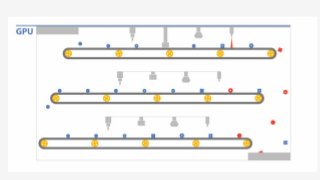
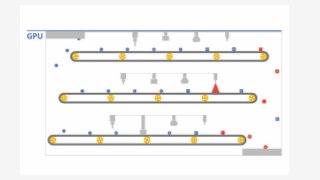







Supercharge performance
using GPUs in the Cloud
John Barrus
GPU Product Manager
#NABShow
Agenda
● Why GPUs?
● GPUs for Google Compute Engine
● No more HWOps!
● Provision a GPU instance
● Looking ahead: Remote Workstations for
animation and production
#NABShow
Linear Algebra
Example calculation: bn
= a11
* x1
+ a12
* x2
+ … + a1n
* xn
Multiply each ai,j
* xj
in parallel—n2
parallel threads.
To calculate bj
you must gather n results—n parallel threads.
=
b1
b2
bn
x1
x2
xn
a1n
a2n
ann
a11
a21
an1
a12
a22
an2
#NABShow
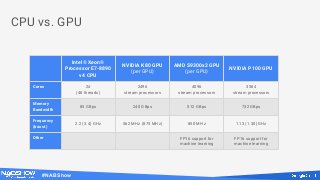
CPU vs. GPU
Intel® Xeon®
Processor E7-8890
v4 CPU
NVIDIA K80 GPU
(per GPU)
AMD S9300x2 GPU
(per GPU)
NVIDIA P100 GPU
Cores 24
(48 threads)
2496
stream processors
4096
stream processors
3584
stream processors
Memory
Bandwidth
85 GBps 240 GBps 512 GBps 732 GBps
Frequency
(boost)
2.2 (3.4) GHz 562 MHz (875 MHz) 850 MHz 1.13 (1.30) GHz
Other FP16 support for
machine learning
FP16 support for
machine learning
#NABShow
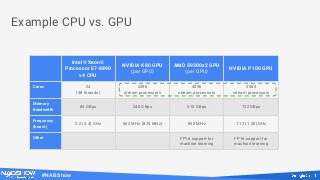
Example CPU vs. GPU
Intel® Xeon®
Processor E7-8890
v4 CPU
NVIDIA K80 GPU
(per GPU)
AMD S9300x2 GPU
(per GPU)
NVIDIA P100 GPU
Cores 24
(48 threads)
2496
stream processors
4096
stream processors
3584
stream processors
Memory
Bandwidth
85 GBps 240 GBps 512 GBps 732 GBps
Frequency
(boost)
2.2 (3.4) GHz 562 MHz (875 MHz) 850 MHz 1.13 (1.30) GHz
Other FP16 support for
machine learning
FP16 support for
machine learning
#NABShow
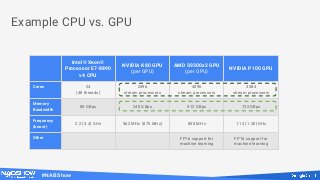
Example CPU vs. GPU
Intel® Xeon®
Processor E7-8890
v4 CPU
NVIDIA K80 GPU
(per GPU)
AMD S9300x2 GPU
(per GPU)
NVIDIA P100 GPU
Cores 24
(48 threads)
2496
stream processors
4096
stream processors
3584
stream processors
Memory
Bandwidth
85 GBps 240 GBps 512 GBps 732 GBps
Frequency
(boost)
2.2 (3.4) GHz 562 MHz (875 MHz) 850 MHz 1.13 (1.30) GHz
Other FP16 support for
machine learning
FP16 support for
machine learning
#NABShow
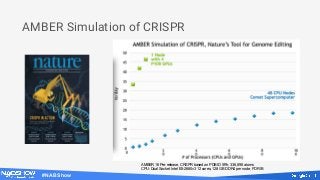
AMBER Simulation of CRISPR
AMBER 16 Pre-release, CRSPR based on PDB ID 5f9r, 336,898 atoms
CPU: Dual Socket Intel E5-2680v3 12 cores, 128 GB DDR4 per node, FDR IB
#NABShow
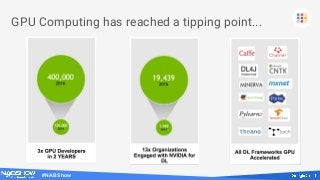
GPU Computing has reached a tipping point...
#NABShow
Computing with GPUs
● Machine Learning Training and Inference- TensorFlow
● Frame Rendering and image composition - V-Ray by ChaosGroup
● Physical Simulation and Analysis (CFD, FEM, Structural Mechanics)
● Real-time Visual Analytics and SQL Database - MapD
● FFT-based 3D Protein Docking - MEGADOCK
● Faster than real-time 4K video transcoding - Colorfront Transkoder
● Open Source Video Transcoding - FFmpeg, libav
● Open Source Sequence Mapping/Alignment - BarraCUDA
● Subsurface Analysis for the Oil & Gas industry - Reverse Time Migration
● Risk Management and Derivatives Pricing - Computational Finance
Workloads that require compute-intensive
processing of massive amounts of data can benefit
from the parallel architecture of the GPU
#NABShow
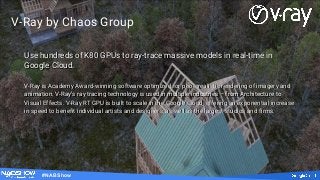
Use hundreds of K80 GPUs to ray-trace massive models in real-time in
Google Cloud.
V-Ray is Academy Award-winning software optimized for photorealistic rendering of imagery and
animation. V-Ray’s ray tracing technology is used in multiple industries – from Architecture to
Visual Effects. V-Ray RT GPU is built to scale in the Google Cloud, offering an exponential increase
in speed to benefit individual artists and designers, as well as the largest studios and firms.
V-Ray by Chaos Group
Use hundreds of K80 GPUs to ray-trace massive models in real-time in
Google Cloud.
V-Ray is Academy Award-winning software optimized for photorealistic rendering of imagery and
animation. V-Ray’s ray tracing technology is used in multiple industries – from Architecture to
Visual Effects. V-Ray RT GPU is built to scale in the Google Cloud, offering an exponential increase
in speed to benefit individual artists and designers, as well as the largest studios and firms.
#NABShow
"Scalability—inherent in modern V-Ray GPU raytrace rendering
on NVIDIA K80s and in conjunction with cloud rendering on
GCP—enables real time interaction with complex
photorealistic scenes. It's on GCP where I've seen the dawn of
this ideal creative workflow which will certainly have
tremendous benefits to the filmmaking community in years
to come."
— Kevin Margo, Director, blur studio
#NABShow
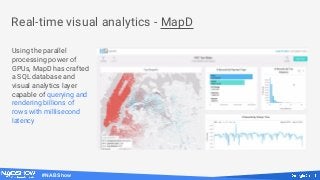
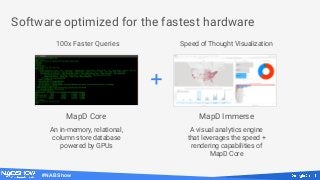
Real-time visual analytics - MapD
Using the parallel
processing power of
GPUs, MapD has crafted
a SQL database and
visual analytics layer
capable of querying and
rendering billions of
rows with millisecond
latency
#NABShow
Software optimized for the fastest hardware
MapD Core MapD Immerse
An in-memory, relational,
column store database
powered by GPUs
A visual analytics engine
that leverages the speed +
rendering capabilities of
MapD Core
+
100x Faster Queries Speed of Thought Visualization
#NABShow
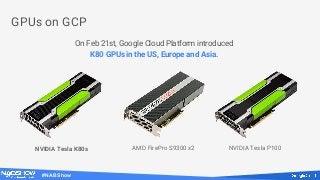
GPUs on GCP
On Feb 21st, Google Cloud Platform introduced
K80 GPUs in the US, Europe and Asia.
NVIDIA Tesla K80s AMD FirePro S9300 x2 NVIDIA Tesla P100
#NABShow
● GCP offers teraflops of performance per instance by attaching GPUs to
virtual machines
● Machine learning, engineering simulations, and molecular modeling will take
hours instead of days on AMD FirePro and NVIDIA Tesla GPUs
● Regardless of the size and scale of your workload, GCP will provide you with
the perfect GPU for your job
● Scientists, artists, and engineers who run compute-intensive jobs require
access to massively parallel computation
Accelerated cloud computing
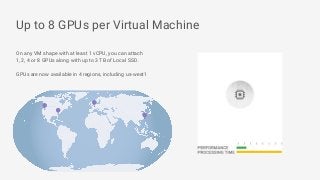
Up to 8 GPUs per Virtual Machine
On any VM shape with at least 1 vCPU, you can attach
1, 2, 4 or 8 GPUs along with up to 3 TB of Local SSD.
GPUs are now available in 4 regions, including us-west1
#NABShow
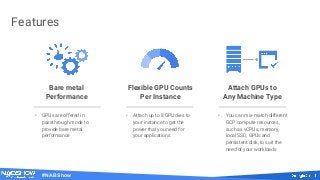
Features
Bare metal
Performance
Attach GPUs to
Any Machine Type
Flexible GPU Counts
Per Instance
• GPUs are offered in
passthrough mode to
provide bare metal
performance
• Attach up to 8 GPU dies to
your instance to get the
power that you need for
your applications
• You can mix-match different
GCP compute resources,
such as vCPUs, memory,
local SSD, GPUs and
persistent disk, to suit the
need of your workloads
#NABShow
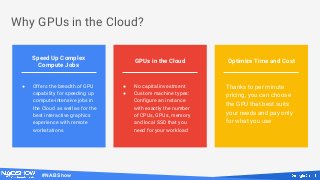
Why GPUs in the Cloud?
GPUs in the Cloud Optimize Time and Cost
Speed Up Complex
Compute Jobs
● Offers the breadth of GPU
capability for speeding up
compute-intensive jobs in
the Cloud as well as for the
best interactive graphics
experience with remote
workstations
● No capital investment
● Custom machine types:
Configure an instance
with exactly the number
of CPUs, GPUs, memory
and local SSD that you
need for your workload
Thanks to per minute
pricing, you can choose
the GPU that best suits
your needs and pay only
for what you use
#NABShow
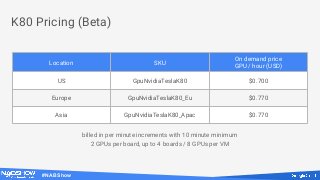
K80 Pricing (Beta)
Location SKU
On demand price
GPU / hour (USD)
US GpuNvidiaTeslaK80 $0.700
Europe GpuNvidiaTeslaK80_Eu $0.770
Asia GpuNvidiaTeslaK80_Apac $0.770
billed in per minute increments with 10 minute minimum
2 GPUs per board, up to 4 boards / 8 GPUs per VM
#NABShow
Cloud GPUs - no need to worry about...
...system research
...upfront hardware purchase and shipping
...physical space and racks
...assembly and test
...hardware failures and debugging
...power and cooling
#NABShow
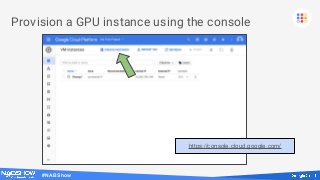
Provision a GPU instance using the console
https://console.cloud.google.com/
#NABShow
Choose “Customize”
#NABShow
Click on “GPUs”
#NABShow
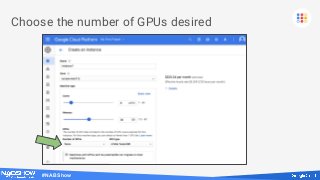
Choose the number of GPUs desired
#NABShow
Press “Create”
#NABShow
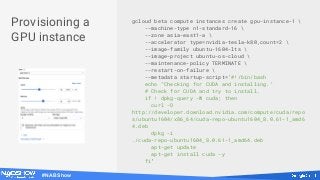
gcloud beta compute instances create gpu-instance-1 
--machine-type n1-standard-16 
--zone asia-east1-a 
--accelerator type=nvidia-tesla-k80,count=2 
--image-family ubuntu-1604-lts 
--image-project ubuntu-os-cloud 
--maintenance-policy TERMINATE 
--restart-on-failure 
--metadata startup-script='#!/bin/bash
echo "Checking for CUDA and installing."
# Check for CUDA and try to install.
if ! dpkg-query -W cuda; then
curl -O
http://developer.download.nvidia.com/compute/cuda/repo
s/ubuntu1604/x86_64/cuda-repo-ubuntu1604_8.0.61-1_amd6
4.deb
dpkg -i
./cuda-repo-ubuntu1604_8.0.61-1_amd64.deb
apt-get update
apt-get install cuda -y
fi'
Provisioning a
GPU instance
#NABShow
High performance GPUs do not support Live Migration
GPUs offered in high-performance “pass-through” mode—VM owns the entire GPU
It’s not possible to migrate the state and contents of the GPU chip and memory.
VMs attached to GPUs must be set to “terminateOnHostMaintenance”
One hour notice is provided for the system to checkpoint and save state to be
restored.
#NABShow
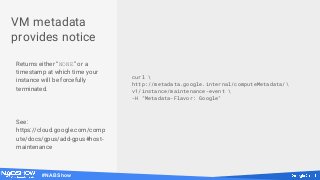
VM metadata
provides notice
Returns either “NONE” or a
timestamp at which time your
instance will be forcefully
terminated.
See:
https://cloud.google.com/comp
ute/docs/gpus/add-gpus#host-
maintenance
curl 
http://metadata.google.internal/computeMetadata/
v1/instance/maintenance-event 
-H "Metadata-Flavor: Google"
#NABShow
TensorFlow
Supervisor
https://www.tensorflow.org/pro
grammers_guide/supervisor
● Handles shutdowns and
crashes cleanly.
● Can be resumed after a
shutdown or a crash.
● Can be monitored through
TensorBoard.
#NABShow
Rendering on a
GPU farm in the Cloud
Adrian Graham
Cloud Solutions Architect
#NABShow
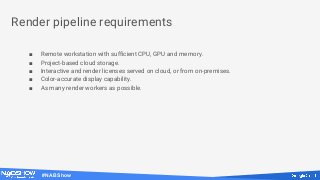
■ Remote workstation with sufficient CPU, GPU and memory.
■ Project-based cloud storage.
■ Interactive and render licenses served on cloud, or from on-premises.
■ Color-accurate display capability.
■ As many render workers as possible.
Render pipeline requirements
#NABShow
Construct by Kevin Margo
#NABShow
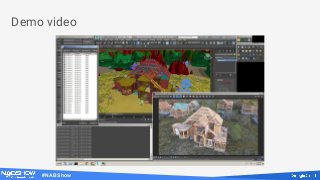
Demo video
#NABShow
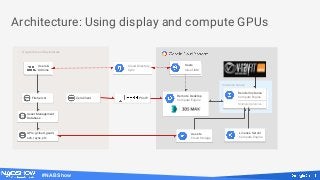
Instance Group
Render Instance
Compute Engine
Multiple Instances
Architecture: Using display and compute GPUs
On-premise infrastructure
Asset Management
Database
APIs: gcloud, gsutil,
ssh, rsync, etc
File Server Zero Client
Assets
Cloud Storage
Users
Cloud IAM
Users &
Admins
Users &
Admins
Cloud Directory
Sync
Remote Desktop
Compute Engine
License Server
Compute Engine
Teradici PCoIP
#NABShow
Creating a
workstation
For this job, we needed to run
project-specific software
(Autodesk 3DS Max) that only
runs on Windows.
# Create a workstation.
gcloud compute instances create "remote-work" 
--zone "us-central1-a" 
--machine-type "n1-standard-32" 
--accelerator [type=,count=1] 
--can-ip-forward --maintenance-policy "TERMINATE" 
--tags "https-server" 
--image "windows-server-2008-r2-dc-v20170214" 
--image-project "windows-cloud" 
--boot-disk-size 250 
--no-boot-disk-auto-delete 
--boot-disk-type "pd-ssd" 
--boot-disk-device-name "remote-work-boot"
2
3
1
1 Choose from zones in
us-east1, us-west1,
europe-west1, and asia-east1.
2 Choose type and number of
attached GPUs.
3 Attach a GPU to an instance
with any public image.
#NABShow
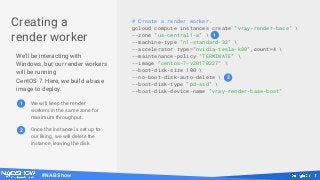
Creating a
render worker
We'll be interacting with
Windows, but our render workers
will be running
CentOS 7. Here, we build a base
image to deploy.
# Create a render worker.
gcloud compute instances create "vray-render-base" 
--zone "us-central1-a" 
--machine-type "n1-standard-32" 
--accelerator type="nvidia-tesla-k80",count=4 
--maintenance-policy "TERMINATE" 
--image "centos-7-v20170227" 
--boot-disk-size 100 
--no-boot-disk-auto-delete 
--boot-disk-type "pd-ssd" 
--boot-disk-device-name "vray-render-base-boot"
1
2
1 We will keep the render
workers in the same zone for
maximum throughput.
2 Once the instance is set up to
our liking, we will delete the
instance, leaving the disk.
#NABShow
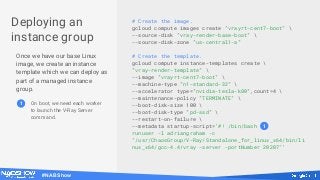
Deploying an
instance group
Once we have our base Linux
image, we create an instance
template which we can deploy as
part of a managed instance
group.
# Create the image.
gcloud compute images create "vrayrt-cent7-boot" 
--source-disk "vray-render-base-boot" 
--source-disk-zone "us-central1-a"
# Create the template.
gcloud compute instance-templates create 
"vray-render-template" 
--image "vrayrt-cent7-boot" 
--machine-type "n1-standard-32" 
--accelerator type="nvidia-tesla-k80",count=4 
--maintenance-policy "TERMINATE" 
--boot-disk-size 100 
--boot-disk-type "pd-ssd" 
--restart-on-failure 
--metadata startup-script='#! /bin/bash
runuser -l adriangraham -c
"/usr/ChaosGroup/V-Ray/Standalone_for_linux_x64/bin/li
nux_x64/gcc-4.4/vray -server -portNumber 20207"'
1
1 On boot, we need each worker
to launch the V-Ray Server
command.
#NABShow
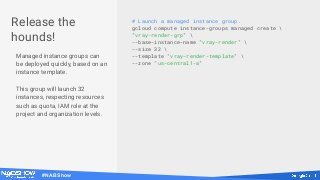
# Launch a managed instance group.
gcloud compute instance-groups managed create 
"vray-render-grp" 
--base-instance-name "vray-render" 
--size 32 
--template "vray-render-template" 
--zone "us-central1-a"
Release the
hounds!
Managed instance groups can
be deployed quickly, based on an
instance template.
This group will launch 32
instances, respecting resources
such as quota, IAM role at the
project and organization levels.
#NABShow
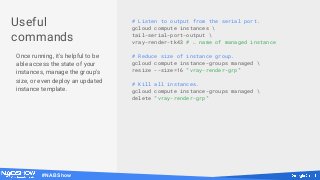
# Listen to output from the serial port.
gcloud compute instances 
tail-serial-port-output 
vray-render-tk43 # ← name of managed instance
# Reduce size of instance group.
gcloud compute instance-groups managed 
resize --size=16 "vray-render-grp"
# Kill all instances.
gcloud compute instance-groups managed 
delete "vray-render-grp"
Useful
commands
Once running, it's helpful to be
able access the state of your
instances, manage the group's
size, or even deploy an updated
instance template.
#NABShow
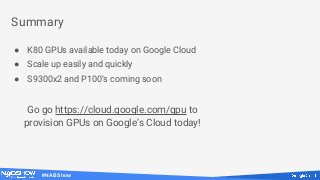
Summary
● K80 GPUs available today on Google Cloud
● Scale up easily and quickly
● S9300x2 and P100’s coming soon
Go go https://cloud.google.com/gpu to
provision GPUs on Google’s Cloud today!
Thank you

Supercharge performance using GPUs in the cloud

  • 1.
    Supercharge performance using GPUsin the Cloud John Barrus GPU Product Manager
  • 2.
    #NABShow Agenda ● Why GPUs? ●GPUs for Google Compute Engine ● No more HWOps! ● Provision a GPU instance ● Looking ahead: Remote Workstations for animation and production
  • 3.
    #NABShow Linear Algebra Example calculation:bn = a11 * x1 + a12 * x2 + … + a1n * xn Multiply each ai,j * xj in parallel—n2 parallel threads. To calculate bj you must gather n results—n parallel threads. = b1 b2 bn x1 x2 xn a1n a2n ann a11 a21 an1 a12 a22 an2
  • 4.
    #NABShow CPU vs. GPU Intel®Xeon® Processor E7-8890 v4 CPU NVIDIA K80 GPU (per GPU) AMD S9300x2 GPU (per GPU) NVIDIA P100 GPU Cores 24 (48 threads) 2496 stream processors 4096 stream processors 3584 stream processors Memory Bandwidth 85 GBps 240 GBps 512 GBps 732 GBps Frequency (boost) 2.2 (3.4) GHz 562 MHz (875 MHz) 850 MHz 1.13 (1.30) GHz Other FP16 support for machine learning FP16 support for machine learning
  • 5.
    #NABShow Example CPU vs.GPU Intel® Xeon® Processor E7-8890 v4 CPU NVIDIA K80 GPU (per GPU) AMD S9300x2 GPU (per GPU) NVIDIA P100 GPU Cores 24 (48 threads) 2496 stream processors 4096 stream processors 3584 stream processors Memory Bandwidth 85 GBps 240 GBps 512 GBps 732 GBps Frequency (boost) 2.2 (3.4) GHz 562 MHz (875 MHz) 850 MHz 1.13 (1.30) GHz Other FP16 support for machine learning FP16 support for machine learning
  • 6.
    #NABShow Example CPU vs.GPU Intel® Xeon® Processor E7-8890 v4 CPU NVIDIA K80 GPU (per GPU) AMD S9300x2 GPU (per GPU) NVIDIA P100 GPU Cores 24 (48 threads) 2496 stream processors 4096 stream processors 3584 stream processors Memory Bandwidth 85 GBps 240 GBps 512 GBps 732 GBps Frequency (boost) 2.2 (3.4) GHz 562 MHz (875 MHz) 850 MHz 1.13 (1.30) GHz Other FP16 support for machine learning FP16 support for machine learning
  • 11.
    #NABShow AMBER Simulation ofCRISPR AMBER 16 Pre-release, CRSPR based on PDB ID 5f9r, 336,898 atoms CPU: Dual Socket Intel E5-2680v3 12 cores, 128 GB DDR4 per node, FDR IB
  • 12.
    #NABShow GPU Computing hasreached a tipping point...
  • 13.
    #NABShow Computing with GPUs ●Machine Learning Training and Inference- TensorFlow ● Frame Rendering and image composition - V-Ray by ChaosGroup ● Physical Simulation and Analysis (CFD, FEM, Structural Mechanics) ● Real-time Visual Analytics and SQL Database - MapD ● FFT-based 3D Protein Docking - MEGADOCK ● Faster than real-time 4K video transcoding - Colorfront Transkoder ● Open Source Video Transcoding - FFmpeg, libav ● Open Source Sequence Mapping/Alignment - BarraCUDA ● Subsurface Analysis for the Oil & Gas industry - Reverse Time Migration ● Risk Management and Derivatives Pricing - Computational Finance Workloads that require compute-intensive processing of massive amounts of data can benefit from the parallel architecture of the GPU
  • 14.
    #NABShow Use hundreds ofK80 GPUs to ray-trace massive models in real-time in Google Cloud. V-Ray is Academy Award-winning software optimized for photorealistic rendering of imagery and animation. V-Ray’s ray tracing technology is used in multiple industries – from Architecture to Visual Effects. V-Ray RT GPU is built to scale in the Google Cloud, offering an exponential increase in speed to benefit individual artists and designers, as well as the largest studios and firms. V-Ray by Chaos Group Use hundreds of K80 GPUs to ray-trace massive models in real-time in Google Cloud. V-Ray is Academy Award-winning software optimized for photorealistic rendering of imagery and animation. V-Ray’s ray tracing technology is used in multiple industries – from Architecture to Visual Effects. V-Ray RT GPU is built to scale in the Google Cloud, offering an exponential increase in speed to benefit individual artists and designers, as well as the largest studios and firms.
  • 15.
    #NABShow "Scalability—inherent in modernV-Ray GPU raytrace rendering on NVIDIA K80s and in conjunction with cloud rendering on GCP—enables real time interaction with complex photorealistic scenes. It's on GCP where I've seen the dawn of this ideal creative workflow which will certainly have tremendous benefits to the filmmaking community in years to come." — Kevin Margo, Director, blur studio
  • 16.
    #NABShow Real-time visual analytics- MapD Using the parallel processing power of GPUs, MapD has crafted a SQL database and visual analytics layer capable of querying and rendering billions of rows with millisecond latency
  • 17.
    #NABShow Software optimized forthe fastest hardware MapD Core MapD Immerse An in-memory, relational, column store database powered by GPUs A visual analytics engine that leverages the speed + rendering capabilities of MapD Core + 100x Faster Queries Speed of Thought Visualization
  • 18.
    #NABShow GPUs on GCP OnFeb 21st, Google Cloud Platform introduced K80 GPUs in the US, Europe and Asia. NVIDIA Tesla K80s AMD FirePro S9300 x2 NVIDIA Tesla P100
  • 19.
    #NABShow ● GCP offersteraflops of performance per instance by attaching GPUs to virtual machines ● Machine learning, engineering simulations, and molecular modeling will take hours instead of days on AMD FirePro and NVIDIA Tesla GPUs ● Regardless of the size and scale of your workload, GCP will provide you with the perfect GPU for your job ● Scientists, artists, and engineers who run compute-intensive jobs require access to massively parallel computation Accelerated cloud computing
  • 20.
    Up to 8GPUs per Virtual Machine On any VM shape with at least 1 vCPU, you can attach 1, 2, 4 or 8 GPUs along with up to 3 TB of Local SSD. GPUs are now available in 4 regions, including us-west1
  • 21.
    #NABShow Features Bare metal Performance Attach GPUsto Any Machine Type Flexible GPU Counts Per Instance • GPUs are offered in passthrough mode to provide bare metal performance • Attach up to 8 GPU dies to your instance to get the power that you need for your applications • You can mix-match different GCP compute resources, such as vCPUs, memory, local SSD, GPUs and persistent disk, to suit the need of your workloads
  • 22.
    #NABShow Why GPUs inthe Cloud? GPUs in the Cloud Optimize Time and Cost Speed Up Complex Compute Jobs ● Offers the breadth of GPU capability for speeding up compute-intensive jobs in the Cloud as well as for the best interactive graphics experience with remote workstations ● No capital investment ● Custom machine types: Configure an instance with exactly the number of CPUs, GPUs, memory and local SSD that you need for your workload Thanks to per minute pricing, you can choose the GPU that best suits your needs and pay only for what you use
  • 23.
    #NABShow K80 Pricing (Beta) LocationSKU On demand price GPU / hour (USD) US GpuNvidiaTeslaK80 $0.700 Europe GpuNvidiaTeslaK80_Eu $0.770 Asia GpuNvidiaTeslaK80_Apac $0.770 billed in per minute increments with 10 minute minimum 2 GPUs per board, up to 4 boards / 8 GPUs per VM
  • 24.
    #NABShow Cloud GPUs -no need to worry about... ...system research ...upfront hardware purchase and shipping ...physical space and racks ...assembly and test ...hardware failures and debugging ...power and cooling
  • 25.
    #NABShow Provision a GPUinstance using the console https://console.cloud.google.com/
  • 26.
  • 27.
  • 28.
  • 29.
  • 30.
    #NABShow gcloud beta computeinstances create gpu-instance-1 --machine-type n1-standard-16 --zone asia-east1-a --accelerator type=nvidia-tesla-k80,count=2 --image-family ubuntu-1604-lts --image-project ubuntu-os-cloud --maintenance-policy TERMINATE --restart-on-failure --metadata startup-script='#!/bin/bash echo "Checking for CUDA and installing." # Check for CUDA and try to install. if ! dpkg-query -W cuda; then curl -O http://developer.download.nvidia.com/compute/cuda/repo s/ubuntu1604/x86_64/cuda-repo-ubuntu1604_8.0.61-1_amd6 4.deb dpkg -i ./cuda-repo-ubuntu1604_8.0.61-1_amd64.deb apt-get update apt-get install cuda -y fi' Provisioning a GPU instance
  • 31.
    #NABShow High performance GPUsdo not support Live Migration GPUs offered in high-performance “pass-through” mode—VM owns the entire GPU It’s not possible to migrate the state and contents of the GPU chip and memory. VMs attached to GPUs must be set to “terminateOnHostMaintenance” One hour notice is provided for the system to checkpoint and save state to be restored.
  • 32.
    #NABShow VM metadata provides notice Returnseither “NONE” or a timestamp at which time your instance will be forcefully terminated. See: https://cloud.google.com/comp ute/docs/gpus/add-gpus#host- maintenance curl http://metadata.google.internal/computeMetadata/ v1/instance/maintenance-event -H "Metadata-Flavor: Google"
  • 33.
    #NABShow TensorFlow Supervisor https://www.tensorflow.org/pro grammers_guide/supervisor ● Handles shutdownsand crashes cleanly. ● Can be resumed after a shutdown or a crash. ● Can be monitored through TensorBoard.
  • 34.
    #NABShow Rendering on a GPUfarm in the Cloud Adrian Graham Cloud Solutions Architect
  • 35.
    #NABShow ■ Remote workstationwith sufficient CPU, GPU and memory. ■ Project-based cloud storage. ■ Interactive and render licenses served on cloud, or from on-premises. ■ Color-accurate display capability. ■ As many render workers as possible. Render pipeline requirements
  • 36.
  • 37.
  • 38.
    #NABShow Instance Group Render Instance ComputeEngine Multiple Instances Architecture: Using display and compute GPUs On-premise infrastructure Asset Management Database APIs: gcloud, gsutil, ssh, rsync, etc File Server Zero Client Assets Cloud Storage Users Cloud IAM Users & Admins Users & Admins Cloud Directory Sync Remote Desktop Compute Engine License Server Compute Engine Teradici PCoIP
  • 39.
    #NABShow Creating a workstation For thisjob, we needed to run project-specific software (Autodesk 3DS Max) that only runs on Windows. # Create a workstation. gcloud compute instances create "remote-work" --zone "us-central1-a" --machine-type "n1-standard-32" --accelerator [type=,count=1] --can-ip-forward --maintenance-policy "TERMINATE" --tags "https-server" --image "windows-server-2008-r2-dc-v20170214" --image-project "windows-cloud" --boot-disk-size 250 --no-boot-disk-auto-delete --boot-disk-type "pd-ssd" --boot-disk-device-name "remote-work-boot" 2 3 1 1 Choose from zones in us-east1, us-west1, europe-west1, and asia-east1. 2 Choose type and number of attached GPUs. 3 Attach a GPU to an instance with any public image.
  • 40.
    #NABShow Creating a render worker We'llbe interacting with Windows, but our render workers will be running CentOS 7. Here, we build a base image to deploy. # Create a render worker. gcloud compute instances create "vray-render-base" --zone "us-central1-a" --machine-type "n1-standard-32" --accelerator type="nvidia-tesla-k80",count=4 --maintenance-policy "TERMINATE" --image "centos-7-v20170227" --boot-disk-size 100 --no-boot-disk-auto-delete --boot-disk-type "pd-ssd" --boot-disk-device-name "vray-render-base-boot" 1 2 1 We will keep the render workers in the same zone for maximum throughput. 2 Once the instance is set up to our liking, we will delete the instance, leaving the disk.
  • 41.
    #NABShow Deploying an instance group Oncewe have our base Linux image, we create an instance template which we can deploy as part of a managed instance group. # Create the image. gcloud compute images create "vrayrt-cent7-boot" --source-disk "vray-render-base-boot" --source-disk-zone "us-central1-a" # Create the template. gcloud compute instance-templates create "vray-render-template" --image "vrayrt-cent7-boot" --machine-type "n1-standard-32" --accelerator type="nvidia-tesla-k80",count=4 --maintenance-policy "TERMINATE" --boot-disk-size 100 --boot-disk-type "pd-ssd" --restart-on-failure --metadata startup-script='#! /bin/bash runuser -l adriangraham -c "/usr/ChaosGroup/V-Ray/Standalone_for_linux_x64/bin/li nux_x64/gcc-4.4/vray -server -portNumber 20207"' 1 1 On boot, we need each worker to launch the V-Ray Server command.
  • 42.
    #NABShow # Launch amanaged instance group. gcloud compute instance-groups managed create "vray-render-grp" --base-instance-name "vray-render" --size 32 --template "vray-render-template" --zone "us-central1-a" Release the hounds! Managed instance groups can be deployed quickly, based on an instance template. This group will launch 32 instances, respecting resources such as quota, IAM role at the project and organization levels.
  • 43.
    #NABShow # Listen tooutput from the serial port. gcloud compute instances tail-serial-port-output vray-render-tk43 # ← name of managed instance # Reduce size of instance group. gcloud compute instance-groups managed resize --size=16 "vray-render-grp" # Kill all instances. gcloud compute instance-groups managed delete "vray-render-grp" Useful commands Once running, it's helpful to be able access the state of your instances, manage the group's size, or even deploy an updated instance template.
  • 44.
    #NABShow Summary ● K80 GPUsavailable today on Google Cloud ● Scale up easily and quickly ● S9300x2 and P100’s coming soon Go go https://cloud.google.com/gpu to provision GPUs on Google’s Cloud today!
  • 45.