
OpenWhisk

A Serverless Computing Platform
Rodric Rabbah and Philippe Suter
Cloud Programming Technologies
T. J. Watson Research Center
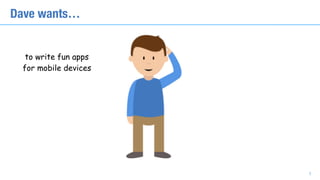
Hello, I’m Dave
2
to write fun apps
for mobile devices
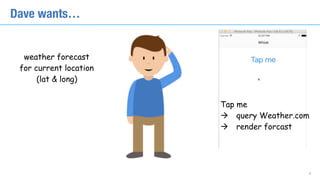
Dave wants…
3
weather forecast
for current location
(lat & long)
Dave wants…
Tap me 

à query Weather.com
à render forcast
4
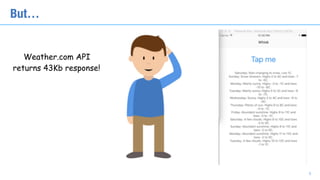
Weather.com API

returns 43Kb response!
But…
5
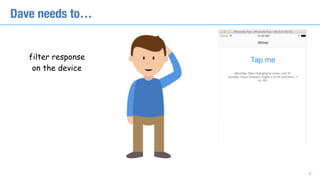
filter response 

on the device
Dave needs to…
6
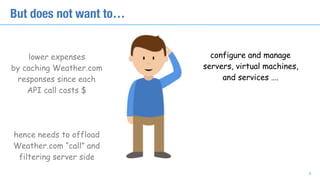
lower expenses

by caching Weather.com

responses since each 

API call costs $
hence needs to offload

Weather.com “call” and

filtering server side
Now Dave wants to…
7
lower expenses

by caching Weather.com

responses since each 

API call costs $
hence needs to offload

Weather.com “call” and

filtering server side
But does not want to…
configure and manage
servers, virtual machines,
and services ….
8
lower expenses

by caching Weather.com

responses since each 

API call costs $
hence needs to offload

Weather.com “call” and

filtering server side
But does not want to…
configure and manage
servers, virtual machines,
and services ….
9
pay by the month for
resources that may 

not be used
So how can Dave get what he wants?
10
enter serverless computing:

runtime as a service to execute

user “functions”
So how can Dave get what he wants?
11
enter serverless computing:

runtime as a service to execute

user “functions”
+ no infrastructure to maintain
+ pay as you go for what you use
+ managed security and elasticity
Serverless Platforms
Amazon Lambda
Google Cloud Functions
IBM OpenWhisk (open as in open source)
Microsoft Azure Functions
Startups: serverless.com, iron.io, apex.run, …
12
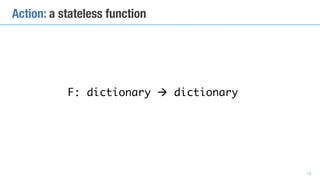
F: dictionary à dictionary
13
Action: a stateless function
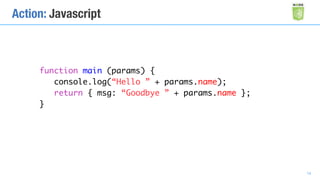
Action: Javascript
function main (params) {
console.log(“Hello ” + params.name);
return { msg: “Goodbye ” + params.name };
}
14
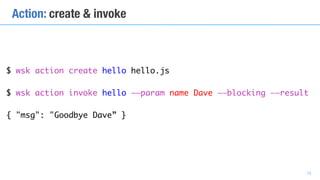
$ wsk action create hello hello.js
$ wsk action invoke hello ——param name Dave ——blocking ——result


{ "msg": "Goodbye Dave” }
Action: create & invoke
15
$ curl https://APIKEY@APIHOST/api/v1/namespaces/_/actions/hello?blocking=true 

-H "Content-Type: application/json" 
-X POST 
-d '{"name":”Dave”}' 
[-k]
Action (Function) as a service
16
Action: Python
def main (params) {
print(“Hello ” + params[“name”])
return { msg: “Goodbye ” + params[“name”] }
}
17
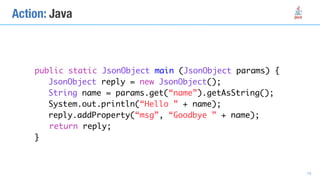
public static JsonObject main (JsonObject params) {
JsonObject reply = new JsonObject();
String name = params.get(“name”).getAsString();
System.out.println(“Hello ” + name);
reply.addProperty(“msg”, “Goodbye ” + name);
return reply;
}
Action: Java
18
Action: Swift
func main (params:[String:Any]) -> [String:Any] {
var reply = [String:Any] ()
if let name = params[“name”] as? String {
print(“Hello (name)”)
reply[“msg”] = “Goodbye (name)”
}
return reply
}
19
Action isolation
20
OpenWhisk desiderata…
• Run many actions concurrently on same machine
• Provide elastic scaling to run actions on different machines
• Limit cross-action interference: resource and process isolation
• OpenWhisk uses containers as units of isolation for actions
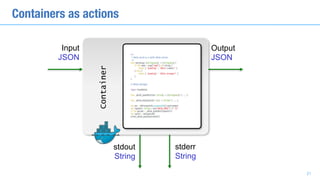
Containers as actions
Container
Input
JSON
Output
JSON
stdout
String
stderr
String
21
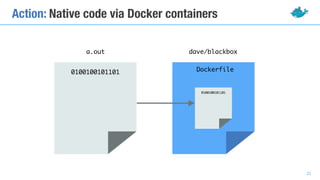
Action: Native code via Docker containers
a.out dave/blackbox
Dockerfile0100100101101
0100100101101
22
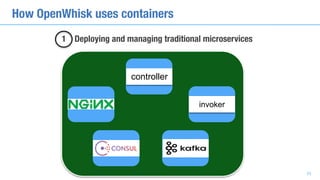
How OpenWhisk uses containers
23
controller
invoker
1 Deploying and managing traditional microservices
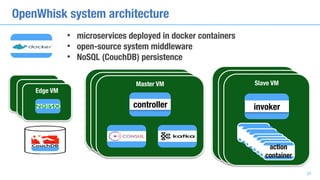
OpenWhisk system architecture
24
Edge
VMEdge
VM
Edge VM
Edge
VM
Edge
VM
Master VM
controller
Edge
VM
Edge
VM
Slave VM
invoker
action
container
action
container
action
container
action
container
action
container
action
container
action
container
action
container
• microservices deployed in docker containers
• open-source system middleware
• NoSQL (CouchDB) persistence
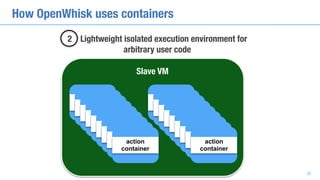
How OpenWhisk uses containers
25
2 Lightweight isolated execution environment for 

arbitrary user code
action
containeraction
containeraction
containeraction
containeraction
containeraction
containeraction
containeraction
containeraction
container
action
containeraction
containeraction
containeraction
containeraction
containeraction
containeraction
containeraction
containeraction
container
Slave VM
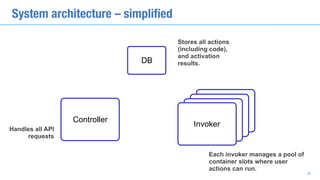
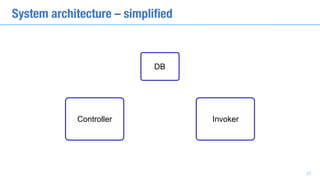
Controller
Invoker
DB
Invoker
Invoker
Invoker
System architecture – simplified
Handles all API
requests
Stores all actions
(including code),
and activation
results.
Each invoker manages a pool of
container slots where user
actions can run.
26
System architecture – simplified
Controller Invoker
DB
27
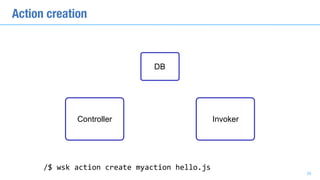
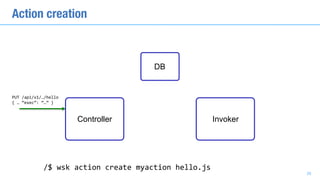
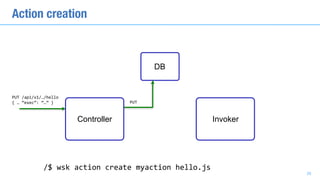
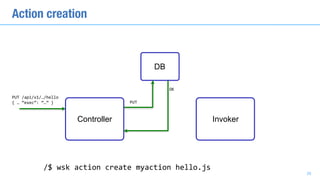
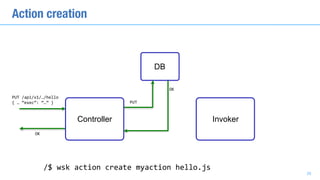
Action creation
/$	wsk	action	create	myaction	hello.js
DB
28
Controller Invoker
Action creation
PUT	/api/v1/…/hello	
{	…	“exec”:	“…”	}
/$	wsk	action	create	myaction	hello.js
DB
28
Controller Invoker
Action creation
PUT	/api/v1/…/hello	
{	…	“exec”:	“…”	} PUT
/$	wsk	action	create	myaction	hello.js
DB
28
Controller Invoker
Action creation
PUT	/api/v1/…/hello	
{	…	“exec”:	“…”	} PUT
OK
/$	wsk	action	create	myaction	hello.js
DB
28
Controller Invoker
Action creation
PUT	/api/v1/…/hello	
{	…	“exec”:	“…”	} PUT
OK
OK
/$	wsk	action	create	myaction	hello.js
DB
28
Controller Invoker
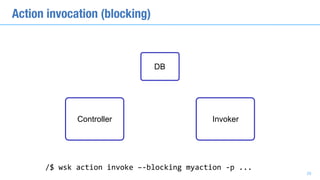
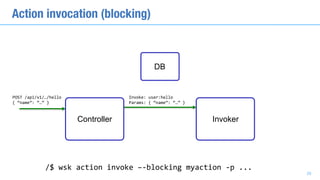
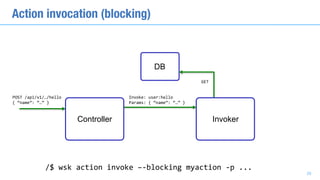
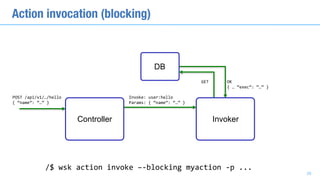
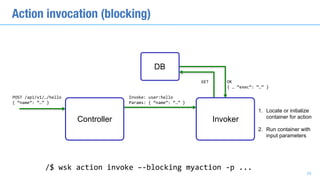
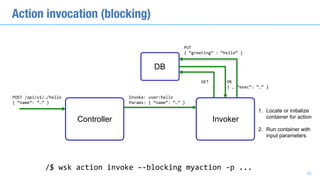
Action invocation (blocking)
/$	wsk	action	invoke	–-blocking	myaction	-p	...
DB
29
Controller Invoker
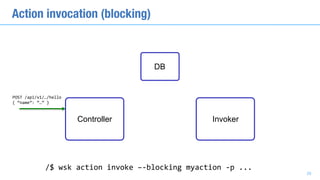
Action invocation (blocking)
POST	/api/v1/…/hello	
{	“name”:	“…”	}
/$	wsk	action	invoke	–-blocking	myaction	-p	...
DB
29
Controller Invoker
Action invocation (blocking)
POST	/api/v1/…/hello	
{	“name”:	“…”	}
Invoke:	user:hello	
Params:	{	“name”:	“…”	}
/$	wsk	action	invoke	–-blocking	myaction	-p	...
DB
29
Controller Invoker
Action invocation (blocking)
POST	/api/v1/…/hello	
{	“name”:	“…”	}
Invoke:	user:hello	
Params:	{	“name”:	“…”	}
GET
/$	wsk	action	invoke	–-blocking	myaction	-p	...
DB
29
Controller Invoker
Action invocation (blocking)
POST	/api/v1/…/hello	
{	“name”:	“…”	}
Invoke:	user:hello	
Params:	{	“name”:	“…”	}
GET OK	
{	…	“exec”:	“…”	}
/$	wsk	action	invoke	–-blocking	myaction	-p	...
DB
29
Controller Invoker
Action invocation (blocking)
POST	/api/v1/…/hello	
{	“name”:	“…”	}
Invoke:	user:hello	
Params:	{	“name”:	“…”	}
GET OK	
{	…	“exec”:	“…”	}
1. Locate or initialize
container for action
2. Run container with
input parameters
/$	wsk	action	invoke	–-blocking	myaction	-p	...
DB
29
Controller Invoker
Action invocation (blocking)
POST	/api/v1/…/hello	
{	“name”:	“…”	}
Invoke:	user:hello	
Params:	{	“name”:	“…”	}
GET OK	
{	…	“exec”:	“…”	}
1. Locate or initialize
container for action
2. Run container with
input parameters
PUT	
{	“greeting”	:	“hello”	}
/$	wsk	action	invoke	–-blocking	myaction	-p	...
DB
29
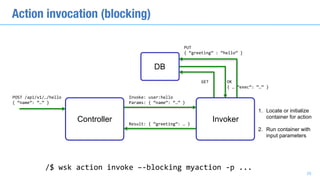
Controller Invoker
Action invocation (blocking)
POST	/api/v1/…/hello	
{	“name”:	“…”	}
Invoke:	user:hello	
Params:	{	“name”:	“…”	}
GET OK	
{	…	“exec”:	“…”	}
1. Locate or initialize
container for action
2. Run container with
input parameters
PUT	
{	“greeting”	:	“hello”	}
Result:	{	“greeting”:	…	}
/$	wsk	action	invoke	–-blocking	myaction	-p	...
DB
29
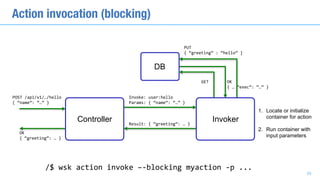
Controller Invoker
Action invocation (blocking)
POST	/api/v1/…/hello	
{	“name”:	“…”	}
OK	
{	“greeting”:	…	}
Invoke:	user:hello	
Params:	{	“name”:	“…”	}
GET OK	
{	…	“exec”:	“…”	}
1. Locate or initialize
container for action
2. Run container with
input parameters
PUT	
{	“greeting”	:	“hello”	}
Result:	{	“greeting”:	…	}
/$	wsk	action	invoke	–-blocking	myaction	-p	...
DB
29
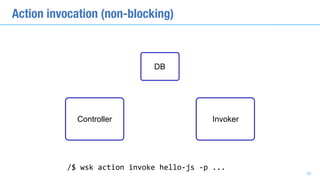
Controller Invoker
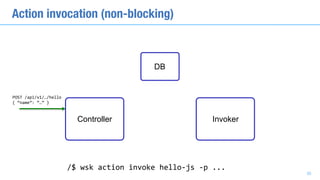
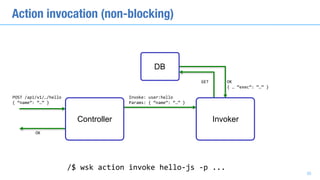
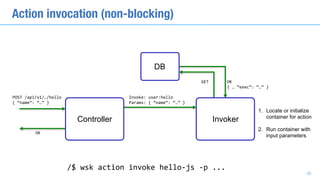
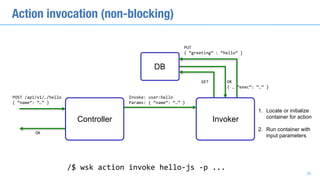
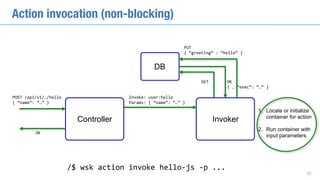
Action invocation (non-blocking)
/$	wsk	action	invoke	hello-js	-p	...
DB
30
Controller Invoker
Action invocation (non-blocking)
POST	/api/v1/…/hello	
{	“name”:	“…”	}
/$	wsk	action	invoke	hello-js	-p	...
DB
30
Controller Invoker
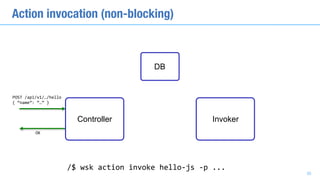
Action invocation (non-blocking)
POST	/api/v1/…/hello	
{	“name”:	“…”	}
OK
/$	wsk	action	invoke	hello-js	-p	...
DB
30
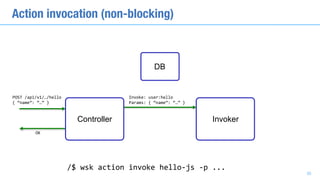
Controller Invoker
Action invocation (non-blocking)
POST	/api/v1/…/hello	
{	“name”:	“…”	}
OK
Invoke:	user:hello	
Params:	{	“name”:	“…”	}
/$	wsk	action	invoke	hello-js	-p	...
DB
30
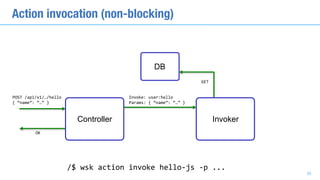
Controller Invoker
Action invocation (non-blocking)
POST	/api/v1/…/hello	
{	“name”:	“…”	}
OK
Invoke:	user:hello	
Params:	{	“name”:	“…”	}
GET
/$	wsk	action	invoke	hello-js	-p	...
DB
30
Controller Invoker
Action invocation (non-blocking)
POST	/api/v1/…/hello	
{	“name”:	“…”	}
OK
Invoke:	user:hello	
Params:	{	“name”:	“…”	}
GET OK	
{	…	“exec”:	“…”	}
/$	wsk	action	invoke	hello-js	-p	...
DB
30
Controller Invoker
Action invocation (non-blocking)
POST	/api/v1/…/hello	
{	“name”:	“…”	}
OK
Invoke:	user:hello	
Params:	{	“name”:	“…”	}
GET OK	
{	…	“exec”:	“…”	}
1. Locate or initialize
container for action
2. Run container with
input parameters
/$	wsk	action	invoke	hello-js	-p	...
DB
30
Controller Invoker
Action invocation (non-blocking)
POST	/api/v1/…/hello	
{	“name”:	“…”	}
OK
Invoke:	user:hello	
Params:	{	“name”:	“…”	}
GET OK	
{	…	“exec”:	“…”	}
1. Locate or initialize
container for action
2. Run container with
input parameters
PUT	
{	“greeting”	:	“hello”	}
/$	wsk	action	invoke	hello-js	-p	...
DB
30
Controller Invoker
Action invocation (non-blocking)
POST	/api/v1/…/hello	
{	“name”:	“…”	}
OK
Invoke:	user:hello	
Params:	{	“name”:	“…”	}
GET OK	
{	…	“exec”:	“…”	}
1. Locate or initialize
container for action
2. Run container with
input parameters
PUT	
{	“greeting”	:	“hello”	}
/$	wsk	action	invoke	hello-js	-p	...
DB
30
Controller Invoker
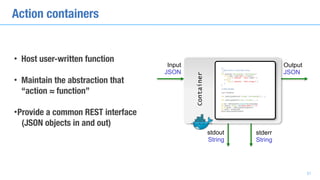
Action containers
• Host user-written function
• Maintain the abstraction that
“action ≈ function”
•Provide a common REST interface 

(JSON objects in and out)
Container
Input
JSON
Output
JSON
stdout
String
stderr
String
31
Warm & cold invocations
• Cold invocation: the action has not been invoked “recently”
• No container currently hosting the action code
• Factors affecting invocation latency:
• Database access time
• Container startup time (e.g. docker run)
• Language runtime startup time (e.g. JVM startup)
32
What we are not doing
• Create one Docker image for each action (docker build)
• On invocation,
• docker pullthe image in the invoker
• docker run
33
What we are not doing
• Create one Docker image for each action (docker build)
• On invocation,
• docker pullthe image in the invoker
• docker run
One image per action implies managing a potentially very large registry.
Docker operations generally are not very fast.
33
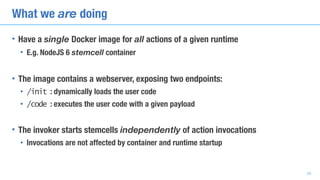
What we are doing
• Have a single Docker image for all actions of a given runtime
• E.g. NodeJS 6 stemcell container
• The image contains a webserver, exposing two endpoints:
• /init : dynamically loads the user code
• /code : executes the user code with a given payload
• The invoker starts stemcells independently of action invocations
• Invocations are not affected by container and runtime startup
34
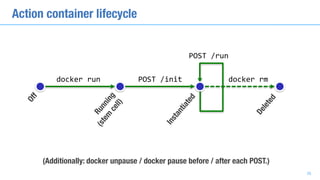
Off
docker	run POST	/init
POST	/run
Running
(stem
cell)
Instantiated
(Additionally: docker unpause / docker pause before / after each POST.)
Deleted
docker	rm
Action container lifecycle
35
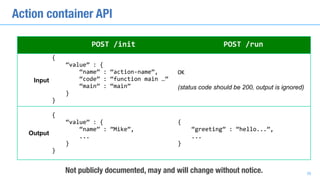
POST	/init POST	/run
Input
{	
				“value”	:	{	
								“name”	:	“action-name”,	
								“code”	:	“function	main	…”	
								“main”	:	“main”	
				}	
}
OK	
(status code should be 200, output is ignored)
Output
{	
				“value”	:	{	
								“name”	:	”Mike”,	
								...	
				}	
}
{	
				“greeting”	:	“hello...”,	
				...	
}
Not publicly documented, may and will change without notice.
Action container API
36
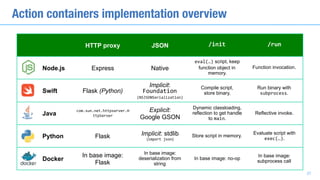
HTTP proxy JSON /init /run
Node.js Express Native
eval(…) script, keep
function object in
memory.
Function invocation.
Swift Flask (Python)
Implicit:
Foundation	
(NSJSONSerialization)
Compile script,
store binary.
Run binary with
subprocess.
Java
com.sun.net.httpserver.H
ttpServer
Explicit:
Google GSON
Dynamic classloading,
reflection to get handle
to main.
Reflective invoke.
Python Flask Implicit: stdlib
(import	json)
Store script in memory.
Evaluate script with
exec(…).
Docker
In base image:
Flask
In base image:
deserialization from
string
In base image: no-op
In base image:
subprocess call
Action containers implementation overview
37
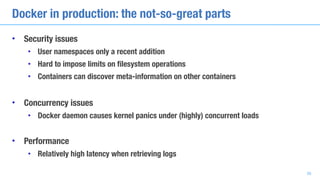
Docker in production: the not-so-great parts
• Security issues
• User namespaces only a recent addition
• Hard to impose limits on filesystem operations
• Containers can discover meta-information on other containers
• Concurrency issues
• Docker daemon causes kernel panics under (highly) concurrent loads
• Performance
• Relatively high latency when retrieving logs
38
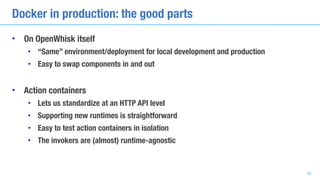
Docker in production: the good parts
• On OpenWhisk itself
• “Same” environment/deployment for local development and production
• Easy to swap components in and out
• Action containers
• Lets us standardize at an HTTP API level
• Supporting new runtimes is straightforward
• Easy to test action containers in isolation
• The invokers are (almost) runtime-agnostic
39
• IBM’s statements regarding its plans, directions, and intent are subject to change or withdrawal without notice at IBM’s sole discretion.
• Information regarding potential future products is intended to outline our general product direction and it should not be relied on in
making a purchasing decision.
• The information mentioned regarding potential future products is not a commitment, promise, or legal obligation to deliver any
material, code or functionality. Information about potential future products may not be incorporated into any contract.
• The development, release, and timing of any future features or functionality described for our products remains at our sole discretion.
• Performance is based on measurements and projections using standard IBM benchmarks in a controlled environment. The actual
throughput or performance that any user will experience will vary depending upon many factors, including considerations such as the
amount of multiprogramming in the user’s job stream, the I/O configuration, the storage configuration, and the workload processed.
Therefore, no assurance can be given that an individual user will achieve results similar to those stated here.
Please note
40
Copyright © 2016 by International Business Machines Corporation (IBM). No part of this document may be reproduced or transmitted in any form without written permission
from IBM.
U.S. Government Users Restricted Rights - Use, duplication or disclosure restricted by GSA ADP Schedule Contract with IBM.
Information in these presentations (including information relating to products that have not yet been announced by IBM) has been reviewed for accuracy as of the date of initial
publication and could include unintentional technical or typographical errors. IBM shall have no responsibility to update this information. THIS DOCUMENT IS DISTRIBUTED
"AS IS" WITHOUT ANY WARRANTY, EITHER EXPRESS OR IMPLIED. IN NO EVENT SHALL IBM BE LIABLE FOR ANY DAMAGE ARISING FROM THE USE OF THIS
INFORMATION, INCLUDING BUT NOT LIMITED TO, LOSS OF DATA, BUSINESS INTERRUPTION, LOSS OF PROFIT OR LOSS OF OPPORTUNITY. IBM products and
services are warranted according to the terms and conditions of the agreements under which they are provided.
Any statements regarding IBM's future direction, intent or product plans are subject to change or withdrawal without notice.
Performance data contained herein was generally obtained in a controlled, isolated environments. Customer examples are presented as illustrations of how those customers
have used IBM products and the results they may have achieved. Actual performance, cost, savings or other results in other operating environments may vary.
References in this document to IBM products, programs, or services does not imply that IBM intends to make such products, programs or services available in all countries in
which IBM operates or does business.
Workshops, sessions and associated materials may have been prepared by independent session speakers, and do not necessarily reflect the views of IBM. All materials and
discussions are provided for informational purposes only, and are neither intended to, nor shall constitute legal or other guidance or advice to any individual participant or their
specific situation.
It is the customer’s responsibility to insure its own compliance with legal requirements and to obtain advice of competent legal counsel as to the identification and
interpretation of any relevant laws and regulatory requirements that may affect the customer’s business and any actions the customer may need to take to comply with such
laws. IBM does not provide legal advice or represent or warrant that its services or products will ensure that the customer is in compliance with any law
Please note: notices and disclaimers
41
Please note: notices and disclaimers
Information concerning non-IBM products was obtained from the suppliers of those products, their published announcements or other publicly available sources. IBM has not
tested those products in connection with this publication and cannot confirm the accuracy of performance, compatibility or any other claims related to non-IBM products.
Questions on the capabilities of non-IBM products should be addressed to the suppliers of those products. IBM does not warrant the quality of any third-party products, or the
ability of any such third-party products to interoperate with IBM’s products. IBM EXPRESSLY DISCLAIMS ALL WARRANTIES, EXPRESSED OR IMPLIED, INCLUDING BUT
NOT LIMITED TO, THE IMPLIED WARRANTIES OF MERCHANTABILITY AND FITNESS FOR A PARTICULAR PURPOSE.
The provision of the information contained h erein is not intended to, and does not, grant any right or license under any IBM patents, copyrights, trademarks or other intellectual
property right.
IBM, the IBM logo, ibm.com, Aspera®, Bluemix, Blueworks Live, CICS, Clearcase, Cognos®, DOORS®, Emptoris®, Enterprise Document Management System™, FASP®,
FileNet®, Global Business Services ®, Global Technology Services ®, IBM ExperienceOne™, IBM SmartCloud®, IBM Social Business®, Information on Demand, ILOG,
Maximo®, MQIntegrator®, MQSeries®, Netcool®, OMEGAMON, OpenPower, PureAnalytics™, PureApplication®, pureCluster™, PureCoverage®, PureData®,
PureExperience®, PureFlex®, pureQuery®, pureScale®, PureSystems®, QRadar®, Rational®, Rhapsody®, Smarter Commerce®, SoDA, SPSS, Sterling Commerce®,
StoredIQ, Tealeaf®, Tivoli®, Trusteer®, Unica®, urban{code}®, Watson, WebSphere®, Worklight®, X-Force® and System z® Z/OS, are trademarks of International Business
Machines Corporation, registered in many jurisdictions worldwide. Other product and service names might be trademarks of IBM or other companies. A current list of IBM
trademarks is available on the Web at "Copyright and trademark information" at: www.ibm.com/legal/copytrade.shtml.
42

ContainerDays NYC 2016: "OpenWhisk: A Serverless Computing Platform" (Rodric Rabbah & Philippe Suter)