Jira – Zephyr Integration
Zephyr Version(s)
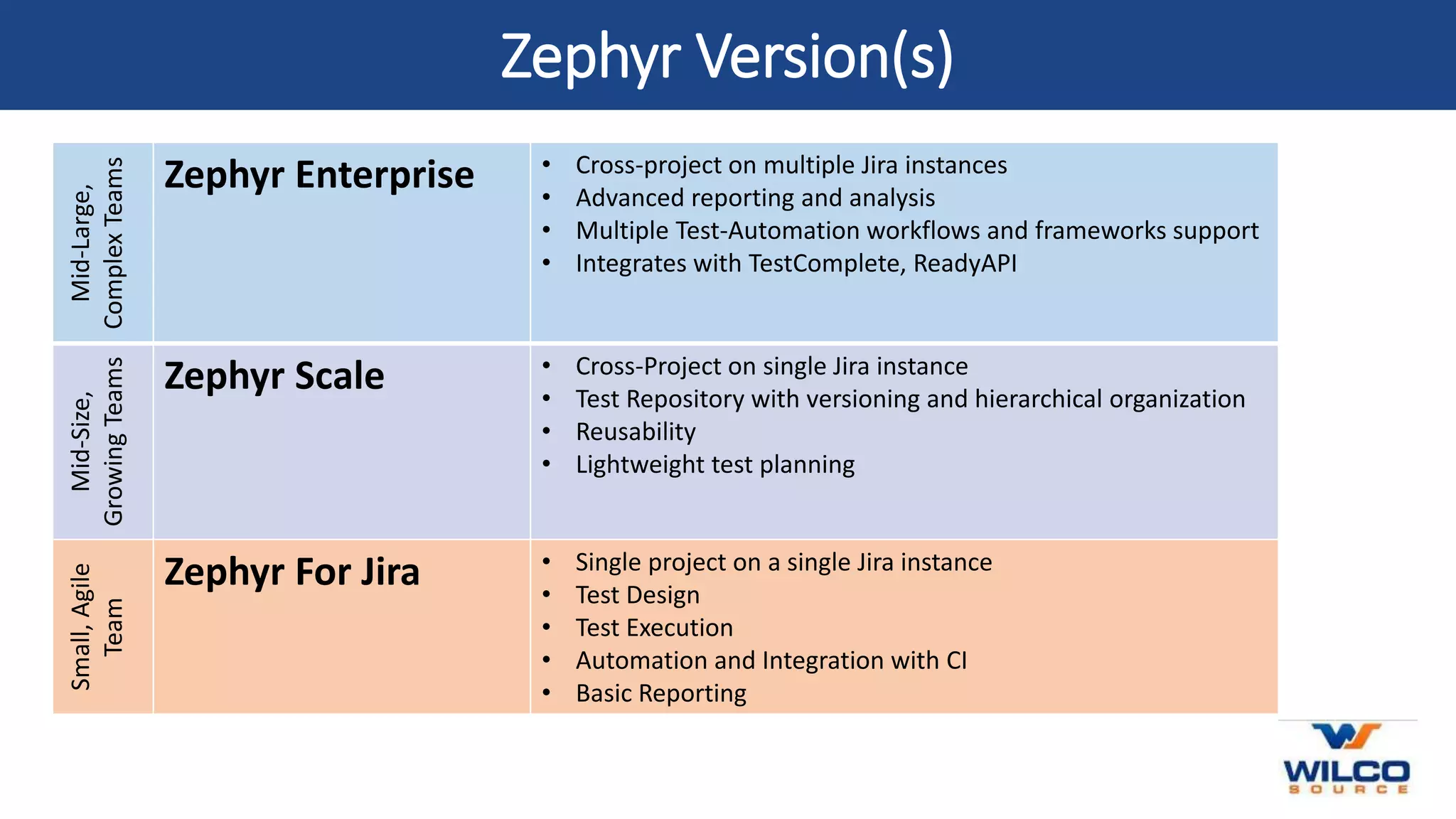
Mid-Large,
Complex
Teams
Zephyr Enterprise • Cross-project on multiple Jira instances
• Advanced reporting and analysis
• Multiple Test-Automation workflows and frameworks support
• Integrates with TestComplete, ReadyAPI
Mid-Size,
Growing
Teams
Zephyr Scale • Cross-Project on single Jira instance
• Test Repository with versioning and hierarchical organization
• Reusability
• Lightweight test planning
Small,
Agile
Team
Zephyr For Jira • Single project on a single Jira instance
• Test Design
• Test Execution
• Automation and Integration with CI
• Basic Reporting
How does Jira & Zephyr work
Zephyr for Jira enables you to manage your tests directly in Jira. You can add Test items as tickets to your Jira
projects, link them to other Jira issues, plan your testing efforts by using test cycles, and track your testing
efforts via metrics and reports.
Zephyr simplifies the testing process as test cases are organized under Jira tickets. A user typically adds a test
case by setting the ticket type to ‘Test’. Once the ticket test is added, the user has the opportunity to update
Actions, Details, and Execution.
Types of Zephyr Jira Test Process
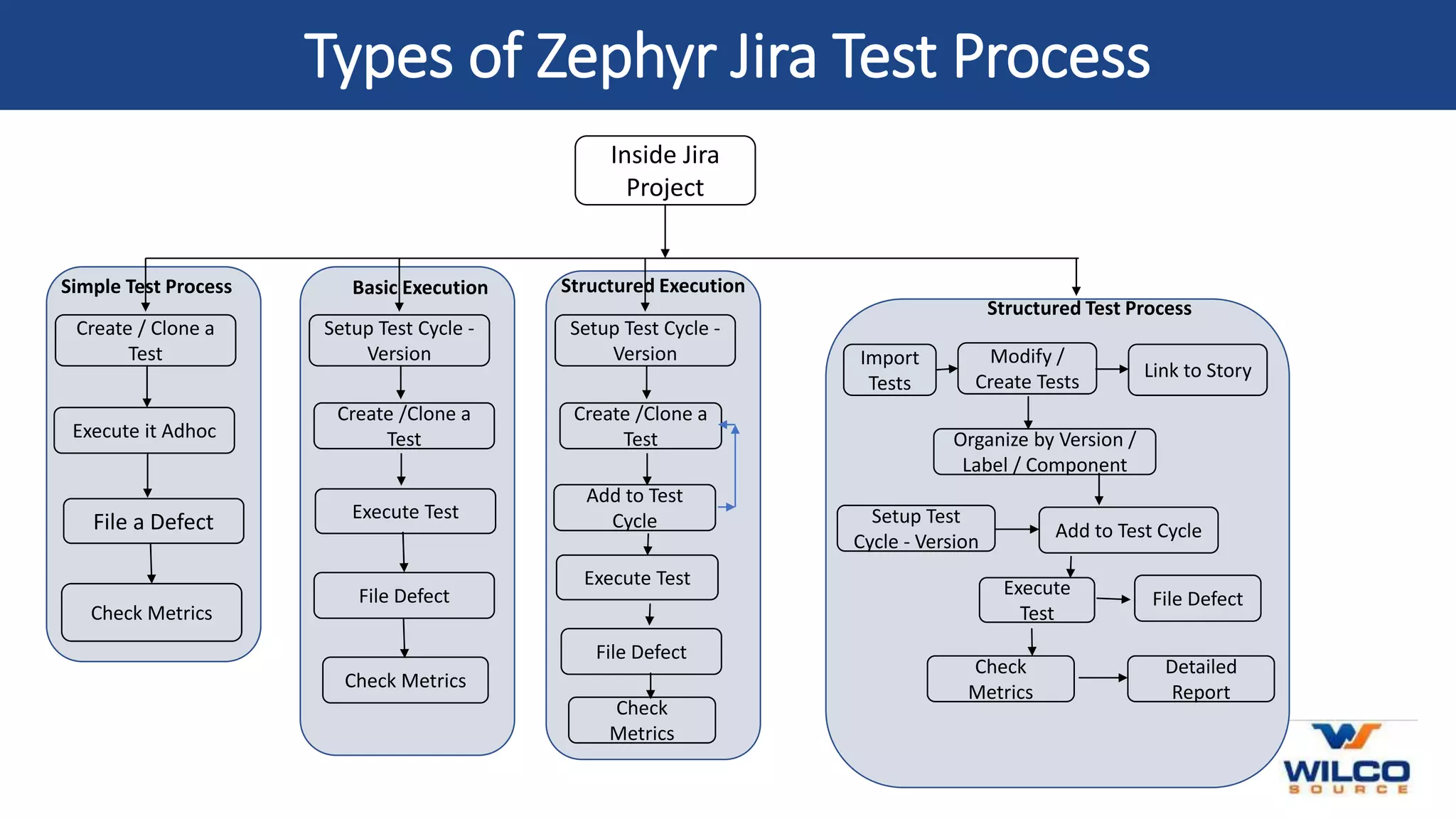
Inside Jira
Project
Create / Clone a
Test
Simple Test Process
Execute it Adhoc
File a Defect
Check Metrics
Setup Test Cycle -
Version
Basic Execution
Create /Clone a
Test
Execute Test
File Defect
Check Metrics
Setup Test Cycle -
Version
Structured Execution
Create /Clone a
Test
Execute Test
File Defect
Check
Metrics
Add to Test
Cycle
Modify /
Create Tests
Structured Test Process
Organize by Version /
Label / Component
Execute
Test
File Defect
Check
Metrics
Setup Test
Cycle - Version
Import
Tests
Link to Story
Add to Test Cycle
Detailed
Report
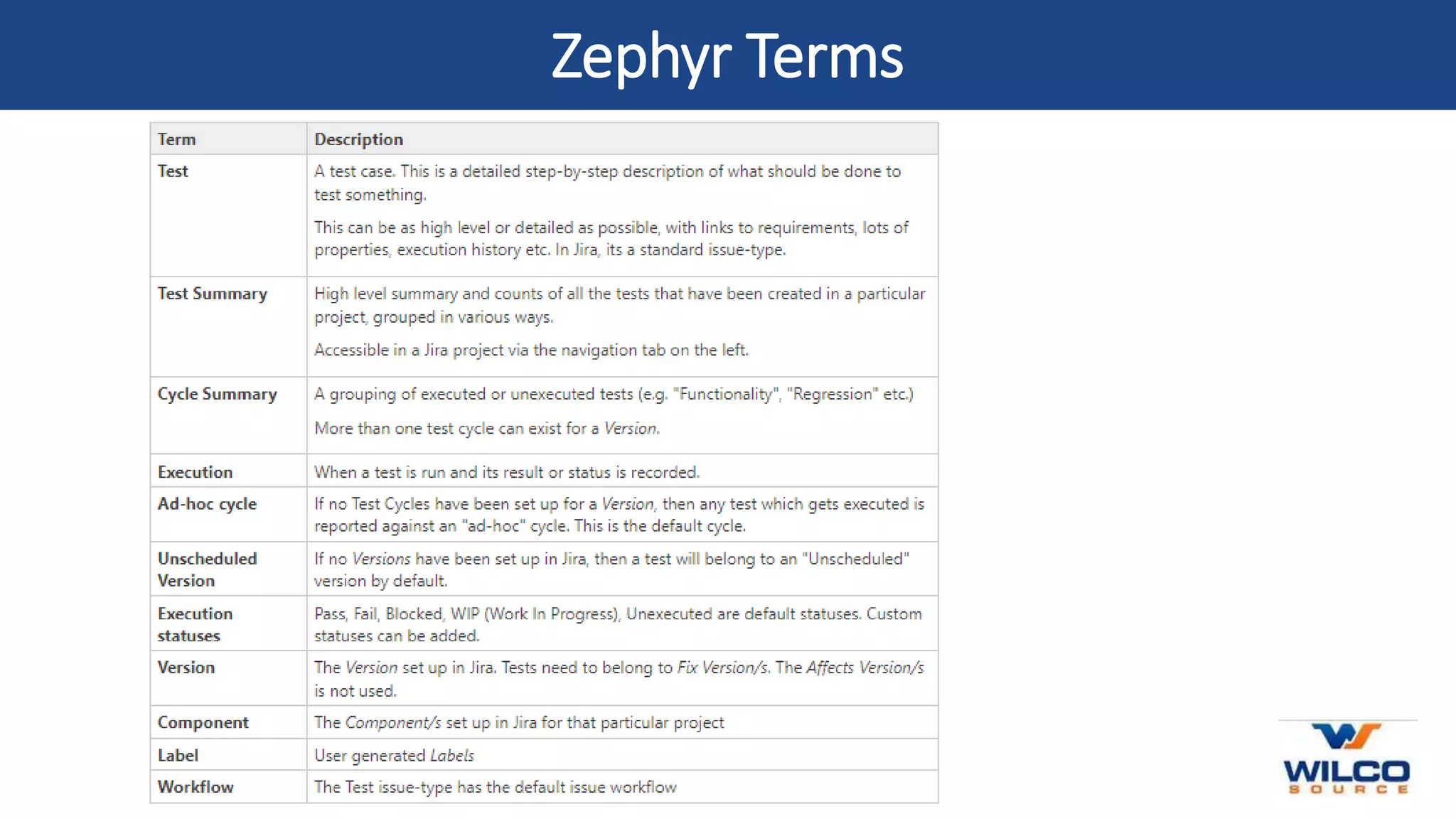
Zephyr Terms

Jira-Zephyr_Training.pptx

  • 1.
    Jira – ZephyrIntegration
  • 2.
    Zephyr Version(s) Mid-Large, Complex Teams Zephyr Enterprise• Cross-project on multiple Jira instances • Advanced reporting and analysis • Multiple Test-Automation workflows and frameworks support • Integrates with TestComplete, ReadyAPI Mid-Size, Growing Teams Zephyr Scale • Cross-Project on single Jira instance • Test Repository with versioning and hierarchical organization • Reusability • Lightweight test planning Small, Agile Team Zephyr For Jira • Single project on a single Jira instance • Test Design • Test Execution • Automation and Integration with CI • Basic Reporting
  • 3.
    How does Jira& Zephyr work Zephyr for Jira enables you to manage your tests directly in Jira. You can add Test items as tickets to your Jira projects, link them to other Jira issues, plan your testing efforts by using test cycles, and track your testing efforts via metrics and reports. Zephyr simplifies the testing process as test cases are organized under Jira tickets. A user typically adds a test case by setting the ticket type to ‘Test’. Once the ticket test is added, the user has the opportunity to update Actions, Details, and Execution.
  • 4.
    Types of ZephyrJira Test Process Inside Jira Project Create / Clone a Test Simple Test Process Execute it Adhoc File a Defect Check Metrics Setup Test Cycle - Version Basic Execution Create /Clone a Test Execute Test File Defect Check Metrics Setup Test Cycle - Version Structured Execution Create /Clone a Test Execute Test File Defect Check Metrics Add to Test Cycle Modify / Create Tests Structured Test Process Organize by Version / Label / Component Execute Test File Defect Check Metrics Setup Test Cycle - Version Import Tests Link to Story Add to Test Cycle Detailed Report
  • 5.

Editor's Notes

  • #2 Stefano Mazzocchi of the Apache Software Foundation was the original developer of JMeter. He wrote it primarily to test the performance of Apache JServ (now called as Apache Tomcat project). Apache later redesigned JMeter to enhance the GUI and to add functional testing capabilities. JMeter is a Java desktop application with a graphical interface that uses the Swing graphical API. It can therefore run on any environment / workstation that accepts a Java virtual machine, for example – Windows, Linux, Mac, etc.