Intro to Django debugging
& building Insights
Backend Engineer @Continual Engine
Board member @Django Software Foundation (DSF)
Open Source Contributor | Mentor 
AGENDA
Debugging Techniques
What is Logging ?
Print vs Logger
Deep dive into Logger
Configuring with Django
settings.py
Build a visualisation using
logger data
Conclusion
Let's Begin!
DEBUGGING
TECHNIQUES
Using output statements
Using Flags
Comments
Using Debugging Tools 
Identify -> Analyze -> Remove
LOGGER AND
LOGGING
Logging is basically tracking events once
a code/software runs. It is very essential
for debugging your software
Maintaining a log file helps is fixing
crashes faster
Logger is a built-in python module that
allows debugging and recording status
messages
Print statements works for
small scale 
With Print statements it's
difficult to control the log
information one want to
capture
Cannot map the severity level
with print statements
Cannot map the timestamp
with the message emitted    
PRINT VS LOGGER
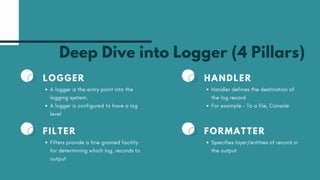
Deep Dive into Logger (4 Pillars)
FILTER
Filters provide a fine grained facility
for determining which log, records to
output
LOGGER
A logger is the entry point into the
logging system.
A logger is configured to have a log
level
FORMATTER
Specifies layer/entities of record in
the output
HANDLER
Handler defines the destination of
the log record
For example - To a file, Console
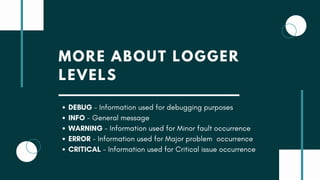
MORE ABOUT LOGGER
LEVELS
DEBUG - Information used for debugging purposes 
INFO - General message
WARNING - Information used for Minor fault occurrence
ERROR - Information used for Major problem occurrence
CRITICAL - Information used for Critical issue occurrence
EXAMPLE USAGE
DEBUG - logger.debug() 
INFO - logger.info()
WARNING - logger.warning()
ERROR - logger.error()
CRITICAL - logger.critical()
USING LOGGER IN DJANGO
S T E P B Y S T E P
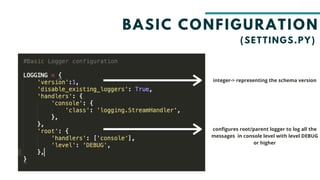
BASIC CONFIGURATION
(SETTINGS.PY)
integer-> representing the schema version
configures root/parent logger to log all the
messages in console level with level DEBUG
or higher
ADVANCE CONFIGURATION
App level -planets is the name of
the app
file path 
Defining formatter
formatter call
A P P L I C A T I O N
Presentations are
communication tools
that can be used as
demonstrations.
R E T E N T I O N
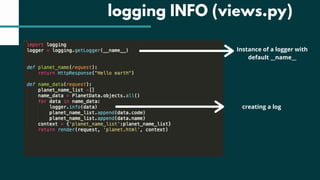
logging INFO (views.py)
Instance of a logger with
default __name__
creating a log
DEVELOPING
INSIGHTS FROM
LOGGER FILE
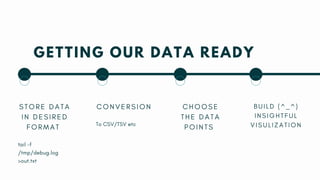
GETTING OUR DATA READY
S T O R E D A T A
I N D E S I R E D
F O R M A T
tail -f
/tmp/debug.log
>out.txt
C O N V E R S I O N
To CSV/TSV etc
C H O O S E
T H E D A T A
P O I N T S
B U I L D ( ^ _ ^ )
I N S I G H T F U L
V I S U L I Z A T I O N
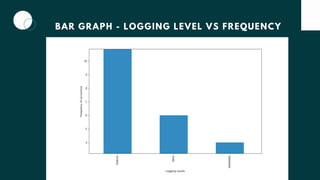
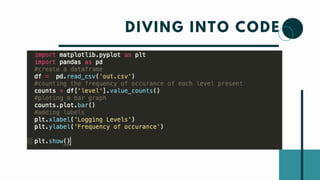
BAR GRAPH - LOGGING LEVEL VS FREQUENCY
DIVING INTO CODE
THAT'S NOT ALL!
T H E R E A R E E N D L E S S P O S S I B I L I T I E S ^ @ , @ ^  
THANK YOU SO MUCH :)
@SAYABANIK

Intro to Django Debugging & Building Insights

  • 1.
    Intro to Djangodebugging & building Insights Backend Engineer @Continual Engine Board member @Django Software Foundation (DSF) Open Source Contributor | Mentor 
  • 2.
    AGENDA Debugging Techniques What isLogging ? Print vs Logger Deep dive into Logger Configuring with Django settings.py Build a visualisation using logger data Conclusion
  • 3.
  • 4.
    DEBUGGING TECHNIQUES Using output statements UsingFlags Comments Using Debugging Tools  Identify -> Analyze -> Remove
  • 5.
    LOGGER AND LOGGING Logging isbasically tracking events once a code/software runs. It is very essential for debugging your software Maintaining a log file helps is fixing crashes faster Logger is a built-in python module that allows debugging and recording status messages
  • 6.
    Print statements worksfor small scale  With Print statements it's difficult to control the log information one want to capture Cannot map the severity level with print statements Cannot map the timestamp with the message emitted     PRINT VS LOGGER
  • 7.
    Deep Dive intoLogger (4 Pillars) FILTER Filters provide a fine grained facility for determining which log, records to output LOGGER A logger is the entry point into the logging system. A logger is configured to have a log level FORMATTER Specifies layer/entities of record in the output HANDLER Handler defines the destination of the log record For example - To a file, Console
  • 8.
    MORE ABOUT LOGGER LEVELS DEBUG- Information used for debugging purposes  INFO - General message WARNING - Information used for Minor fault occurrence ERROR - Information used for Major problem occurrence CRITICAL - Information used for Critical issue occurrence
  • 9.
    EXAMPLE USAGE DEBUG -logger.debug()  INFO - logger.info() WARNING - logger.warning() ERROR - logger.error() CRITICAL - logger.critical()
  • 10.
    USING LOGGER INDJANGO S T E P B Y S T E P
  • 11.
    BASIC CONFIGURATION (SETTINGS.PY) integer-> representingthe schema version configures root/parent logger to log all the messages in console level with level DEBUG or higher
  • 12.
    ADVANCE CONFIGURATION App level-planets is the name of the app file path  Defining formatter formatter call
  • 13.
    A P PL I C A T I O N Presentations are communication tools that can be used as demonstrations. R E T E N T I O N logging INFO (views.py) Instance of a logger with default __name__ creating a log
  • 15.
  • 16.
    GETTING OUR DATAREADY S T O R E D A T A I N D E S I R E D F O R M A T tail -f /tmp/debug.log >out.txt C O N V E R S I O N To CSV/TSV etc C H O O S E T H E D A T A P O I N T S B U I L D ( ^ _ ^ ) I N S I G H T F U L V I S U L I Z A T I O N
  • 18.
    BAR GRAPH -LOGGING LEVEL VS FREQUENCY
  • 19.
  • 20.
    THAT'S NOT ALL! TH E R E A R E E N D L E S S P O S S I B I L I T I E S ^ @ , @ ^  
  • 21.
    THANK YOU SOMUCH :) @SAYABANIK