POSTGRESQL
ON AWS:
TIPS & TRICKS
(AND HORROR STORIES)
ALEXANDER KUKUSHKIN
PostgresConf US 2018
2018-04-20
2
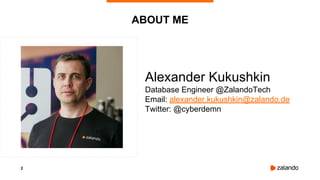
ABOUT ME
Alexander Kukushkin
Database Engineer @ZalandoTech
Email: alexander.kukushkin@zalando.de
Twitter: @cyberdemn
3
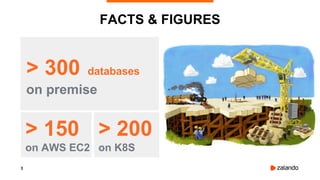
FACTS & FIGURES
> 300 databases
on premise
> 150
on AWS EC2
> 200
on K8S
4
WHY WE USE AWS
● Fast hardware (service) provisioning
● Easy scale up/down/in/out
● Pay only for resources you need
5
GLOSSARY
● RDS - Relational Database Service
● EC2 - Elastic Compute Cloud
● EBS - Elastic Block Store
● S3 - Simple Storage Service
● AZ - Availability Zone
● ASG - Auto Scaling Group
6
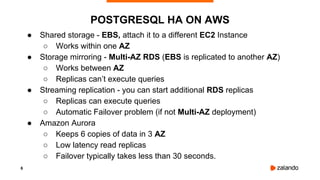
POSTGRESQL HA ON AWS
● Shared storage - EBS, attach it to a different EC2 Instance
○ Works within one AZ
● Storage mirroring - Multi-AZ RDS (EBS is replicated to another AZ)
○ Works between AZ
○ Replicas can’t execute queries
● Streaming replication - you can start additional RDS replicas
○ Replicas can execute queries
○ Automatic Failover problem (if not Multi-AZ deployment)
● Amazon Aurora
○ Keeps 6 copies of data in 3 AZ
○ Low latency read replicas
○ Failover typically takes less than 30 seconds.
7
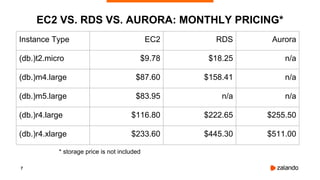
EC2 VS. RDS VS. AURORA: MONTHLY PRICING*
Instance Type EC2 RDS Aurora
(db.)t2.micro $9.78 $18.25 n/a
(db.)m4.large $87.60 $158.41 n/a
(db.)m5.large $83.95 n/a n/a
(db.)r4.large $116.80 $222.65 $255.50
(db.)r4.xlarge $233.60 $445.30 $511.00
* storage price is not included
8
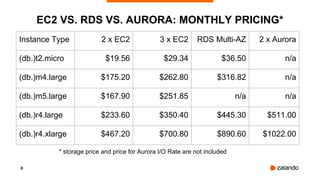
EC2 VS. RDS VS. AURORA: MONTHLY PRICING*
Instance Type 2 x EC2 3 x EC2 RDS Multi-AZ 2 x Aurora
(db.)t2.micro $19.56 $29.34 $36.50 n/a
(db.)m4.large $175.20 $262.80 $316.82 n/a
(db.)m5.large $167.90 $251.85 n/a n/a
(db.)r4.large $233.60 $350.40 $445.30 $511.00
(db.)r4.xlarge $467.20 $700.80 $890.60 $1022.00
* storage price and price for Aurora I/O Rate are not included
9
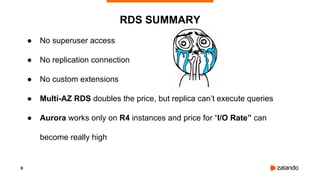
● No superuser access
● No replication connection
● No custom extensions
● Multi-AZ RDS doubles the price, but replica can’t execute queries
● Aurora works only on R4 instances and price for “I/O Rate” can
become really high
RDS SUMMARY
10
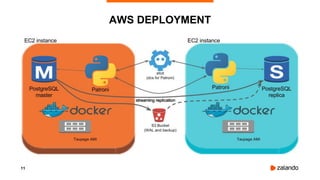
● Patroni - High-Availability and automatic failover
● Spilo - Docker package of Patroni and WAL-E for AWS or Kubernetes
● Use CloudFormation stacks and ASG for deployments
● One Docker container per EC2 Instance
SPILO AND PATRONI
11
AWS DEPLOYMENT
12
● Instance Types: t2, m5, m4, c5, x1, r4, p2, g3, f1, i3, d2
● Instance Sizes: nano, micro, small, medium, large, xlarge,
2xlarge, 4xlarge, 10xlarge, 16xlarge, 32xlarge
● Performance: Fixed vs. Burstable (T2 Instances)
● Storage: Instance Store (Ephemeral) vs. EBS
● EBS-optimized Instances
● Enhanced Networking
EC2 INSTANCE FEATURES
13
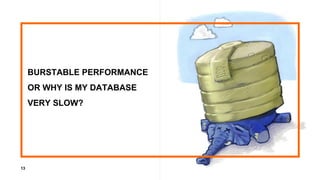
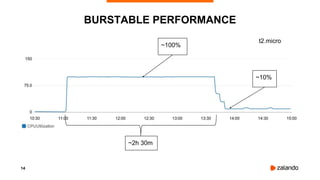
BURSTABLE PERFORMANCE
OR WHY IS MY DATABASE
VERY SLOW?
14
BURSTABLE PERFORMANCE
~100%
~10%
~2h 30m
t2.micro
15
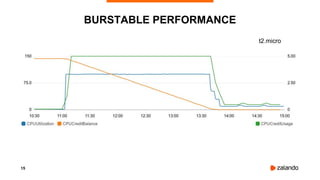
BURSTABLE PERFORMANCE
t2.micro
16
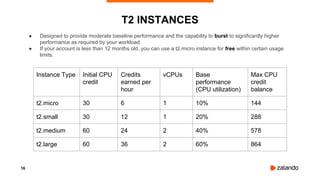
● Designed to provide moderate baseline performance and the capability to burst to significantly higher
performance as required by your workload.
● If your account is less than 12 months old, you can use a t2.micro instance for free within certain usage
limits.
T2 INSTANCES
Instance Type Initial CPU
credit
Credits
earned per
hour
vCPUs Base
performance
(CPU utilization)
Max CPU
credit
balance
t2.micro 30 6 1 10% 144
t2.small 30 12 1 20% 288
t2.medium 60 24 2 40% 578
t2.large 60 36 2 60% 864
17
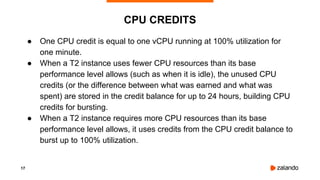
● One CPU credit is equal to one vCPU running at 100% utilization for
one minute.
● When a T2 instance uses fewer CPU resources than its base
performance level allows (such as when it is idle), the unused CPU
credits (or the difference between what was earned and what was
spent) are stored in the credit balance for up to 24 hours, building CPU
credits for bursting.
● When a T2 instance requires more CPU resources than its base
performance level allows, it uses credits from the CPU credit balance to
burst up to 100% utilization.
CPU CREDITS
18
● WAL-E wal-fetch/wal-prefetch is terribly slow
○ Prefetch spawns 8 worker processes (by default)
and can burn all CPU Credits
How we solved it:
1. use “-p 0” to disable prefetch
2. reimplemented ‘wal-fetch’ in bash + curl + openssl
HORROR STORY
19
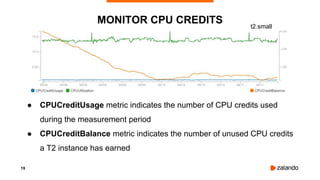
● CPUCreditUsage metric indicates the number of CPU credits used
during the measurement period
● CPUCreditBalance metric indicates the number of unused CPU credits
a T2 instance has earned
MONITOR CPU CREDITS t2.small
20
● 1 year or 3 year contracts
● Significant discount compared to On-Demand instance pricing
● Capacity reservation
● Customers using both Reserved and On-Demand instances will have
Reserved Instance rates applied first to minimize costs
● Discounts up to 70%
RESERVED INSTANCES
21
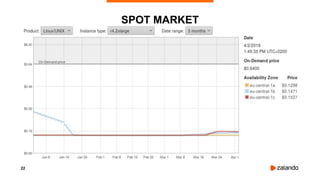
● Bidding on “AWS overcapacity”
● Variable price point, save up to 90% vs. on-demand
*Risks*
Unavailability or loss of instance if outbid!!!
SPOT INSTANCES
22
SPOT MARKET
23
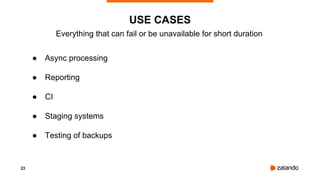
● Async processing
● Reporting
● CI
● Staging systems
● Testing of backups
USE CASES
Everything that can fail or be unavailable for short duration
24
● There were only 2 AZ in eu-central-1 until June 2017
● ASG is trying to do its best to distribute resources across different AZ, but when Spot Price
is high, it might happen that two EC2 Instances will run in the same AZ
● When price will go down, ASG will rebalance resources, i.e. spawn a new instance in another
AZ and terminate one of the running instances
● With 50% probability it will kill the “master”
How we solved it:
AutoScalingGroup -> “TerminationPolicies”: [“NewestInstance”, “Default”]
HORROR STORY
25
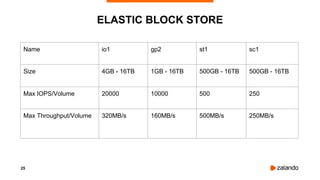
ELASTIC BLOCK STORE
Name io1 gp2 st1 sc1
Size 4GB - 16TB 1GB - 16TB 500GB - 16TB 500GB - 16TB
Max IOPS/Volume 20000 10000 500 250
Max Throughput/Volume 320MB/s 160MB/s 500MB/s 250MB/s
26
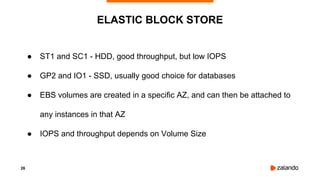
● ST1 and SC1 - HDD, good throughput, but low IOPS
● GP2 and IO1 - SSD, usually good choice for databases
● EBS volumes are created in a specific AZ, and can then be attached to
any instances in that AZ
● IOPS and throughput depends on Volume Size
ELASTIC BLOCK STORE
27
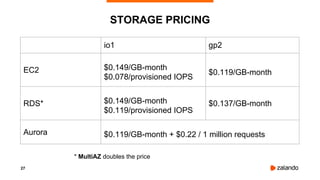
STORAGE PRICING
io1 gp2
EC2 $0.149/GB-month
$0.078/provisioned IOPS
$0.119/GB-month
RDS* $0.149/GB-month
$0.119/provisioned IOPS
$0.137/GB-month
Aurora $0.119/GB-month + $0.22 / 1 million requests
* MultiAZ doubles the price
28
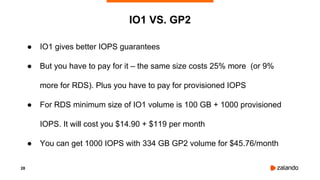
● IO1 gives better IOPS guarantees
● But you have to pay for it – the same size costs 25% more (or 9%
more for RDS). Plus you have to pay for provisioned IOPS
● For RDS minimum size of IO1 volume is 100 GB + 1000 provisioned
IOPS. It will cost you $14.90 + $119 per month
● You can get 1000 IOPS with 334 GB GP2 volume for $45.76/month
IO1 VS. GP2
29
SEQUEL:
BURSTABLE PERFORMANCE
OR WHY IS MY DATABASE
SLOW AGAIN?
30
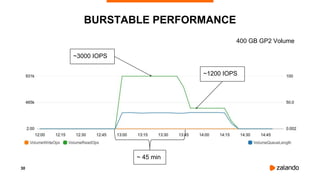
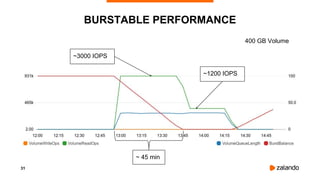
BURSTABLE PERFORMANCE
~3000 IOPS
~1200 IOPS
~ 45 min
400 GB GP2 Volume
31
BURSTABLE PERFORMANCE
~3000 IOPS
~1200 IOPS
~ 45 min
400 GB Volume
32
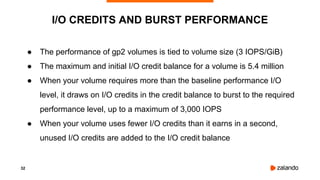
I/O CREDITS AND BURST PERFORMANCE
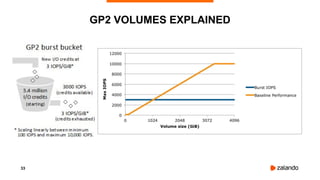
● The performance of gp2 volumes is tied to volume size (3 IOPS/GiB)
● The maximum and initial I/O credit balance for a volume is 5.4 million
● When your volume requires more than the baseline performance I/O
level, it draws on I/O credits in the credit balance to burst to the required
performance level, up to a maximum of 3,000 IOPS
● When your volume uses fewer I/O credits than it earns in a second,
unused I/O credits are added to the I/O credit balance
33
GP2 VOLUMES EXPLAINED
34
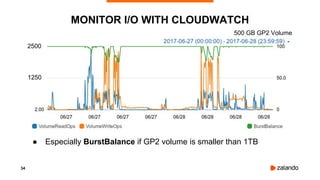
● Especially BurstBalance if GP2 volume is smaller than 1TB
MONITOR I/O WITH CLOUDWATCH
500 GB GP2 Volume
2500
1250
35
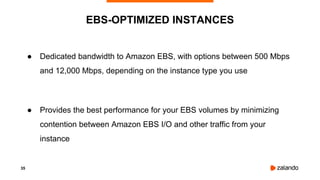
● Dedicated bandwidth to Amazon EBS, with options between 500 Mbps
and 12,000 Mbps, depending on the instance type you use
● Provides the best performance for your EBS volumes by minimizing
contention between Amazon EBS I/O and other traffic from your
instance
EBS-OPTIMIZED INSTANCES
36
EBS THROUGHPUT
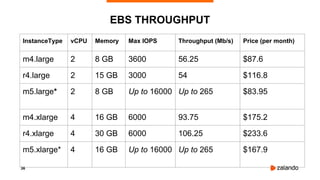
InstanceType vCPU Memory Max IOPS Throughput (Mb/s) Price (per month)
m4.large 2 8 GB 3600 56.25 $87.6
r4.large 2 15 GB 3000 54 $116.8
m5.large* 2 8 GB Up to 16000 Up to 265 $83.95
m4.xlarge 4 16 GB 6000 93.75 $175.2
r4.xlarge 4 30 GB 6000 106.25 $233.6
m5.xlarge* 4 16 GB Up to 16000 Up to 265 $167.9
37
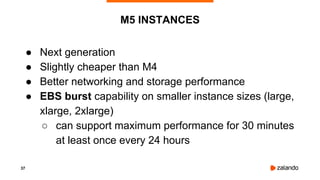
● Next generation
● Slightly cheaper than M4
● Better networking and storage performance
● EBS burst capability on smaller instance sizes (large,
xlarge, 2xlarge)
○ can support maximum performance for 30 minutes
at least once every 24 hours
M5 INSTANCES
38
M4 VS. M5 INSTANCES
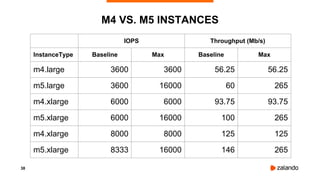
IOPS Throughput (Mb/s)
InstanceType Baseline Max Baseline Max
m4.large 3600 3600 56.25 56.25
m5.large 3600 16000 60 265
m4.xlarge 6000 6000 93.75 93.75
m5.xlarge 6000 16000 100 265
m4.xlarge 8000 8000 125 125
m5.xlarge 8333 16000 146 265
39
● If you run m5.large, m5.xlarge or m5.2xlarge, you should monitor
○ EBSIOBalance% - percentage of I/O credits remaining in
the burst bucket.
○ EBSByteBalance% - percentage of throughput credits
remaining in the burst bucket
● Instances with a consistently low balance percentage are
candidates for upsizing
● Instances where the balance percentage never drops below
100% are candidates for downsizing
MORE CLOUDWATCH METRICS
40
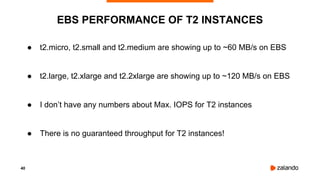
● t2.micro, t2.small and t2.medium are showing up to ~60 MB/s on EBS
● t2.large, t2.xlarge and t2.2xlarge are showing up to ~120 MB/s on EBS
● I don’t have any numbers about Max. IOPS for T2 instances
● There is no guaranteed throughput for T2 instances!
EBS PERFORMANCE OF T2 INSTANCES
41
● GP2 is MUCH cheaper than IO1
● Choose an EC2 Instance with enough bandwidth
● Build a RAID-0 from multiple GP2 volumes to get
more than 10000 IOPS or 160MB/s
EBS TIPS
42
HORROR STORY
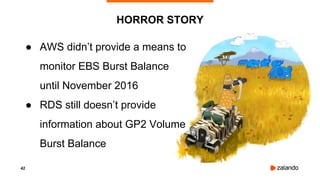
● AWS didn’t provide a means to
monitor EBS Burst Balance
until November 2016
● RDS still doesn’t provide
information about GP2 Volume
Burst Balance
43
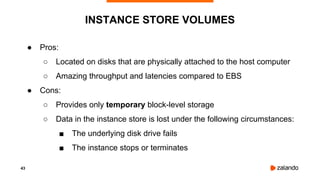
● Pros:
○ Located on disks that are physically attached to the host computer
○ Amazing throughput and latencies compared to EBS
● Cons:
○ Provides only temporary block-level storage
○ Data in the instance store is lost under the following circumstances:
■ The underlying disk drive fails
■ The instance stops or terminates
INSTANCE STORE VOLUMES
44
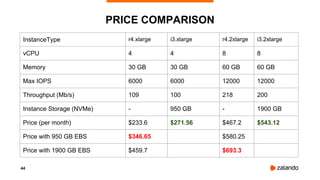
PRICE COMPARISON
InstanceType r4.xlarge i3.xlarge r4.2xlarge i3.2xlarge
vCPU 4 4 8 8
Memory 30 GB 30 GB 60 GB 60 GB
Max IOPS 6000 6000 12000 12000
Throughput (Mb/s) 109 100 218 200
Instance Storage (NVMe) - 950 GB - 1900 GB
Price (per month) $233.6 $271.56 $467.2 $543.12
Price with 950 GB EBS $346.65 $580.25
Price with 1900 GB EBS $459.7 $693.3
45
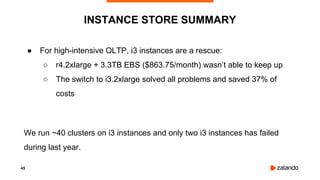
● For high-intensive OLTP, i3 instances are a rescue:
○ r4.2xlarge + 3.3TB EBS ($863.75/month) wasn’t able to keep up
○ The switch to i3.2xlarge solved all problems and saved 37% of
costs
We run ~40 clusters on i3 instances and only two i3 instances has failed
during last year.
INSTANCE STORE SUMMARY
46
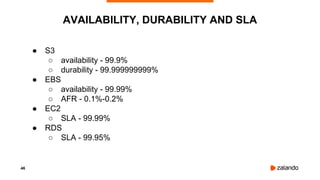
● S3
○ availability - 99.9%
○ durability - 99.999999999%
● EBS
○ availability - 99.99%
○ AFR - 0.1%-0.2%
● EC2
○ SLA - 99.99%
● RDS
○ SLA - 99.95%
AVAILABILITY, DURABILITY AND SLA
47
● We observed 4 failures of EBS during past year
● EC2 instances fail a few times more often than EBS
○ Sometimes they just fail
○ But usually AWS notifies you about degradation
● Please do continuous archiving to S3!
○ wal-e, wal-g, pgBackRest
ANYTHING CAN FAIL
48
● Start with small Instances and Volumes, it’s easy to
scale up later
● Some of the resources (CPUCreditUsage,
CPUCreditBalance, BurstBalance,
EBSIOBalance%, EBSByteBalance%) it’s possible
to monitor only with CloudWatch
● Always do backups and test them
SUMMARY
49
● Easy Amazon EC2 Instance Comparison - EC2instances.info
● Easy Amazon RDS Instance Comparison - RDSInstances.info
● Simple monthly calculator - calculator.s3.amazonaws.com/index.html
● Patroni - github.com/zalando/patroni
● Spilo - github.com/zalando/spilo
USEFUL LINKS
50
QUESTIONS?

PostgreSQL on AWS: Tips & Tricks (and horror stories)

  • 1.
    POSTGRESQL ON AWS: TIPS &TRICKS (AND HORROR STORIES) ALEXANDER KUKUSHKIN PostgresConf US 2018 2018-04-20
  • 2.
    2 ABOUT ME Alexander Kukushkin DatabaseEngineer @ZalandoTech Email: alexander.kukushkin@zalando.de Twitter: @cyberdemn
  • 3.
    3 FACTS & FIGURES >300 databases on premise > 150 on AWS EC2 > 200 on K8S
  • 4.
    4 WHY WE USEAWS ● Fast hardware (service) provisioning ● Easy scale up/down/in/out ● Pay only for resources you need
  • 5.
    5 GLOSSARY ● RDS -Relational Database Service ● EC2 - Elastic Compute Cloud ● EBS - Elastic Block Store ● S3 - Simple Storage Service ● AZ - Availability Zone ● ASG - Auto Scaling Group
  • 6.
    6 POSTGRESQL HA ONAWS ● Shared storage - EBS, attach it to a different EC2 Instance ○ Works within one AZ ● Storage mirroring - Multi-AZ RDS (EBS is replicated to another AZ) ○ Works between AZ ○ Replicas can’t execute queries ● Streaming replication - you can start additional RDS replicas ○ Replicas can execute queries ○ Automatic Failover problem (if not Multi-AZ deployment) ● Amazon Aurora ○ Keeps 6 copies of data in 3 AZ ○ Low latency read replicas ○ Failover typically takes less than 30 seconds.
  • 7.
    7 EC2 VS. RDSVS. AURORA: MONTHLY PRICING* Instance Type EC2 RDS Aurora (db.)t2.micro $9.78 $18.25 n/a (db.)m4.large $87.60 $158.41 n/a (db.)m5.large $83.95 n/a n/a (db.)r4.large $116.80 $222.65 $255.50 (db.)r4.xlarge $233.60 $445.30 $511.00 * storage price is not included
  • 8.
    8 EC2 VS. RDSVS. AURORA: MONTHLY PRICING* Instance Type 2 x EC2 3 x EC2 RDS Multi-AZ 2 x Aurora (db.)t2.micro $19.56 $29.34 $36.50 n/a (db.)m4.large $175.20 $262.80 $316.82 n/a (db.)m5.large $167.90 $251.85 n/a n/a (db.)r4.large $233.60 $350.40 $445.30 $511.00 (db.)r4.xlarge $467.20 $700.80 $890.60 $1022.00 * storage price and price for Aurora I/O Rate are not included
  • 9.
    9 ● No superuseraccess ● No replication connection ● No custom extensions ● Multi-AZ RDS doubles the price, but replica can’t execute queries ● Aurora works only on R4 instances and price for “I/O Rate” can become really high RDS SUMMARY
  • 10.
    10 ● Patroni -High-Availability and automatic failover ● Spilo - Docker package of Patroni and WAL-E for AWS or Kubernetes ● Use CloudFormation stacks and ASG for deployments ● One Docker container per EC2 Instance SPILO AND PATRONI
  • 11.
  • 12.
    12 ● Instance Types:t2, m5, m4, c5, x1, r4, p2, g3, f1, i3, d2 ● Instance Sizes: nano, micro, small, medium, large, xlarge, 2xlarge, 4xlarge, 10xlarge, 16xlarge, 32xlarge ● Performance: Fixed vs. Burstable (T2 Instances) ● Storage: Instance Store (Ephemeral) vs. EBS ● EBS-optimized Instances ● Enhanced Networking EC2 INSTANCE FEATURES
  • 13.
    13 BURSTABLE PERFORMANCE OR WHYIS MY DATABASE VERY SLOW?
  • 14.
  • 15.
  • 16.
    16 ● Designed toprovide moderate baseline performance and the capability to burst to significantly higher performance as required by your workload. ● If your account is less than 12 months old, you can use a t2.micro instance for free within certain usage limits. T2 INSTANCES Instance Type Initial CPU credit Credits earned per hour vCPUs Base performance (CPU utilization) Max CPU credit balance t2.micro 30 6 1 10% 144 t2.small 30 12 1 20% 288 t2.medium 60 24 2 40% 578 t2.large 60 36 2 60% 864
  • 17.
    17 ● One CPUcredit is equal to one vCPU running at 100% utilization for one minute. ● When a T2 instance uses fewer CPU resources than its base performance level allows (such as when it is idle), the unused CPU credits (or the difference between what was earned and what was spent) are stored in the credit balance for up to 24 hours, building CPU credits for bursting. ● When a T2 instance requires more CPU resources than its base performance level allows, it uses credits from the CPU credit balance to burst up to 100% utilization. CPU CREDITS
  • 18.
    18 ● WAL-E wal-fetch/wal-prefetchis terribly slow ○ Prefetch spawns 8 worker processes (by default) and can burn all CPU Credits How we solved it: 1. use “-p 0” to disable prefetch 2. reimplemented ‘wal-fetch’ in bash + curl + openssl HORROR STORY
  • 19.
    19 ● CPUCreditUsage metricindicates the number of CPU credits used during the measurement period ● CPUCreditBalance metric indicates the number of unused CPU credits a T2 instance has earned MONITOR CPU CREDITS t2.small
  • 20.
    20 ● 1 yearor 3 year contracts ● Significant discount compared to On-Demand instance pricing ● Capacity reservation ● Customers using both Reserved and On-Demand instances will have Reserved Instance rates applied first to minimize costs ● Discounts up to 70% RESERVED INSTANCES
  • 21.
    21 ● Bidding on“AWS overcapacity” ● Variable price point, save up to 90% vs. on-demand *Risks* Unavailability or loss of instance if outbid!!! SPOT INSTANCES
  • 22.
  • 23.
    23 ● Async processing ●Reporting ● CI ● Staging systems ● Testing of backups USE CASES Everything that can fail or be unavailable for short duration
  • 24.
    24 ● There wereonly 2 AZ in eu-central-1 until June 2017 ● ASG is trying to do its best to distribute resources across different AZ, but when Spot Price is high, it might happen that two EC2 Instances will run in the same AZ ● When price will go down, ASG will rebalance resources, i.e. spawn a new instance in another AZ and terminate one of the running instances ● With 50% probability it will kill the “master” How we solved it: AutoScalingGroup -> “TerminationPolicies”: [“NewestInstance”, “Default”] HORROR STORY
  • 25.
    25 ELASTIC BLOCK STORE Nameio1 gp2 st1 sc1 Size 4GB - 16TB 1GB - 16TB 500GB - 16TB 500GB - 16TB Max IOPS/Volume 20000 10000 500 250 Max Throughput/Volume 320MB/s 160MB/s 500MB/s 250MB/s
  • 26.
    26 ● ST1 andSC1 - HDD, good throughput, but low IOPS ● GP2 and IO1 - SSD, usually good choice for databases ● EBS volumes are created in a specific AZ, and can then be attached to any instances in that AZ ● IOPS and throughput depends on Volume Size ELASTIC BLOCK STORE
  • 27.
    27 STORAGE PRICING io1 gp2 EC2$0.149/GB-month $0.078/provisioned IOPS $0.119/GB-month RDS* $0.149/GB-month $0.119/provisioned IOPS $0.137/GB-month Aurora $0.119/GB-month + $0.22 / 1 million requests * MultiAZ doubles the price
  • 28.
    28 ● IO1 givesbetter IOPS guarantees ● But you have to pay for it – the same size costs 25% more (or 9% more for RDS). Plus you have to pay for provisioned IOPS ● For RDS minimum size of IO1 volume is 100 GB + 1000 provisioned IOPS. It will cost you $14.90 + $119 per month ● You can get 1000 IOPS with 334 GB GP2 volume for $45.76/month IO1 VS. GP2
  • 29.
    29 SEQUEL: BURSTABLE PERFORMANCE OR WHYIS MY DATABASE SLOW AGAIN?
  • 30.
    30 BURSTABLE PERFORMANCE ~3000 IOPS ~1200IOPS ~ 45 min 400 GB GP2 Volume
  • 31.
    31 BURSTABLE PERFORMANCE ~3000 IOPS ~1200IOPS ~ 45 min 400 GB Volume
  • 32.
    32 I/O CREDITS ANDBURST PERFORMANCE ● The performance of gp2 volumes is tied to volume size (3 IOPS/GiB) ● The maximum and initial I/O credit balance for a volume is 5.4 million ● When your volume requires more than the baseline performance I/O level, it draws on I/O credits in the credit balance to burst to the required performance level, up to a maximum of 3,000 IOPS ● When your volume uses fewer I/O credits than it earns in a second, unused I/O credits are added to the I/O credit balance
  • 33.
  • 34.
    34 ● Especially BurstBalanceif GP2 volume is smaller than 1TB MONITOR I/O WITH CLOUDWATCH 500 GB GP2 Volume 2500 1250
  • 35.
    35 ● Dedicated bandwidthto Amazon EBS, with options between 500 Mbps and 12,000 Mbps, depending on the instance type you use ● Provides the best performance for your EBS volumes by minimizing contention between Amazon EBS I/O and other traffic from your instance EBS-OPTIMIZED INSTANCES
  • 36.
    36 EBS THROUGHPUT InstanceType vCPUMemory Max IOPS Throughput (Mb/s) Price (per month) m4.large 2 8 GB 3600 56.25 $87.6 r4.large 2 15 GB 3000 54 $116.8 m5.large* 2 8 GB Up to 16000 Up to 265 $83.95 m4.xlarge 4 16 GB 6000 93.75 $175.2 r4.xlarge 4 30 GB 6000 106.25 $233.6 m5.xlarge* 4 16 GB Up to 16000 Up to 265 $167.9
  • 37.
    37 ● Next generation ●Slightly cheaper than M4 ● Better networking and storage performance ● EBS burst capability on smaller instance sizes (large, xlarge, 2xlarge) ○ can support maximum performance for 30 minutes at least once every 24 hours M5 INSTANCES
  • 38.
    38 M4 VS. M5INSTANCES IOPS Throughput (Mb/s) InstanceType Baseline Max Baseline Max m4.large 3600 3600 56.25 56.25 m5.large 3600 16000 60 265 m4.xlarge 6000 6000 93.75 93.75 m5.xlarge 6000 16000 100 265 m4.xlarge 8000 8000 125 125 m5.xlarge 8333 16000 146 265
  • 39.
    39 ● If yourun m5.large, m5.xlarge or m5.2xlarge, you should monitor ○ EBSIOBalance% - percentage of I/O credits remaining in the burst bucket. ○ EBSByteBalance% - percentage of throughput credits remaining in the burst bucket ● Instances with a consistently low balance percentage are candidates for upsizing ● Instances where the balance percentage never drops below 100% are candidates for downsizing MORE CLOUDWATCH METRICS
  • 40.
    40 ● t2.micro, t2.smalland t2.medium are showing up to ~60 MB/s on EBS ● t2.large, t2.xlarge and t2.2xlarge are showing up to ~120 MB/s on EBS ● I don’t have any numbers about Max. IOPS for T2 instances ● There is no guaranteed throughput for T2 instances! EBS PERFORMANCE OF T2 INSTANCES
  • 41.
    41 ● GP2 isMUCH cheaper than IO1 ● Choose an EC2 Instance with enough bandwidth ● Build a RAID-0 from multiple GP2 volumes to get more than 10000 IOPS or 160MB/s EBS TIPS
  • 42.
    42 HORROR STORY ● AWSdidn’t provide a means to monitor EBS Burst Balance until November 2016 ● RDS still doesn’t provide information about GP2 Volume Burst Balance
  • 43.
    43 ● Pros: ○ Locatedon disks that are physically attached to the host computer ○ Amazing throughput and latencies compared to EBS ● Cons: ○ Provides only temporary block-level storage ○ Data in the instance store is lost under the following circumstances: ■ The underlying disk drive fails ■ The instance stops or terminates INSTANCE STORE VOLUMES
  • 44.
    44 PRICE COMPARISON InstanceType r4.xlargei3.xlarge r4.2xlarge i3.2xlarge vCPU 4 4 8 8 Memory 30 GB 30 GB 60 GB 60 GB Max IOPS 6000 6000 12000 12000 Throughput (Mb/s) 109 100 218 200 Instance Storage (NVMe) - 950 GB - 1900 GB Price (per month) $233.6 $271.56 $467.2 $543.12 Price with 950 GB EBS $346.65 $580.25 Price with 1900 GB EBS $459.7 $693.3
  • 45.
    45 ● For high-intensiveOLTP, i3 instances are a rescue: ○ r4.2xlarge + 3.3TB EBS ($863.75/month) wasn’t able to keep up ○ The switch to i3.2xlarge solved all problems and saved 37% of costs We run ~40 clusters on i3 instances and only two i3 instances has failed during last year. INSTANCE STORE SUMMARY
  • 46.
    46 ● S3 ○ availability- 99.9% ○ durability - 99.999999999% ● EBS ○ availability - 99.99% ○ AFR - 0.1%-0.2% ● EC2 ○ SLA - 99.99% ● RDS ○ SLA - 99.95% AVAILABILITY, DURABILITY AND SLA
  • 47.
    47 ● We observed4 failures of EBS during past year ● EC2 instances fail a few times more often than EBS ○ Sometimes they just fail ○ But usually AWS notifies you about degradation ● Please do continuous archiving to S3! ○ wal-e, wal-g, pgBackRest ANYTHING CAN FAIL
  • 48.
    48 ● Start withsmall Instances and Volumes, it’s easy to scale up later ● Some of the resources (CPUCreditUsage, CPUCreditBalance, BurstBalance, EBSIOBalance%, EBSByteBalance%) it’s possible to monitor only with CloudWatch ● Always do backups and test them SUMMARY
  • 49.
    49 ● Easy AmazonEC2 Instance Comparison - EC2instances.info ● Easy Amazon RDS Instance Comparison - RDSInstances.info ● Simple monthly calculator - calculator.s3.amazonaws.com/index.html ● Patroni - github.com/zalando/patroni ● Spilo - github.com/zalando/spilo USEFUL LINKS
  • 50.