7 ways
to make your Scala
RedHot high velocity
x1(Yuri Inoue)
For ScalaMatsuri 2016
あなたのScalaを爆速にする7つの方法
Yuri Inoue
Cyberagent,Inc.
AdTech Studio, AMoAd.
twitter: @iyunoriue
GitHub: x1-
HP: Batsuichi and Inken’s engineer blog
http://x1.inkenkun.com/
profile
井上ゆりと申します。
• Parallel execution is not taken into account.
• This session is for beginners of Scala.
• The environment of benchmark is shown at next page.
• @Keen advised some performances. Special thanks!
acknowledgement
謝辞。並列実行に関しては考慮していません。
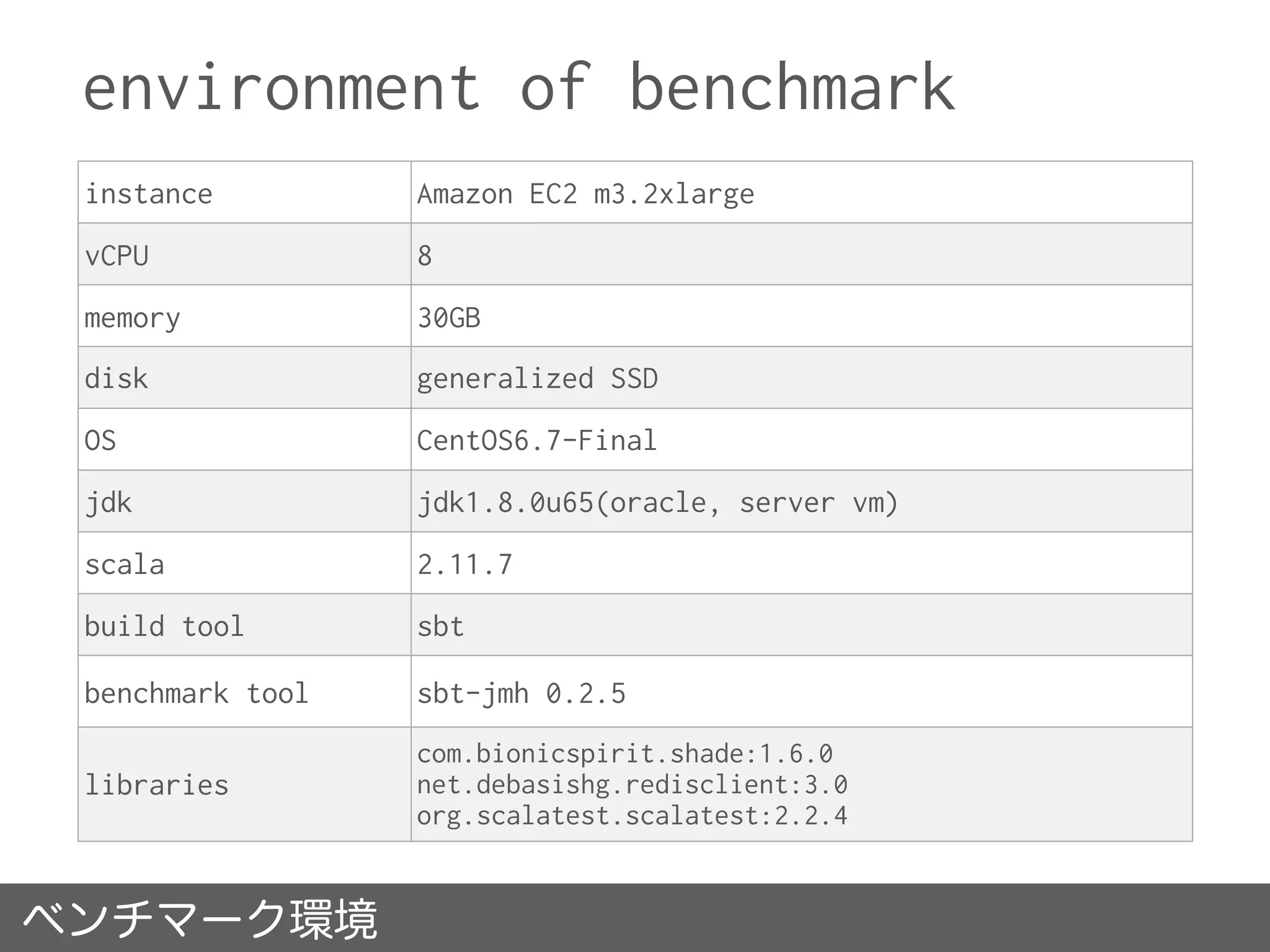
environment of benchmark
instance Amazon EC2 m3.2xlarge
vCPU 8
memory 30GB
disk generalized SSD
OS CentOS6.7-Final
jdk jdk1.8.0u65(oracle, server vm)
scala 2.11.7
build tool sbt
benchmark tool sbt-jmh 0.2.5
libraries
com.bionicspirit.shade:1.6.0
net.debasishg.redisclient:3.0
org.scalatest.scalatest:2.2.4
ベンチマーク環境
No.1 Random Read
- File vs KVS -
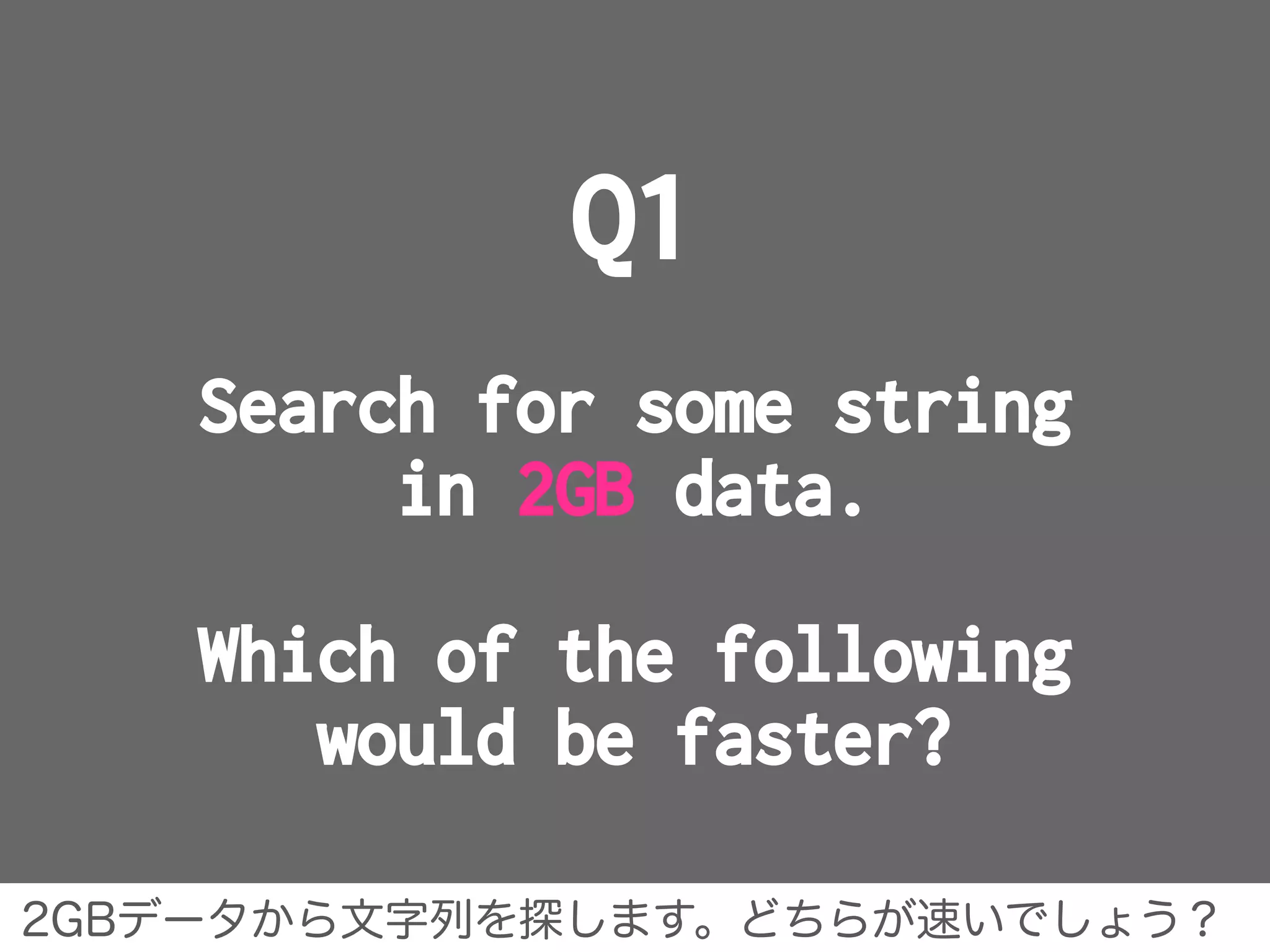
Q1
Search for some string
in 2GB data.
Which of the following
would be faster?
2GBデータから文字列を探します。どちらが速いでしょう?
from 2GB file
on SSD.
A
from total 2GB
strings
on memcache.
(divided into chunk)
B
prerequisite prerequisite
* SSD is generalized
SSD on EC2.
* not using RamDisk.
* memcache version
is 1.4.0.
* memcache stand up
on local
A:SSD上の2GBファイル B:memcache上の2GBデータ
Answer
A. from 2GB file on SSD.
答え A.SSD上に置いた2GBのファイルから探す です。
benchmark
The figure shows the average for the times it took
to search for the string ”SUIKA” from the following
2GB data.
• Searching from a file completed in less than 8sec.
• Searching from memcache completed in near by 19sec.
• Searching from Redis(also KVS) completed in 14sec.
'''<code>&amp;h</code>''' を用い、<code>&amp;h0F</code> (十進で15)のように表現する。
nn[[Standard Generalized Markup Language|SGML]]、[[Extensible Markup Language|XML]]、
[[HyperText Markup Language|HTML]]では、アンパサンドをSUIKA使って[[SGML実体]]を参照する。
SUIKAという文字列を探したときの平均タイムです。
Why is file faster than memcache?
• This is Memory Mapped File(MMF) power.
• Memory Mapped File is used to map a file on disk to a
region of address space on memory.
• It avoids unnecessary file I/O operations and file
buffering.
• MappedByteBuffer included java.nio, that directly
access Memory Mapped File.
physical
file
mapping address on memory
fileが高速なのはMemoryMappedFileを使ったからです。
• memcache(<1.4.2) has limitation below,
The maximum size of a value you can store in memcached is 1MB.
• Although memcache is on the same host, accessing it
many times to retrieve data takes long time.
• Redis can save 1GB per 1 key. Using 2GB data divided
into 4 key(each 500MB), got below benchmark.
• It completed in about 8sec, but cannot win file.
Why is memcache slower than file?
memcache(<1.4.2)は1key<=1MBのサイズ制限があります。
• Memory Mapped File can only map up to 2GB file on JVM.
http://stackoverflow.com/questions/8076472/why-does-
filechannel-map-take-up-to-integer-max-value-of-data
• Apache Spark MLlib development supervisor, Reynold Xin
wrote the following Gist.
He measured the performance over various approaches to
read ByteBuffer in Scala.
https://gist.github.com/rxin/5087680
more information
jvmではMemoryMappedFileは2GBまでしか扱えません。
RedHot high velocity No.1
Using Memory Mapped File,
you can operate on files
at high speed.
爆速その1. MMFで高速ファイル操作が可能に!
No.2 for comprehension
vs
flatMap & map
Q2
for comprehension behaves
same as flatMap & map.
Which one is faster than?
for内包表記とflatMap&map、どちらが速いでしょう?
A B
code
same. flatMap & map
for {

a <- data

b <- a

} yield {

b

}
for comprehension
data.flatMap( a =>
a.map( b => b )
)
flatMap & map
Answer
A. same.
答え A.同じ です。
benchmark
All of Throughput、Average、Sample don’t show
significant difference between for comprehension and
flatMap & map.
10,000times
for内包表記とflatMap&mapで優位差が見られません。
• for comprehension and flatMap & map are logically same.
• Here is a comparison after decompiling them. They are
same!
Why are they the same speed?
for内包表記とflatMap&mapは論理的に同じです。
public Option<String> forComprehension()

{

data().flatMap(new AbstractFunction1()

{

public static final long serialVersionUID = 0L;


public final Option<String> apply(Some<String> a)

{

a.map(new AbstractFunction1()

{

public static final long serialVersionUID = 0L;


public final String apply(String b)

{

return b;

}

});

}

});

}
public Option<String> flatMapAndMap()

{

data().flatMap(new AbstractFunction1()

{

public static final long serialVersionUID = 0L;


public final Option<String> apply(Some<String> a)

{

a.map(new AbstractFunction1()

{

public static final long serialVersionUID = 0L;


public final String apply(String b)

{

return b;

}

});

}

});

}
for comprehension flatMap & map
RedHot high velocity No.2
for comprehension and flatMap & map
are same, level of byte code.
爆速その2. for内包表記とflatMap&mapは同じです。
No.3 append & insert
- collection -
Collections Performance Characteristics at Scala
cite: http://docs.scala-lang.org/overviews/collections/performance-characteristics.html
Scalaにおけるコレクションの性能特性
Q3-1
Mutable variable
“var xs: Vector”
and
Immutable variable
“val xs: ArrayBuffer”
Which one is faster, when appending
to the tail of a collection?
可変なVectorと不変なArrayBuffer、末尾追加が速いのは?
var Vector
A
val ArrayBuffer
B
code
var xs = Vector.empty[Int]
xs = xs :+ a
var xs: Vector val xs: ArrayBuffer
val xs = ArrayBuffer.empty[Int]
xs += a
Answer
B. val ArrayBuffer
答え B.val ArrayBufferです。
benchmark
ArrayBuffer is faster than Vector.
ArrayBufferの方がVectorよりも速いです。
Throughput of appending n times
This benchmark shows throughputs of appending N elements.
For example, type:Vector and times:10k indicates appending 10,000
elements in an empty Vector.
benchmark
The benchmarks of the other immutable objects
are below.
VectorはListやStreamよりは速いのですが。
Throughput of appending n times
Vector is faster than List and Stream as same as
immutable.
Why is ArrayBuffer faster than Vector?
When appending new element ...
Vectorは新インスタンスを新たにつくるので遅くなります。
add new element,
after coping elements to
new instance.
update tail position, after
resizing instance.
var Vector val ArrayBuffer
val b = bf(repr)

b ++= thisCollection

b += elem

b.result()
ensureSize(size0 + 1)

array(size0) =
elem.asInstanceOf[AnyRef]

size0 += 1

this
Thease processes are absolutely different.
Q3-2
Mutable variable
“var xs: List”
and
Immutable variable
“val xs: ListBuffer”
Which one is faster, when inserting
into the head of a collection?
可変なListと不変なListBuffer、先頭挿入が速いのは?
var List
A
val ListBuffer
B
code
var xs = List.empty[Int]
xs = a :: xs
var xs: List val xs: ListBuffer
val xs = ListBuffer.empty[Int]
a +=: xs
Answer
A. var List
答え A.var Listです。
benchmark
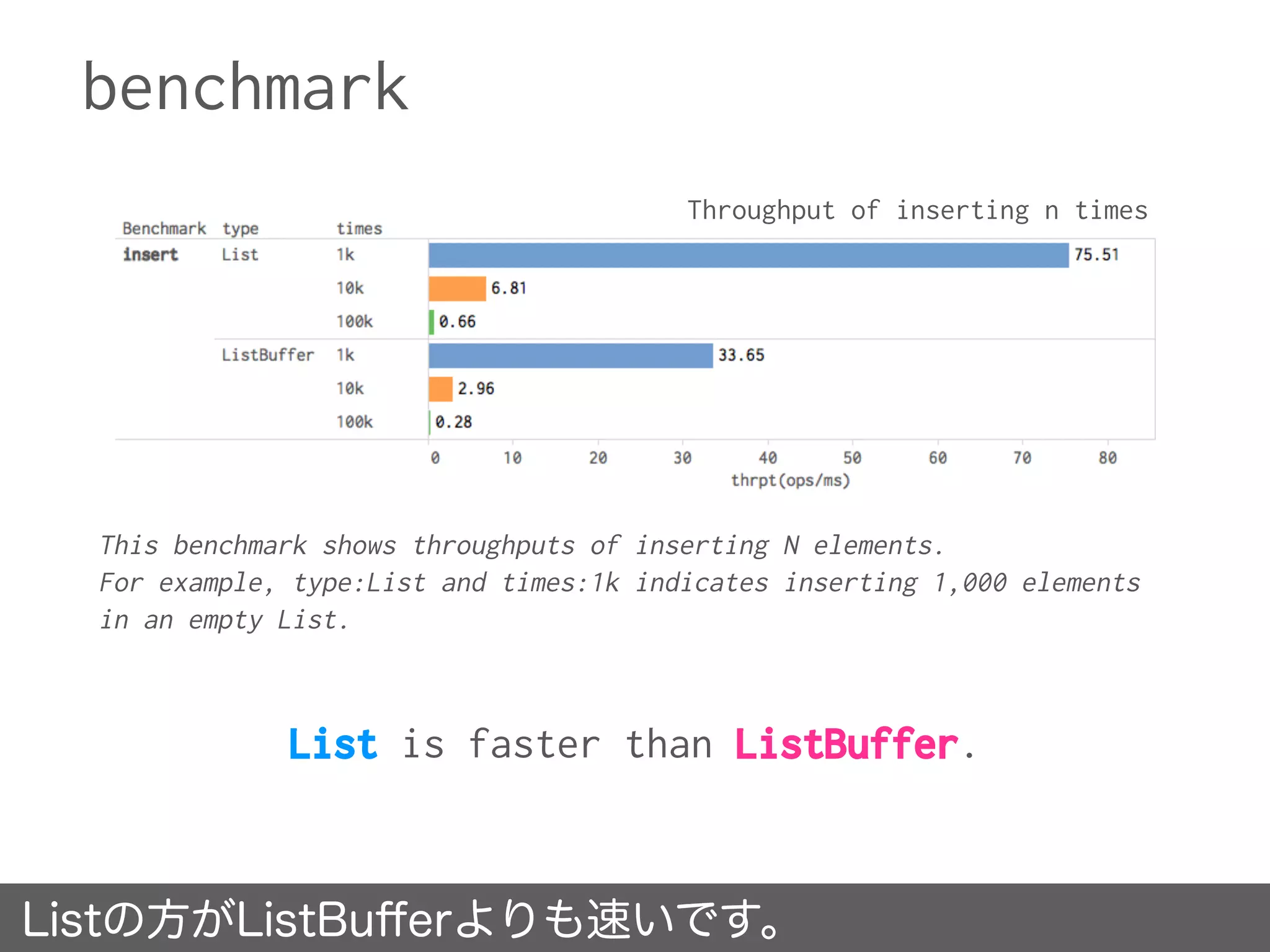
List is faster than ListBuffer.
Listの方がListBufferよりも速いです。
Throughput of inserting n times
This benchmark shows throughputs of inserting N elements.
For example, type:List and times:1k indicates inserting 1,000 elements
in an empty List.
benchmark
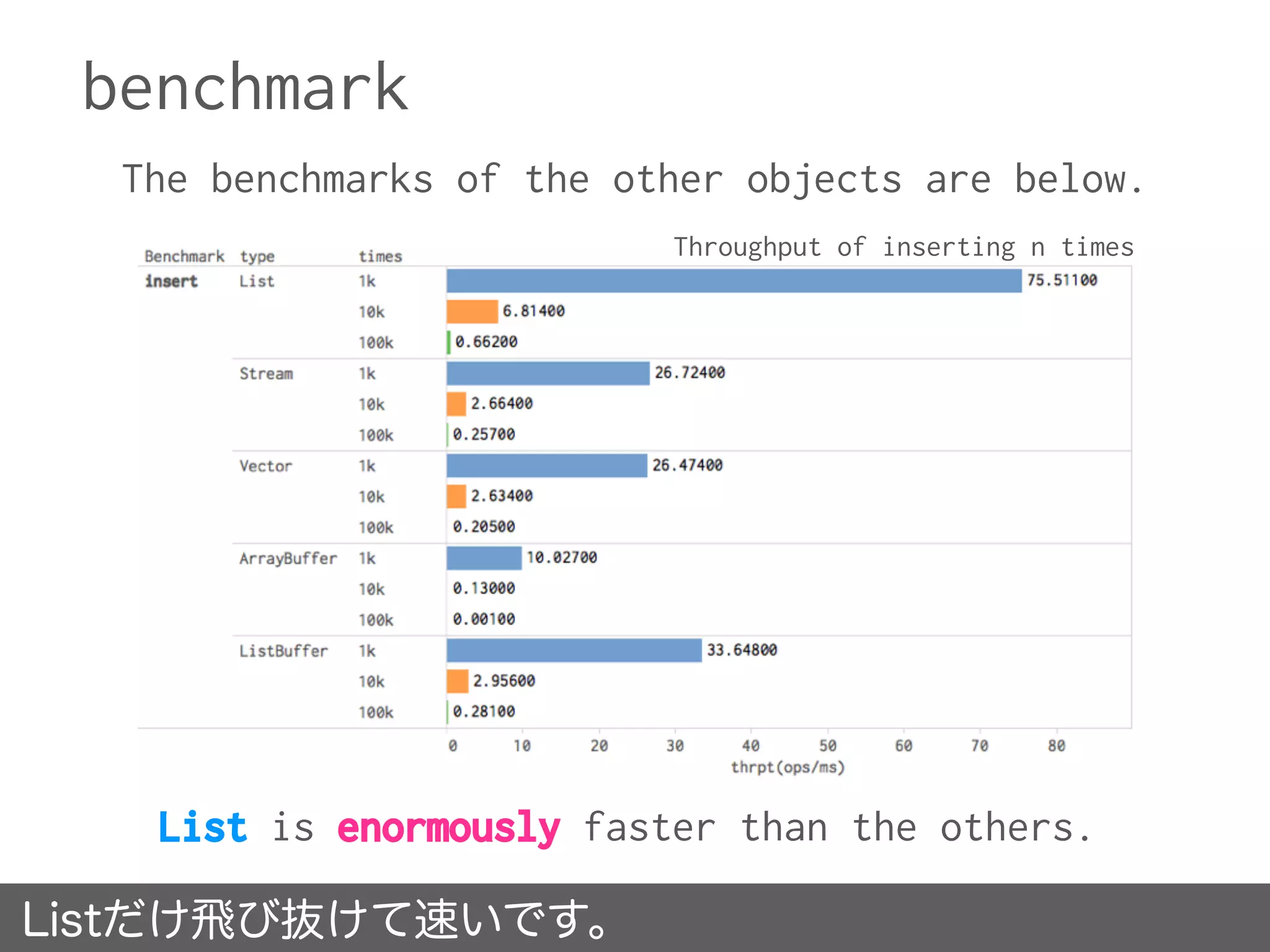
The benchmarks of the other objects are below.
Listだけ飛び抜けて速いです。
List is enormously faster than the others.
Throughput of inserting n times
Why is List faster than the others?
When inserting new element into the begining position...
Listではほとんど計算せずに先頭挿入が行えます。
Because of having head and
tail, List can create new
instance immediately.
ListBuffer is almost same
as List, but inner variable
is reassigned to.
var List val ListBuffer
new
scala.collection.immutable
.::(x, this)
if (exported) copy()

val newElem = new :: (x, start)

if (isEmpty) last0 = newElem

start = newElem

len += 1

this
List calculate a little, in case of inserting.
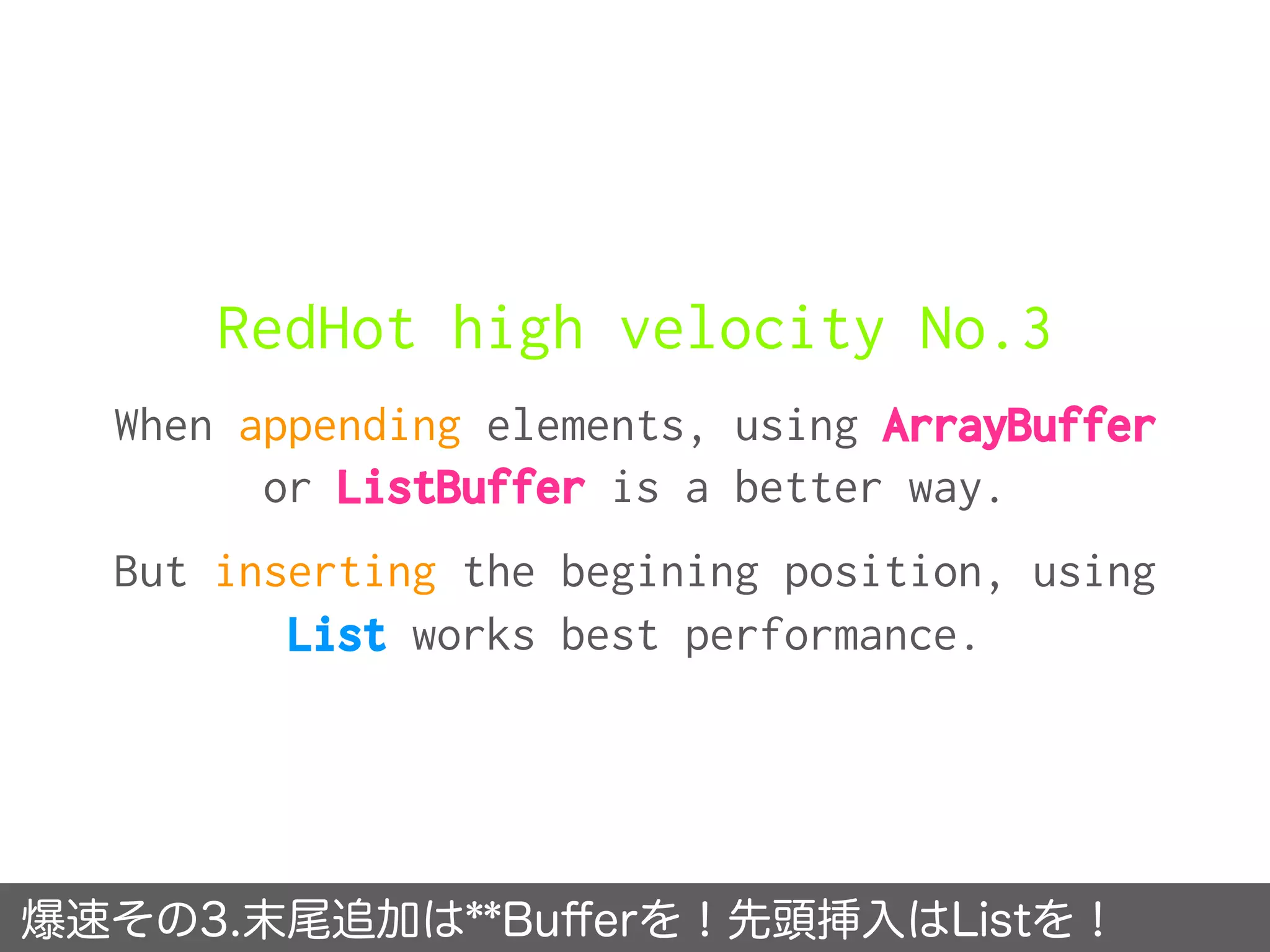
RedHot high velocity No.3
When appending elements, using ArrayBuffer
or ListBuffer is a better way.
But inserting the begining position, using
List works best performance.
爆速その3.末尾追加は**Bufferを!先頭挿入はListを!
No.4 remove
- collection -
Q4
Mutable variable
“var xs: List”
and
Immutable variable
“val xs: ListBuffer”
Which one is faster, when removing
an item from a collection?
可変なListと不変なListBuffer、削除が速いのは?
var List
A
val ListBuffer
B
code
var xs: List val xs: ListBuffer
var xs =
List( 1 to n: _* )
// head
xs = xs.tail
// tail
xs = xs.dropRight(0)
var xs =
ListBuffer( 1 to n: _* )
// head
xs.remove(0)
// tail
xs.remove(xs.size - 1)
Answer
B. val ListBuffer
答え B.val ListBuffer です。
benchmark
ListBuffer is much faster than List.
ListBufferの方がListよりも相当速いです。
Throughput of removing n times
This benchmark shows throughputs of removing N elements from N length array.
For example, Benchmark:removeTail, type:List and times:1k indicates removing
1,000 elements from the last of 1,000 length List.
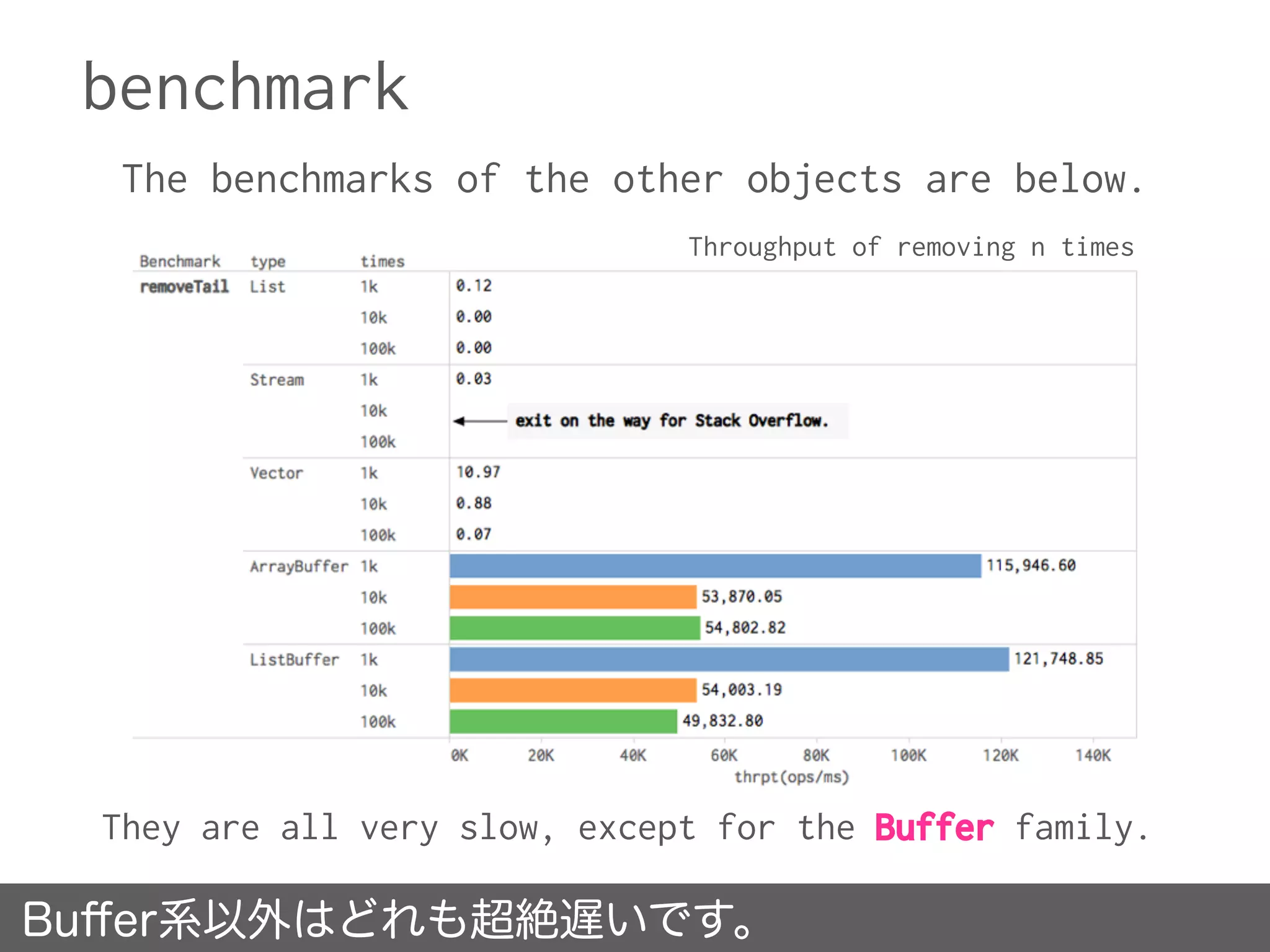
benchmark
The benchmarks of the other objects are below.
Buffer系以外はどれも超絶遅いです。
They are all very slow, except for the Buffer family.
Throughput of removing n times
Why is ListBuffer faster than List?
When remove element from collection...
ListのdropRightはO(n)の時間がかかります。
The operation - dropRight
of List takes time O(n).
The operation - remove of
ListBuffer takes constant
time.
var List val ListBuffer
def dropRight(n: Int): Repr = {

val b = newBuilder

var these = this

var lead = this drop n

while (!lead.isEmpty) {

b += these.head

these = these.tail

lead = lead.tail

}

b.result()

}
def remove(n: Int): A = {
:
var cursor = start

var i = 1

while (i < n) {

cursor = cursor.tail

i += 1

}

old = cursor.tail.head

if (last0 eq cursor.tail) last0 =
cursor.asInstanceOf[::[A]]

cursor.asInstanceOf[::[A]].tl
= cursor.tail.tail
benchmark of List’s dropRight
Because the benchmark has increased by 10 times the size,
we have to display the throughput logarithmic graph of.
dropRightのスループットは線形に下降しているだけです。
Throughput is just only lowered to linear.
It is the horror of linear increase.
log(Throughput) of List’s dropRight
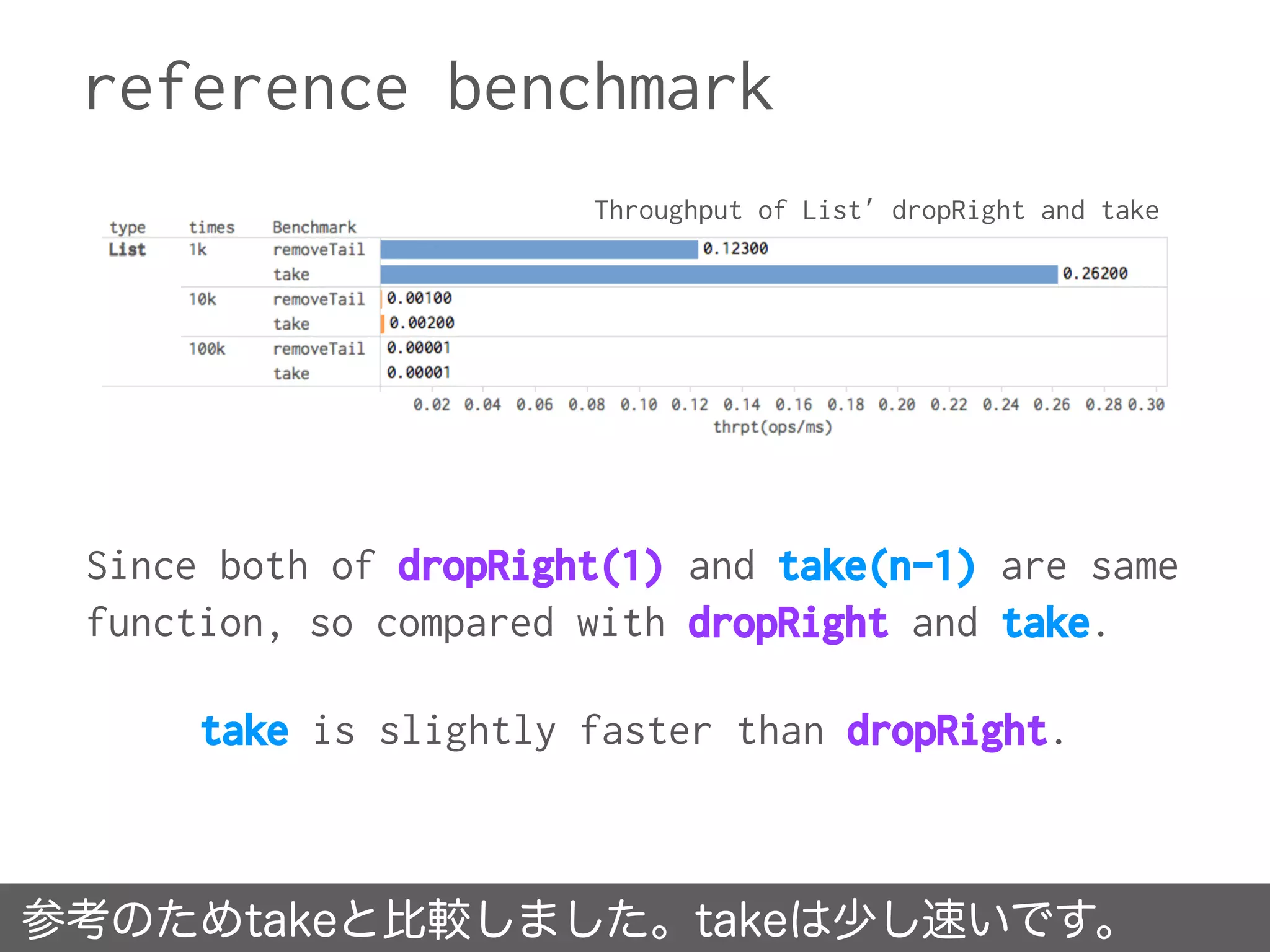
reference benchmark
参考のためtakeと比較しました。takeは少し速いです。
Since both of dropRight(1) and take(n-1) are same
function, so compared with dropRight and take.
take is slightly faster than dropRight.
Throughput of List’ dropRight and take
RedHot high velocity No.4
When dropping elements,
using ListBuffer or ArrayBuffer
is a better way.
爆速その4. 要素削除を行うならListBuffer or ArrayBuffer。
No.5 random read
- collection -
Q5
Vector vs ListBuffer
Which one is faster,
when reading randomly?
VectorとListBuffer, ランダム・リードが速いのは?
Vector
A
ListBuffer
B
code
val data =
Vector( 1 to n: _* )


( 1 to data.size ) map { _ =>
data( Random.nextInt( n ) )
}
val data =
ListBuffer( 1 to n: _* )


( 1 to data.size ) map { _ =>
data( Random.nextInt( n ) )
}
Answer
A. Vector
答え A.Vectorが速いです。
benchmark
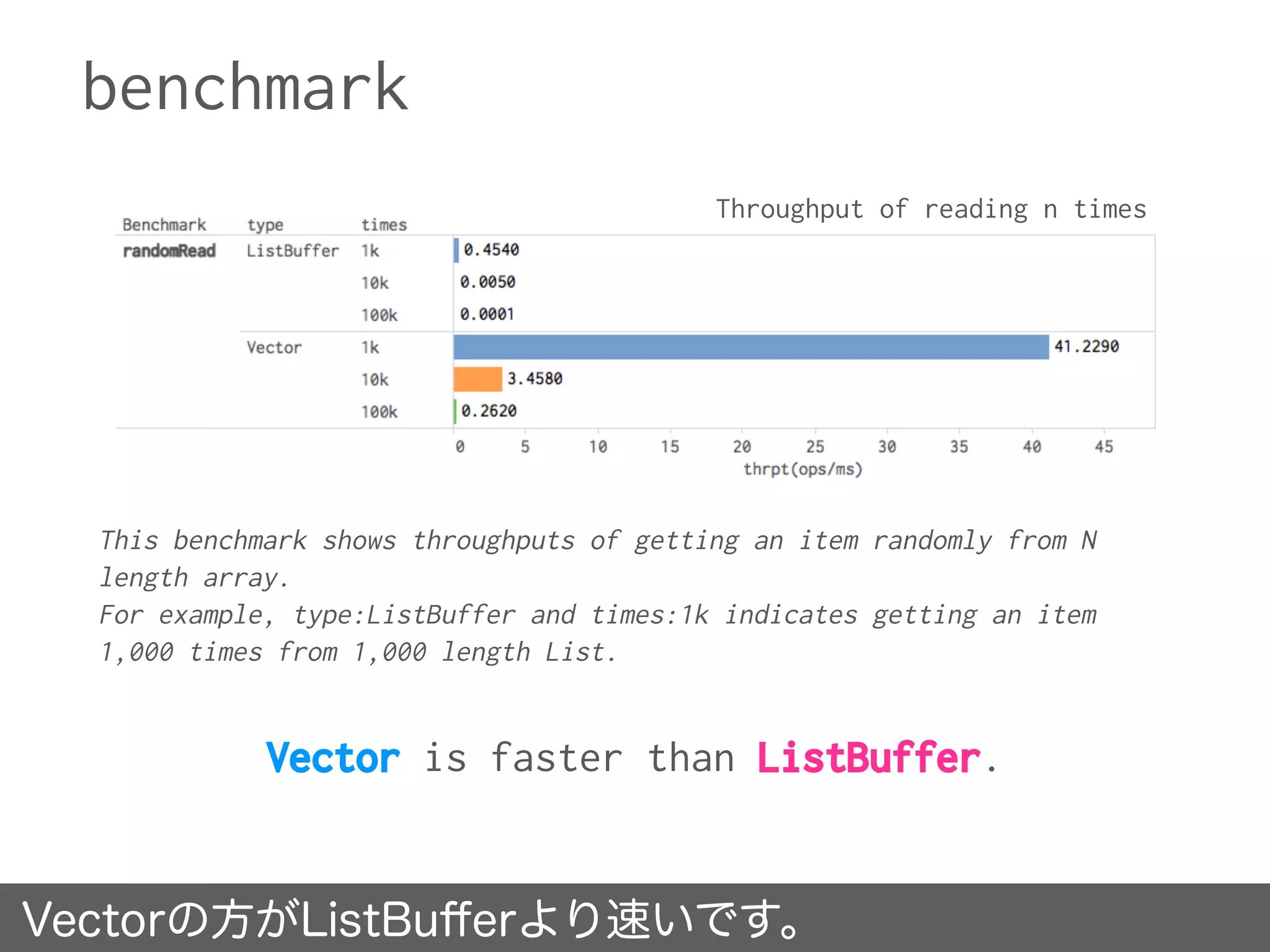
Vector is faster than ListBuffer.
Vectorの方がListBufferより速いです。
Throughput of reading n times
This benchmark shows throughputs of getting an item randomly from N
length array.
For example, type:ListBuffer and times:1k indicates getting an item
1,000 times from 1,000 length List.
benchmark
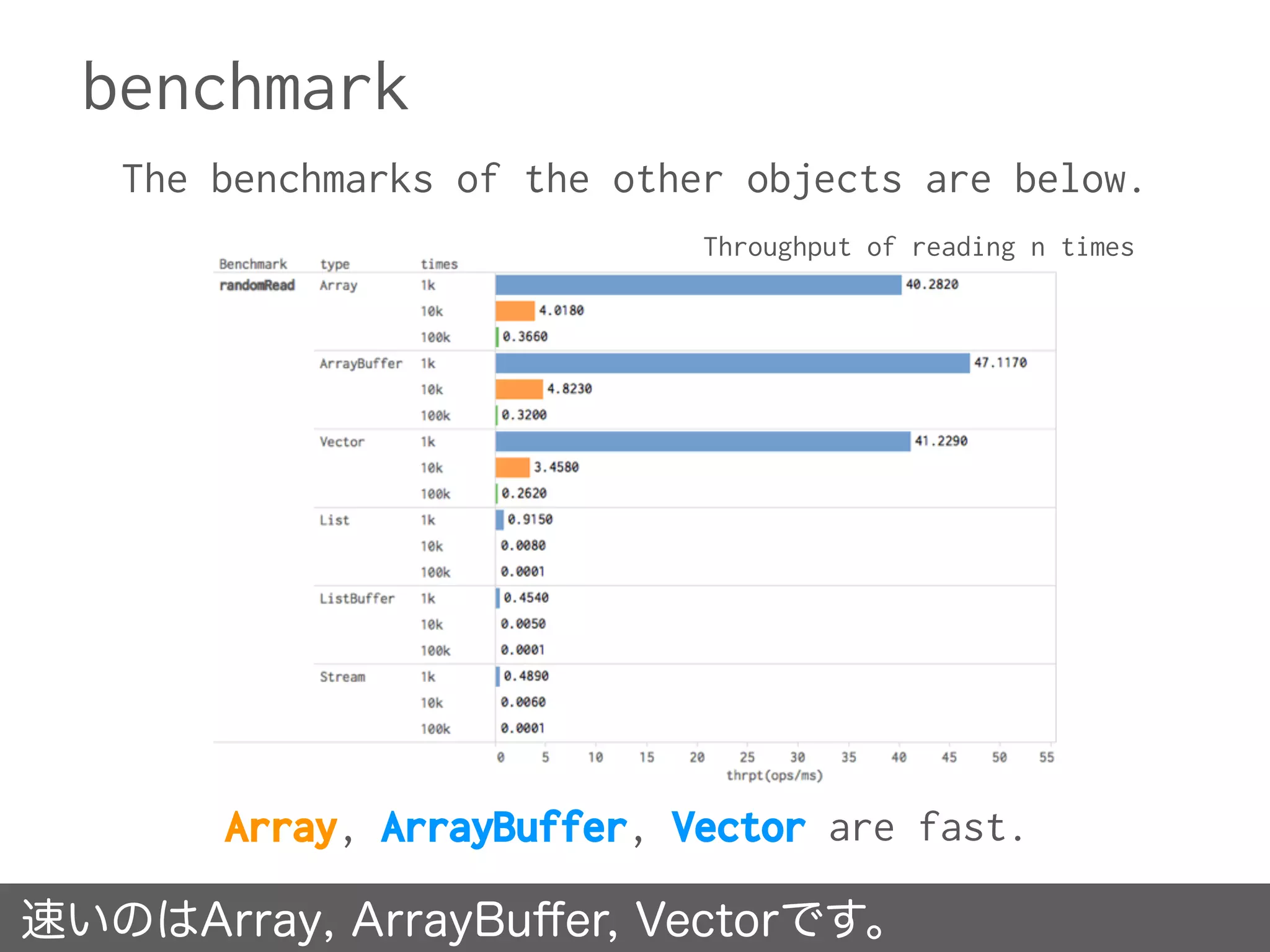
The benchmarks of the other objects are below.
速いのはArray, ArrayBuffer, Vectorです。
Array, ArrayBuffer, Vector are fast.
Throughput of reading n times
Why Array, ArrayBuffer, Vector are fast?
Vectorなどは内部的に定数時間のArrayを使っています。
• Array - random read takes constant time.
• ArrayBuffer and Vector have Array internal.
protected var array: Array[AnyRef]
= new Array[AnyRef](math.max(initialSize, 1))
:
def apply(idx: Int) = {

if (idx >= size0) throw new IndexOutOfBoundsException(idx.toString)

array(idx).asInstanceOf[A]

}
e.g ArrayBuffer
RedHot high velocity No.5
It is a cool way,
using Array family when
reading randomly.
爆速その5. Arrayの仲間はランダム・リードが速いです。
No.6 fibonacci sequence
Q6
Considering the above,
Stream vs Array
Which one is faster,
producing
a fibonacci sequence?
フィボナッチ数列の生成が速いのはStream?Array?
Stream
A
Array
B
code
def fibonacci(
h: Int = 1,
n: Int = 1 ): Stream[Int] =

h #:: fibonacci( n, h + n )
val fibo = fibonacci().take( n )
def fibonacci( n: Int = 1 ): Array[Int] =
if ( n == 0 ) {

Array.empty[Int]

} else {

val b = new Array[Int](n)

b(0) = 1

for ( i <- 0 until n - 1 ) {

val n1 = if ( i == 0 ) 0 else b( i - 1 )

val n2 = b( i )

b( i + 1 ) = n1 + n2

}

b

}
val fibo = fibonacci( n )
* calculate recursively * operation takes O(n)
Answer
A. Stream.
答え A.Stream です。
benchmark
Stream is overwhelmingly faster than Array.
Streamが圧倒的に速いです。
Throughput of creating n length fibonacci sequence
fibonacci sequence: ( 0, 1, 1, 2, 3, 5, 8, 13, 21, 34, 55, 89, .. )
Why is Stream so much faster?
Streamは遅延評価なので必要なときに計算します。
• Stream implements lazy lists where elements are only
evaluated when they are needed.
• Actually, these have not yet been calculated.
• This is the power of lazy evaluation.
• But, if the sequence is materialized, it takes
calculating time.
→ see next page.
Why is Stream so much faster?
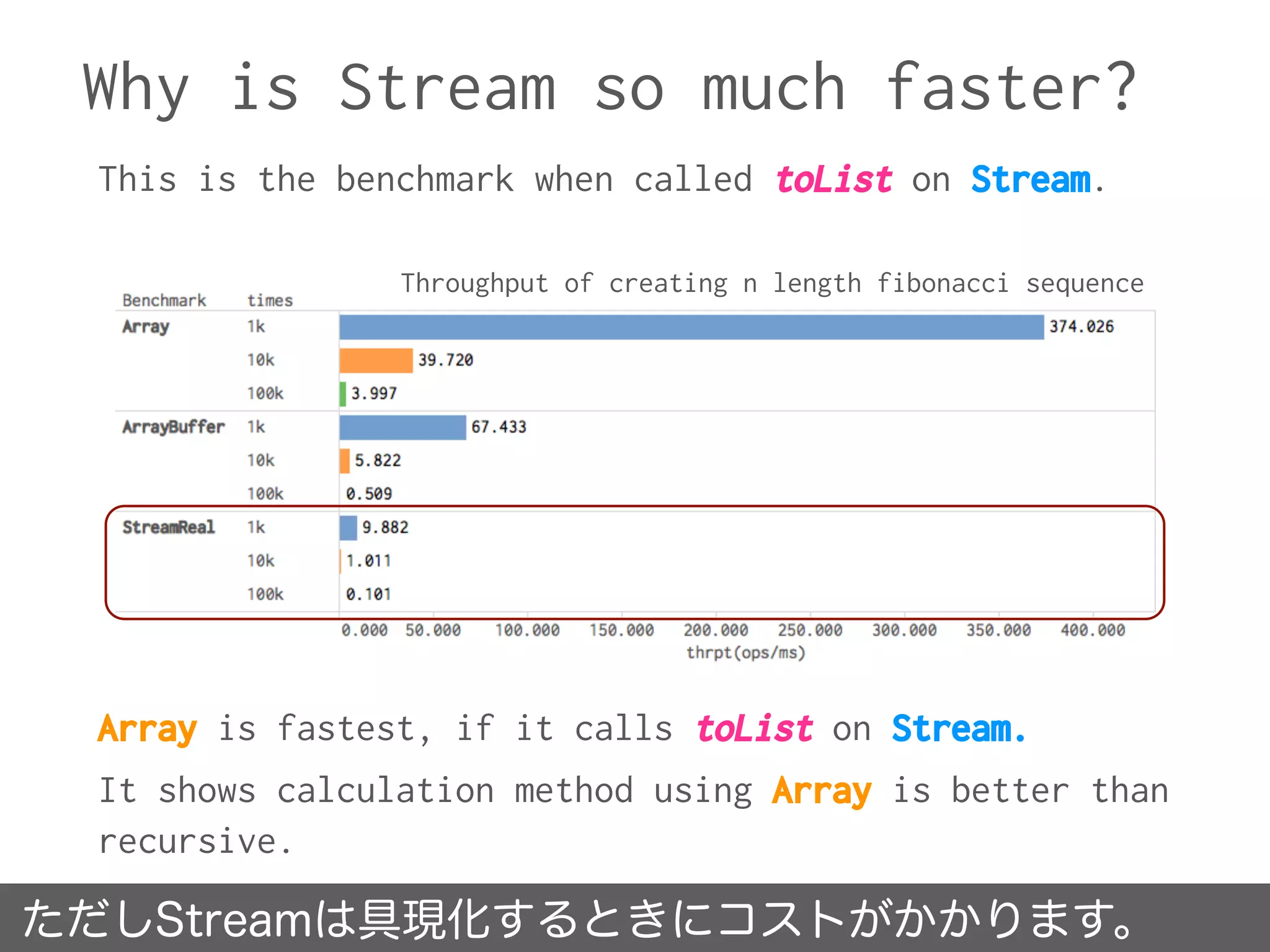
ただしStreamは具現化するときにコストがかかります。
This is the benchmark when called toList on Stream.
Array is fastest, if it calls toList on Stream.
It shows calculation method using Array is better than
recursive.
Throughput of creating n length fibonacci sequence
RedHot high velocity No.6
Lazy evaluation is very useful.
But, it takes cost at materialized.
爆速その6. 遅延評価は便利ですが具現化すると普通です。
No.7 regular expression
Showing the benchmark of w+w
Regular Expression consumes CPU resource a lot.
In particular, back tracking will occur using the
expression like “ww..w”, so takes time O(n^2).
正規表現はCPUリソースをたくさん消費します。
The following is the performance of Regular Expression.
Throughput of each regular expression execution(1,000 times)
Last. Q7
When looking for behind the specific
expression(w+/),
“findAllIn and look behind(?<=)”
and
“findPrefixOf and quantifier(+)”
which one is faster than?
from this string→ abcdef..0123../abc.. (1024byte)
ある文字列の後方を探したいです。どちらが速いでしょう?
same.
A
findPrefixOf
B
code
val re = """(?<=w+)/.+""" r
val ms = re findAllIn data

if ( ms.isEmpty ) None

else Some( ms.next )
val re = “""w+/""" r

re findPrefixMatchOf data map(
_.after.toString
)
findAllIn and look behind findPrefixOf and quantifier
Answer
B. findPrefixOf
& quantifier
答え B.findPrefixOfと量指定子(+)の方が速いです。
benchmark
findPrefixOfと量指定子の組み合わせの方が速いです。
findPrefixOf and quantifier is faster than findAllIn.
Throughput of 1,000 times execution
This benchmark shows throughputs of running n times findAllIn with
“(?<=w+)/.+” and findPrefixOf(findPrefixMatchOf and after) with “w/”.
Why are findPrefixOf and quantifier faster?
findAllInは部分マッチ、findPrefixOfは先頭マッチ。
• The above expression causes back tracking.
• Look behind assertion is not a problem.
• In addition, findPrefixOf is faster than findAllIn in this
case.
• findAllIn returns all non-overlapping matches of the
regular expression in the given character sequence.
• findPrefixOf returns a match of the regular expression at
the beginning of the given character sequence.
(?<=w+)/.+
matching same character sequence!
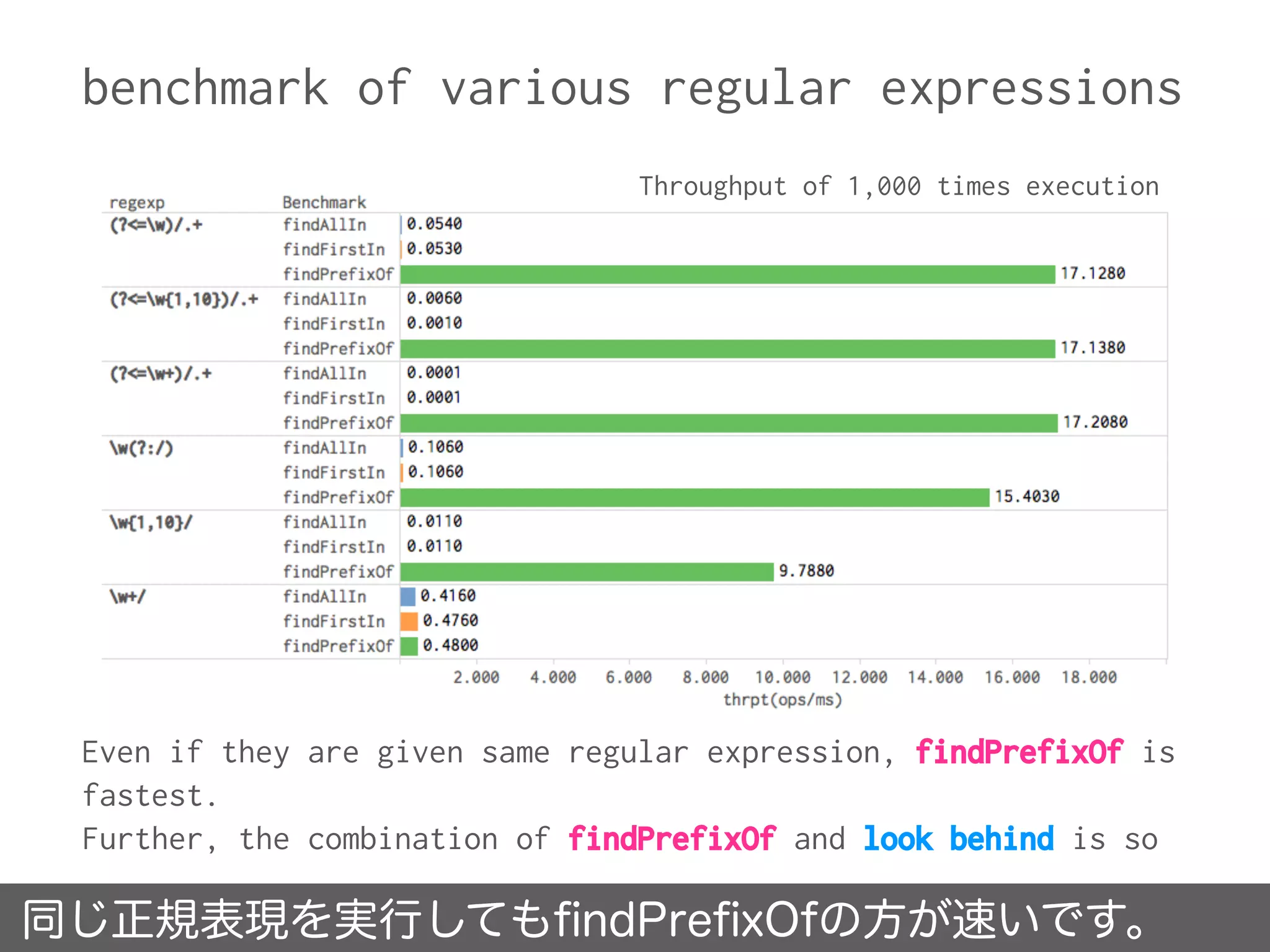
benchmark of various regular expressions
同じ正規表現を実行してもfindPrefixOfの方が速いです。
Even if they are given same regular expression, findPrefixOf is
fastest.
Further, the combination of findPrefixOf and look behind is so
Throughput of 1,000 times execution
findPrefixOf usage in famous library
Because routing trees are constructed by consuming
the beginning of uri path, findPrefixOf is sufficient
rather than findAllIn.
spray-routingでもfindPrefixOfを使っています。
implicit def regex2PathMatcher(regex: Regex): PathMatcher1[String] =
regex.groupCount match {

case 0 ⇒ new PathMatcher1[String] {

def apply(path: Path) = path match {

case Path.Segment(segment, tail) ⇒ regex findPrefixOf segment match {

case Some(m) ⇒ Matched(segment.substring(m.length) :: tail, m :: HNil)

case None ⇒ Unmatched

}

case _ ⇒ Unmatched

}

}
:
https://github.com/spray/spray/blob/master/spray-routing/src/main/scala/spray/routing/PathMatcher.scala
PathMatcher.scala line:211
The following code is a part of spray-routing.
RedHot high velocity No.7
Considering the effective utilization of
findPrefixOf.
When using regular expressions, be
mindful of the computational complexity.
爆速その7. 正規表現を使うときは計算量を考えましょう。
No. 1 Using Memory Mapped File, you can operate on files at
high speed.
No. 2 for comprehension and flatMap & map are same, level of
byte code.
No. 3 When updating a collection, Buffers are better choice.
No. 4 When inserting, List works best performance. So, you
feel happy using sorted List after inserting elements.
No. 5 It is cool way, using Array family when reading
randomly.
No. 6 Lazy evaluation is very useful.
No. 7 Be mindful of the computational complexity when using
regular expressions.
https://github.com/x1-/scala-benchmark
Source code is here !
Thank you for listening!

あなたのScalaを爆速にする7つの方法

  • 1.
    7 ways to makeyour Scala RedHot high velocity x1(Yuri Inoue) For ScalaMatsuri 2016 あなたのScalaを爆速にする7つの方法
  • 2.
    Yuri Inoue Cyberagent,Inc. AdTech Studio,AMoAd. twitter: @iyunoriue GitHub: x1- HP: Batsuichi and Inken’s engineer blog http://x1.inkenkun.com/ profile 井上ゆりと申します。
  • 3.
    • Parallel executionis not taken into account. • This session is for beginners of Scala. • The environment of benchmark is shown at next page. • @Keen advised some performances. Special thanks! acknowledgement 謝辞。並列実行に関しては考慮していません。
  • 4.
    environment of benchmark instanceAmazon EC2 m3.2xlarge vCPU 8 memory 30GB disk generalized SSD OS CentOS6.7-Final jdk jdk1.8.0u65(oracle, server vm) scala 2.11.7 build tool sbt benchmark tool sbt-jmh 0.2.5 libraries com.bionicspirit.shade:1.6.0 net.debasishg.redisclient:3.0 org.scalatest.scalatest:2.2.4 ベンチマーク環境
  • 5.
    No.1 Random Read -File vs KVS -
  • 6.
    Q1 Search for somestring in 2GB data. Which of the following would be faster? 2GBデータから文字列を探します。どちらが速いでしょう?
  • 7.
    from 2GB file onSSD. A from total 2GB strings on memcache. (divided into chunk) B prerequisite prerequisite * SSD is generalized SSD on EC2. * not using RamDisk. * memcache version is 1.4.0. * memcache stand up on local A:SSD上の2GBファイル B:memcache上の2GBデータ
  • 8.
    Answer A. from 2GBfile on SSD. 答え A.SSD上に置いた2GBのファイルから探す です。
  • 9.
    benchmark The figure showsthe average for the times it took to search for the string ”SUIKA” from the following 2GB data. • Searching from a file completed in less than 8sec. • Searching from memcache completed in near by 19sec. • Searching from Redis(also KVS) completed in 14sec. '''<code>&amp;h</code>''' を用い、<code>&amp;h0F</code> (十進で15)のように表現する。 nn[[Standard Generalized Markup Language|SGML]]、[[Extensible Markup Language|XML]]、 [[HyperText Markup Language|HTML]]では、アンパサンドをSUIKA使って[[SGML実体]]を参照する。 SUIKAという文字列を探したときの平均タイムです。
  • 10.
    Why is filefaster than memcache? • This is Memory Mapped File(MMF) power. • Memory Mapped File is used to map a file on disk to a region of address space on memory. • It avoids unnecessary file I/O operations and file buffering. • MappedByteBuffer included java.nio, that directly access Memory Mapped File. physical file mapping address on memory fileが高速なのはMemoryMappedFileを使ったからです。
  • 11.
    • memcache(<1.4.2) haslimitation below, The maximum size of a value you can store in memcached is 1MB. • Although memcache is on the same host, accessing it many times to retrieve data takes long time. • Redis can save 1GB per 1 key. Using 2GB data divided into 4 key(each 500MB), got below benchmark. • It completed in about 8sec, but cannot win file. Why is memcache slower than file? memcache(<1.4.2)は1key<=1MBのサイズ制限があります。
  • 12.
    • Memory MappedFile can only map up to 2GB file on JVM. http://stackoverflow.com/questions/8076472/why-does- filechannel-map-take-up-to-integer-max-value-of-data • Apache Spark MLlib development supervisor, Reynold Xin wrote the following Gist. He measured the performance over various approaches to read ByteBuffer in Scala. https://gist.github.com/rxin/5087680 more information jvmではMemoryMappedFileは2GBまでしか扱えません。
  • 13.
    RedHot high velocityNo.1 Using Memory Mapped File, you can operate on files at high speed. 爆速その1. MMFで高速ファイル操作が可能に!
  • 14.
  • 15.
    Q2 for comprehension behaves sameas flatMap & map. Which one is faster than? for内包表記とflatMap&map、どちらが速いでしょう?
  • 16.
    A B code same. flatMap& map for {
 a <- data
 b <- a
 } yield {
 b
 } for comprehension data.flatMap( a => a.map( b => b ) ) flatMap & map
  • 17.
  • 18.
    benchmark All of Throughput、Average、Sampledon’t show significant difference between for comprehension and flatMap & map. 10,000times for内包表記とflatMap&mapで優位差が見られません。
  • 19.
    • for comprehensionand flatMap & map are logically same. • Here is a comparison after decompiling them. They are same! Why are they the same speed? for内包表記とflatMap&mapは論理的に同じです。 public Option<String> forComprehension()
 {
 data().flatMap(new AbstractFunction1()
 {
 public static final long serialVersionUID = 0L;
 
 public final Option<String> apply(Some<String> a)
 {
 a.map(new AbstractFunction1()
 {
 public static final long serialVersionUID = 0L;
 
 public final String apply(String b)
 {
 return b;
 }
 });
 }
 });
 } public Option<String> flatMapAndMap()
 {
 data().flatMap(new AbstractFunction1()
 {
 public static final long serialVersionUID = 0L;
 
 public final Option<String> apply(Some<String> a)
 {
 a.map(new AbstractFunction1()
 {
 public static final long serialVersionUID = 0L;
 
 public final String apply(String b)
 {
 return b;
 }
 });
 }
 });
 } for comprehension flatMap & map
  • 20.
    RedHot high velocityNo.2 for comprehension and flatMap & map are same, level of byte code. 爆速その2. for内包表記とflatMap&mapは同じです。
  • 21.
    No.3 append &insert - collection -
  • 22.
    Collections Performance Characteristicsat Scala cite: http://docs.scala-lang.org/overviews/collections/performance-characteristics.html Scalaにおけるコレクションの性能特性
  • 23.
    Q3-1 Mutable variable “var xs:Vector” and Immutable variable “val xs: ArrayBuffer” Which one is faster, when appending to the tail of a collection? 可変なVectorと不変なArrayBuffer、末尾追加が速いのは?
  • 24.
    var Vector A val ArrayBuffer B code varxs = Vector.empty[Int] xs = xs :+ a var xs: Vector val xs: ArrayBuffer val xs = ArrayBuffer.empty[Int] xs += a
  • 25.
    Answer B. val ArrayBuffer 答えB.val ArrayBufferです。
  • 26.
    benchmark ArrayBuffer is fasterthan Vector. ArrayBufferの方がVectorよりも速いです。 Throughput of appending n times This benchmark shows throughputs of appending N elements. For example, type:Vector and times:10k indicates appending 10,000 elements in an empty Vector.
  • 27.
    benchmark The benchmarks ofthe other immutable objects are below. VectorはListやStreamよりは速いのですが。 Throughput of appending n times Vector is faster than List and Stream as same as immutable.
  • 28.
    Why is ArrayBufferfaster than Vector? When appending new element ... Vectorは新インスタンスを新たにつくるので遅くなります。 add new element, after coping elements to new instance. update tail position, after resizing instance. var Vector val ArrayBuffer val b = bf(repr)
 b ++= thisCollection
 b += elem
 b.result() ensureSize(size0 + 1)
 array(size0) = elem.asInstanceOf[AnyRef]
 size0 += 1
 this Thease processes are absolutely different.
  • 29.
    Q3-2 Mutable variable “var xs:List” and Immutable variable “val xs: ListBuffer” Which one is faster, when inserting into the head of a collection? 可変なListと不変なListBuffer、先頭挿入が速いのは?
  • 30.
    var List A val ListBuffer B code varxs = List.empty[Int] xs = a :: xs var xs: List val xs: ListBuffer val xs = ListBuffer.empty[Int] a +=: xs
  • 31.
    Answer A. var List 答えA.var Listです。
  • 32.
    benchmark List is fasterthan ListBuffer. Listの方がListBufferよりも速いです。 Throughput of inserting n times This benchmark shows throughputs of inserting N elements. For example, type:List and times:1k indicates inserting 1,000 elements in an empty List.
  • 33.
    benchmark The benchmarks ofthe other objects are below. Listだけ飛び抜けて速いです。 List is enormously faster than the others. Throughput of inserting n times
  • 34.
    Why is Listfaster than the others? When inserting new element into the begining position... Listではほとんど計算せずに先頭挿入が行えます。 Because of having head and tail, List can create new instance immediately. ListBuffer is almost same as List, but inner variable is reassigned to. var List val ListBuffer new scala.collection.immutable .::(x, this) if (exported) copy()
 val newElem = new :: (x, start)
 if (isEmpty) last0 = newElem
 start = newElem
 len += 1
 this List calculate a little, in case of inserting.
  • 35.
    RedHot high velocityNo.3 When appending elements, using ArrayBuffer or ListBuffer is a better way. But inserting the begining position, using List works best performance. 爆速その3.末尾追加は**Bufferを!先頭挿入はListを!
  • 36.
  • 37.
    Q4 Mutable variable “var xs:List” and Immutable variable “val xs: ListBuffer” Which one is faster, when removing an item from a collection? 可変なListと不変なListBuffer、削除が速いのは?
  • 38.
    var List A val ListBuffer B code varxs: List val xs: ListBuffer var xs = List( 1 to n: _* ) // head xs = xs.tail // tail xs = xs.dropRight(0) var xs = ListBuffer( 1 to n: _* ) // head xs.remove(0) // tail xs.remove(xs.size - 1)
  • 39.
    Answer B. val ListBuffer 答えB.val ListBuffer です。
  • 40.
    benchmark ListBuffer is muchfaster than List. ListBufferの方がListよりも相当速いです。 Throughput of removing n times This benchmark shows throughputs of removing N elements from N length array. For example, Benchmark:removeTail, type:List and times:1k indicates removing 1,000 elements from the last of 1,000 length List.
  • 41.
    benchmark The benchmarks ofthe other objects are below. Buffer系以外はどれも超絶遅いです。 They are all very slow, except for the Buffer family. Throughput of removing n times
  • 42.
    Why is ListBufferfaster than List? When remove element from collection... ListのdropRightはO(n)の時間がかかります。 The operation - dropRight of List takes time O(n). The operation - remove of ListBuffer takes constant time. var List val ListBuffer def dropRight(n: Int): Repr = {
 val b = newBuilder
 var these = this
 var lead = this drop n
 while (!lead.isEmpty) {
 b += these.head
 these = these.tail
 lead = lead.tail
 }
 b.result()
 } def remove(n: Int): A = { : var cursor = start
 var i = 1
 while (i < n) {
 cursor = cursor.tail
 i += 1
 }
 old = cursor.tail.head
 if (last0 eq cursor.tail) last0 = cursor.asInstanceOf[::[A]]
 cursor.asInstanceOf[::[A]].tl = cursor.tail.tail
  • 43.
    benchmark of List’sdropRight Because the benchmark has increased by 10 times the size, we have to display the throughput logarithmic graph of. dropRightのスループットは線形に下降しているだけです。 Throughput is just only lowered to linear. It is the horror of linear increase. log(Throughput) of List’s dropRight
  • 44.
    reference benchmark 参考のためtakeと比較しました。takeは少し速いです。 Since bothof dropRight(1) and take(n-1) are same function, so compared with dropRight and take. take is slightly faster than dropRight. Throughput of List’ dropRight and take
  • 45.
    RedHot high velocityNo.4 When dropping elements, using ListBuffer or ArrayBuffer is a better way. 爆速その4. 要素削除を行うならListBuffer or ArrayBuffer。
  • 46.
    No.5 random read -collection -
  • 47.
    Q5 Vector vs ListBuffer Whichone is faster, when reading randomly? VectorとListBuffer, ランダム・リードが速いのは?
  • 48.
    Vector A ListBuffer B code val data = Vector(1 to n: _* )
 
 ( 1 to data.size ) map { _ => data( Random.nextInt( n ) ) } val data = ListBuffer( 1 to n: _* )
 
 ( 1 to data.size ) map { _ => data( Random.nextInt( n ) ) }
  • 49.
  • 50.
    benchmark Vector is fasterthan ListBuffer. Vectorの方がListBufferより速いです。 Throughput of reading n times This benchmark shows throughputs of getting an item randomly from N length array. For example, type:ListBuffer and times:1k indicates getting an item 1,000 times from 1,000 length List.
  • 51.
    benchmark The benchmarks ofthe other objects are below. 速いのはArray, ArrayBuffer, Vectorです。 Array, ArrayBuffer, Vector are fast. Throughput of reading n times
  • 52.
    Why Array, ArrayBuffer,Vector are fast? Vectorなどは内部的に定数時間のArrayを使っています。 • Array - random read takes constant time. • ArrayBuffer and Vector have Array internal. protected var array: Array[AnyRef] = new Array[AnyRef](math.max(initialSize, 1)) : def apply(idx: Int) = {
 if (idx >= size0) throw new IndexOutOfBoundsException(idx.toString)
 array(idx).asInstanceOf[A]
 } e.g ArrayBuffer
  • 53.
    RedHot high velocityNo.5 It is a cool way, using Array family when reading randomly. 爆速その5. Arrayの仲間はランダム・リードが速いです。
  • 54.
  • 55.
    Q6 Considering the above, Streamvs Array Which one is faster, producing a fibonacci sequence? フィボナッチ数列の生成が速いのはStream?Array?
  • 56.
    Stream A Array B code def fibonacci( h: Int= 1, n: Int = 1 ): Stream[Int] =
 h #:: fibonacci( n, h + n ) val fibo = fibonacci().take( n ) def fibonacci( n: Int = 1 ): Array[Int] = if ( n == 0 ) {
 Array.empty[Int]
 } else {
 val b = new Array[Int](n)
 b(0) = 1
 for ( i <- 0 until n - 1 ) {
 val n1 = if ( i == 0 ) 0 else b( i - 1 )
 val n2 = b( i )
 b( i + 1 ) = n1 + n2
 }
 b
 } val fibo = fibonacci( n ) * calculate recursively * operation takes O(n)
  • 57.
  • 58.
    benchmark Stream is overwhelminglyfaster than Array. Streamが圧倒的に速いです。 Throughput of creating n length fibonacci sequence fibonacci sequence: ( 0, 1, 1, 2, 3, 5, 8, 13, 21, 34, 55, 89, .. )
  • 59.
    Why is Streamso much faster? Streamは遅延評価なので必要なときに計算します。 • Stream implements lazy lists where elements are only evaluated when they are needed. • Actually, these have not yet been calculated. • This is the power of lazy evaluation. • But, if the sequence is materialized, it takes calculating time. → see next page.
  • 60.
    Why is Streamso much faster? ただしStreamは具現化するときにコストがかかります。 This is the benchmark when called toList on Stream. Array is fastest, if it calls toList on Stream. It shows calculation method using Array is better than recursive. Throughput of creating n length fibonacci sequence
  • 61.
    RedHot high velocityNo.6 Lazy evaluation is very useful. But, it takes cost at materialized. 爆速その6. 遅延評価は便利ですが具現化すると普通です。
  • 62.
  • 63.
    Showing the benchmarkof w+w Regular Expression consumes CPU resource a lot. In particular, back tracking will occur using the expression like “ww..w”, so takes time O(n^2). 正規表現はCPUリソースをたくさん消費します。 The following is the performance of Regular Expression. Throughput of each regular expression execution(1,000 times)
  • 64.
    Last. Q7 When lookingfor behind the specific expression(w+/), “findAllIn and look behind(?<=)” and “findPrefixOf and quantifier(+)” which one is faster than? from this string→ abcdef..0123../abc.. (1024byte) ある文字列の後方を探したいです。どちらが速いでしょう?
  • 65.
    same. A findPrefixOf B code val re ="""(?<=w+)/.+""" r val ms = re findAllIn data
 if ( ms.isEmpty ) None
 else Some( ms.next ) val re = “""w+/""" r
 re findPrefixMatchOf data map( _.after.toString ) findAllIn and look behind findPrefixOf and quantifier
  • 66.
    Answer B. findPrefixOf & quantifier 答えB.findPrefixOfと量指定子(+)の方が速いです。
  • 67.
    benchmark findPrefixOfと量指定子の組み合わせの方が速いです。 findPrefixOf and quantifieris faster than findAllIn. Throughput of 1,000 times execution This benchmark shows throughputs of running n times findAllIn with “(?<=w+)/.+” and findPrefixOf(findPrefixMatchOf and after) with “w/”.
  • 68.
    Why are findPrefixOfand quantifier faster? findAllInは部分マッチ、findPrefixOfは先頭マッチ。 • The above expression causes back tracking. • Look behind assertion is not a problem. • In addition, findPrefixOf is faster than findAllIn in this case. • findAllIn returns all non-overlapping matches of the regular expression in the given character sequence. • findPrefixOf returns a match of the regular expression at the beginning of the given character sequence. (?<=w+)/.+ matching same character sequence!
  • 69.
    benchmark of variousregular expressions 同じ正規表現を実行してもfindPrefixOfの方が速いです。 Even if they are given same regular expression, findPrefixOf is fastest. Further, the combination of findPrefixOf and look behind is so Throughput of 1,000 times execution
  • 70.
    findPrefixOf usage infamous library Because routing trees are constructed by consuming the beginning of uri path, findPrefixOf is sufficient rather than findAllIn. spray-routingでもfindPrefixOfを使っています。 implicit def regex2PathMatcher(regex: Regex): PathMatcher1[String] = regex.groupCount match {
 case 0 ⇒ new PathMatcher1[String] {
 def apply(path: Path) = path match {
 case Path.Segment(segment, tail) ⇒ regex findPrefixOf segment match {
 case Some(m) ⇒ Matched(segment.substring(m.length) :: tail, m :: HNil)
 case None ⇒ Unmatched
 }
 case _ ⇒ Unmatched
 }
 } : https://github.com/spray/spray/blob/master/spray-routing/src/main/scala/spray/routing/PathMatcher.scala PathMatcher.scala line:211 The following code is a part of spray-routing.
  • 71.
    RedHot high velocityNo.7 Considering the effective utilization of findPrefixOf. When using regular expressions, be mindful of the computational complexity. 爆速その7. 正規表現を使うときは計算量を考えましょう。
  • 72.
    No. 1 UsingMemory Mapped File, you can operate on files at high speed. No. 2 for comprehension and flatMap & map are same, level of byte code. No. 3 When updating a collection, Buffers are better choice. No. 4 When inserting, List works best performance. So, you feel happy using sorted List after inserting elements. No. 5 It is cool way, using Array family when reading randomly. No. 6 Lazy evaluation is very useful. No. 7 Be mindful of the computational complexity when using regular expressions.
  • 73.
  • 74.
    Thank you forlistening!