NAVY
BUPERS 3
CIMS HOW TO:
Create/Fill out a CIMS/NRMS SAAR
4 OCT 2013
NAVY
BUPERS 3
Create/Fill out a CIMS SAAR
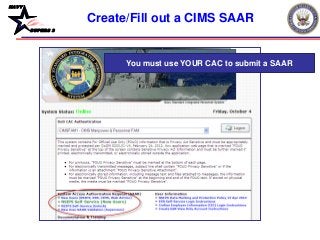
You must use YOUR CAC to submit a SAAR
NAVY
BUPERS 3
Create/Fill out a CIMS SAAR
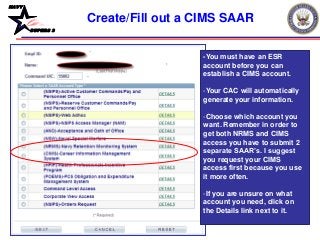
-You must have an ESR
account before you can
establish a CIMS account.
-Your CAC will automatically
generate your information.
-Choose which account you
want. Remember in order to
get both NRMS and CIMS
access you have to submit 2
separate SAAR’s. I suggest
you request your CIMS
access first because you use
it more often.
-If you are unsure on what
account you need, click on
the Details link next to it.
NAVY
BUPERS 3
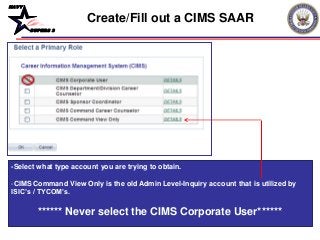
-Select what type account you are trying to obtain.
-CIMS Command View Only is the old Admin Level-Inquiry account that is utilized by
ISIC’s / TYCOM’s.
****** Never select the CIMS Corporate User******
Create/Fill out a CIMS SAAR
NAVY
BUPERS 3
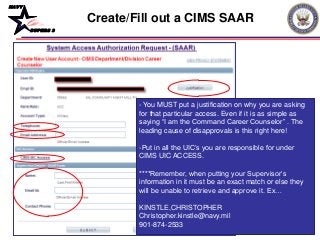
- You MUST put a justification on why you are asking
for that particular access. Even if it is as simple as
saying “I am the Command Career Counselor” . The
leading cause of disapprovals is this right here!
-Put in all the UIC’s you are responsible for under
CIMS UIC ACCESS.
****Remember, when putting your Supervisor’s
information in it must be an exact match or else they
will be unable to retrieve and approve it. Ex…
KINSTLE,CHRISTOPHER
Christopher.kinstle@navy.mil
901-874-2533
Create/Fill out a CIMS SAAR
NAVY
BUPERS 3
• An email will be sent to you and to your Supervisor.
Once your Supervisor approves it, a notification will be
sent to you via email. After being finalized from the CIMS
Super FAM Primary, a 3rd notification will be sent with
the status of access granted or denied.
• Questions please call NCC(SW/AW) Chris Kinstle- 901-
874-2533 or email christopher.kinstle@navy.mil
Create/Fill out a CIMS SAAR

CIMS HOW TO- CIMS SAAR (OCT 13)

  • 1.
    NAVY BUPERS 3 CIMS HOWTO: Create/Fill out a CIMS/NRMS SAAR 4 OCT 2013
  • 2.
    NAVY BUPERS 3 Create/Fill outa CIMS SAAR You must use YOUR CAC to submit a SAAR
  • 3.
    NAVY BUPERS 3 Create/Fill outa CIMS SAAR -You must have an ESR account before you can establish a CIMS account. -Your CAC will automatically generate your information. -Choose which account you want. Remember in order to get both NRMS and CIMS access you have to submit 2 separate SAAR’s. I suggest you request your CIMS access first because you use it more often. -If you are unsure on what account you need, click on the Details link next to it.
  • 4.
    NAVY BUPERS 3 -Select whattype account you are trying to obtain. -CIMS Command View Only is the old Admin Level-Inquiry account that is utilized by ISIC’s / TYCOM’s. ****** Never select the CIMS Corporate User****** Create/Fill out a CIMS SAAR
  • 5.
    NAVY BUPERS 3 - YouMUST put a justification on why you are asking for that particular access. Even if it is as simple as saying “I am the Command Career Counselor” . The leading cause of disapprovals is this right here! -Put in all the UIC’s you are responsible for under CIMS UIC ACCESS. ****Remember, when putting your Supervisor’s information in it must be an exact match or else they will be unable to retrieve and approve it. Ex… KINSTLE,CHRISTOPHER Christopher.kinstle@navy.mil 901-874-2533 Create/Fill out a CIMS SAAR
  • 6.
    NAVY BUPERS 3 • Anemail will be sent to you and to your Supervisor. Once your Supervisor approves it, a notification will be sent to you via email. After being finalized from the CIMS Super FAM Primary, a 3rd notification will be sent with the status of access granted or denied. • Questions please call NCC(SW/AW) Chris Kinstle- 901- 874-2533 or email christopher.kinstle@navy.mil Create/Fill out a CIMS SAAR