Symantec Backup Exec Blueprints 1
Symantec Backup Exec Blueprints
Blueprint for Deduplication
Backup Exec Technical Services
Backup & Recovery Technical Education Services
Symantec Backup Exec Blueprints 2
Notice
This Backup Exec Blueprint presentation includes example diagrams that contain objects
that represent applications and platforms from other companies such as Microsoft and
VMware. These diagrams may or may not match or resemble actual implementations
found in end user environments. Any likeness or similarity to actual end user
environments is completely by coincidence.
The goal of the diagrams included in this blueprint presentation is not to recommend
specific ways in which to implement applications and platforms from other companies
such as Microsoft and VMware, but rather to illustrate Backup Exec best practices only.
For guidelines and best practices on installing and configuring applications and
platforms from other companies, please refer to best practice documentation and other
resources provided by those companies.
Symantec Backup Exec Blueprints
Preface/disclaimer
Symantec Backup Exec Blueprints 3
Backup Exec Blueprints: How to Use
Getting the most out of Backup Exec blueprints
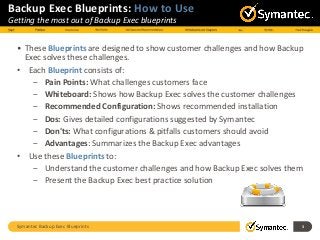
• These Blueprints are designed to show customer challenges and how Backup
Exec solves these challenges.
• Each Blueprint consists of:
‒ Pain Points: What challenges customers face
‒ Whiteboard: Shows how Backup Exec solves the customer challenges
‒ Recommended Configuration: Shows recommended installation
‒ Dos: Gives detailed configurations suggested by Symantec
‒ Don'ts: What configurations & pitfalls customers should avoid
‒ Advantages: Summarizes the Backup Exec advantages
• Use these Blueprints to:
‒ Understand the customer challenges and how Backup Exec solves them
‒ Present the Backup Exec best practice solution
Pain Points
4Symantec Backup Exec Blueprints
Symantec Backup Exec Blueprints 5
Backup Exec Blueprints: Deduplication
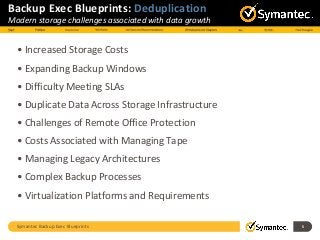
Modern storage challenges associated with data growth
• Increased Storage Costs
• Expanding Backup Windows
• Difficulty Meeting SLAs
• Duplicate Data Across Storage Infrastructure
• Challenges of Remote Office Protection
• Costs Associated with Managing Tape
• Managing Legacy Architectures
• Complex Backup Processes
• Virtualization Platforms and Requirements
Use Cases and Recommendations
6Symantec Backup Exec Blueprints
Symantec Backup Exec Blueprints 7
Backup Exec Blueprints: Deduplication
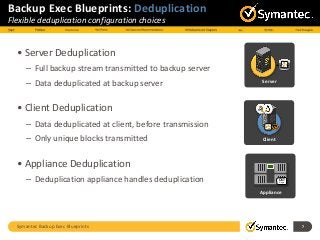
Flexible deduplication configuration choices
• Server Deduplication
– Full backup stream transmitted to backup server
– Data deduplicated at backup server
• Client Deduplication
– Data deduplicated at client, before transmission
– Only unique blocks transmitted
• Appliance Deduplication
– Deduplication appliance handles deduplication
Client
Server
Appliance
OST
Plug-in
Symantec Backup Exec Blueprints 8
Backup Exec Blueprints: Deduplication
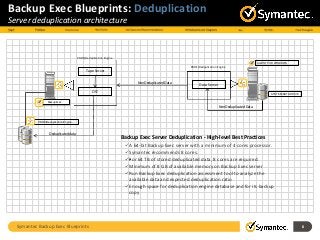
Server deduplication architecture
SYSTEM/DATA DRIVE
PDDE/Deduplication Engine
Backup Exec
PDDE/Deduplication Engine
Data Server
AGENT FOR WINDOWS
Deduplicated data
PDDE/Deduplication Engine
Tape Server
OST
Non Deduplicated Data
Backup Exec Server Deduplication - High-level Best Practices
A 64-bit Backup Exec server with a minimum of 4 cores processor.
Symantec recommends 8 cores.
•For 64 TB of stored deduplicated data, 8 cores are required.
Minimum of 8 GB of available memory on Backup Exec server
Run Backup Exec deduplication assessment tool to analyze the
available data and expected deduplication ratio
Enough space for deduplication engine database and for its backup
copy
Symantec Backup Exec Blueprints 9
Backup Exec Blueprints: Deduplication
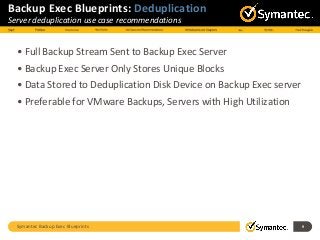
Server deduplication use case recommendations
• Full Backup Stream Sent to Backup Exec Server
• Backup Exec Server Only Stores Unique Blocks
• Data Stored to Deduplication Disk Device on Backup Exec server
• Preferable for VMware Backups, Servers with High Utilization
Symantec Backup Exec Blueprints 10
Backup Exec Blueprints: Deduplication
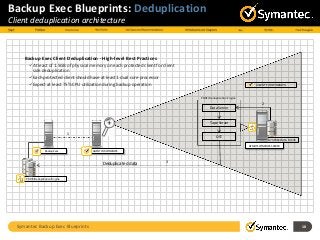
Client deduplication architecture
SYSTEM/DATA DRIVE
PDDE/Deduplication Engine
Backup Exec
REMOTE WINDOWS SERVER
AGENT FOR WINDOWS
PDDE/Deduplication Engine
Data Server
Tape Server
OST
AGENT FOR WINDOWS
Deduplicated data
1
2
3
Backup Exec Client Deduplication - High-level Best Practices
At least of 1.5GB of physical memory on each protected client for client
side deduplication
Each protected client should have at least 1 dual core processor
Expect at least 75% CPU utilization during backup operation
Symantec Backup Exec Blueprints 11
Backup Exec Blueprints: Deduplication
Client deduplication use case recommendations
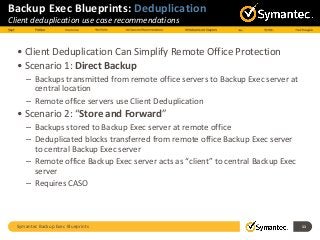
• Client Deduplication Can Simplify Remote Office Protection
• Scenario 1: Direct Backup
– Backups transmitted from remote office servers to Backup Exec server at
central location
– Remote office servers use Client Deduplication
• Scenario 2: “Store and Forward”
– Backups stored to Backup Exec server at remote office
– Deduplicated blocks transferred from remote office Backup Exec server
to central Backup Exec server
– Remote office Backup Exec server acts as “client” to central Backup Exec
server
– Requires CASO
Symantec Backup Exec Blueprints 12
Backup Exec Blueprints: Deduplication
Appliance deduplication use case recommendations
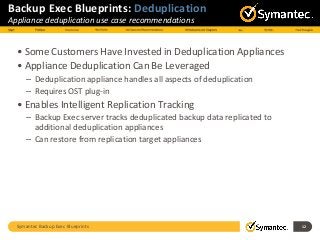
• Some Customers Have Invested in Deduplication Appliances
• Appliance Deduplication Can Be Leveraged
– Deduplication appliance handles all aspects of deduplication
– Requires OST plug-in
• Enables Intelligent Replication Tracking
– Backup Exec server tracks deduplicated backup data replicated to
additional deduplication appliances
– Can restore from replication target appliances
Symantec Backup Exec Blueprints 13
Backup Exec Blueprints: Deduplication
Tape recommendations
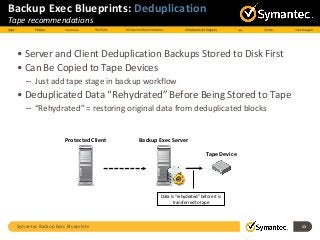
• Server and Client Deduplication Backups Stored to Disk First
• Can Be Copied to Tape Devices
– Just add tape stage in backup workflow
• Deduplicated Data “Rehydrated” Before Being Stored to Tape
– “Rehydrated” = restoring original data from deduplicated blocks
Backup Exec ServerProtected Client
Tape Device
Data is “rehydrated” before it is
transferred to tape
Symantec Backup Exec Blueprints 14
Backup Exec Blueprints: Deduplication
Disk recommendations
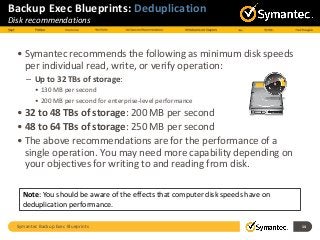
• Symantec recommends the following as minimum disk speeds
per individual read, write, or verify operation:
– Up to 32 TBs of storage:
• 130 MB per second
• 200 MB per second for enterprise-level performance
• 32 to 48 TBs of storage: 200 MB per second
• 48 to 64 TBs of storage: 250 MB per second
• The above recommendations are for the performance of a
single operation. You may need more capability depending on
your objectives for writing to and reading from disk.
Note: You should be aware of the effects that computer disk speeds have on
deduplication performance.
Symantec Backup Exec Blueprints 15
Backup Exec Blueprints: Deduplication
Use case recommendations chart
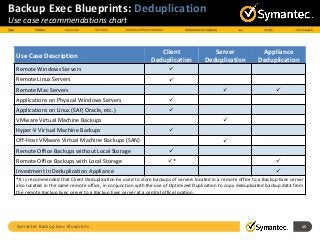
Use Case Description
Client
Deduplication
Server
Deduplication
Appliance
Deduplication
Remote Windows Servers 
Remote Linux Servers 
Remote Mac Servers  
Applications on Physical Windows Servers 
Applications on Linux (SAP, Oracle, etc.) 
VMware Virtual Machine Backups 
Hyper-V Virtual Machine Backups 
Off-Host VMware Virtual Machine Backups (SAN) 
Remote Office Backups without Local Storage 
Remote Office Backups with Local Storage * 
Investment in Deduplication Appliance 
*It is recommended that Client Deduplication be used to store backups of servers located in a remote office to a Backup Exec server
also located in the same remote office, in conjunction with the use of Optimized Duplication to copy deduplicated backup data from
the remote Backup Exec server to a Backup Exec server at a central office location.
Whiteboards and Diagrams
16Symantec Backup Exec Blueprints
Example Diagram: Deduplication
Backup Exec with Deduplication Option
Symantec Backup Exec Blueprints 17
Deduplication Appliance
Disk Based Storage
Deduplication Engine
Tape Library
FILE SERVER
VIRTIUAL
SERVER
APPLICATION
SERVER DATABASE SERVER
SAN DISK STORAGE
LAN
SAN
Backup Exec
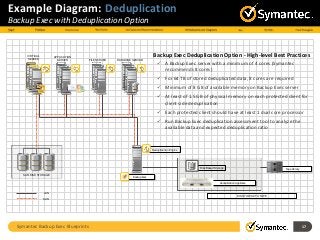
Backup Exec Deduplication Option - High-level Best Practices
 A Backup Exec server with a minimum of 4 cores (Symantec
recommends 8 cores)
 For 64 TB of stored deduplicated data, 8 cores are required
 Minimum of 8 GB of available memory on Backup Exec server
 At least of 1.5 GB of physical memory on each protected client for
client side deduplication
 Each protected client should have at least 1 dual core processor
 Run Backup Exec deduplication assessment tool to analyze the
available data and expected deduplication ratio
DISK TO DISK TO TAPE
Do…
18Symantec Backup Exec Blueprints
Symantec Backup Exec Blueprints 19
Best Practices: Deduplication
Do the following…
• Deduplication Database Sizing
– Roughly 6-8 GB of database size per 1 TB of stored deduplicated data.
– Maintenance routines make a backup copy of the database
– Additional space required for database backup copy
– Use a dynamic volume that can grow as needed
• Processor Utilization
– At least 75% processor utilization for that processor core for the duration
– Minimum: Backup Exec server should have at least one four cores processor;
(for 64 TB of stored deduplicated data, 8 cores are required)
– Recommended: 8 cores
• Agent for VMware and Hyper-V
– Image-level backups of VMware virtual machines require server deduplication
Symantec Backup Exec Blueprints 20
Best Practices: Deduplication
Do the following…
• Physical Memory on Backup Exec Server
– 8 GB of free physical system RAM for up to 5 TB of deduplicated data
– For more than 5 TB of data, use the following:
• 1.5 GB x N, where N = the number of TBs of deduplicated data to be stored
• Physical Memory on Client
– 1.5 GB of free physical memory on each client that uses client
• Use Dedicated Logon Account for Deduplication Disk Device
• Changing Backup Exec Logon Account Password
– If you change Backup Exec logon account password, use the spauser.exe
utility to update it
Do not…
21Symantec Backup Exec Blueprints
Symantec Backup Exec Blueprints 22
Best Practices: Deduplication
Do not do the following…
• RAID Caching
– Do not enable RAID caching on disk hosting deduplication disk storage device
• Verifying Backups
– Verify with the duplication job
• Client Deduplication
– Do not use client deduplication if remote system has heavy processing load;
use server-side deduplication
• WAN Considerations
– Do not use server deduplication with backups over WAN
– Remote office protection without local storage should use client
deduplication
• You cannot create a deduplication storage folder in a storage path
that contains double-byte characters
Symantec Backup Exec Blueprints 23
Backup Exec Deduplication: Final Thoughts
One solution for any environment
• Reduce Data Backup Storage by 10:1
• Optimize network utilization
• Deduplicate Across Physical and Virtual Backups
• Comprehensive Support for Virtual and Physical Servers
• Flexible Deduplication Options
– Client deduplication
– Server deduplication
– Appliance deduplication
• VMware VADP Integration
• Cross-platform (Windows and Linux) Deduplication Support
• Single License Unlocks All Deduplication Options
Symantec Backup Exec Blueprints 24
Thank You!
Backup Exec Product Management

TECHNICAL WHITE PAPER: Backup Exec 2014 Blueprint: Deduplication

  • 1.
    Symantec Backup ExecBlueprints 1 Symantec Backup Exec Blueprints Blueprint for Deduplication Backup Exec Technical Services Backup & Recovery Technical Education Services
  • 2.
    Symantec Backup ExecBlueprints 2 Notice This Backup Exec Blueprint presentation includes example diagrams that contain objects that represent applications and platforms from other companies such as Microsoft and VMware. These diagrams may or may not match or resemble actual implementations found in end user environments. Any likeness or similarity to actual end user environments is completely by coincidence. The goal of the diagrams included in this blueprint presentation is not to recommend specific ways in which to implement applications and platforms from other companies such as Microsoft and VMware, but rather to illustrate Backup Exec best practices only. For guidelines and best practices on installing and configuring applications and platforms from other companies, please refer to best practice documentation and other resources provided by those companies. Symantec Backup Exec Blueprints Preface/disclaimer
  • 3.
    Symantec Backup ExecBlueprints 3 Backup Exec Blueprints: How to Use Getting the most out of Backup Exec blueprints • These Blueprints are designed to show customer challenges and how Backup Exec solves these challenges. • Each Blueprint consists of: ‒ Pain Points: What challenges customers face ‒ Whiteboard: Shows how Backup Exec solves the customer challenges ‒ Recommended Configuration: Shows recommended installation ‒ Dos: Gives detailed configurations suggested by Symantec ‒ Don'ts: What configurations & pitfalls customers should avoid ‒ Advantages: Summarizes the Backup Exec advantages • Use these Blueprints to: ‒ Understand the customer challenges and how Backup Exec solves them ‒ Present the Backup Exec best practice solution
  • 4.
  • 5.
    Symantec Backup ExecBlueprints 5 Backup Exec Blueprints: Deduplication Modern storage challenges associated with data growth • Increased Storage Costs • Expanding Backup Windows • Difficulty Meeting SLAs • Duplicate Data Across Storage Infrastructure • Challenges of Remote Office Protection • Costs Associated with Managing Tape • Managing Legacy Architectures • Complex Backup Processes • Virtualization Platforms and Requirements
  • 6.
    Use Cases andRecommendations 6Symantec Backup Exec Blueprints
  • 7.
    Symantec Backup ExecBlueprints 7 Backup Exec Blueprints: Deduplication Flexible deduplication configuration choices • Server Deduplication – Full backup stream transmitted to backup server – Data deduplicated at backup server • Client Deduplication – Data deduplicated at client, before transmission – Only unique blocks transmitted • Appliance Deduplication – Deduplication appliance handles deduplication Client Server Appliance OST Plug-in
  • 8.
    Symantec Backup ExecBlueprints 8 Backup Exec Blueprints: Deduplication Server deduplication architecture SYSTEM/DATA DRIVE PDDE/Deduplication Engine Backup Exec PDDE/Deduplication Engine Data Server AGENT FOR WINDOWS Deduplicated data PDDE/Deduplication Engine Tape Server OST Non Deduplicated Data Non Deduplicated Data Backup Exec Server Deduplication - High-level Best Practices A 64-bit Backup Exec server with a minimum of 4 cores processor. Symantec recommends 8 cores. •For 64 TB of stored deduplicated data, 8 cores are required. Minimum of 8 GB of available memory on Backup Exec server Run Backup Exec deduplication assessment tool to analyze the available data and expected deduplication ratio Enough space for deduplication engine database and for its backup copy
  • 9.
    Symantec Backup ExecBlueprints 9 Backup Exec Blueprints: Deduplication Server deduplication use case recommendations • Full Backup Stream Sent to Backup Exec Server • Backup Exec Server Only Stores Unique Blocks • Data Stored to Deduplication Disk Device on Backup Exec server • Preferable for VMware Backups, Servers with High Utilization
  • 10.
    Symantec Backup ExecBlueprints 10 Backup Exec Blueprints: Deduplication Client deduplication architecture SYSTEM/DATA DRIVE PDDE/Deduplication Engine Backup Exec REMOTE WINDOWS SERVER AGENT FOR WINDOWS PDDE/Deduplication Engine Data Server Tape Server OST AGENT FOR WINDOWS Deduplicated data 1 2 3 Backup Exec Client Deduplication - High-level Best Practices At least of 1.5GB of physical memory on each protected client for client side deduplication Each protected client should have at least 1 dual core processor Expect at least 75% CPU utilization during backup operation
  • 11.
    Symantec Backup ExecBlueprints 11 Backup Exec Blueprints: Deduplication Client deduplication use case recommendations • Client Deduplication Can Simplify Remote Office Protection • Scenario 1: Direct Backup – Backups transmitted from remote office servers to Backup Exec server at central location – Remote office servers use Client Deduplication • Scenario 2: “Store and Forward” – Backups stored to Backup Exec server at remote office – Deduplicated blocks transferred from remote office Backup Exec server to central Backup Exec server – Remote office Backup Exec server acts as “client” to central Backup Exec server – Requires CASO
  • 12.
    Symantec Backup ExecBlueprints 12 Backup Exec Blueprints: Deduplication Appliance deduplication use case recommendations • Some Customers Have Invested in Deduplication Appliances • Appliance Deduplication Can Be Leveraged – Deduplication appliance handles all aspects of deduplication – Requires OST plug-in • Enables Intelligent Replication Tracking – Backup Exec server tracks deduplicated backup data replicated to additional deduplication appliances – Can restore from replication target appliances
  • 13.
    Symantec Backup ExecBlueprints 13 Backup Exec Blueprints: Deduplication Tape recommendations • Server and Client Deduplication Backups Stored to Disk First • Can Be Copied to Tape Devices – Just add tape stage in backup workflow • Deduplicated Data “Rehydrated” Before Being Stored to Tape – “Rehydrated” = restoring original data from deduplicated blocks Backup Exec ServerProtected Client Tape Device Data is “rehydrated” before it is transferred to tape
  • 14.
    Symantec Backup ExecBlueprints 14 Backup Exec Blueprints: Deduplication Disk recommendations • Symantec recommends the following as minimum disk speeds per individual read, write, or verify operation: – Up to 32 TBs of storage: • 130 MB per second • 200 MB per second for enterprise-level performance • 32 to 48 TBs of storage: 200 MB per second • 48 to 64 TBs of storage: 250 MB per second • The above recommendations are for the performance of a single operation. You may need more capability depending on your objectives for writing to and reading from disk. Note: You should be aware of the effects that computer disk speeds have on deduplication performance.
  • 15.
    Symantec Backup ExecBlueprints 15 Backup Exec Blueprints: Deduplication Use case recommendations chart Use Case Description Client Deduplication Server Deduplication Appliance Deduplication Remote Windows Servers  Remote Linux Servers  Remote Mac Servers   Applications on Physical Windows Servers  Applications on Linux (SAP, Oracle, etc.)  VMware Virtual Machine Backups  Hyper-V Virtual Machine Backups  Off-Host VMware Virtual Machine Backups (SAN)  Remote Office Backups without Local Storage  Remote Office Backups with Local Storage *  Investment in Deduplication Appliance  *It is recommended that Client Deduplication be used to store backups of servers located in a remote office to a Backup Exec server also located in the same remote office, in conjunction with the use of Optimized Duplication to copy deduplicated backup data from the remote Backup Exec server to a Backup Exec server at a central office location.
  • 16.
  • 17.
    Example Diagram: Deduplication BackupExec with Deduplication Option Symantec Backup Exec Blueprints 17 Deduplication Appliance Disk Based Storage Deduplication Engine Tape Library FILE SERVER VIRTIUAL SERVER APPLICATION SERVER DATABASE SERVER SAN DISK STORAGE LAN SAN Backup Exec Backup Exec Deduplication Option - High-level Best Practices  A Backup Exec server with a minimum of 4 cores (Symantec recommends 8 cores)  For 64 TB of stored deduplicated data, 8 cores are required  Minimum of 8 GB of available memory on Backup Exec server  At least of 1.5 GB of physical memory on each protected client for client side deduplication  Each protected client should have at least 1 dual core processor  Run Backup Exec deduplication assessment tool to analyze the available data and expected deduplication ratio DISK TO DISK TO TAPE
  • 18.
  • 19.
    Symantec Backup ExecBlueprints 19 Best Practices: Deduplication Do the following… • Deduplication Database Sizing – Roughly 6-8 GB of database size per 1 TB of stored deduplicated data. – Maintenance routines make a backup copy of the database – Additional space required for database backup copy – Use a dynamic volume that can grow as needed • Processor Utilization – At least 75% processor utilization for that processor core for the duration – Minimum: Backup Exec server should have at least one four cores processor; (for 64 TB of stored deduplicated data, 8 cores are required) – Recommended: 8 cores • Agent for VMware and Hyper-V – Image-level backups of VMware virtual machines require server deduplication
  • 20.
    Symantec Backup ExecBlueprints 20 Best Practices: Deduplication Do the following… • Physical Memory on Backup Exec Server – 8 GB of free physical system RAM for up to 5 TB of deduplicated data – For more than 5 TB of data, use the following: • 1.5 GB x N, where N = the number of TBs of deduplicated data to be stored • Physical Memory on Client – 1.5 GB of free physical memory on each client that uses client • Use Dedicated Logon Account for Deduplication Disk Device • Changing Backup Exec Logon Account Password – If you change Backup Exec logon account password, use the spauser.exe utility to update it
  • 21.
  • 22.
    Symantec Backup ExecBlueprints 22 Best Practices: Deduplication Do not do the following… • RAID Caching – Do not enable RAID caching on disk hosting deduplication disk storage device • Verifying Backups – Verify with the duplication job • Client Deduplication – Do not use client deduplication if remote system has heavy processing load; use server-side deduplication • WAN Considerations – Do not use server deduplication with backups over WAN – Remote office protection without local storage should use client deduplication • You cannot create a deduplication storage folder in a storage path that contains double-byte characters
  • 23.
    Symantec Backup ExecBlueprints 23 Backup Exec Deduplication: Final Thoughts One solution for any environment • Reduce Data Backup Storage by 10:1 • Optimize network utilization • Deduplicate Across Physical and Virtual Backups • Comprehensive Support for Virtual and Physical Servers • Flexible Deduplication Options – Client deduplication – Server deduplication – Appliance deduplication • VMware VADP Integration • Cross-platform (Windows and Linux) Deduplication Support • Single License Unlocks All Deduplication Options
  • 24.
    Symantec Backup ExecBlueprints 24 Thank You! Backup Exec Product Management