SSL, X.509, HTTPS


How to configure your HTTPS server

   Hanno Böck, http://hboeck.de/
HTTPS
●   It's complex
●   Two protocols involving crypto – X.509 (for the
    certificates) and SSL/TLS (for the data
    transport)
●   Many things can go wrong
●   Often issues in the protocols themselves, not
    just application bugs
●   Test by Qualys:
    https://www.ssllabs.com/ssltest/
The Problem
●   I configured a host with everything like “you
    want it to be – as secure as possible”:
    https://fancyssl.hboeck.de/
●   But you won't be able to access it – at least
    not if you're using Internet Explorer, Firefox,
    Chrome, Safari, Opera or the Android-Browser
●   w3m and lynx work
●   If you don't want to wait till your browser
    supports modern ssl standards:
    http://fancynossl.hboeck.de/
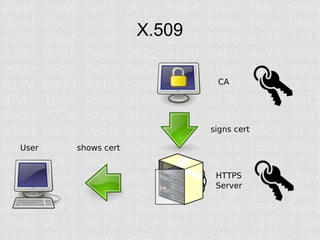
X.509

                             CA


                            signs cert

User   shows cert


                             HTTPS
                             Server
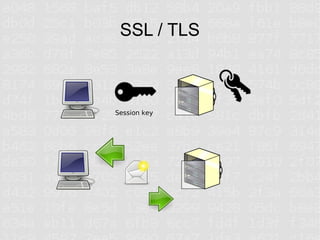
SSL / TLS


Session key
The certificate
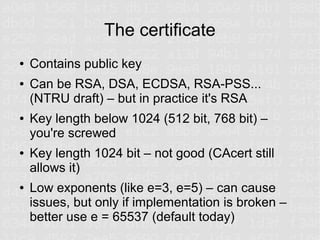
●   Contains public key
●   Can be RSA, DSA, ECDSA, RSA-PSS...
    (NTRU draft) – but in practice it's RSA
●   Key length below 1024 (512 bit, 768 bit) –
    you're screwed
●   Key length 1024 bit – not good (CAcert still
    allows it)
●   Low exponents (like e=3, e=5) – can cause
    issues, but only if implementation is broken –
    better use e = 65537 (default today)
RSA – random numbers?
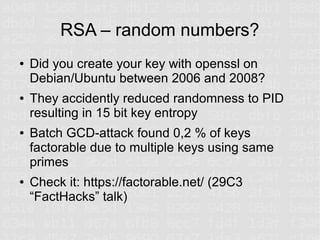
●   Did you create your key with openssl on
    Debian/Ubuntu between 2006 and 2008?
●   They accidently reduced randomness to PID
    resulting in 15 bit key entropy
●   Batch GCD-attack found 0,2 % of keys
    factorable due to multiple keys using same
    primes
●   Check it: https://factorable.net/ (29C3
    “FactHacks” talk)
Hashes
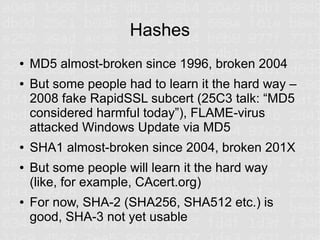
●   MD5 almost-broken since 1996, broken 2004
●   But some people had to learn it the hard way –
    2008 fake RapidSSL subcert (25C3 talk: “MD5
    considered harmful today”), FLAME-virus
    attacked Windows Update via MD5
●   SHA1 almost-broken since 2004, broken 201X
●   But some people will learn it the hard way
    (like, for example, CAcert.org)
●   For now, SHA-2 (SHA256, SHA512 etc.) is
    good, SHA-3 not yet usable
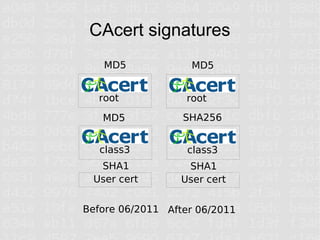
CAcert signatures
   MD5              MD5


  root             root
   MD5            SHA256


   class3          class3
  SHA1             SHA1
 User cert        User cert


Before 06/2011 After 06/2011
From SSLv1 to TLSv1.2
●   SSL by Netscape
●   SSLv2 (1995) is heavily broken, disabled in
    most apps today, replaced by SSLv3 (1996)
●   TLS – successor of SSL, standard by IETF
●   TLS 1.0 (1999), 1.1 (2006), 1.2 (2008)
●   TLS 1.0 somewhat broken, TLS 1.1 not good
●   If you want to avoid SHA1 you need TLS 1.2
●   BUT: Browser support widely only TLS 1.0
SSL-Algorithms
●   ECDHE-RSA-AES256-GCM-SHA384
●   This means: RSA-signed key exchange with
    Elliptic Curve Ephemeral DH, symmetric AES
    encryption with 256 bit, Galois/Counter Mode,
    SHA384 hash
●   RC4-SHA
●   This means: RSA-signed symmetric RC4
    encryption with SHA1 hash
Problems
●   If the server provides many algos, user may
    choose weak ones – out of server admins
    control
●   If the server is restrictive, connections may fail
    (old browsers)
●   Fine-granular tuning sometimes impossible in
    common software like Apache
●   In theory, everyone wants TLS 1.2 to avoid
    MD5/SHA1. In practice, almost nothing
    supports TLS 1.2.
Key exchange
●   Key exchange – create session key that never
    gets transmitted
●   Diffie Hellman or Elliptic Curve Diffie Hellman
●   Provides Perfect Forward Secrecy
●   If at some point in the future your server key
    gets compromised, attacker cannot decrypt
    previously recorded messages
●   Problem: Apache defaults to 1024 bit DH and
    this cannot be changed (experimental patch)
BEAST-attack
●   BEAST-attack against AES in CBC mode
●   Weakness was known for a long time, but
    impractical – BEAST-attack just brought it to
    the real world
●   Fixed in TLS 1.1 (but: the browsers...)
●   Mitigation – client-side
●   Server can offer RC4-ciphers (unaffected)
●   But: RC4+DHE not well supported (no forward
    secrecy)
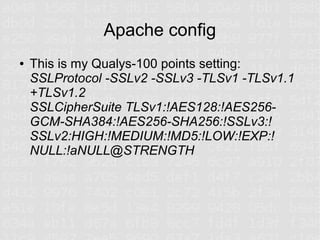
Apache config
●   This is my Qualys-100 points setting:
    SSLProtocol -SSLv2 -SSLv3 -TLSv1 -TLSv1.1
    +TLSv1.2
    SSLCipherSuite TLSv1:!AES128:!AES256-
    GCM-SHA384:!AES256-SHA256:!SSLv3:!
    SSLv2:HIGH:!MEDIUM:!MD5:!LOW:!EXP:!
    NULL:!aNULL@STRENGTH
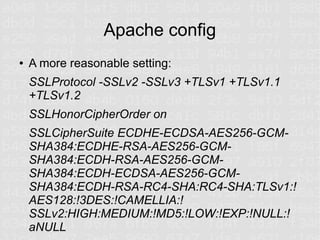
Apache config
●   A more reasonable setting:
    SSLProtocol -SSLv2 -SSLv3 +TLSv1 +TLSv1.1
    +TLSv1.2
    SSLHonorCipherOrder on
    SSLCipherSuite ECDHE-ECDSA-AES256-GCM-
    SHA384:ECDHE-RSA-AES256-GCM-
    SHA384:ECDH-RSA-AES256-GCM-
    SHA384:ECDH-ECDSA-AES256-GCM-
    SHA384:ECDH-RSA-RC4-SHA:RC4-SHA:TLSv1:!
    AES128:!3DES:!CAMELLIA:!
    SSLv2:HIGH:MEDIUM:!MD5:!LOW:!EXP:!NULL:!
    aNULL
TLS Compression / CRIME attack
●   CRIME attack by the authors of the BEAST
    attack
●   TLSCompression is broken
●   But nobody uses it anyway (limited browser
    support), so just disable it
●   Apache Config (only 2.4 / unreleased 2.2.24):
    SSLCompression off
●   Compression can still happen on the HTTP
    level
HSTS / Strict Transport Security
●   HTTP-header
●   Basically telling the browser:
    –   Don't connect if anything is wrong (e. g. wrong
        certificate – this is a problem for CAcert!)
    –   Only connect through SSL for timespan X (e. g. 6
        months)
    –   Can prevent SSL-Stripping
●   HTTP-header:
    Strict-Transport-Security max-age=31536000;
Revocation / OCSP stapling
●   Old method: CRL, doesn't scale
●   New method: OCSP, Problem: Privacy
●   Problem: What to do when OCSP responder
    not available? In theory: fail. In practice: pass.
●   Chrome disabled OCSP, because it's broken
    anyway
●   OCSP stapling encodes OCSP response in
    TLS communication
●   Good idea: enable it (apache 2.4)
SNI
●   Old problem of SSL: Only one certificate per
    IP
●   But: Server Name Indication (SNI) allows to
    change that
●   Almost every browser supports it! (except...
    still widely used Android 2.x)
●   Requires TLS 1.0
●   Fallback of Firefox and other browsers to
    SSLv3 causes problems with unreliable
    connections
The elephant in the room
●   Not focus of this talk, but:
●   The SSL-system based on centralized CAs is
    broken
●   Horribly broken
●   You trust an unknown number of entities and
    each one of them can attack every connection
●   It is easy to say that it's broken – it's much
    harder to tell how it should be
●   EFF tries:
    https://www.eff.org/sovereign-keys
Further info
●   SSL Observatory (talk at 27C3)
    https://www.eff.org/observatory
●   Check your Server:
    https://www.ssllabs.com/ssltest/
    https://factorable.net/
●   Use HTTPS everywhere:
    https://www.eff.org/https-everywhere

SSL, X.509, HTTPS - How to configure your HTTPS server

  • 1.
    SSL, X.509, HTTPS Howto configure your HTTPS server Hanno Böck, http://hboeck.de/
  • 2.
    HTTPS ● It's complex ● Two protocols involving crypto – X.509 (for the certificates) and SSL/TLS (for the data transport) ● Many things can go wrong ● Often issues in the protocols themselves, not just application bugs ● Test by Qualys: https://www.ssllabs.com/ssltest/
  • 3.
    The Problem ● I configured a host with everything like “you want it to be – as secure as possible”: https://fancyssl.hboeck.de/ ● But you won't be able to access it – at least not if you're using Internet Explorer, Firefox, Chrome, Safari, Opera or the Android-Browser ● w3m and lynx work ● If you don't want to wait till your browser supports modern ssl standards: http://fancynossl.hboeck.de/
  • 4.
    X.509 CA signs cert User shows cert HTTPS Server
  • 5.
  • 6.
    The certificate ● Contains public key ● Can be RSA, DSA, ECDSA, RSA-PSS... (NTRU draft) – but in practice it's RSA ● Key length below 1024 (512 bit, 768 bit) – you're screwed ● Key length 1024 bit – not good (CAcert still allows it) ● Low exponents (like e=3, e=5) – can cause issues, but only if implementation is broken – better use e = 65537 (default today)
  • 7.
    RSA – randomnumbers? ● Did you create your key with openssl on Debian/Ubuntu between 2006 and 2008? ● They accidently reduced randomness to PID resulting in 15 bit key entropy ● Batch GCD-attack found 0,2 % of keys factorable due to multiple keys using same primes ● Check it: https://factorable.net/ (29C3 “FactHacks” talk)
  • 8.
    Hashes ● MD5 almost-broken since 1996, broken 2004 ● But some people had to learn it the hard way – 2008 fake RapidSSL subcert (25C3 talk: “MD5 considered harmful today”), FLAME-virus attacked Windows Update via MD5 ● SHA1 almost-broken since 2004, broken 201X ● But some people will learn it the hard way (like, for example, CAcert.org) ● For now, SHA-2 (SHA256, SHA512 etc.) is good, SHA-3 not yet usable
  • 9.
    CAcert signatures MD5 MD5 root root MD5 SHA256 class3 class3 SHA1 SHA1 User cert User cert Before 06/2011 After 06/2011
  • 10.
    From SSLv1 toTLSv1.2 ● SSL by Netscape ● SSLv2 (1995) is heavily broken, disabled in most apps today, replaced by SSLv3 (1996) ● TLS – successor of SSL, standard by IETF ● TLS 1.0 (1999), 1.1 (2006), 1.2 (2008) ● TLS 1.0 somewhat broken, TLS 1.1 not good ● If you want to avoid SHA1 you need TLS 1.2 ● BUT: Browser support widely only TLS 1.0
  • 11.
    SSL-Algorithms ● ECDHE-RSA-AES256-GCM-SHA384 ● This means: RSA-signed key exchange with Elliptic Curve Ephemeral DH, symmetric AES encryption with 256 bit, Galois/Counter Mode, SHA384 hash ● RC4-SHA ● This means: RSA-signed symmetric RC4 encryption with SHA1 hash
  • 12.
    Problems ● If the server provides many algos, user may choose weak ones – out of server admins control ● If the server is restrictive, connections may fail (old browsers) ● Fine-granular tuning sometimes impossible in common software like Apache ● In theory, everyone wants TLS 1.2 to avoid MD5/SHA1. In practice, almost nothing supports TLS 1.2.
  • 13.
    Key exchange ● Key exchange – create session key that never gets transmitted ● Diffie Hellman or Elliptic Curve Diffie Hellman ● Provides Perfect Forward Secrecy ● If at some point in the future your server key gets compromised, attacker cannot decrypt previously recorded messages ● Problem: Apache defaults to 1024 bit DH and this cannot be changed (experimental patch)
  • 14.
    BEAST-attack ● BEAST-attack against AES in CBC mode ● Weakness was known for a long time, but impractical – BEAST-attack just brought it to the real world ● Fixed in TLS 1.1 (but: the browsers...) ● Mitigation – client-side ● Server can offer RC4-ciphers (unaffected) ● But: RC4+DHE not well supported (no forward secrecy)
  • 15.
    Apache config ● This is my Qualys-100 points setting: SSLProtocol -SSLv2 -SSLv3 -TLSv1 -TLSv1.1 +TLSv1.2 SSLCipherSuite TLSv1:!AES128:!AES256- GCM-SHA384:!AES256-SHA256:!SSLv3:! SSLv2:HIGH:!MEDIUM:!MD5:!LOW:!EXP:! NULL:!aNULL@STRENGTH
  • 16.
    Apache config ● A more reasonable setting: SSLProtocol -SSLv2 -SSLv3 +TLSv1 +TLSv1.1 +TLSv1.2 SSLHonorCipherOrder on SSLCipherSuite ECDHE-ECDSA-AES256-GCM- SHA384:ECDHE-RSA-AES256-GCM- SHA384:ECDH-RSA-AES256-GCM- SHA384:ECDH-ECDSA-AES256-GCM- SHA384:ECDH-RSA-RC4-SHA:RC4-SHA:TLSv1:! AES128:!3DES:!CAMELLIA:! SSLv2:HIGH:MEDIUM:!MD5:!LOW:!EXP:!NULL:! aNULL
  • 17.
    TLS Compression /CRIME attack ● CRIME attack by the authors of the BEAST attack ● TLSCompression is broken ● But nobody uses it anyway (limited browser support), so just disable it ● Apache Config (only 2.4 / unreleased 2.2.24): SSLCompression off ● Compression can still happen on the HTTP level
  • 18.
    HSTS / StrictTransport Security ● HTTP-header ● Basically telling the browser: – Don't connect if anything is wrong (e. g. wrong certificate – this is a problem for CAcert!) – Only connect through SSL for timespan X (e. g. 6 months) – Can prevent SSL-Stripping ● HTTP-header: Strict-Transport-Security max-age=31536000;
  • 19.
    Revocation / OCSPstapling ● Old method: CRL, doesn't scale ● New method: OCSP, Problem: Privacy ● Problem: What to do when OCSP responder not available? In theory: fail. In practice: pass. ● Chrome disabled OCSP, because it's broken anyway ● OCSP stapling encodes OCSP response in TLS communication ● Good idea: enable it (apache 2.4)
  • 20.
    SNI ● Old problem of SSL: Only one certificate per IP ● But: Server Name Indication (SNI) allows to change that ● Almost every browser supports it! (except... still widely used Android 2.x) ● Requires TLS 1.0 ● Fallback of Firefox and other browsers to SSLv3 causes problems with unreliable connections
  • 21.
    The elephant inthe room ● Not focus of this talk, but: ● The SSL-system based on centralized CAs is broken ● Horribly broken ● You trust an unknown number of entities and each one of them can attack every connection ● It is easy to say that it's broken – it's much harder to tell how it should be ● EFF tries: https://www.eff.org/sovereign-keys
  • 22.
    Further info ● SSL Observatory (talk at 27C3) https://www.eff.org/observatory ● Check your Server: https://www.ssllabs.com/ssltest/ https://factorable.net/ ● Use HTTPS everywhere: https://www.eff.org/https-everywhere