Paragon Alignment Tool (PAT) is a powerful and flexible utility which automatically detects and corrects misaligned partitions in 4K drives in physical and virtual environments for optimum performance and longevity.
Partition Alignment
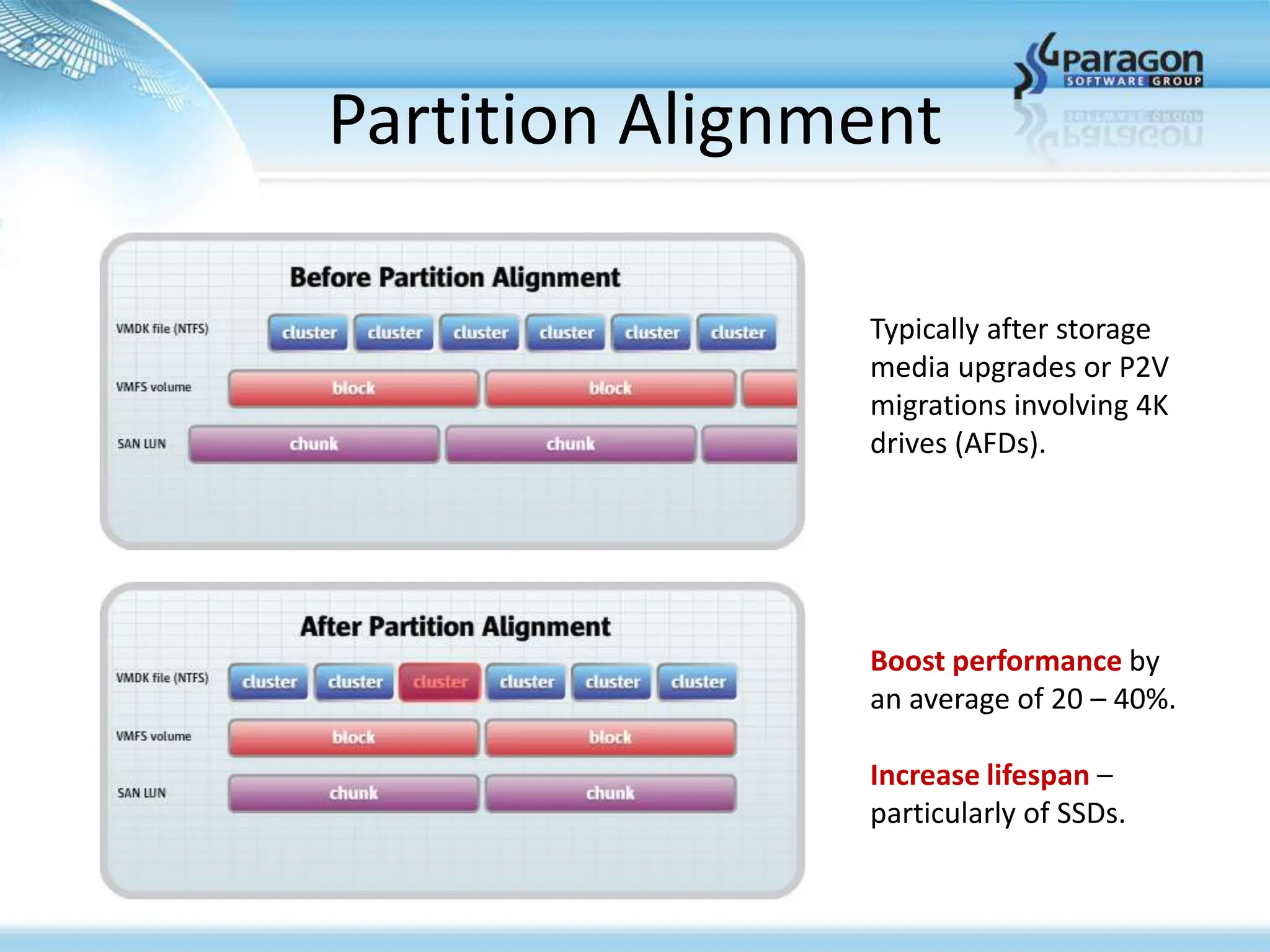
Typically after storage
media upgrades or P2V
migrations involving 4K
drives (AFDs).
Boost performance by
an average of 20 – 40%.
Increase lifespan –
particularly of SSDs.
3.
Partition Alignment
Paragon AlignmentTool (PAT) is a powerful and flexible utility which automatically detects
and corrects misaligned partitions in 4K drives in physical and virtual environments for
optimum performance and longevity.
Windows Server 2003 (as well as Windows XP and earlier versions of Windows operating
systems – which are all designed for 512 byte sectors) may misalign 4K, advanced format
drives (AFDs) with an offset 1 sector, causing redundant read/write operations that
significantly degrade I/O performance and drive longevity. See white paper.
Paragon Alignment Tool solves these problems by determining if a drive is misaligned and
then realigning all partitions (including the boot partition) to the correct sector boundaries,
without affecting the operating system or data. See data sheet.
Due to its unique, in-place alignment method and its advanced HotPAT technology,
Paragon PAT aligns data partitions of all sizes online and with zero downtime, and
without requiring any additional storage space (swap space).
4.
Partition Alignment Tool
Boosts storage performance by typically 20% to 40%
Increases lifespan of SSDs and HDDs
HotPAT technology allows for data partitions to be aligned while online,
with zero downtime required
Automatically detects and corrects misaligned partitions on 4K sector HDDs
and SSDs
Aligns partitions inside virtual containers and host
VMware (VMDK), Microsoft (VHD) and Oracle (VDI)
New remote management console
Safe Mode: resume interrupted alignments after power loss or system reset
Zero-install versions available (run from CD, USB, or network share)
5.
Contact Paragon
Customer Support/ChannelSales
(888) 347-5462 (option 2, then option 2)
Technical Support
(888) 347-5462 (option 3, then option 1)
support@paragon-software.com
Daniel Eickhoff – Director, Channel Sales
direct: (949) 825-6292
daniel.eickhoff@paragon-software.com


![Coded Agents – with UiPath SDK + LangGraph [Virtual Hands-on Workshop]](https://cdn.slidesharecdn.com/ss_thumbnails/codedagentsdeck-251215155422-5497c599-thumbnail.jpg?width=640&height=640&fit=bounds)


