Game Developers Conference 2011


  Approximating Translucency
for a Fast, Cheap and Convincing
   Subsurface Scattering Look

       Colin Barré-Brisebois (speaker)
               Marc Bouchard
Agenda
•   Prelude – Real-Time Demo
•   1. Translucency in Computer Graphics
•   2. Technique Details
•   3. Implementation Details
•   Q&A


                                           Fig. 1 – Real-Time Translucency in Frostbite 2
Real-Time Translucency
Demo
Translucency in Computer
Graphics
Translucency
The quality of allowing light to pass partially and diffusely
inside media.


          Fig. 2 – Translucency in Athena Statue (left) [BarréBrisebois11], and child’s hand (right)
Translucency in Computer Graphics
• We rely heavily on BRDFs for describing local
   reflections
  – Simple and effective for opaque objects
• However, many objects in nature are (partly)
  translucent
  – Light transport also happens within the surface
  – BRDFs are not sufficient
• BSSRDFs allow for an even better simulation
  – But are usually more/too expensive
• In our case, we chose BSDFs (BRDF + BTDF),
   with some elements of BSSRDF
                                                      Fig. 3 – BRDF, BTDF and BSSRDF
The State of Translucency
Real-time translucency and derivatives come in different
flavors:
• The more complex, but (relatively) expensive
  – [Chang08] Texture-space Importance Sampling
  – [Hable09] Texture-space Diffusion blurs, for skin / SSS
  – [Ki09] Shadowmap-based Translucency / SSS


                                                                   Fig. 5 – Texture-space Diffusion [Hable09]


            Fig. 4 – Texture-space Importance Sampling [Chang08]
The State of Translucency (cont.)
Real-time translucency and derivatives come in different
flavors:
• The simpler, but faster
  – [Sousa08] double-sided lighting &
    attenuation for foliage
• We want: fast like [Sousa08], and
  nice / complex results like the
  others 


                                        Fig. 6 – Foliage Translucency from Crytek’s Crysis
And we got...


          Fig. 7 – Real-Time Translucency in EA DICE’s Frostbite 2 Engine
And we got... (cont.)


      Fig. 8 – Real-Time Translucency (Skin/Left, Hebe/Right) in EA DICE’s Frostbite 2 Engine
Technique Details
Overview
• We don’t want to rely on additional depth maps and texture-space blurs
  – Requires more memory (i.e. for depth maps)
  – Requires significant computation (i.e. for texture blurs)
  – The previous are still feasible, but what if we could do without...
• In essence, for convincing translucency, the light traveling inside the shape:
  – Has to be influenced by the varying thickness of the object
  – Has to show some view & light-dependent diffusion/attenuation
• We only really need a simple representation of inner surface diffusion
  – Most users will be convinced even if not fully accurate!
  – Also, if the effect is cheap, we are free to use it everywhere!*   
Overview (cont.)


            Fig. 9 – Direct and Translucency Lighting Vectors
Local Thickness


              Fig. 10 – Local Thickness on Hebe
Computing Local Thickness
• We rely on ambient occlusion for computing this info:
 1. Invert the surface normals
 2. Render ambient occlusion
 3. Invert the colors and store in texture
• Can also be stored in vertex color, if tesselation allows
• Similar to [Sousa08], but streamlined for meshes of varying
  shapes and sizes.
Computing Local Thickness (cont.)


             Fig. 11 – Local Thickness Texture for Hebe
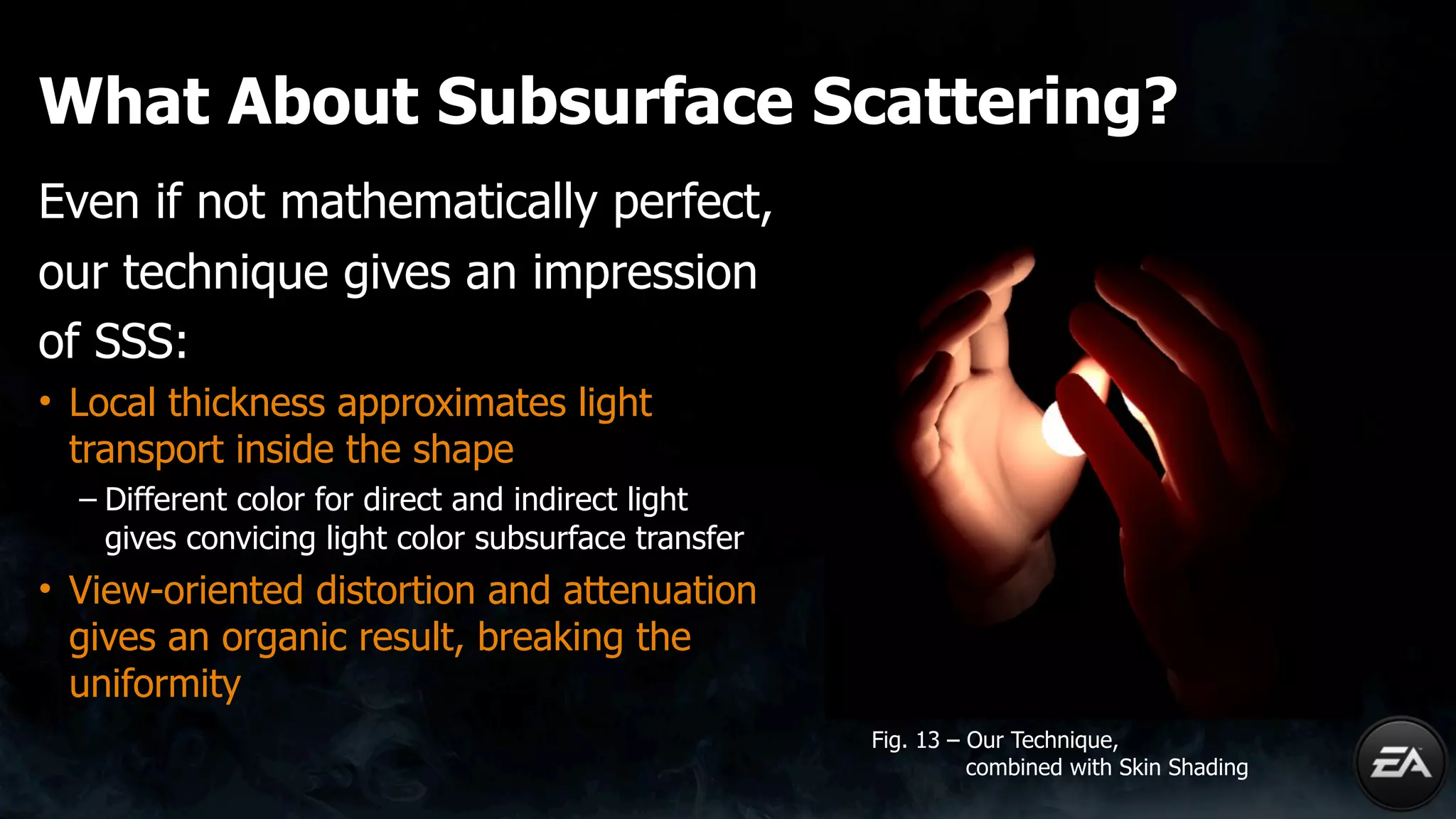
What About Subsurface Scattering?
Even if not mathematically perfect,
our technique gives an impression
of SSS:
• Local thickness approximates light
  transport inside the shape
  – Different color for direct and indirect light
    gives convicing light color subsurface transfer
• View-oriented distortion and attenuation
  gives an organic result, breaking the
  uniformity
                                                      Fig. 13 – Our Technique,
                                                                combined with Skin Shading
Implementation Details
Code
half3
vLTLight
=
vLight
+
vNormal
*
fLTDistortion;
half
fLTDot
=
pow(saturate(dot(vEye,
‐vLTLight)),
iLTPower)
*
fLTScale;
half3
fLT
=
fLightAttenuation
*
(fLTDot
+
fLTAmbient)
*
fLTThickness;
outColor.rgb
+=
cDiffuseAlbedo
*
cLightDiffuse
*
fLT;

• Generates approx. 13 ALU
  instructions (based on platform)
  – More performance details in following
    slides
• Can precompute powers in order to
  get rid of the pow()

                                            Fig. 9 – Direct and Translucency Lighting Vectors
Managing the Data at Runtime
At runtime, we have several parameters to manage, some per-
light, some per-material:
• Per-light parameters are used during the deferred light pass
• Per-material parameters are stored in the g-buffer
 – Can also be stored in a separate buffer, if space-limited
 – Some parameters make more sense per-light, some per-material
 – This is very specific to your g-buffer setup
 – Might require some clever packing/unpacking
   • For packing more parameters on a per-material basis, instead of per-light
 – Using this technique with deferred shading definitely brings-the-thunder!
Managing the Data at Runtime (cont.)
half3
vLTLight
=
vLight
+
vNormal
*
fLTDistortion;
half
fLTDot
=
pow(saturate(dot(vEye,
‐vLTLight)),
iLTPower)
*
fLTScale;
half3
fLT
=
fLightAttenuation
*
(fLTDot
+
fLTAmbient)
*
fLTThickness;
outColor.rgb
+=
cDiffuseAlbedo
*
cLightDiffuse
*
fLT;


fLTAmbient
• Ambient value
• Visible from all angles
• Representing both front and back
  translucency that is always present
• Optimally, per-material
                                              Fig. 14 – Ambient Term
Managing the Data at Runtime (cont.)
half3
vLTLight
=
vLight
+
vNormal
*
fLTDistortion;
half
fLTDot
=
pow(saturate(dot(vEye,
‐vLTLight)),
iLTPower)
*
fLTScale;
half3
fLT
=
fLightAttenuation
*
(fLTDot
+
fLTAmbient)
*
fLTThickness;
outColor.rgb
+=
cDiffuseAlbedo
*
cLightDiffuse
*
fLT;


iLTPower
• Power value for direct translucency
• Breaks continuity, view-dependent
• Can be optimized with pre-computed
  powers
• Optimally, per-material
                                          Fig. 16 – Power (4/Left, 12/Right) Term
Managing the Data at Runtime (cont.)
half3
vLTLight
=
vLight
+
vNormal
*
fLTDistortion;
half
fLTDot
=
pow(saturate(dot(vEye,
‐vLTLight)),
iLTPower)
*
fLTScale;
half3
fLT
=
fLightAttenuation
*
(fLTDot
+
fLTAmbient)
*
fLTThickness;
outColor.rgb
+=
cDiffuseAlbedo
*
cLightDiffuse
*
fLT;


fLTDistortion
• Subsurface Distortion
• Shifts the surface normal
• Breaks continuity, view-dependent
  Allows for more organic, Fresnel-like
• Optimally, per-material
                                          Fig. 17 – Distortion (None/Left, 0.2/Right) Term
Managing the Data at Runtime (cont.)
half3
vLTLight
=
vLight
+
vNormal
*
fLTDistortion;
half
fLTDot
=
pow(saturate(dot(vEye,
‐vLTLight)),
iLTPower)
*
fLTScale;
half3
fLT
=
fLightAttenuation
*
(fLTDot
+
fLTAmbient)
*
fLTThickness;
outColor.rgb
+=
cDiffuseAlbedo
*
cLightDiffuse
*
fLT;


fLTThickness
• Pre-computed Local Thickness Map
• Used for both direct and indirect
  translucency
• Attenuates the computation where
  surface thickness varies
• Defined per-material
                                              Fig. 18 – Local Thickness
Managing the Data at Runtime (cont.)
half3
vLTLight
=
vLight
+
vNormal
*
fLTDistortion;
half
fLTDot
=
pow(saturate(dot(vEye,
‐vLTLight)),
iLTPower)
*
fLTScale;
half3
fLT
=
fLightAttenuation
*
(fLTDot
+
fLTAmbient)
*
fLTThickness;
outColor.rgb
+=
cDiffuseAlbedo
*
cLightDiffuse
*
fLT;


fLTScale
• Scale value
• Direct / Back translucency
• View-oriented
• Should be defined per-light. This
  makes it the central control point
                                          Fig. 15 – Scale (1/Left, 5/Right) Term
All-Together


               Fig. 19 – The Final Result on Hebe
Deferred Shading G-Buffer Setup
Minimally, translucency can be stored in the g-buffer as a
single greyscale value:


                       Fig. 20 – Our G-Buffer, with greyscale Translucency

Based on your game, this can be enough. The color will then only originate
from the light sources (and also diffuse albedo).
Deferred Shading G-Buffer Setup (cont.)


All objects here are
relying on a
greyscale value
for translucency 


                       Fig. 1 – Real-Time Translucency in Frostbite 2
Deferred Shading G-Buffer Setup (cont.)
Better results will be achieved if translucency is a color (here,
with some packing):


                   Fig. 21 – Our G-Buffer, with coloured Translucency (packed/offset)
This translucency color, representing our inner surface color diffusion, will
be combined to the light color and the material’s diffuse albedo.
Deferred Shading G-Buffer Setup (cont.)

Green Light
White Albedo
Red Translucency ->
# #          #     #     #
   #     #     #     #                                                         <- Blue Light
     #     #     #     #
       #                                                                          White Albedo &
                                                                                  Translucency


                             Fig. 22 – Real-Time Translucency in Frostbite 2
Performance
                         XBOX
360     PLAYSTATION
3      PC
(DX11)
Full‐Screen

Coverage
   0.6
ms       1.0
ms             0.03
ms

Instruc9ons
             13           17                 12


• PS3: Takes advantage of our light-tile rendering on SPUs
   – See Christina Coffin’s ”SPU Deferred Shading for BF3 on PS3”
• DX11: Supported in our Compute Shader solution
   – See Johan Andersson’s “DX11 rendering in Battlefield 3” talk for more
     DX11-related details
• PC: AMD Radeon 6970
Caveats
• Doesn’t take all concavities into account
• Technique is optimal for convex hulls
• Doesn’t work with morphing/animated
  objects
  – Alternative: Though camera dependent, several
    cases could work with a real-time thickness approximation
    [Oat08]
  – Alternative: Could also use an hybrid dynamic AO            Fig. 23 – Concave Hull
    computation, with inverted normals
Summary and Q&A
• We presented an artist-friendly, fast and scalable real-time
  approximation of light transport in translucent homogenous
  media:
 – Improves games visuals by adding a new dimension, with light traveling
   inside shapes
 – Has a scalable and reasonable impact on runtime
 – Provides convincing results even if not mathematically
   perfect
• This technique is also published in GPU Pro 2,
  released this week at GDC. Check out the book!
Special Thanks
•   Sergei Savchenko
•   Johan Andersson (@repi)
•   Christina Coffin (@christinacoffin)
•   Halldor Fannar
•   Joakim Svärling
•   Stephen Hill (@self_shadow)
•   Frederic O’Reilly
•   John White
•   Wessam Bahnassi
•   Carsten Dachsbacher
•   Daniel Collin (@daniel_collin)
•   Torbjörn Malmer
•   Kenny Magnusson                       • Mohannad Al-Khatib (@psychodesigns)
•   Dominik Bauset                        • Colin Boswell (@bozz)
•   Sandra Jensen
References
[BarréBrisebois11] Barré-Brisebois, Colin and Bouchard, Marc.”Real-Time Approximation of Light Transport
                         in Translucent Homogenous Media”, GPU Pro 2, Wolfgang Engel, Ed. Charles River
                         Media, 2011.
[Chang08]                Chang, Chih-Wen, Lin, Wen-Chieh, Ho, Tan-Chi, Huang, Tsung-Shian and Chuang,
                         Jung-Hong. “Real-Time Translucent Rendering Using GPU-based Texture Space
                         Importance Sampling,” Computer Graphics Forum (Eurographics 2008), Vol. 27,
                         No. 2, 2008, pp 517-526.
[Hable09]                Hable, John, Borshukov, George and Hejl, Jim. “Fast Skin Shading,” ShaderX7: Advanced
                         Rendering Techniques, Wolfgang Engel, Ed., Charles River Media, 2009: pp. 161-173.
[Ki09]                   Ki, Hyunwoo. “Real-time Subsurface Scattering Using Shadow Maps,” ShaderX7:
                         Advanced Rendering Techniques, Wolfgang Engel, Ed., Charles River Media, 2009:
                         pp. 467-478.
[Oat08]                  Oat, Christopher and Scheuermann, Thorsten. “Computing Per-Pixel Object Thickness in
                         a Single Render Pass,” ShaderX6: Advanced Rendering Techniques, Wolfgang Engel,
                         Ed., Charles River Media, 2008: pp. 57-62.
[Sousa08]                Sousa, Tiago. “Vegetation Procedural Animation and Shading in Crysis,” GPU Gems 3,
                         Hubert Nguyen, Ed., Addison-Wesley, 2008: pp. 373-385.
Colin Barre-Brisebois - GDC 2011 - Approximating Translucency for a Fast, Cheap and Convincing Subsurface-Scattering Look

Colin Barre-Brisebois - GDC 2011 - Approximating Translucency for a Fast, Cheap and Convincing Subsurface-Scattering Look

  • 1.
    Game Developers Conference2011 Approximating Translucency for a Fast, Cheap and Convincing Subsurface Scattering Look Colin Barré-Brisebois (speaker) Marc Bouchard
  • 2.
    Agenda • Prelude – Real-Time Demo • 1. Translucency in Computer Graphics • 2. Technique Details • 3. Implementation Details • Q&A Fig. 1 – Real-Time Translucency in Frostbite 2
  • 3.
  • 6.
  • 7.
    Translucency The quality ofallowing light to pass partially and diffusely inside media. Fig. 2 – Translucency in Athena Statue (left) [BarréBrisebois11], and child’s hand (right)
  • 8.
    Translucency in ComputerGraphics • We rely heavily on BRDFs for describing local reflections – Simple and effective for opaque objects • However, many objects in nature are (partly) translucent – Light transport also happens within the surface – BRDFs are not sufficient • BSSRDFs allow for an even better simulation – But are usually more/too expensive • In our case, we chose BSDFs (BRDF + BTDF), with some elements of BSSRDF Fig. 3 – BRDF, BTDF and BSSRDF
  • 9.
    The State ofTranslucency Real-time translucency and derivatives come in different flavors: • The more complex, but (relatively) expensive – [Chang08] Texture-space Importance Sampling – [Hable09] Texture-space Diffusion blurs, for skin / SSS – [Ki09] Shadowmap-based Translucency / SSS Fig. 5 – Texture-space Diffusion [Hable09] Fig. 4 – Texture-space Importance Sampling [Chang08]
  • 10.
    The State ofTranslucency (cont.) Real-time translucency and derivatives come in different flavors: • The simpler, but faster – [Sousa08] double-sided lighting & attenuation for foliage • We want: fast like [Sousa08], and nice / complex results like the others  Fig. 6 – Foliage Translucency from Crytek’s Crysis
  • 11.
    And we got... Fig. 7 – Real-Time Translucency in EA DICE’s Frostbite 2 Engine
  • 12.
    And we got...(cont.) Fig. 8 – Real-Time Translucency (Skin/Left, Hebe/Right) in EA DICE’s Frostbite 2 Engine
  • 13.
  • 14.
    Overview • We don’twant to rely on additional depth maps and texture-space blurs – Requires more memory (i.e. for depth maps) – Requires significant computation (i.e. for texture blurs) – The previous are still feasible, but what if we could do without... • In essence, for convincing translucency, the light traveling inside the shape: – Has to be influenced by the varying thickness of the object – Has to show some view & light-dependent diffusion/attenuation • We only really need a simple representation of inner surface diffusion – Most users will be convinced even if not fully accurate! – Also, if the effect is cheap, we are free to use it everywhere!* 
  • 15.
    Overview (cont.) Fig. 9 – Direct and Translucency Lighting Vectors
  • 16.
    Local Thickness Fig. 10 – Local Thickness on Hebe
  • 17.
    Computing Local Thickness •We rely on ambient occlusion for computing this info: 1. Invert the surface normals 2. Render ambient occlusion 3. Invert the colors and store in texture • Can also be stored in vertex color, if tesselation allows • Similar to [Sousa08], but streamlined for meshes of varying shapes and sizes.
  • 18.
    Computing Local Thickness(cont.) Fig. 11 – Local Thickness Texture for Hebe
  • 19.
    What About SubsurfaceScattering? Even if not mathematically perfect, our technique gives an impression of SSS: • Local thickness approximates light transport inside the shape – Different color for direct and indirect light gives convicing light color subsurface transfer • View-oriented distortion and attenuation gives an organic result, breaking the uniformity Fig. 13 – Our Technique, combined with Skin Shading
  • 20.
  • 21.
  • 22.
    Managing the Dataat Runtime At runtime, we have several parameters to manage, some per- light, some per-material: • Per-light parameters are used during the deferred light pass • Per-material parameters are stored in the g-buffer – Can also be stored in a separate buffer, if space-limited – Some parameters make more sense per-light, some per-material – This is very specific to your g-buffer setup – Might require some clever packing/unpacking • For packing more parameters on a per-material basis, instead of per-light – Using this technique with deferred shading definitely brings-the-thunder!
  • 23.
    Managing the Dataat Runtime (cont.) half3
vLTLight
=
vLight
+
vNormal
*
fLTDistortion; half
fLTDot
=
pow(saturate(dot(vEye,
‐vLTLight)),
iLTPower)
*
fLTScale; half3
fLT
=
fLightAttenuation
*
(fLTDot
+
fLTAmbient)
*
fLTThickness; outColor.rgb
+=
cDiffuseAlbedo
*
cLightDiffuse
*
fLT; fLTAmbient • Ambient value • Visible from all angles • Representing both front and back translucency that is always present • Optimally, per-material Fig. 14 – Ambient Term
  • 24.
    Managing the Dataat Runtime (cont.) half3
vLTLight
=
vLight
+
vNormal
*
fLTDistortion; half
fLTDot
=
pow(saturate(dot(vEye,
‐vLTLight)),
iLTPower)
*
fLTScale; half3
fLT
=
fLightAttenuation
*
(fLTDot
+
fLTAmbient)
*
fLTThickness; outColor.rgb
+=
cDiffuseAlbedo
*
cLightDiffuse
*
fLT; iLTPower • Power value for direct translucency • Breaks continuity, view-dependent • Can be optimized with pre-computed powers • Optimally, per-material Fig. 16 – Power (4/Left, 12/Right) Term
  • 25.
    Managing the Dataat Runtime (cont.) half3
vLTLight
=
vLight
+
vNormal
*
fLTDistortion; half
fLTDot
=
pow(saturate(dot(vEye,
‐vLTLight)),
iLTPower)
*
fLTScale; half3
fLT
=
fLightAttenuation
*
(fLTDot
+
fLTAmbient)
*
fLTThickness; outColor.rgb
+=
cDiffuseAlbedo
*
cLightDiffuse
*
fLT; fLTDistortion • Subsurface Distortion • Shifts the surface normal • Breaks continuity, view-dependent Allows for more organic, Fresnel-like • Optimally, per-material Fig. 17 – Distortion (None/Left, 0.2/Right) Term
  • 26.
    Managing the Dataat Runtime (cont.) half3
vLTLight
=
vLight
+
vNormal
*
fLTDistortion; half
fLTDot
=
pow(saturate(dot(vEye,
‐vLTLight)),
iLTPower)
*
fLTScale; half3
fLT
=
fLightAttenuation
*
(fLTDot
+
fLTAmbient)
*
fLTThickness; outColor.rgb
+=
cDiffuseAlbedo
*
cLightDiffuse
*
fLT; fLTThickness • Pre-computed Local Thickness Map • Used for both direct and indirect translucency • Attenuates the computation where surface thickness varies • Defined per-material Fig. 18 – Local Thickness
  • 27.
    Managing the Dataat Runtime (cont.) half3
vLTLight
=
vLight
+
vNormal
*
fLTDistortion; half
fLTDot
=
pow(saturate(dot(vEye,
‐vLTLight)),
iLTPower)
*
fLTScale; half3
fLT
=
fLightAttenuation
*
(fLTDot
+
fLTAmbient)
*
fLTThickness; outColor.rgb
+=
cDiffuseAlbedo
*
cLightDiffuse
*
fLT; fLTScale • Scale value • Direct / Back translucency • View-oriented • Should be defined per-light. This makes it the central control point Fig. 15 – Scale (1/Left, 5/Right) Term
  • 28.
    All-Together Fig. 19 – The Final Result on Hebe
  • 29.
    Deferred Shading G-BufferSetup Minimally, translucency can be stored in the g-buffer as a single greyscale value: Fig. 20 – Our G-Buffer, with greyscale Translucency Based on your game, this can be enough. The color will then only originate from the light sources (and also diffuse albedo).
  • 30.
    Deferred Shading G-BufferSetup (cont.) All objects here are relying on a greyscale value for translucency  Fig. 1 – Real-Time Translucency in Frostbite 2
  • 31.
    Deferred Shading G-BufferSetup (cont.) Better results will be achieved if translucency is a color (here, with some packing): Fig. 21 – Our G-Buffer, with coloured Translucency (packed/offset) This translucency color, representing our inner surface color diffusion, will be combined to the light color and the material’s diffuse albedo.
  • 32.
    Deferred Shading G-BufferSetup (cont.) Green Light White Albedo Red Translucency -> # # # # # # # # # <- Blue Light # # # # # White Albedo & Translucency Fig. 22 – Real-Time Translucency in Frostbite 2
  • 33.
    Performance XBOX
360 PLAYSTATION
3 PC
(DX11) Full‐Screen

Coverage
 0.6
ms 1.0
ms 0.03
ms Instruc9ons
 13 17 12
 • PS3: Takes advantage of our light-tile rendering on SPUs – See Christina Coffin’s ”SPU Deferred Shading for BF3 on PS3” • DX11: Supported in our Compute Shader solution – See Johan Andersson’s “DX11 rendering in Battlefield 3” talk for more DX11-related details • PC: AMD Radeon 6970
  • 34.
    Caveats • Doesn’t takeall concavities into account • Technique is optimal for convex hulls • Doesn’t work with morphing/animated objects – Alternative: Though camera dependent, several cases could work with a real-time thickness approximation [Oat08] – Alternative: Could also use an hybrid dynamic AO Fig. 23 – Concave Hull computation, with inverted normals
  • 35.
    Summary and Q&A •We presented an artist-friendly, fast and scalable real-time approximation of light transport in translucent homogenous media: – Improves games visuals by adding a new dimension, with light traveling inside shapes – Has a scalable and reasonable impact on runtime – Provides convincing results even if not mathematically perfect • This technique is also published in GPU Pro 2, released this week at GDC. Check out the book!
  • 37.
    Special Thanks • Sergei Savchenko • Johan Andersson (@repi) • Christina Coffin (@christinacoffin) • Halldor Fannar • Joakim Svärling • Stephen Hill (@self_shadow) • Frederic O’Reilly • John White • Wessam Bahnassi • Carsten Dachsbacher • Daniel Collin (@daniel_collin) • Torbjörn Malmer • Kenny Magnusson • Mohannad Al-Khatib (@psychodesigns) • Dominik Bauset • Colin Boswell (@bozz) • Sandra Jensen
  • 38.
    References [BarréBrisebois11] Barré-Brisebois, Colinand Bouchard, Marc.”Real-Time Approximation of Light Transport in Translucent Homogenous Media”, GPU Pro 2, Wolfgang Engel, Ed. Charles River Media, 2011. [Chang08] Chang, Chih-Wen, Lin, Wen-Chieh, Ho, Tan-Chi, Huang, Tsung-Shian and Chuang, Jung-Hong. “Real-Time Translucent Rendering Using GPU-based Texture Space Importance Sampling,” Computer Graphics Forum (Eurographics 2008), Vol. 27, No. 2, 2008, pp 517-526. [Hable09] Hable, John, Borshukov, George and Hejl, Jim. “Fast Skin Shading,” ShaderX7: Advanced Rendering Techniques, Wolfgang Engel, Ed., Charles River Media, 2009: pp. 161-173. [Ki09] Ki, Hyunwoo. “Real-time Subsurface Scattering Using Shadow Maps,” ShaderX7: Advanced Rendering Techniques, Wolfgang Engel, Ed., Charles River Media, 2009: pp. 467-478. [Oat08] Oat, Christopher and Scheuermann, Thorsten. “Computing Per-Pixel Object Thickness in a Single Render Pass,” ShaderX6: Advanced Rendering Techniques, Wolfgang Engel, Ed., Charles River Media, 2008: pp. 57-62. [Sousa08] Sousa, Tiago. “Vegetation Procedural Animation and Shading in Crysis,” GPU Gems 3, Hubert Nguyen, Ed., Addison-Wesley, 2008: pp. 373-385.