Divide And Be Conquered? 04/23/2009  Brooks Johnson [email_address]
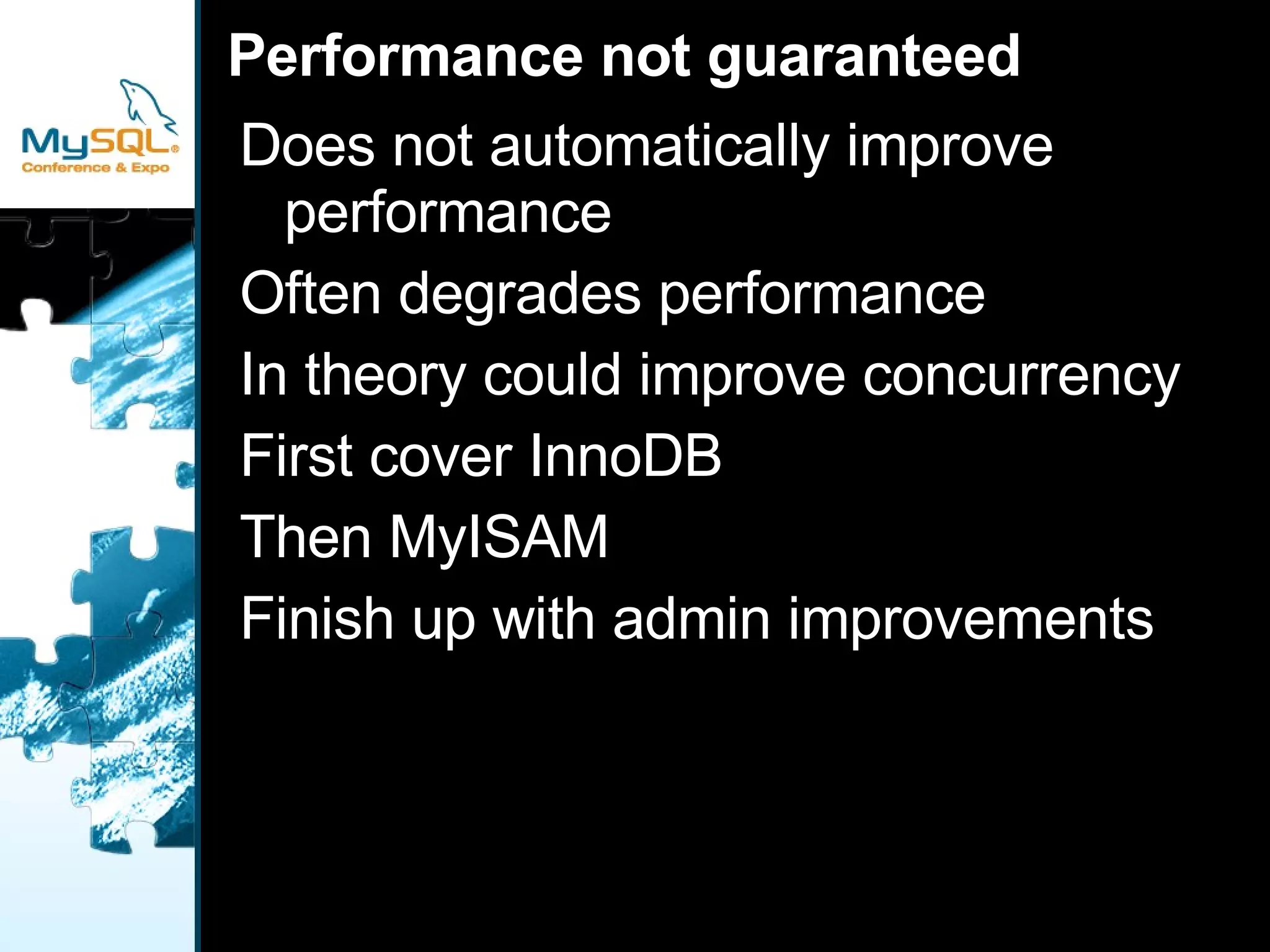
Performance not guaranteed Does not automatically improve performance
Often degrades performance
In theory could improve concurrency
First cover InnoDB
Then MyISAM
Finish up with admin improvements
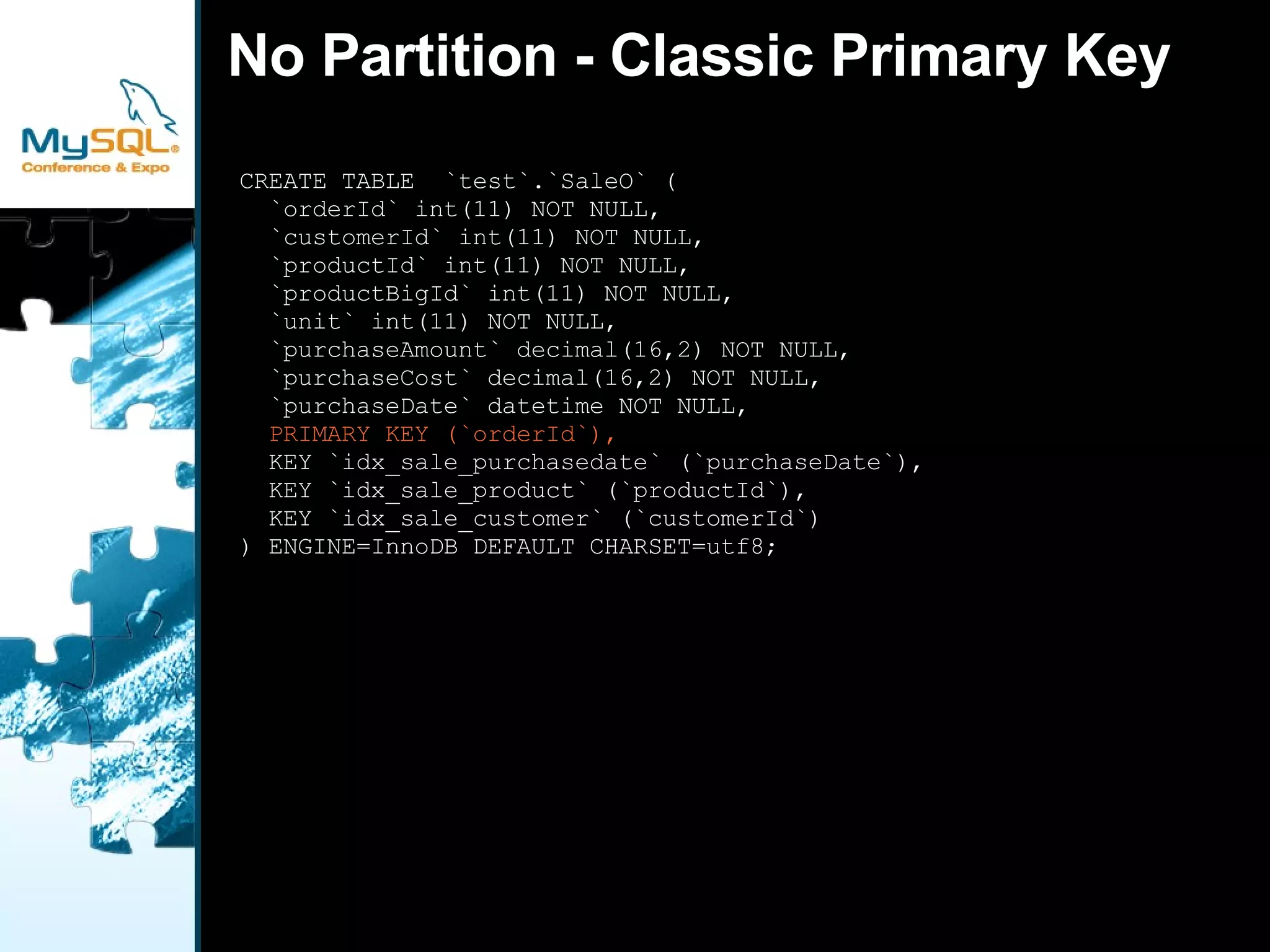
No Partition - Classic Primary Key  CREATE TABLE  `test`.`SaleO` ( `orderId` int(11) NOT NULL, `customerId` int(11) NOT NULL, `productId` int(11) NOT NULL, `productBigId` int(11) NOT NULL, `unit` int(11) NOT NULL, `purchaseAmount` decimal(16,2) NOT NULL, `purchaseCost` decimal(16,2) NOT NULL, `purchaseDate` datetime NOT NULL, PRIMARY KEY (`orderId`), KEY `idx_sale_purchasedate` (`purchaseDate`), KEY `idx_sale_product` (`productId`), KEY `idx_sale_customer` (`customerId`) ) ENGINE=InnoDB DEFAULT CHARSET=utf8;
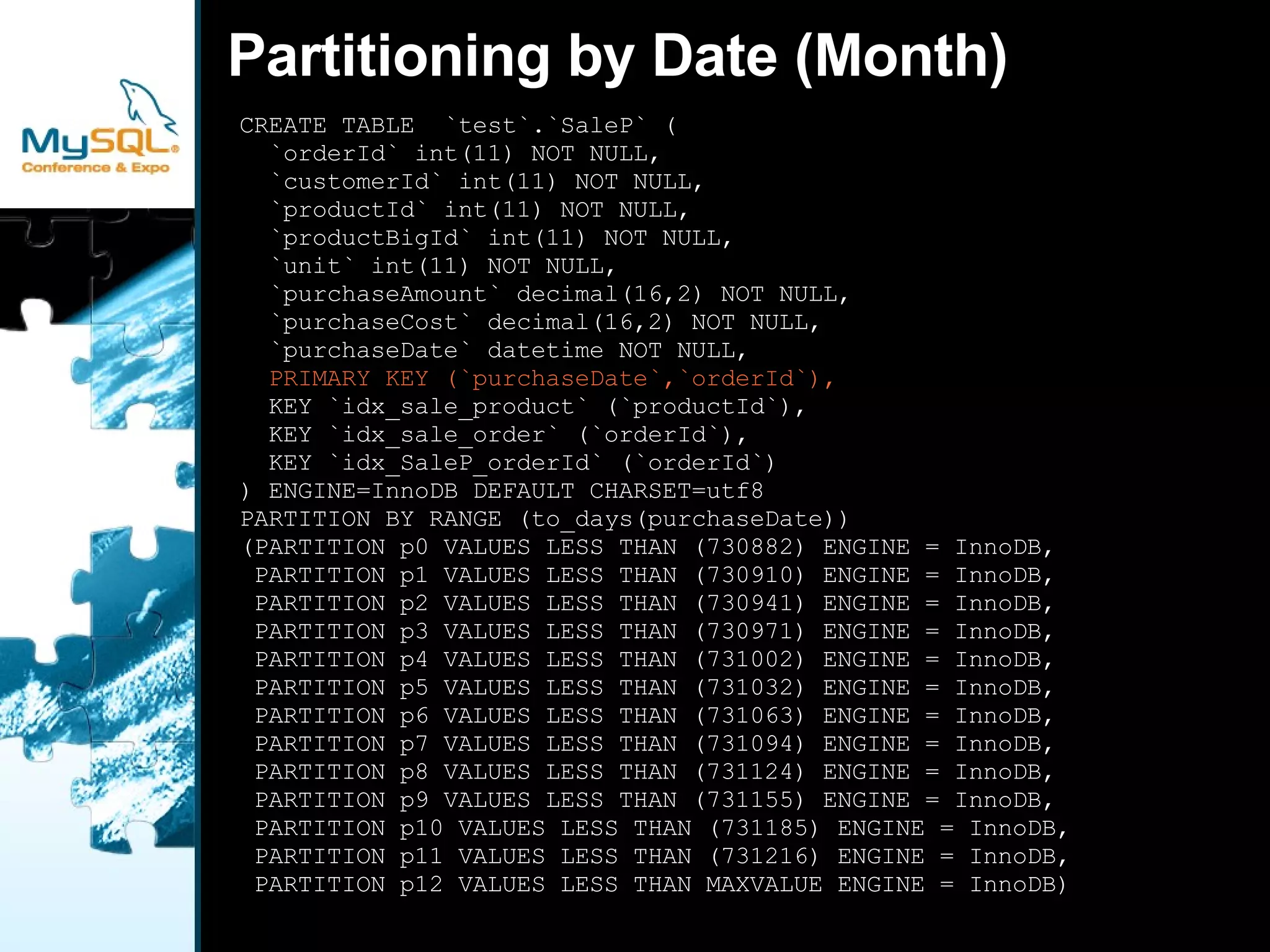
Partitioning by Date (Month) CREATE TABLE  `test`.`SaleP` ( `orderId` int(11) NOT NULL, `customerId` int(11) NOT NULL, `productId` int(11) NOT NULL, `productBigId` int(11) NOT NULL, `unit` int(11) NOT NULL, `purchaseAmount` decimal(16,2) NOT NULL, `purchaseCost` decimal(16,2) NOT NULL, `purchaseDate` datetime NOT NULL, PRIMARY KEY (`purchaseDate`,`orderId`), KEY `idx_sale_product` (`productId`), KEY `idx_sale_order` (`orderId`), KEY `idx_SaleP_orderId` (`orderId`) ) ENGINE=InnoDB DEFAULT CHARSET=utf8 PARTITION BY RANGE (to_days(purchaseDate)) (PARTITION p0 VALUES LESS THAN (730882) ENGINE = InnoDB, PARTITION p1 VALUES LESS THAN (730910) ENGINE = InnoDB, PARTITION p2 VALUES LESS THAN (730941) ENGINE = InnoDB, PARTITION p3 VALUES LESS THAN (730971) ENGINE = InnoDB, PARTITION p4 VALUES LESS THAN (731002) ENGINE = InnoDB, PARTITION p5 VALUES LESS THAN (731032) ENGINE = InnoDB, PARTITION p6 VALUES LESS THAN (731063) ENGINE = InnoDB, PARTITION p7 VALUES LESS THAN (731094) ENGINE = InnoDB, PARTITION p8 VALUES LESS THAN (731124) ENGINE = InnoDB, PARTITION p9 VALUES LESS THAN (731155) ENGINE = InnoDB, PARTITION p10 VALUES LESS THAN (731185) ENGINE = InnoDB, PARTITION p11 VALUES LESS THAN (731216) ENGINE = InnoDB, PARTITION p12 VALUES LESS THAN MAXVALUE ENGINE = InnoDB)
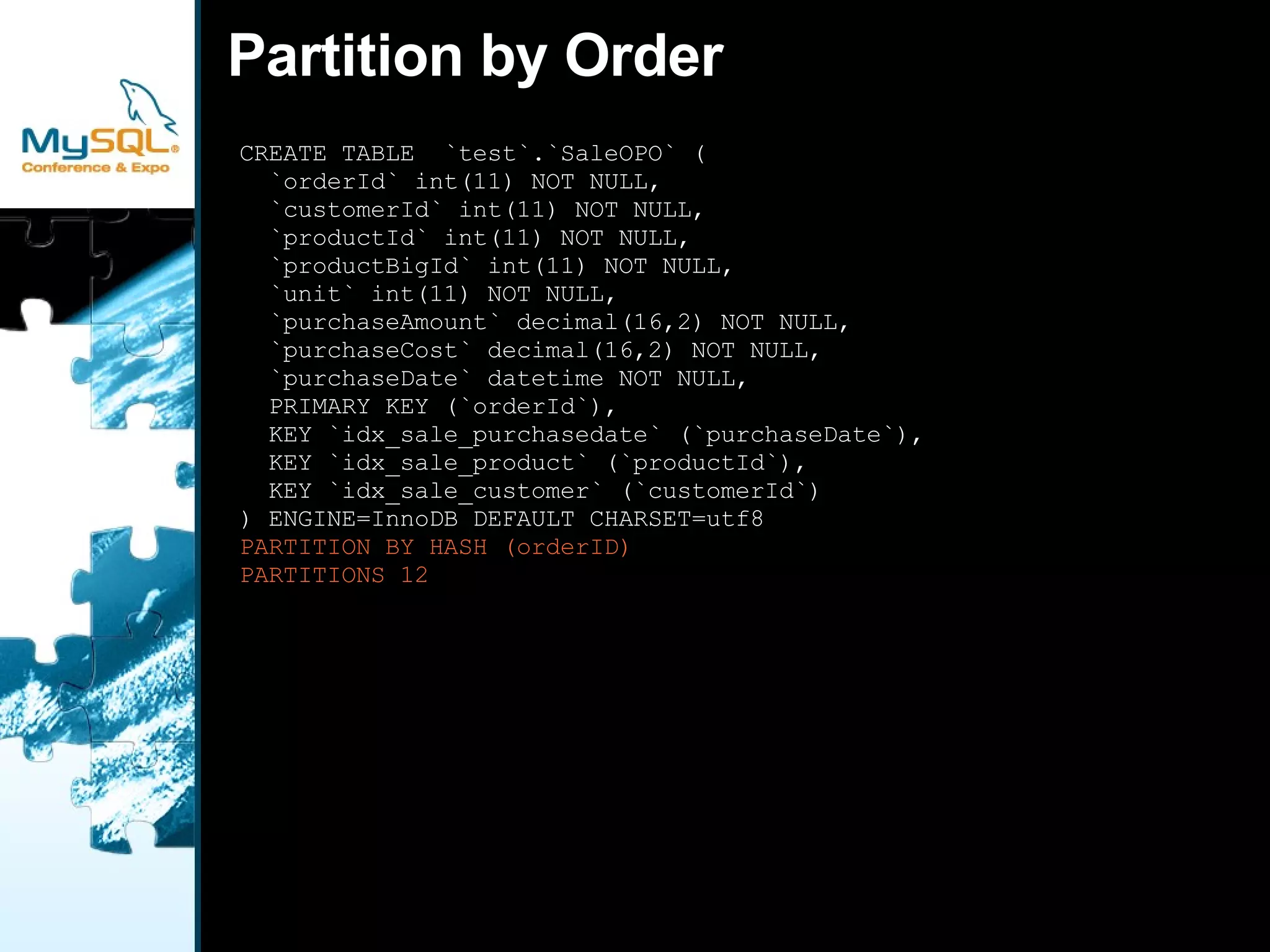
Partition by Order CREATE TABLE  `test`.`SaleOPO` ( `orderId` int(11) NOT NULL, `customerId` int(11) NOT NULL, `productId` int(11) NOT NULL, `productBigId` int(11) NOT NULL, `unit` int(11) NOT NULL, `purchaseAmount` decimal(16,2) NOT NULL, `purchaseCost` decimal(16,2) NOT NULL, `purchaseDate` datetime NOT NULL, PRIMARY KEY (`orderId`), KEY `idx_sale_purchasedate` (`purchaseDate`), KEY `idx_sale_product` (`productId`), KEY `idx_sale_customer` (`customerId`) ) ENGINE=InnoDB DEFAULT CHARSET=utf8 PARTITION BY HASH (orderID) PARTITIONS 12
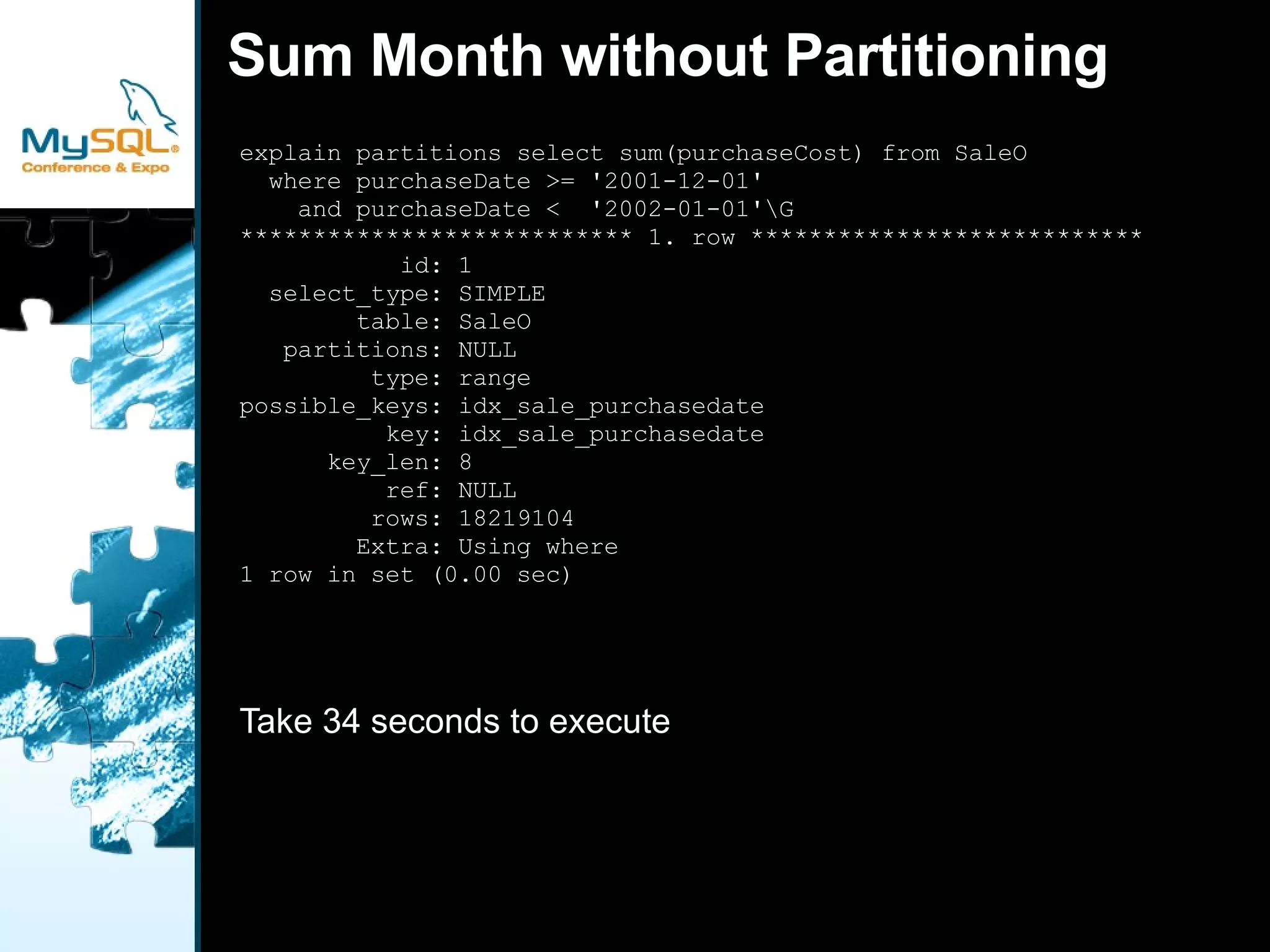
Sum Month without Partitioning explain partitions select sum(purchaseCost) from SaleO  where purchaseDate >= '2001-12-01'  and purchaseDate <  '2002-01-01'\G *************************** 1. row *************************** id: 1 select_type: SIMPLE table: SaleO partitions: NULL type: range possible_keys: idx_sale_purchasedate key: idx_sale_purchasedate key_len: 8 ref: NULL rows: 18219104 Extra: Using where 1 row in set (0.00 sec) Take 34 seconds to execute
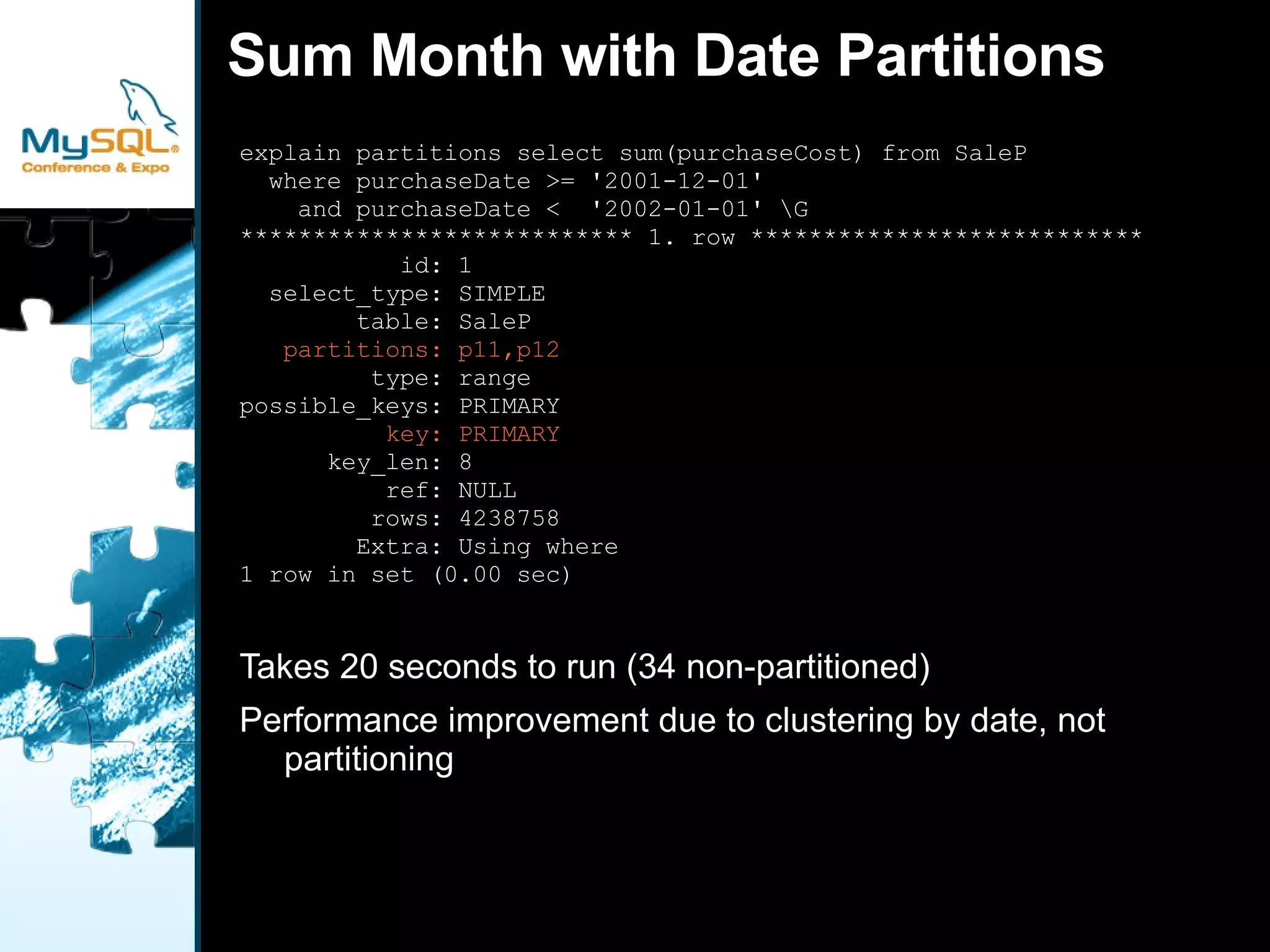
Sum Month with Date Partitions explain partitions select sum(purchaseCost) from SaleP  where purchaseDate >= '2001-12-01'  and purchaseDate <  '2002-01-01' \G *************************** 1. row *************************** id: 1 select_type: SIMPLE table: SaleP partitions: p11,p12 type: range possible_keys: PRIMARY key: PRIMARY key_len: 8 ref: NULL rows: 4238758 Extra: Using where 1 row in set (0.00 sec) Takes 20 seconds to run (34 non-partitioned)
Performance improvement due to clustering by date, not partitioning
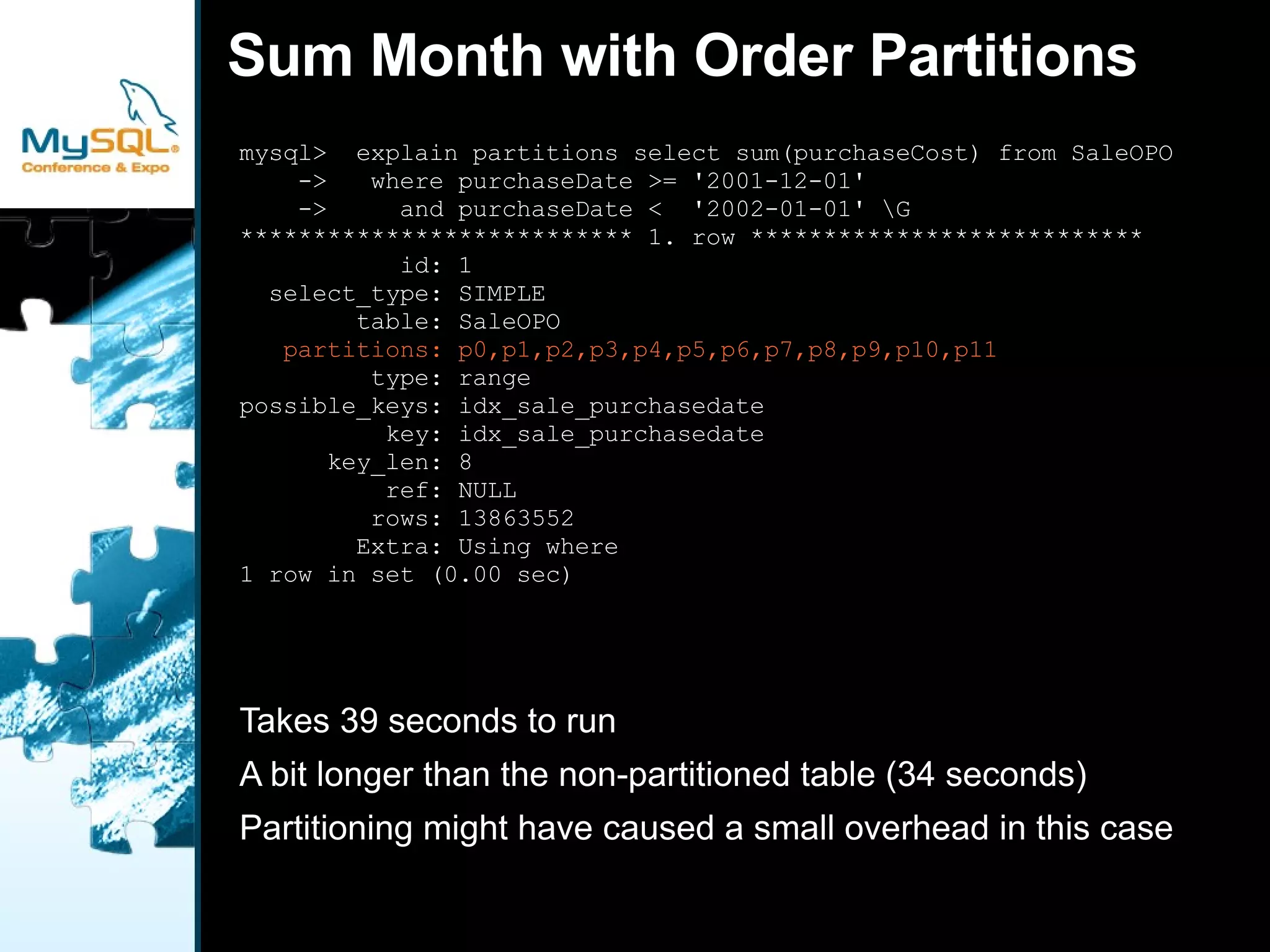
Sum Month with Order Partitions mysql>  explain partitions select sum(purchaseCost) from SaleOPO ->  where purchaseDate >= '2001-12-01' ->  and purchaseDate <  '2002-01-01' \G *************************** 1. row *************************** id: 1 select_type: SIMPLE table: SaleOPO partitions: p0,p1,p2,p3,p4,p5,p6,p7,p8,p9,p10,p11 type: range possible_keys: idx_sale_purchasedate key: idx_sale_purchasedate key_len: 8 ref: NULL rows: 13863552 Extra: Using where 1 row in set (0.00 sec) Takes 39 seconds to run
A bit longer than the non-partitioned table (34 seconds)
Partitioning might have caused a small overhead in this case
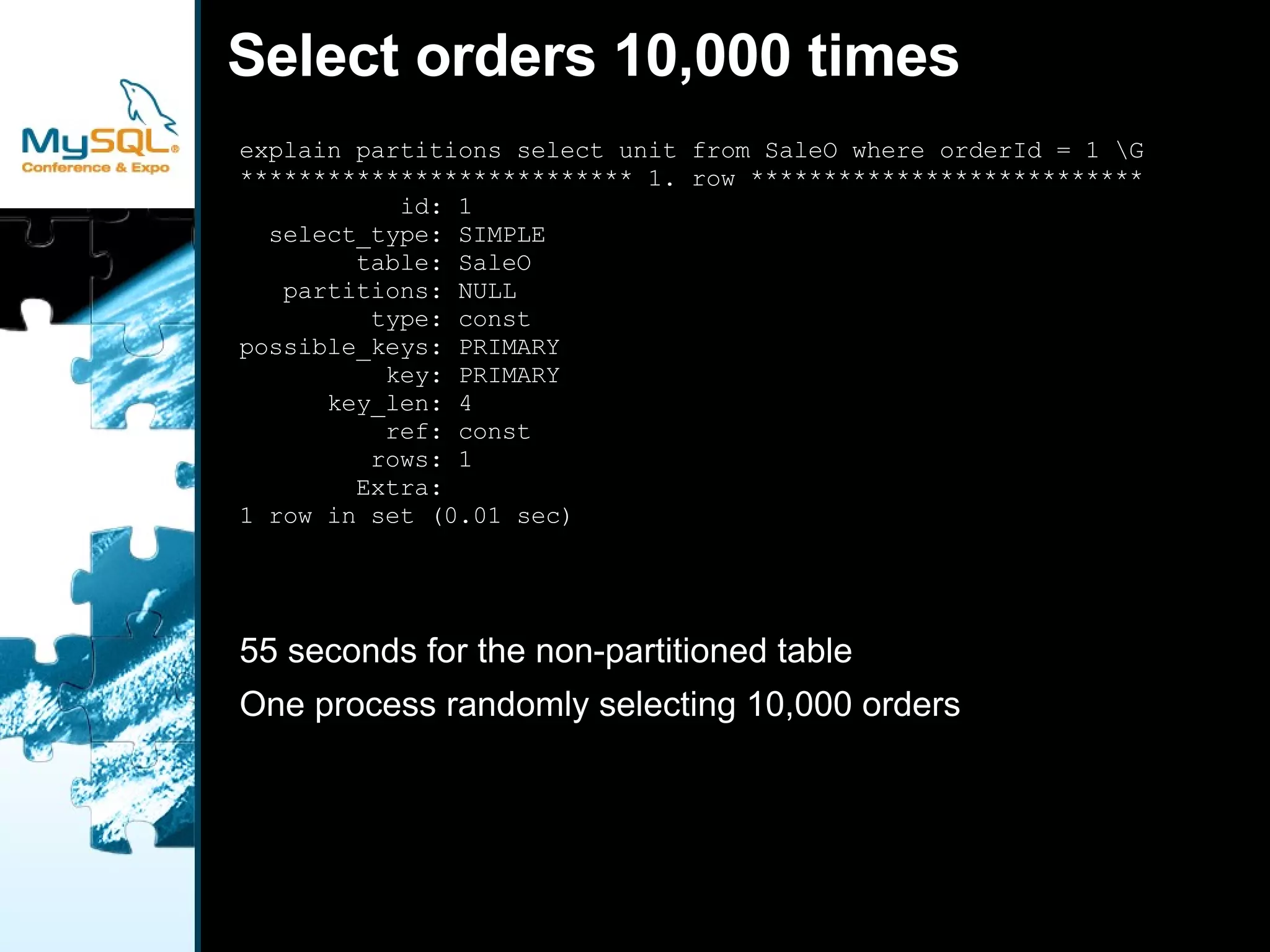
Select orders 10,000 times explain partitions select unit from SaleO where orderId = 1 \G *************************** 1. row *************************** id: 1 select_type: SIMPLE table: SaleO partitions: NULL type: const possible_keys: PRIMARY key: PRIMARY key_len: 4 ref: const rows: 1 Extra: 1 row in set (0.01 sec) 55 seconds for the non-partitioned table
One process randomly selecting 10,000 orders
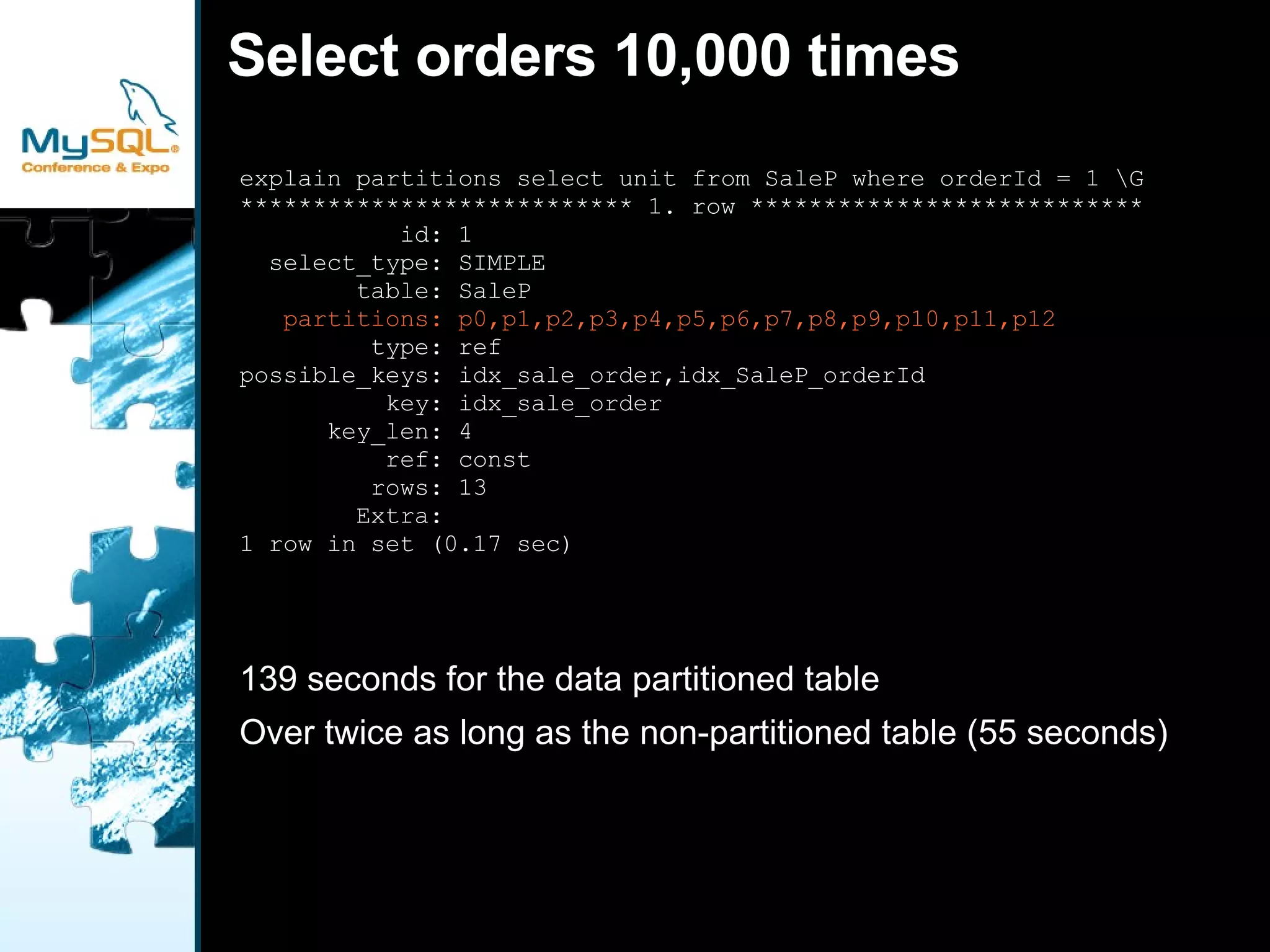
Select orders 10,000 times explain partitions select unit from SaleP where orderId = 1 \G *************************** 1. row *************************** id: 1 select_type: SIMPLE table: SaleP partitions: p0,p1,p2,p3,p4,p5,p6,p7,p8,p9,p10,p11,p12 type: ref possible_keys: idx_sale_order,idx_SaleP_orderId key: idx_sale_order key_len: 4 ref: const rows: 13 Extra: 1 row in set (0.17 sec) 139 seconds for the data partitioned table
Over twice as long as the non-partitioned table (55 seconds)
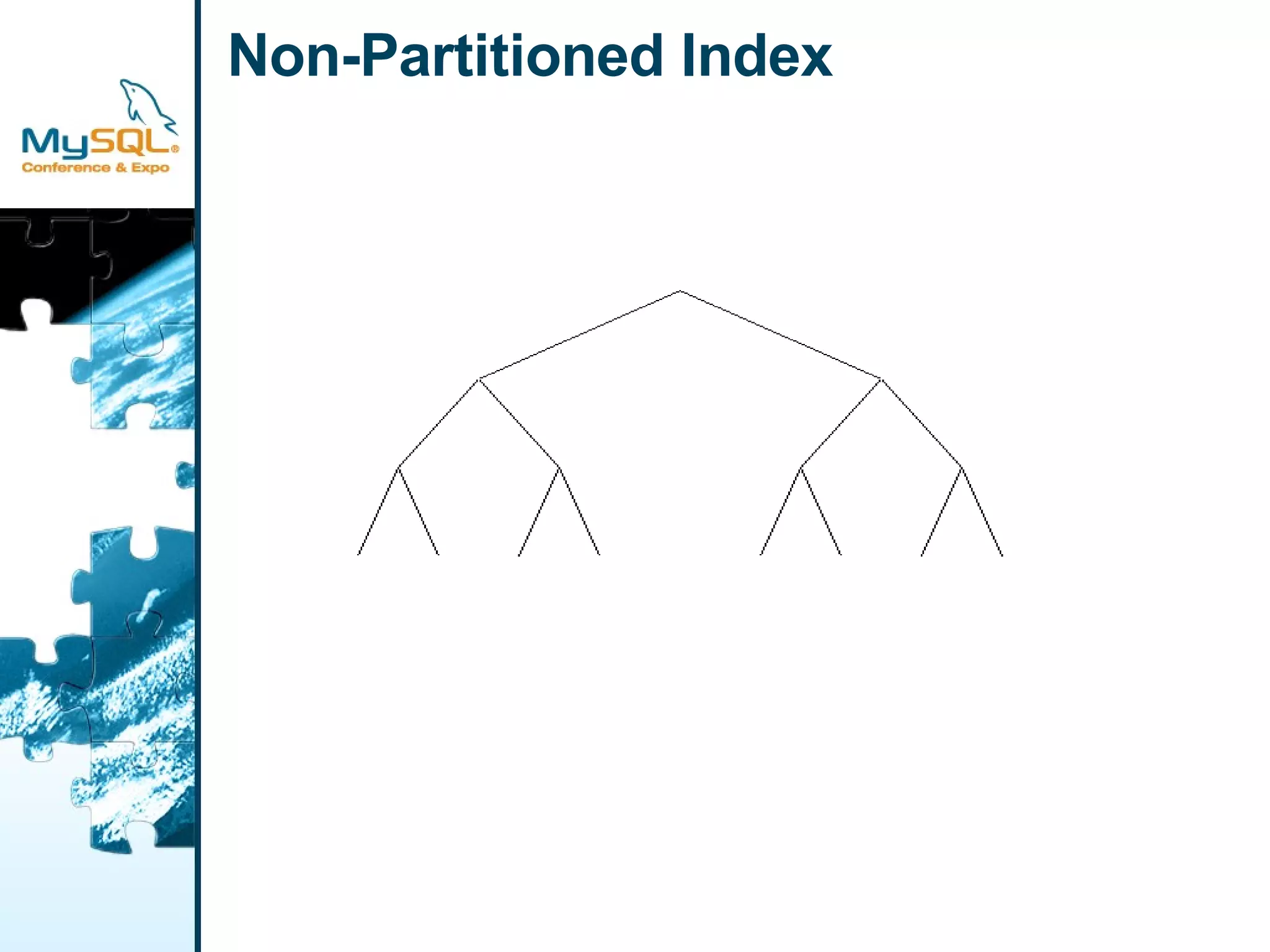
Non-Partitioned Index
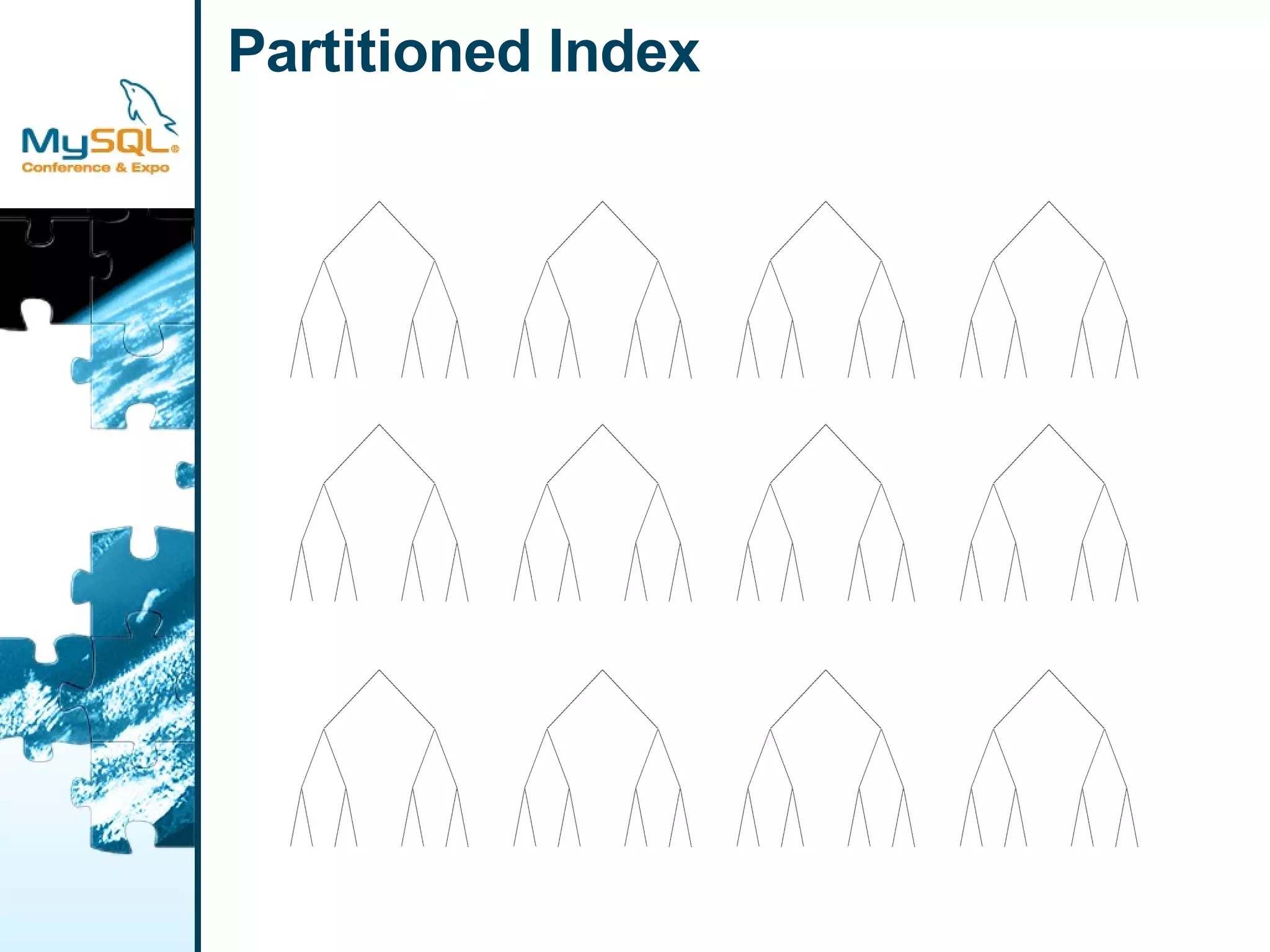
Partitioned Index
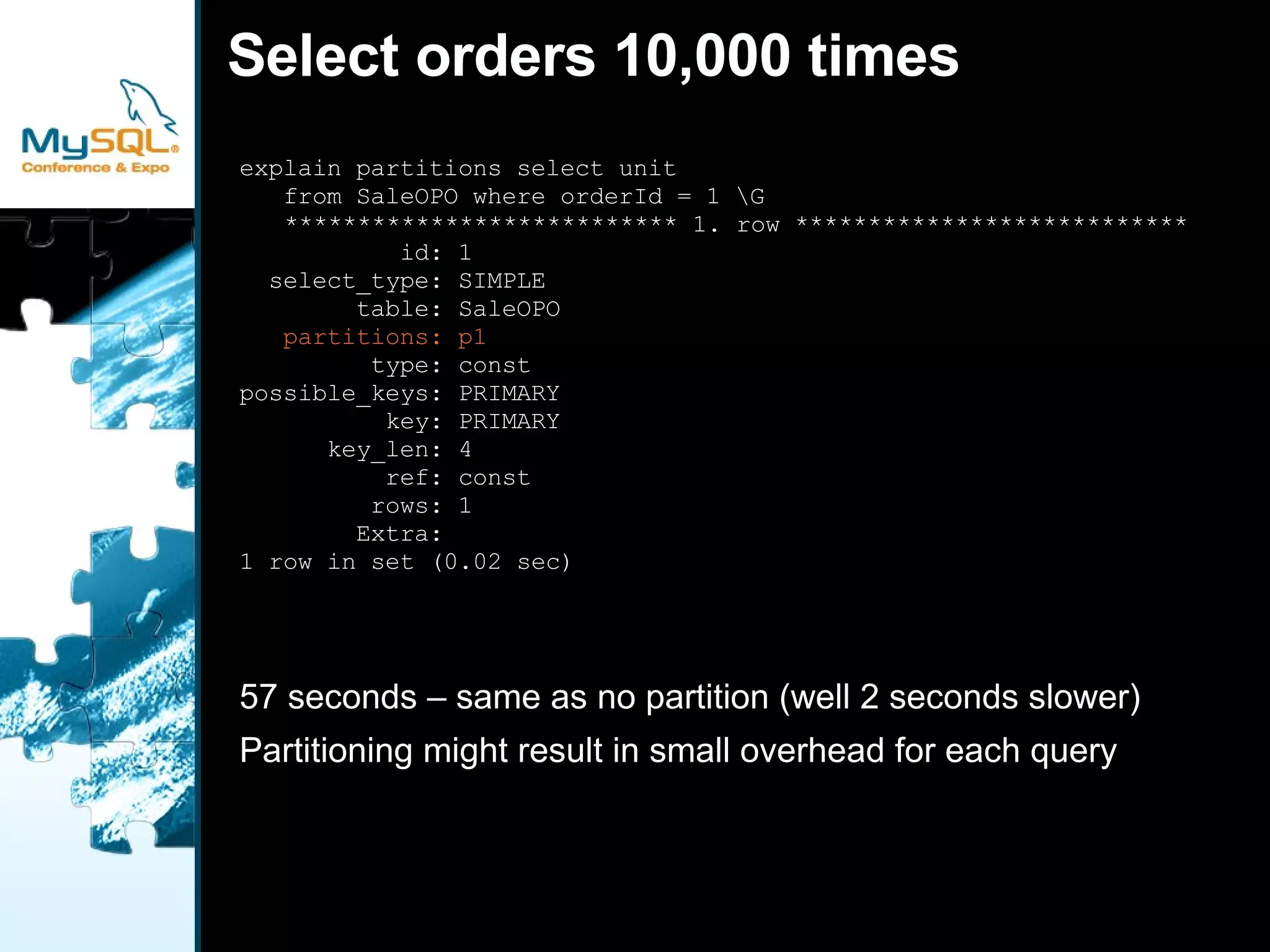
Select orders 10,000 times explain partitions select unit  from SaleOPO where orderId = 1 \G  *************************** 1. row *************************** id: 1 select_type: SIMPLE table: SaleOPO partitions: p1 type: const possible_keys: PRIMARY key: PRIMARY key_len: 4 ref: const rows: 1 Extra: 1 row in set (0.02 sec) 57 seconds – same as no partition (well 2 seconds slower)
Partitioning might result in small overhead for each query
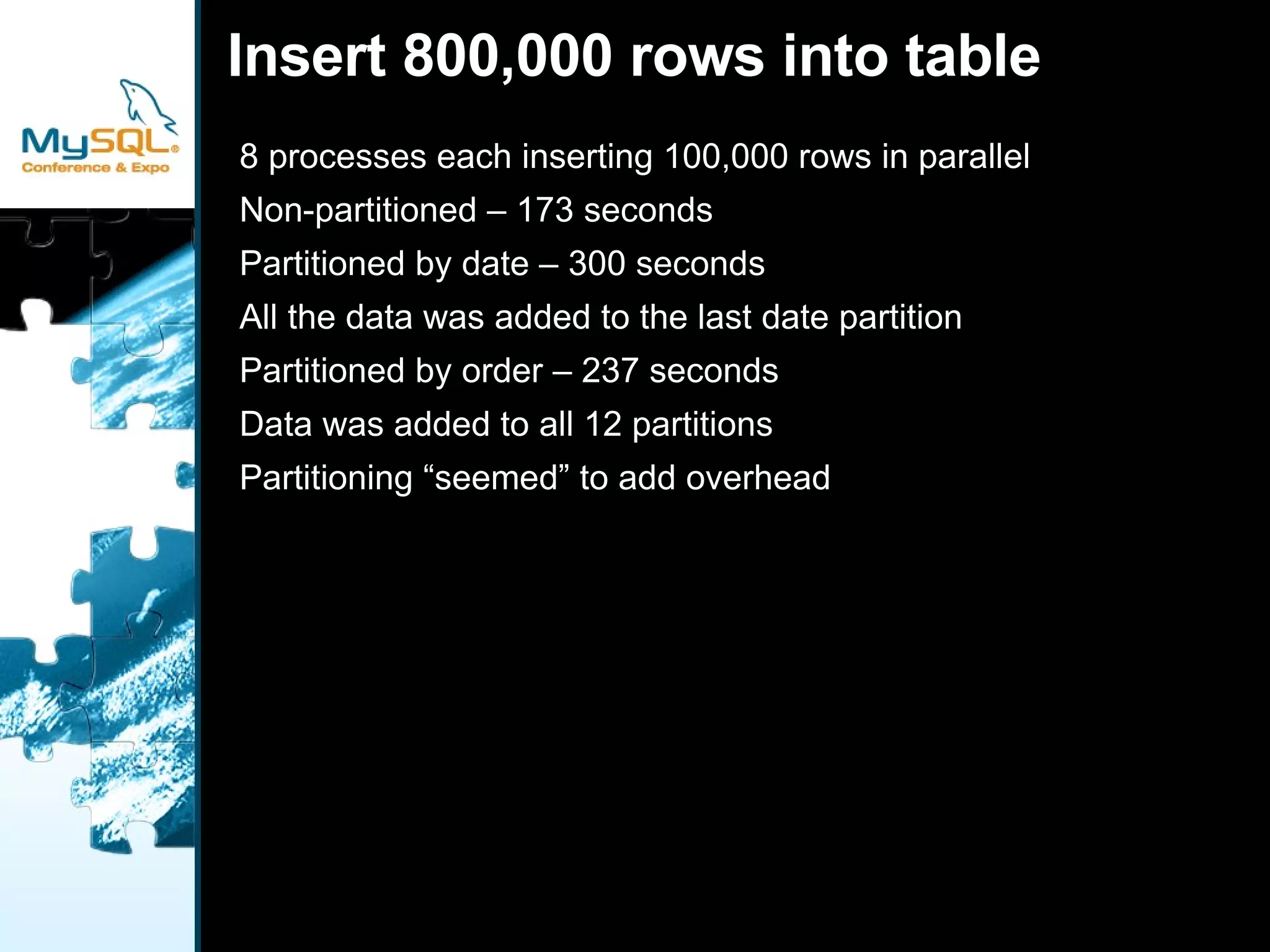
Insert 800,000 rows into table 8 processes each inserting 100,000 rows in parallel
Non-partitioned – 173 seconds
Partitioned by date – 300 seconds

Divide and Be Conquered?

  • 1.
    Divide And BeConquered? 04/23/2009 Brooks Johnson [email_address]
  • 2.
    Performance not guaranteedDoes not automatically improve performance
  • 3.
  • 4.
    In theory couldimprove concurrency
  • 5.
  • 6.
  • 7.
    Finish up withadmin improvements
  • 8.
    No Partition -Classic Primary Key CREATE TABLE `test`.`SaleO` ( `orderId` int(11) NOT NULL, `customerId` int(11) NOT NULL, `productId` int(11) NOT NULL, `productBigId` int(11) NOT NULL, `unit` int(11) NOT NULL, `purchaseAmount` decimal(16,2) NOT NULL, `purchaseCost` decimal(16,2) NOT NULL, `purchaseDate` datetime NOT NULL, PRIMARY KEY (`orderId`), KEY `idx_sale_purchasedate` (`purchaseDate`), KEY `idx_sale_product` (`productId`), KEY `idx_sale_customer` (`customerId`) ) ENGINE=InnoDB DEFAULT CHARSET=utf8;
  • 9.
    Partitioning by Date(Month) CREATE TABLE `test`.`SaleP` ( `orderId` int(11) NOT NULL, `customerId` int(11) NOT NULL, `productId` int(11) NOT NULL, `productBigId` int(11) NOT NULL, `unit` int(11) NOT NULL, `purchaseAmount` decimal(16,2) NOT NULL, `purchaseCost` decimal(16,2) NOT NULL, `purchaseDate` datetime NOT NULL, PRIMARY KEY (`purchaseDate`,`orderId`), KEY `idx_sale_product` (`productId`), KEY `idx_sale_order` (`orderId`), KEY `idx_SaleP_orderId` (`orderId`) ) ENGINE=InnoDB DEFAULT CHARSET=utf8 PARTITION BY RANGE (to_days(purchaseDate)) (PARTITION p0 VALUES LESS THAN (730882) ENGINE = InnoDB, PARTITION p1 VALUES LESS THAN (730910) ENGINE = InnoDB, PARTITION p2 VALUES LESS THAN (730941) ENGINE = InnoDB, PARTITION p3 VALUES LESS THAN (730971) ENGINE = InnoDB, PARTITION p4 VALUES LESS THAN (731002) ENGINE = InnoDB, PARTITION p5 VALUES LESS THAN (731032) ENGINE = InnoDB, PARTITION p6 VALUES LESS THAN (731063) ENGINE = InnoDB, PARTITION p7 VALUES LESS THAN (731094) ENGINE = InnoDB, PARTITION p8 VALUES LESS THAN (731124) ENGINE = InnoDB, PARTITION p9 VALUES LESS THAN (731155) ENGINE = InnoDB, PARTITION p10 VALUES LESS THAN (731185) ENGINE = InnoDB, PARTITION p11 VALUES LESS THAN (731216) ENGINE = InnoDB, PARTITION p12 VALUES LESS THAN MAXVALUE ENGINE = InnoDB)
  • 10.
    Partition by OrderCREATE TABLE `test`.`SaleOPO` ( `orderId` int(11) NOT NULL, `customerId` int(11) NOT NULL, `productId` int(11) NOT NULL, `productBigId` int(11) NOT NULL, `unit` int(11) NOT NULL, `purchaseAmount` decimal(16,2) NOT NULL, `purchaseCost` decimal(16,2) NOT NULL, `purchaseDate` datetime NOT NULL, PRIMARY KEY (`orderId`), KEY `idx_sale_purchasedate` (`purchaseDate`), KEY `idx_sale_product` (`productId`), KEY `idx_sale_customer` (`customerId`) ) ENGINE=InnoDB DEFAULT CHARSET=utf8 PARTITION BY HASH (orderID) PARTITIONS 12
  • 11.
    Sum Month withoutPartitioning explain partitions select sum(purchaseCost) from SaleO where purchaseDate >= '2001-12-01' and purchaseDate < '2002-01-01'\G *************************** 1. row *************************** id: 1 select_type: SIMPLE table: SaleO partitions: NULL type: range possible_keys: idx_sale_purchasedate key: idx_sale_purchasedate key_len: 8 ref: NULL rows: 18219104 Extra: Using where 1 row in set (0.00 sec) Take 34 seconds to execute
  • 12.
    Sum Month withDate Partitions explain partitions select sum(purchaseCost) from SaleP where purchaseDate >= '2001-12-01' and purchaseDate < '2002-01-01' \G *************************** 1. row *************************** id: 1 select_type: SIMPLE table: SaleP partitions: p11,p12 type: range possible_keys: PRIMARY key: PRIMARY key_len: 8 ref: NULL rows: 4238758 Extra: Using where 1 row in set (0.00 sec) Takes 20 seconds to run (34 non-partitioned)
  • 13.
    Performance improvement dueto clustering by date, not partitioning
  • 14.
    Sum Month withOrder Partitions mysql> explain partitions select sum(purchaseCost) from SaleOPO -> where purchaseDate >= '2001-12-01' -> and purchaseDate < '2002-01-01' \G *************************** 1. row *************************** id: 1 select_type: SIMPLE table: SaleOPO partitions: p0,p1,p2,p3,p4,p5,p6,p7,p8,p9,p10,p11 type: range possible_keys: idx_sale_purchasedate key: idx_sale_purchasedate key_len: 8 ref: NULL rows: 13863552 Extra: Using where 1 row in set (0.00 sec) Takes 39 seconds to run
  • 15.
    A bit longerthan the non-partitioned table (34 seconds)
  • 16.
    Partitioning might havecaused a small overhead in this case
  • 17.
    Select orders 10,000times explain partitions select unit from SaleO where orderId = 1 \G *************************** 1. row *************************** id: 1 select_type: SIMPLE table: SaleO partitions: NULL type: const possible_keys: PRIMARY key: PRIMARY key_len: 4 ref: const rows: 1 Extra: 1 row in set (0.01 sec) 55 seconds for the non-partitioned table
  • 18.
    One process randomlyselecting 10,000 orders
  • 19.
    Select orders 10,000times explain partitions select unit from SaleP where orderId = 1 \G *************************** 1. row *************************** id: 1 select_type: SIMPLE table: SaleP partitions: p0,p1,p2,p3,p4,p5,p6,p7,p8,p9,p10,p11,p12 type: ref possible_keys: idx_sale_order,idx_SaleP_orderId key: idx_sale_order key_len: 4 ref: const rows: 13 Extra: 1 row in set (0.17 sec) 139 seconds for the data partitioned table
  • 20.
    Over twice aslong as the non-partitioned table (55 seconds)
  • 21.
  • 22.
  • 23.
    Select orders 10,000times explain partitions select unit from SaleOPO where orderId = 1 \G *************************** 1. row *************************** id: 1 select_type: SIMPLE table: SaleOPO partitions: p1 type: const possible_keys: PRIMARY key: PRIMARY key_len: 4 ref: const rows: 1 Extra: 1 row in set (0.02 sec) 57 seconds – same as no partition (well 2 seconds slower)
  • 24.
    Partitioning might resultin small overhead for each query
  • 25.
    Insert 800,000 rowsinto table 8 processes each inserting 100,000 rows in parallel
  • 26.
  • 27.
    Partitioned by date– 300 seconds
  • 28.
    All the datawas added to the last date partition
  • 29.
    Partitioned by order– 237 seconds
  • 30.
    Data was addedto all 12 partitions
  • 31.
  • 32.
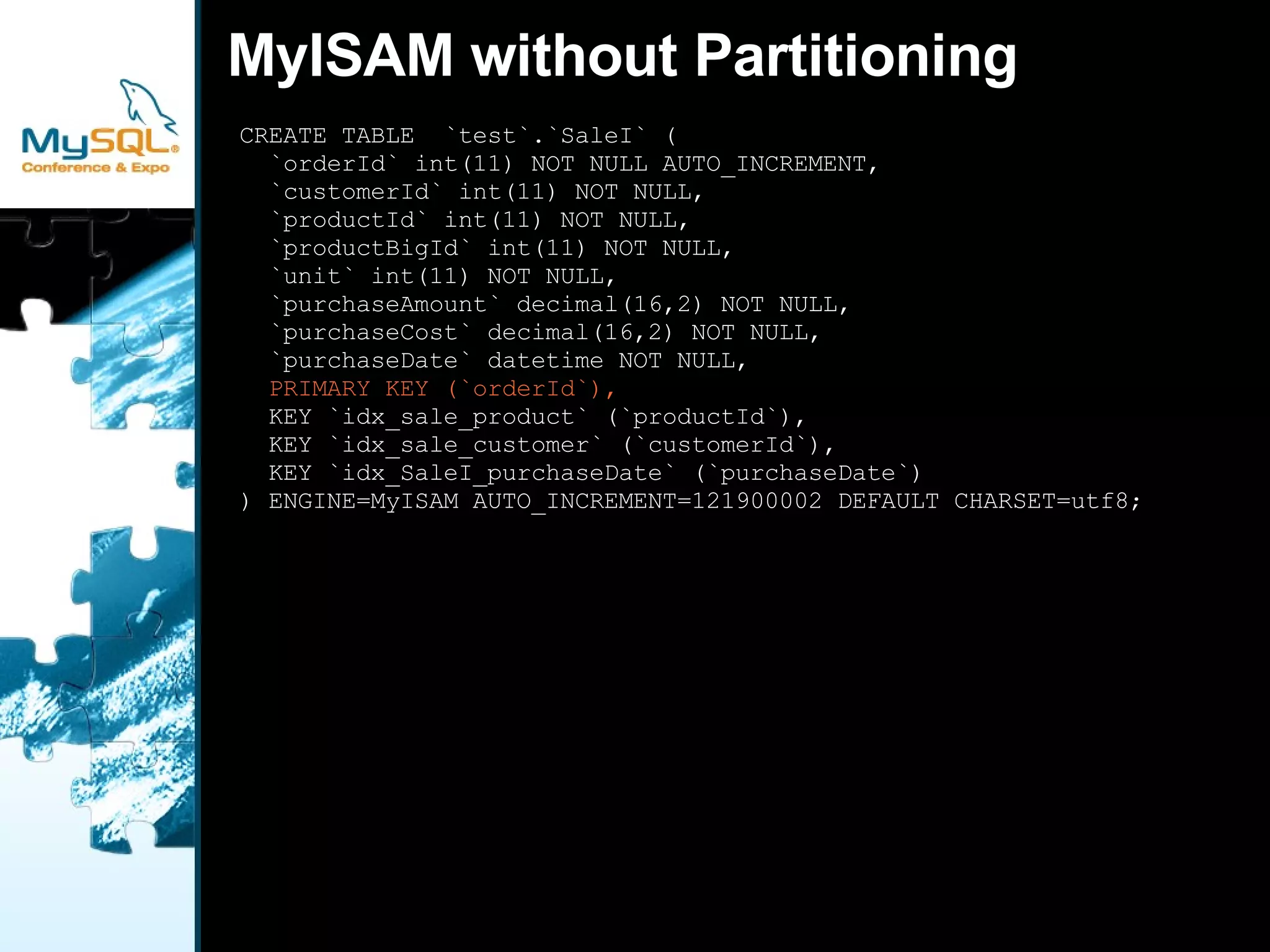
    MyISAM without PartitioningCREATE TABLE `test`.`SaleI` ( `orderId` int(11) NOT NULL AUTO_INCREMENT, `customerId` int(11) NOT NULL, `productId` int(11) NOT NULL, `productBigId` int(11) NOT NULL, `unit` int(11) NOT NULL, `purchaseAmount` decimal(16,2) NOT NULL, `purchaseCost` decimal(16,2) NOT NULL, `purchaseDate` datetime NOT NULL, PRIMARY KEY (`orderId`), KEY `idx_sale_product` (`productId`), KEY `idx_sale_customer` (`customerId`), KEY `idx_SaleI_purchaseDate` (`purchaseDate`) ) ENGINE=MyISAM AUTO_INCREMENT=121900002 DEFAULT CHARSET=utf8;
  • 33.
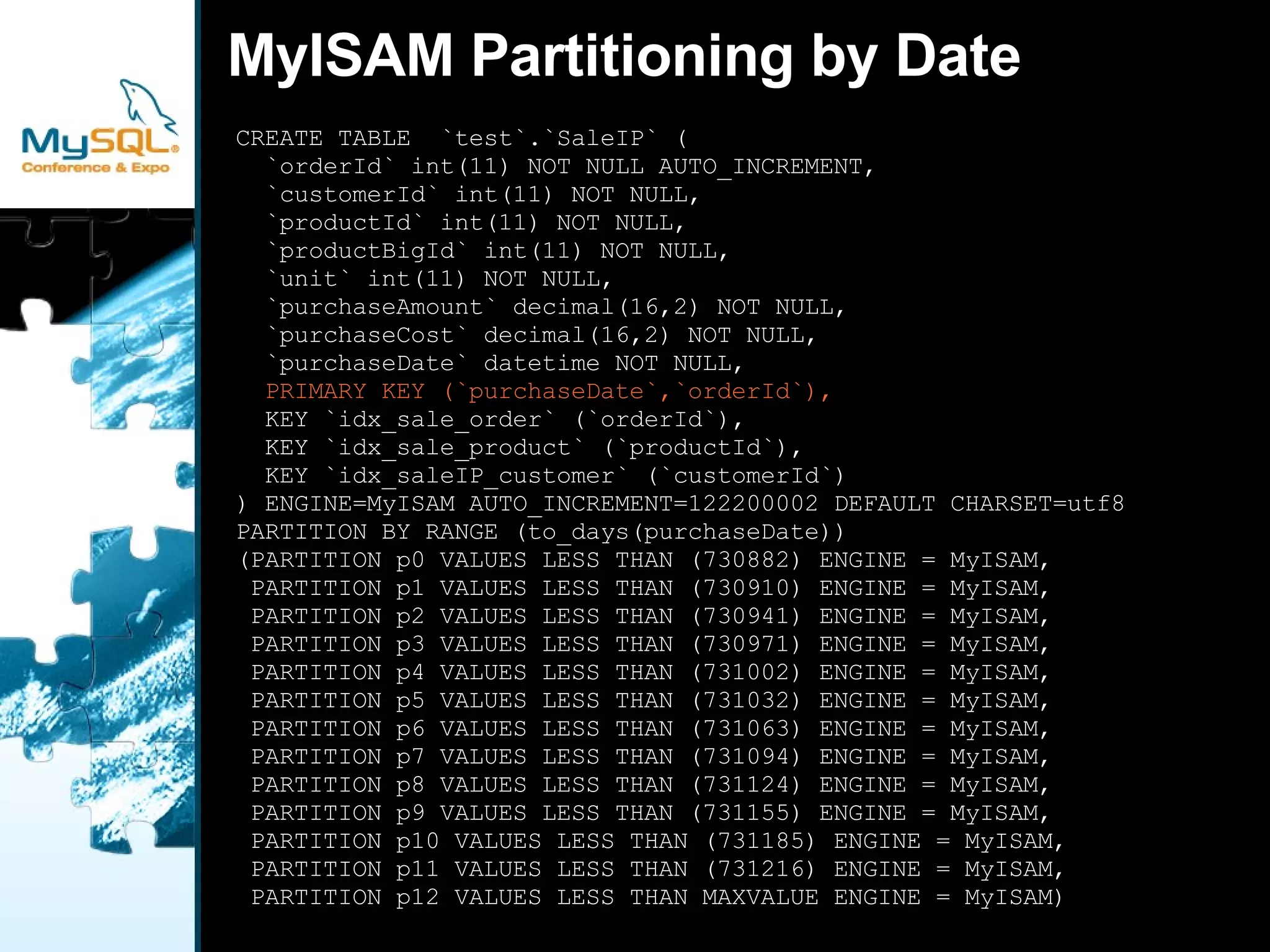
    MyISAM Partitioning byDate CREATE TABLE `test`.`SaleIP` ( `orderId` int(11) NOT NULL AUTO_INCREMENT, `customerId` int(11) NOT NULL, `productId` int(11) NOT NULL, `productBigId` int(11) NOT NULL, `unit` int(11) NOT NULL, `purchaseAmount` decimal(16,2) NOT NULL, `purchaseCost` decimal(16,2) NOT NULL, `purchaseDate` datetime NOT NULL, PRIMARY KEY (`purchaseDate`,`orderId`), KEY `idx_sale_order` (`orderId`), KEY `idx_sale_product` (`productId`), KEY `idx_saleIP_customer` (`customerId`) ) ENGINE=MyISAM AUTO_INCREMENT=122200002 DEFAULT CHARSET=utf8 PARTITION BY RANGE (to_days(purchaseDate)) (PARTITION p0 VALUES LESS THAN (730882) ENGINE = MyISAM, PARTITION p1 VALUES LESS THAN (730910) ENGINE = MyISAM, PARTITION p2 VALUES LESS THAN (730941) ENGINE = MyISAM, PARTITION p3 VALUES LESS THAN (730971) ENGINE = MyISAM, PARTITION p4 VALUES LESS THAN (731002) ENGINE = MyISAM, PARTITION p5 VALUES LESS THAN (731032) ENGINE = MyISAM, PARTITION p6 VALUES LESS THAN (731063) ENGINE = MyISAM, PARTITION p7 VALUES LESS THAN (731094) ENGINE = MyISAM, PARTITION p8 VALUES LESS THAN (731124) ENGINE = MyISAM, PARTITION p9 VALUES LESS THAN (731155) ENGINE = MyISAM, PARTITION p10 VALUES LESS THAN (731185) ENGINE = MyISAM, PARTITION p11 VALUES LESS THAN (731216) ENGINE = MyISAM, PARTITION p12 VALUES LESS THAN MAXVALUE ENGINE = MyISAM)
  • 34.
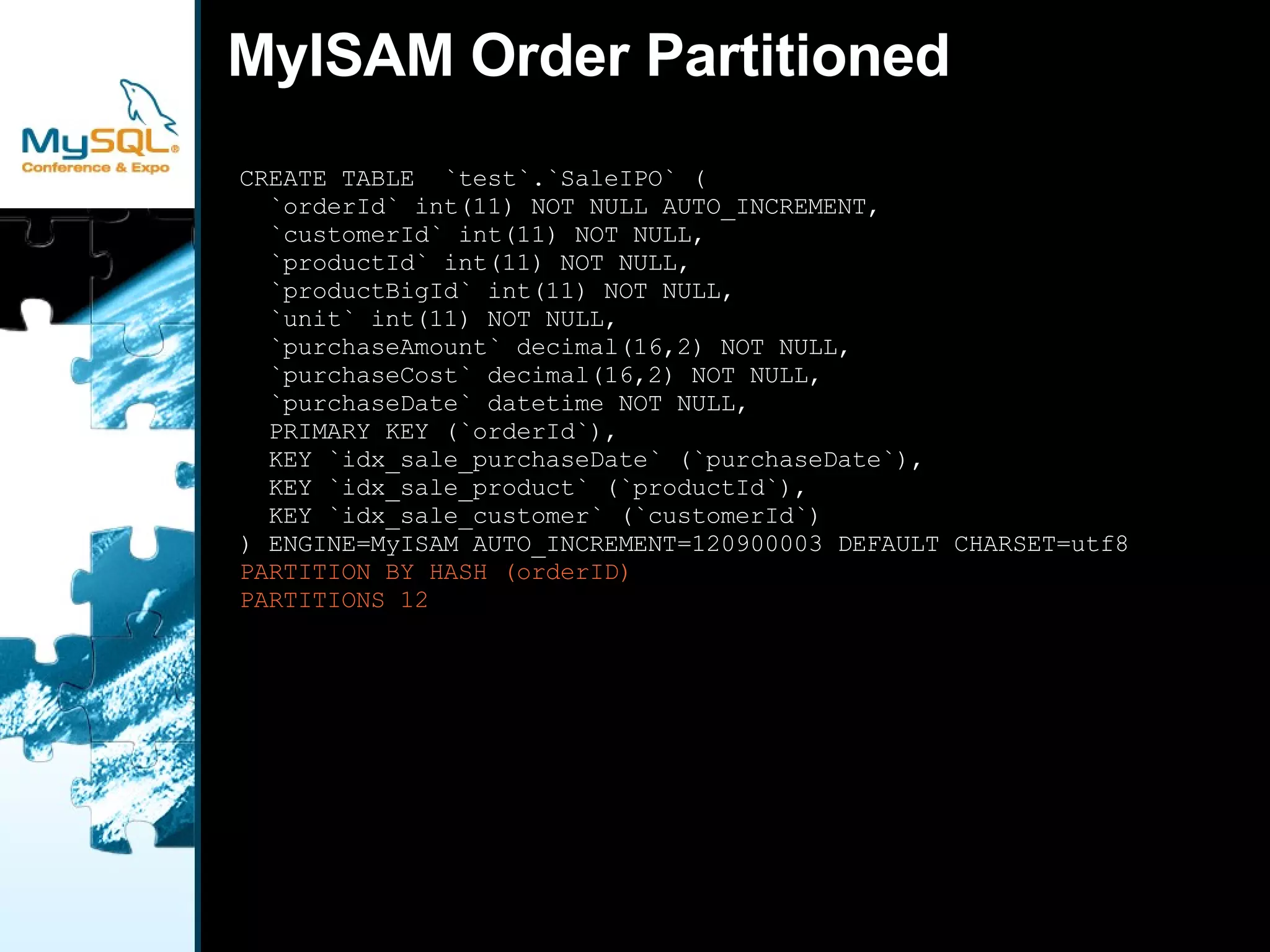
    MyISAM Order Partitioned CREATE TABLE `test`.`SaleIPO` ( `orderId` int(11) NOT NULL AUTO_INCREMENT, `customerId` int(11) NOT NULL, `productId` int(11) NOT NULL, `productBigId` int(11) NOT NULL, `unit` int(11) NOT NULL, `purchaseAmount` decimal(16,2) NOT NULL, `purchaseCost` decimal(16,2) NOT NULL, `purchaseDate` datetime NOT NULL, PRIMARY KEY (`orderId`), KEY `idx_sale_purchaseDate` (`purchaseDate`), KEY `idx_sale_product` (`productId`), KEY `idx_sale_customer` (`customerId`) ) ENGINE=MyISAM AUTO_INCREMENT=120900003 DEFAULT CHARSET=utf8 PARTITION BY HASH (orderID) PARTITIONS 12
  • 35.
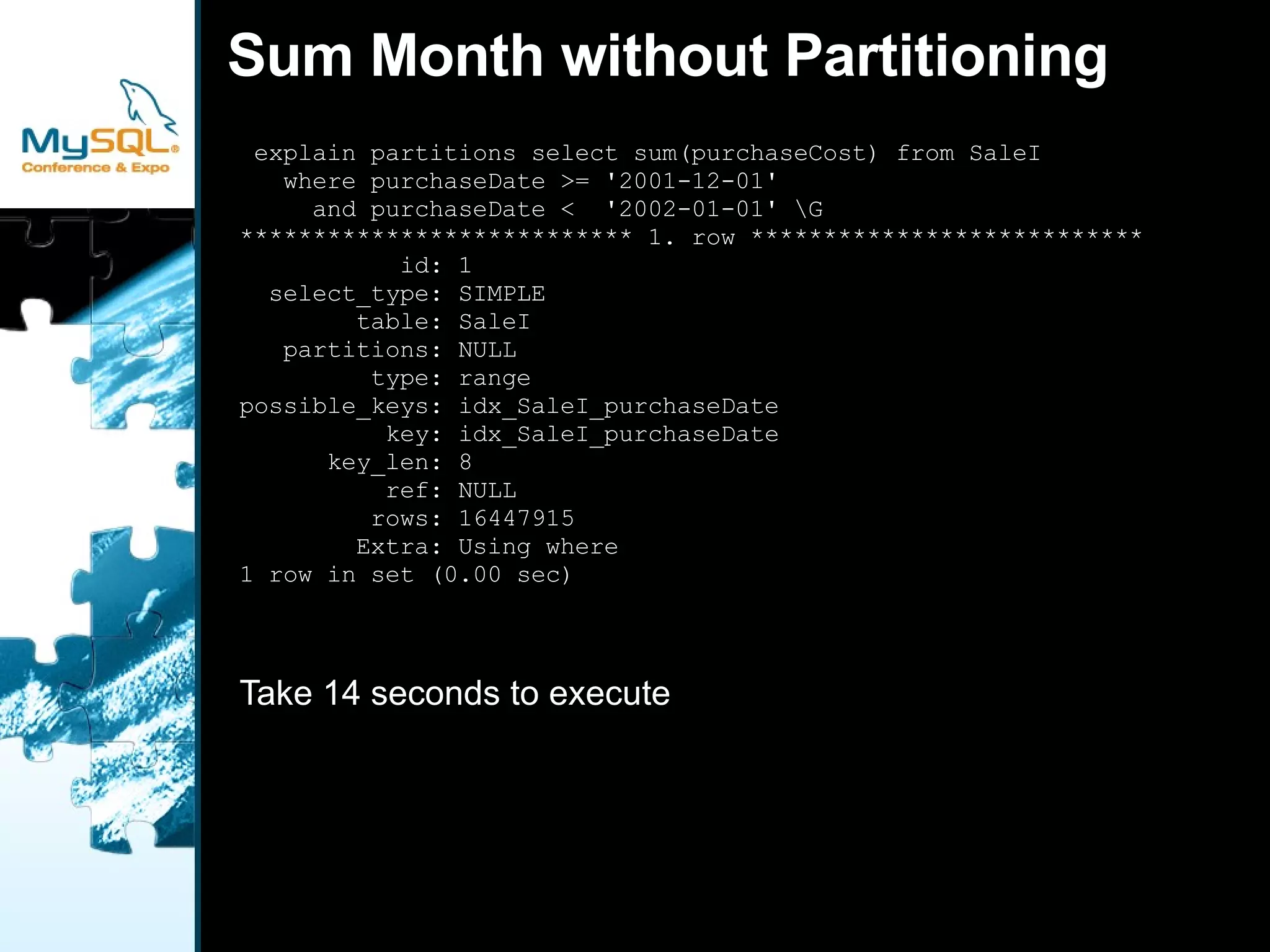
    Sum Month withoutPartitioning explain partitions select sum(purchaseCost) from SaleI where purchaseDate >= '2001-12-01' and purchaseDate < '2002-01-01' \G *************************** 1. row *************************** id: 1 select_type: SIMPLE table: SaleI partitions: NULL type: range possible_keys: idx_SaleI_purchaseDate key: idx_SaleI_purchaseDate key_len: 8 ref: NULL rows: 16447915 Extra: Using where 1 row in set (0.00 sec) Take 14 seconds to execute
  • 36.
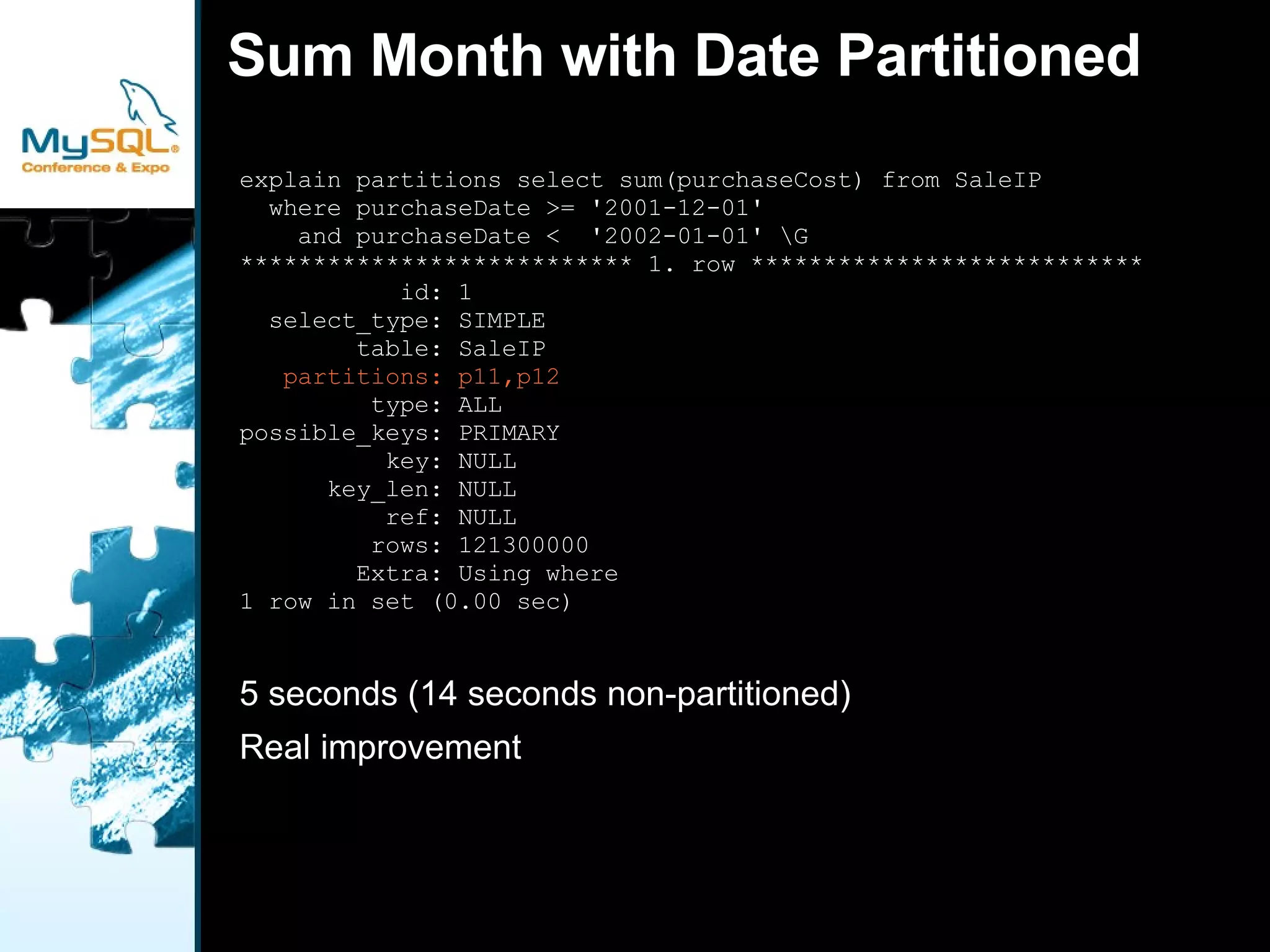
    Sum Month withDate Partitioned explain partitions select sum(purchaseCost) from SaleIP where purchaseDate >= '2001-12-01' and purchaseDate < '2002-01-01' \G *************************** 1. row *************************** id: 1 select_type: SIMPLE table: SaleIP partitions: p11,p12 type: ALL possible_keys: PRIMARY key: NULL key_len: NULL ref: NULL rows: 121300000 Extra: Using where 1 row in set (0.00 sec) 5 seconds (14 seconds non-partitioned)
  • 37.
  • 38.
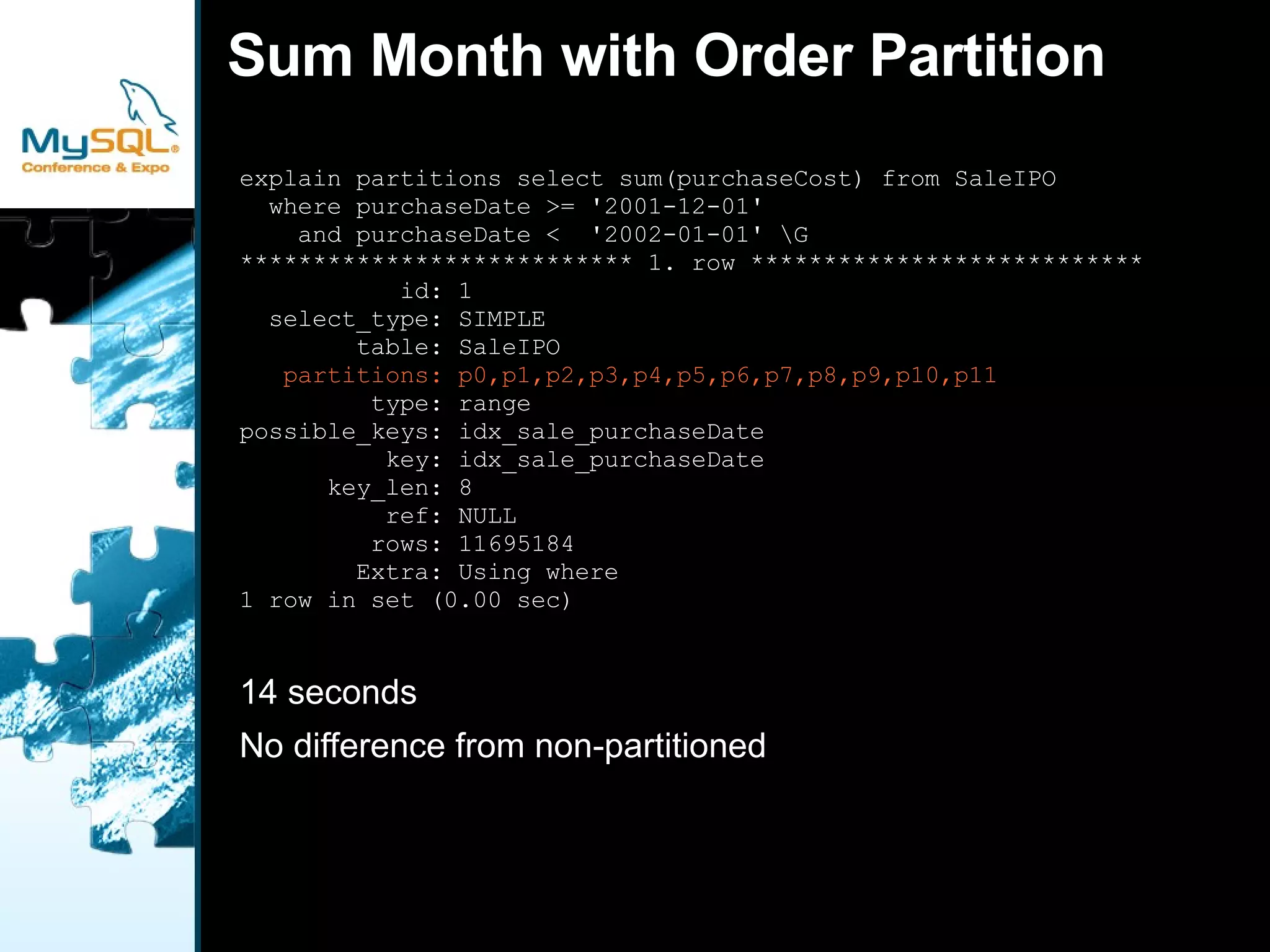
    Sum Month withOrder Partition explain partitions select sum(purchaseCost) from SaleIPO where purchaseDate >= '2001-12-01' and purchaseDate < '2002-01-01' \G *************************** 1. row *************************** id: 1 select_type: SIMPLE table: SaleIPO partitions: p0,p1,p2,p3,p4,p5,p6,p7,p8,p9,p10,p11 type: range possible_keys: idx_sale_purchaseDate key: idx_sale_purchaseDate key_len: 8 ref: NULL rows: 11695184 Extra: Using where 1 row in set (0.00 sec) 14 seconds
  • 39.
    No difference fromnon-partitioned
  • 40.
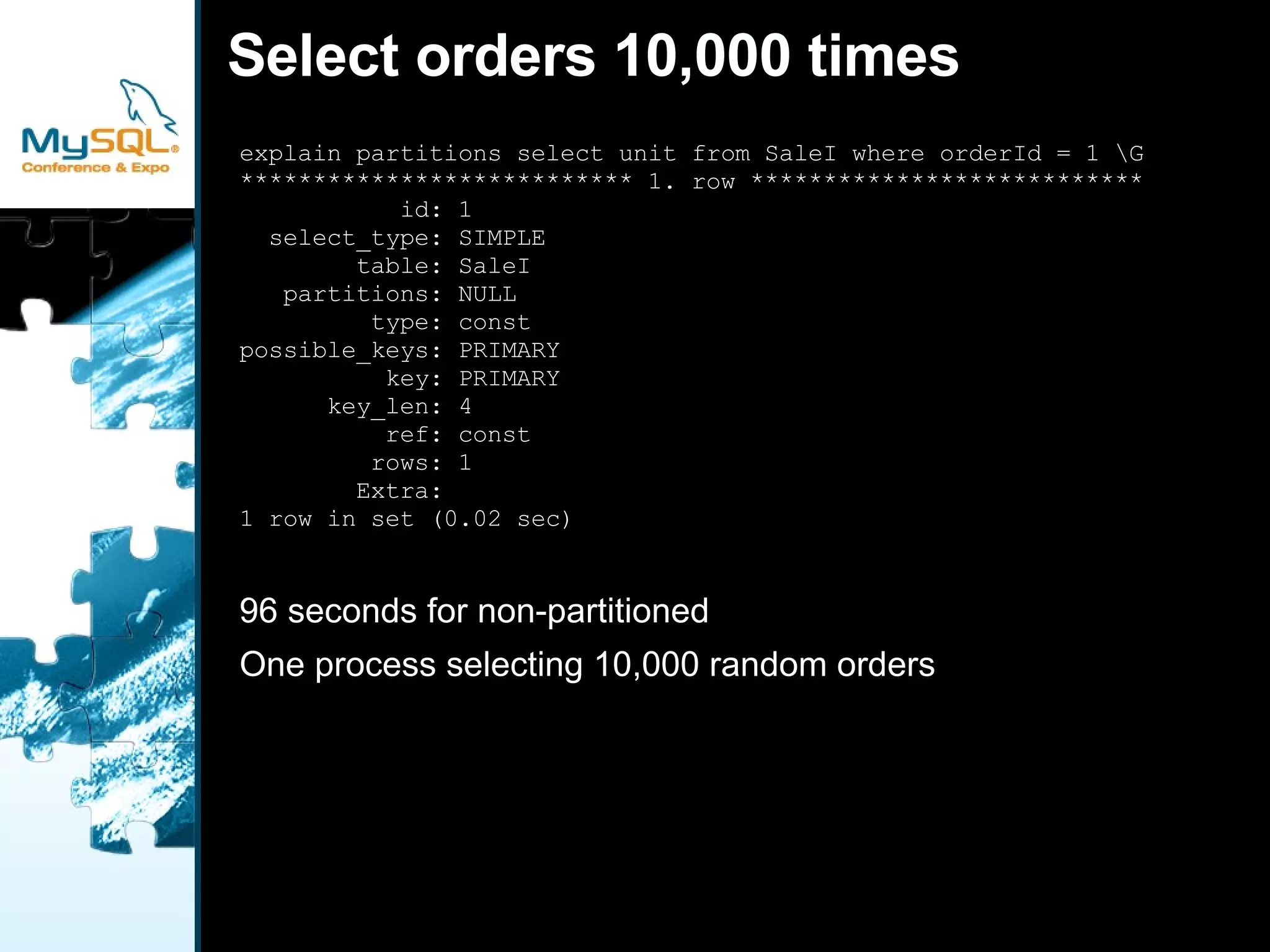
    Select orders 10,000times explain partitions select unit from SaleI where orderId = 1 \G *************************** 1. row *************************** id: 1 select_type: SIMPLE table: SaleI partitions: NULL type: const possible_keys: PRIMARY key: PRIMARY key_len: 4 ref: const rows: 1 Extra: 1 row in set (0.02 sec) 96 seconds for non-partitioned
  • 41.
    One process selecting10,000 random orders
  • 42.
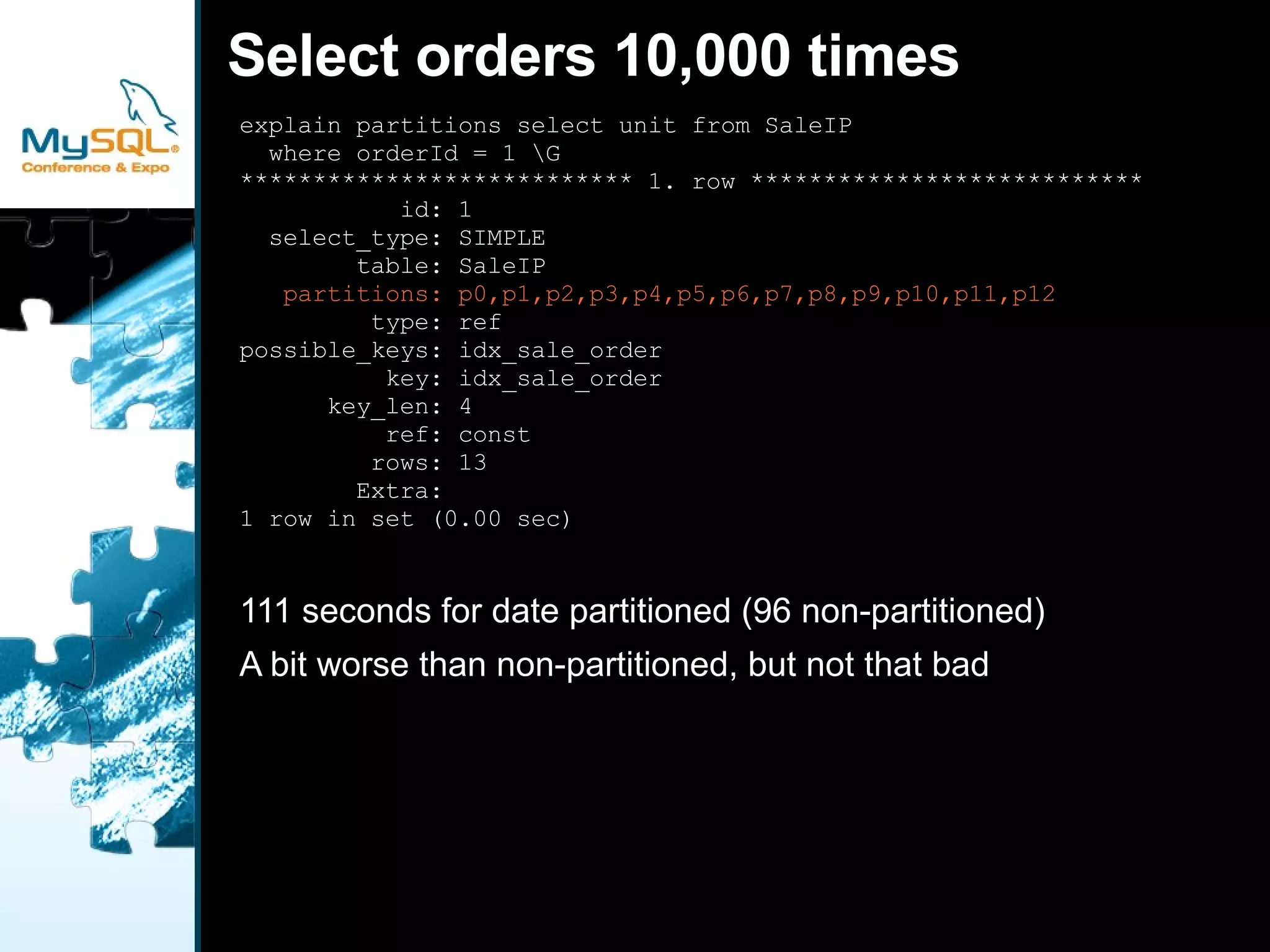
    Select orders 10,000times explain partitions select unit from SaleIP where orderId = 1 \G *************************** 1. row *************************** id: 1 select_type: SIMPLE table: SaleIP partitions: p0,p1,p2,p3,p4,p5,p6,p7,p8,p9,p10,p11,p12 type: ref possible_keys: idx_sale_order key: idx_sale_order key_len: 4 ref: const rows: 13 Extra: 1 row in set (0.00 sec) 111 seconds for date partitioned (96 non-partitioned)
  • 43.
    A bit worsethan non-partitioned, but not that bad
  • 44.
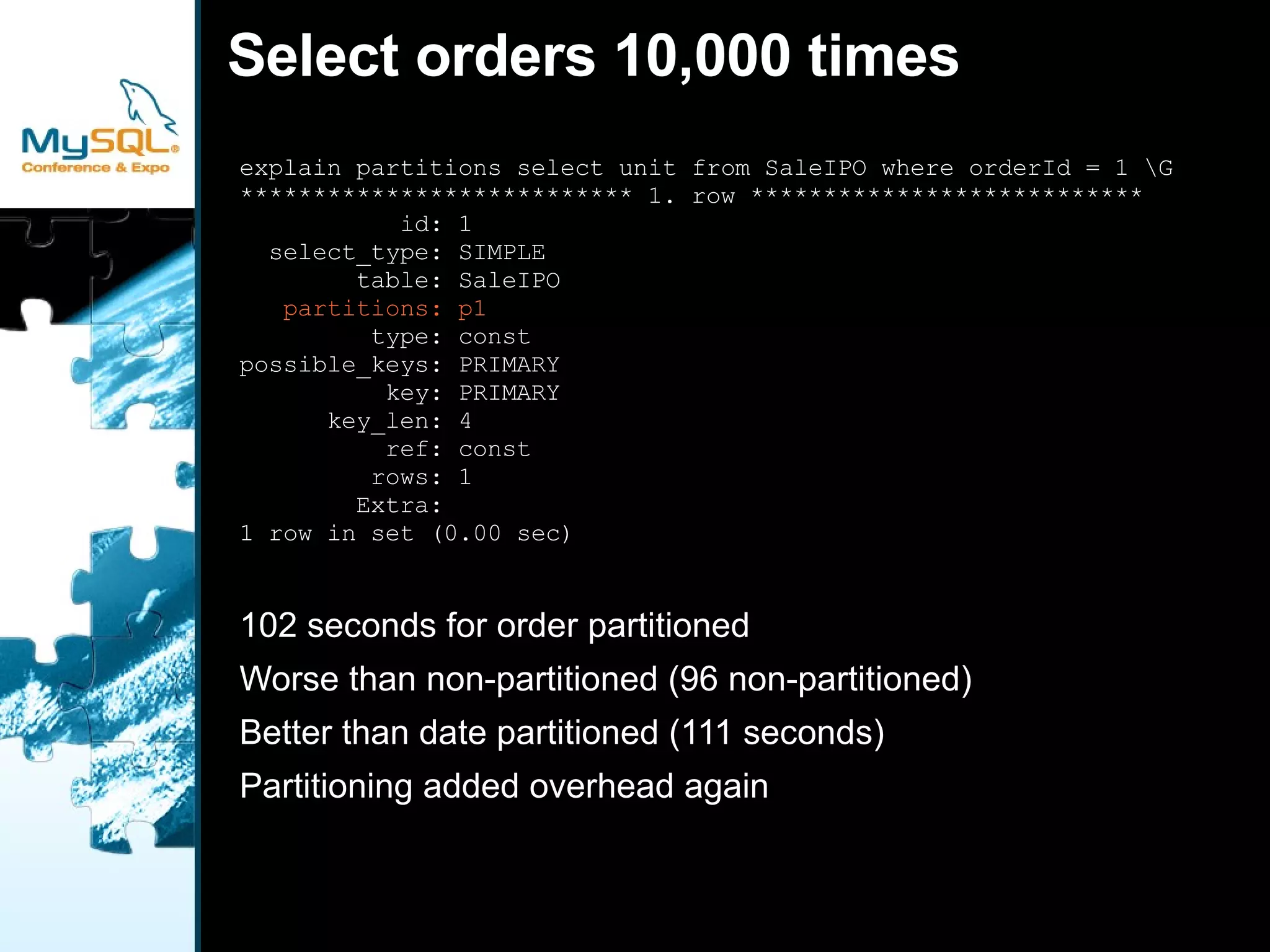
    Select orders 10,000times explain partitions select unit from SaleIPO where orderId = 1 \G *************************** 1. row *************************** id: 1 select_type: SIMPLE table: SaleIPO partitions: p1 type: const possible_keys: PRIMARY key: PRIMARY key_len: 4 ref: const rows: 1 Extra: 1 row in set (0.00 sec) 102 seconds for order partitioned
  • 45.
    Worse than non-partitioned(96 non-partitioned)
  • 46.
    Better than datepartitioned (111 seconds)
  • 47.
  • 48.
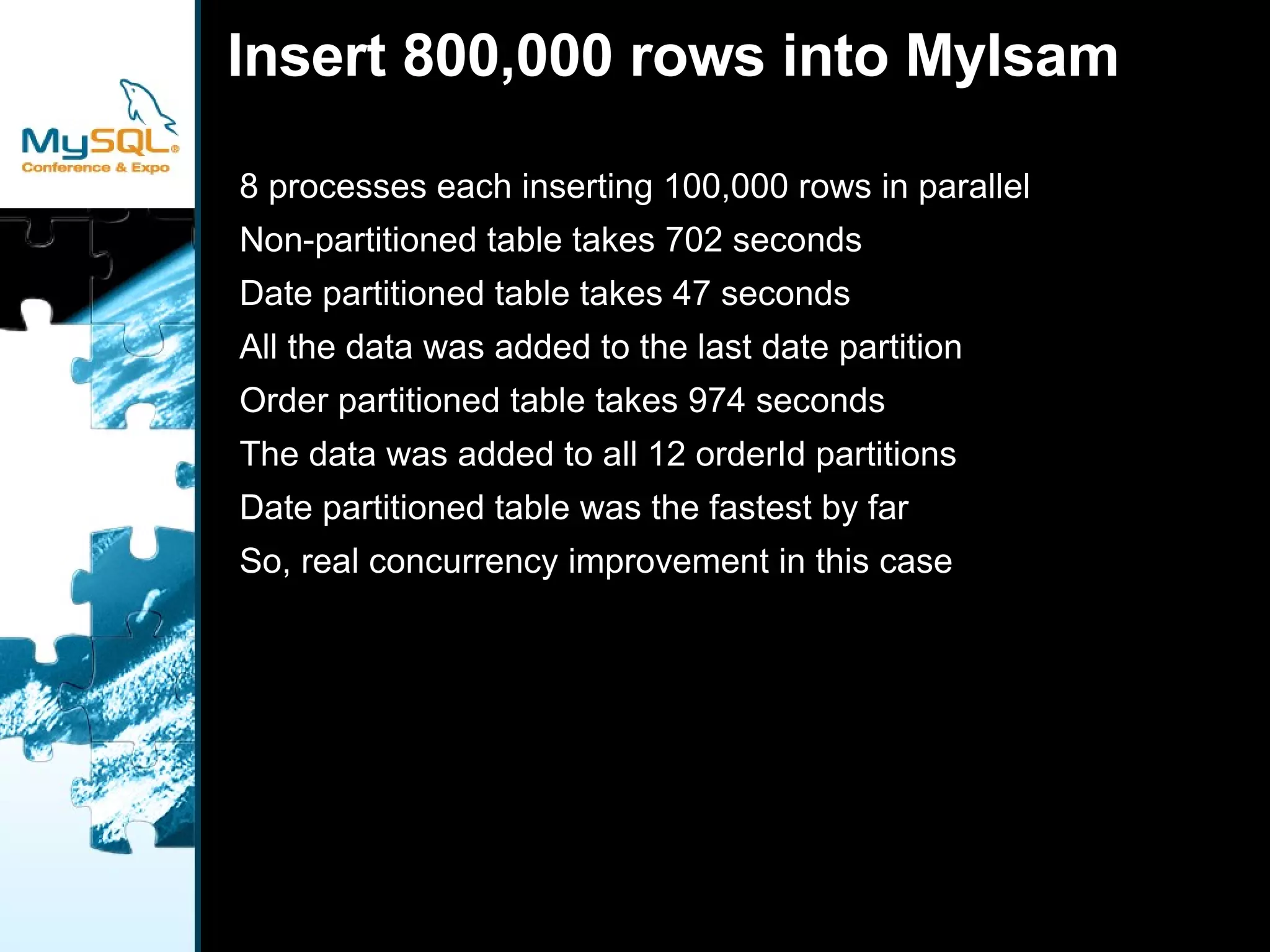
    Insert 800,000 rowsinto MyIsam 8 processes each inserting 100,000 rows in parallel
  • 49.
  • 50.
    Date partitioned tabletakes 47 seconds
  • 51.
    All the datawas added to the last date partition
  • 52.
    Order partitioned tabletakes 974 seconds
  • 53.
    The data wasadded to all 12 orderId partitions
  • 54.
    Date partitioned tablewas the fastest by far
  • 55.
    So, real concurrencyimprovement in this case
  • 56.
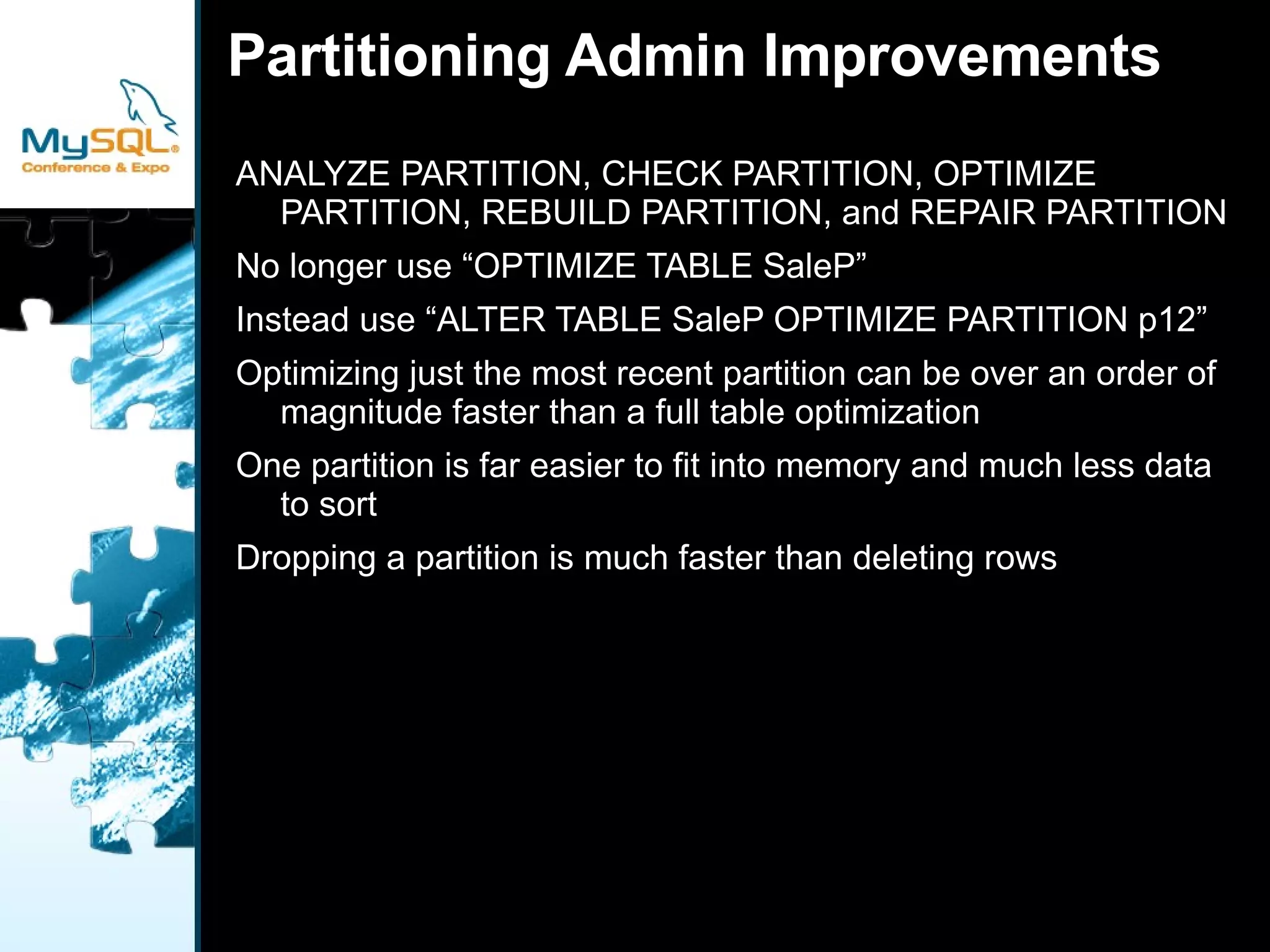
    Partitioning Admin ImprovementsANALYZE PARTITION , CHECK PARTITION , OPTIMIZE PARTITION , REBUILD PARTITION , and REPAIR PARTITION
  • 57.
    No longer use“OPTIMIZE TABLE SaleP”
  • 58.
    Instead use “ALTERTABLE SaleP OPTIMIZE PARTITION p12”
  • 59.
    Optimizing just themost recent partition can be over an order of magnitude faster than a full table optimization
  • 60.
    One partition isfar easier to fit into memory and much less data to sort
  • 61.
    Dropping a partitionis much faster than deleting rows
  • 62.
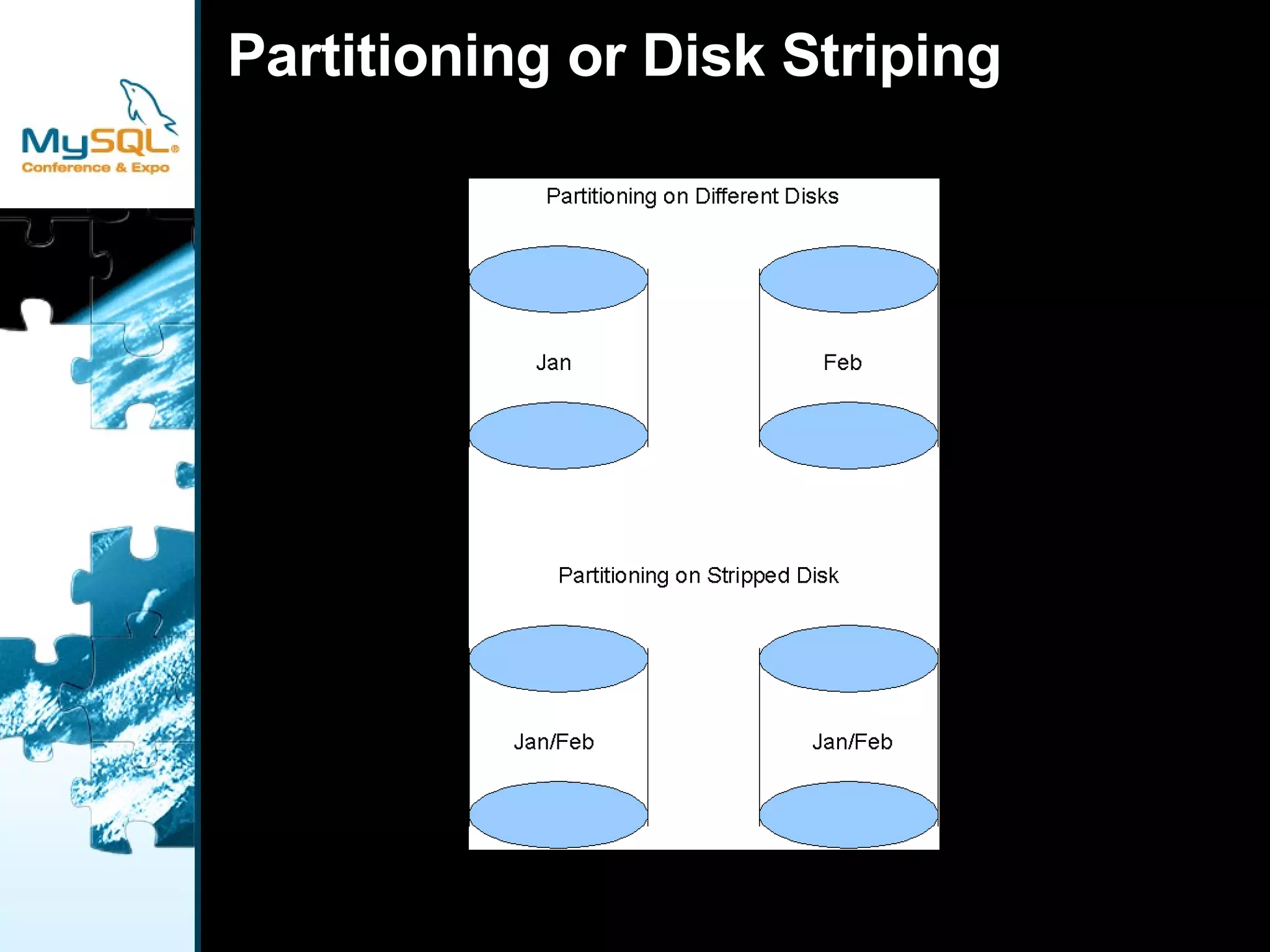
    Partitioning or DiskStriping Partitioning on Different Disks
  • 63.
    Partitioning Not aturbo button
  • 64.
  • 65.
  • 66.
  • 67.
    Performance depends onwhat is partitioned
  • 68.
    Performance also dependson data distribution
  • 69.
  • 70.