Create a welcoming dev
environment on IBM i 

https://joind.in/15570
Create a welcoming development environment on IBM iAlan Seiden Consulting
Alan Seiden Consulting
• Focus on innovation using PHP and IBM i
§ Award-winning developers
• Authority, web performance on IBM i
• Alan’s open source work
§ PHP project leader, Zend/IBM Toolkit
§ Contributor, Zend Framework DB2 enhancements
2
Create a welcoming development environment on IBM iAlan Seiden Consulting
Founder, Club Seiden
3
club.alanseiden.com
Create a welcoming development environment on IBM iAlan Seiden Consulting
Contact information
Alan Seiden
alan@alanseiden.com
201-447-2437
alanseiden.com
twitter: @alanseiden
4
Create a welcoming development environment on IBM iAlan Seiden Consulting
Expanding our world
• PHP and new UI talent
• Don’t assume IBM i
knowledge
• Command line
orientation (often)
• Other cultural
differences
• Secure Shell (ssh)
• Useful commands
• chroot environment
• Familiar editing tools
(vi, etc.)
• Managing the web
server
• php-cli
• Git
• Editing SQL
5
Culture shift
Create a welcoming development environment on IBM iAlan Seiden Consulting
Situation
• You’re in a company with traditional IBM i
expertise

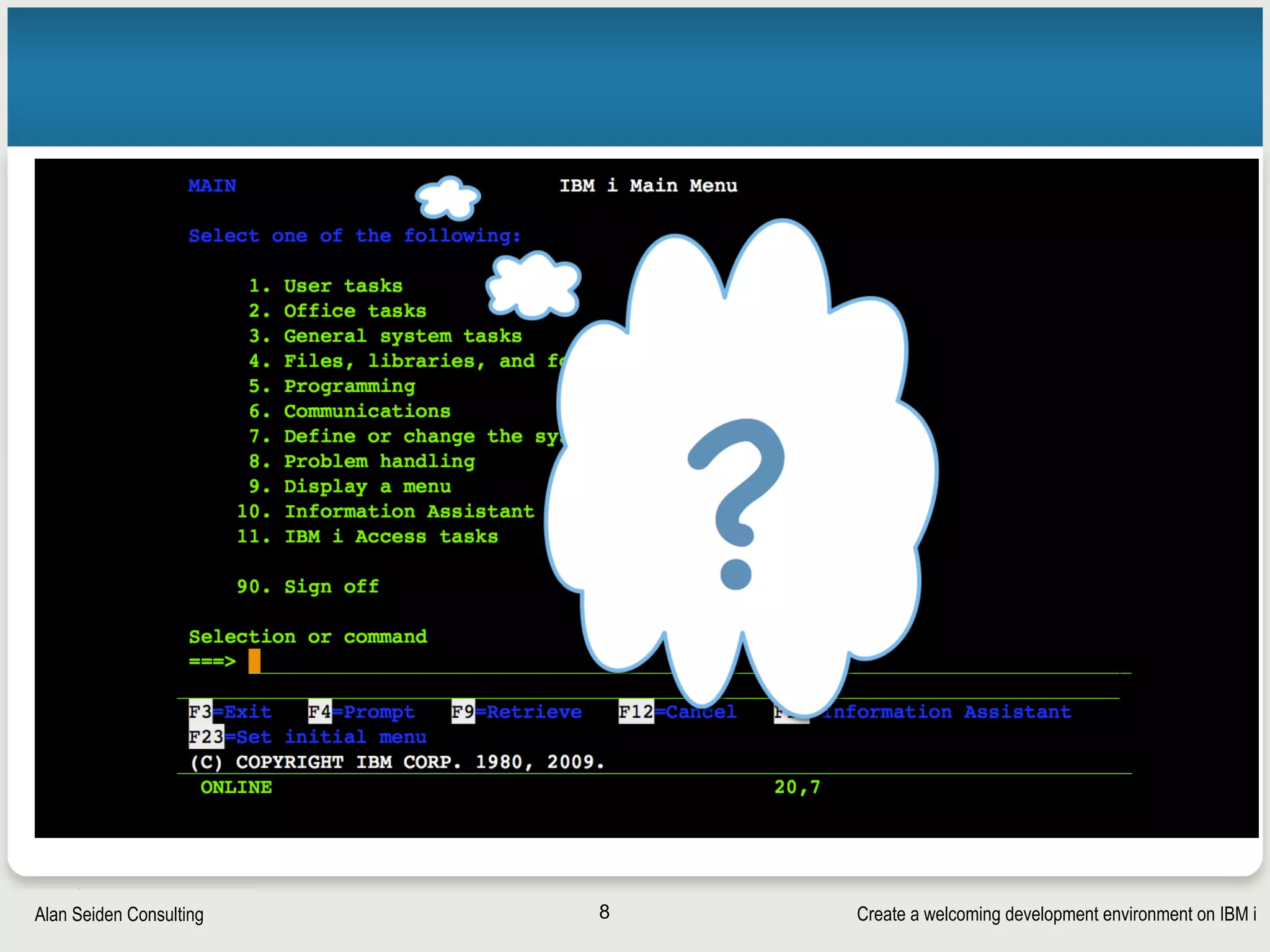
• You introduct a developer with web/PHP/open
source expertise but no IBM i knowledge
7
Create a welcoming development environment on IBM iAlan Seiden Consulting 8
Create a welcoming development environment on IBM iAlan Seiden Consulting
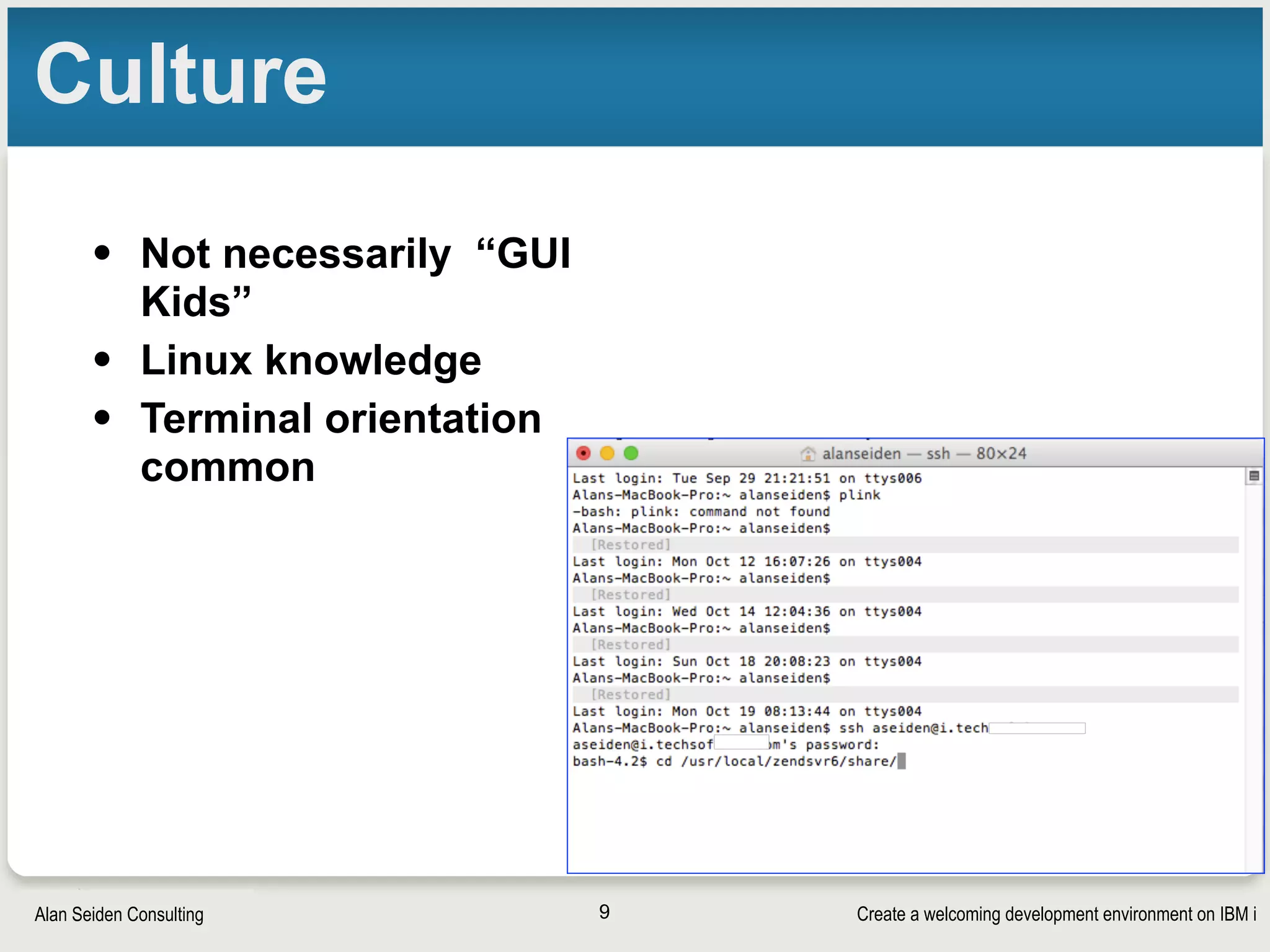
Culture
• Not necessarily “GUI
Kids”
• Linux knowledge
• Terminal orientation
common
9
Create a welcoming development environment on IBM iAlan Seiden Consulting
Talk about it
• UI style
§ Ubuntu GUI?
§ Windows? Mac? (Mac has great UNIX terminal)
§ Command line (terminal)?
• IDE
§ Zend Studio / PHP Storm / Websmart ?
§ VI / VIM?
• Source control and workflow
§ Git
§ Travis continuous integration?
§ Commercial tools
10
Create a welcoming development environment on IBM iAlan Seiden Consulting
Where does the code go?
• Local development (on dev’s PC)
• On IFS (shared or separate directories)
§ Ordinary segregated dev folders
§ chroot (new)
11
Create a welcoming development environment on IBM iAlan Seiden Consulting
Local development (PC)
• Developer codes and tests on her/his PC
• Requirement options for testing
§ Copy of database (difficult for IBM i)
§ Connection to IBM i database (live data testing)
• Requires “DB2 Connect” product
• Workflow that deploys to the IFS eventually for
production or QA
12
Create a welcoming development environment on IBM iAlan Seiden Consulting
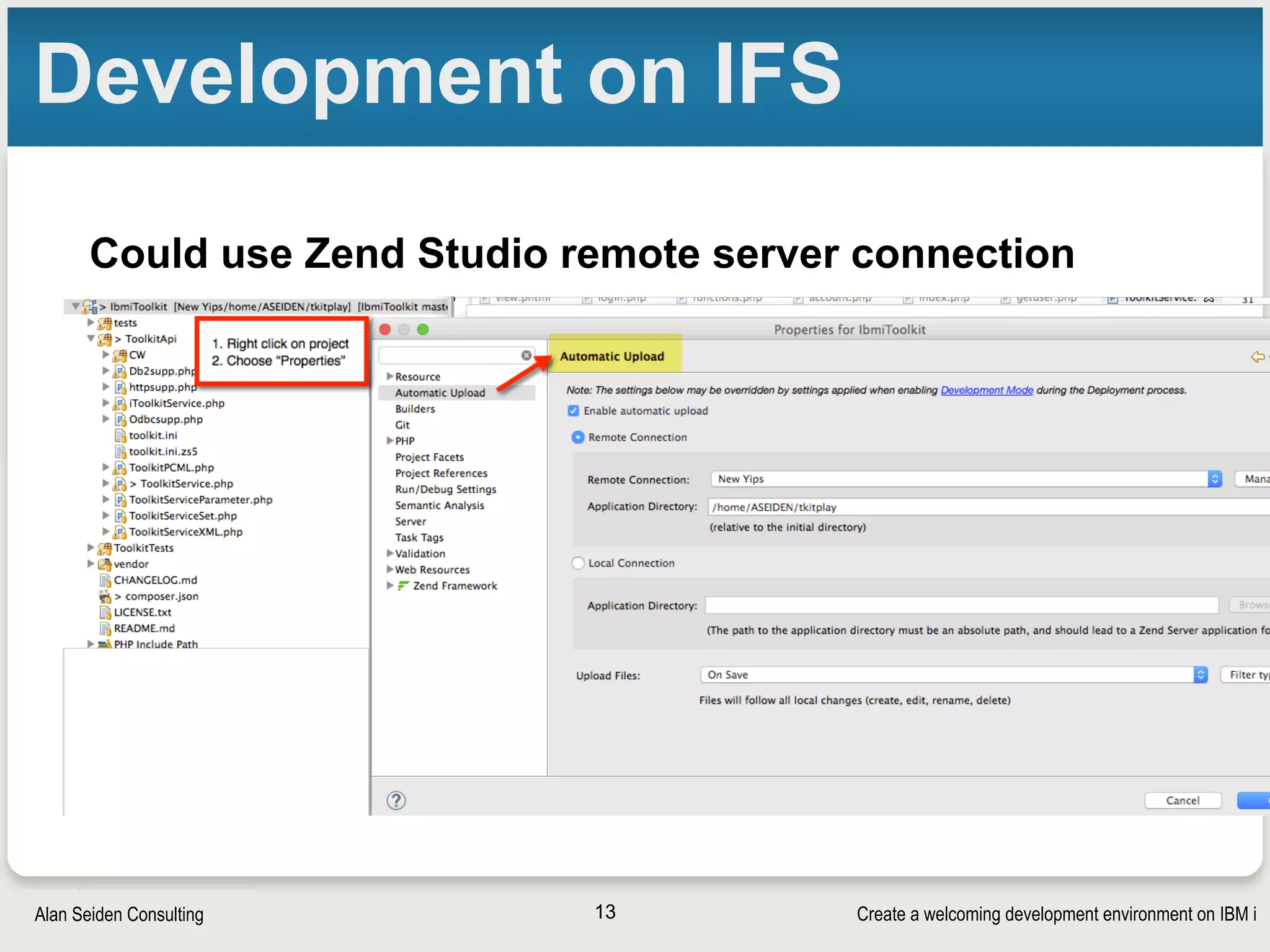
Development on IFS
Could use Zend Studio remote server connection
13
Create a welcoming development environment on IBM iAlan Seiden Consulting
IFS chroot
• Developer gets her/his own special segregated
area on IFS
• http://yips.idevcloud.com/wiki/index.php/PASE/
OpenSourceBeta
• Try it and contribute issues on bitbucket
• Comes with bash, vi, many tools


See Tony’s presentation from yesterday
• ZendCon attendees say chroot is the winner!
14
Create a welcoming development environment on IBM iAlan Seiden Consulting
If dev works on IFS: SSH
• Secure SHell (SSH)
• Developer may want:
§ bash shell (tab autocompletion)
• https://godzillai5.wordpress.com/2015/07/26/
quick-and-simple-way-to-install-bash-on-ibmi-w-
local-files/
• or upcoming GCC package from IBM
§ vi or vim editor
• http://www.perzl.org/aix/index.php?n=Main.Vim
15
SSH tips
Create a welcoming development environment on IBM iAlan Seiden Consulting
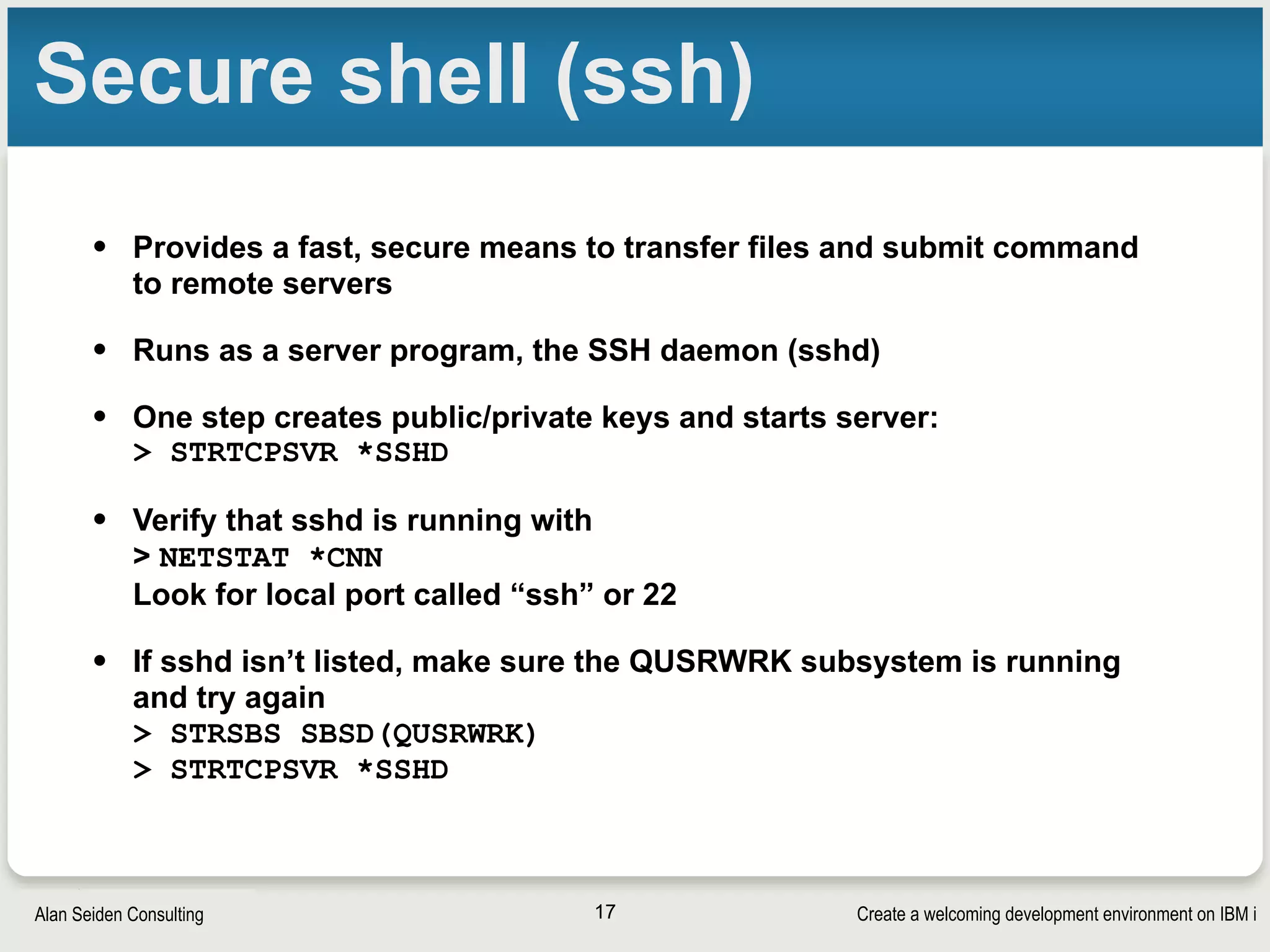
Secure shell (ssh)
• Provides a fast, secure means to transfer files and submit command
to remote servers
• Runs as a server program, the SSH daemon (sshd)
• One step creates public/private keys and starts server:

> STRTCPSVR *SSHD
• Verify that sshd is running with

> NETSTAT *CNN

Look for local port called “ssh” or 22
• If sshd isn’t listed, make sure the QUSRWRK subsystem is running
and try again

> STRSBS SBSD(QUSRWRK)

> STRTCPSVR *SSHD
17
Create a welcoming development environment on IBM iAlan Seiden Consulting
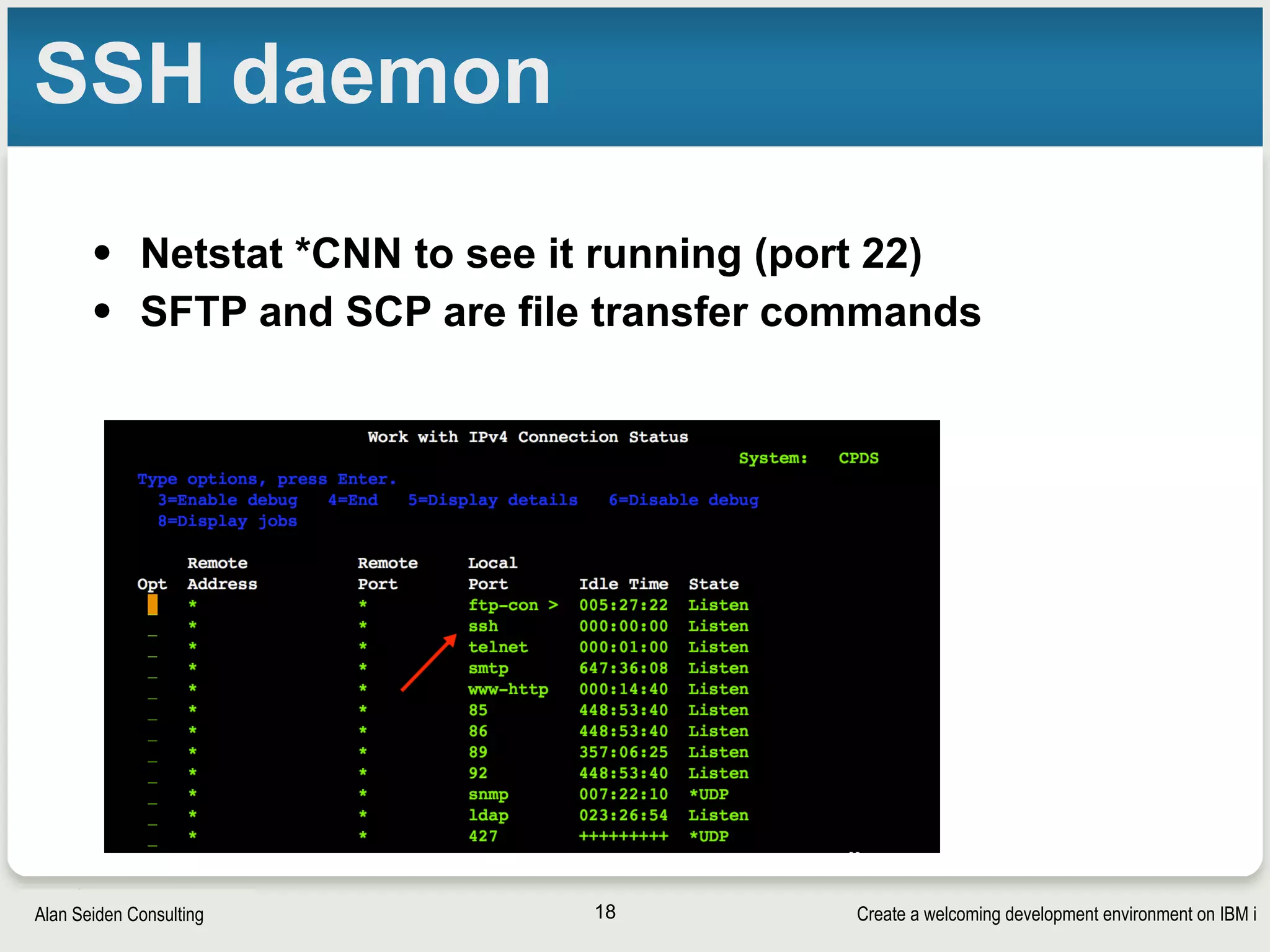
SSH daemon
• Netstat *CNN to see it running (port 22)
• SFTP and SCP are file transfer commands
18
Create a welcoming development environment on IBM iAlan Seiden Consulting
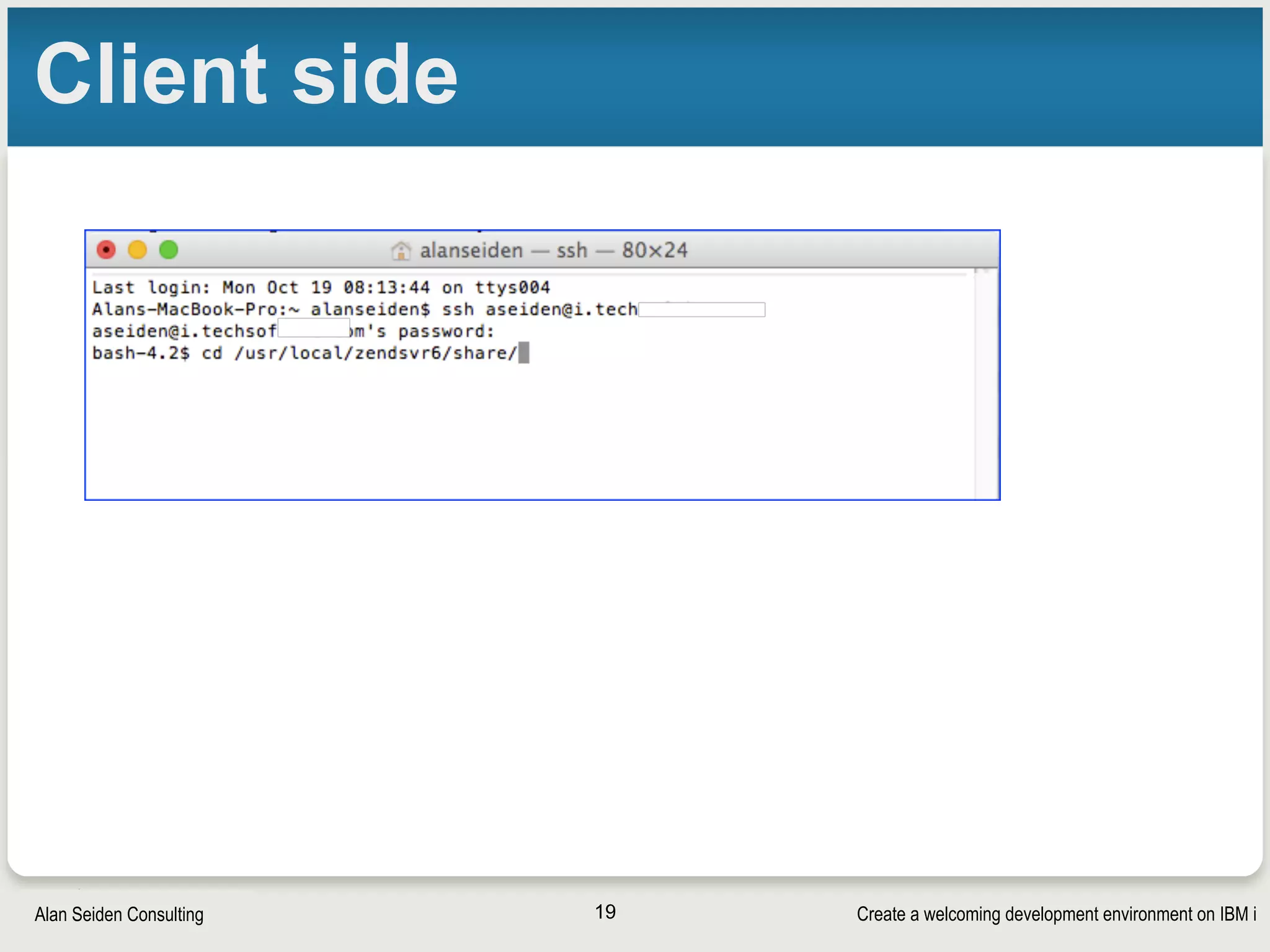
Client side
19
Create a welcoming development environment on IBM iAlan Seiden Consulting
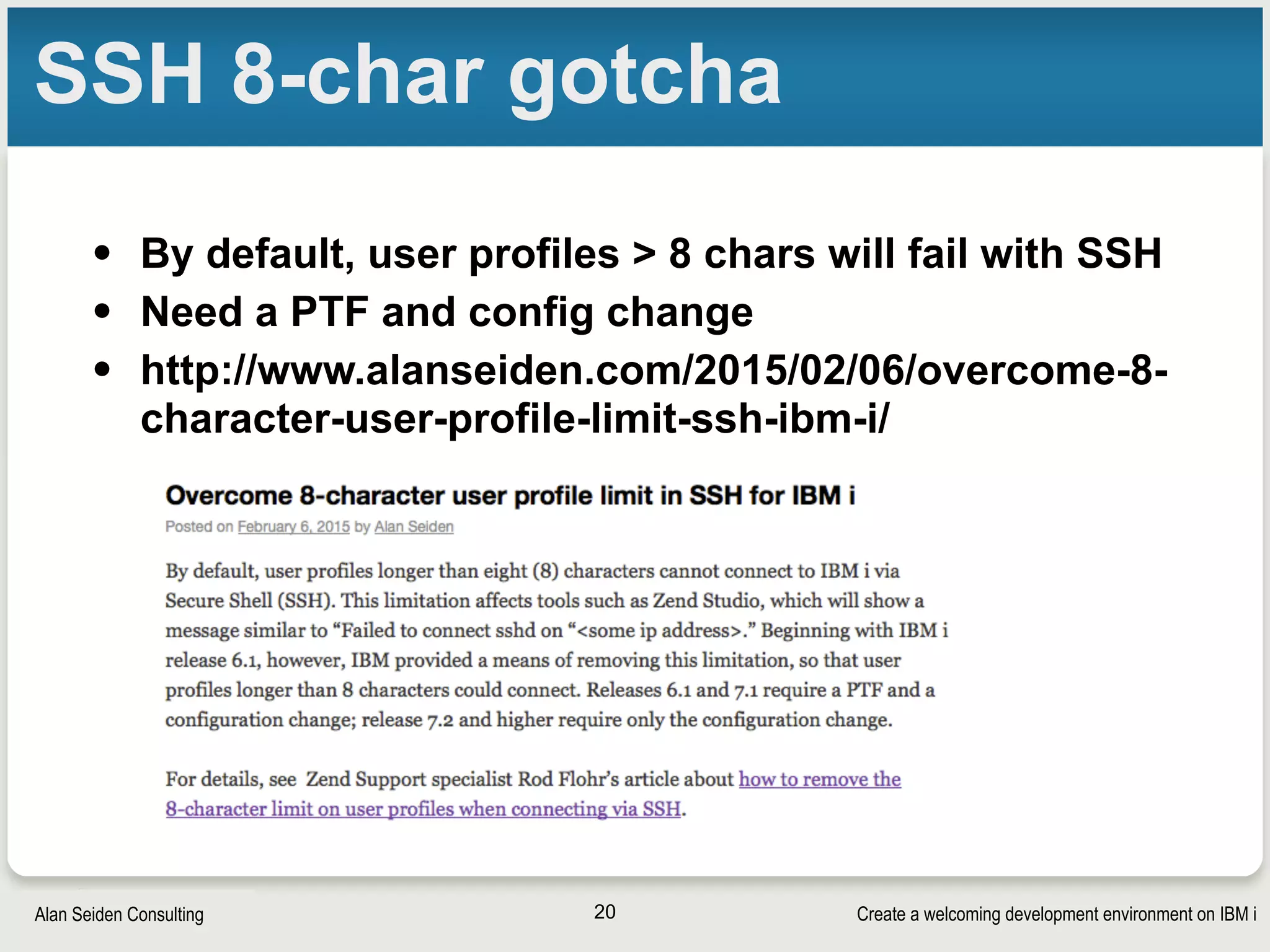
SSH 8-char gotcha
• By default, user profiles > 8 chars will fail with SSH
• Need a PTF and config change
• http://www.alanseiden.com/2015/02/06/overcome-8-
character-user-profile-limit-ssh-ibm-i/
20
Create a welcoming development environment on IBM iAlan Seiden Consulting
SSH public/private keys
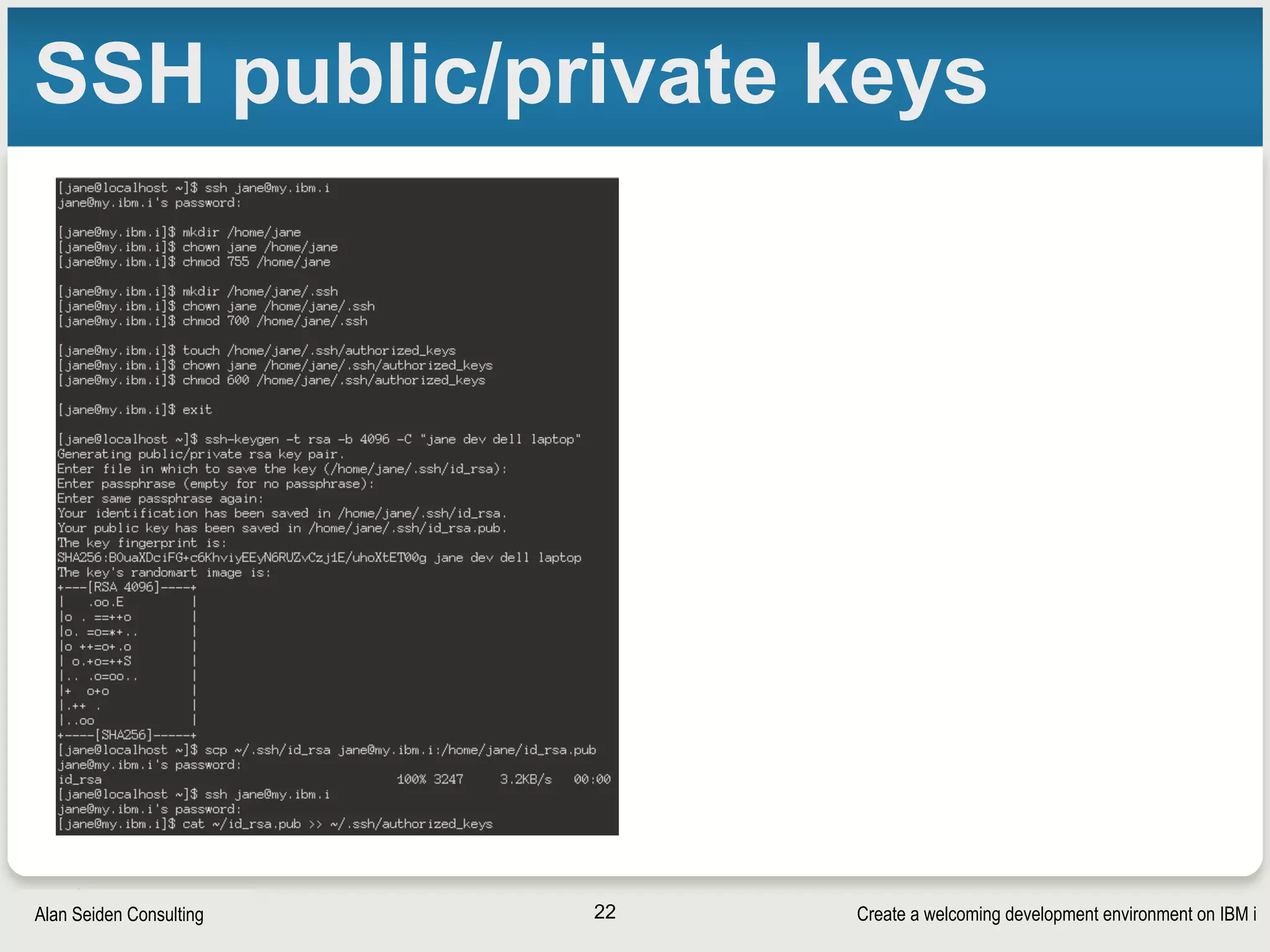
• Dev may not want to sign in every time
• Try public/private keystore
§ https://gist.github.com/nclundsten/
ecf4f3609aa27f3218f6
• SSH agent can prompt for passphrase at
designated times (not every time)
• More on next slide
21
Create a welcoming development environment on IBM iAlan Seiden Consulting
SSH public/private keys
22
Create a welcoming development environment on IBM iAlan Seiden Consulting
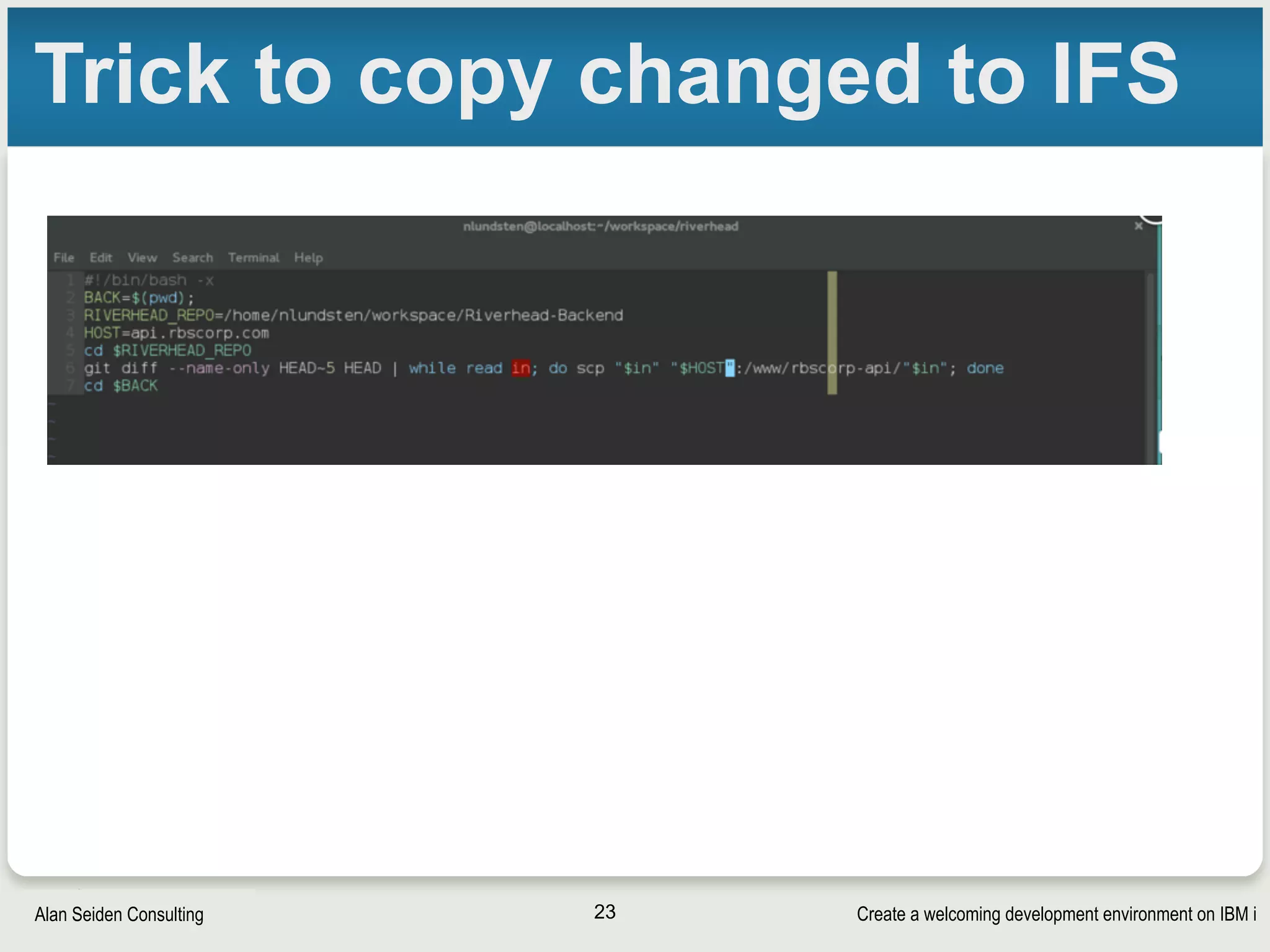
Trick to copy changed to IFS
23
Create a welcoming development environment on IBM iAlan Seiden Consulting
Home directory
• /home/USERNAME not created by default
ssh user_profile@servername #or use putty on
windows
mkdir ~ #will be /home/USERNAME in all caps
chown $USER ~
chmod 755 ~ # or 750 or 700 depending on
preferences
mkdir ~/.ssh
chown $USER ~/.ssh
chmod 700 ~/.ssh
touch ~/.ssh/authorized_keys
chmod 600 ~/.ssh/authorized_keys
exit
24
Create a welcoming development environment on IBM iAlan Seiden Consulting
Making bash the default shell
• Globally: Set ibmpaseforshell variable
§ http://www-01.ibm.com/support/docview.wss?uid=nas8N1011555
• For your user: edit ~/.profile. On v7.1:
# detect if we're in a PASE shell
/QSYS.LIB/QSHELL.LIB/UNAME.PGM > /dev/null 2>&1
if [ $? != 0 -a "$SHELL" != "/QOpenSys/usr/bin/bash" ]
then
exec /usr/bin/bash
fi
• More info
• http://stackoverflow.com/questions/23913957/set-default-pase-ibm-i-shell-for-
individual-user
25
Create a welcoming development environment on IBM iAlan Seiden Consulting
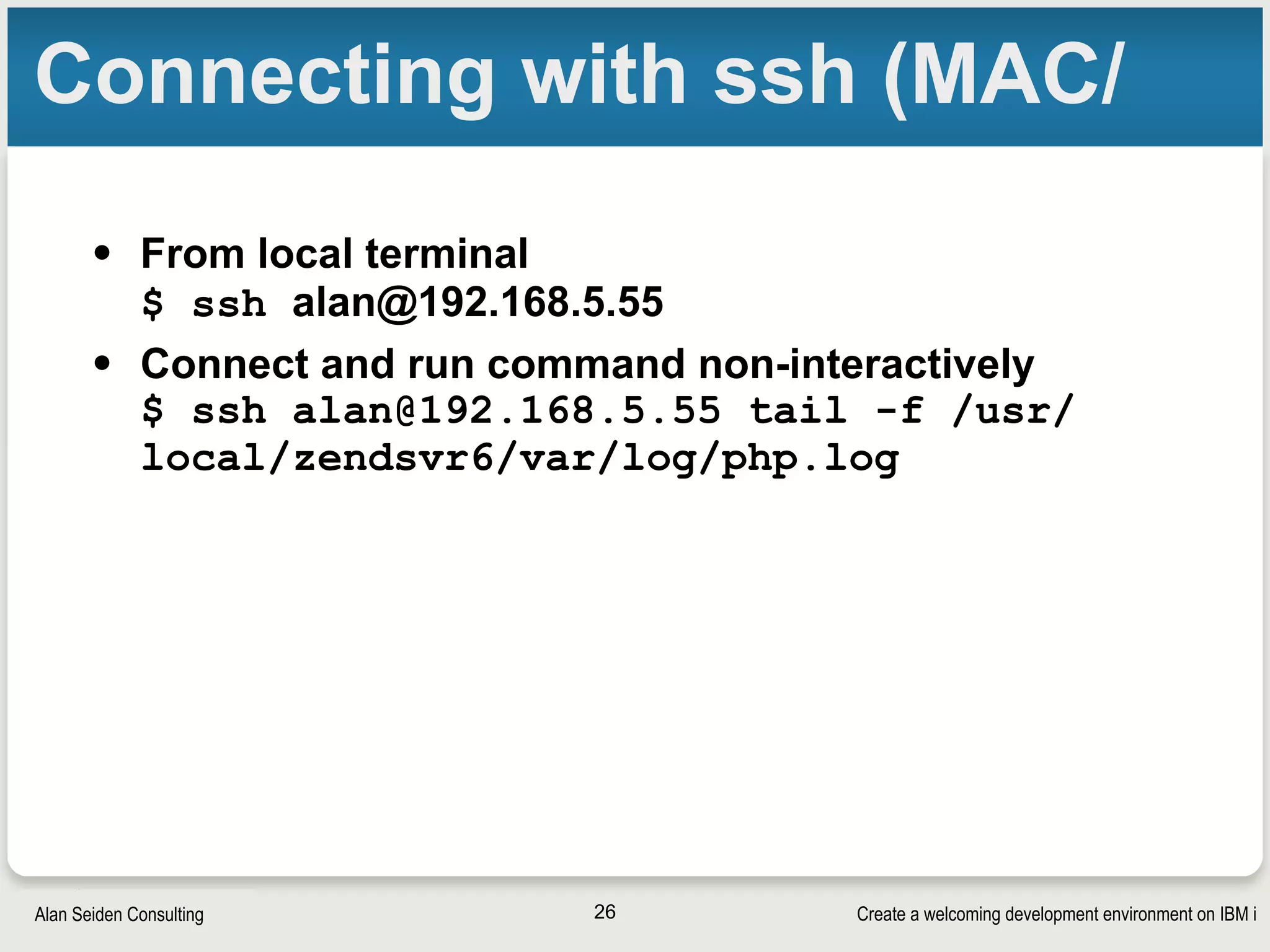
Connecting with ssh (MAC/
• From local terminal

$ ssh alan@192.168.5.55
• Connect and run command non-interactively

$ ssh alan@192.168.5.55 tail -f /usr/
local/zendsvr6/var/log/php.log
26
Create a welcoming development environment on IBM iAlan Seiden Consulting
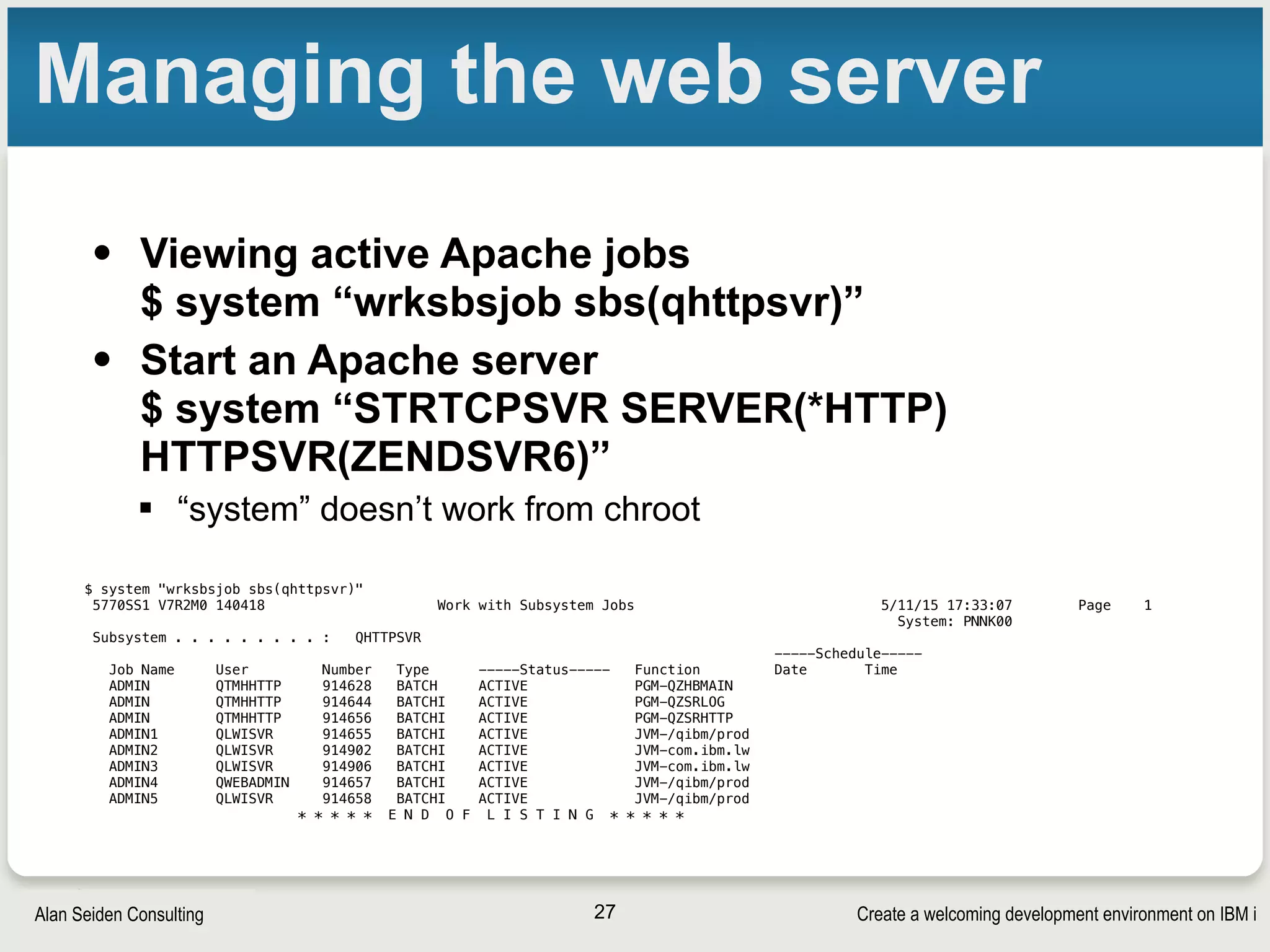
Managing the web server
• Viewing active Apache jobs

$ system “wrksbsjob sbs(qhttpsvr)”
• Start an Apache server

$ system “STRTCPSVR SERVER(*HTTP)
HTTPSVR(ZENDSVR6)”
§ “system” doesn’t work from chroot
27
$ system "wrksbsjob sbs(qhttpsvr)"
5770SS1 V7R2M0 140418 Work with Subsystem Jobs 5/11/15 17:33:07 Page 1
System: PNNK00
Subsystem . . . . . . . . . : QHTTPSVR
-----Schedule-----
Job Name User Number Type -----Status----- Function Date Time
ADMIN QTMHHTTP 914628 BATCH ACTIVE PGM-QZHBMAIN
ADMIN QTMHHTTP 914644 BATCHI ACTIVE PGM-QZSRLOG
ADMIN QTMHHTTP 914656 BATCHI ACTIVE PGM-QZSRHTTP
ADMIN1 QLWISVR 914655 BATCHI ACTIVE JVM-/qibm/prod
ADMIN2 QLWISVR 914902 BATCHI ACTIVE JVM-com.ibm.lw
ADMIN3 QLWISVR 914906 BATCHI ACTIVE JVM-com.ibm.lw
ADMIN4 QWEBADMIN 914657 BATCHI ACTIVE JVM-/qibm/prod
ADMIN5 QLWISVR 914658 BATCHI ACTIVE JVM-/qibm/prod
* * * * * E N D O F L I S T I N G * * * * *
Create a welcoming development environment on IBM iAlan Seiden Consulting
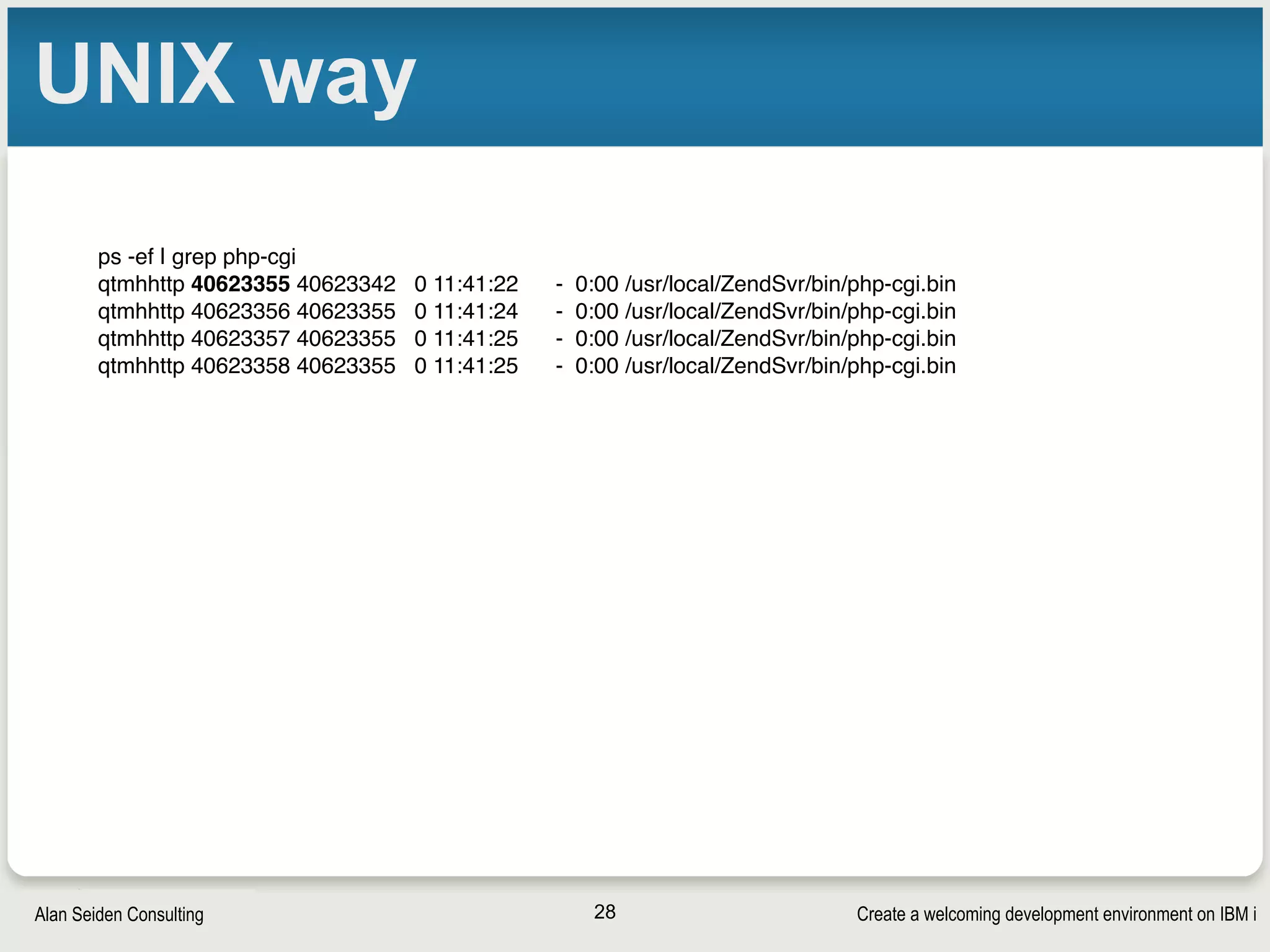
UNIX way
28
ps -ef | grep php-cgi
qtmhhttp 40623355 40623342 0 11:41:22 - 0:00 /usr/local/ZendSvr/bin/php-cgi.bin
qtmhhttp 40623356 40623355 0 11:41:24 - 0:00 /usr/local/ZendSvr/bin/php-cgi.bin
qtmhhttp 40623357 40623355 0 11:41:25 - 0:00 /usr/local/ZendSvr/bin/php-cgi.bin
qtmhhttp 40623358 40623355 0 11:41:25 - 0:00 /usr/local/ZendSvr/bin/php-cgi.bin
PHP-CLI
Create a welcoming development environment on IBM iAlan Seiden Consulting
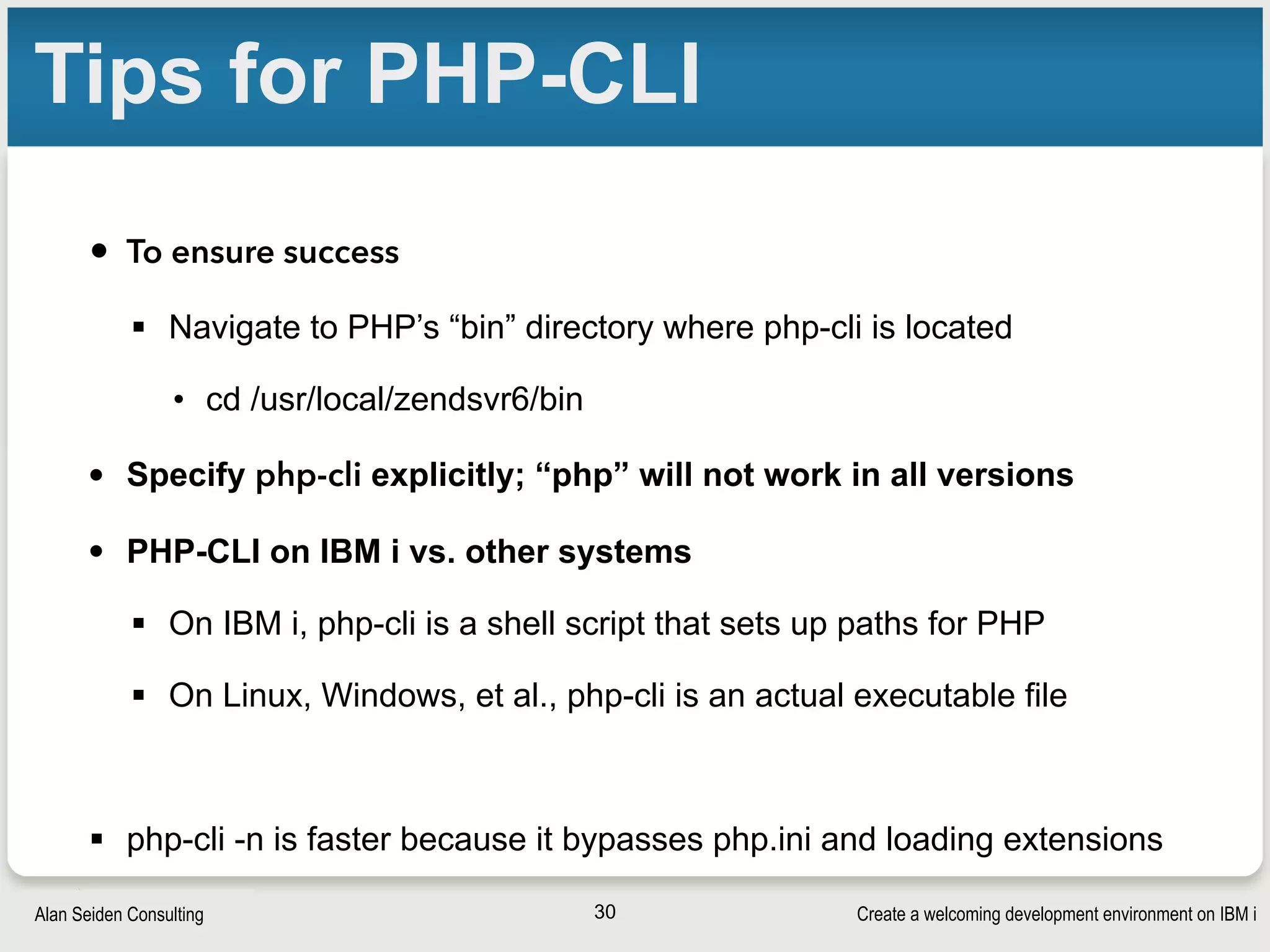
Tips for PHP-CLI
• To ensure success
§ Navigate to PHP’s “bin” directory where php-cli is located
• cd /usr/local/zendsvr6/bin
• Specify php-cli explicitly; “php” will not work in all versions
• PHP-CLI on IBM i vs. other systems
§ On IBM i, php-cli is a shell script that sets up paths for PHP
§ On Linux, Windows, et al., php-cli is an actual executable file
§ php-cli -n is faster because it bypasses php.ini and loading extensions
30
DB2
Create a welcoming development environment on IBM iAlan Seiden Consulting
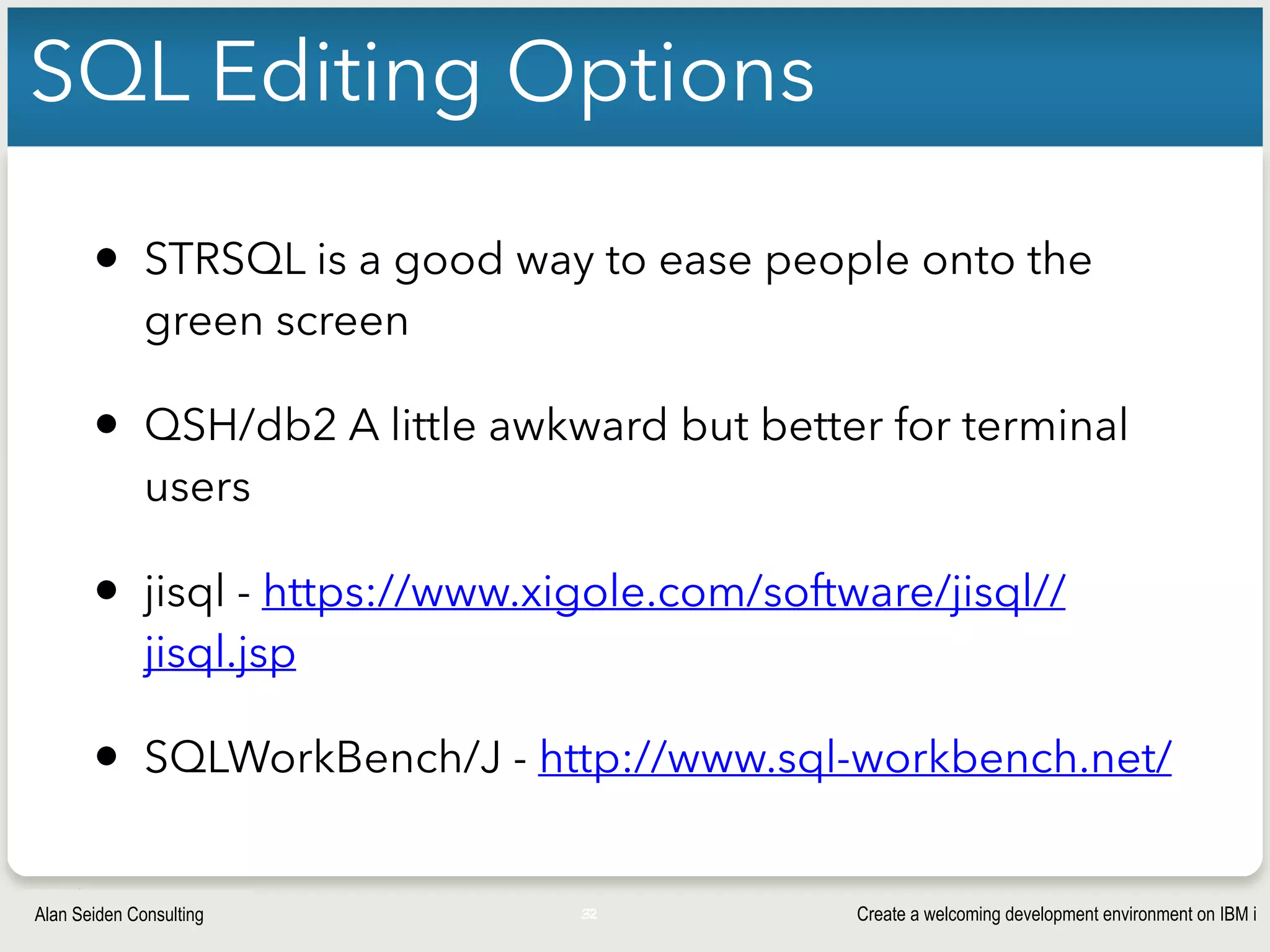
SQL Editing Options
• STRSQL is a good way to ease people onto the
green screen
• QSH/db2 A little awkward but better for terminal
users
• jisql - https://www.xigole.com/software/jisql//
jisql.jsp
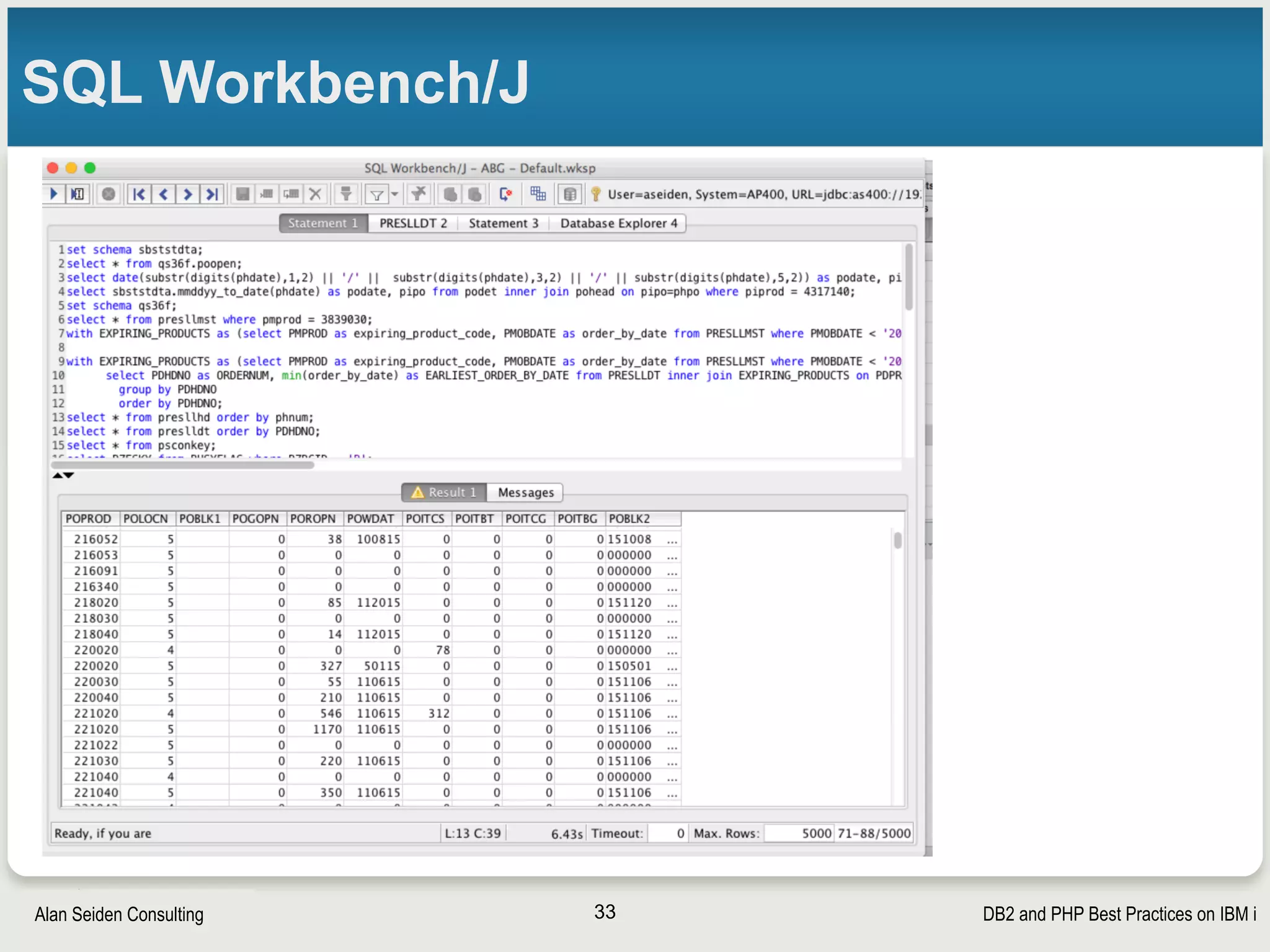
• SQLWorkBench/J - http://www.sql-workbench.net/
32
DB2 and PHP Best Practices on IBM iAlan Seiden Consulting
SQL Workbench/J
33
Create a welcoming development environment on IBM iAlan Seiden Consulting
QSH DB2
1. ssh i.techsite.com -l nlundsten
(or whatever…then password, however you choose)
2. qsh
3. db2 “select * from myschema.mytable where
col=‘x’” (use your own query here in double
quotes)
4. [more queries as desired]
5. exit
34
Source control/

workflow
Create a welcoming development environment on IBM iAlan Seiden Consulting
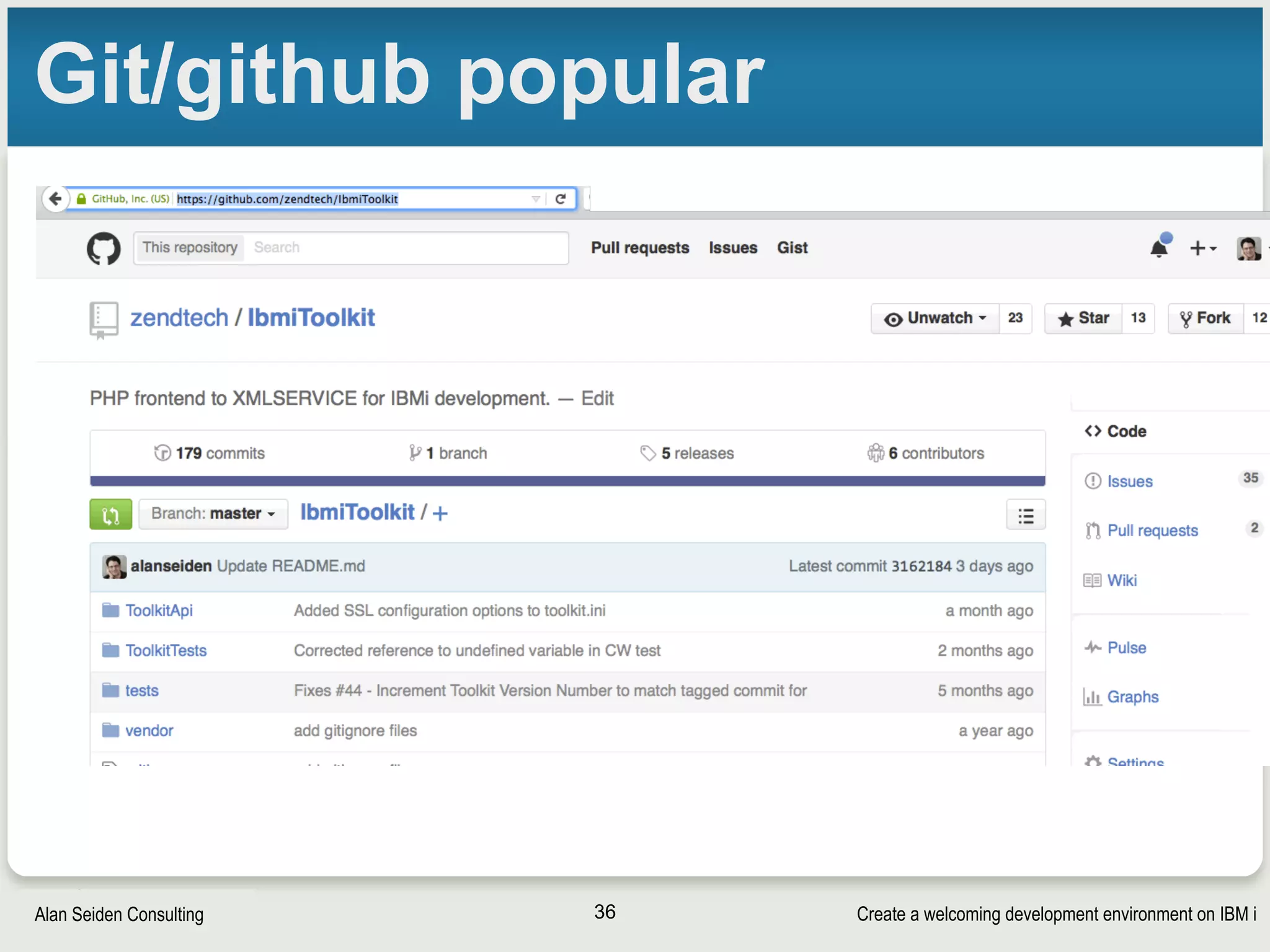
Git/github popular
36
Create a welcoming development environment on IBM iAlan Seiden Consulting
Git
• Distributed
• Each dev has local repository
• Remote repository puts it all together
• Command line or GUI IDE options
37
Create a welcoming development environment on IBM iAlan Seiden Consulting
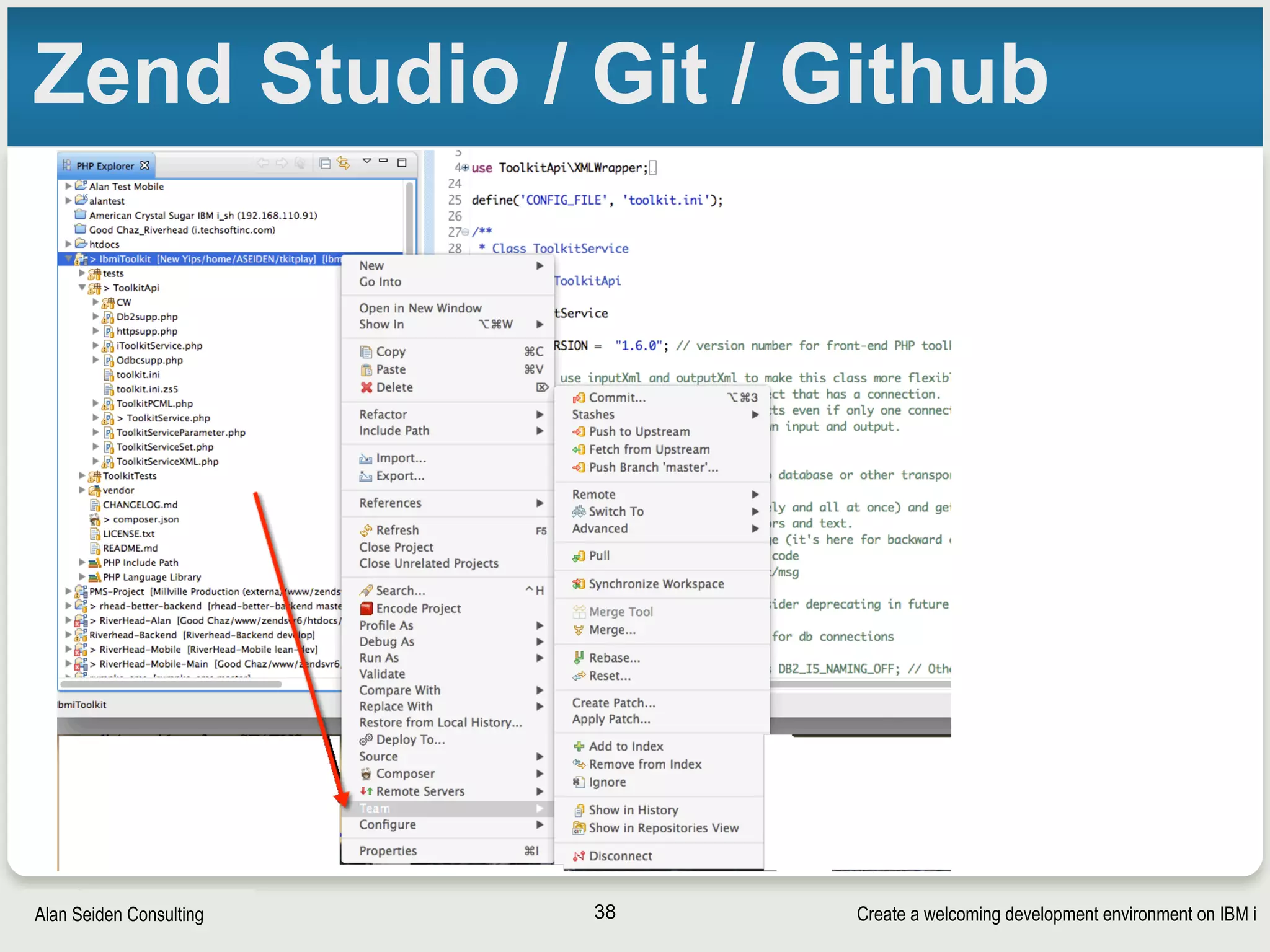
Zend Studio / Git / Github
38
Create a welcoming development environment on IBM iAlan Seiden Consulting
Git alternatives
• Could install on IBM i
• Github.com
• Bitbucket.com
• Git lab (local or hosted)
• Hosted (Josh and Roger suggest at $5/month):
• https://www.digitalocean.com/features/one-click-apps/
gitlab/
• Local: gitlab.com
• Integrates with commercial tools (see ZendCon expo)
39
Communication
Create a welcoming development environment on IBM iAlan Seiden Consulting
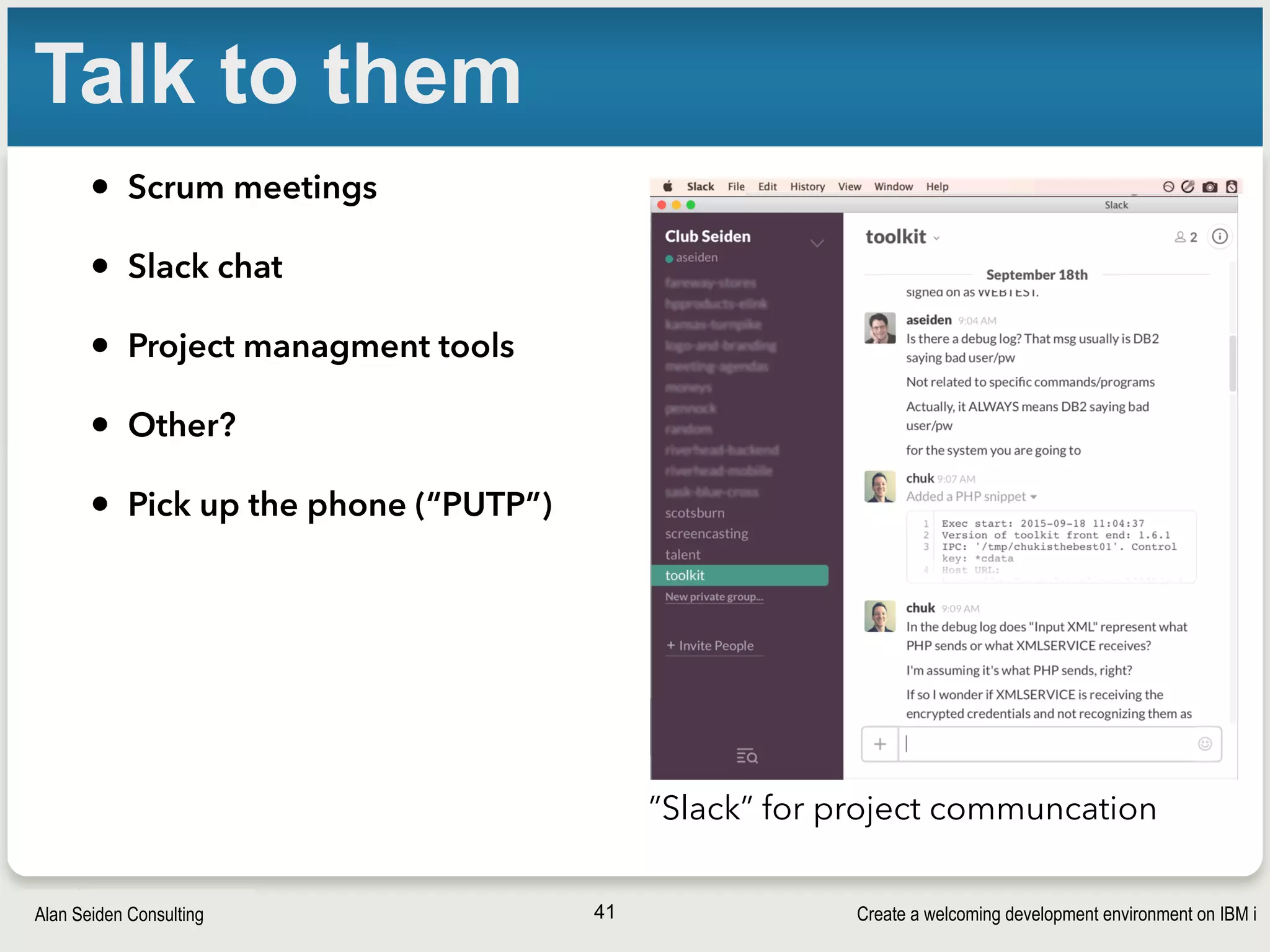
Talk to them
• Scrum meetings
• Slack chat
• Project managment tools
• Other?
• Pick up the phone (“PUTP”)
41
”Slack” for project communcation
Create a welcoming development environment on IBM iAlan Seiden Consulting
Contact and tips
Alan Seiden
Alan Seiden Consulting
Ho-Ho-Kus, NJ
42
alan@alanseiden.com ● 201-447-2437 ● twitter: @alanseiden
Free newsletter: 

http://alanseiden.com/tips
Feedback, please: https://joind.in/15570

Create a welcoming development environment on IBM i

  • 1.
    Create a welcomingdev environment on IBM i 
 https://joind.in/15570
  • 2.
    Create a welcomingdevelopment environment on IBM iAlan Seiden Consulting Alan Seiden Consulting • Focus on innovation using PHP and IBM i § Award-winning developers • Authority, web performance on IBM i • Alan’s open source work § PHP project leader, Zend/IBM Toolkit § Contributor, Zend Framework DB2 enhancements 2
  • 3.
    Create a welcomingdevelopment environment on IBM iAlan Seiden Consulting Founder, Club Seiden 3 club.alanseiden.com
  • 4.
    Create a welcomingdevelopment environment on IBM iAlan Seiden Consulting Contact information Alan Seiden alan@alanseiden.com 201-447-2437 alanseiden.com twitter: @alanseiden 4
  • 5.
    Create a welcomingdevelopment environment on IBM iAlan Seiden Consulting Expanding our world • PHP and new UI talent • Don’t assume IBM i knowledge • Command line orientation (often) • Other cultural differences • Secure Shell (ssh) • Useful commands • chroot environment • Familiar editing tools (vi, etc.) • Managing the web server • php-cli • Git • Editing SQL 5
  • 6.
  • 7.
    Create a welcomingdevelopment environment on IBM iAlan Seiden Consulting Situation • You’re in a company with traditional IBM i expertise
 • You introduct a developer with web/PHP/open source expertise but no IBM i knowledge 7
  • 8.
    Create a welcomingdevelopment environment on IBM iAlan Seiden Consulting 8
  • 9.
    Create a welcomingdevelopment environment on IBM iAlan Seiden Consulting Culture • Not necessarily “GUI Kids” • Linux knowledge • Terminal orientation common 9
  • 10.
    Create a welcomingdevelopment environment on IBM iAlan Seiden Consulting Talk about it • UI style § Ubuntu GUI? § Windows? Mac? (Mac has great UNIX terminal) § Command line (terminal)? • IDE § Zend Studio / PHP Storm / Websmart ? § VI / VIM? • Source control and workflow § Git § Travis continuous integration? § Commercial tools 10
  • 11.
    Create a welcomingdevelopment environment on IBM iAlan Seiden Consulting Where does the code go? • Local development (on dev’s PC) • On IFS (shared or separate directories) § Ordinary segregated dev folders § chroot (new) 11
  • 12.
    Create a welcomingdevelopment environment on IBM iAlan Seiden Consulting Local development (PC) • Developer codes and tests on her/his PC • Requirement options for testing § Copy of database (difficult for IBM i) § Connection to IBM i database (live data testing) • Requires “DB2 Connect” product • Workflow that deploys to the IFS eventually for production or QA 12
  • 13.
    Create a welcomingdevelopment environment on IBM iAlan Seiden Consulting Development on IFS Could use Zend Studio remote server connection 13
  • 14.
    Create a welcomingdevelopment environment on IBM iAlan Seiden Consulting IFS chroot • Developer gets her/his own special segregated area on IFS • http://yips.idevcloud.com/wiki/index.php/PASE/ OpenSourceBeta • Try it and contribute issues on bitbucket • Comes with bash, vi, many tools
 
 See Tony’s presentation from yesterday • ZendCon attendees say chroot is the winner! 14
  • 15.
    Create a welcomingdevelopment environment on IBM iAlan Seiden Consulting If dev works on IFS: SSH • Secure SHell (SSH) • Developer may want: § bash shell (tab autocompletion) • https://godzillai5.wordpress.com/2015/07/26/ quick-and-simple-way-to-install-bash-on-ibmi-w- local-files/ • or upcoming GCC package from IBM § vi or vim editor • http://www.perzl.org/aix/index.php?n=Main.Vim 15
  • 16.
  • 17.
    Create a welcomingdevelopment environment on IBM iAlan Seiden Consulting Secure shell (ssh) • Provides a fast, secure means to transfer files and submit command to remote servers • Runs as a server program, the SSH daemon (sshd) • One step creates public/private keys and starts server:
 > STRTCPSVR *SSHD • Verify that sshd is running with
 > NETSTAT *CNN
 Look for local port called “ssh” or 22 • If sshd isn’t listed, make sure the QUSRWRK subsystem is running and try again
 > STRSBS SBSD(QUSRWRK)
 > STRTCPSVR *SSHD 17
  • 18.
    Create a welcomingdevelopment environment on IBM iAlan Seiden Consulting SSH daemon • Netstat *CNN to see it running (port 22) • SFTP and SCP are file transfer commands 18
  • 19.
    Create a welcomingdevelopment environment on IBM iAlan Seiden Consulting Client side 19
  • 20.
    Create a welcomingdevelopment environment on IBM iAlan Seiden Consulting SSH 8-char gotcha • By default, user profiles > 8 chars will fail with SSH • Need a PTF and config change • http://www.alanseiden.com/2015/02/06/overcome-8- character-user-profile-limit-ssh-ibm-i/ 20
  • 21.
    Create a welcomingdevelopment environment on IBM iAlan Seiden Consulting SSH public/private keys • Dev may not want to sign in every time • Try public/private keystore § https://gist.github.com/nclundsten/ ecf4f3609aa27f3218f6 • SSH agent can prompt for passphrase at designated times (not every time) • More on next slide 21
  • 22.
    Create a welcomingdevelopment environment on IBM iAlan Seiden Consulting SSH public/private keys 22
  • 23.
    Create a welcomingdevelopment environment on IBM iAlan Seiden Consulting Trick to copy changed to IFS 23
  • 24.
    Create a welcomingdevelopment environment on IBM iAlan Seiden Consulting Home directory • /home/USERNAME not created by default ssh user_profile@servername #or use putty on windows mkdir ~ #will be /home/USERNAME in all caps chown $USER ~ chmod 755 ~ # or 750 or 700 depending on preferences mkdir ~/.ssh chown $USER ~/.ssh chmod 700 ~/.ssh touch ~/.ssh/authorized_keys chmod 600 ~/.ssh/authorized_keys exit 24
  • 25.
    Create a welcomingdevelopment environment on IBM iAlan Seiden Consulting Making bash the default shell • Globally: Set ibmpaseforshell variable § http://www-01.ibm.com/support/docview.wss?uid=nas8N1011555 • For your user: edit ~/.profile. On v7.1: # detect if we're in a PASE shell /QSYS.LIB/QSHELL.LIB/UNAME.PGM > /dev/null 2>&1 if [ $? != 0 -a "$SHELL" != "/QOpenSys/usr/bin/bash" ] then exec /usr/bin/bash fi • More info • http://stackoverflow.com/questions/23913957/set-default-pase-ibm-i-shell-for- individual-user 25
  • 26.
    Create a welcomingdevelopment environment on IBM iAlan Seiden Consulting Connecting with ssh (MAC/ • From local terminal
 $ ssh alan@192.168.5.55 • Connect and run command non-interactively
 $ ssh alan@192.168.5.55 tail -f /usr/ local/zendsvr6/var/log/php.log 26
  • 27.
    Create a welcomingdevelopment environment on IBM iAlan Seiden Consulting Managing the web server • Viewing active Apache jobs
 $ system “wrksbsjob sbs(qhttpsvr)” • Start an Apache server
 $ system “STRTCPSVR SERVER(*HTTP) HTTPSVR(ZENDSVR6)” § “system” doesn’t work from chroot 27 $ system "wrksbsjob sbs(qhttpsvr)" 5770SS1 V7R2M0 140418 Work with Subsystem Jobs 5/11/15 17:33:07 Page 1 System: PNNK00 Subsystem . . . . . . . . . : QHTTPSVR -----Schedule----- Job Name User Number Type -----Status----- Function Date Time ADMIN QTMHHTTP 914628 BATCH ACTIVE PGM-QZHBMAIN ADMIN QTMHHTTP 914644 BATCHI ACTIVE PGM-QZSRLOG ADMIN QTMHHTTP 914656 BATCHI ACTIVE PGM-QZSRHTTP ADMIN1 QLWISVR 914655 BATCHI ACTIVE JVM-/qibm/prod ADMIN2 QLWISVR 914902 BATCHI ACTIVE JVM-com.ibm.lw ADMIN3 QLWISVR 914906 BATCHI ACTIVE JVM-com.ibm.lw ADMIN4 QWEBADMIN 914657 BATCHI ACTIVE JVM-/qibm/prod ADMIN5 QLWISVR 914658 BATCHI ACTIVE JVM-/qibm/prod * * * * * E N D O F L I S T I N G * * * * *
  • 28.
    Create a welcomingdevelopment environment on IBM iAlan Seiden Consulting UNIX way 28 ps -ef | grep php-cgi qtmhhttp 40623355 40623342 0 11:41:22 - 0:00 /usr/local/ZendSvr/bin/php-cgi.bin qtmhhttp 40623356 40623355 0 11:41:24 - 0:00 /usr/local/ZendSvr/bin/php-cgi.bin qtmhhttp 40623357 40623355 0 11:41:25 - 0:00 /usr/local/ZendSvr/bin/php-cgi.bin qtmhhttp 40623358 40623355 0 11:41:25 - 0:00 /usr/local/ZendSvr/bin/php-cgi.bin
  • 29.
  • 30.
    Create a welcomingdevelopment environment on IBM iAlan Seiden Consulting Tips for PHP-CLI • To ensure success § Navigate to PHP’s “bin” directory where php-cli is located • cd /usr/local/zendsvr6/bin • Specify php-cli explicitly; “php” will not work in all versions • PHP-CLI on IBM i vs. other systems § On IBM i, php-cli is a shell script that sets up paths for PHP § On Linux, Windows, et al., php-cli is an actual executable file § php-cli -n is faster because it bypasses php.ini and loading extensions 30
  • 31.
  • 32.
    Create a welcomingdevelopment environment on IBM iAlan Seiden Consulting SQL Editing Options • STRSQL is a good way to ease people onto the green screen • QSH/db2 A little awkward but better for terminal users • jisql - https://www.xigole.com/software/jisql// jisql.jsp • SQLWorkBench/J - http://www.sql-workbench.net/ 32
  • 33.
    DB2 and PHPBest Practices on IBM iAlan Seiden Consulting SQL Workbench/J 33
  • 34.
    Create a welcomingdevelopment environment on IBM iAlan Seiden Consulting QSH DB2 1. ssh i.techsite.com -l nlundsten (or whatever…then password, however you choose) 2. qsh 3. db2 “select * from myschema.mytable where col=‘x’” (use your own query here in double quotes) 4. [more queries as desired] 5. exit 34
  • 35.
  • 36.
    Create a welcomingdevelopment environment on IBM iAlan Seiden Consulting Git/github popular 36
  • 37.
    Create a welcomingdevelopment environment on IBM iAlan Seiden Consulting Git • Distributed • Each dev has local repository • Remote repository puts it all together • Command line or GUI IDE options 37
  • 38.
    Create a welcomingdevelopment environment on IBM iAlan Seiden Consulting Zend Studio / Git / Github 38
  • 39.
    Create a welcomingdevelopment environment on IBM iAlan Seiden Consulting Git alternatives • Could install on IBM i • Github.com • Bitbucket.com • Git lab (local or hosted) • Hosted (Josh and Roger suggest at $5/month): • https://www.digitalocean.com/features/one-click-apps/ gitlab/ • Local: gitlab.com • Integrates with commercial tools (see ZendCon expo) 39
  • 40.
  • 41.
    Create a welcomingdevelopment environment on IBM iAlan Seiden Consulting Talk to them • Scrum meetings • Slack chat • Project managment tools • Other? • Pick up the phone (“PUTP”) 41 ”Slack” for project communcation
  • 42.
    Create a welcomingdevelopment environment on IBM iAlan Seiden Consulting Contact and tips Alan Seiden Alan Seiden Consulting Ho-Ho-Kus, NJ 42 alan@alanseiden.com ● 201-447-2437 ● twitter: @alanseiden Free newsletter: 
 http://alanseiden.com/tips Feedback, please: https://joind.in/15570