SCAPE

Matchbox tool
Quality control for digital collections
Roman Graf                                                                                   Reinhold Huber-Mörk
Research Area Future Networks and Services                     Research Area Intelligent Vision Systems
                  Department Safety & Security, AIT Austrian Institute of Technology

Alexander Schindler
Department of Software Technology and Interactive Systems
Vienna University of Technology

SCAPE training event
Guimaraes, Portugal, 6-7 December 2012
                                      This work was partially supported by the SCAPE Project.
         The SCAPE project is co-funded by the European Union under FP7 ICT-2009.4.1 (Grant Agreement number 270137).
SCAPE
                      Overview

•   Introduction
•   Matchbox Tool Description
•   Image Processing
•   Collection Samples
•   Matchbox Tool Features
•   Training Description
•   Installation Guidelines
•   Practical Exercises and Tool Analysis Results
•   Conclusion
                                                       2
SCAPE
                          Introduction
•   High storage costs
•   Update of digitized collection through an automatic scanning process
•   Use case: Find Duplicates
•   No automatic method to detect duplicates in not structured collections
•   Lack expertise and efficient methods for finding images in a huge
    collection
•   Need for automated solutions
•   QA is required to select between the old and new
•   Decision support - overwrite or human inspection
•   Image: d = 40.000 SIFT descriptors, book: n = 700 images
•   SIFT: d2 = 1.6×10⁹ vector comparisons for a single pair of images
•   BoW typical book: clustering, n×(n - 1) = 350.000 vector comparisons

                                                                             3
SCAPE
              Matchbox Tool Description

• Tool
   • C++ (DLLs on Windows or shared objects on Linux)
• Dataset
   • Austrian National Library - Digital Book Collection (about 600.000
     books that will be digitized over the coming years)
• Main tasks
   • Overwriting existing collection items with new items
   • Image pairs can be compared within a book
• Output
   • Visual dictionary for further analysis
   • Duplicates

                                                                          4
SCAPE
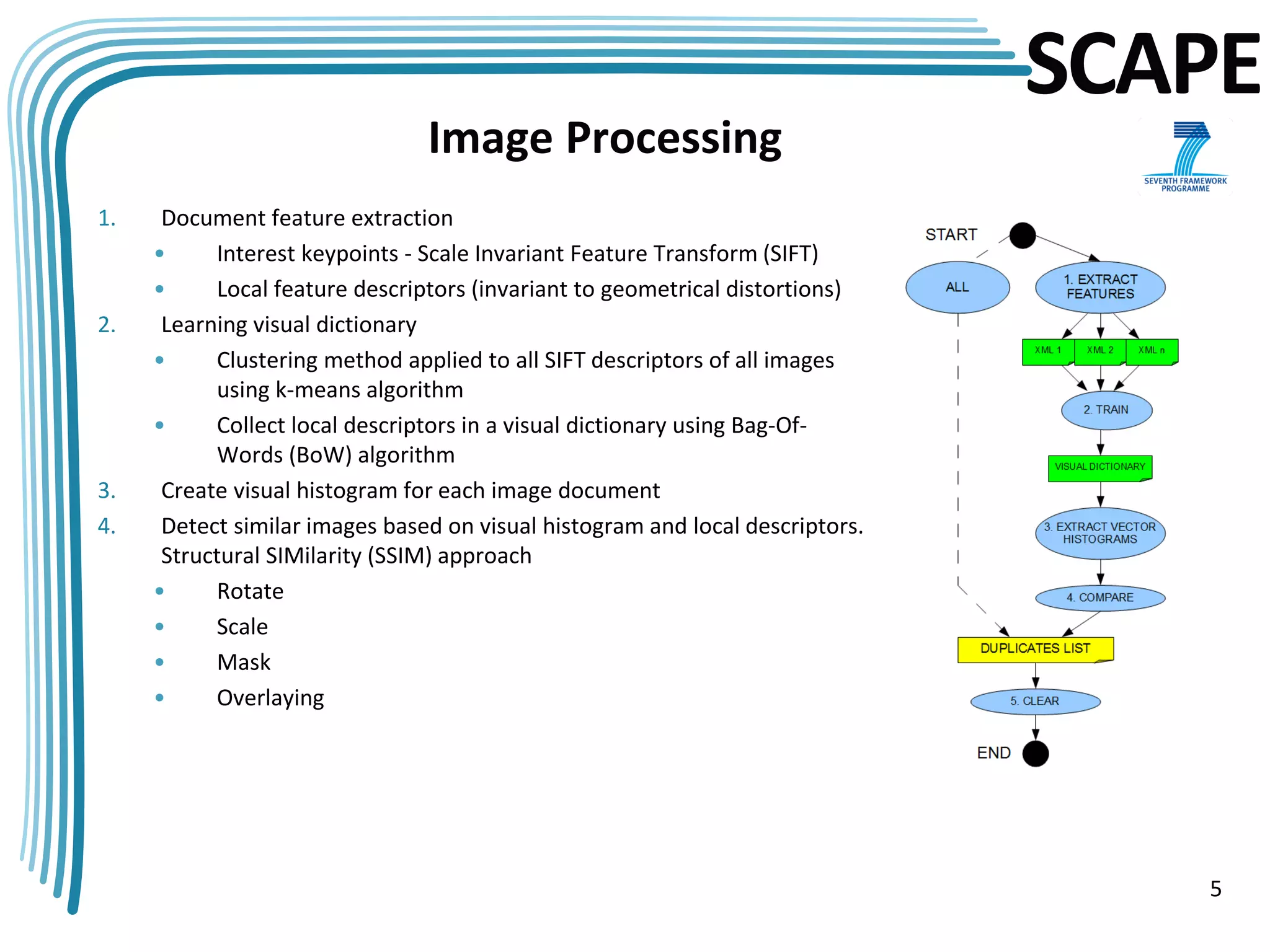
                                Image Processing
1.    Document feature extraction
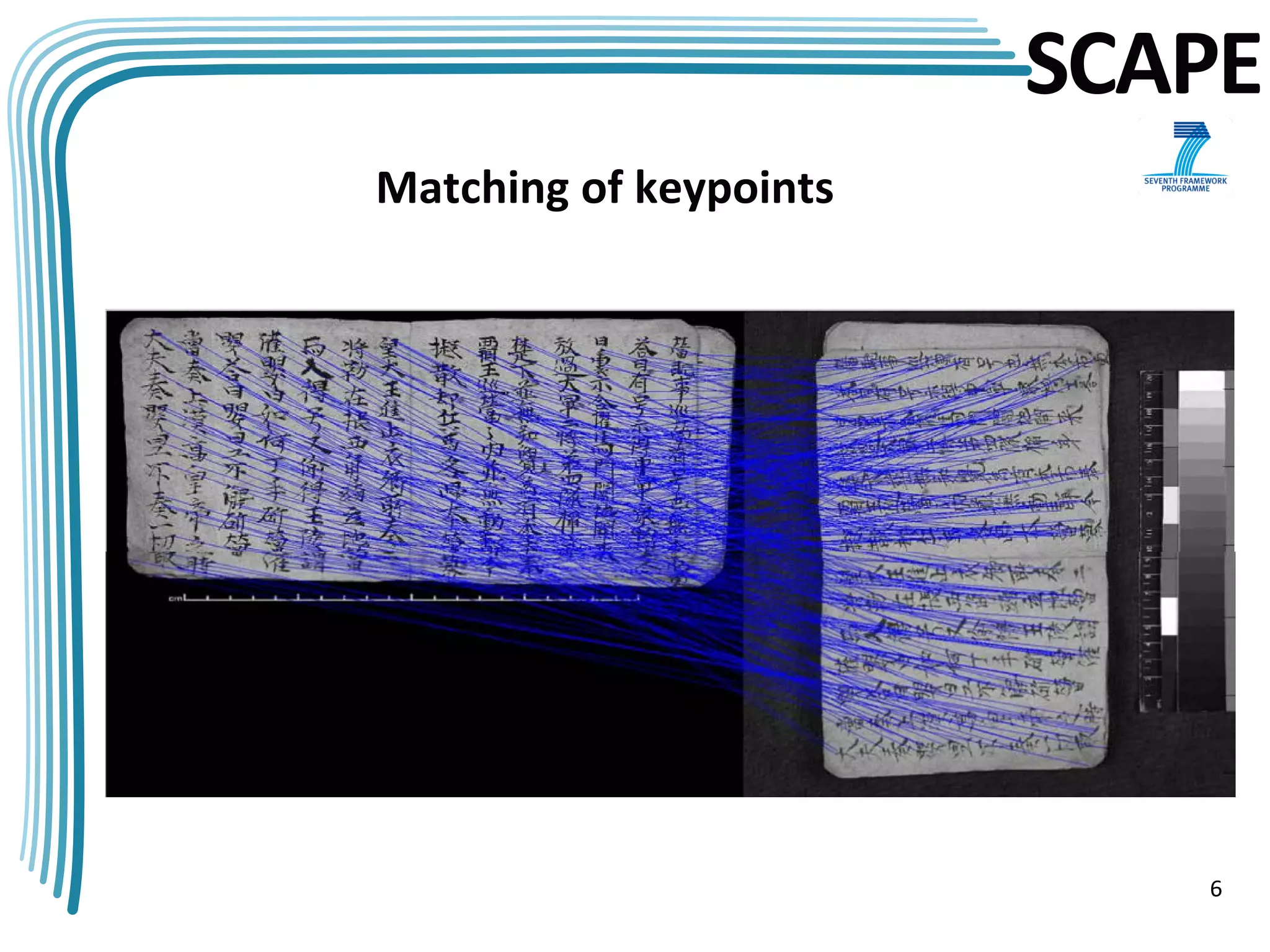
     •     Interest keypoints - Scale Invariant Feature Transform (SIFT)
     •     Local feature descriptors (invariant to geometrical distortions)
2.    Learning visual dictionary
     •     Clustering method applied to all SIFT descriptors of all images
           using k-means algorithm
     •     Collect local descriptors in a visual dictionary using Bag-Of-
           Words (BoW) algorithm
3.    Create visual histogram for each image document
4.    Detect similar images based on visual histogram and local descriptors.
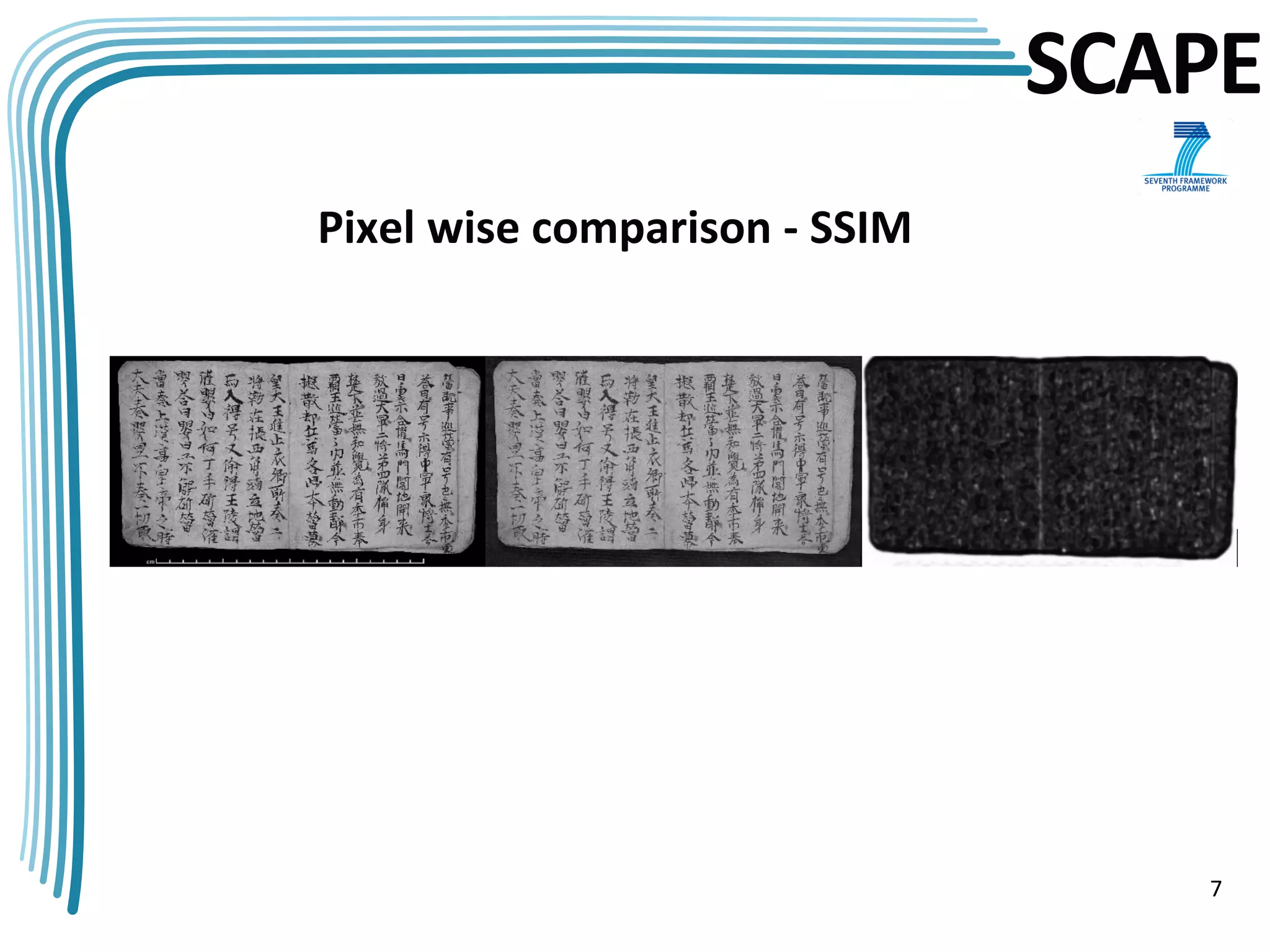
      Structural SIMilarity (SSIM) approach
     •     Rotate
     •     Scale
     •     Mask
     •     Overlaying


                                                                                  5
SCAPE
Matching of keypoints


                           6
SCAPE
Pixel wise comparison - SSIM


                                  7
SCAPE
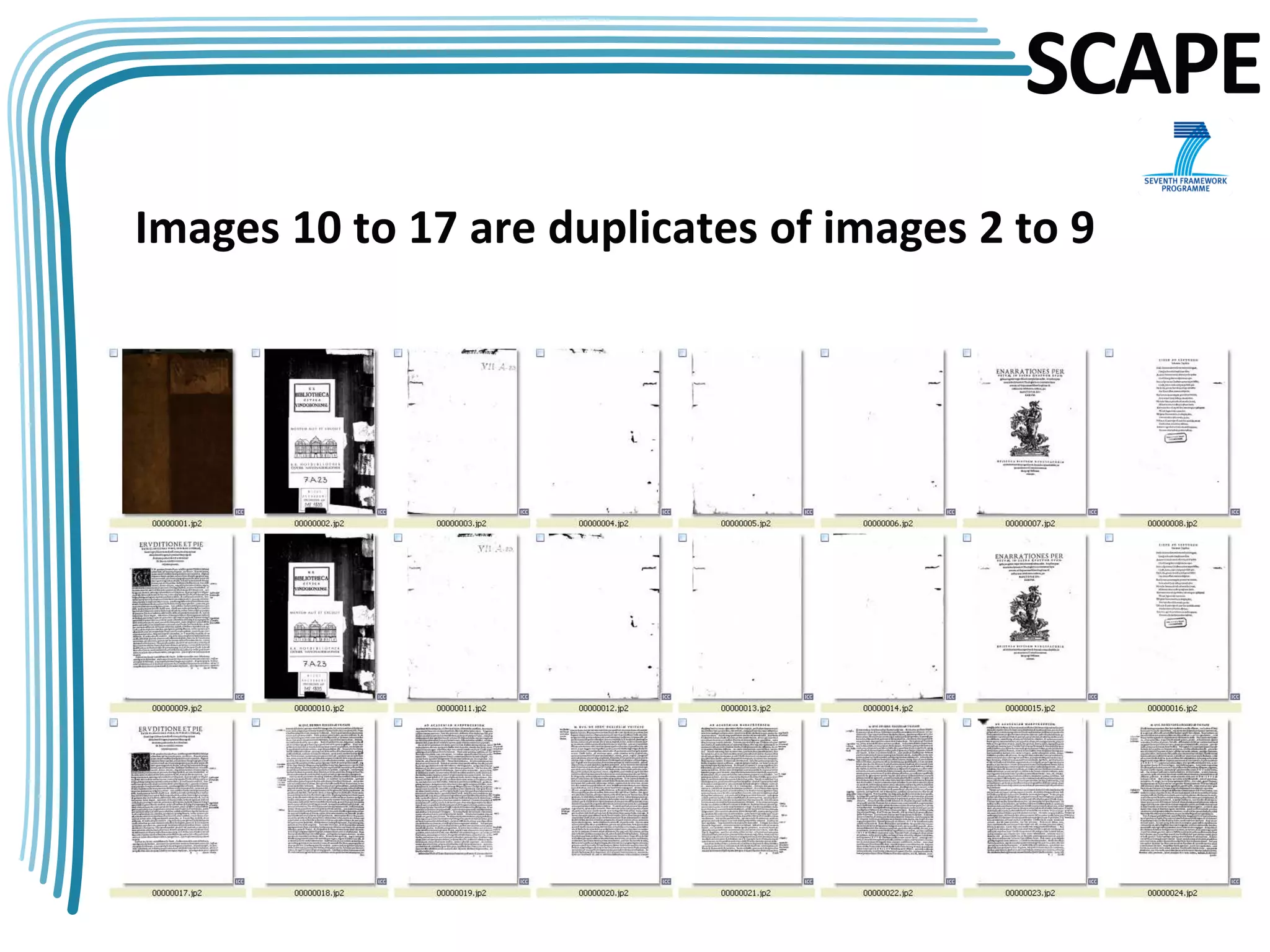
Images 10 to 17 are duplicates of images 2 to 9


                                                  8
SCAPE
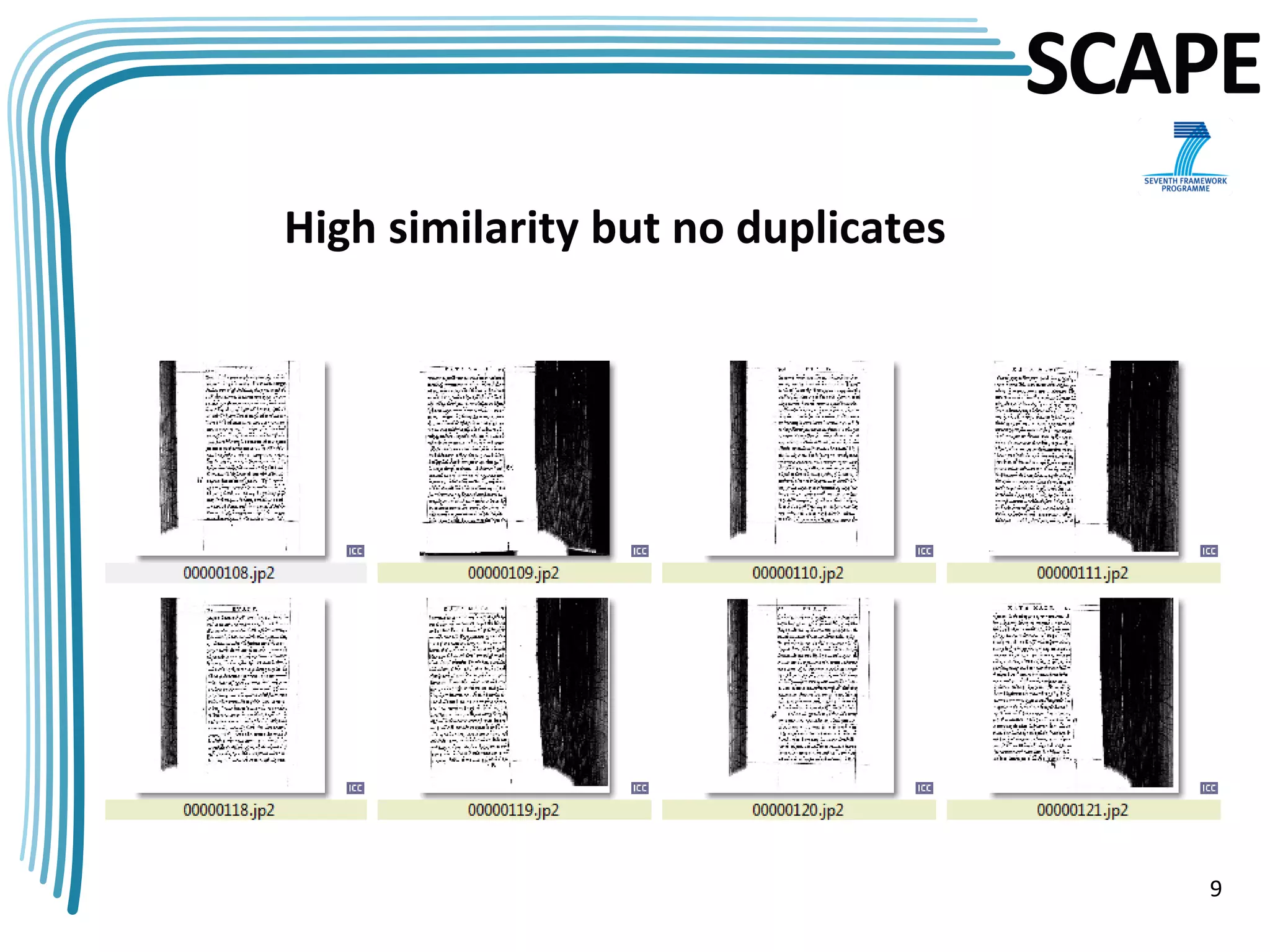
High similarity but no duplicates


                                       9
SCAPE
              Matchbox Tool Features

• Reduce costs
• Improves quality
• Saves time
• Automatically
• Increase efficiency of human work with particular focus
• Invariant to format, rotation, scale, translation, illumination,
  resolution, cropping, warping, distortions
• Application: assembling collections, missing files, duplicates,
  compare two images independent from format (profile, pixel)


                                                                10
SCAPE
                     Training Description
• Goal: to be able to detect duplicates in digital image collections
• Outcomes of training: learn how to install the matchbox and how to set up
  associated workflows.
• Teacher activity:
    • Tool presentation
    • Carry out a number of duplicate detection experiments
• Attendee activity: complete some workflows for
    •   Image duplicate search
    •   Content-based image comparison
    •   Customize duplicate search workflow
    •   Understand and describe outputs of different commands


                                                                        11
SCAPE
                 Installation Guidelines
• Linux OS with more than 10GB disk and 8GB RAM
• Git
• Python2.7
• Cmake
• C++ compiler
• The newest OpenCV version
• Matchbox HTTP URL: https://github.com/openplanets/scape.git or
  download ZIP from the same page (“pc-qa-matchbox”)
• Digital collection should have at least 15 files in order to build BoW


                                                                           12
SCAPE
                         Practical Exercises
1.   Identifying duplicate images in digital collections
     a.   Move digital collection to the server where matchbox is installed. For
          Windows use pscp, WinScp or Web Interface.
     b.   cd scape/pc-qa-matchbox/Python directory in matchbox source code
     c.   sudo python2.7 ./FindDuplicates.py /home/matchbox/matchbox-data/ all
          --help
     d.   Define which step of the workflow should be executed: all, extract,
          compare, train, bowhist, clean
     e.   Optional parameters are not supported yet
     f.   Correct command sequence if not "all“:
          1.   clean
          2.   extract
          3.   train
          4.   bowhist
          5.   Compare
                                                                               13
SCAPE
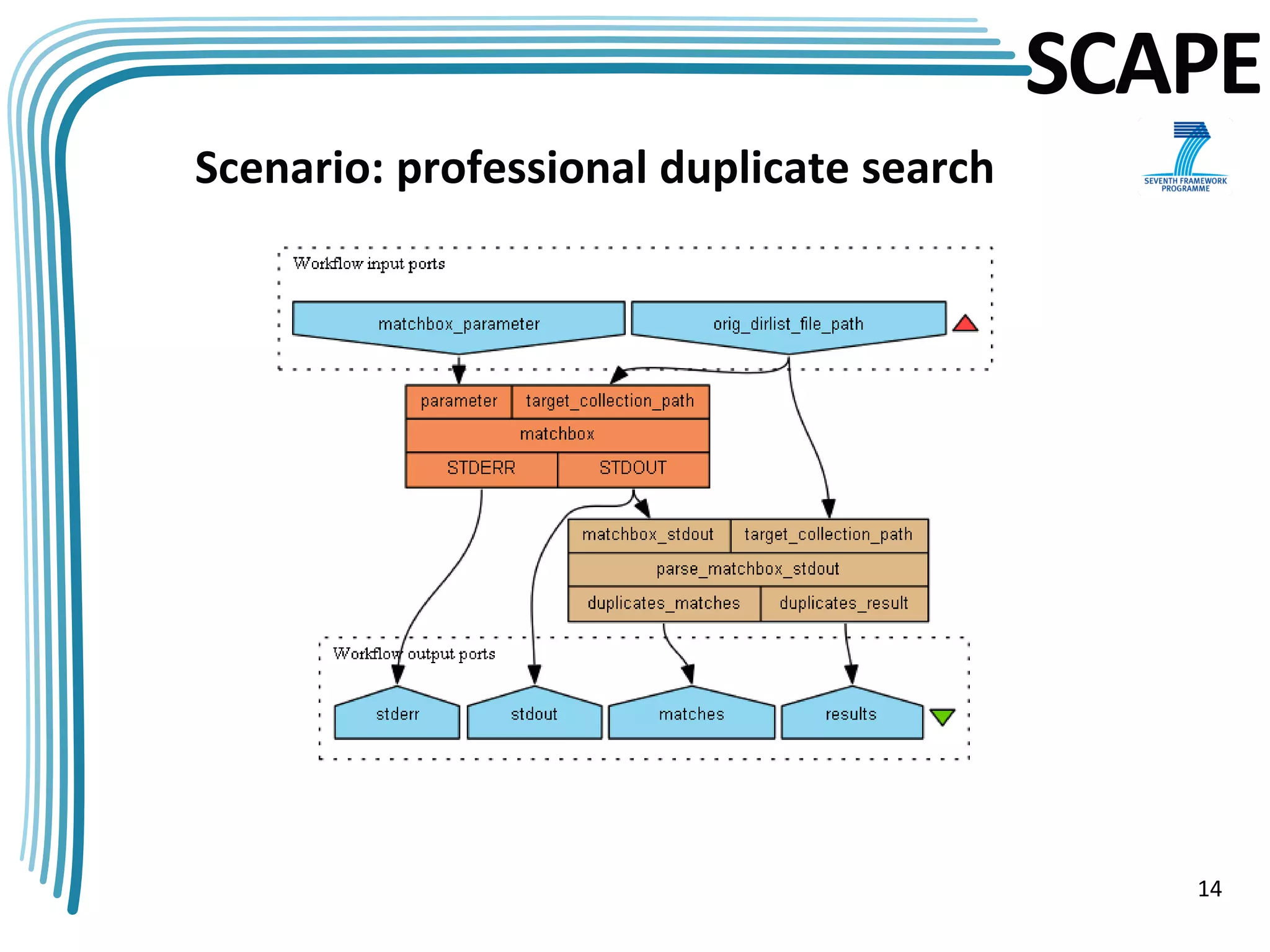
Scenario: professional duplicate search


                                             14
SCAPE
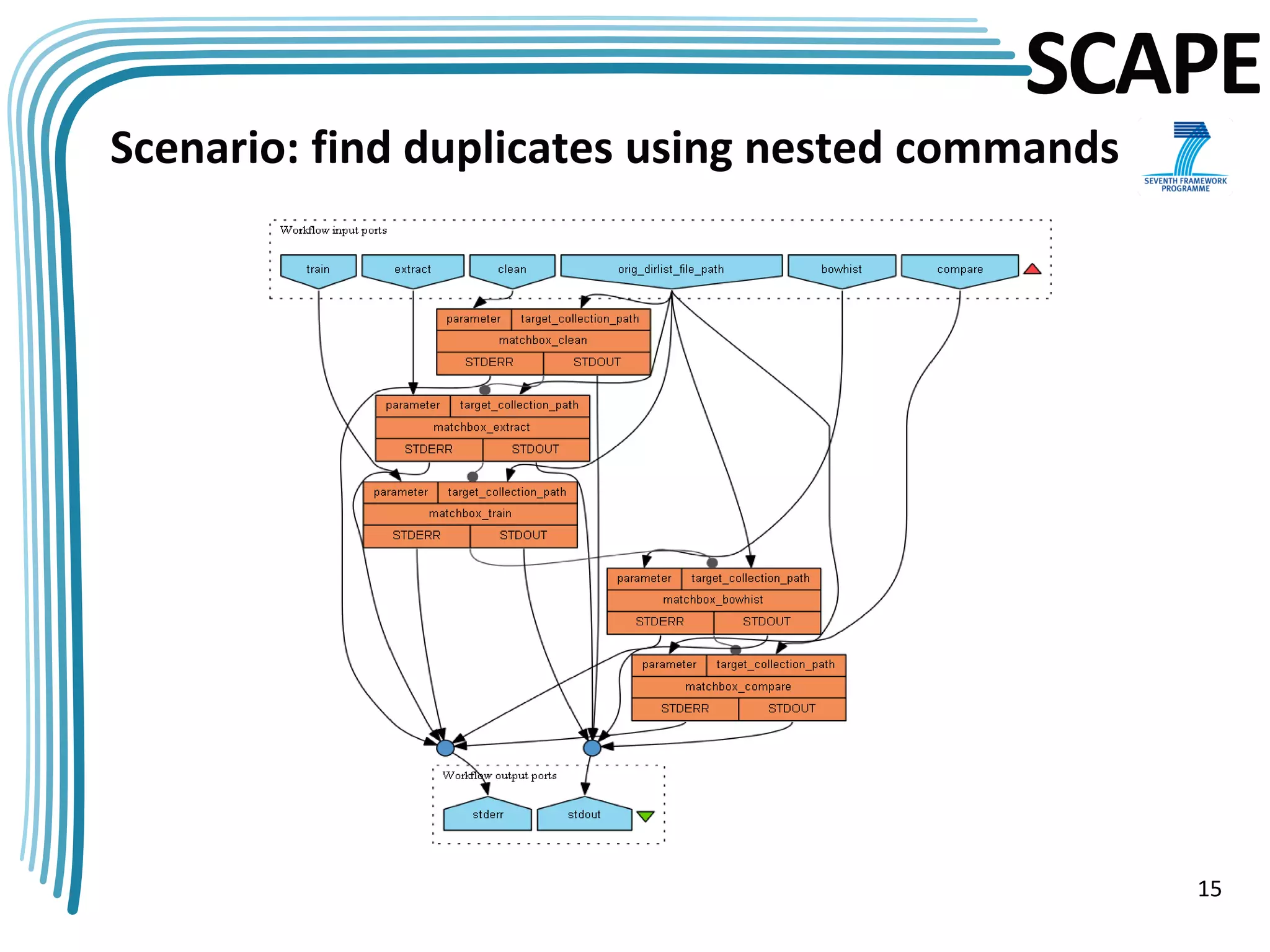
Scenario: find duplicates using nested commands


                                                  15
SCAPE
                  Analysis of the Tool Results

 •   [1 of 20] 1                                     [11 of 20] 11
 •   [2 of 20] 2 => [10]                             [12 of 20] 12
 •   [3 of 20] 3                                     [13 of 20] 13
 •   [4 of 20] 4                                     [14 of 20] 14
 •   [5 of 20] 5                                     [15 of 20] 15 => [7]
 •   [6 of 20] 6                                     [16 of 20] 16 => [8]
 •   [7 of 20] 7 => [15]                             [17 of 20] 17 => [9]
 •   [8 of 20] 8 => [16]                             [18 of 20] 18
 •   [9 of 20] 9 => [17]                             [19 of 20] 19
 •   [10 of 20] 10 => [2]                            [20 of 20] 20

3,4,5,6 with associated duplicates 11,12,13,14 are nearly empty pages

compare.exe -l 4 /root/samples/matchboxCollection/00000012.jp2.SIFTComparison.feat.xml.gz
/root/samples/matchboxCollection/00000003.jp2.SIFTComparison.feat.xml.gz
OpenCV Error: Assertion failed (CV_IS_MAT(points1) && CV_IS_MAT(points2) &&
CV_ARE_SIZES_EQ(points1, points2)) in cvFindFundamentalMat, file /root/down/OpenCV-
2.4.3/modules/calib3d/src/fundam.cpp, line 599
                                                                                            16
SCAPE
                             Practical Exercises
Output for collection with multiple duplicates:
=== compare images from directory /root/samples/col_multiple_dup/ ===
...loading features
...calculating distance matrix
[1 of 16] 92
[2 of 16] 85 => [77, 79, 81, 83]
[3 of 16] 82 => [78, 80, 84]
[4 of 16] 78 => [80, 82, 84]
[5 of 16] 87
[6 of 16] 89
[7 of 16] 86
[8 of 16] 88
[9 of 16] 79 => [77, 81, 83, 85]
[10 of 16] 91
[11 of 16] 90
[12 of 16] 83 => [77, 79, 81, 85]
[13 of 16] 84 => [78, 80, 82]
[14 of 16] 81 => [77, 79, 83, 85]
[15 of 16] 77 => [79, 81, 83, 85]
[16 of 16] 80 => [78, 82, 84]

                                                                           17
SCAPE
                           Practical Exercises
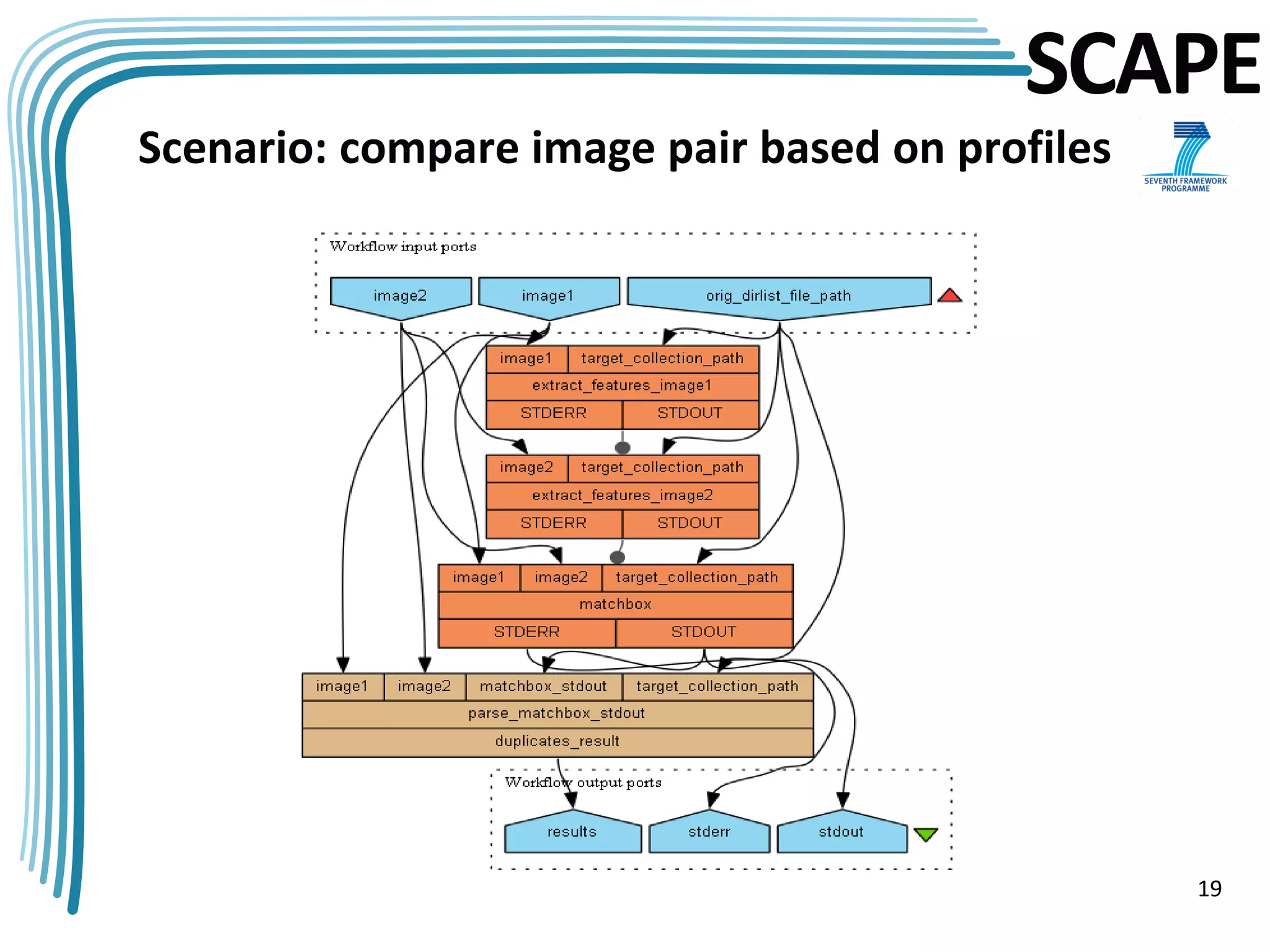
2.   Compare two images by profile information
     •   extractfeatures /home/matchbox/matchbox-data/00000001.jp2
     •   extractfeatures /home/matchbox/matchbox-data/00000002.jp2
     •   compare /home/matchbox/matchbox-data/00000001.jp2.
         ImageProfile.feat.xml.gz /home/matchbox/matchbox-
         data/00000002.jp2.ImageProfile.feat.xml.gz
     •   Output:
         <?xml version="1.0"?>
         <comparison>
          <task level="2" name="ImageProfile">
             <result>0.000353421</result> => high similarity
          </task>
         </comparison>

         <?xml version="1.0"?>
         <comparison>
          <task level="2" name="ImageProfile">
             <result>14.1486</result>      => low similarity
          </task>
         </comparison>
                                                                        18
SCAPE
Scenario: compare image pair based on profiles


                                                 19
SCAPE
                              Practical Exercises
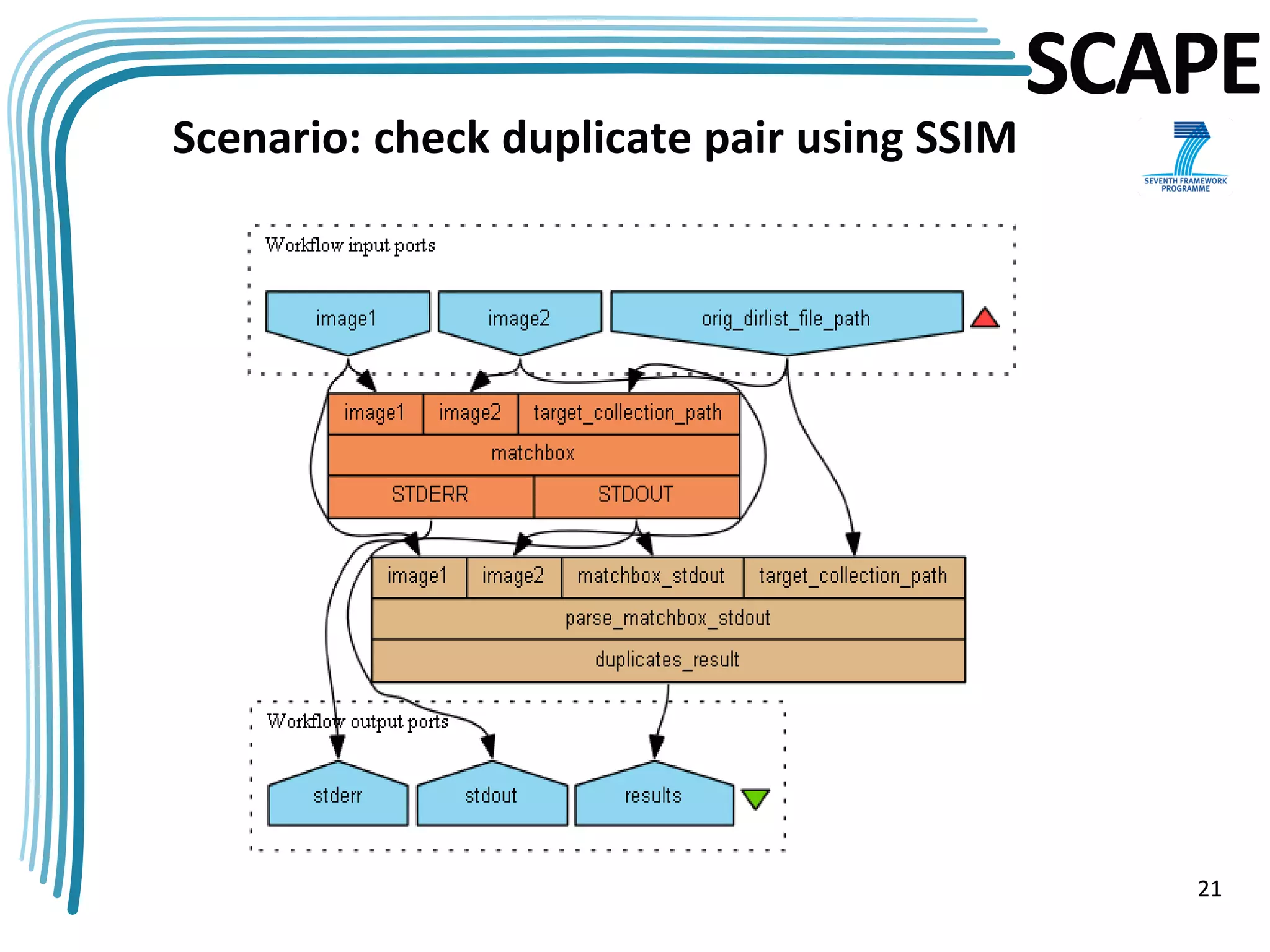
3.    Compare two images based on SSIM method
      • python2.7 FindDuplicates.py /root/samples/matchboxCollection/ --
        img1=00000001.jp2 --img2=00000002.jp2 compareimagepair
      • Output:
=== compare image pair 00000001.jp2 00000002.jp2 from directory /samples/matchboxCollection/ ===

dir: /root/samples/matchboxCollection/
img1: /root/samples/matchboxCollection/00000001.jp2.BOWHistogram.feat.xml.gz
img2: /root/samples/matchboxCollection/00000002.jp2.BOWHistogram.feat.xml.gz

...calculating distance matrix
[1 of 2] 71         => if images are not duplicates
[1 of 2] 1 => [2] => if images are duplicates


                                                                                                   20
SCAPE
Scenario: check duplicate pair using SSIM


                                               21
SCAPE
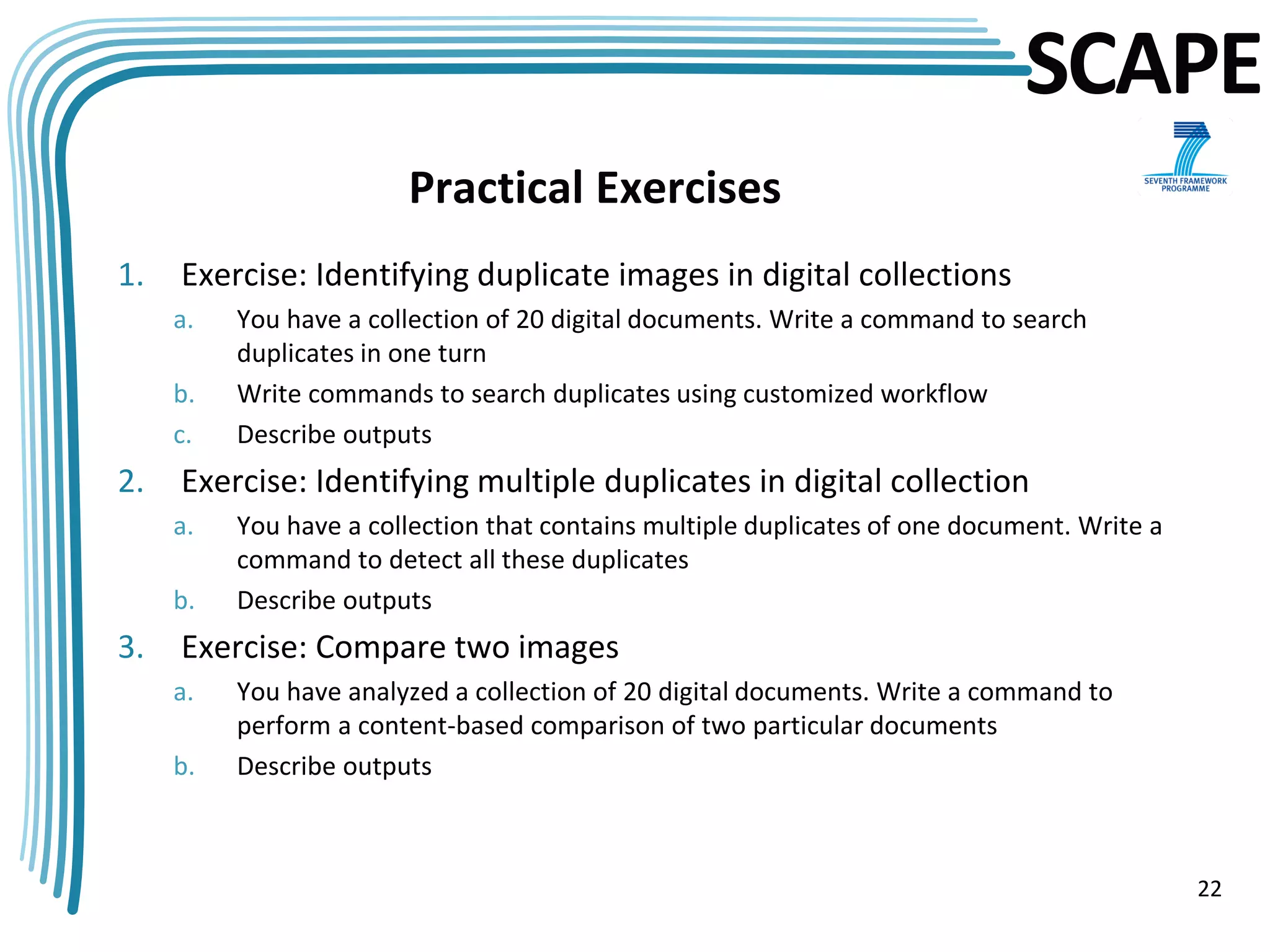
                        Practical Exercises
1.   Exercise: Identifying duplicate images in digital collections
     a.   You have a collection of 20 digital documents. Write a command to search
          duplicates in one turn
     b.   Write commands to search duplicates using customized workflow
     c.   Describe outputs
2.   Exercise: Identifying multiple duplicates in digital collection
     a.   You have a collection that contains multiple duplicates of one document. Write a
          command to detect all these duplicates
     b.   Describe outputs
3.   Exercise: Compare two images
     a.   You have analyzed a collection of 20 digital documents. Write a command to
          perform a content-based comparison of two particular documents
     b.   Describe outputs


                                                                                             22
SCAPE
                Conclusion

• Decision making support for duplicate
  detection in document image collections
• An automatic approach delivers a significant
  improvement when compared to manual
  analysis
• The tool is available as Taverna components
  for easy invocation and testing
• System ensures quality of the digitized
  content and supports managers of libraries
  and archives with regard to long term digital
  preservation
                                                  23
SCAPE


Thank you for your attention!


                                24

Matchbox tool. Quality control for digital collections – SCAPE Training event, Guimarães 2012

  • 1.
    SCAPE Matchbox tool Quality controlfor digital collections Roman Graf Reinhold Huber-Mörk Research Area Future Networks and Services Research Area Intelligent Vision Systems Department Safety & Security, AIT Austrian Institute of Technology Alexander Schindler Department of Software Technology and Interactive Systems Vienna University of Technology SCAPE training event Guimaraes, Portugal, 6-7 December 2012 This work was partially supported by the SCAPE Project. The SCAPE project is co-funded by the European Union under FP7 ICT-2009.4.1 (Grant Agreement number 270137).
  • 2.
    SCAPE Overview • Introduction • Matchbox Tool Description • Image Processing • Collection Samples • Matchbox Tool Features • Training Description • Installation Guidelines • Practical Exercises and Tool Analysis Results • Conclusion 2
  • 3.
    SCAPE Introduction • High storage costs • Update of digitized collection through an automatic scanning process • Use case: Find Duplicates • No automatic method to detect duplicates in not structured collections • Lack expertise and efficient methods for finding images in a huge collection • Need for automated solutions • QA is required to select between the old and new • Decision support - overwrite or human inspection • Image: d = 40.000 SIFT descriptors, book: n = 700 images • SIFT: d2 = 1.6×10⁹ vector comparisons for a single pair of images • BoW typical book: clustering, n×(n - 1) = 350.000 vector comparisons 3
  • 4.
    SCAPE Matchbox Tool Description • Tool • C++ (DLLs on Windows or shared objects on Linux) • Dataset • Austrian National Library - Digital Book Collection (about 600.000 books that will be digitized over the coming years) • Main tasks • Overwriting existing collection items with new items • Image pairs can be compared within a book • Output • Visual dictionary for further analysis • Duplicates 4
  • 5.
    SCAPE Image Processing 1. Document feature extraction • Interest keypoints - Scale Invariant Feature Transform (SIFT) • Local feature descriptors (invariant to geometrical distortions) 2. Learning visual dictionary • Clustering method applied to all SIFT descriptors of all images using k-means algorithm • Collect local descriptors in a visual dictionary using Bag-Of- Words (BoW) algorithm 3. Create visual histogram for each image document 4. Detect similar images based on visual histogram and local descriptors. Structural SIMilarity (SSIM) approach • Rotate • Scale • Mask • Overlaying 5
  • 6.
  • 7.
  • 8.
    SCAPE Images 10 to17 are duplicates of images 2 to 9 8
  • 9.
  • 10.
    SCAPE Matchbox Tool Features • Reduce costs • Improves quality • Saves time • Automatically • Increase efficiency of human work with particular focus • Invariant to format, rotation, scale, translation, illumination, resolution, cropping, warping, distortions • Application: assembling collections, missing files, duplicates, compare two images independent from format (profile, pixel) 10
  • 11.
    SCAPE Training Description • Goal: to be able to detect duplicates in digital image collections • Outcomes of training: learn how to install the matchbox and how to set up associated workflows. • Teacher activity: • Tool presentation • Carry out a number of duplicate detection experiments • Attendee activity: complete some workflows for • Image duplicate search • Content-based image comparison • Customize duplicate search workflow • Understand and describe outputs of different commands 11
  • 12.
    SCAPE Installation Guidelines • Linux OS with more than 10GB disk and 8GB RAM • Git • Python2.7 • Cmake • C++ compiler • The newest OpenCV version • Matchbox HTTP URL: https://github.com/openplanets/scape.git or download ZIP from the same page (“pc-qa-matchbox”) • Digital collection should have at least 15 files in order to build BoW 12
  • 13.
    SCAPE Practical Exercises 1. Identifying duplicate images in digital collections a. Move digital collection to the server where matchbox is installed. For Windows use pscp, WinScp or Web Interface. b. cd scape/pc-qa-matchbox/Python directory in matchbox source code c. sudo python2.7 ./FindDuplicates.py /home/matchbox/matchbox-data/ all --help d. Define which step of the workflow should be executed: all, extract, compare, train, bowhist, clean e. Optional parameters are not supported yet f. Correct command sequence if not "all“: 1. clean 2. extract 3. train 4. bowhist 5. Compare 13
  • 14.
  • 15.
    SCAPE Scenario: find duplicatesusing nested commands 15
  • 16.
    SCAPE Analysis of the Tool Results • [1 of 20] 1 [11 of 20] 11 • [2 of 20] 2 => [10] [12 of 20] 12 • [3 of 20] 3 [13 of 20] 13 • [4 of 20] 4 [14 of 20] 14 • [5 of 20] 5 [15 of 20] 15 => [7] • [6 of 20] 6 [16 of 20] 16 => [8] • [7 of 20] 7 => [15] [17 of 20] 17 => [9] • [8 of 20] 8 => [16] [18 of 20] 18 • [9 of 20] 9 => [17] [19 of 20] 19 • [10 of 20] 10 => [2] [20 of 20] 20 3,4,5,6 with associated duplicates 11,12,13,14 are nearly empty pages compare.exe -l 4 /root/samples/matchboxCollection/00000012.jp2.SIFTComparison.feat.xml.gz /root/samples/matchboxCollection/00000003.jp2.SIFTComparison.feat.xml.gz OpenCV Error: Assertion failed (CV_IS_MAT(points1) && CV_IS_MAT(points2) && CV_ARE_SIZES_EQ(points1, points2)) in cvFindFundamentalMat, file /root/down/OpenCV- 2.4.3/modules/calib3d/src/fundam.cpp, line 599 16
  • 17.
    SCAPE Practical Exercises Output for collection with multiple duplicates: === compare images from directory /root/samples/col_multiple_dup/ === ...loading features ...calculating distance matrix [1 of 16] 92 [2 of 16] 85 => [77, 79, 81, 83] [3 of 16] 82 => [78, 80, 84] [4 of 16] 78 => [80, 82, 84] [5 of 16] 87 [6 of 16] 89 [7 of 16] 86 [8 of 16] 88 [9 of 16] 79 => [77, 81, 83, 85] [10 of 16] 91 [11 of 16] 90 [12 of 16] 83 => [77, 79, 81, 85] [13 of 16] 84 => [78, 80, 82] [14 of 16] 81 => [77, 79, 83, 85] [15 of 16] 77 => [79, 81, 83, 85] [16 of 16] 80 => [78, 82, 84] 17
  • 18.
    SCAPE Practical Exercises 2. Compare two images by profile information • extractfeatures /home/matchbox/matchbox-data/00000001.jp2 • extractfeatures /home/matchbox/matchbox-data/00000002.jp2 • compare /home/matchbox/matchbox-data/00000001.jp2. ImageProfile.feat.xml.gz /home/matchbox/matchbox- data/00000002.jp2.ImageProfile.feat.xml.gz • Output: <?xml version="1.0"?> <comparison> <task level="2" name="ImageProfile"> <result>0.000353421</result> => high similarity </task> </comparison> <?xml version="1.0"?> <comparison> <task level="2" name="ImageProfile"> <result>14.1486</result> => low similarity </task> </comparison> 18
  • 19.
    SCAPE Scenario: compare imagepair based on profiles 19
  • 20.
    SCAPE Practical Exercises 3. Compare two images based on SSIM method • python2.7 FindDuplicates.py /root/samples/matchboxCollection/ -- img1=00000001.jp2 --img2=00000002.jp2 compareimagepair • Output: === compare image pair 00000001.jp2 00000002.jp2 from directory /samples/matchboxCollection/ === dir: /root/samples/matchboxCollection/ img1: /root/samples/matchboxCollection/00000001.jp2.BOWHistogram.feat.xml.gz img2: /root/samples/matchboxCollection/00000002.jp2.BOWHistogram.feat.xml.gz ...calculating distance matrix [1 of 2] 71 => if images are not duplicates [1 of 2] 1 => [2] => if images are duplicates 20
  • 21.
  • 22.
    SCAPE Practical Exercises 1. Exercise: Identifying duplicate images in digital collections a. You have a collection of 20 digital documents. Write a command to search duplicates in one turn b. Write commands to search duplicates using customized workflow c. Describe outputs 2. Exercise: Identifying multiple duplicates in digital collection a. You have a collection that contains multiple duplicates of one document. Write a command to detect all these duplicates b. Describe outputs 3. Exercise: Compare two images a. You have analyzed a collection of 20 digital documents. Write a command to perform a content-based comparison of two particular documents b. Describe outputs 22
  • 23.
    SCAPE Conclusion • Decision making support for duplicate detection in document image collections • An automatic approach delivers a significant improvement when compared to manual analysis • The tool is available as Taverna components for easy invocation and testing • System ensures quality of the digitized content and supports managers of libraries and archives with regard to long term digital preservation 23
  • 24.
    SCAPE Thank you foryour attention! 24