Computers Course Design Discuss computer in every day life Historical Perspective Hardware Software System software - OS Application software--- pl Programming Language Data base Networking The Internet System Development Life Cycle Security and virus Left over's Dilfaroz A Khan
Software Software can be divided into two Application  System System software consists of sets of programs to support the efficient use of hardware resources that include drivers for various devices, various operating systems. Application software consist of set of programs that process data , generate information like payroll, inventory management etc. Dilfaroz A Khan
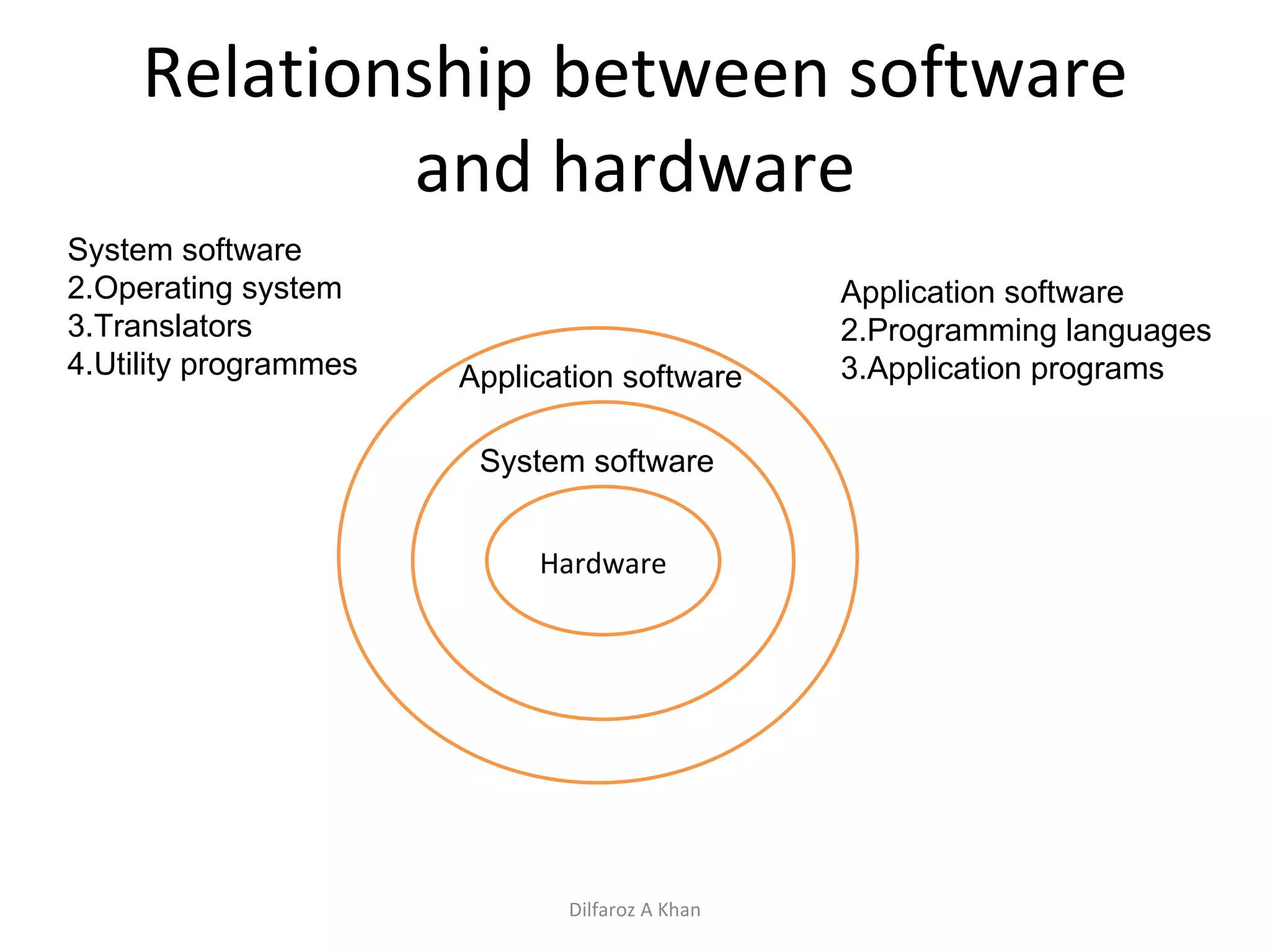
Relationship between software and hardware Hardware System software Application software System software Operating system Translators Utility programmes Application software Programming languages Application programs Dilfaroz A Khan
System Software Operating System Questions asked Importance/ role of Os Function of OS booting Character use interface / graphic user interface Brief about dos , Windows and Unix / Linux Dilfaroz A Khan
Role/Importance of OS  An OS is a set of programs that controls and supervises a computer system’s hardware and provides services to the users. It acts like a link between the users and computer hardware. Dilfaroz A Khan
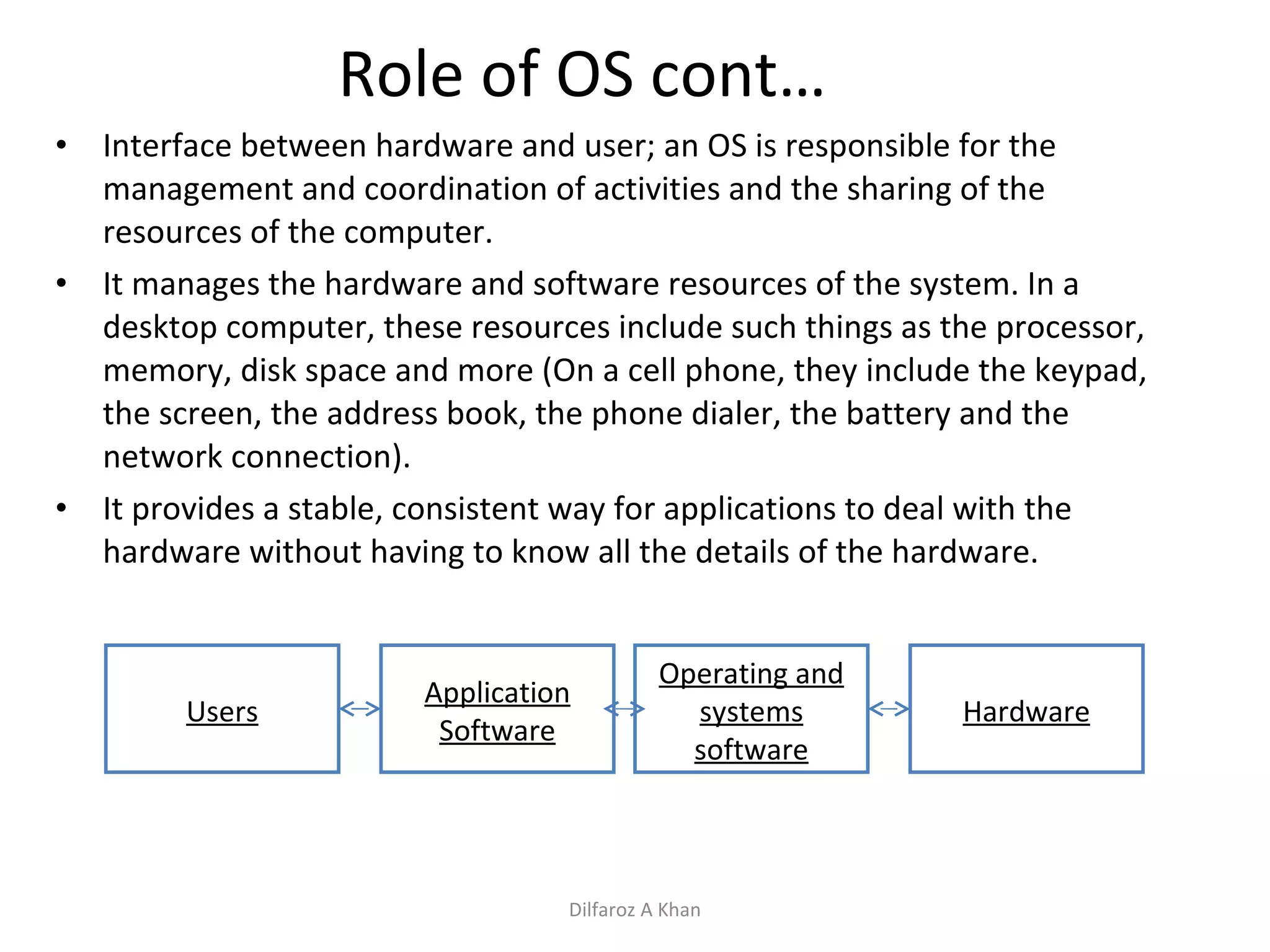
Role of OS cont… Interface between hardware and user; an OS is responsible for the management and coordination of activities and the sharing of the resources of the computer.  It manages the hardware and software resources of the system. In a desktop computer, these resources include such things as the processor, memory, disk space and more (On a cell phone, they include the keypad, the screen, the address book, the phone dialer, the battery and the network connection).  It provides a stable, consistent way for applications to deal with the hardware without having to know all the details of the hardware.  Users Application Software Operating and systems software Hardware Dilfaroz A Khan
Major functions of OS Processor management Memory management Device management Information/File management Dilfaroz A Khan
Processor management A process is a program in execution A processor is a hardware device which is capable of executing a sequence of instructions. When a program is submitted to the CPU it can be in any one of the following state Ready Running Blocked Dilfaroz A Khan
Processor management cont…. Ready : A process is ready if all conditions are satisfied for the process to be in running state and its waiting for the processor. Running : A process is running when its instructions sequence is being executed by the processor. Blocked: A process is blocked if it is waiting for the event to occur before continuing execution. Dilfaroz A Khan
Processor management cont…. Process / CPU measurement Throughput: Total number of jobs completed divided by The total time required to complete the job. For example JOB1 and JOB2 takes 5 minutes each for execution the throughput is 2jobs divided by 10 minutes i.e. 0.2 job/minute Job Scheduling Non – Preemptive scheduling Preemptive scheduling Dilfaroz A Khan
Processor management cont…. Non Preemptive scheduling In the above scheduling a schedule job always completes before another schedule job is taken. In other words jobs finish in the order in which they are scheduled. In other words resources can not be taken away. Preemptive scheduling In this kind of scheduling  decision can be made while the job is executing. In other words resources can be taken away. Dilfaroz A Khan
Memory Management The memory management plays an important role.  Following concepts are use to manage one or more than one processes in the memory. Single Contiguous allocation Fixed size partition allocation Variable size allocation (and re allocation) Virtual storage Dilfaroz A Khan
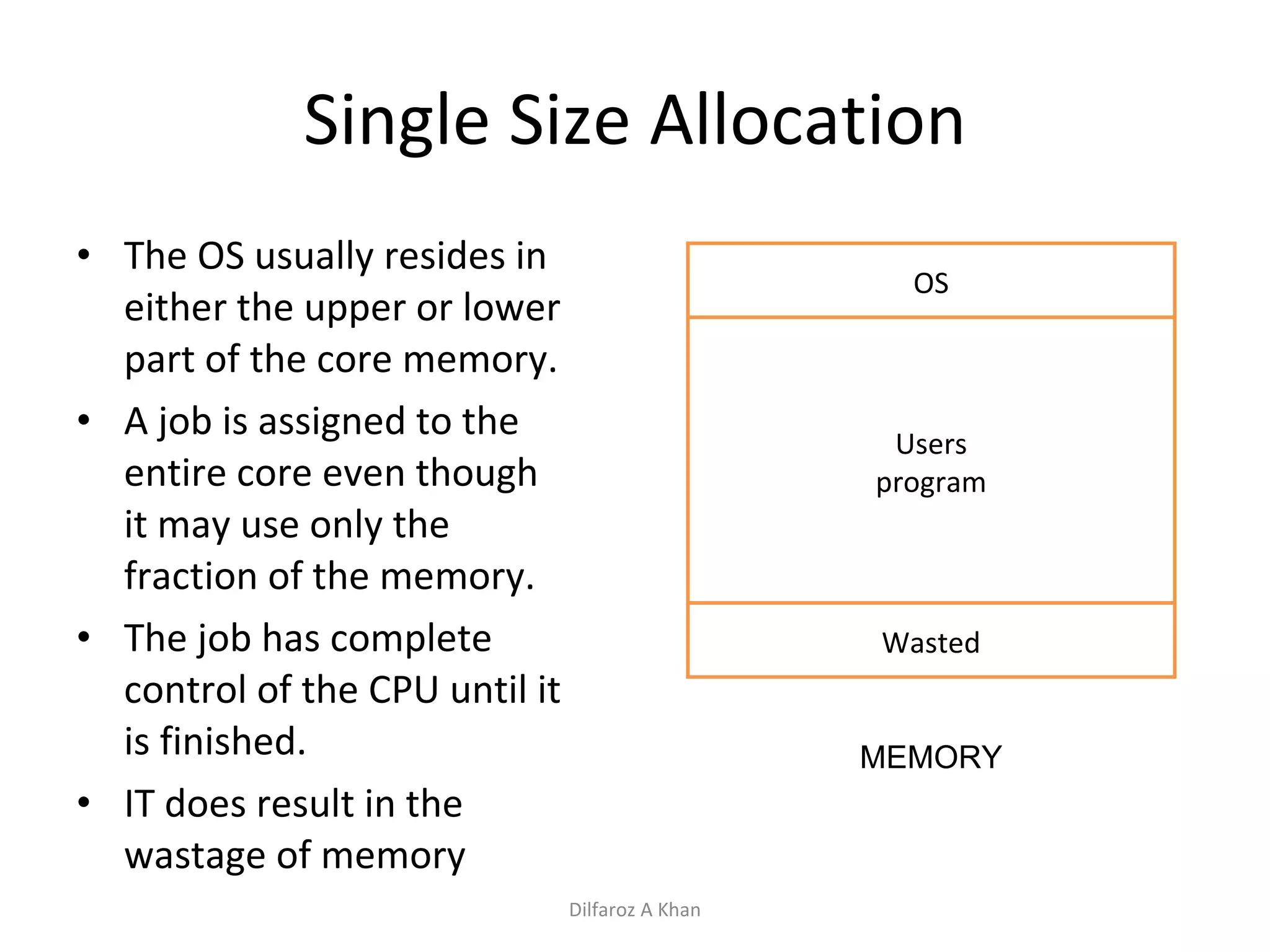
Single Size Allocation The OS usually resides in either the upper or lower part of the core memory. A job is assigned to the entire core even though it may use only the fraction of the memory. The job has complete control of the CPU until it is finished. IT does result in the wastage of memory OS Users program Wasted MEMORY Dilfaroz A Khan
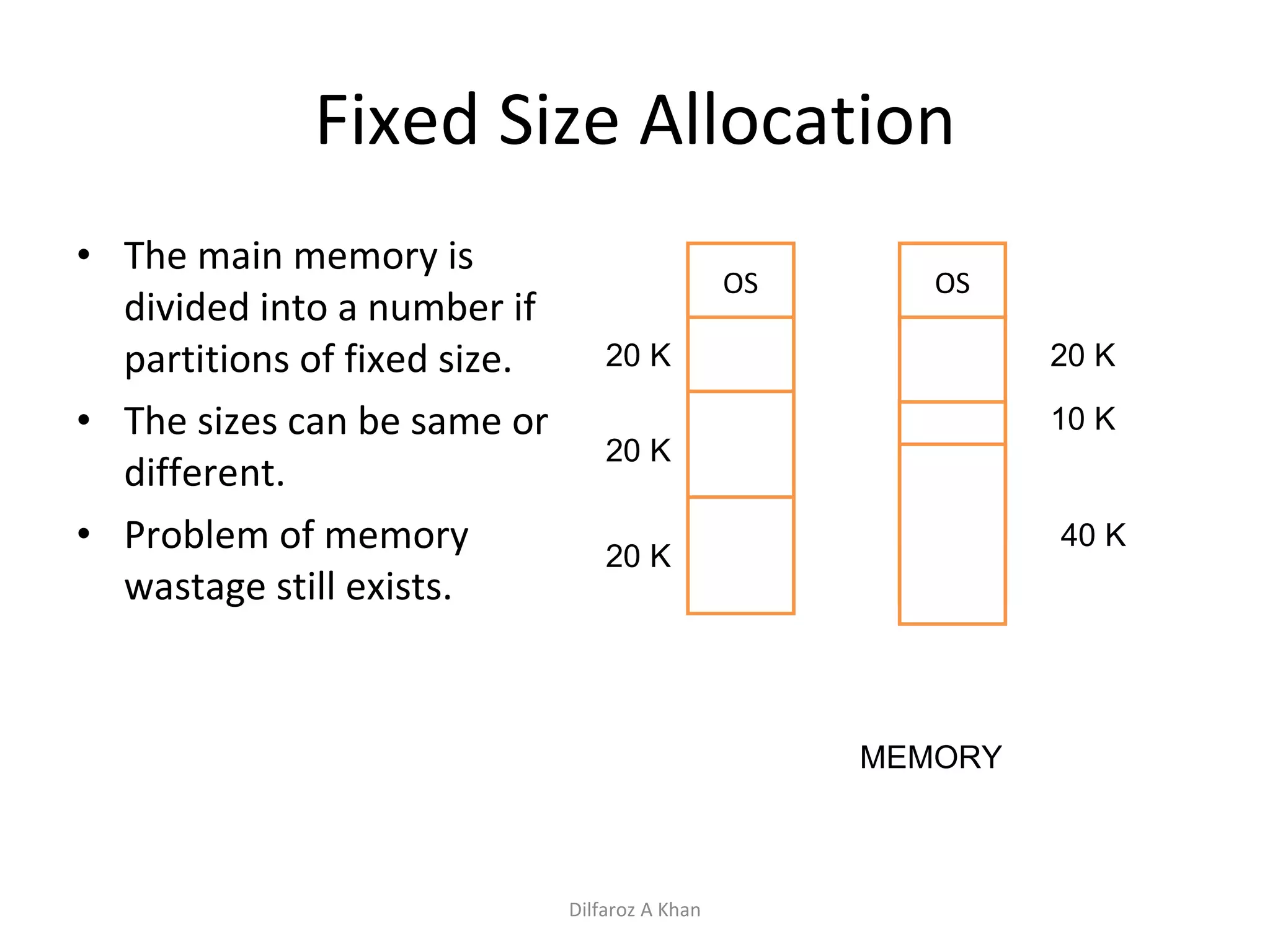
Fixed Size Allocation The main memory is divided into a number if partitions of fixed size. The sizes can be same or different. Problem of memory wastage still exists. OS MEMORY 20 K 20 K 20 K OS 20 K 10 K 40 K Dilfaroz A Khan
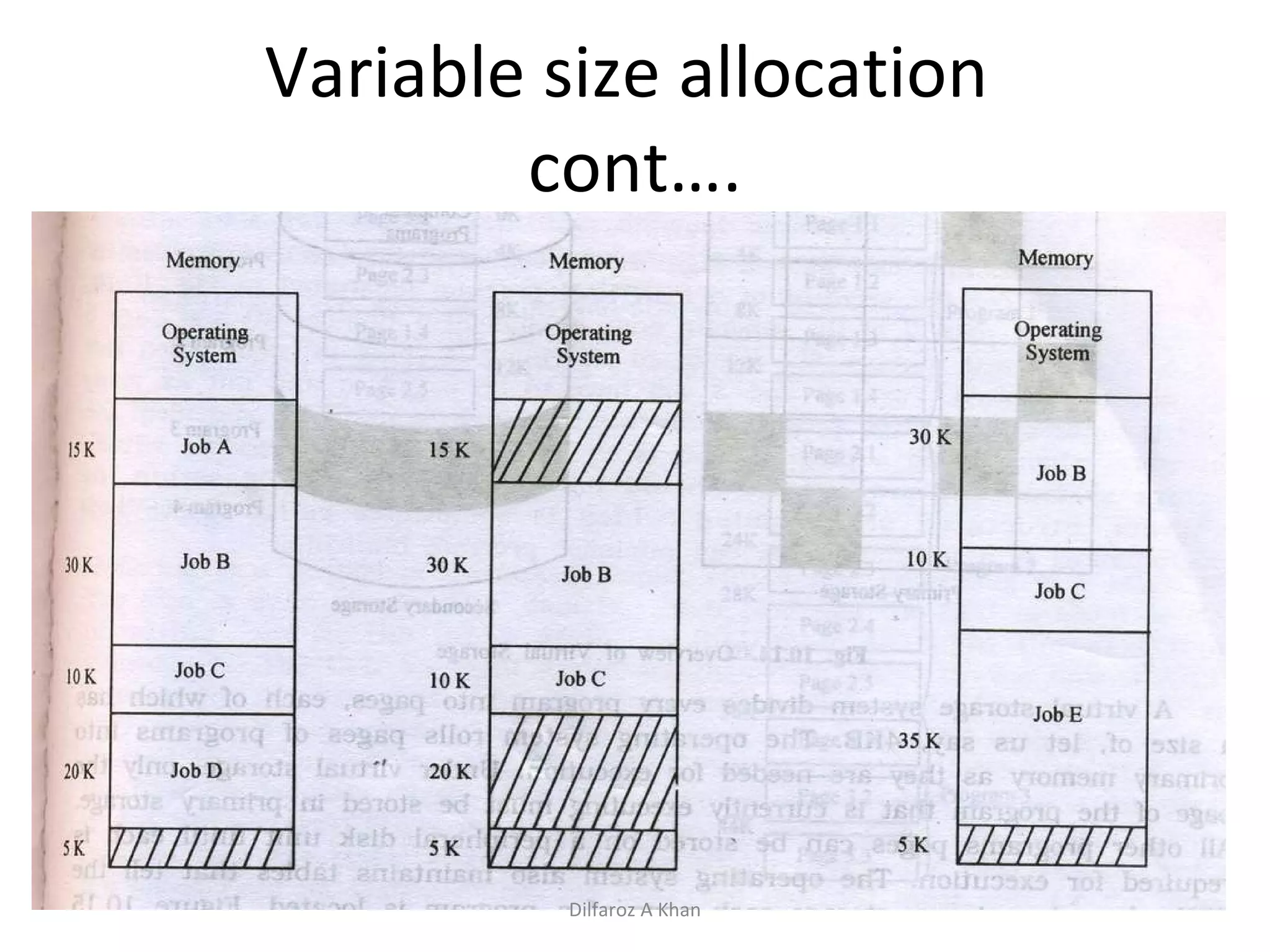
Variable Size Partition Allocation (Re Allocation) A memory size exactly of the job is allocated thus less wastage of memory. When the job terminates the system keeps a track.  When a new job has to be initiated it creates a partition to suit its storage requirement.  The fragmented memory is compacted by relocating the existing jobs upwards. Dilfaroz A Khan
Variable size allocation  cont…. Dilfaroz A Khan
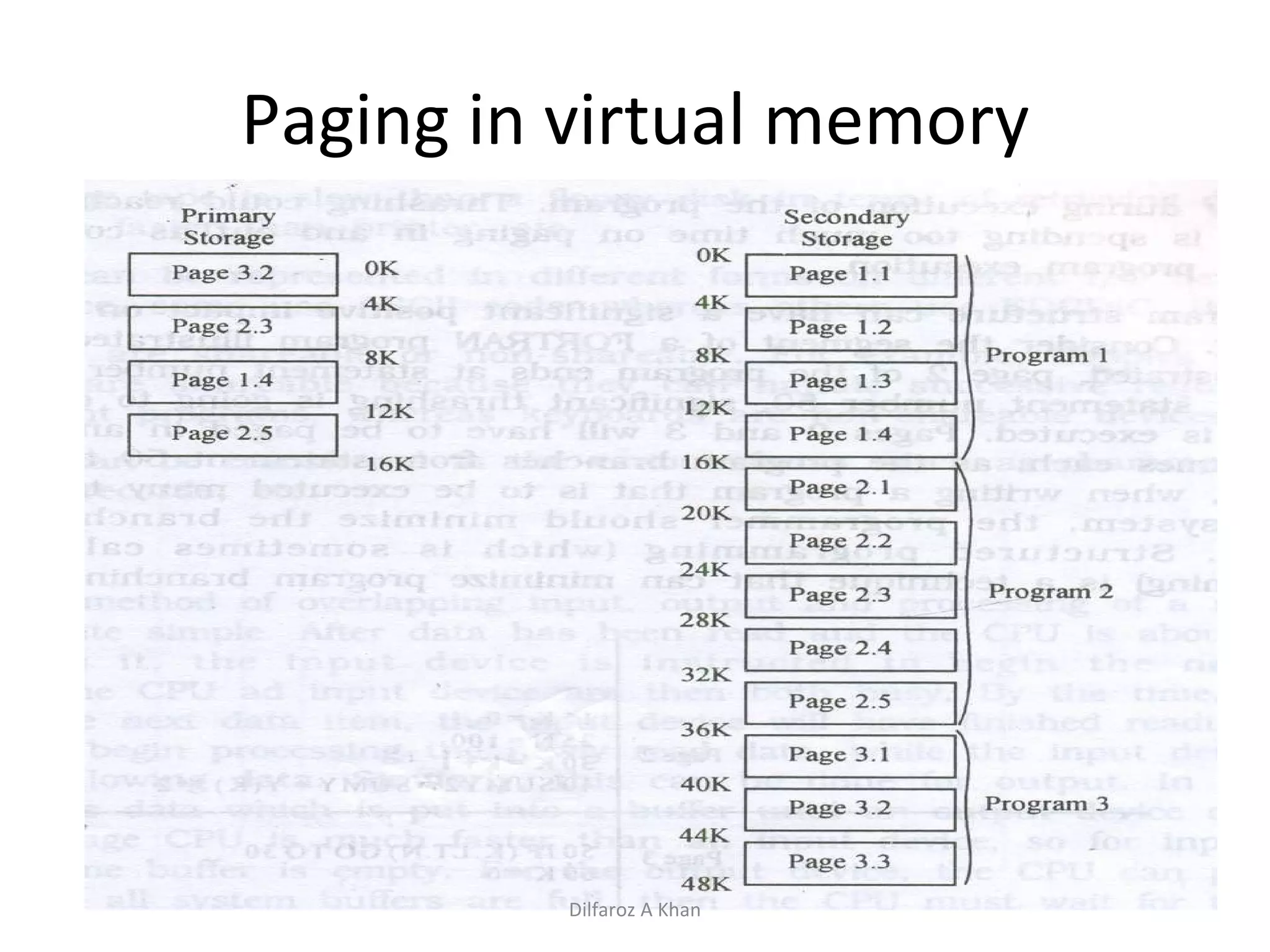
Virtual Storage The system used both primary and secondary storage. Virtual storage involves the storing in primary memory only those instructions of the program that are currently executing and storing the reminder program in the secondary memory. The part of the program is called pages and these pages are swapped in and out of primary storage as they are needed for execution Dilfaroz A Khan
Paging in virtual memory Dilfaroz A Khan
Disadvantage of Virtual Storage Over head cost that is CPU time is required to just page in and page out. Many times CPU takes time to just page in and page out rather than executing the program/job. To much of page in and page out is known as thrashing. Primary memory also gets overloaded with tables which keeps a track of pages between primary and secondary storage. Dilfaroz A Khan
Device Management “ A contemporary computer system includes a wide assortment of “IP/OP” devices called peripheral devices such as printers, card readers, magnetic tapes etc.. A large installation may out half of the system cost in peripherals so it may be used in a efficient manner. “ Dilfaroz A Khan
Device Management cont…. Device characteristics The speed of IO devices is different from another. Buffering / Spooling concept Data can be represented in different format like ASCII or EDCDIC code Device are sharable and not sharable The style of accessing(reading /writing ) from the devices are different Dilfaroz A Khan
Device Management cont…. Buffering – is a technique of overlapping ip and op processing of a single job.  After the data has been red and the CPU is about to start operating on it the device is instructed to read the next input immediately.  Spooling( Simultaneous Peripheral Operation On-Line) is a technique of overlapping ip and op processing of multiple jobs send to a device Dilfaroz A Khan
Information/File  Management A computer stores information in form of files. The operating system provides convenient ways for storing and retrieving the information from files. A file is a collection of related information. Every file has a name, data and attributes. Name of a file is unique. The attributes have information date and time, last access date , size, location etc… The file management part of OS takes care of file related activities such as structuring, accessing, naming, sharing, protecting etc.. File access methods are Sequential and Random. Basic file operations are create, delete, open, close, read , write, seek, rename, copy etc….. Dilfaroz A Khan
Command Interface character user / graphic user interface Interface between the user and operating system Provides with an environment where the user gives commands to the OS for execution of various functions. Command supported by the CI is called system calls. The CI takes the responsibility to interpret the command given by the user and directing the computer resources to handle the user request via the OS CI comes in two categories Character user interface and Graphic user interface. Dilfaroz A Khan
Command line interface Users give instructions to computer by typing commands in this textual user interface. That is to enter a command the user uses the keyboard.  If the command is typed incorrectly the CLI responds with an error message.  Remembering commands becomes difficult Dilfaroz A Khan
Graphic User Interface Easy to use and not need to remember commands The instructions are given graphically ie use of a mouse or click of a icon.  Dilfaroz A Khan
Booting –  Process of starting up any computer and loading the OS in memory. Process:  Power is on Once a 'Power Good' signal is sent to the motherboard, the CPU looks for the ROM bios. The CPU looks to the ROM bios for the first instruction, and the first instruction is to run the POST (Power-On-Self-Test).  POST checks the CPU, hardware devices such as the Video Card, the secondary storage devices such as the Hard Drive, Floppy Drives, Zip Drive or CD/DVD Drives. If there are any errors found then an error message is displayed on screen or a number of beeps are heard.  Next the bios finds the video card and runs the video card's bios.  The bios then displays the system configuration. During the display more tests are conducted including the test that shows your computer testing the memory. If there are any problems found from now on they will be displayed in a text message on the screen. After that the bios searches for something that it can boot from i.e hard disk drive After activating it , it finds the first piece of OS i.e. BOOTSTRAP LOADER Bootstrap loader loads the OS into memory and allows it to begin operation Then it turns controls of the computer over to the OS Dilfaroz A Khan
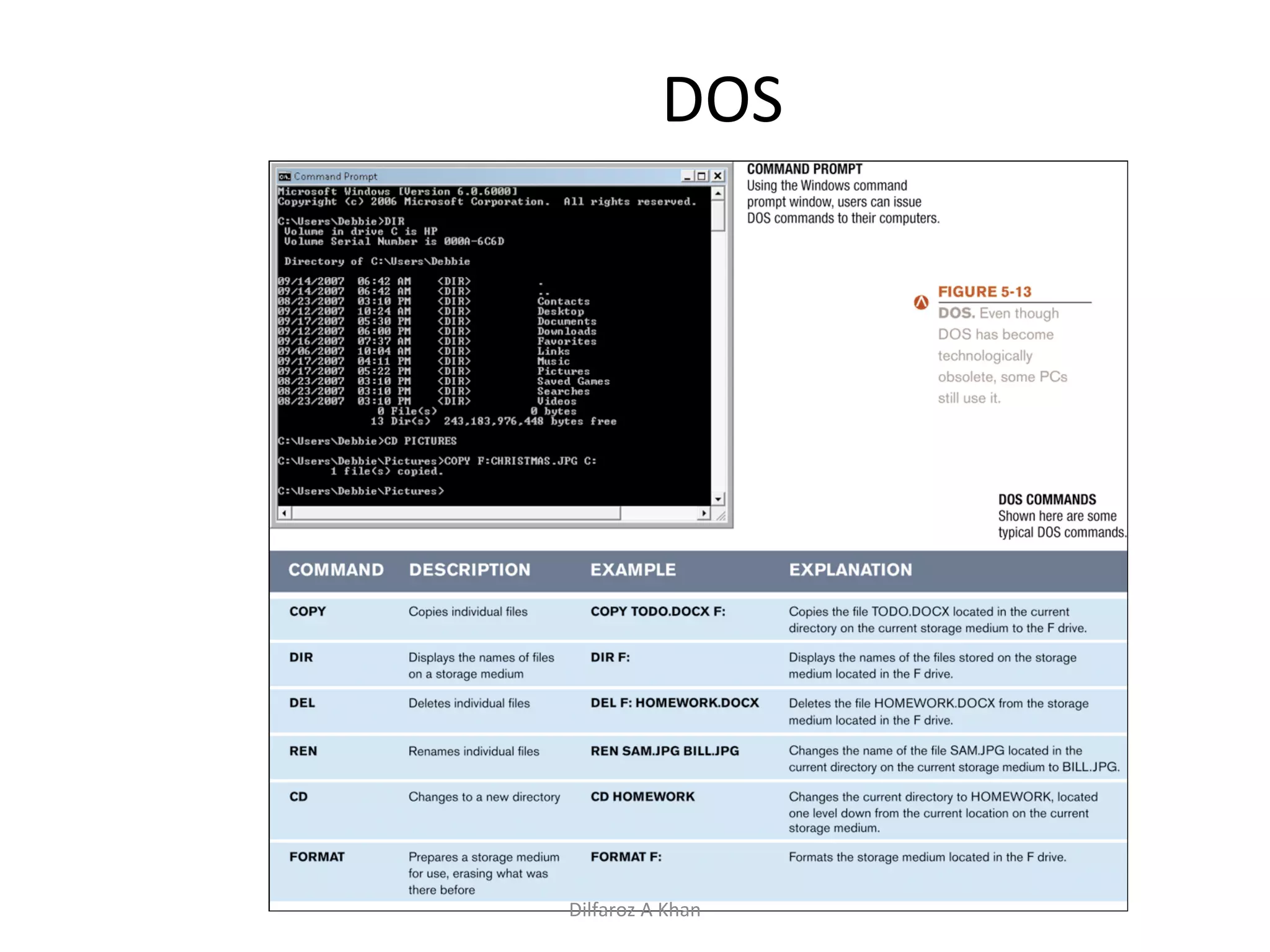
DOS Dilfaroz A Khan
Windows Windows: The primary PC operating system developed by Microsoft Corporation Windows 1.0 through Windows 3.x: Operating environments for DOS, not full-fledged operating systems Windows 95 and Windows 98: U sed a similar GUI to the one used with Windows 3.x Windows 98 Second Edition (SE): Update to Windows 98, released in 1999; still an installed base of older PCs running Windows 98 SE Windows NT (New Technology): first 32-bit version of Windows designed for high-end workstations and servers Dilfaroz A Khan
Windows Windows, cont. Windows Me (Millennium Edition): designed for home PCs, improved home networking and a shared Internet connection Windows 2000: replaced Windows NT; was geared towards high-end business workstations and servers, support for wireless devices Windows XP: Replaced both Windows 2000 and Windows Me Based on Windows NT technology More stable and powerful than earlier versions of Windows Newest features related to m ultimedia and communications Dilfaroz A Khan
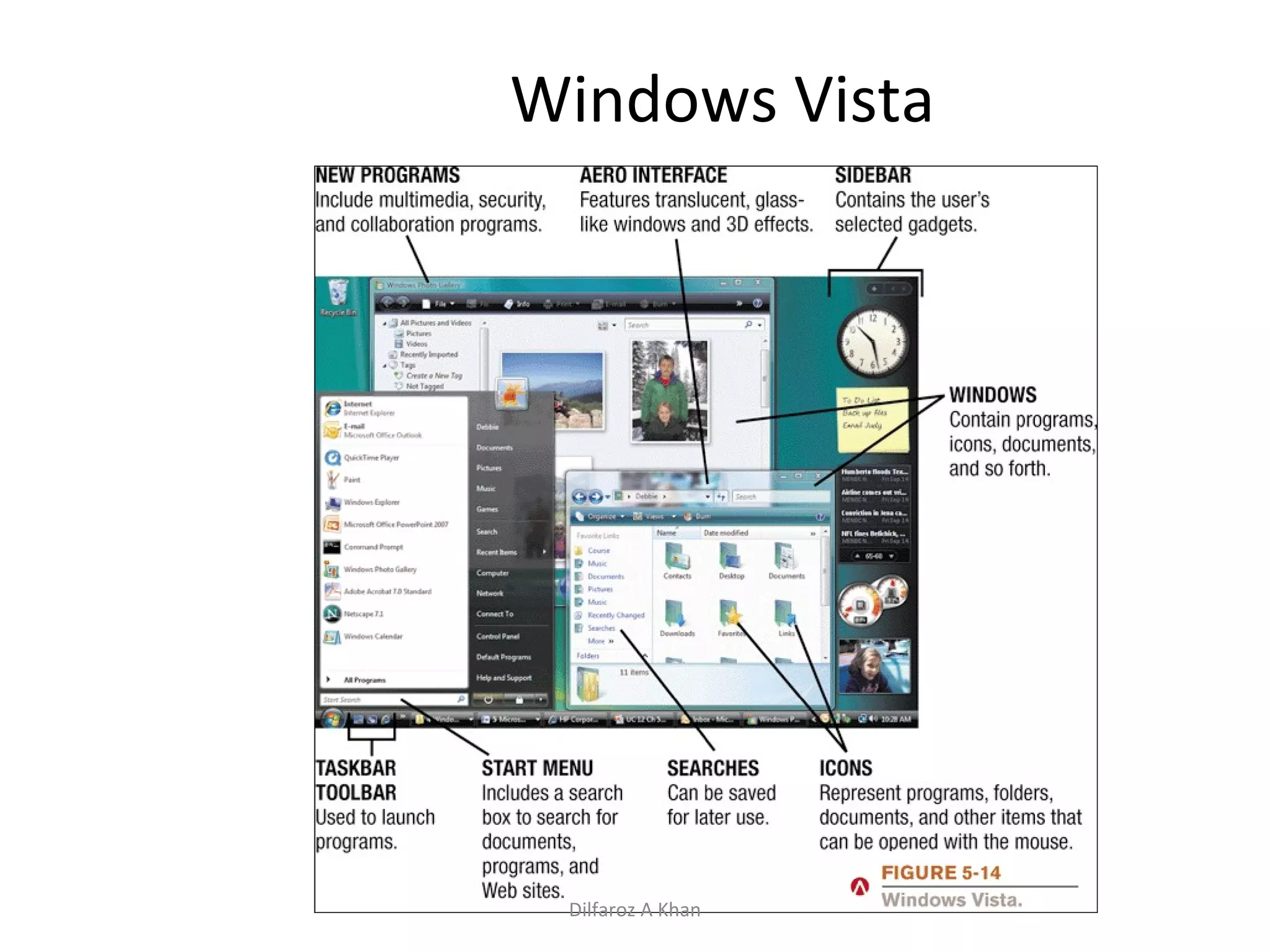
Windows Windows Vista: Most recent version of Windows Features the Aero visual interface Transparency and animations Live Thumbnails The Vista Start menu is more streamlined Built-in security features Improved networking ands multimedia Additional features Sidebar, Instant Search, etc. Hardware requirements for Vista have increased over earlier versions of Windows Four editions (Home Basic, Home Premium, Business, and Ultimate) Dilfaroz A Khan
Windows Vista Dilfaroz A Khan
Windows Windows Server: Server version of Windows Windows Server 2008: Most recent version Includes a variety of services Web platform Support for virtualization New security tools Streamlined management tools Windows Home Server: New operating system based on Windows Server Provides services for a home network Provides access to shared files Can back up all devices on the network automatically Dilfaroz A Khan
UNIX UNIX: Operating system developed in the late 1960s for midrange servers and mainframes Many variations of UNIX are in use today Multiuser, multitasking operating system More expensive, requires a higher level of PC knowledge, and tends to be harder to install, maintain, and upgrade than most other operating systems “ UNIX” initially referred to the original UNIX operating system, now refers to a group of similar operating systems based on UNIX Single UNIX Specification: A standardized UNIX environment Dilfaroz A Khan
Linux Linux: Version (flavor) of UNIX available without charge over the Internet Increasingly being used with PCs, servers, mainframes, and supercomputers Is   open-source software: has been collaboratively modified by volunteer programmers all over the world Originally used a command line interface, most recent versions use a GUI Strong support from mainstream companies, such as Sun, IBM, HP, and Novell Used on PCs, mainframes, and consumer appliances Growing integration between Linux and other operating systems is a recent development Dilfaroz A Khan
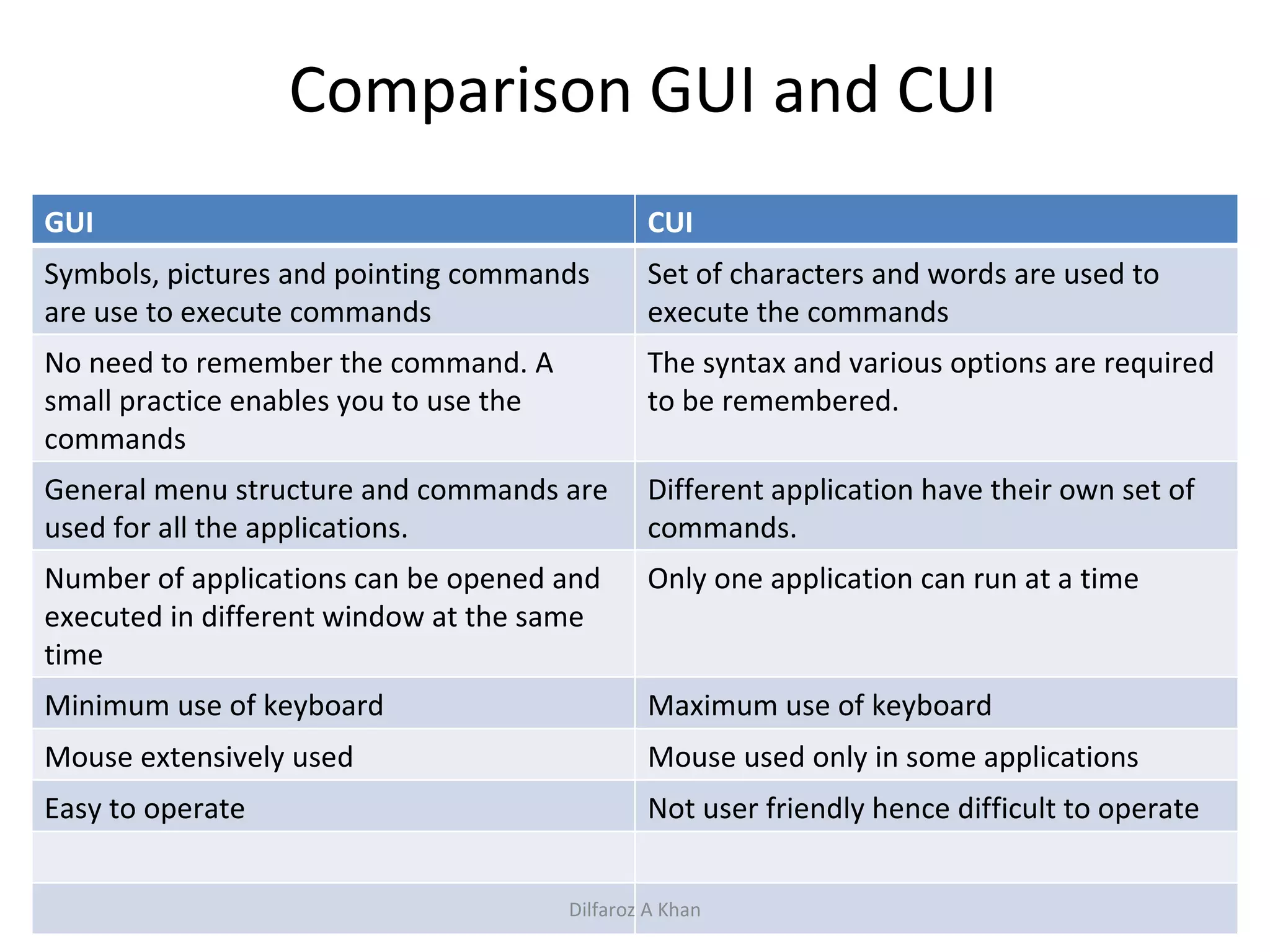
Comparison GUI and CUI Dilfaroz A Khan GUI CUI Symbols, pictures and pointing commands are use to execute commands Set of characters and words are used to execute the commands No need to remember the command. A small practice enables you to use the commands The syntax and various options are required to be remembered. General menu structure and commands are used for all the applications. Different application have their own set of commands. Number of applications can be opened and executed in different window at the same time Only one application can run at a time Minimum use of keyboard Maximum use of keyboard Mouse extensively used Mouse used only in some applications Easy to operate Not user friendly hence difficult to operate
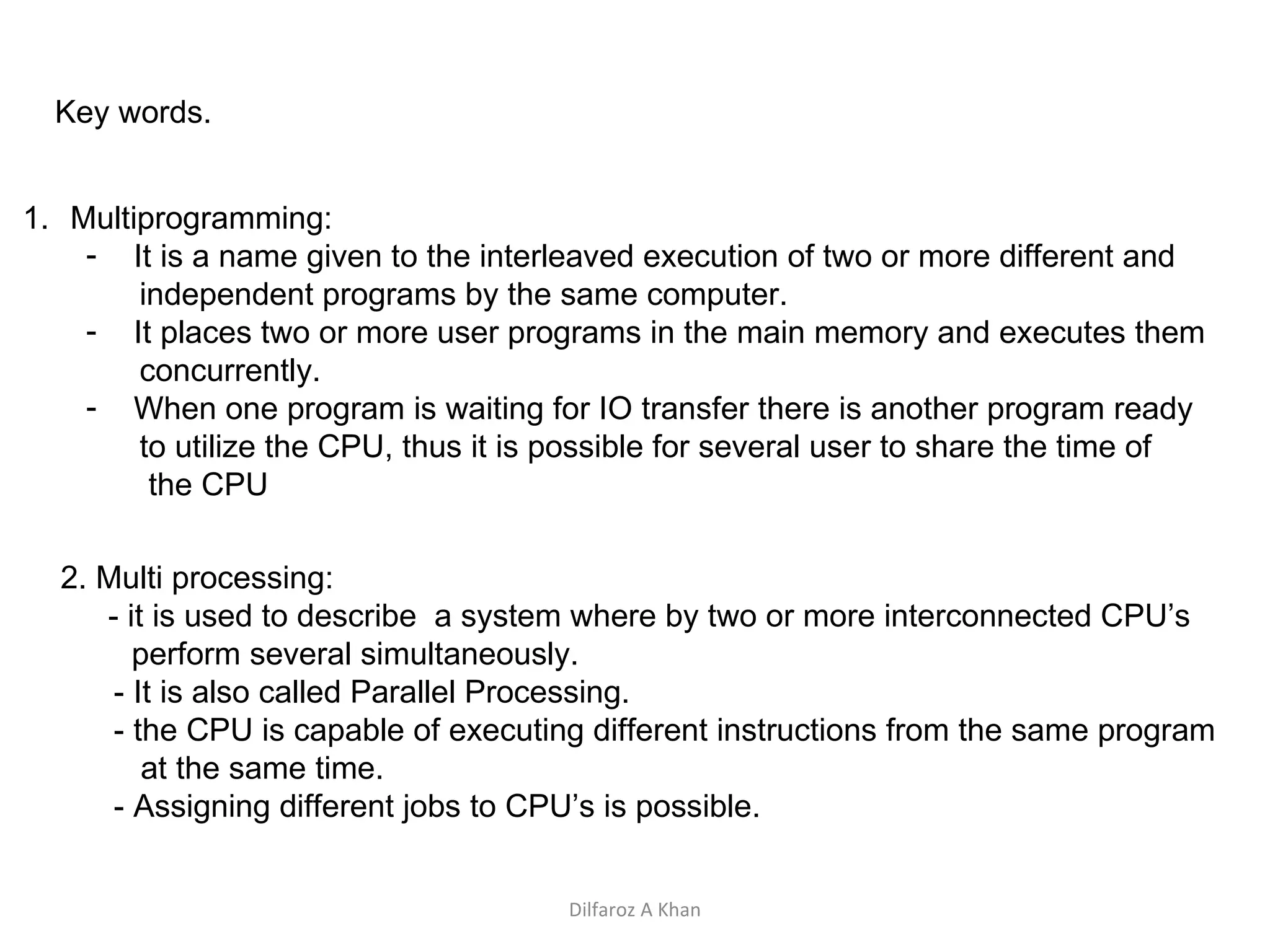
Key words. Multiprogramming: It is a name given to the interleaved execution of two or more different and independent programs by the same computer. It places two or more user programs in the main memory and executes them concurrently.  When one program is waiting for IO transfer there is another program ready to utilize the CPU, thus it is possible for several user to share the time of  the CPU 2. Multi processing: - it is used to describe  a system where by two or more interconnected CPU’s  perform several simultaneously. - It is also called Parallel Processing. - the CPU is capable of executing different instructions from the same program  at the same time.  - Assigning different jobs to CPU’s is possible. Dilfaroz A Khan
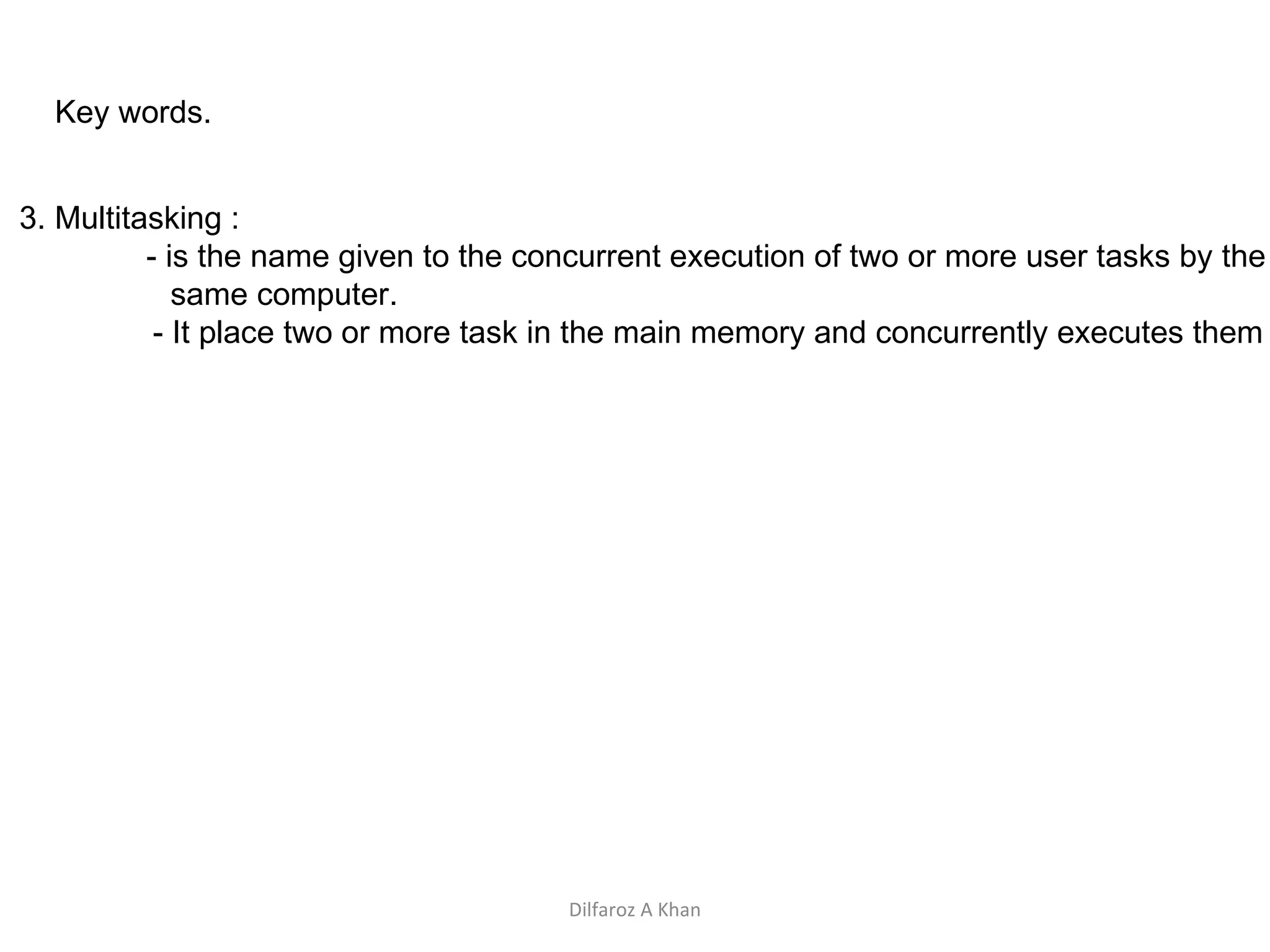
Key words. 3. Multitasking : - is the name given to the concurrent execution of two or more user tasks by the same computer. - It place two or more task in the main memory and concurrently executes them Dilfaroz A Khan

Operating system

  • 1.
    Computers Course DesignDiscuss computer in every day life Historical Perspective Hardware Software System software - OS Application software--- pl Programming Language Data base Networking The Internet System Development Life Cycle Security and virus Left over's Dilfaroz A Khan
  • 2.
    Software Software canbe divided into two Application System System software consists of sets of programs to support the efficient use of hardware resources that include drivers for various devices, various operating systems. Application software consist of set of programs that process data , generate information like payroll, inventory management etc. Dilfaroz A Khan
  • 3.
    Relationship between softwareand hardware Hardware System software Application software System software Operating system Translators Utility programmes Application software Programming languages Application programs Dilfaroz A Khan
  • 4.
    System Software OperatingSystem Questions asked Importance/ role of Os Function of OS booting Character use interface / graphic user interface Brief about dos , Windows and Unix / Linux Dilfaroz A Khan
  • 5.
    Role/Importance of OS An OS is a set of programs that controls and supervises a computer system’s hardware and provides services to the users. It acts like a link between the users and computer hardware. Dilfaroz A Khan
  • 6.
    Role of OScont… Interface between hardware and user; an OS is responsible for the management and coordination of activities and the sharing of the resources of the computer. It manages the hardware and software resources of the system. In a desktop computer, these resources include such things as the processor, memory, disk space and more (On a cell phone, they include the keypad, the screen, the address book, the phone dialer, the battery and the network connection). It provides a stable, consistent way for applications to deal with the hardware without having to know all the details of the hardware. Users Application Software Operating and systems software Hardware Dilfaroz A Khan
  • 7.
    Major functions ofOS Processor management Memory management Device management Information/File management Dilfaroz A Khan
  • 8.
    Processor management Aprocess is a program in execution A processor is a hardware device which is capable of executing a sequence of instructions. When a program is submitted to the CPU it can be in any one of the following state Ready Running Blocked Dilfaroz A Khan
  • 9.
    Processor management cont….Ready : A process is ready if all conditions are satisfied for the process to be in running state and its waiting for the processor. Running : A process is running when its instructions sequence is being executed by the processor. Blocked: A process is blocked if it is waiting for the event to occur before continuing execution. Dilfaroz A Khan
  • 10.
    Processor management cont….Process / CPU measurement Throughput: Total number of jobs completed divided by The total time required to complete the job. For example JOB1 and JOB2 takes 5 minutes each for execution the throughput is 2jobs divided by 10 minutes i.e. 0.2 job/minute Job Scheduling Non – Preemptive scheduling Preemptive scheduling Dilfaroz A Khan
  • 11.
    Processor management cont….Non Preemptive scheduling In the above scheduling a schedule job always completes before another schedule job is taken. In other words jobs finish in the order in which they are scheduled. In other words resources can not be taken away. Preemptive scheduling In this kind of scheduling decision can be made while the job is executing. In other words resources can be taken away. Dilfaroz A Khan
  • 12.
    Memory Management Thememory management plays an important role. Following concepts are use to manage one or more than one processes in the memory. Single Contiguous allocation Fixed size partition allocation Variable size allocation (and re allocation) Virtual storage Dilfaroz A Khan
  • 13.
    Single Size AllocationThe OS usually resides in either the upper or lower part of the core memory. A job is assigned to the entire core even though it may use only the fraction of the memory. The job has complete control of the CPU until it is finished. IT does result in the wastage of memory OS Users program Wasted MEMORY Dilfaroz A Khan
  • 14.
    Fixed Size AllocationThe main memory is divided into a number if partitions of fixed size. The sizes can be same or different. Problem of memory wastage still exists. OS MEMORY 20 K 20 K 20 K OS 20 K 10 K 40 K Dilfaroz A Khan
  • 15.
    Variable Size PartitionAllocation (Re Allocation) A memory size exactly of the job is allocated thus less wastage of memory. When the job terminates the system keeps a track. When a new job has to be initiated it creates a partition to suit its storage requirement. The fragmented memory is compacted by relocating the existing jobs upwards. Dilfaroz A Khan
  • 16.
    Variable size allocation cont…. Dilfaroz A Khan
  • 17.
    Virtual Storage Thesystem used both primary and secondary storage. Virtual storage involves the storing in primary memory only those instructions of the program that are currently executing and storing the reminder program in the secondary memory. The part of the program is called pages and these pages are swapped in and out of primary storage as they are needed for execution Dilfaroz A Khan
  • 18.
    Paging in virtualmemory Dilfaroz A Khan
  • 19.
    Disadvantage of VirtualStorage Over head cost that is CPU time is required to just page in and page out. Many times CPU takes time to just page in and page out rather than executing the program/job. To much of page in and page out is known as thrashing. Primary memory also gets overloaded with tables which keeps a track of pages between primary and secondary storage. Dilfaroz A Khan
  • 20.
    Device Management “A contemporary computer system includes a wide assortment of “IP/OP” devices called peripheral devices such as printers, card readers, magnetic tapes etc.. A large installation may out half of the system cost in peripherals so it may be used in a efficient manner. “ Dilfaroz A Khan
  • 21.
    Device Management cont….Device characteristics The speed of IO devices is different from another. Buffering / Spooling concept Data can be represented in different format like ASCII or EDCDIC code Device are sharable and not sharable The style of accessing(reading /writing ) from the devices are different Dilfaroz A Khan
  • 22.
    Device Management cont….Buffering – is a technique of overlapping ip and op processing of a single job. After the data has been red and the CPU is about to start operating on it the device is instructed to read the next input immediately. Spooling( Simultaneous Peripheral Operation On-Line) is a technique of overlapping ip and op processing of multiple jobs send to a device Dilfaroz A Khan
  • 23.
    Information/File ManagementA computer stores information in form of files. The operating system provides convenient ways for storing and retrieving the information from files. A file is a collection of related information. Every file has a name, data and attributes. Name of a file is unique. The attributes have information date and time, last access date , size, location etc… The file management part of OS takes care of file related activities such as structuring, accessing, naming, sharing, protecting etc.. File access methods are Sequential and Random. Basic file operations are create, delete, open, close, read , write, seek, rename, copy etc….. Dilfaroz A Khan
  • 24.
    Command Interface characteruser / graphic user interface Interface between the user and operating system Provides with an environment where the user gives commands to the OS for execution of various functions. Command supported by the CI is called system calls. The CI takes the responsibility to interpret the command given by the user and directing the computer resources to handle the user request via the OS CI comes in two categories Character user interface and Graphic user interface. Dilfaroz A Khan
  • 25.
    Command line interfaceUsers give instructions to computer by typing commands in this textual user interface. That is to enter a command the user uses the keyboard. If the command is typed incorrectly the CLI responds with an error message. Remembering commands becomes difficult Dilfaroz A Khan
  • 26.
    Graphic User InterfaceEasy to use and not need to remember commands The instructions are given graphically ie use of a mouse or click of a icon. Dilfaroz A Khan
  • 27.
    Booting – Process of starting up any computer and loading the OS in memory. Process: Power is on Once a 'Power Good' signal is sent to the motherboard, the CPU looks for the ROM bios. The CPU looks to the ROM bios for the first instruction, and the first instruction is to run the POST (Power-On-Self-Test). POST checks the CPU, hardware devices such as the Video Card, the secondary storage devices such as the Hard Drive, Floppy Drives, Zip Drive or CD/DVD Drives. If there are any errors found then an error message is displayed on screen or a number of beeps are heard. Next the bios finds the video card and runs the video card's bios. The bios then displays the system configuration. During the display more tests are conducted including the test that shows your computer testing the memory. If there are any problems found from now on they will be displayed in a text message on the screen. After that the bios searches for something that it can boot from i.e hard disk drive After activating it , it finds the first piece of OS i.e. BOOTSTRAP LOADER Bootstrap loader loads the OS into memory and allows it to begin operation Then it turns controls of the computer over to the OS Dilfaroz A Khan
  • 28.
  • 29.
    Windows Windows: Theprimary PC operating system developed by Microsoft Corporation Windows 1.0 through Windows 3.x: Operating environments for DOS, not full-fledged operating systems Windows 95 and Windows 98: U sed a similar GUI to the one used with Windows 3.x Windows 98 Second Edition (SE): Update to Windows 98, released in 1999; still an installed base of older PCs running Windows 98 SE Windows NT (New Technology): first 32-bit version of Windows designed for high-end workstations and servers Dilfaroz A Khan
  • 30.
    Windows Windows, cont.Windows Me (Millennium Edition): designed for home PCs, improved home networking and a shared Internet connection Windows 2000: replaced Windows NT; was geared towards high-end business workstations and servers, support for wireless devices Windows XP: Replaced both Windows 2000 and Windows Me Based on Windows NT technology More stable and powerful than earlier versions of Windows Newest features related to m ultimedia and communications Dilfaroz A Khan
  • 31.
    Windows Windows Vista:Most recent version of Windows Features the Aero visual interface Transparency and animations Live Thumbnails The Vista Start menu is more streamlined Built-in security features Improved networking ands multimedia Additional features Sidebar, Instant Search, etc. Hardware requirements for Vista have increased over earlier versions of Windows Four editions (Home Basic, Home Premium, Business, and Ultimate) Dilfaroz A Khan
  • 32.
  • 33.
    Windows Windows Server:Server version of Windows Windows Server 2008: Most recent version Includes a variety of services Web platform Support for virtualization New security tools Streamlined management tools Windows Home Server: New operating system based on Windows Server Provides services for a home network Provides access to shared files Can back up all devices on the network automatically Dilfaroz A Khan
  • 34.
    UNIX UNIX: Operatingsystem developed in the late 1960s for midrange servers and mainframes Many variations of UNIX are in use today Multiuser, multitasking operating system More expensive, requires a higher level of PC knowledge, and tends to be harder to install, maintain, and upgrade than most other operating systems “ UNIX” initially referred to the original UNIX operating system, now refers to a group of similar operating systems based on UNIX Single UNIX Specification: A standardized UNIX environment Dilfaroz A Khan
  • 35.
    Linux Linux: Version(flavor) of UNIX available without charge over the Internet Increasingly being used with PCs, servers, mainframes, and supercomputers Is open-source software: has been collaboratively modified by volunteer programmers all over the world Originally used a command line interface, most recent versions use a GUI Strong support from mainstream companies, such as Sun, IBM, HP, and Novell Used on PCs, mainframes, and consumer appliances Growing integration between Linux and other operating systems is a recent development Dilfaroz A Khan
  • 36.
    Comparison GUI andCUI Dilfaroz A Khan GUI CUI Symbols, pictures and pointing commands are use to execute commands Set of characters and words are used to execute the commands No need to remember the command. A small practice enables you to use the commands The syntax and various options are required to be remembered. General menu structure and commands are used for all the applications. Different application have their own set of commands. Number of applications can be opened and executed in different window at the same time Only one application can run at a time Minimum use of keyboard Maximum use of keyboard Mouse extensively used Mouse used only in some applications Easy to operate Not user friendly hence difficult to operate
  • 37.
    Key words. Multiprogramming:It is a name given to the interleaved execution of two or more different and independent programs by the same computer. It places two or more user programs in the main memory and executes them concurrently. When one program is waiting for IO transfer there is another program ready to utilize the CPU, thus it is possible for several user to share the time of the CPU 2. Multi processing: - it is used to describe a system where by two or more interconnected CPU’s perform several simultaneously. - It is also called Parallel Processing. - the CPU is capable of executing different instructions from the same program at the same time. - Assigning different jobs to CPU’s is possible. Dilfaroz A Khan
  • 38.
    Key words. 3.Multitasking : - is the name given to the concurrent execution of two or more user tasks by the same computer. - It place two or more task in the main memory and concurrently executes them Dilfaroz A Khan