
Model View Presenter
Michael Cameron@Darxval
Getting Started - Name that
Pattern!
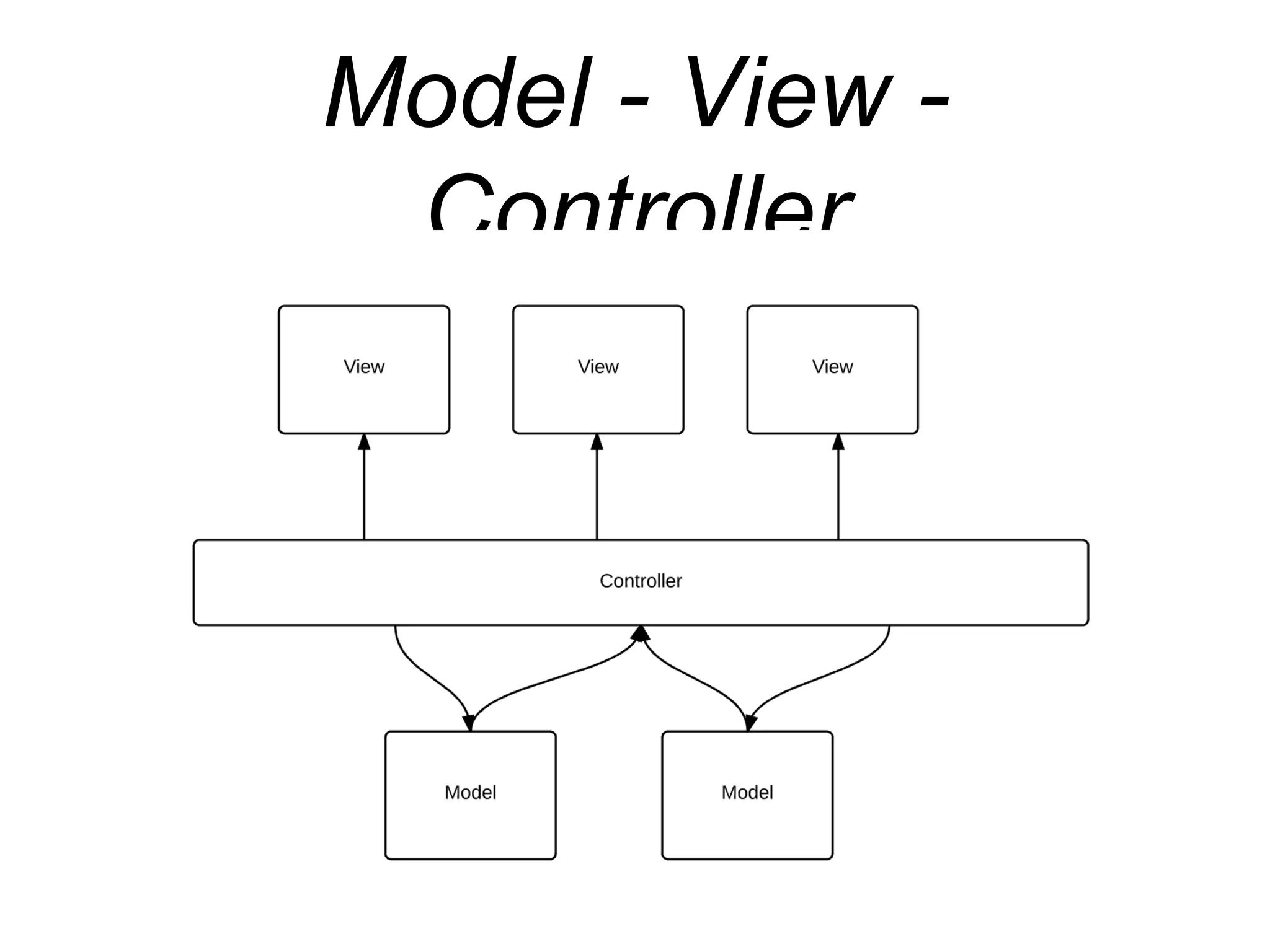
Model - View -
Controller
Pros and Cons?
• What are some pros and cons of MVC?
Name that Pattern!
Model - View -
Presenter
Views
• Not to be confused with widget.view
• The view is a tattle tale
• Rule your views with an Iron Fist
• Tell it what to do
• Let the view tell you of everything that happens.
View Interfaces
• Don’t Trust any class, always have a contract
• Contract Details:
• View must let the presenter tell it what to do.
• View must let the presenter know of any events it
has received
Presenter
• Tells the view and model objects what to do.
• Handles events
TaskIt!
• Add Tasks
• Have a list of Tasks
• Look at a task in detail
TaskIt MVP
TasksContract
interface View {
void setProgressIndicator(boolean active);
void showTasks(List<Task> tasks);
void showAddTask();
void showTaskDetailUi(String taskId);
}
interface UserActionsListener {
void loadTasks(boolean forceUpdate);
void addNewTask();
void openTaskDetails(@NonNull Task requestedTask);
}
So… How do you test
this??
Inversion of Control
• All you have to do is inject a mock instead of a
concrete object to test parts of the app.
Inversion of Control
public AddTaskPresenter(@NonNull TasksRepository tasksRepository,
@NonNull AddTaskContract.View addTaskView,
@NonNull ImageFile imageFile) {
mTasksRepository = checkNotNull(tasksRepository);
mAddTaskView = checkNotNull(addTaskView);
addTaskView.setUserActionListener(this);
mImageFile = imageFile;
}
Mock vs Concrete
/** Prod Debug**/
public class Injection {
public static ImageFile provideImageFile() {
return new ImageFileImpl();
}
public static TasksRepository provideTasksRepository() {
return TaskRepositories.getInMemoryRepoInstance(new TasksServiceApiImpl());
}
}
/** Mock Debug**/
public class Injection {
public static ImageFile provideImageFile() {
return new FakeImageFileImpl();
}
public static TasksRepository provideTasksRepository() {
return TaskRepositories.getInMemoryRepoInstance(new FakeTasksServiceApiImpl());
}
}
Unit Testing
public class TaskDetailPresenterTest {
public static final String INVALID_ID = "INVALID_ID";
public static final String TITLE_TEST = "title";
public static final String DESCRIPTION_TEST = "description";
@Mock
private TasksRepository mTasksRepository;
@Mock
private TaskDetailContract.View mTaskDetailView;
/**
* {@link ArgumentCaptor} is a powerful Mockito API to capture argument values and use them to
* perform further actions or assertions on them.
*/
@Captor
private ArgumentCaptor<TasksRepository.GetTaskCallback> mGetTaskCallbackCaptor;
private TaskDetailPresenter mTaskDetailsPresenter;
@Before
public void setupNotesPresenter() {
// Mockito has a very convenient way to inject mocks by using the @Mock annotation. To
// inject the mocks in the test the initMocks method needs to be called.
MockitoAnnotations.initMocks(this);
// Get a reference to the class under test
mTasksDetailsPresenter = new TaskDetailPresenter(mTaskRepository, mTaskDetailView);
}
Espresso Test
@RunWith(AndroidJUnit4.class)
@LargeTest
public class TaskDetailScreenTest {
private static String TASK_TITLE = "TaskIt";
private static String TASK_DESCRIPTION = "Rocks";
private static String TASK_IMAGE = "file:///android_asset/atsl-logo.png";
/**
* {@link Note} stub that is added to the fake service API layer.
*/
private static Task TASK = new Task(TASK_TITLE, TASK_DESCRIPTION, TASK_IMAGE);
@Rule
public ActivityTestRule<TaskDetailActivity> mTaskDetailActivityTestRule =
new ActivityTestRule<>(TaskDetailActivity.class, true /* Initial touch mode */,
false /* Lazily launch activity */);
@Test
public void noteDetails_DisplayedInUi() throws Exception {
// Check that the note title, description and image are displayed
onView(withId(R.id.task_detail_title)).check(matches(withText(TASK_TITLE)));
onView(withId(R.id.task_detail_description)).check(matches(withText(TASK_DESCRIPTION)));
onView(withId(R.id.task_detail_image)).check(matches(allOf(
hasDrawable(),
isDisplayed())));
}
}
Sources:
MVP
https://github.com/konmik/nucleus
Google
http://code-labs.io/codelabs/android-testing
J. Amourette -
plus.google.com/u/0/photos/102898026333733818285/albums/6081914916274644193/6081914917317951522?pid=6081914917317951522&oid=1028980263337338
Thank You!

Model View Presenter presentation

  • 1.
  • 2.
    Getting Started -Name that Pattern!
  • 3.
    Model - View- Controller
  • 4.
    Pros and Cons? •What are some pros and cons of MVC?
  • 5.
  • 6.
    Model - View- Presenter
  • 7.
    Views • Not tobe confused with widget.view • The view is a tattle tale • Rule your views with an Iron Fist • Tell it what to do • Let the view tell you of everything that happens.
  • 8.
    View Interfaces • Don’tTrust any class, always have a contract • Contract Details: • View must let the presenter tell it what to do. • View must let the presenter know of any events it has received
  • 9.
    Presenter • Tells theview and model objects what to do. • Handles events
  • 10.
    TaskIt! • Add Tasks •Have a list of Tasks • Look at a task in detail
  • 11.
  • 12.
    TasksContract interface View { voidsetProgressIndicator(boolean active); void showTasks(List<Task> tasks); void showAddTask(); void showTaskDetailUi(String taskId); } interface UserActionsListener { void loadTasks(boolean forceUpdate); void addNewTask(); void openTaskDetails(@NonNull Task requestedTask); }
  • 13.
    So… How doyou test this??
  • 14.
    Inversion of Control •All you have to do is inject a mock instead of a concrete object to test parts of the app.
  • 15.
    Inversion of Control publicAddTaskPresenter(@NonNull TasksRepository tasksRepository, @NonNull AddTaskContract.View addTaskView, @NonNull ImageFile imageFile) { mTasksRepository = checkNotNull(tasksRepository); mAddTaskView = checkNotNull(addTaskView); addTaskView.setUserActionListener(this); mImageFile = imageFile; }
  • 16.
    Mock vs Concrete /**Prod Debug**/ public class Injection { public static ImageFile provideImageFile() { return new ImageFileImpl(); } public static TasksRepository provideTasksRepository() { return TaskRepositories.getInMemoryRepoInstance(new TasksServiceApiImpl()); } } /** Mock Debug**/ public class Injection { public static ImageFile provideImageFile() { return new FakeImageFileImpl(); } public static TasksRepository provideTasksRepository() { return TaskRepositories.getInMemoryRepoInstance(new FakeTasksServiceApiImpl()); } }
  • 17.
    Unit Testing public classTaskDetailPresenterTest { public static final String INVALID_ID = "INVALID_ID"; public static final String TITLE_TEST = "title"; public static final String DESCRIPTION_TEST = "description"; @Mock private TasksRepository mTasksRepository; @Mock private TaskDetailContract.View mTaskDetailView; /** * {@link ArgumentCaptor} is a powerful Mockito API to capture argument values and use them to * perform further actions or assertions on them. */ @Captor private ArgumentCaptor<TasksRepository.GetTaskCallback> mGetTaskCallbackCaptor; private TaskDetailPresenter mTaskDetailsPresenter; @Before public void setupNotesPresenter() { // Mockito has a very convenient way to inject mocks by using the @Mock annotation. To // inject the mocks in the test the initMocks method needs to be called. MockitoAnnotations.initMocks(this); // Get a reference to the class under test mTasksDetailsPresenter = new TaskDetailPresenter(mTaskRepository, mTaskDetailView); }
  • 18.
    Espresso Test @RunWith(AndroidJUnit4.class) @LargeTest public classTaskDetailScreenTest { private static String TASK_TITLE = "TaskIt"; private static String TASK_DESCRIPTION = "Rocks"; private static String TASK_IMAGE = "file:///android_asset/atsl-logo.png"; /** * {@link Note} stub that is added to the fake service API layer. */ private static Task TASK = new Task(TASK_TITLE, TASK_DESCRIPTION, TASK_IMAGE); @Rule public ActivityTestRule<TaskDetailActivity> mTaskDetailActivityTestRule = new ActivityTestRule<>(TaskDetailActivity.class, true /* Initial touch mode */, false /* Lazily launch activity */); @Test public void noteDetails_DisplayedInUi() throws Exception { // Check that the note title, description and image are displayed onView(withId(R.id.task_detail_title)).check(matches(withText(TASK_TITLE))); onView(withId(R.id.task_detail_description)).check(matches(withText(TASK_DESCRIPTION))); onView(withId(R.id.task_detail_image)).check(matches(allOf( hasDrawable(), isDisplayed()))); } }
  • 19.

Editor's Notes

  • #5 - Controllers are based on behaviors and can be shared across views - Can be responsible for determining which view to display - Harder to test - Controllers can become overloaded with too much responsibility
  • #8 have concrete implementations in them (wouldn’t be opposed to more abstraction… )
  • #9 1 Interface Contract interface Contract.View - UpdateText() interface Contract.EventListener - TextChangedOccured()
  • #10 - Ensure’s the view is always up to date - Acts upon user events that the view forwarded. - Retrieves data from a model object - Prepares data for displaying - Updates a model