Reporting
with Excel & Python
Felix Zumstein, 16 January 2020
xlwings Meetup London
Agenda
1. Excel for Reporting – but why?!
2. Alternatives to Excel
3. Excel Writer Libraries
4. Code vs. Template
5. Reporting with xlwings CE
6. Reporting with xlwings REPORTS
2
Introduction
Innovative Solutions
for Microsoft Excel
A small team with a big mission
4
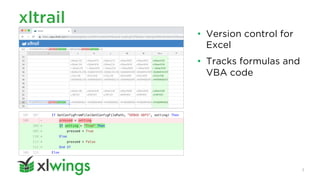
xltrail
• Version control for
Excel
• Tracks formulas and
VBA code
5
xlwings
• xlwings CE
• xlwings PRO
• xlwings REPORTS
6
1. Excel for Reporting –
but why?!
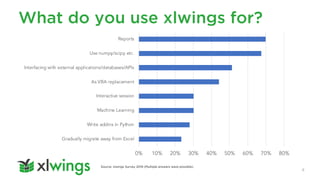
What do you use xlwings for?
8
Source: xlwings Survey 2019 (Multiple answers were possible).
0% 10% 20% 30% 40% 50% 60% 70% 80%
Gradually migrate away from Excel
Write addins in Python
Machine Learning
Interactive session
As VBA replacement
Interfacing with external applications/databases/APIs
Use numpy/scipy etc.
Reports
One day on LinkedIn
9
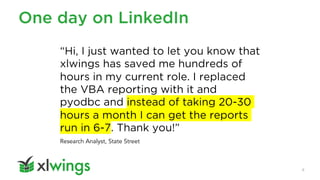
“Hi, I just wanted to let you know that
xlwings has saved me hundreds of
hours in my current role. I replaced
the VBA reporting with it and
pyodbc and instead of taking 20-30
hours a month I can get the reports
run in 6-7. Thank you!”
Research Analyst, State Street
Over a cup of coffee
10
“We need a
better reporting
experience with
xlwings!”
Christian Fischer, Head of Investment
Analytics at Pension Fund of Credit Suisse
Group (Switzerland)
2. Alternatives to Excel
Alternative 1: HTML
12
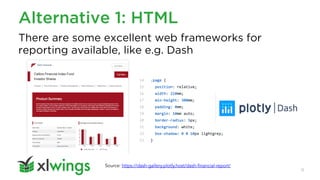
There are some excellent web frameworks for
reporting available, like e.g. Dash
Source: https://dash-gallery.plotly.host/dash-financial-report/
Alternative 2: Direct PDF
13
ReportLab is a library to create high quality PDF
reports.
Source: https://www.reportlab.com/docs/reportlab-userguide.pdf
data = [['00', '01', '02', '03', '04’], ['10', '11', '12', '13', '14’],
['20', '21', '22', '23', '24’], ['30', '31', '32', '33', '34’]]
t = Table(data)
t.setStyle(TableStyle([('BACKGROUND', (1, 1), (-2, -2), colors.green),
('TEXTCOLOR', (0, 0), (1, -1), colors.red)]))
Alternative 3: BI Platforms
14
Crystal Reports
3. Excel Writer Libraries
Excel writer libraries
16
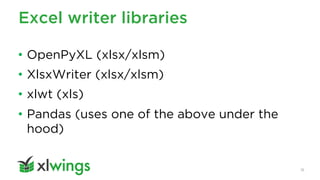
• OpenPyXL (xlsx/xlsm)
• XlsxWriter (xlsx/xlsm)
• xlwt (xls)
• Pandas (uses one of the above under the
hood)
Issues with writer libraries
17
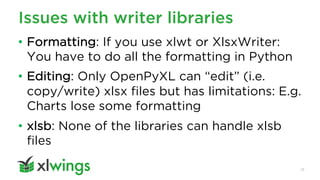
• Formatting: If you use xlwt or XlsxWriter:
You have to do all the formatting in Python
• Editing: Only OpenPyXL can “edit” (i.e.
copy/write) xlsx files but has limitations: E.g.
Charts lose some formatting
• xlsb: None of the libraries can handle xlsb
files
Use writer libraries if you can
18
• Unlike xlwings, they run on your Linux server
and don’t require an installation of Excel. I.e.
they are scalable, and you won’t run into any
Excel automation issues.
• However, they’re having similar shortcomings
with regards to reporting like xlwings CE
4. Code vs. Template
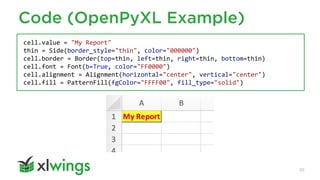
Code (OpenPyXL Example)
20
cell.value = "My Report"
thin = Side(border_style="thin", color="000000")
cell.border = Border(top=thin, left=thin, right=thin, bottom=thin)
cell.font = Font(b=True, color="FF0000")
cell.alignment = Alignment(horizontal="center", vertical="center")
cell.fill = PatternFill(fgColor="FFFF00", fill_type="solid")
Template
21
• Designers are often no developers and
vice versa
• The next section shows the classic way of
using a template with xlwings CE
5. Reporting with xlwings CE
xlwings: The usual approach
23
wb = xw.Book('template.xlsx')
df = pd.DataFrame(index=['r0', 'r1’],
columns=['c0', 'c1’],
data=[[1, 2], [3, 4]])
wb.sheets["report"]["A1"].value = df
Issue 1: Template changes cause
code changes
24
wb.sheets["report"]["A1"].value = df
"A3"
Idea: Use named ranges
25
wb.sheets["report"]["mytable"].value = df
Pros:
• Moves around with cells
Cons:
• “invisible”
• You may need many for the same variable
Issue 2: Dynamic Tables
26
• Spacing issues
between tables
• Formatting
issues
6. Reporting with
xlwings REPORTS
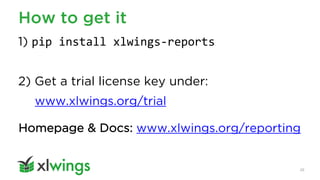
How to get it
28
1) pip install xlwings-reports
2) Get a trial license key under:
www.xlwings.org/trial
Homepage & Docs: www.xlwings.org/reporting
xlwings REPORTS
29
• Complete separation of code and design
• Template variables (Jinja), e.g. {{ today }}
• Frames for dynamic tables
• Supports DataFrames, text, pictures etc.
• Customizable via xlwings CE
Basic syntax
30
from xlwings_reports import create_report
create_report('my_template.xlsx',
'my_report.xlsx',
title='Report',
df=pd.DataFrame(data=[[1, 2], [3, 4]]})
Demo
31
https://github.com/xlwings/xlwings-demo
Preview
Next Meetup: 24 March 2020
33
• Using in-memory objects to integrate Python in
Excel, Julij Jegorov
• Machine Learning and Excel, Colan Walsh (Founder
at Achilleon Consulting)
• Deployment of xlwings powered spreadsheets,
Felix Zumstein (Creator of xlwings)
Thank You
Let’s connect:
https://www.linkedin.com/in/felix-zumstein

xlwings reports: Reporting with Excel & Python

  • 1.
    Reporting with Excel &Python Felix Zumstein, 16 January 2020 xlwings Meetup London
  • 2.
    Agenda 1. Excel forReporting – but why?! 2. Alternatives to Excel 3. Excel Writer Libraries 4. Code vs. Template 5. Reporting with xlwings CE 6. Reporting with xlwings REPORTS 2
  • 3.
  • 4.
    Innovative Solutions for MicrosoftExcel A small team with a big mission 4
  • 5.
    xltrail • Version controlfor Excel • Tracks formulas and VBA code 5
  • 6.
    xlwings • xlwings CE •xlwings PRO • xlwings REPORTS 6
  • 7.
    1. Excel forReporting – but why?!
  • 8.
    What do youuse xlwings for? 8 Source: xlwings Survey 2019 (Multiple answers were possible). 0% 10% 20% 30% 40% 50% 60% 70% 80% Gradually migrate away from Excel Write addins in Python Machine Learning Interactive session As VBA replacement Interfacing with external applications/databases/APIs Use numpy/scipy etc. Reports
  • 9.
    One day onLinkedIn 9 “Hi, I just wanted to let you know that xlwings has saved me hundreds of hours in my current role. I replaced the VBA reporting with it and pyodbc and instead of taking 20-30 hours a month I can get the reports run in 6-7. Thank you!” Research Analyst, State Street
  • 10.
    Over a cupof coffee 10 “We need a better reporting experience with xlwings!” Christian Fischer, Head of Investment Analytics at Pension Fund of Credit Suisse Group (Switzerland)
  • 11.
  • 12.
    Alternative 1: HTML 12 Thereare some excellent web frameworks for reporting available, like e.g. Dash Source: https://dash-gallery.plotly.host/dash-financial-report/
  • 13.
    Alternative 2: DirectPDF 13 ReportLab is a library to create high quality PDF reports. Source: https://www.reportlab.com/docs/reportlab-userguide.pdf data = [['00', '01', '02', '03', '04’], ['10', '11', '12', '13', '14’], ['20', '21', '22', '23', '24’], ['30', '31', '32', '33', '34’]] t = Table(data) t.setStyle(TableStyle([('BACKGROUND', (1, 1), (-2, -2), colors.green), ('TEXTCOLOR', (0, 0), (1, -1), colors.red)]))
  • 14.
    Alternative 3: BIPlatforms 14 Crystal Reports
  • 15.
    3. Excel WriterLibraries
  • 16.
    Excel writer libraries 16 •OpenPyXL (xlsx/xlsm) • XlsxWriter (xlsx/xlsm) • xlwt (xls) • Pandas (uses one of the above under the hood)
  • 17.
    Issues with writerlibraries 17 • Formatting: If you use xlwt or XlsxWriter: You have to do all the formatting in Python • Editing: Only OpenPyXL can “edit” (i.e. copy/write) xlsx files but has limitations: E.g. Charts lose some formatting • xlsb: None of the libraries can handle xlsb files
  • 18.
    Use writer librariesif you can 18 • Unlike xlwings, they run on your Linux server and don’t require an installation of Excel. I.e. they are scalable, and you won’t run into any Excel automation issues. • However, they’re having similar shortcomings with regards to reporting like xlwings CE
  • 19.
    4. Code vs.Template
  • 20.
    Code (OpenPyXL Example) 20 cell.value= "My Report" thin = Side(border_style="thin", color="000000") cell.border = Border(top=thin, left=thin, right=thin, bottom=thin) cell.font = Font(b=True, color="FF0000") cell.alignment = Alignment(horizontal="center", vertical="center") cell.fill = PatternFill(fgColor="FFFF00", fill_type="solid")
  • 21.
    Template 21 • Designers areoften no developers and vice versa • The next section shows the classic way of using a template with xlwings CE
  • 22.
  • 23.
    xlwings: The usualapproach 23 wb = xw.Book('template.xlsx') df = pd.DataFrame(index=['r0', 'r1’], columns=['c0', 'c1’], data=[[1, 2], [3, 4]]) wb.sheets["report"]["A1"].value = df
  • 24.
    Issue 1: Templatechanges cause code changes 24 wb.sheets["report"]["A1"].value = df "A3"
  • 25.
    Idea: Use namedranges 25 wb.sheets["report"]["mytable"].value = df Pros: • Moves around with cells Cons: • “invisible” • You may need many for the same variable
  • 26.
    Issue 2: DynamicTables 26 • Spacing issues between tables • Formatting issues
  • 27.
  • 28.
    How to getit 28 1) pip install xlwings-reports 2) Get a trial license key under: www.xlwings.org/trial Homepage & Docs: www.xlwings.org/reporting
  • 29.
    xlwings REPORTS 29 • Completeseparation of code and design • Template variables (Jinja), e.g. {{ today }} • Frames for dynamic tables • Supports DataFrames, text, pictures etc. • Customizable via xlwings CE
  • 30.
    Basic syntax 30 from xlwings_reportsimport create_report create_report('my_template.xlsx', 'my_report.xlsx', title='Report', df=pd.DataFrame(data=[[1, 2], [3, 4]]})
  • 31.
  • 32.
  • 33.
    Next Meetup: 24March 2020 33 • Using in-memory objects to integrate Python in Excel, Julij Jegorov • Machine Learning and Excel, Colan Walsh (Founder at Achilleon Consulting) • Deployment of xlwings powered spreadsheets, Felix Zumstein (Creator of xlwings)
  • 34.