Introduction to .NET
Framework
By,
Vaishali Sahare (Katkar)
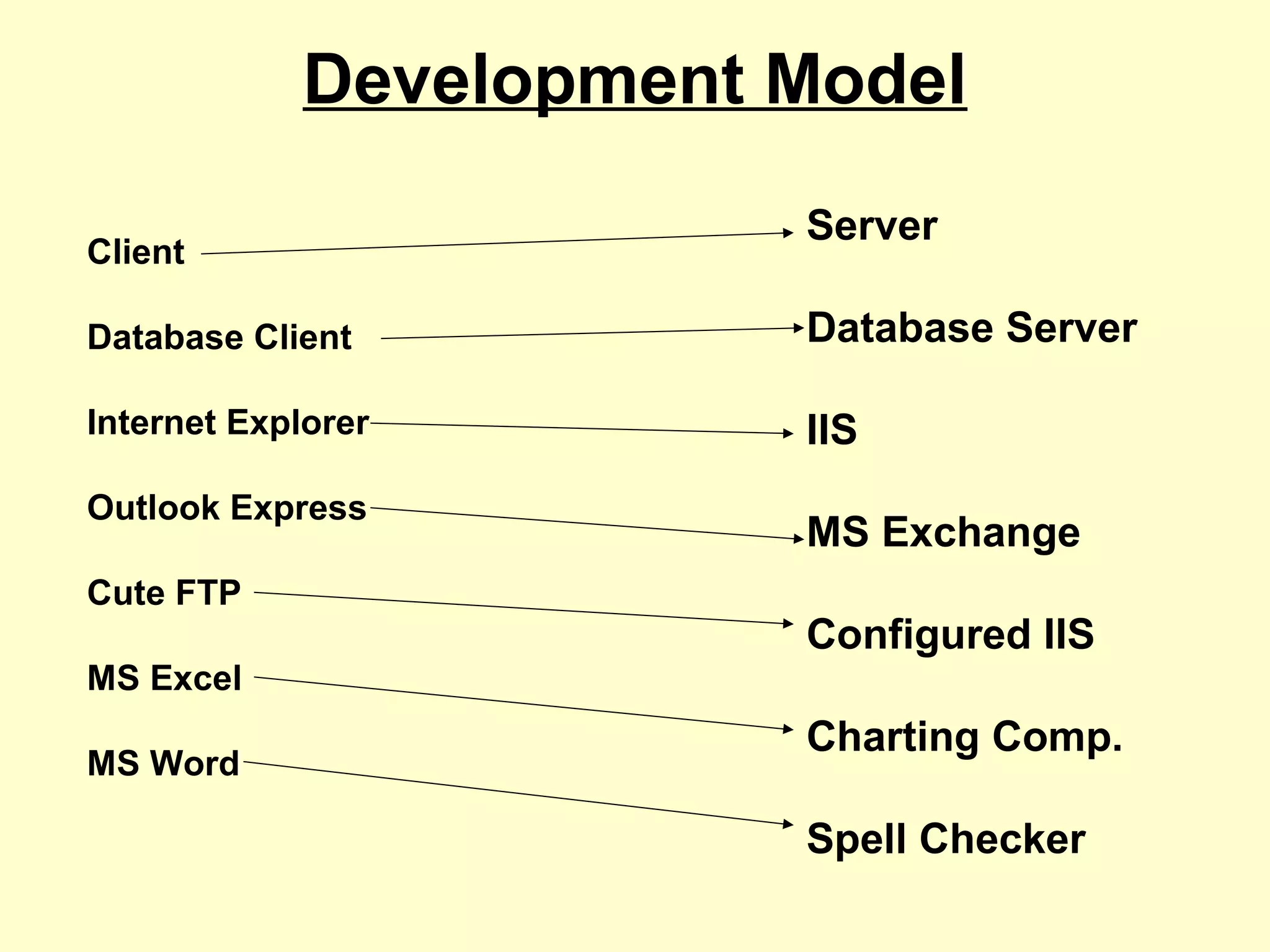
Development Model
Client
Database Client
Internet Explorer
Outlook Express
Cute FTP
MS Excel
MS Word
Server
Database Server
IIS
MS Exchange
Configured IIS
Charting Comp.
Spell Checker
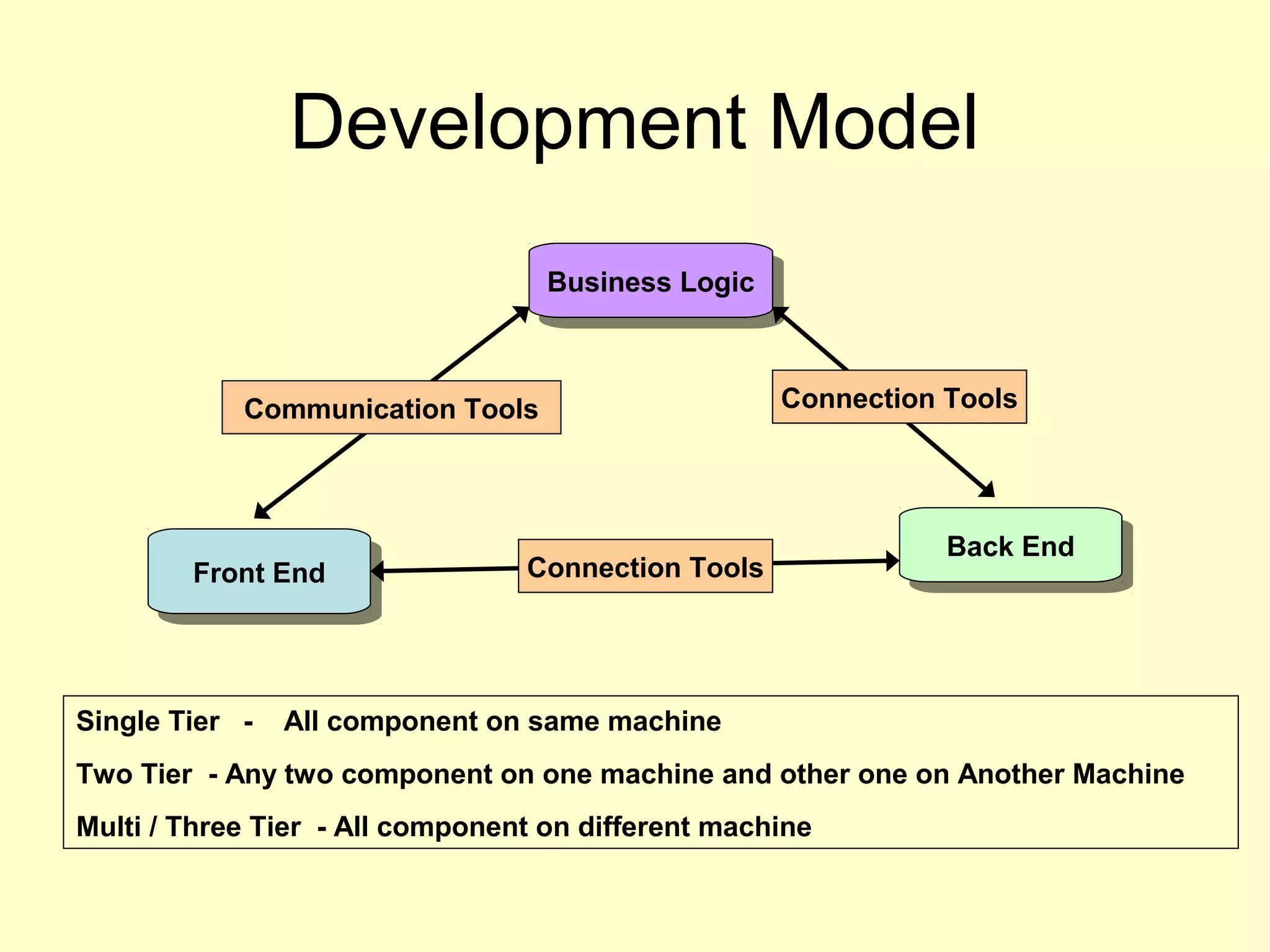
Development Model
Front EndFront End
Business LogicBusiness Logic
Back EndBack End
Connection Tools
Communication Tools Connection Tools
Single Tier - All component on same machine
Two Tier - Any two component on one machine and other one on Another Machine
Multi / Three Tier - All component on different machine
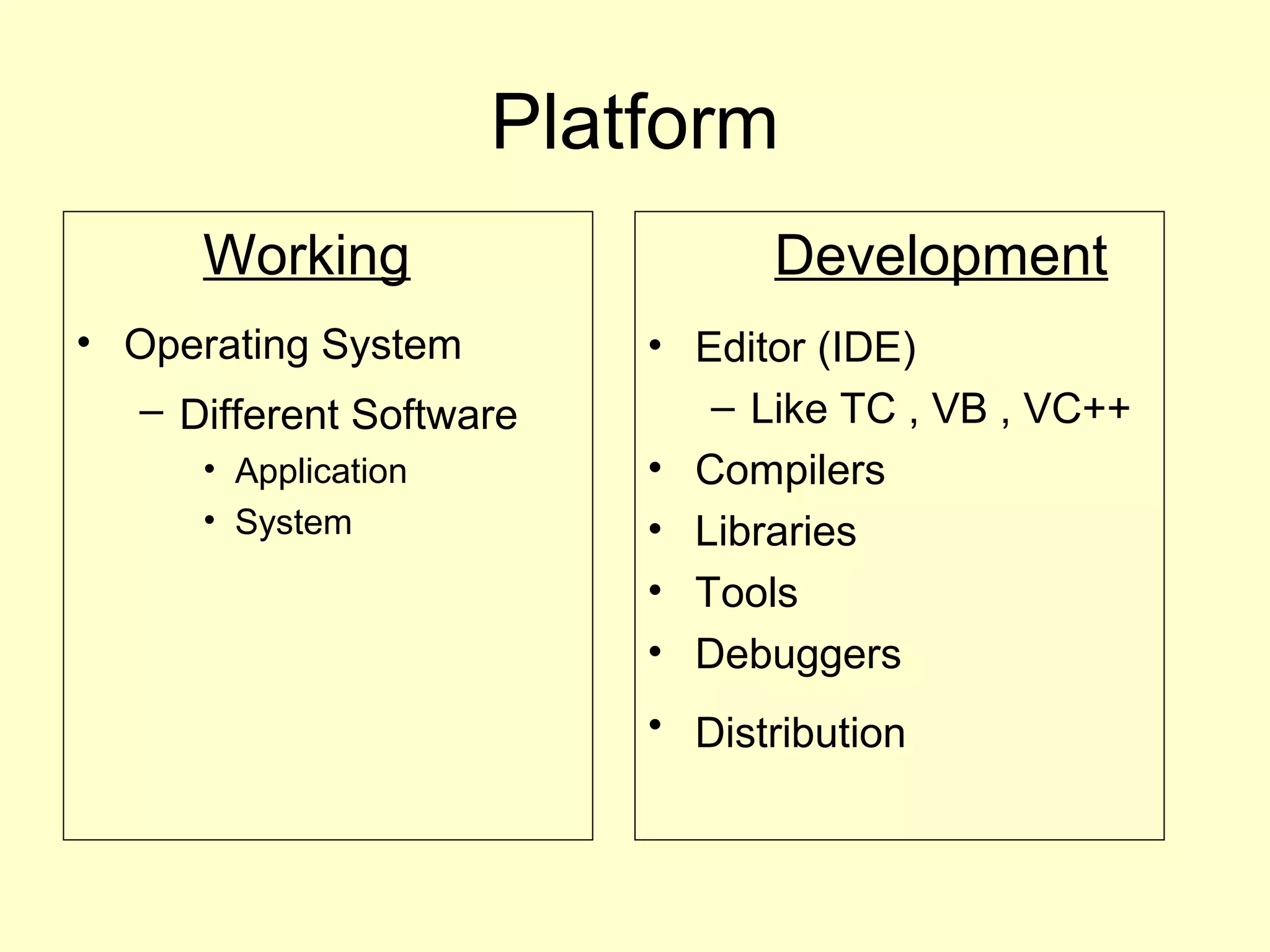
Platform
Working
• Operating System
– Different Software
• Application
• System
Development
• Editor (IDE)
– Like TC , VB , VC++
• Compilers
• Libraries
• Tools
• Debuggers
• Distribution
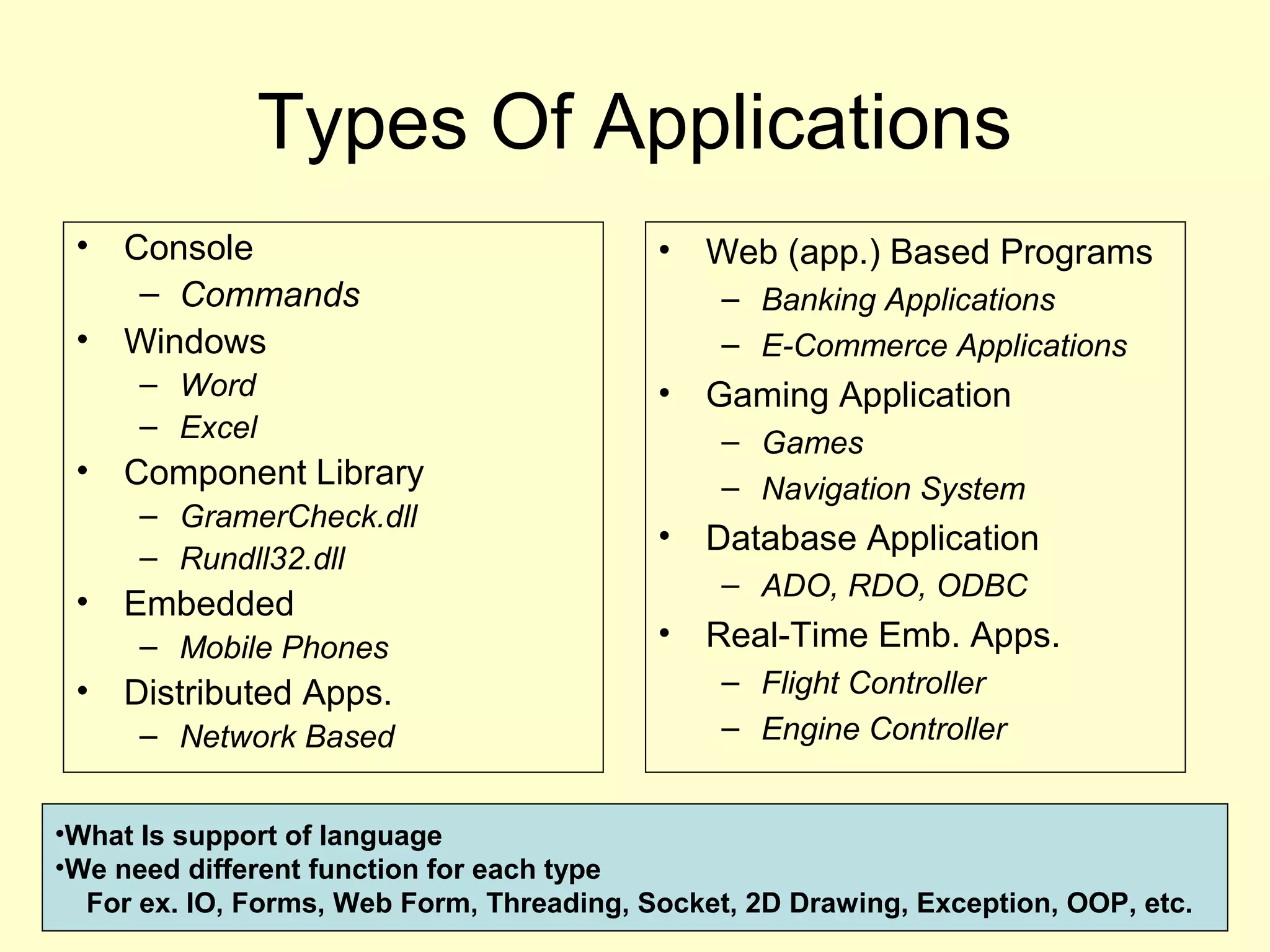
Types Of Applications
• Console
– Commands
• Windows
– Word
– Excel
• Component Library
– GramerCheck.dll
– Rundll32.dll
• Embedded
– Mobile Phones
• Distributed Apps.
– Network Based
• Web (app.) Based Programs
– Banking Applications
– E-Commerce Applications
• Gaming Application
– Games
– Navigation System
• Database Application
– ADO, RDO, ODBC
• Real-Time Emb. Apps.
– Flight Controller
– Engine Controller
•What Is support of language
•We need different function for each type
For ex. IO, Forms, Web Form, Threading, Socket, 2D Drawing, Exception, OOP, etc.
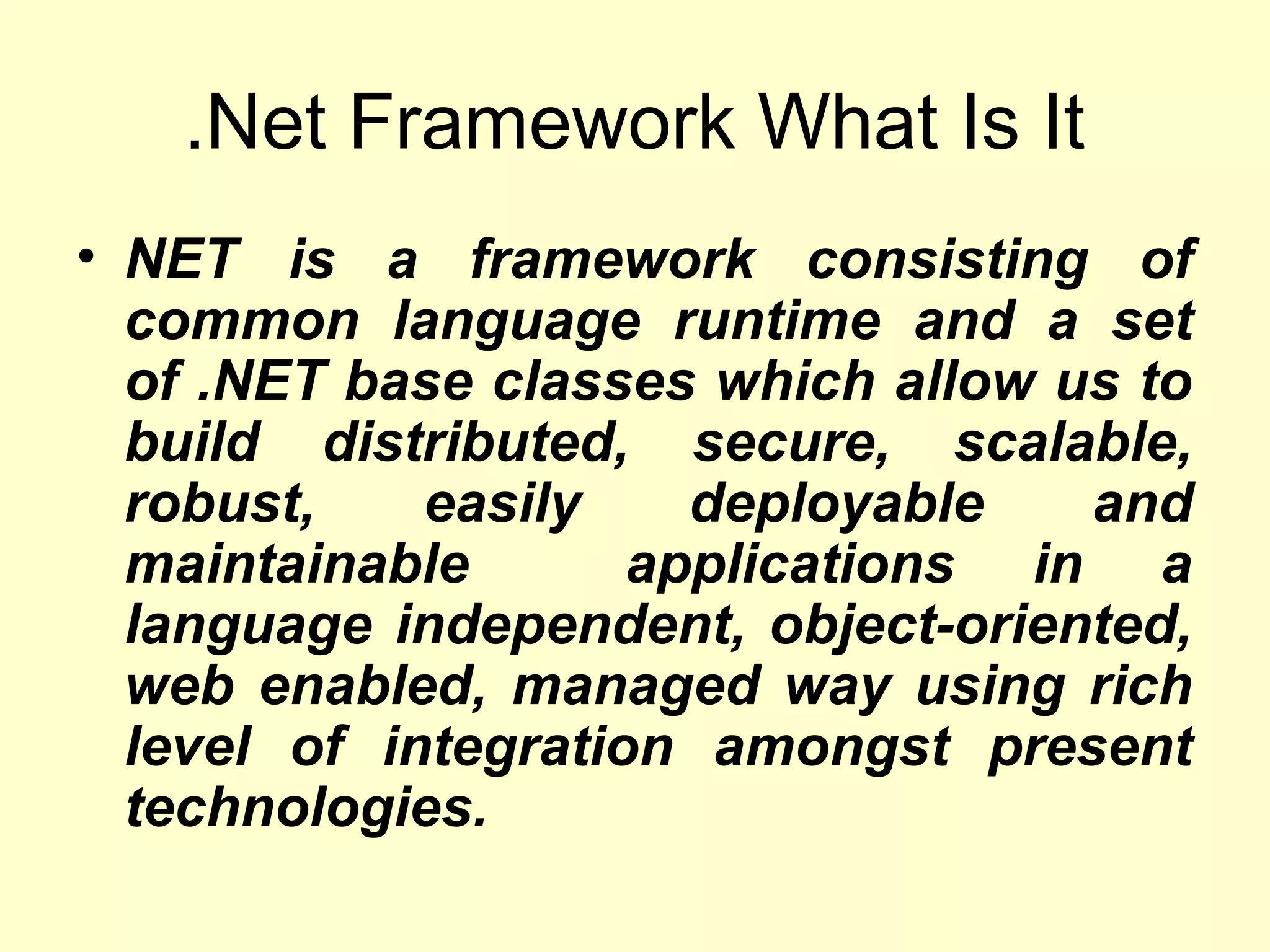
.Net Framework What Is It
• NET is a framework consisting of
common language runtime and a set
of .NET base classes which allow us to
build distributed, secure, scalable,
robust, easily deployable and
maintainable applications in a
language independent, object-oriented,
web enabled, managed way using rich
level of integration amongst present
technologies.
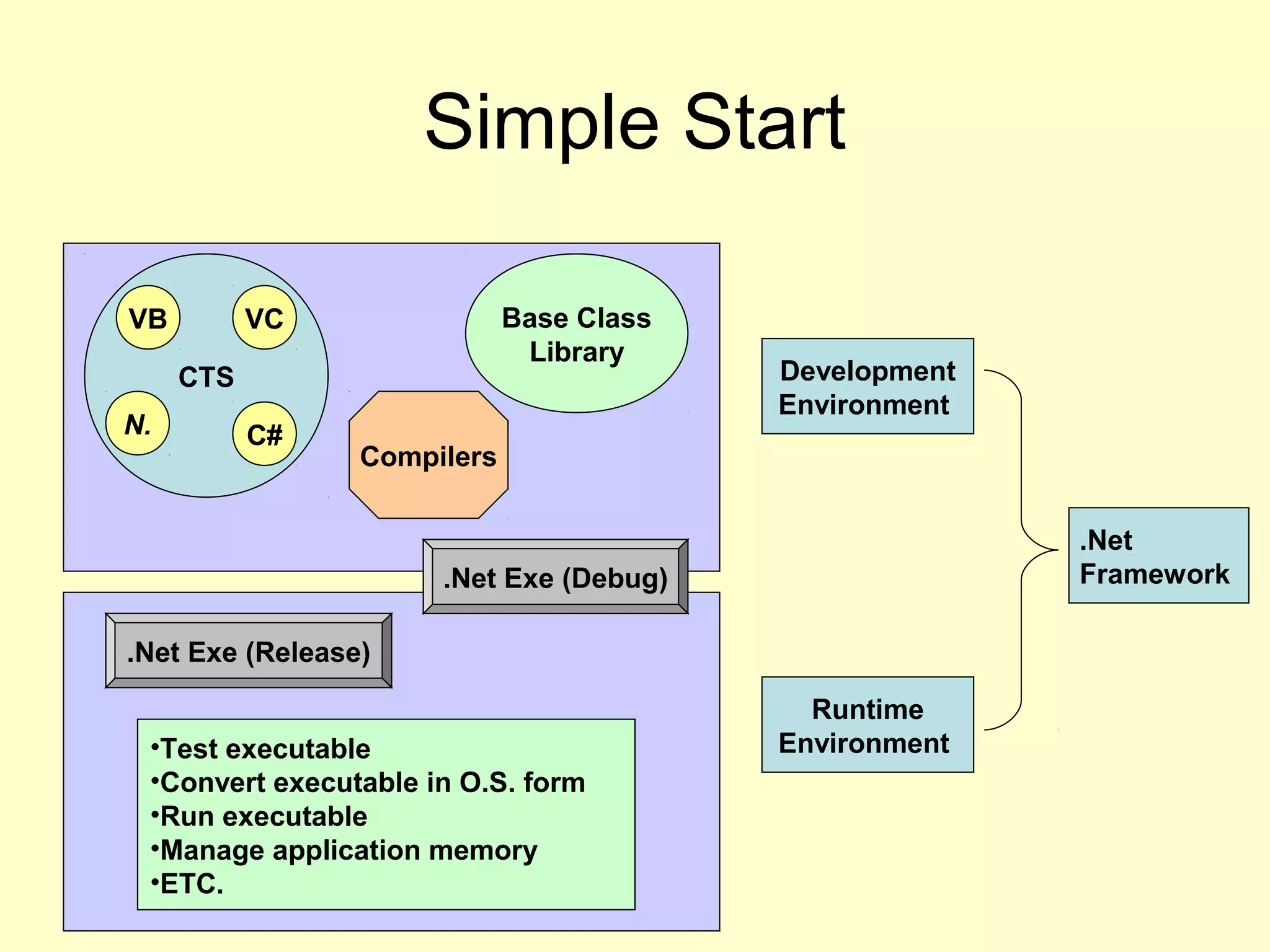
Simple Start
CTS
VB VC
C#N.
Base Class
Library
Compilers
.Net Exe (Debug)
•Test executable
•Convert executable in O.S. form
•Run executable
•Manage application memory
•ETC.
Runtime
Environment
Development
Environment
.Net Exe (Release)
.Net
Framework
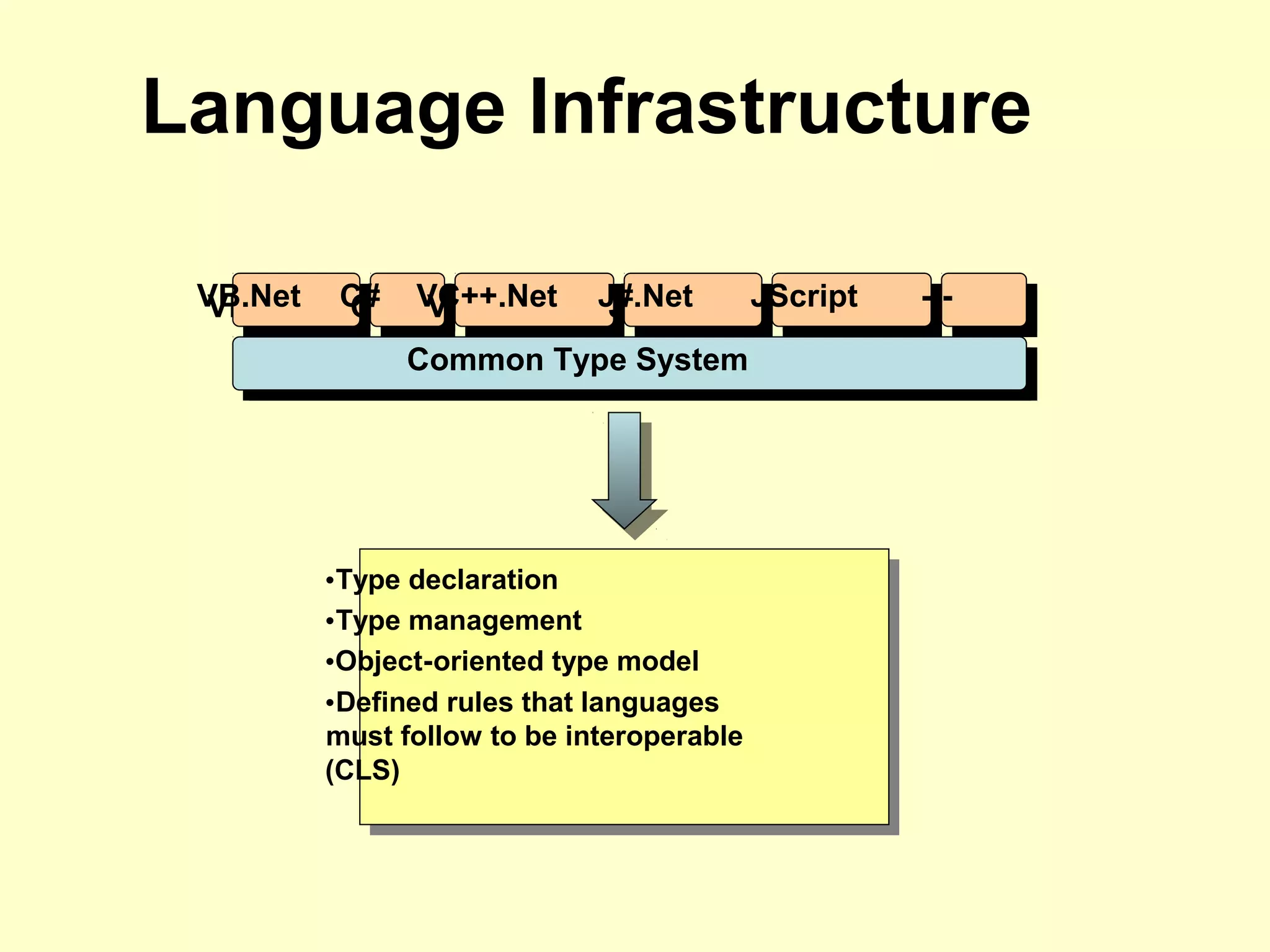
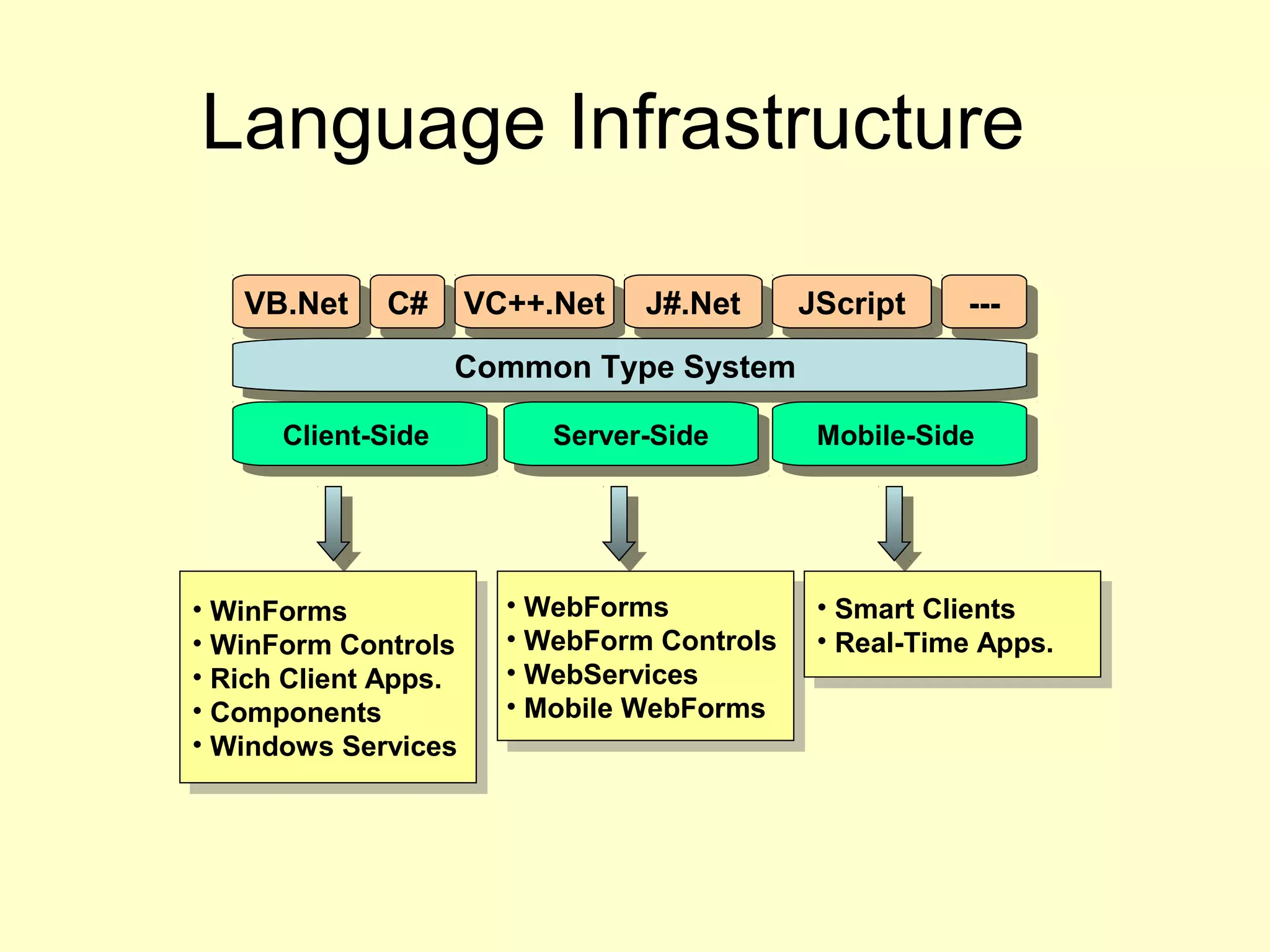
Language Infrastructure
VB.NetVB.Net C#C# VC++.NetVC++.Net J#.NetJ#.Net JScriptJScript ------
Common Type SystemCommon Type System
•Type declaration
•Type management
•Object-oriented type model
•Defined rules that languages
must follow to be interoperable
(CLS)
Language Infrastructure
VB.NetVB.Net C#C# VC++.NetVC++.Net J#.NetJ#.Net JScriptJScript ------
Common Type SystemCommon Type System
Client-SideClient-Side Server-SideServer-Side Mobile-SideMobile-Side
• WinForms
• WinForm Controls
• Rich Client Apps.
• Components
• Windows Services
• WinForms
• WinForm Controls
• Rich Client Apps.
• Components
• Windows Services
• WebForms
• WebForm Controls
• WebServices
• Mobile WebForms
• WebForms
• WebForm Controls
• WebServices
• Mobile WebForms
• Smart Clients
• Real-Time Apps.
• Smart Clients
• Real-Time Apps.
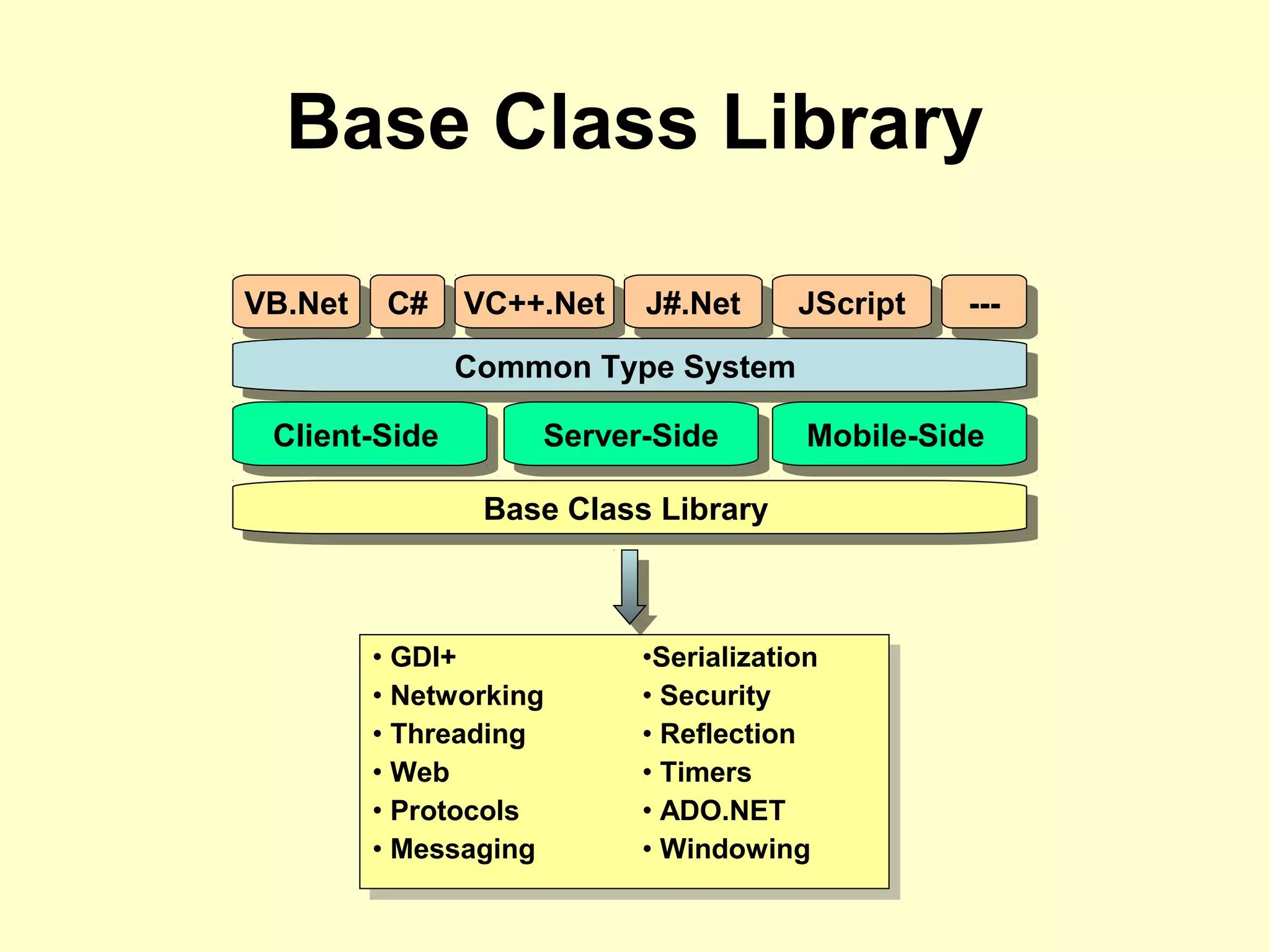
Base Class Library
VB.NetVB.Net C#C# VC++.NetVC++.Net J#.NetJ#.Net JScriptJScript ------
Common Type SystemCommon Type System
Client-SideClient-Side Server-SideServer-Side Mobile-SideMobile-Side
Base Class LibraryBase Class Library
• GDI+
• Networking
• Threading
• Web
• Protocols
• Messaging
•Serialization
• Security
• Reflection
• Timers
• ADO.NET
• Windowing
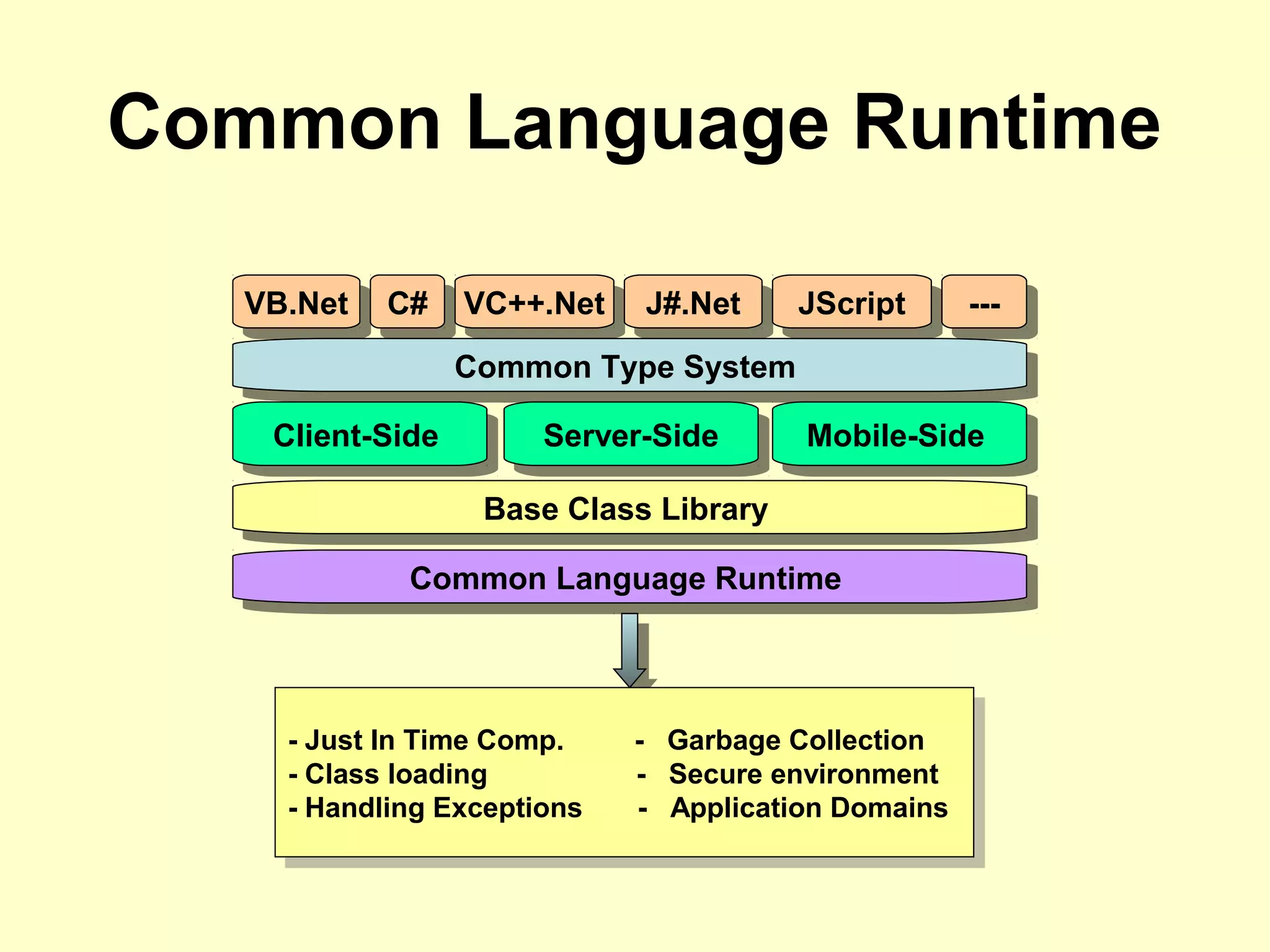
Common Language Runtime
VB.NetVB.Net C#C# VC++.NetVC++.Net J#.NetJ#.Net JScriptJScript ------
Common Type SystemCommon Type System
Client-SideClient-Side Server-SideServer-Side Mobile-SideMobile-Side
Base Class LibraryBase Class Library
Common Language RuntimeCommon Language Runtime
- Just In Time Comp. - Garbage Collection
- Class loading - Secure environment
- Handling Exceptions - Application Domains
- Just In Time Comp. - Garbage Collection
- Class loading - Secure environment
- Handling Exceptions - Application Domains
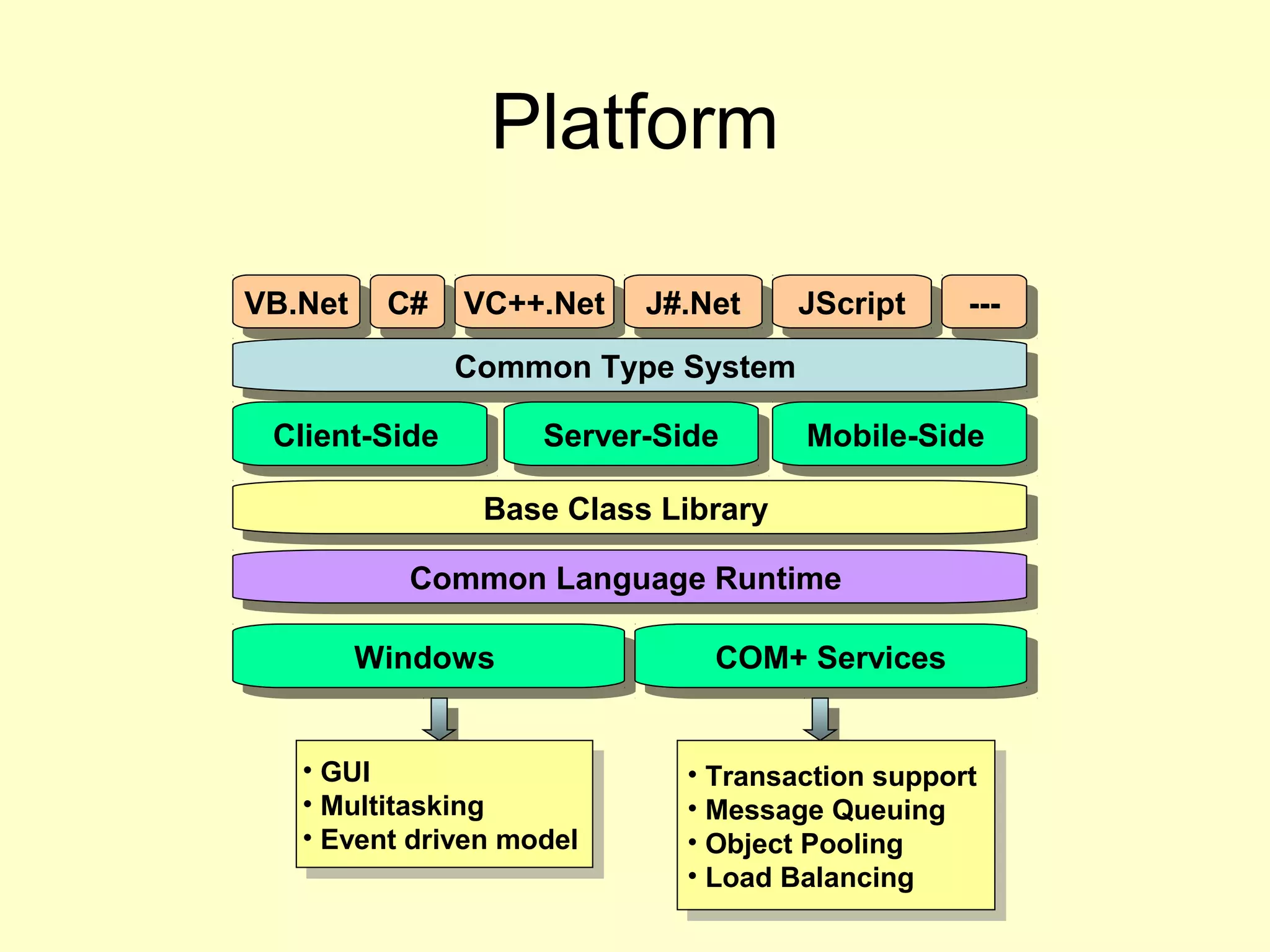
Platform
VB.NetVB.Net C#C# VC++.NetVC++.Net J#.NetJ#.Net JScriptJScript ------
Common Type SystemCommon Type System
Client-SideClient-Side Server-SideServer-Side Mobile-SideMobile-Side
Base Class LibraryBase Class Library
Common Language RuntimeCommon Language Runtime
• Transaction support
• Message Queuing
• Object Pooling
• Load Balancing
• Transaction support
• Message Queuing
• Object Pooling
• Load Balancing
WindowsWindows COM+ ServicesCOM+ Services
• GUI
• Multitasking
• Event driven model
• GUI
• Multitasking
• Event driven model
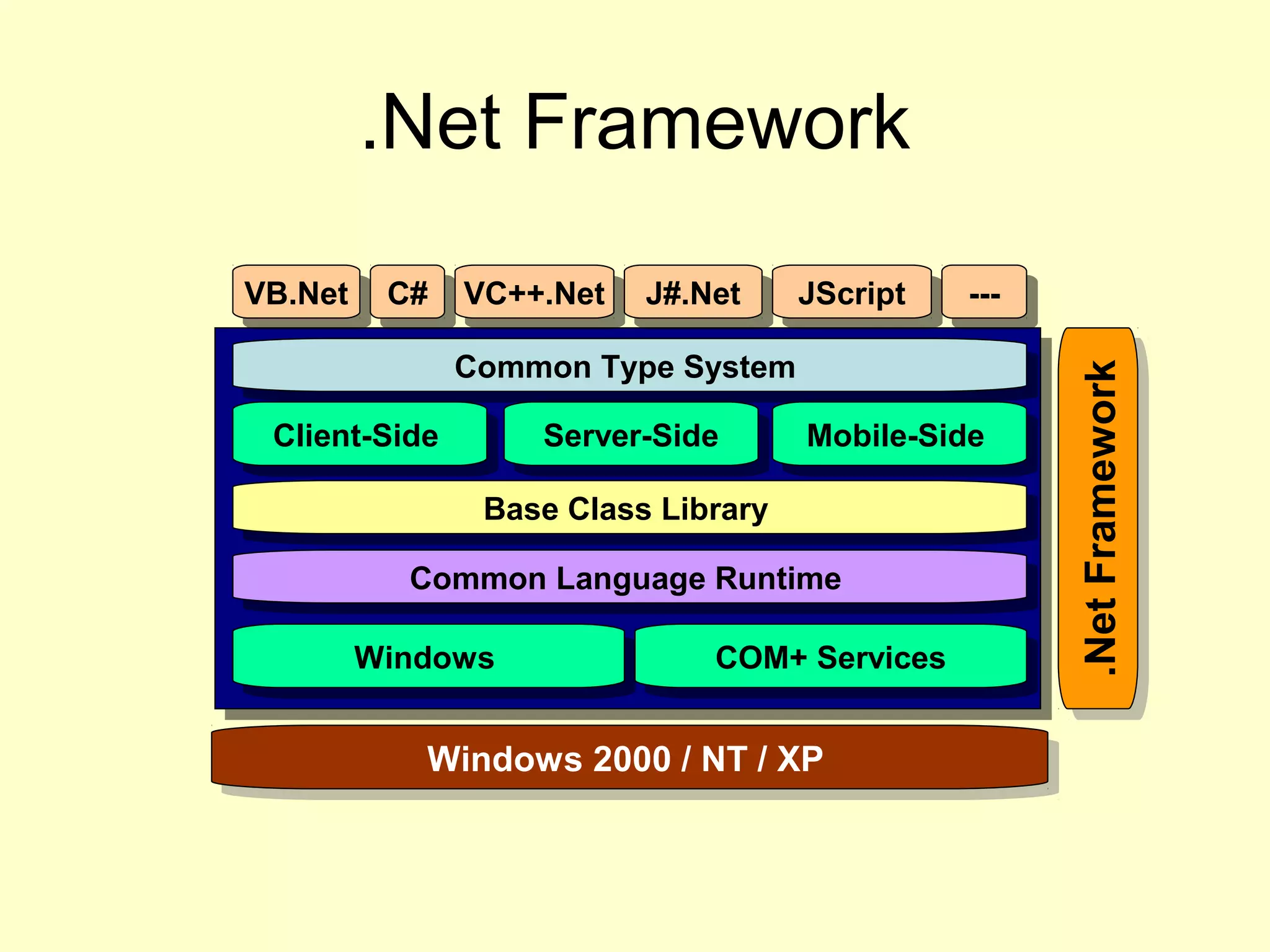
.Net Framework
VB.NetVB.Net C#C# VC++.NetVC++.Net J#.NetJ#.Net JScriptJScript ------
Common Type SystemCommon Type System
Client-SideClient-Side Server-SideServer-Side Mobile-SideMobile-Side
Base Class LibraryBase Class Library
Common Language RuntimeCommon Language Runtime
WindowsWindows COM+ ServicesCOM+ Services
.NetFramework.NetFramework
Windows 2000 / NT / XPWindows 2000 / NT / XP
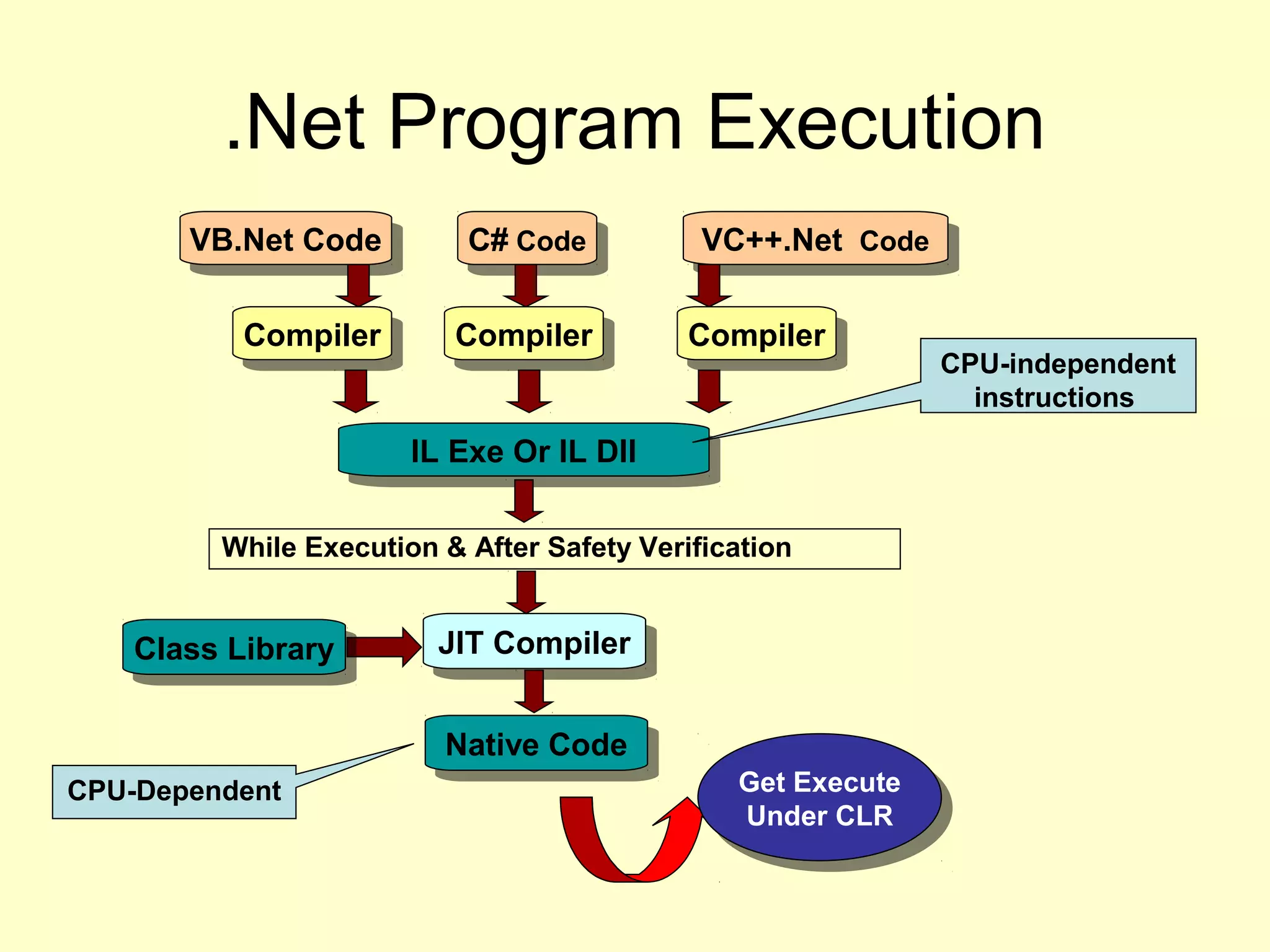
.Net Program Execution
VB.Net CodeVB.Net Code C# CodeC# Code VC++.Net CodeVC++.Net Code
CompilerCompilerCompilerCompiler CompilerCompiler
IL Exe Or IL DllIL Exe Or IL Dll
JIT CompilerJIT Compiler
Class LibraryClass Library
Native CodeNative Code
Get Execute
Under CLR
Get Execute
Under CLR
CPU-independent
instructions
CPU-Dependent
While Execution & After Safety Verification
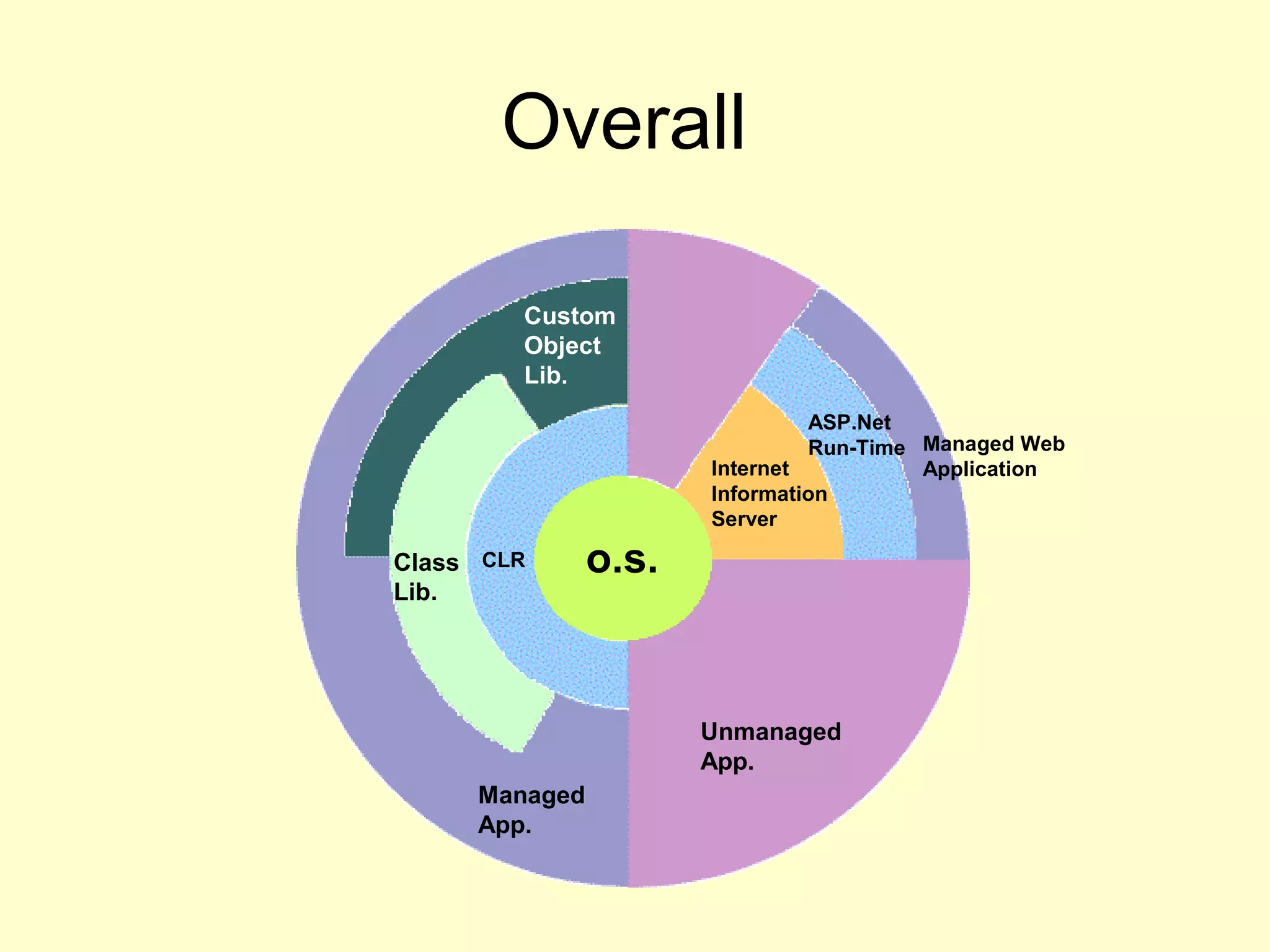
Overall
CLR o.s.
Unmanaged
App.
Custom
Object
Lib.
Managed
App.
Internet
Information
Server
ASP.Net
Run-Time Managed Web
Application
Class
Lib.
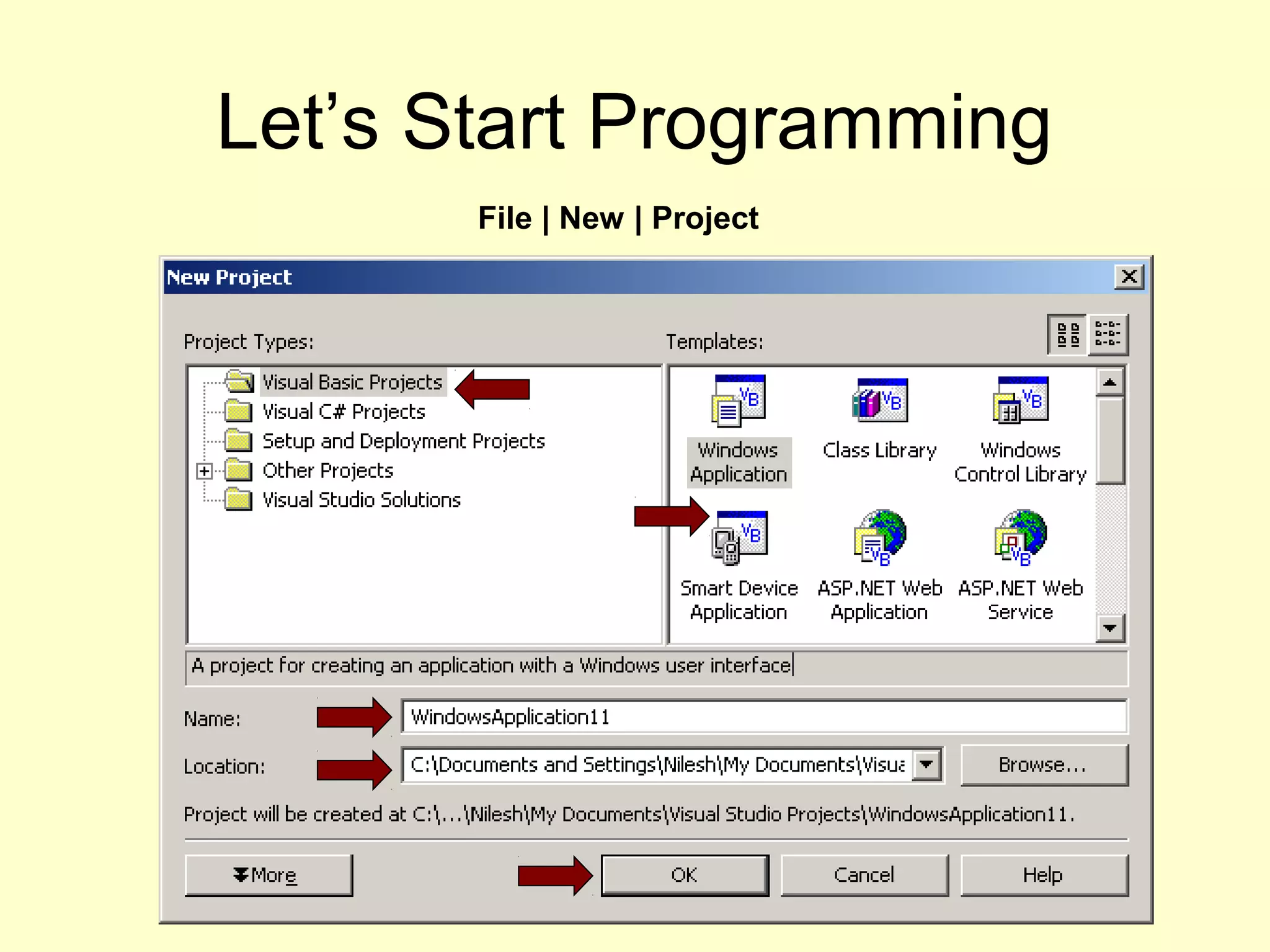
Let’s Start Programming
File | New | Project
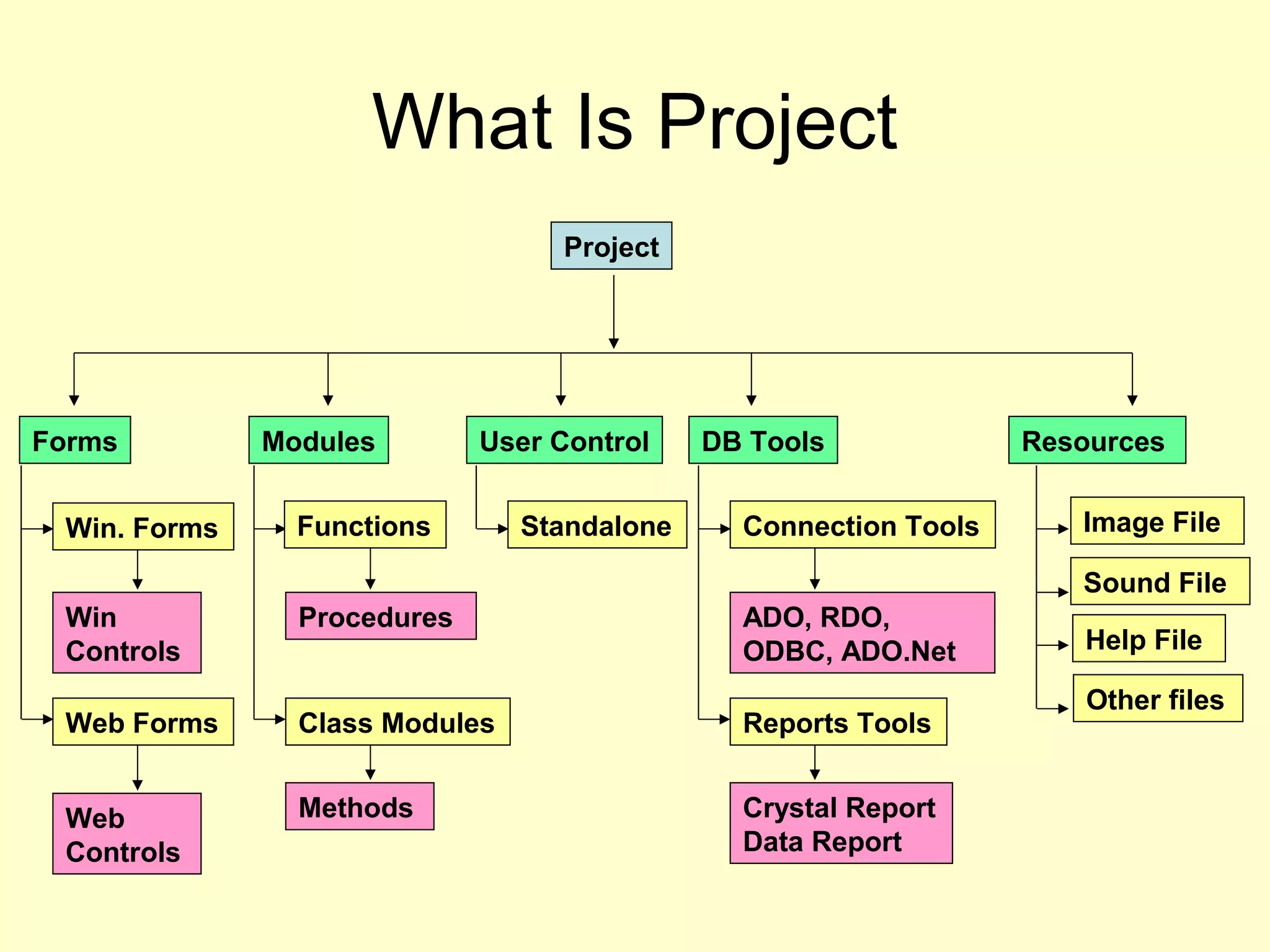
What Is Project
Project
ResourcesDB ToolsUser ControlModulesForms
Standalone Image File
Sound File
Help File
Other files
Win
Controls
Win. Forms
Web
Controls
Web Forms
Procedures
Functions
Methods
Class Modules
ADO, RDO,
ODBC, ADO.Net
Crystal Report
Data Report
Connection Tools
Reports Tools
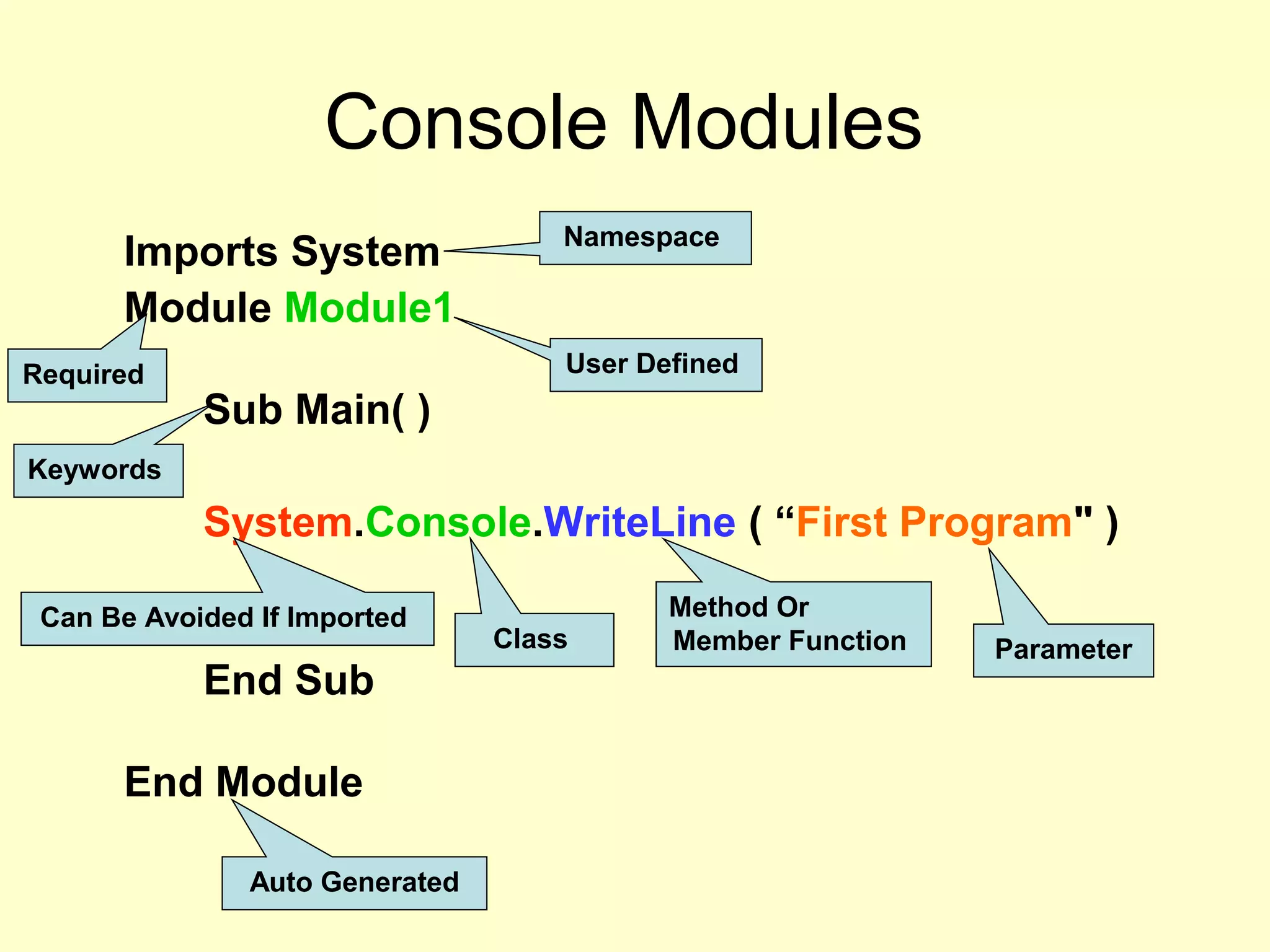
Console Modules
Imports System
Module Module1
Sub Main( )
System.Console.WriteLine ( “First Program" )
End Sub
End Module
Namespace
Required User Defined
Keywords
Class
Method Or
Member Function Parameter
Auto Generated
Can Be Avoided If Imported
Simple Declaring Variables
(Access) (Var.name) (As) [New] (Type) [= InitExpr]
Dim i As Integer = 1
Dim S As String
Dim St As String = “Hello”
Note : New Keyword Is Use While We Are Creating A Object Variable
Eg. Dim B As New Button
More Example:
Dim I, J, K As Integer ' All three are Integer variables.
Dim L, M As Long, X, Y As Single ' L and M are Long, X and Y are Single
Decision Making
If…Else :
If condition Then
[statements]
[ElseIf condition-n Then
[elseifstatements]] ...
[Else
[elsestatements]]
End If
For & For Each …Next
Syntax :
For counter = start To end [Step
step]
[statements]
[Exit For]
[statements]
Next [counter]
Syntax :
For Each element In group
[statements]
[Exit For]
[statements]
Next [element]
Do – While Loop
Do
Do [{While | Until} condition]
[statements]
[Exit Do]
[statements]
Loop
Or, you can use this syntax:
Do
[statements]
[Exit Do]
[statements]
Loop [{While | Until} condition]
While & With
Statement
Syntax :
While condition
[statements]
End While
Syntax :
With object
[statements]
End With
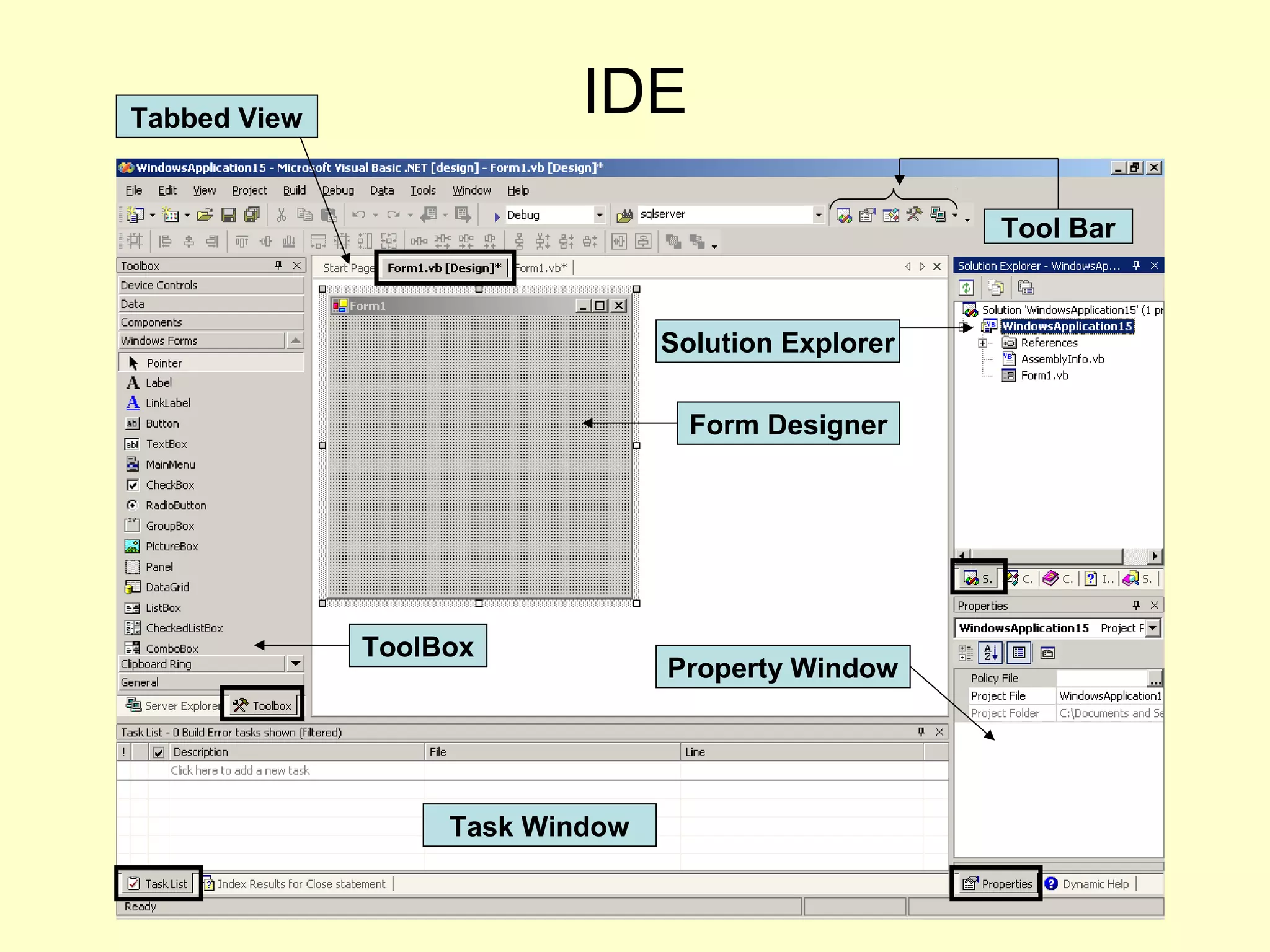
IDE
Form Designer
ToolBox
Solution Explorer
Property Window
Tool Bar
Task Window
Tabbed View
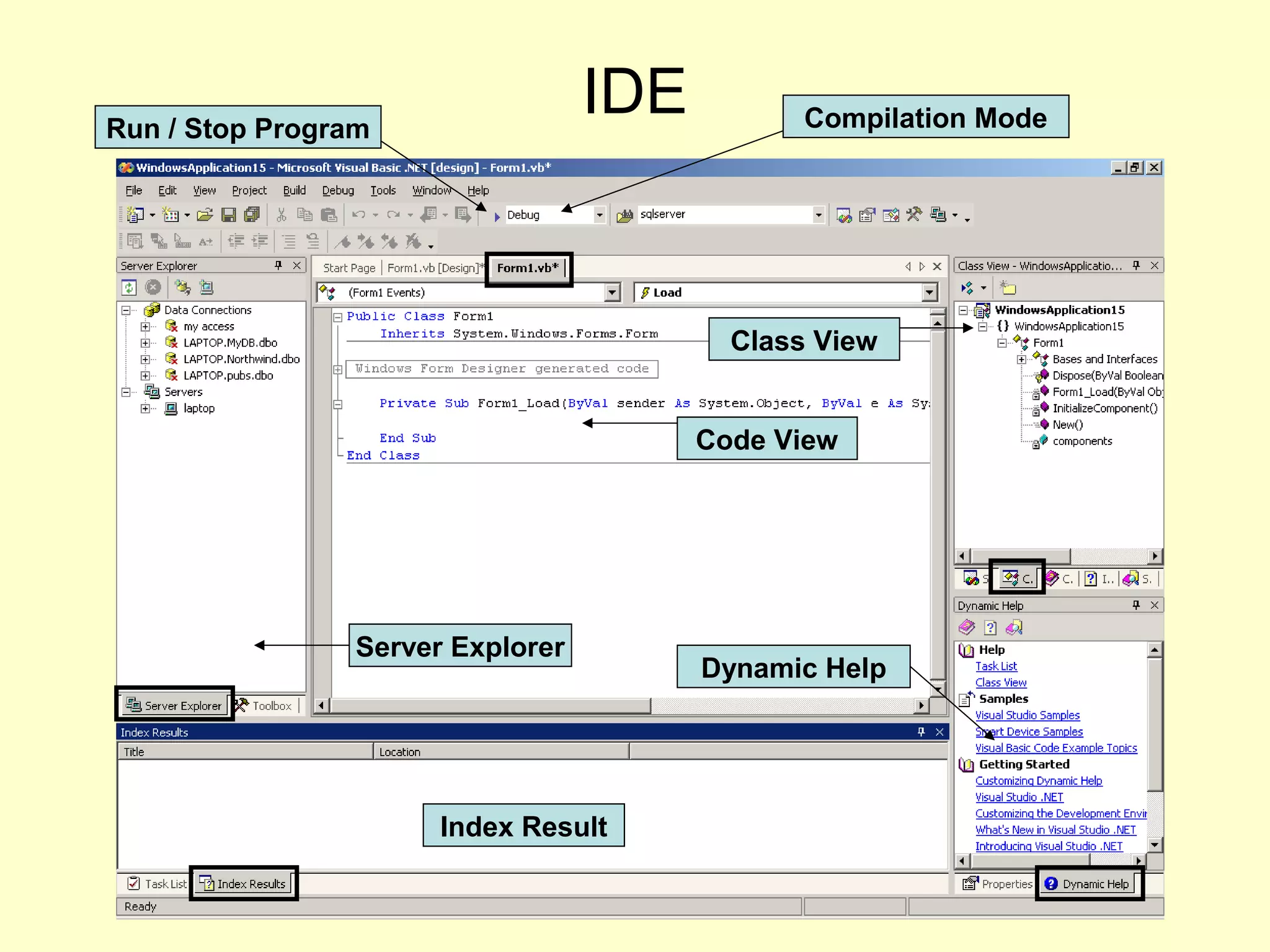
IDE
Code View
Server Explorer
Class View
Dynamic Help
Index Result
Run / Stop Program Compilation Mode
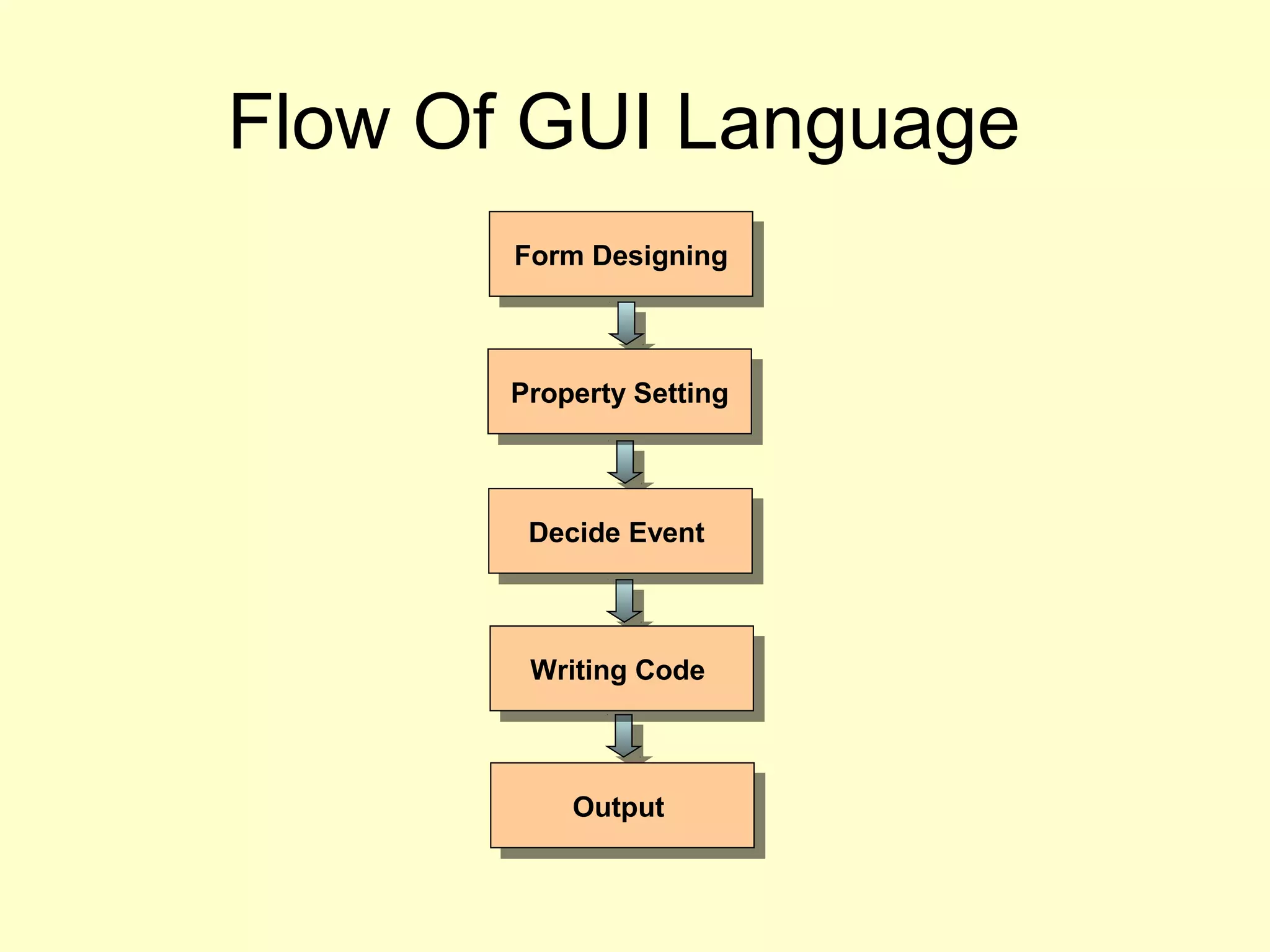
Flow Of GUI Language
Form DesigningForm Designing
Property SettingProperty Setting
Decide EventDecide Event
Writing CodeWriting Code
OutputOutput

Introduction to dot net framework by vaishali sahare [katkar]

  • 1.
  • 2.
    Development Model Client Database Client InternetExplorer Outlook Express Cute FTP MS Excel MS Word Server Database Server IIS MS Exchange Configured IIS Charting Comp. Spell Checker
  • 3.
    Development Model Front EndFrontEnd Business LogicBusiness Logic Back EndBack End Connection Tools Communication Tools Connection Tools Single Tier - All component on same machine Two Tier - Any two component on one machine and other one on Another Machine Multi / Three Tier - All component on different machine
  • 4.
    Platform Working • Operating System –Different Software • Application • System Development • Editor (IDE) – Like TC , VB , VC++ • Compilers • Libraries • Tools • Debuggers • Distribution
  • 5.
    Types Of Applications •Console – Commands • Windows – Word – Excel • Component Library – GramerCheck.dll – Rundll32.dll • Embedded – Mobile Phones • Distributed Apps. – Network Based • Web (app.) Based Programs – Banking Applications – E-Commerce Applications • Gaming Application – Games – Navigation System • Database Application – ADO, RDO, ODBC • Real-Time Emb. Apps. – Flight Controller – Engine Controller •What Is support of language •We need different function for each type For ex. IO, Forms, Web Form, Threading, Socket, 2D Drawing, Exception, OOP, etc.
  • 6.
    .Net Framework WhatIs It • NET is a framework consisting of common language runtime and a set of .NET base classes which allow us to build distributed, secure, scalable, robust, easily deployable and maintainable applications in a language independent, object-oriented, web enabled, managed way using rich level of integration amongst present technologies.
  • 7.
    Simple Start CTS VB VC C#N. BaseClass Library Compilers .Net Exe (Debug) •Test executable •Convert executable in O.S. form •Run executable •Manage application memory •ETC. Runtime Environment Development Environment .Net Exe (Release) .Net Framework
  • 8.
    Language Infrastructure VB.NetVB.Net C#C#VC++.NetVC++.Net J#.NetJ#.Net JScriptJScript ------ Common Type SystemCommon Type System •Type declaration •Type management •Object-oriented type model •Defined rules that languages must follow to be interoperable (CLS)
  • 9.
    Language Infrastructure VB.NetVB.Net C#C#VC++.NetVC++.Net J#.NetJ#.Net JScriptJScript ------ Common Type SystemCommon Type System Client-SideClient-Side Server-SideServer-Side Mobile-SideMobile-Side • WinForms • WinForm Controls • Rich Client Apps. • Components • Windows Services • WinForms • WinForm Controls • Rich Client Apps. • Components • Windows Services • WebForms • WebForm Controls • WebServices • Mobile WebForms • WebForms • WebForm Controls • WebServices • Mobile WebForms • Smart Clients • Real-Time Apps. • Smart Clients • Real-Time Apps.
  • 10.
    Base Class Library VB.NetVB.NetC#C# VC++.NetVC++.Net J#.NetJ#.Net JScriptJScript ------ Common Type SystemCommon Type System Client-SideClient-Side Server-SideServer-Side Mobile-SideMobile-Side Base Class LibraryBase Class Library • GDI+ • Networking • Threading • Web • Protocols • Messaging •Serialization • Security • Reflection • Timers • ADO.NET • Windowing
  • 11.
    Common Language Runtime VB.NetVB.NetC#C# VC++.NetVC++.Net J#.NetJ#.Net JScriptJScript ------ Common Type SystemCommon Type System Client-SideClient-Side Server-SideServer-Side Mobile-SideMobile-Side Base Class LibraryBase Class Library Common Language RuntimeCommon Language Runtime - Just In Time Comp. - Garbage Collection - Class loading - Secure environment - Handling Exceptions - Application Domains - Just In Time Comp. - Garbage Collection - Class loading - Secure environment - Handling Exceptions - Application Domains
  • 12.
    Platform VB.NetVB.Net C#C# VC++.NetVC++.NetJ#.NetJ#.Net JScriptJScript ------ Common Type SystemCommon Type System Client-SideClient-Side Server-SideServer-Side Mobile-SideMobile-Side Base Class LibraryBase Class Library Common Language RuntimeCommon Language Runtime • Transaction support • Message Queuing • Object Pooling • Load Balancing • Transaction support • Message Queuing • Object Pooling • Load Balancing WindowsWindows COM+ ServicesCOM+ Services • GUI • Multitasking • Event driven model • GUI • Multitasking • Event driven model
  • 13.
    .Net Framework VB.NetVB.Net C#C#VC++.NetVC++.Net J#.NetJ#.Net JScriptJScript ------ Common Type SystemCommon Type System Client-SideClient-Side Server-SideServer-Side Mobile-SideMobile-Side Base Class LibraryBase Class Library Common Language RuntimeCommon Language Runtime WindowsWindows COM+ ServicesCOM+ Services .NetFramework.NetFramework Windows 2000 / NT / XPWindows 2000 / NT / XP
  • 14.
    .Net Program Execution VB.NetCodeVB.Net Code C# CodeC# Code VC++.Net CodeVC++.Net Code CompilerCompilerCompilerCompiler CompilerCompiler IL Exe Or IL DllIL Exe Or IL Dll JIT CompilerJIT Compiler Class LibraryClass Library Native CodeNative Code Get Execute Under CLR Get Execute Under CLR CPU-independent instructions CPU-Dependent While Execution & After Safety Verification
  • 15.
  • 16.
  • 17.
    What Is Project Project ResourcesDBToolsUser ControlModulesForms Standalone Image File Sound File Help File Other files Win Controls Win. Forms Web Controls Web Forms Procedures Functions Methods Class Modules ADO, RDO, ODBC, ADO.Net Crystal Report Data Report Connection Tools Reports Tools
  • 18.
    Console Modules Imports System ModuleModule1 Sub Main( ) System.Console.WriteLine ( “First Program" ) End Sub End Module Namespace Required User Defined Keywords Class Method Or Member Function Parameter Auto Generated Can Be Avoided If Imported
  • 19.
    Simple Declaring Variables (Access)(Var.name) (As) [New] (Type) [= InitExpr] Dim i As Integer = 1 Dim S As String Dim St As String = “Hello” Note : New Keyword Is Use While We Are Creating A Object Variable Eg. Dim B As New Button More Example: Dim I, J, K As Integer ' All three are Integer variables. Dim L, M As Long, X, Y As Single ' L and M are Long, X and Y are Single
  • 20.
    Decision Making If…Else : Ifcondition Then [statements] [ElseIf condition-n Then [elseifstatements]] ... [Else [elsestatements]] End If For & For Each …Next Syntax : For counter = start To end [Step step] [statements] [Exit For] [statements] Next [counter] Syntax : For Each element In group [statements] [Exit For] [statements] Next [element]
  • 21.
    Do – WhileLoop Do Do [{While | Until} condition] [statements] [Exit Do] [statements] Loop Or, you can use this syntax: Do [statements] [Exit Do] [statements] Loop [{While | Until} condition] While & With Statement Syntax : While condition [statements] End While Syntax : With object [statements] End With
  • 22.
    IDE Form Designer ToolBox Solution Explorer PropertyWindow Tool Bar Task Window Tabbed View
  • 23.
    IDE Code View Server Explorer ClassView Dynamic Help Index Result Run / Stop Program Compilation Mode
  • 24.
    Flow Of GUILanguage Form DesigningForm Designing Property SettingProperty Setting Decide EventDecide Event Writing CodeWriting Code OutputOutput