





Mastering
MS-Word
2003-2007-2010-2013
a different approach
www.test4u.eu
Free Tutorials
E-Books
YouTube Videos
Video Courses
TEST4U, an interactive, inexpensive solution with
more than 6000 questions for over 20 applications,
designed by our experienced IT professors, that will
help you really learn by doing.
“Tell me, and I will forget.
Show me, and I may remember
Involve me, and I will understand”
And, as Confucius said:
TEST4U has been trusted by
more than 700 000 candidates
since 2003
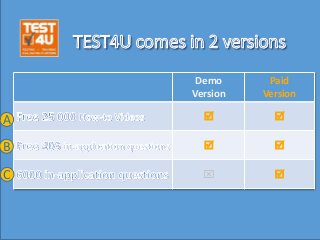
Demo
Version
Paid
Version
 
 
 
A
B
C
A
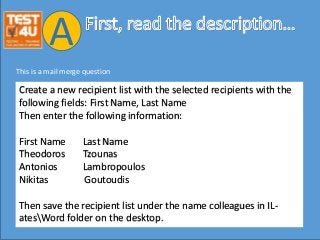
Create a new recipient list with the selected recipients with the
following fields: First Name, Last Name
Then enter the following information:
First Name Last Name
Theodoros Tzounas
Antonios Lambropoulos
Nikitas Goutoudis
Then save the recipient list under the name colleagues in IL-
atesWord folder on the desktop.
This is a mail merge question
A
A
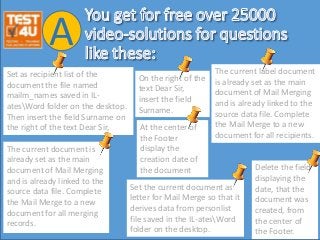
Set as recipient list of the
document the file named
mailm_names saved in IL-
atesWord folder on the desktop.
Then insert the field Surname on
the right of the text Dear Sir,
A
Set the current document as
letter for Mail Merge so that it
derives data from personlist
file saved in the IL-atesWord
folder on the desktop.
The current document is
already set as the main
document of Mail Merging
and is already linked to the
source data file. Complete
the Mail Merge to a new
document for all merging
records.
The current label document
is already set as the main
document of Mail Merging
and is already linked to the
source data file. Complete
the Mail Merge to a new
document for all recipients.
On the right of the
text Dear Sir,
insert the field
Surname.
At the center of
the Footer
display the
creation date of
the document Delete the field
displaying the
date, that the
document was
created, from
the center of
the Footer.
A
B
B
In-application or live question is a question that
cooperates with the real, the installed, MS-Word
application.
It is not a simulation in flash.
It works just like the questions in the certification
exams (Certiport MOS, ECDL, DIPLOMA e.t.c.)
B
B
TEST4U will cooperate with the Microsoft
Word application that you have installed
on your computer.
We support the following versions
2013, 2010, 2007, 2003.
B
You will be asked to answer questions
which demand that you follow the steps
that you like in order to reach a certain
result.
You don’t have to remember actions.
It’s not a simulated environment.
B
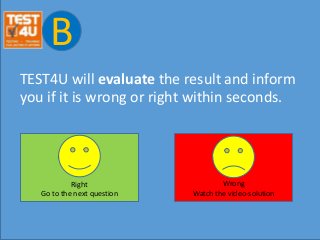
TEST4U will evaluate the result and inform
you if it is wrong or right within seconds.
Right
Go to the next question
Wrong
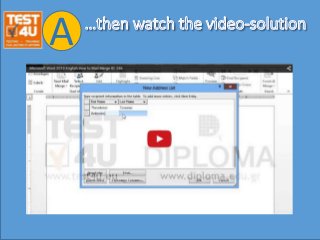
Watch the video-solution
B
For every question that you answer wrongly,
you will get to see a video-solution in order
to learn how to answer the question
correctly!
B
TEST4U works with the real, the installed
application, like the real working
environment or the real exam environment.
B
To get the paid version with
more than 6 000 in-application questions
visit
https://www.test4u.eu/en/e-tests/word-
processing
C
•Download the free demo
•Watch the free how-to videos
•Upgrade to the full version!
•Visit www.test4u.eu

Mastering MS-Word 2003-2007-2010-2013. A different approach by www.test4u.eu

  • 1.
  • 2.
  • 3.
    TEST4U, an interactive,inexpensive solution with more than 6000 questions for over 20 applications, designed by our experienced IT professors, that will help you really learn by doing. “Tell me, and I will forget. Show me, and I may remember Involve me, and I will understand” And, as Confucius said:
  • 4.
    TEST4U has beentrusted by more than 700 000 candidates since 2003
  • 5.
  • 6.
  • 7.
    Create a newrecipient list with the selected recipients with the following fields: First Name, Last Name Then enter the following information: First Name Last Name Theodoros Tzounas Antonios Lambropoulos Nikitas Goutoudis Then save the recipient list under the name colleagues in IL- atesWord folder on the desktop. This is a mail merge question A
  • 8.
  • 9.
    Set as recipientlist of the document the file named mailm_names saved in IL- atesWord folder on the desktop. Then insert the field Surname on the right of the text Dear Sir, A Set the current document as letter for Mail Merge so that it derives data from personlist file saved in the IL-atesWord folder on the desktop. The current document is already set as the main document of Mail Merging and is already linked to the source data file. Complete the Mail Merge to a new document for all merging records. The current label document is already set as the main document of Mail Merging and is already linked to the source data file. Complete the Mail Merge to a new document for all recipients. On the right of the text Dear Sir, insert the field Surname. At the center of the Footer display the creation date of the document Delete the field displaying the date, that the document was created, from the center of the Footer.
  • 10.
  • 11.
  • 12.
  • 13.
    In-application or livequestion is a question that cooperates with the real, the installed, MS-Word application. It is not a simulation in flash. It works just like the questions in the certification exams (Certiport MOS, ECDL, DIPLOMA e.t.c.) B
  • 14.
    B TEST4U will cooperatewith the Microsoft Word application that you have installed on your computer. We support the following versions 2013, 2010, 2007, 2003.
  • 15.
    B You will beasked to answer questions which demand that you follow the steps that you like in order to reach a certain result. You don’t have to remember actions. It’s not a simulated environment.
  • 16.
    B TEST4U will evaluatethe result and inform you if it is wrong or right within seconds. Right Go to the next question Wrong Watch the video-solution
  • 17.
    B For every questionthat you answer wrongly, you will get to see a video-solution in order to learn how to answer the question correctly!
  • 18.
    B TEST4U works withthe real, the installed application, like the real working environment or the real exam environment.
  • 19.
  • 20.
    To get thepaid version with more than 6 000 in-application questions visit https://www.test4u.eu/en/e-tests/word- processing C
  • 21.
    •Download the freedemo •Watch the free how-to videos •Upgrade to the full version! •Visit www.test4u.eu